Lead Generation Process Flow Chart: The 7-Stage 2026 Blueprint
Most lead gen flow charts are drawn for a slide deck, not for a working pipeline. Here is the 7-stage version with real decision gates, owners, exit criteria, and the tool that runs each step.
TL;DR
- A lead generation process flow chart is an operational map: stages as boxes, decision gates as diamonds, owners on every box, and an exit criterion that says exactly when a lead moves forward.
- Most charts fail because they document marketing stages only and stop at "MQL." A working chart runs from ICP definition through to closed-won, including the handoff that breaks in almost every team.
- The 7 stages: define ICP → source accounts → find and verify contacts → score and route → first touch → qualify → hand off to sales.
- Four decision gates do the real work: fit gate, data-quality gate, intent gate, and the SQL acceptance gate. Without them, your chart is a diagram, not a process.
- Data quality sits at stage 3 and quietly determines everything downstream. A 22% bounce rate does not just waste sends — it corrupts every conversion metric in the chart.
What is a lead generation process flow chart?#
A lead generation process flow chart is a visual map of every step a prospect passes through — from the moment they match your ideal customer profile to the moment a sales rep formally accepts them as an opportunity — with the decision points that route them between steps.
Think of it like an airport. Passengers don't wander from the curb to the gate. They pass through check-in, security, and boarding, and at each one there's a gate that either lets them through or sends them somewhere else. A lead generation flow chart is that terminal layout for your pipeline. The boxes are the processing steps. The diamonds are the checkpoints. The arrows are the routing rules.
Technically, it's a standard process flow diagram applied to demand generation, and it uses the same notation as any process flow chart: rectangles for actions, diamonds for decisions, parallelograms for data inputs and outputs, arrows for sequence.
The difference between a useful chart and a decorative one comes down to four attributes per box:
- Trigger — what event starts this step (a form fill, a list import, a scored threshold crossing).
- Owner — the named role accountable for the box, not the team. "Demand gen manager," not "marketing."
- Exit criteria — the objective condition that must be true before the lead advances. "Email verified and title matches ICP," not "lead looks good."
- System of record — where the state change is written. If it isn't written to your CRM, the box doesn't exist.
If any box in your chart is missing one of those four, that box is where your process leaks.
Why do most lead generation flow charts fail in practice?#
Because they're drawn to explain the funnel to executives, not to run it.
Three failure patterns show up repeatedly:
They stop at the MQL. The chart ends with a triumphant "→ MQL → Sales." But the marketing qualified lead handoff is precisely the point where most pipelines lose volume. Sales rejects leads, marketing disputes the rejection, nobody has a written acceptance rule, and the disagreement never gets resolved because the chart has no box for it. Research from Gartner's sales practice has pointed at this handoff for years as the single highest-friction junction in B2B revenue teams.
They have no data-quality gate. Leads flow from "sourced" straight into "outreach." No step verifies the contact actually exists. Then 20% of sends bounce, sender reputation degrades, deliverability drops, and the chart's conversion rates become fiction — you're measuring reply rate against a denominator that includes emails nobody ever received.
They model one motion. Inbound and outbound are different processes with different triggers, different speed requirements, and different qualification logic. Forcing both through one chart means one of them gets served badly. Usually outbound.
The fix isn't a prettier diagram. It's adding the gates that force a yes/no decision with a written rule behind it.
What are the 7 stages of the lead generation process?#
Here's the sequence that holds up across most B2B motions. Each stage is a box; the gates sit between them.
Define the ICP and buying committee. Firmographics (industry, headcount, revenue band, geography), technographics (what they already run), and the three to five job titles that actually sit on the committee. Output: a written ICP doc and a target account list. If this stage is vague, everything downstream inherits the vagueness.
Source accounts and trigger events. Pull companies matching the ICP from your B2B database, job boards, funding announcements, hiring signals, tech-stack changes, or website visitors. Output: a raw account list with a reason-to-reach-out attached to each row.
Find and verify contacts. Convert accounts into named people with reachable addresses. This is where an email finder and an email verifier do the work, and it is the single highest-leverage box in the chart. Output: contacts with a validated email, a role, and a confidence score.
Score and route. Combine fit (does the ICP match) with intent (did they do something). Route by segment: enterprise to AEs, SMB to a self-serve sequence, out-of-ICP to nurture. Output: a scored, assigned lead with an owner.
First touch. Email, call, LinkedIn, or a coordinated sequence across all three. Output: a logged activity and a response state.
Qualify. Run the discovery framework you actually use — BANT, MEDDIC, whatever — against a real conversation, not a form fill. Output: a documented qualification record.
Hand off and accept. Sales formally accepts or rejects, with a reason code on every rejection. Output: an opportunity, or a lead returned to nurture with a reason the marketing team can act on.
Stage 7 is not optional bureaucracy. The rejection reason codes are the feedback loop that makes stages 1 through 4 get better over time. Without them your chart never improves — it just runs.
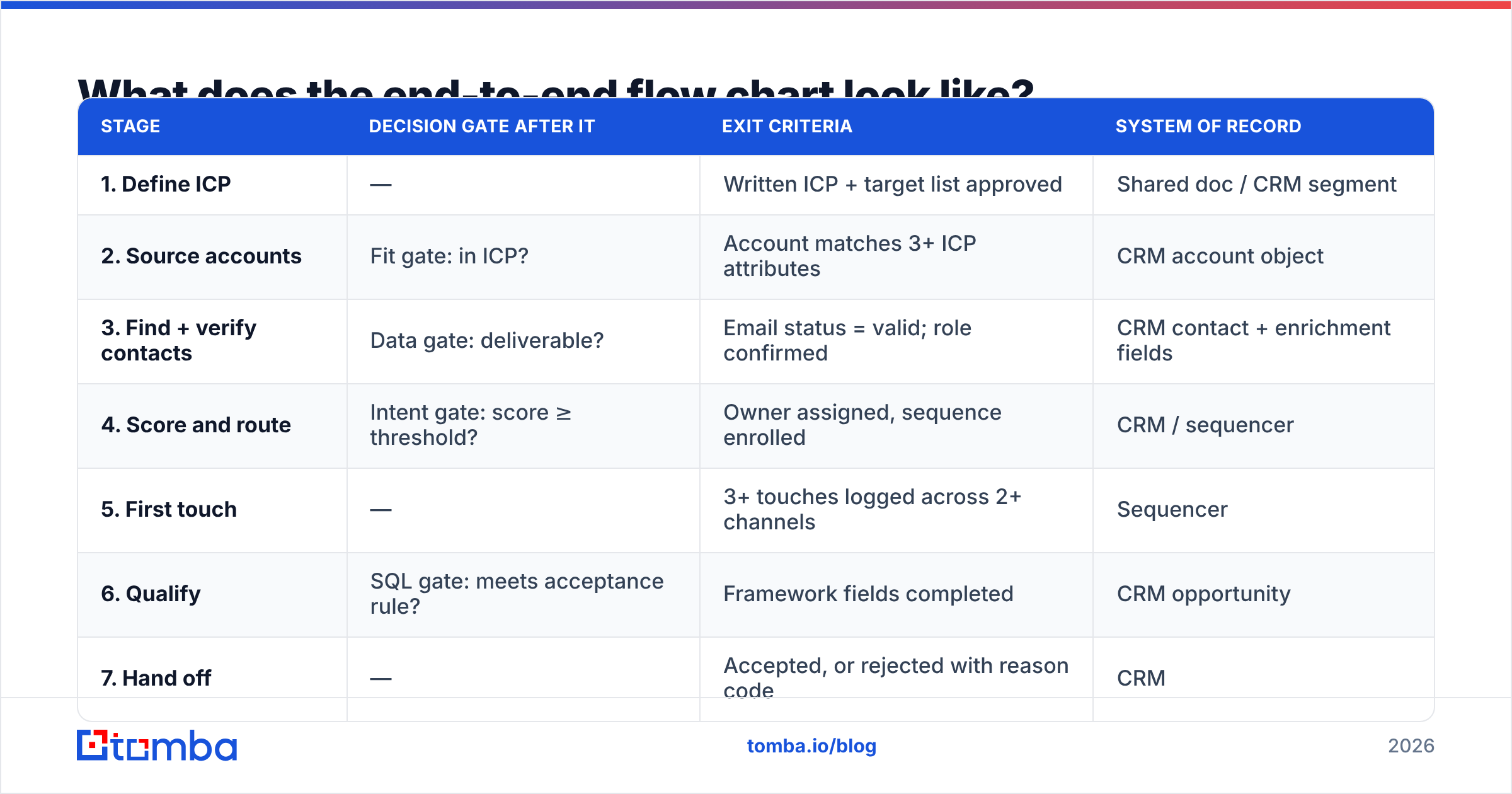
What does the end-to-end flow chart look like?#
| Stage | Decision gate after it | Exit criteria | System of record |
|---|---|---|---|
| 1. Define ICP | — | Written ICP + target list approved | Shared doc / CRM segment |
| 2. Source accounts | Fit gate: in ICP? | Account matches 3+ ICP attributes | CRM account object |
| 3. Find + verify contacts | Data gate: deliverable? | Email status = valid; role confirmed | CRM contact + enrichment fields |
| 4. Score and route | Intent gate: score ≥ threshold? | Owner assigned, sequence enrolled | CRM / sequencer |
| 5. First touch | — | 3+ touches logged across 2+ channels | Sequencer |
| 6. Qualify | SQL gate: meets acceptance rule? | Framework fields completed | CRM opportunity |
| 7. Hand off | — | Accepted, or rejected with reason code | CRM |
Read the middle column as the diamonds in your diagram. Every "no" needs a named destination — nurture, recycle in 90 days, suppress permanently — because a "no" with no arrow attached is how leads vanish.
Where does data quality fit in the chart?#
At stage 3, and it deserves its own gate because it's the only failure mode that silently poisons every number downstream.
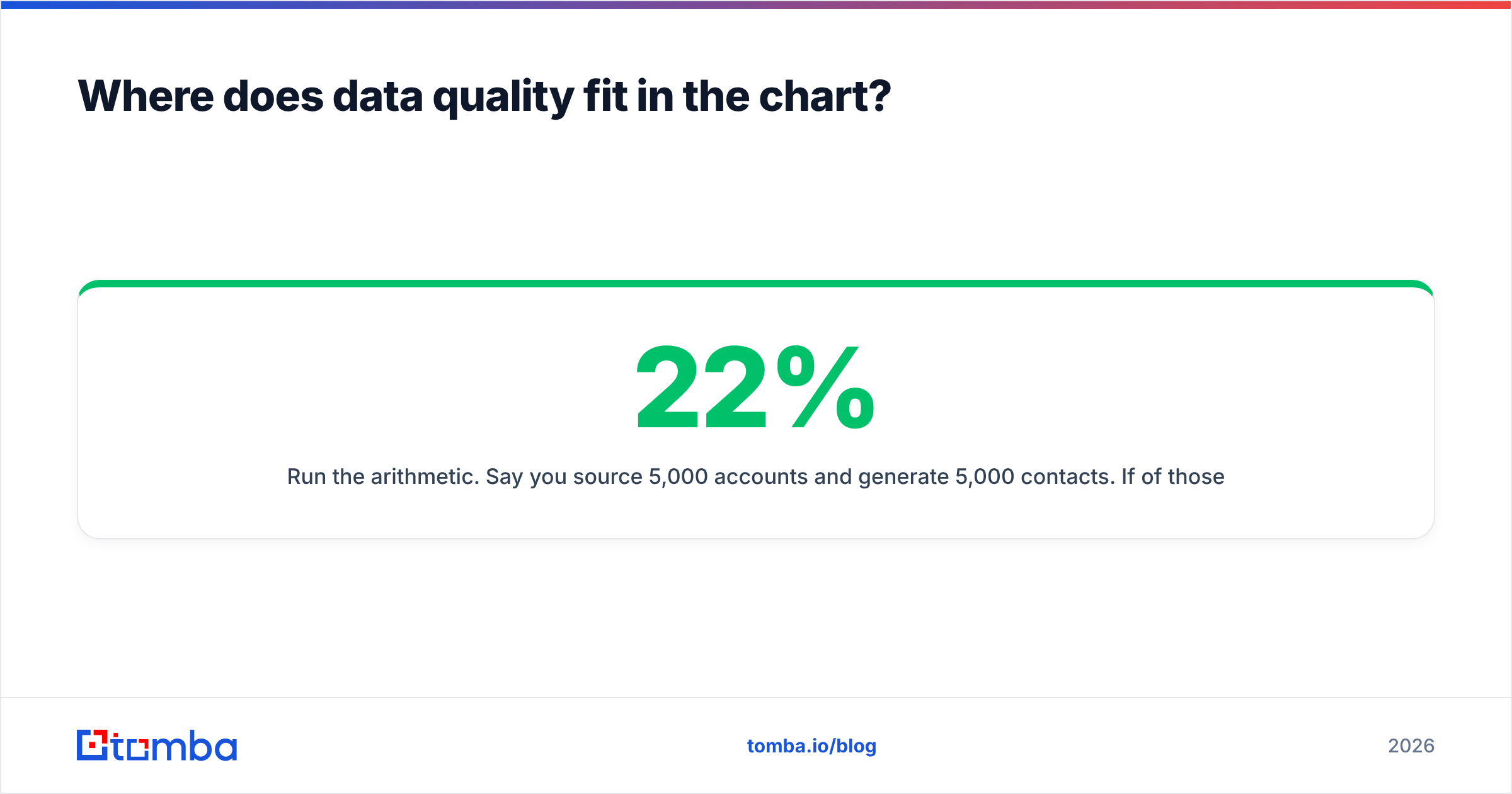
Run the arithmetic. Say you source 5,000 accounts and generate 5,000 contacts. If 22% of those addresses are invalid — a normal rate for guessed or stale data — you send to 5,000 and reach 3,900. Your 3% reply rate is actually 3.8% against delivered mail, and your bounce rate is now high enough to damage sender reputation across the whole domain. That damage doesn't stay in the outbound lane; it degrades your inbound nurture sends too.
The gate is simple to specify: no contact advances from stage 3 to stage 4 unless its email status is "valid" or an explicitly-accepted catch-all. Catch-all domains need their own branch — they can't be verified by standard SMTP checks, so either route them through a catch-all verifier or flag them as lower-confidence and send to them at reduced volume.
The operational rule most teams land on: verify at import, re-verify anything older than 90 days, and never let a bulk list skip the gate because someone was in a hurry.
Which tools run each stage of the flow chart?#
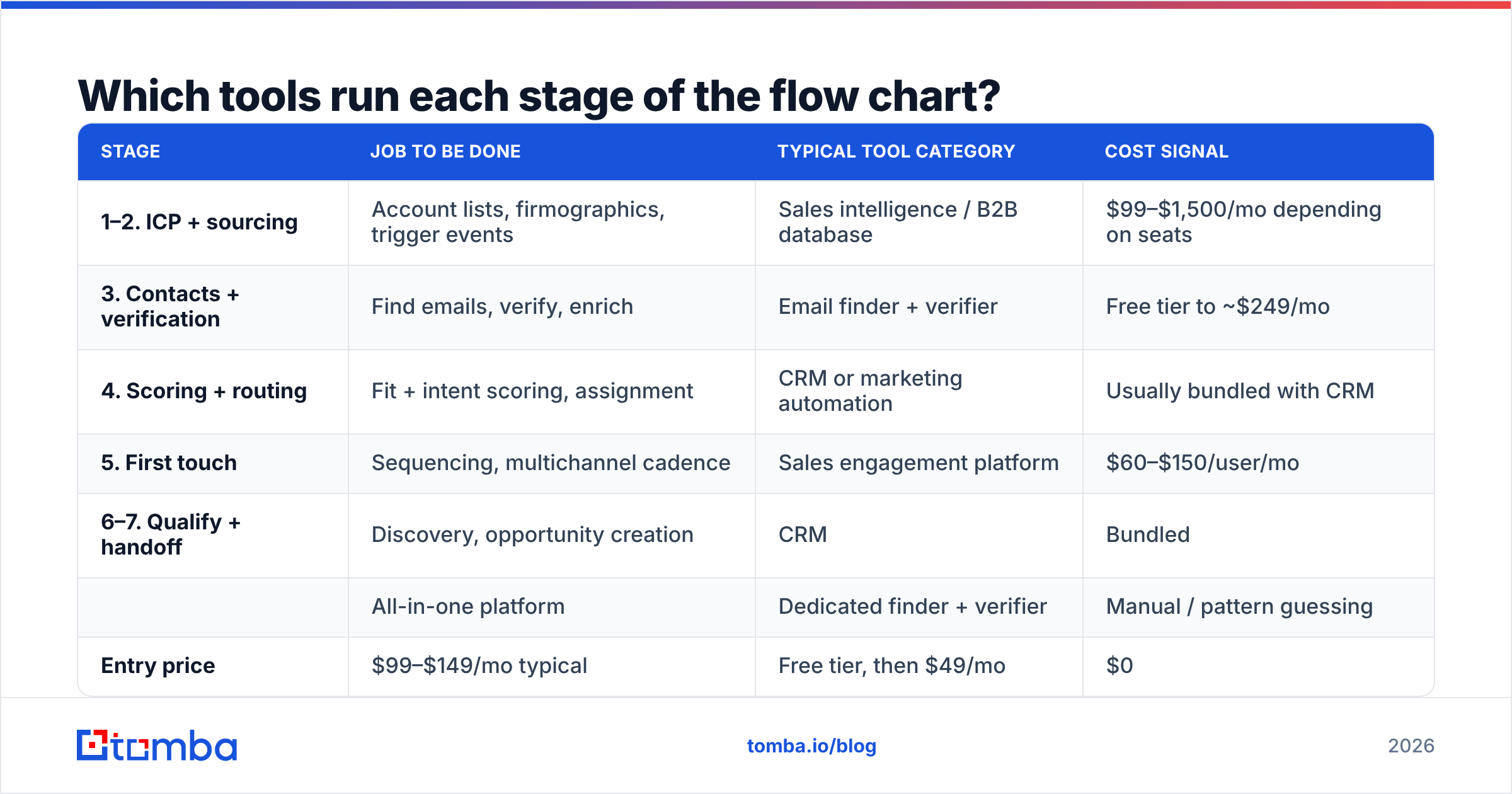
You do not need a different vendor per box. Most teams end up with three or four systems and a clear rule about which one owns which field.
| Stage | Job to be done | Typical tool category | Cost signal |
|---|---|---|---|
| 1–2. ICP + sourcing | Account lists, firmographics, trigger events | Sales intelligence / B2B database | $99–$1,500/mo depending on seats |
| 3. Contacts + verification | Find emails, verify, enrich | Email finder + verifier | Free tier to ~$249/mo |
| 4. Scoring + routing | Fit + intent scoring, assignment | CRM or marketing automation | Usually bundled with CRM |
| 5. First touch | Sequencing, multichannel cadence | Sales engagement platform | $60–$150/user/mo |
| 6–7. Qualify + handoff | Discovery, opportunity creation | CRM | Bundled |
For stage 3 specifically, the comparison that matters is cost-per-verified-contact, not cost-per-credit. A tool that's cheap per credit but returns 60% deliverable addresses is more expensive than one that costs more per credit and returns 95%.
| All-in-one platform | Dedicated finder + verifier | Manual / pattern guessing | |
|---|---|---|---|
| Entry price | $99–$149/mo typical | Free tier, then $49/mo | $0 |
| Verification included | Sometimes, extra credits | Yes, native | No |
| Bulk processing | Yes | Yes, via bulk email finder | No |
| API for the flow chart | Usually enterprise tier | Yes, from paid tiers | No |
| Best for | Teams wanting one login | Teams optimising stage 3 cost | Fewer than 20 contacts/mo |
Tomba's pricing sits in the middle column: a free tier at 25 searches/month for testing the gate, Starter at $49/mo, Growth at $99/mo, and Pro at $249/mo when stage 3 volume gets serious. BookYourData is a solid option when you'd rather buy a pre-built list than build one account by account — a genuinely different shape of solution for stage 2 rather than stage 3.
If your flow chart is automated end to end, stage 3 should be an API call, not a human step. The email finder API slots between your sourcing job and your CRM write, so contacts arrive already verified rather than being cleaned up later by someone with a spreadsheet.
How do you measure each box in the chart?#
Attach one number to every arrow. Stage-to-stage conversion, not vanity totals.
- Account → contact rate. How many sourced accounts produce at least one verified, in-ICP contact? Below 60% means your ICP or your sourcing is off.
- Contact → verified rate. The stage 3 gate pass rate. Below 85% means your finding method is guessing.
- Verified → engaged rate. Replies, meetings booked, or positive intent per 100 delivered. This is your messaging metric, and it's only trustworthy if the gate above it is enforced.
- MQL → SQL acceptance rate. The stage 7 number. Below 50% and your scoring model at stage 4 doesn't reflect what sales actually wants.
- Cycle time per stage. Days a lead sits in each box. Leads that sit longer than 48 hours after stage 4 convert dramatically worse — HubSpot's lead generation research and a long line of speed-to-lead studies have shown the same decay curve.
Plot these on the chart itself. A flow chart with live conversion rates printed on each arrow becomes a diagnostic tool instead of a wall poster — you can see the leak without running a single report.
Does outbound need a different flow chart than inbound?#
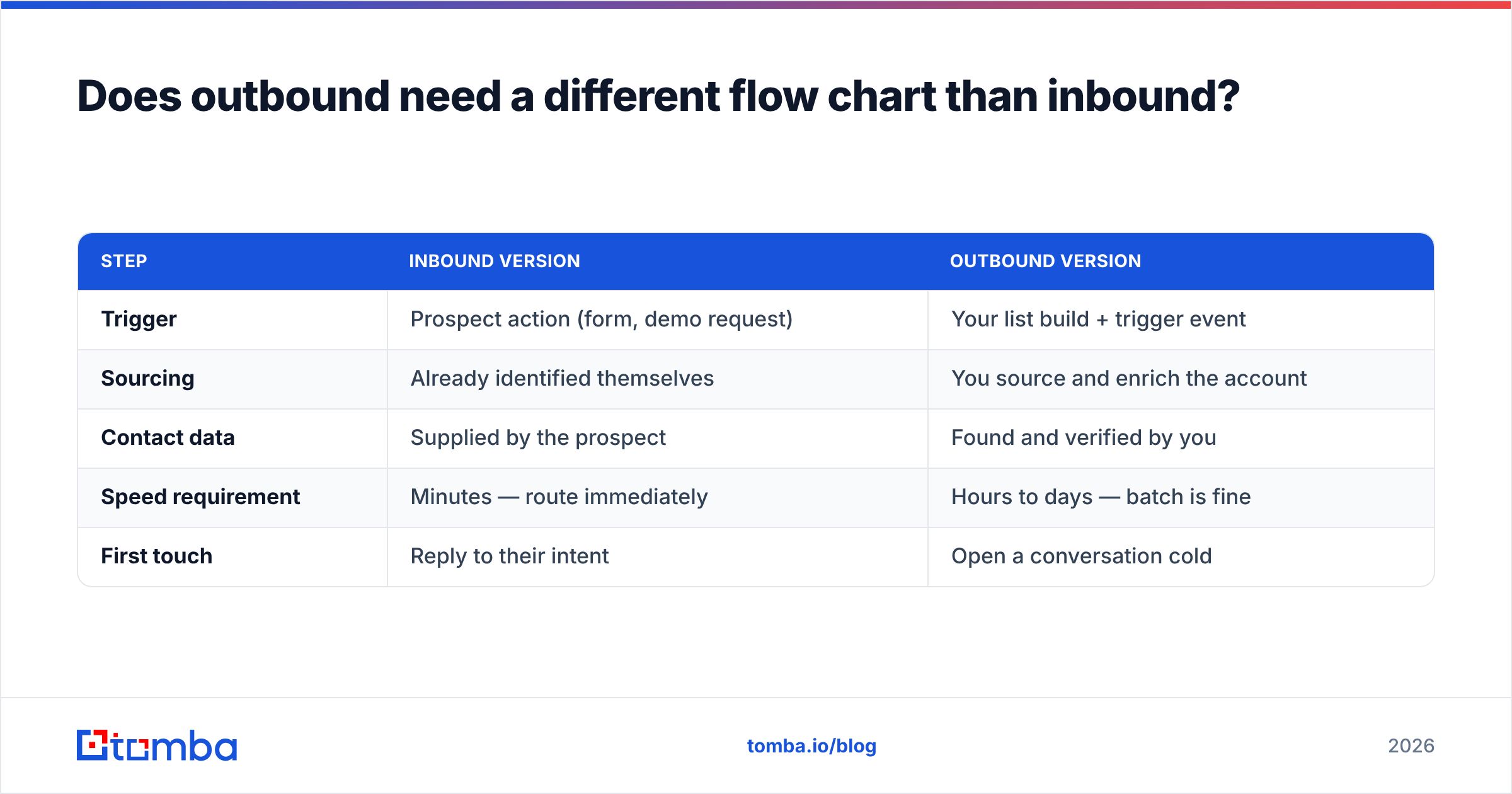
Yes, at stages 2 through 5. Stages 1, 6, and 7 stay shared.
| Step | Inbound version | Outbound version |
|---|---|---|
| Trigger | Prospect action (form, demo request) | Your list build + trigger event |
| Sourcing | Already identified themselves | You source and enrich the account |
| Contact data | Supplied by the prospect | Found and verified by you |
| Speed requirement | Minutes — route immediately | Hours to days — batch is fine |
| First touch | Reply to their intent | Open a conversation cold |
Running one chart for both means either your inbound leads wait in an outbound batch cycle (fatal — intent decays fast), or your outbound gets held to inbound response expectations (demoralising and wrong). Draw two swim lanes that merge at stage 6.
One shared element worth keeping: both lanes benefit from data enrichment before routing. An inbound form fill with a personal Gmail address and no company field is nearly unroutable until you enrich it into a real account.
How do you build your own flow chart in 60 minutes?#
- List your current stages as they actually are, not as they should be. Interview one rep and one marketer separately; the gap between their answers is your first finding.
- Add the four gates — fit, data, intent, acceptance — and write the literal rule for each one in a single sentence.
- Name an owner per box. One person, by role.
- Define the "no" path for every diamond. Where does a rejected lead go, and who reviews that bucket monthly?
- Write the exit criteria as something a system could evaluate. If a human has to interpret it, it isn't criteria.
- Instrument the arrows with the five conversion metrics above and review them at a fixed cadence.
You can draw the whole thing in Lucidchart, Miro, or a whiteboard photo. The diagramming tool is irrelevant. The gates and the owners are the entire value.
Start with the stage that leaks the most#
Of the seven stages, stage 3 is the one that most often turns a well-designed chart into a disappointing pipeline — because bad contact data doesn't announce itself, it just quietly halves every downstream number.
Fix that gate first. Tomba Email Finder finds professional email addresses by domain, name, or company, verifies them in the same workflow, and exposes it all through an API so stage 3 becomes an automated step in your flow chart rather than a manual cleanup task. Start on the free tier at 25 searches a month, run 100 accounts through your chart end to end, and measure the verified rate before you commit to anything — that single number will tell you more about your lead generation process than any diagram will.
Related guides#
// get started
Find, verify and enrich your first contacts today
Start on the free plan with 25 searches a month, then scale when your team is ready.
Free plan · No credit card required · GDPR & CCPA
// about the author