Lead Generation Quality: How to Measure and Fix It in 2026
Most teams count leads instead of qualifying them, then wonder why pipeline stalls. Here is how to measure lead generation quality with real metrics, fix the leaks, and stop paying for contacts that never convert.
TL;DR
- Lead generation quality is measured downstream, not upstream. If you cannot tie a lead source to closed revenue, you are measuring activity, not quality.
- The four leaks that destroy quality: bad contact data, wrong ICP fit, wrong timing, and wrong buying role. Each one needs a different fix.
- Track five numbers: MQL-to-SQL rate, SQL-to-opportunity rate, cost per opportunity, bounce rate, and average deal size by source. Volume metrics belong nowhere near a board deck.
- A 12% bounce rate is not a deliverability problem. It is a data quality problem masquerading as one, and it drags your whole domain down with it.
- Cheap leads are the most expensive thing in your funnel once you price in SDR hours spent on contacts that were never going to buy.
What does lead generation quality actually mean?#
Lead generation quality is the probability that a lead you acquire converts into revenue, divided by what it cost you to acquire and work it.
Think of it like grocery shopping by weight instead of by nutrition. Ten pounds of potato chips and ten pounds of produce cost the same on the scale, but only one of them feeds you. Most demand-gen dashboards weigh the bag. They report 4,200 leads this quarter, up 18% — and say nothing about whether a single one of them belonged in your pipeline.
The technical definition: a high-quality lead matches your ideal customer profile, has a reachable and verified contact point, sits in a buying role with budget influence, and shows a timing signal that suggests they are in-market now rather than eighteen months from now. Miss any one of those four and the lead is theoretically qualified but practically dead.
Here is the uncomfortable part. Most teams inherit their quality problem from a procurement decision. Someone bought a list, signed up for a database with 200M contacts, or turned on a scraper. The volume looked great in the demo. Nobody checked what percentage of those records were still accurate eighteen months after they were harvested.

Why do volume metrics make lead quality look better than it is?#
Because volume metrics are measured at the moment of acquisition, and quality only becomes visible three to nine months later.
Your marketing team reports leads in week one. Your sales team discovers those leads are garbage in week six. By the time the revenue miss shows up in a QBR, the campaign that created the problem has been running for two quarters and nobody wants to be the one who says the number was fake.
Four specific ways volume hides quality damage:
- MQL definitions drift downward. When a team is short of target, the scoring threshold quietly drops. A whitepaper download becomes an MQL. Then a newsletter signup becomes an MQL. The count goes up, the conversion rate goes down, and the two changes cancel out in the topline.
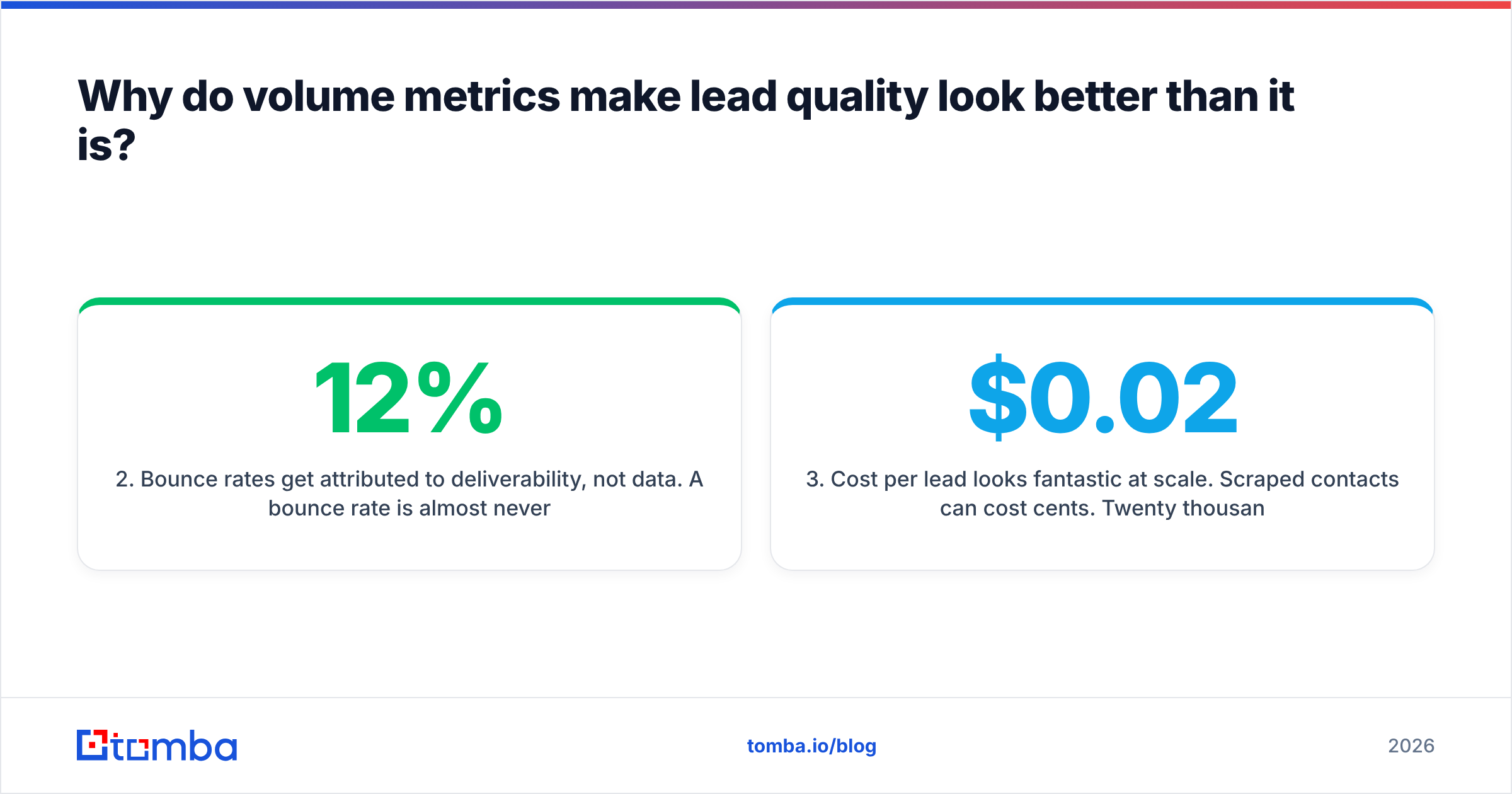
- Bounce rates get attributed to deliverability, not data. A 12% bounce rate is almost never a DNS or authentication problem. It is a records-are-stale problem. But "we need to warm the domain" is an easier internal conversation than "the list we paid for is 30% dead."
- Cost per lead looks fantastic at scale. Scraped contacts can cost cents. Twenty thousand bad contacts at $0.02 each looks like a $400 line item. It is actually a $40,000 line item once you count the SDR hours burned working them.
- Attribution credits the last touch, not the qualification. The webinar gets credit for a deal that closed because an AE happened to know the buyer from a previous job. So you buy more webinars.
The fix is not more dashboards. It is moving your primary KPI one stage further down the funnel. Report opportunities created per source, not leads created per source, and the incentive to inflate disappears overnight.
How do you measure lead generation quality with real numbers?#
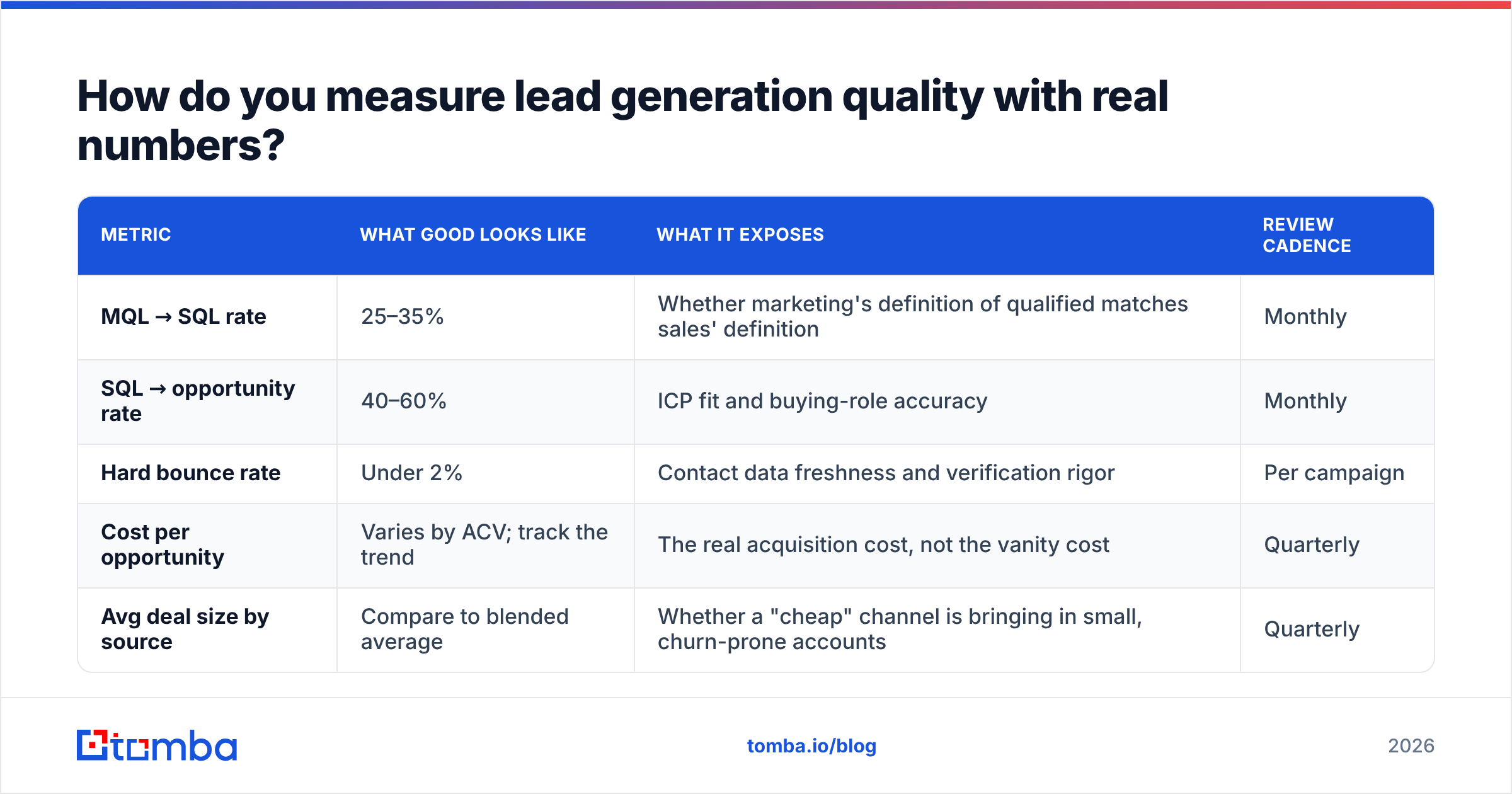
Five metrics, tracked by source, reviewed monthly. Anything more and nobody reads the report; anything less and you cannot isolate which channel is the problem.
| Metric | What good looks like | What it exposes | Review cadence |
|---|---|---|---|
| MQL → SQL rate | 25–35% | Whether marketing's definition of qualified matches sales' definition | Monthly |
| SQL → opportunity rate | 40–60% | ICP fit and buying-role accuracy | Monthly |
| Hard bounce rate | Under 2% | Contact data freshness and verification rigor | Per campaign |
| Cost per opportunity | Varies by ACV; track the trend | The real acquisition cost, not the vanity cost | Quarterly |
| Avg deal size by source | Compare to blended average | Whether a "cheap" channel is bringing in small, churn-prone accounts | Quarterly |
The bounce rate line deserves emphasis. Under 2% is the operational ceiling for a healthy program. Google and Microsoft both treat elevated hard-bounce volume as a spam signal, and once your domain reputation degrades, your good leads stop receiving mail too. That is the compounding cost of bad data: it does not just waste the bad records, it poisons the delivery of the good ones. Google's own Postmaster Tools documentation is explicit about sender reputation being driven by recipient-side signals, and invalid addresses are one of the loudest.
Run this diagnostic before you touch anything else. Take your last 1,000 outbound leads. Sort them by source. For each source, calculate the four rates above. You will almost always find that one or two sources account for the majority of your wasted SDR time — and they are rarely the sources you suspected. Track response rate by source alongside these and the picture sharpens further.
A useful screenshot to capture for your own internal review: your CRM's opportunity-by-lead-source report filtered to the trailing two quarters, with conversion percentage as a calculated column. That single view kills more bad channels than any vendor comparison.
What are the four leaks that destroy lead quality?#
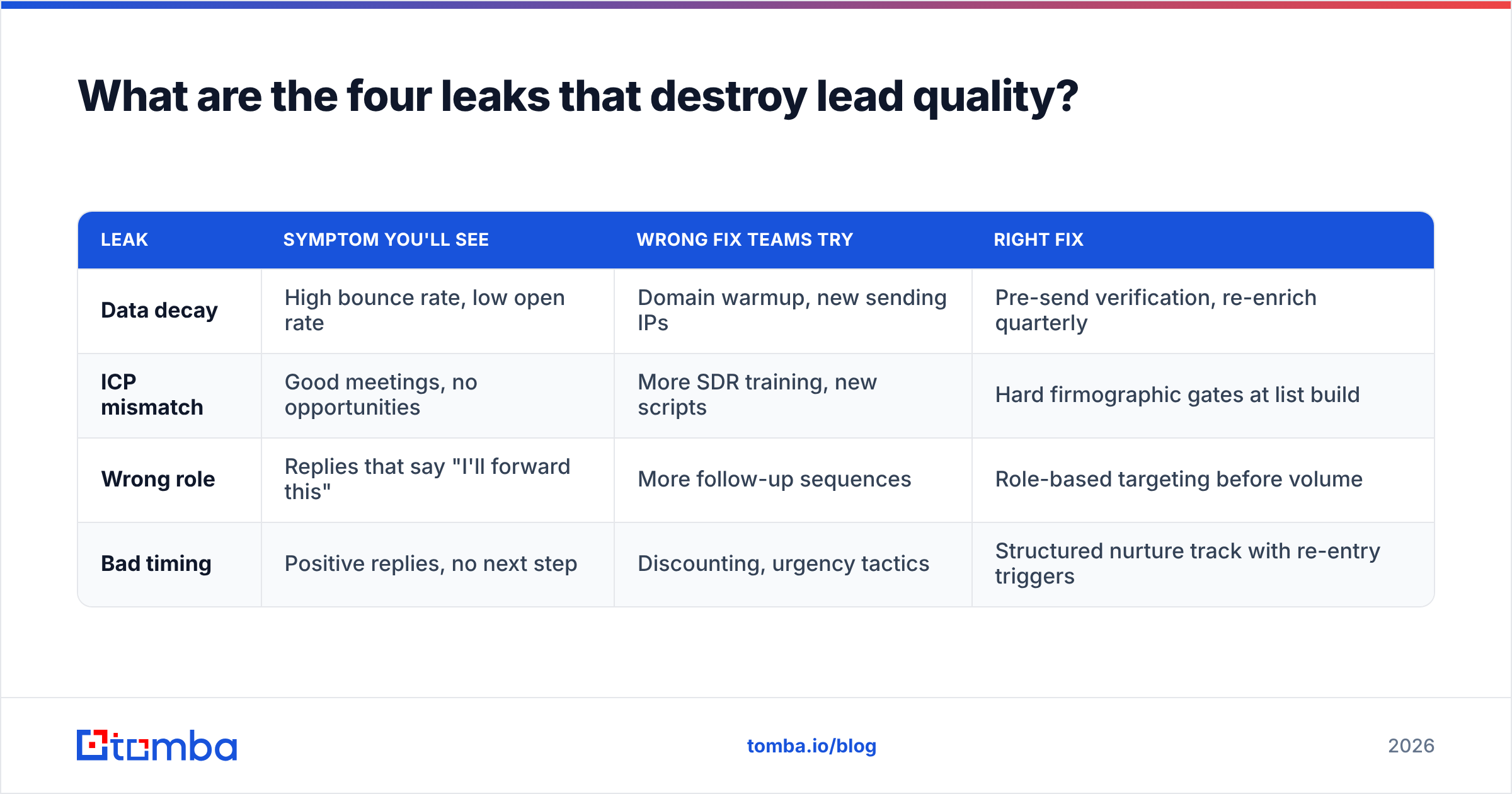
Every bad lead fails for one of four reasons, and each has a distinct fix. Diagnosing the wrong one is why teams spend money on tools that do not move the number.
Leak 1 — Contact data decay. B2B contact data degrades at roughly 25–30% annually as people change roles, companies rebrand, and mail servers reconfigure. A database that was 95% accurate at harvest is meaningfully worse two years later. Fix: verification at the point of use, not at the point of purchase. Run addresses through an email verifier immediately before a send, not once at import.
Leak 2 — ICP mismatch. The contact is real and reachable, but the company was never going to buy. This is the most expensive leak because the lead looks fine all the way through discovery. Fix: tighten firmographic filters upstream and enforce them as a hard gate, not a scoring nudge. Employee count, tech stack, and funding stage are better predictors than industry codes.
Leak 3 — Wrong buying role. You reached a real person at a real target account who has zero budget authority and no internal motivation to champion you. Fix: build your contact list by role and seniority before you build it by volume. A domain search that returns every address at a company is only useful if you then filter to the three roles that matter.
Leak 4 — Timing. Right company, right person, wrong quarter. This is the least damaging leak because it is recoverable. Fix: do not disqualify — nurture. A "not now" that you handle well converts at a higher rate eighteen months later than a cold first touch ever will.
| Leak | Symptom you'll see | Wrong fix teams try | Right fix |
|---|---|---|---|
| Data decay | High bounce rate, low open rate | Domain warmup, new sending IPs | Pre-send verification, re-enrich quarterly |
| ICP mismatch | Good meetings, no opportunities | More SDR training, new scripts | Hard firmographic gates at list build |
| Wrong role | Replies that say "I'll forward this" | More follow-up sequences | Role-based targeting before volume |
| Bad timing | Positive replies, no next step | Discounting, urgency tactics | Structured nurture track with re-entry triggers |
Notice that in three out of four cases, the common industry reflex is the wrong fix. Teams reach for sending infrastructure and copywriting when the problem lives in list construction. G2's demand generation category is full of tools that solve for volume; far fewer solve for the gate.
Is buying leads ever better than building them?#
Sometimes — but only when you know exactly what you are buying and how it was collected.
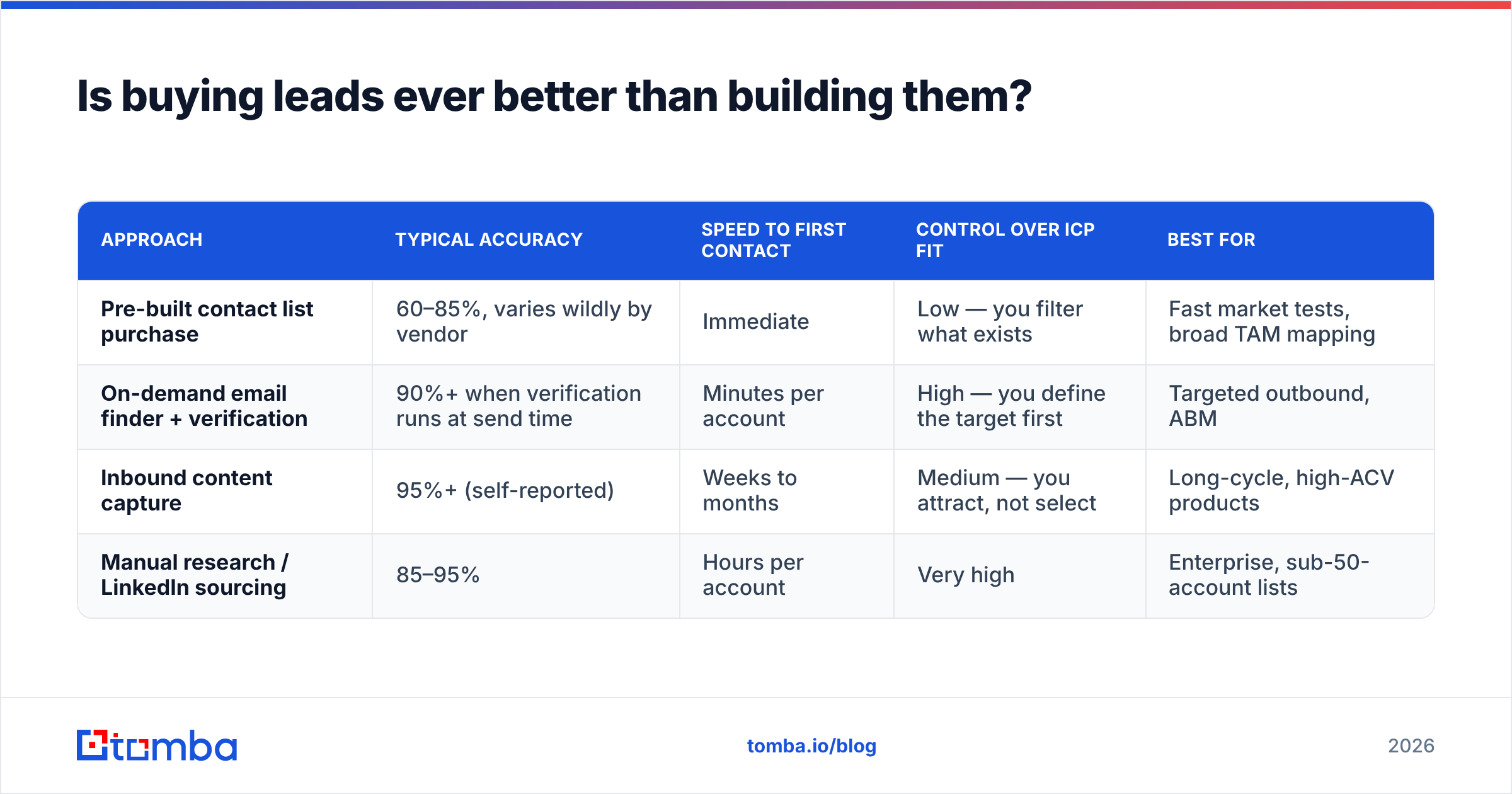
The honest comparison is not "bought leads are bad, self-sourced leads are good." It is a trade-off between speed, control, and verification depth. Here is how the main approaches compare on the dimensions that actually predict quality.
| Approach | Typical accuracy | Speed to first contact | Control over ICP fit | Best for |
|---|---|---|---|---|
| Pre-built contact list purchase | 60–85%, varies wildly by vendor | Immediate | Low — you filter what exists | Fast market tests, broad TAM mapping |
| On-demand email finder + verification | 90%+ when verification runs at send time | Minutes per account | High — you define the target first | Targeted outbound, ABM |
| Inbound content capture | 95%+ (self-reported) | Weeks to months | Medium — you attract, not select | Long-cycle, high-ACV products |
| Manual research / LinkedIn sourcing | 85–95% | Hours per account | Very high | Enterprise, sub-50-account lists |
Vendors like BookYourData have built a solid business on pay-as-you-go verified B2B lists, and for a team that needs 2,000 verified contacts in a defined vertical this week, that model is genuinely efficient — no subscription, no credit rollover games. The reason teams still pair a list purchase with an on-demand finder is sequencing: lists are strongest for breadth, finders are strongest for the specific named accounts your AEs put on a whiteboard on Monday morning.

The practical setup most efficient teams land on is layered. Use a list or B2B database for TAM coverage and territory planning. Use an on-demand email finder for named-account outbound where precision matters more than volume. Verify everything within seven days of sending regardless of where it came from. And run data enrichment on inbound form fills so a bare email address becomes a scored, routable record before it ever hits an SDR queue.
How do you build a quality gate that actually holds?#
Put the gate before the CRM, not after it. Once a bad record is in your CRM, it is in your reports forever.
A gate that holds has four checks, run in this order:
- Firmographic match — does the company clear your hard filters on size, geography, and segment? If no, stop. Do not score it. Do not route it. Discard or park it in a separate nurture database.
- Role match — is this contact in a function that touches your buying committee? A support engineer at a perfect-fit account is not a lead; they are a research data point.
- Deliverability check — is the address valid, non-catch-all, and free of role-based prefixes like info@ or sales@? Catch-all domains need a catch-all verifier rather than a standard SMTP check, since the server accepts everything and tells you nothing.
- Recency stamp — when was this record last confirmed? Anything older than 90 days goes back through verification before it goes into a sequence.
Automate all four. If a human has to remember to do them, they will happen in month one and stop in month three. The Tomba API and equivalent endpoints from other vendors exist precisely so this gate can run as a pre-insert hook on your form handler or your enrichment pipeline rather than as a manual cleanup job.
One structural note on ownership: quality gates fail when marketing owns the top and sales owns the bottom with nothing owned in the middle. Whether you call it revenue operations or just "the person who owns the definition of MQL," someone neutral has to hold the threshold. Forrester's research on B2B revenue process alignment has been making this point for years and it remains the most-ignored piece of practical advice in the category.
What should you actually change this quarter?#
Pick two. Doing all of them badly is worse than doing two properly.
- Move your headline KPI down one stage. Stop reporting MQLs to leadership. Report opportunities created, by source. This single change realigns every incentive upstream of it.
- Verify before send, not at import. Set a hard rule: no address enters a sequence if it has not been checked in the last 30 days. Watch your bounce rate drop below 2% within one campaign cycle.
- Kill your worst source. Run the 1,000-lead diagnostic above. Whichever source has the worst SQL-to-opportunity rate, cut its budget to zero for one quarter and redeploy the money to the best performer. Measure the delta.
- Write down your disqualification criteria. Not your qualification criteria — your disqualification criteria. Teams that can name what a bad lead looks like stop generating them.
- Add a role filter to your list build. Before you pull 500 contacts from an account list, define which three titles you want. Volume without role targeting is the single most common source of the "great meeting, no opportunity" pattern.
The pattern across all five: quality improves when you make it harder for a lead to enter your funnel, not when you make it easier. Every team that fixed this problem fixed it by subtracting.
The bottom line#
Lead generation quality is not a data vendor problem, a copywriting problem, or a deliverability problem, even though it shows up as all three. It is a definition problem. When "lead" means anything, it means nothing — and your SDRs spend their week calling people who were never going to buy.
Start with the diagnostic. Five metrics, by source, over your last 1,000 leads. You will find the leak in an afternoon, and it will almost certainly be one you have been funding for a year.
When you are ready to fix the data layer specifically, start with the Tomba Email Finder. It finds and verifies professional addresses by domain, name, or company so the contacts entering your sequences are real, current, and role-matched before an SDR ever touches them. The free tier gives you 25 searches a month to test against your own account list; paid plans start at $49/mo for Starter and $99/mo for Growth when you are ready to run it across the whole pipeline. Run 50 of your existing leads through it and compare the result to what is in your CRM right now — that comparison is usually all the business case you need.
Related guides#
// get started
Find, verify and enrich your first contacts today
Start on the free plan with 25 searches a month, then scale when your team is ready.
Free plan · No credit card required · GDPR & CCPA
// about the author