Lead Generation Software in 2026: How to Pick the Right Stack
Most lead generation software fails for one boring reason: the data underneath it is stale. Here's how the categories actually differ, what each tier costs, and how to build a stack that books meetings.
TL;DR
- "Lead generation software" is not one category. It's five: data/contact platforms, outbound sequencers, inbound capture, visitor identification, and enrichment/routing. Buying the wrong one is the most common budget mistake.
- Pricing spans $0 to $30,000+/year. The jump from $49/mo to $1,500/mo usually buys workflow and seats, not better data.
- Data freshness beats database size every time. A 700M-record database with 60% deliverable emails produces fewer meetings than a 200M-record one at 95%.
- Most teams under 20 reps need exactly three things: a source of verified contacts, a sending tool, and a CRM. Everything else is premature.
- Budget 20-30% of your lead gen spend on verification and enrichment. Skipping it is how you burn a sending domain in six weeks.
What is lead generation software, actually?#
Lead generation software is any tool that helps you identify, capture, or contact people who might buy from you. That definition is deliberately broad because the market is deliberately blurry — vendors in five genuinely different categories all use the same three words on their homepage.
Think of it like a restaurant kitchen. You need ingredients (contact data), a stove (sending infrastructure), a front-of-house that takes orders (inbound forms and chat), and someone who notices the regular who walked in without a reservation (visitor identification). A vendor selling you a very nice stove does not solve the problem of having no ingredients. That's the mismatch that wastes most budgets.
Here's the honest category map:
- Contact data platforms — find and verify email addresses and phone numbers for specific people or companies. Tomba, Hunter, Apollo's data layer, BookYourData, RocketReach, Clearbit.
- Outbound sequencers — send and schedule the emails, manage inboxes, track replies. Instantly, Smartlead, Salesloft, Outreach, Lemlist.
- Inbound capture — forms, chatbots, landing pages, lead magnets. HubSpot, Typeform, Drift, Unbounce.
- Visitor identification — de-anonymize traffic already hitting your site. Leadfeeder, Albacross, RB2B, Tomba's website visitor reveal.
- Enrichment and routing — fill in missing fields, score, and route to the right rep. Clearbit, Clay, LeanData, Tomba's enrichment API.
Most "all-in-one" platforms do two of these well and three of them badly. That's not a scandal; it's just how product focus works. The scandal is paying all-in-one prices for a stack where only one piece is load-bearing.
Which category do you actually need?#
Start from where your pipeline is starving, not from what's trending.
If you have traffic but no conversions, you have an inbound capture or visitor identification problem — more contact data won't help. If you have a list but your emails bounce, you have a data quality problem, and buying a fancier sequencer makes it worse faster. If you're sending fine and getting replies but nothing closes, that's a targeting or messaging problem, and no software fixes it.
Run this diagnostic before you look at a single pricing page:
- Bounce rate above 3%? Fix data first. Nothing else matters until that's under control — see our notes on email deliverability for why.
- Under 1,000 monthly site visitors? Skip visitor identification entirely. The math doesn't work.
- Reply rate under 2% on clean data? That's messaging, not tooling.
- More than 40% of CRM records missing a field you segment on? You need enrichment, not more leads.
- Reps spending over an hour a day on manual research? That's an automation gap — a bulk email finder or API integration pays for itself in weeks.
How much does lead generation software cost in 2026?#
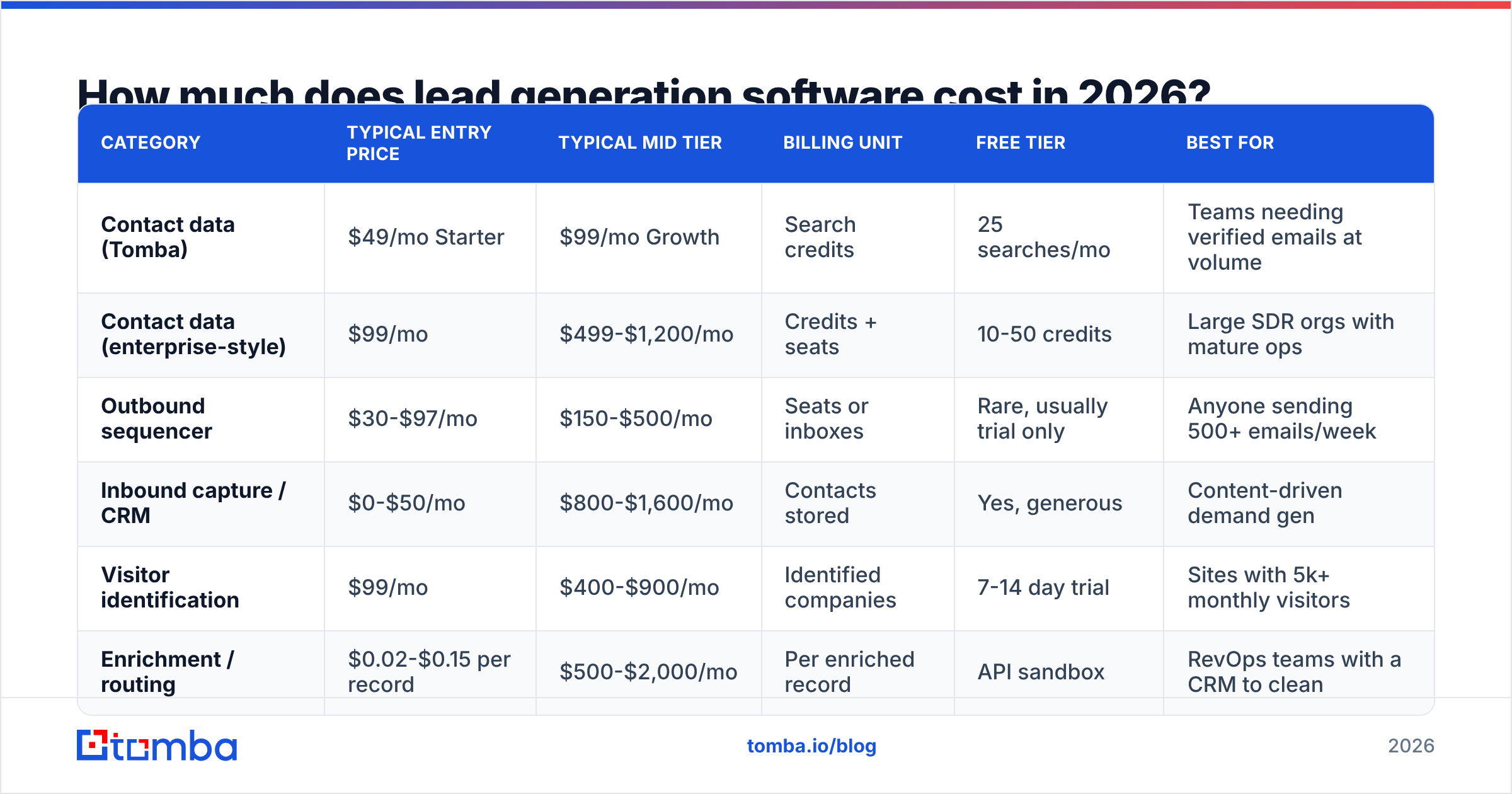
Pricing in this market is genuinely hard to compare because the units differ. Some vendors charge per credit, some per seat, some per contact stored, some per email sent. A "credit" at one vendor is a single email lookup; at another it's a full enriched profile including phone.
Here's a like-for-like comparison at the entry and mid tiers across the categories:
| Category | Typical entry price | Typical mid tier | Billing unit | Free tier | Best for |
|---|---|---|---|---|---|
| Contact data (Tomba) | $49/mo Starter | $99/mo Growth | Search credits | 25 searches/mo | Teams needing verified emails at volume |
| Contact data (enterprise-style) | $99/mo | $499-$1,200/mo | Credits + seats | 10-50 credits | Large SDR orgs with mature ops |
| Outbound sequencer | $30-$97/mo | $150-$500/mo | Seats or inboxes | Rare, usually trial only | Anyone sending 500+ emails/week |
| Inbound capture / CRM | $0-$50/mo | $800-$1,600/mo | Contacts stored | Yes, generous | Content-driven demand gen |
| Visitor identification | $99/mo | $400-$900/mo | Identified companies | 7-14 day trial | Sites with 5k+ monthly visitors |
| Enrichment / routing | $0.02-$0.15 per record | $500-$2,000/mo | Per enriched record | API sandbox | RevOps teams with a CRM to clean |
Two things jump out. First, the sequencer tier is cheap relative to everything else — sending is close to a commodity. Second, contact data pricing varies by more than 10x for functionally similar output, which is why you should test accuracy on your own ICP before committing annually.
Tomba pricing sits at the accessible end: Free (25 searches/mo), Starter $49/mo, Growth $99/mo, Pro $249/mo, Enterprise custom. BookYourData takes a different and legitimate approach — pay-as-you-go list purchase with no subscription, which suits teams that need a one-time targeted list rather than continuous lookups. Neither model is universally better; the question is whether your need is recurring or episodic.
Why does data quality matter more than database size?#
Because every downstream metric multiplies off it.
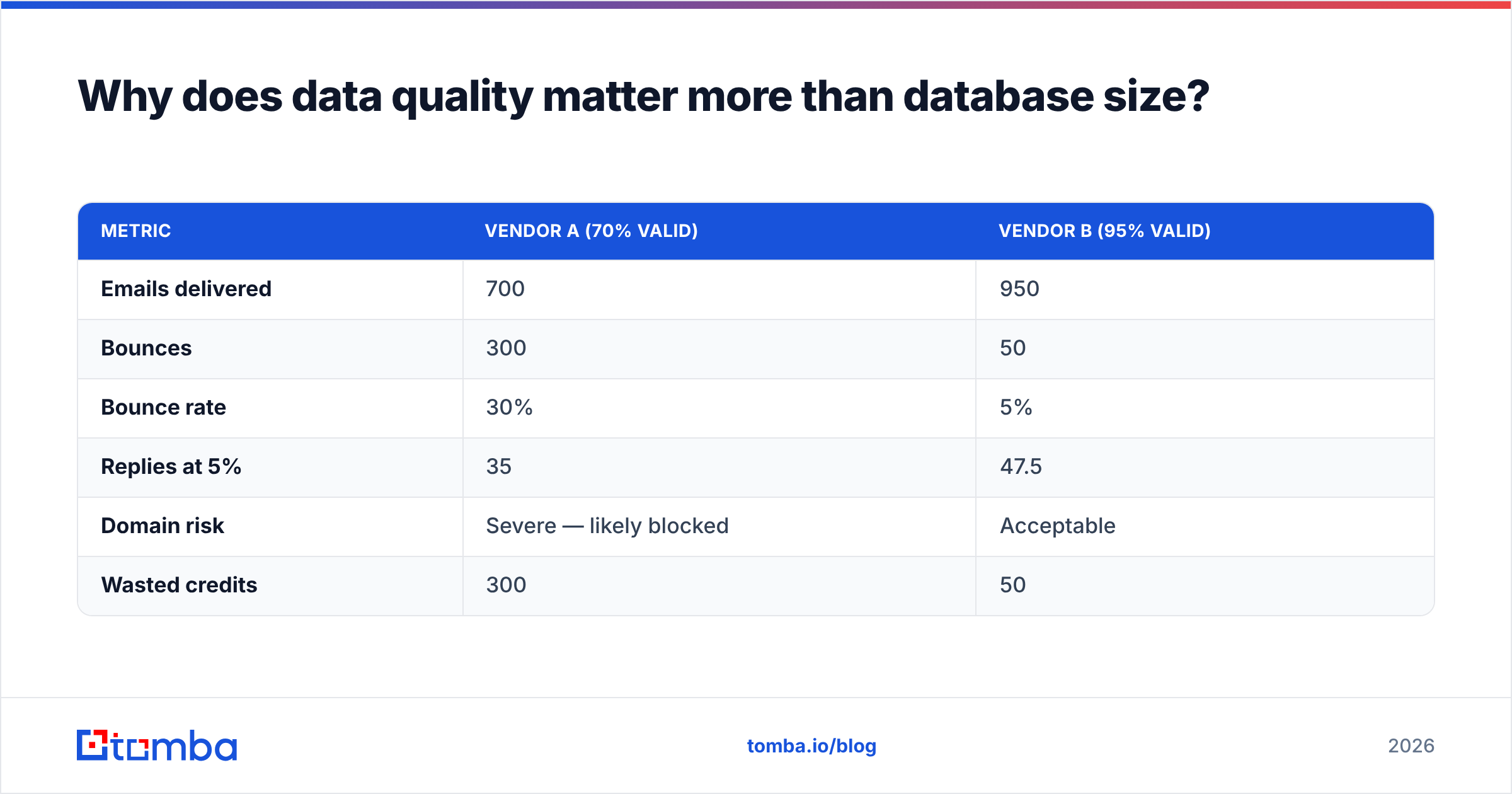
Run the arithmetic. Say you send 1,000 emails. Vendor A claims 700 million contacts but delivers 70% valid addresses. Vendor B claims 200 million with 95% valid. Same 1,000 sends, same 5% reply rate on delivered mail:
| Metric | Vendor A (70% valid) | Vendor B (95% valid) |
|---|---|---|
| Emails delivered | 700 | 950 |
| Bounces | 300 | 50 |
| Bounce rate | 30% | 5% |
| Replies at 5% | 35 | 47.5 |
| Domain risk | Severe — likely blocked | Acceptable |
| Wasted credits | 300 | 50 |
Vendor B produces 36% more replies from identical effort. More importantly, Vendor A's 30% bounce rate will get your sending domain flagged by Google and Microsoft within two or three campaigns, at which point your reply rate on future sends drops toward zero regardless of what you fix.
Google's bulk sender requirements put the practical spam-complaint ceiling at 0.3%, and mailbox providers weigh bounce rate heavily in reputation scoring. You can read the current thresholds in Google's own sender guidelines. Treat 3% bounce as your hard ceiling and 1% as your target.
This is why an email verifier is not an optional add-on. Verify before you send, always — even data you bought last month, because roughly 2-3% of B2B email addresses go stale every month from job changes alone.

Catch-all domains deserve a separate mention. Roughly 15-20% of B2B domains accept all mail regardless of whether the mailbox exists, which means standard SMTP verification returns "unknown." Most tools mark these as risky and you lose the contact. A dedicated catch-all verifier uses pattern confidence and secondary signals to salvage a meaningful share of those — often 10-15% of an enterprise-heavy list that would otherwise be discarded.
What does a good lead generation stack look like by company size?#
Stop copying enterprise stacks. What a 400-person company runs is a liability at 10 people — the integration overhead alone eats the productivity gain.
Solo founder / pre-revenue (under $100/mo)
One data source, one sending tool, a spreadsheet as CRM. Use a free tier or Starter plan for contacts, a $30/mo sequencer, and Google Sheets. The Sheets email finder add-on covers most of this workflow without a single integration to maintain.
Seed to Series A, 2-10 reps ($200-$600/mo)
Add a real CRM and enrichment. Contact data at the Growth tier, a sequencer with multi-inbox rotation, HubSpot or Pipedrive, and an enrichment call on every inbound signup. This is where an API matters — manual CSV shuttling becomes the bottleneck around 200 leads/month.
Series B+, 10-40 reps ($1,500-$5,000/mo)
Now add visitor identification, lead scoring, and routing. Your constraint shifts from "find leads" to "get the right lead to the right rep in under five minutes." Speed-to-lead research from Harvard Business Review found response within an hour makes you roughly 7x more likely to qualify the lead — routing infrastructure is what makes that possible at volume.
Enterprise, 40+ reps ($5,000+/mo)
Intent data, ABM orchestration, dedicated data ops. At this scale you're buying vendor SLAs and security review as much as features. Honest note: most teams that buy at this tier were not constrained by tooling. They were constrained by targeting, and the new platform makes the same bad targeting faster.
How do the main platform types compare head-to-head?#
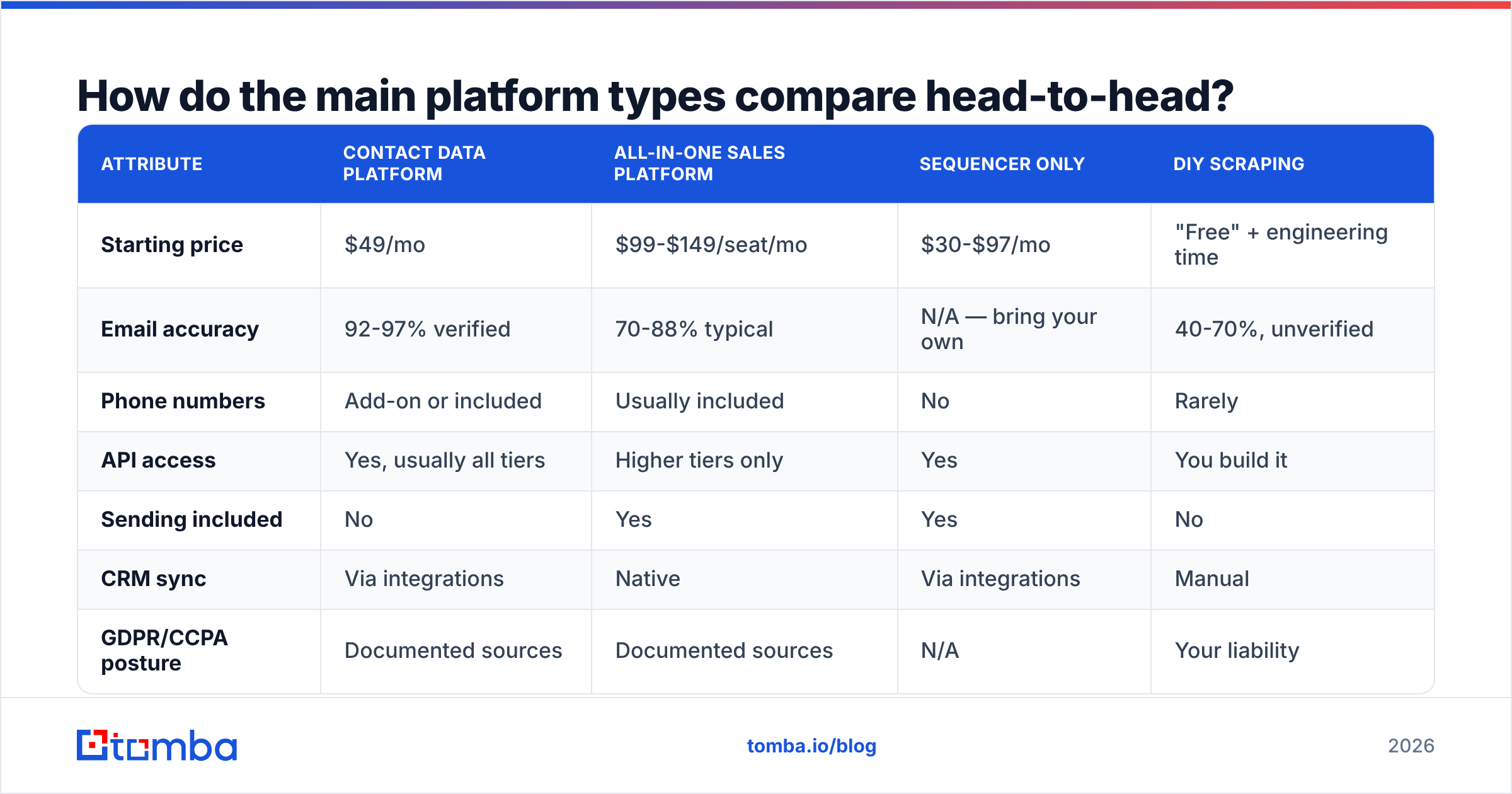
| Attribute | Contact data platform | All-in-one sales platform | Sequencer only | DIY scraping |
|---|---|---|---|---|
| Starting price | $49/mo | $99-$149/seat/mo | $30-$97/mo | "Free" + engineering time |
| Email accuracy | 92-97% verified | 70-88% typical | N/A — bring your own | 40-70%, unverified |
| Phone numbers | Add-on or included | Usually included | No | Rarely |
| API access | Yes, usually all tiers | Higher tiers only | Yes | You build it |
| Sending included | No | Yes | Yes | No |
| CRM sync | Via integrations | Native | Via integrations | Manual |
| GDPR/CCPA posture | Documented sources | Documented sources | N/A | Your liability |
| Realistic time to first meeting | 1-2 days | 1-2 weeks | Same day if you have data | 3-6 weeks |
| Best for | Precision targeting | Teams wanting one vendor | Teams with existing data | Nobody, honestly |

The DIY column is included because it keeps getting proposed in engineering-led companies. It looks free. It isn't — you're absorbing the maintenance of every site layout change, the legal exposure of unsourced personal data, and accuracy in the 40-70% range. A senior engineer's week costs more than two years of a Growth plan.
What features actually move the number?#
Feature lists are where vendors compete on paper. Here's what correlates with booked meetings, ranked:
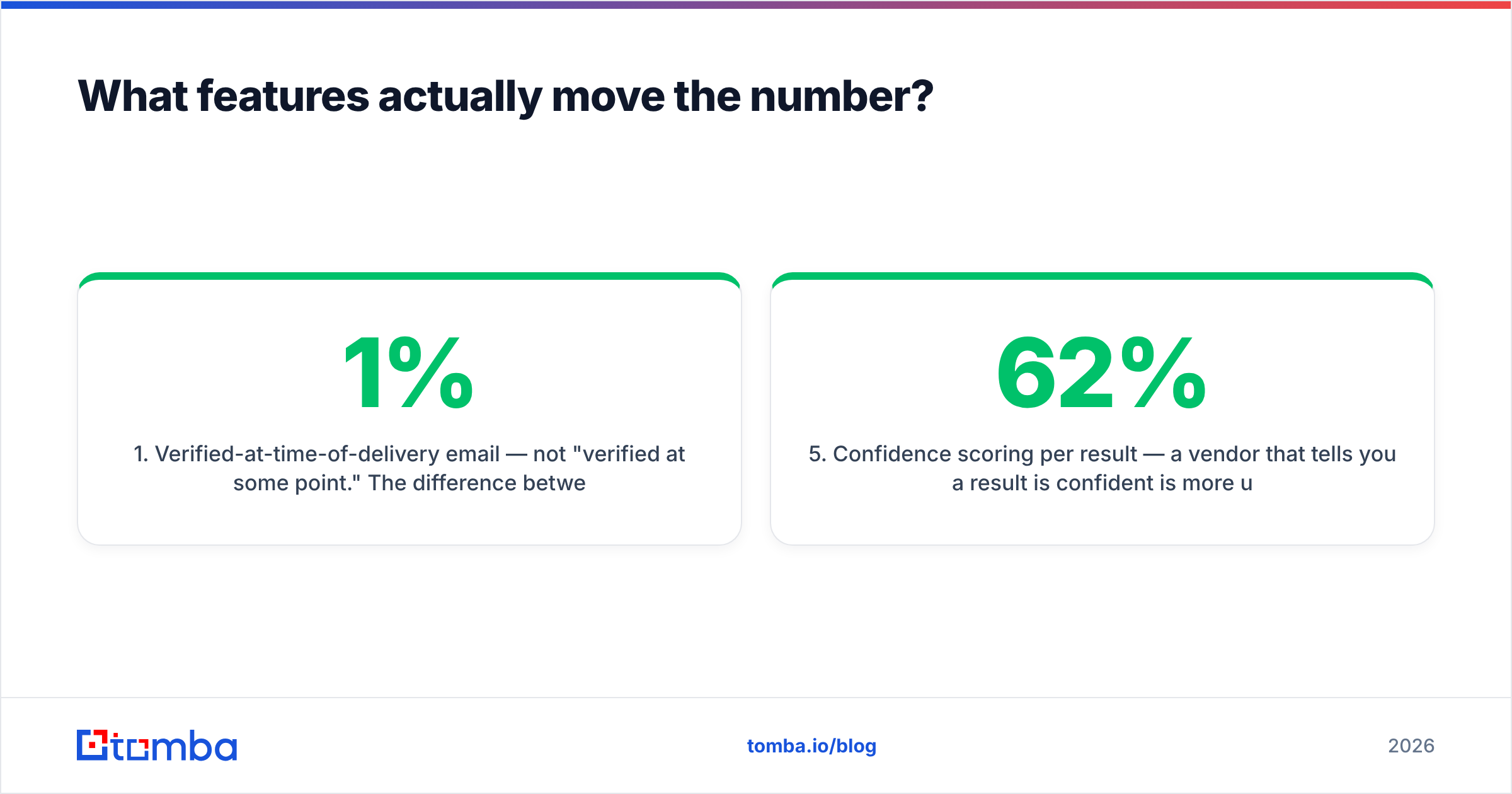
- Verified-at-time-of-delivery email — not "verified at some point." The difference between a database lookup and a live SMTP check is the difference between a 1% and a 15% bounce rate on older records.
- API and native integrations — if your reps are exporting CSVs, you've already lost the efficiency argument. Check for a real email finder API with documented rate limits, not a "coming soon" page.
- Bulk processing — the ability to run 5,000 lookups without babysitting the queue. Ask about throughput, not just credit count.
- Domain-level search — when you know the company but not the person, domain search returns every findable address plus the company's email pattern, which lets you infer new hires before any database has them.
- Confidence scoring per result — a vendor that tells you a result is 62% confident is more useful than one that returns everything at "verified." You can threshold the first; you can only trust or distrust the second.
- Source transparency — where did this record come from, and when. Required for GDPR legitimate-interest documentation, and a fast way to judge whether a vendor is reselling the same scraped corpus as everyone else.
Notably absent from that list: AI-generated email copy, "intent signals" at the SMB tier, and Chrome extensions. Those are nice. They are not why deals close. G2's category reviews for lead intelligence software show the same pattern in user feedback — accuracy complaints dominate, feature-gap complaints are rare.
What are the common mistakes to avoid?#
Buying annual before testing your ICP. Every vendor's accuracy varies wildly by geography and industry. A tool that's 96% accurate on US SaaS might be 60% on German manufacturing. Test 200 contacts from your actual target list on a monthly plan first.
Confusing database size with coverage. "700M contacts" is a marketing number that includes every scraped profile ever seen. The number you care about is: of the 500 people I want to reach, how many can you find with a deliverable address? That's usually 40-75%, and no vendor publishes it.
Skipping verification to save money. Verification costs a fraction of a cent per record. A burned sending domain costs weeks of pipeline and a domain migration.
Over-tooling before product-market fit. If you can't articulate your ICP in one sentence, more software will produce more of the wrong leads faster.
Ignoring phone. Email-only outbound has gotten harder as inbox filtering tightened. Multi-channel sequences that include a call step consistently outperform email-only, and pulling verified B2B phone numbers alongside emails costs less than most teams assume.
How should you run a 30-day evaluation?#
Treat it like a hiring process, not a shopping trip.
Week 1 — Define 200 target contacts from your real ICP with known-good ground truth (LinkedIn-confirmed, currently employed). Sign up for free tiers or monthly plans at three vendors. No annual contracts.
Week 2 — Run the same 200 through each. Score three things: match rate (how many returned anything), accuracy (how many were correct on manual spot-check of 50), and bounce rate on a small live send of 100.
Week 3 — Test the workflow, not just the data. How long does it take a rep to go from "I want contacts at these 50 companies" to "they're in the CRM"? Under five minutes is good. Over twenty means you'll need ops support forever.
Week 4 — Negotiate. Every vendor in this market discounts annual commitments by 20-30%, and most will extend a trial if you ask. Bring your accuracy data to the call; it's leverage.
Document the results in a shared sheet. The next time someone proposes a platform switch, you'll have a baseline instead of an opinion.
Where does this leave you?#
Buy for the constraint you actually have. If your pipeline is starving because you can't reach the right people, the fix is verified contact data feeding a simple sequencer — not a $2,000/mo platform with 40 features you'll never enable. If your traffic converts poorly, no amount of outbound data helps. Diagnose first.
And whatever you buy, verify before you send. It's the cheapest insurance in the category.
If your bottleneck is finding and verifying the right contacts, start with the Tomba Email Finder. The free tier gives you 25 searches a month to test accuracy against your own ICP before you spend anything, Starter is $49/mo when you're ready to scale, and every plan includes API access so your reps stop moving CSVs around. Run your 200-contact benchmark on it and compare the numbers — that's the only vendor claim worth trusting.
Related guides#
// get started
Find, verify and enrich your first contacts today
Start on the free plan with 25 searches a month, then scale when your team is ready.
Free plan · No credit card required · GDPR & CCPA
// about the author