Lead Generation Software for Small Business: 2026 Guide
Most lead gen tools are priced for 50-seat sales teams. Here is what actually works when you have two reps, no RevOps hire, and a $300 monthly budget.
TL;DR
- Small businesses lose money on lead gen software because they buy platforms designed for 20-seat sales teams — seat minimums, annual contracts, and credit pools you cannot burn through.
- A functional small-business stack needs exactly three jobs covered: find contacts, verify contacts, send and track sequences. Everything else is optional until you have a dedicated SDR.
- Budget reality: you can run a credible outbound motion for $150-$300/month total. Most "all-in-one" suites start above that for a single seat.
- Data accuracy matters more than volume at your scale. A 2-person team sending 400 emails/month cannot absorb a 30% bounce rate the way a 40-person team can.
- Skip anything with a mandatory annual commitment until you have proven the channel with a month-to-month tool.
What is lead generation software, exactly?#
Lead generation software is any tool that turns a vague market ("SaaS companies in Berlin with 20-200 employees") into a list of specific, contactable humans, and then helps you reach them. That is the whole category. Everything else vendors bolt on — scoring, intent signals, AI SDRs, conversational chatbots — is a layer on top of that core job.
For a small business, the category splits into four distinct functions that are often sold as one bundle:
- Contact discovery — finding the email address, phone number, or LinkedIn profile of a specific person at a specific company. This is where an email finder or domain search lives.
- Data verification — confirming that the mailbox you found actually accepts mail before you send to it. An email verifier sits here, and it is the step small teams skip most often.
- Outreach and sequencing — the sending layer: multi-step campaigns, follow-ups, reply detection, inbox rotation.
- Capture and routing — forms, chat widgets, website visitor reveal, and the CRM plumbing that stops leads from dying in someone's inbox.
Large companies buy all four from one vendor because procurement hates managing five contracts. You do not have procurement. You have a credit card and a strong incentive to not waste $600/month on modules you will never open.
Why do enterprise lead gen tools fail small businesses?#
Three structural reasons, and none of them are about software quality.
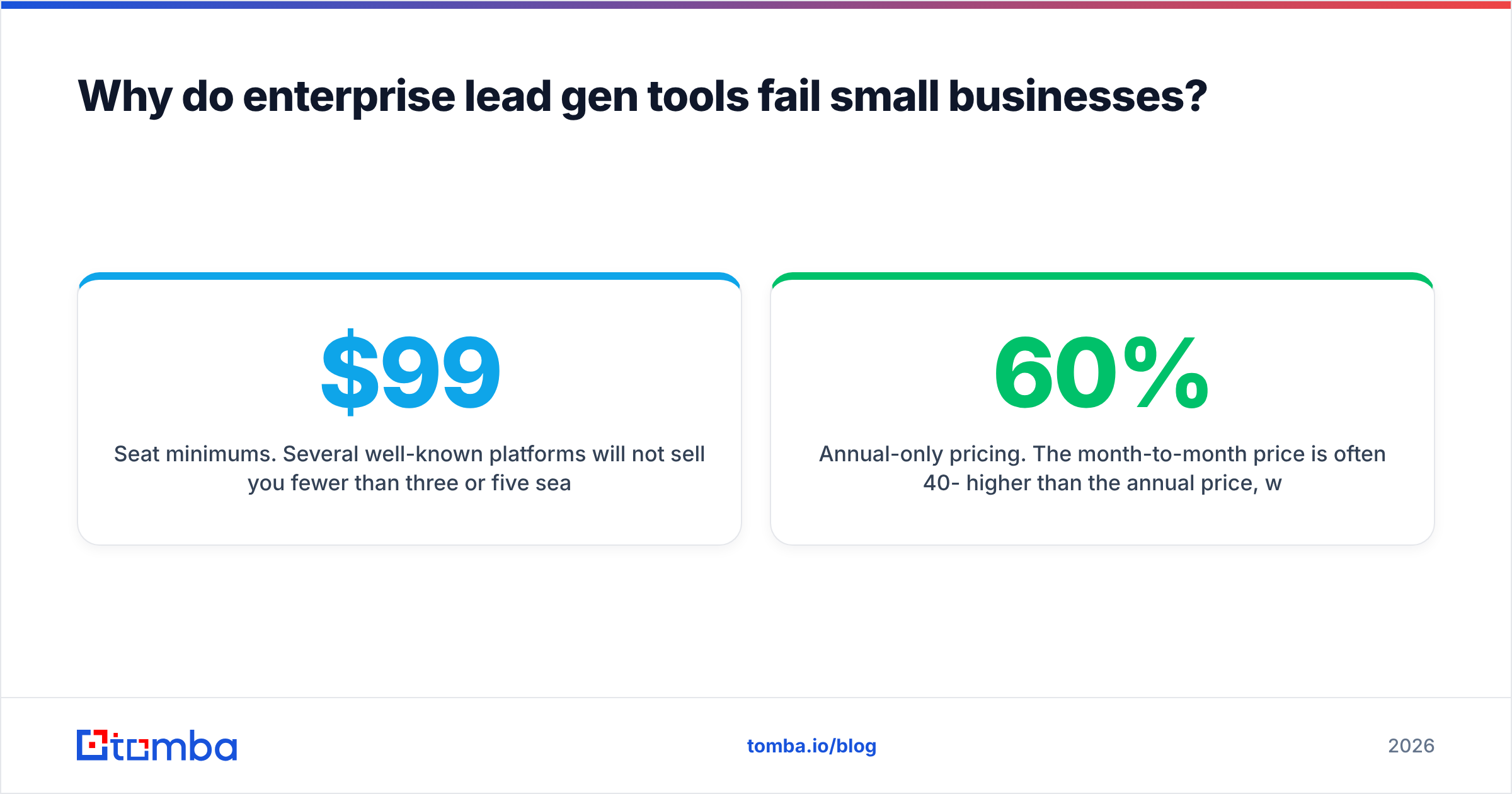
Seat minimums. Several well-known platforms will not sell you fewer than three or five seats. If you are a founder plus one salesperson, you are paying for phantom users. A $99/seat tool with a 5-seat floor is a $495/month tool, not a $99 tool.
Credit pools sized for teams. A plan that includes 12,000 credits per month sounds generous until you realize you will use 800. Credits usually do not roll over. You are buying inventory you will throw away twelve times a year.
Annual-only pricing. The month-to-month price is often 40-60% higher than the annual price, which is a deliberate nudge toward a 12-month commitment. For a channel you have not validated yet, that is a bad bet. Test monthly, commit annually only after you have booked meetings from it.
Implementation weight. Intent-data platforms and ABM suites assume you have someone doing revenue operations full-time. If nobody on your team owns data hygiene, a sophisticated platform degrades into an expensive contact list within two quarters.
How much should a small business actually spend?#
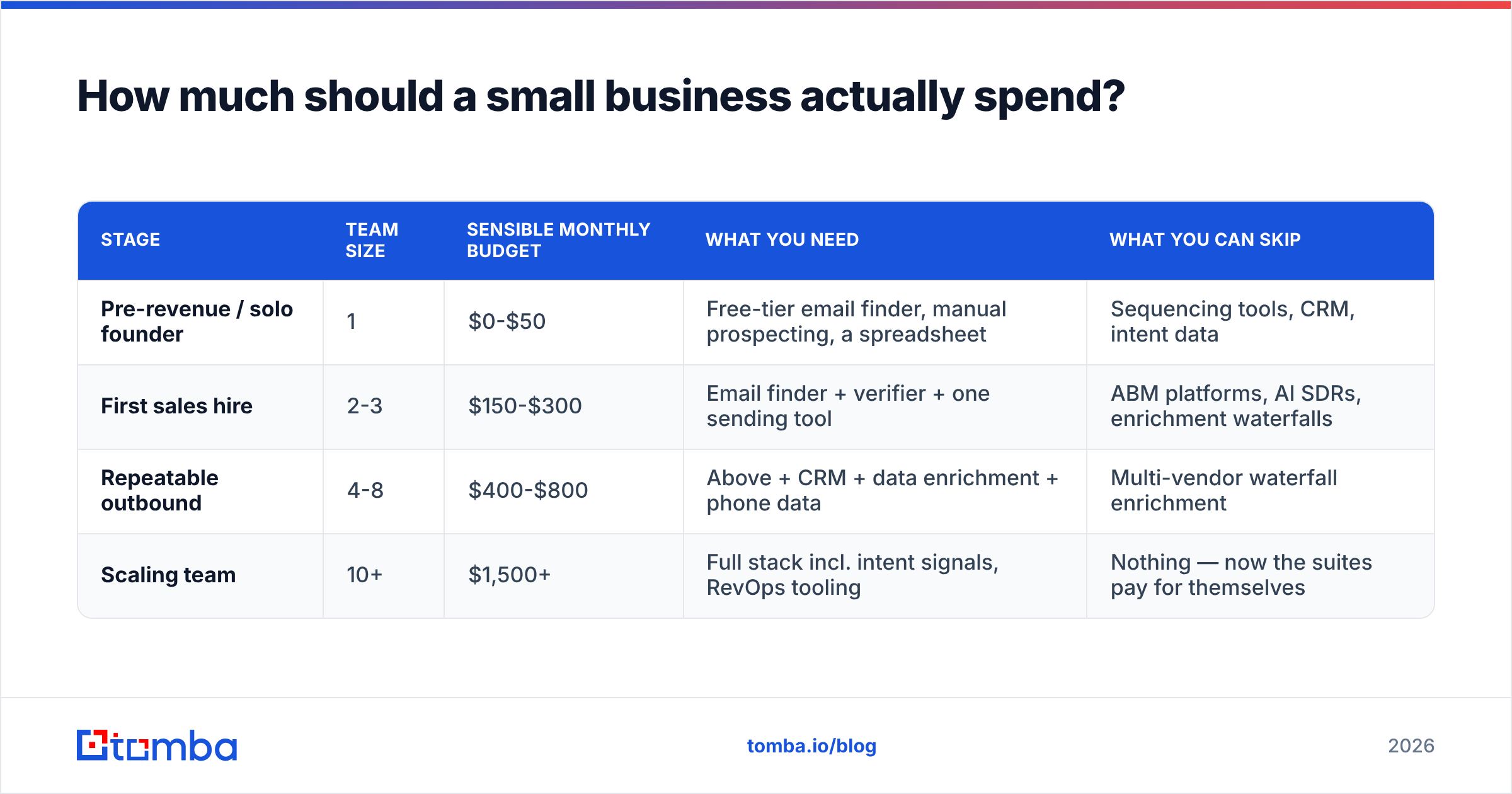
Here is a realistic budget frame by company stage. These are total monthly spends across all lead gen tooling, not per-tool.
| Stage | Team size | Sensible monthly budget | What you need | What you can skip |
|---|---|---|---|---|
| Pre-revenue / solo founder | 1 | $0-$50 | Free-tier email finder, manual prospecting, a spreadsheet | Sequencing tools, CRM, intent data |
| First sales hire | 2-3 | $150-$300 | Email finder + verifier + one sending tool | ABM platforms, AI SDRs, enrichment waterfalls |
| Repeatable outbound | 4-8 | $400-$800 | Above + CRM + data enrichment + phone data | Multi-vendor waterfall enrichment |
| Scaling team | 10+ | $1,500+ | Full stack incl. intent signals, RevOps tooling | Nothing — now the suites pay for themselves |
The pattern to notice: the jump from "first sales hire" to "repeatable outbound" is where most small businesses overspend. They buy the scaling-team stack at the 2-person stage because a demo was persuasive, then churn four months later with an unused seat count.
Which lead generation software categories matter for a small team?#
Rather than ranking 30 tools, it is more useful to understand what each category does and what a small team should pay for it.
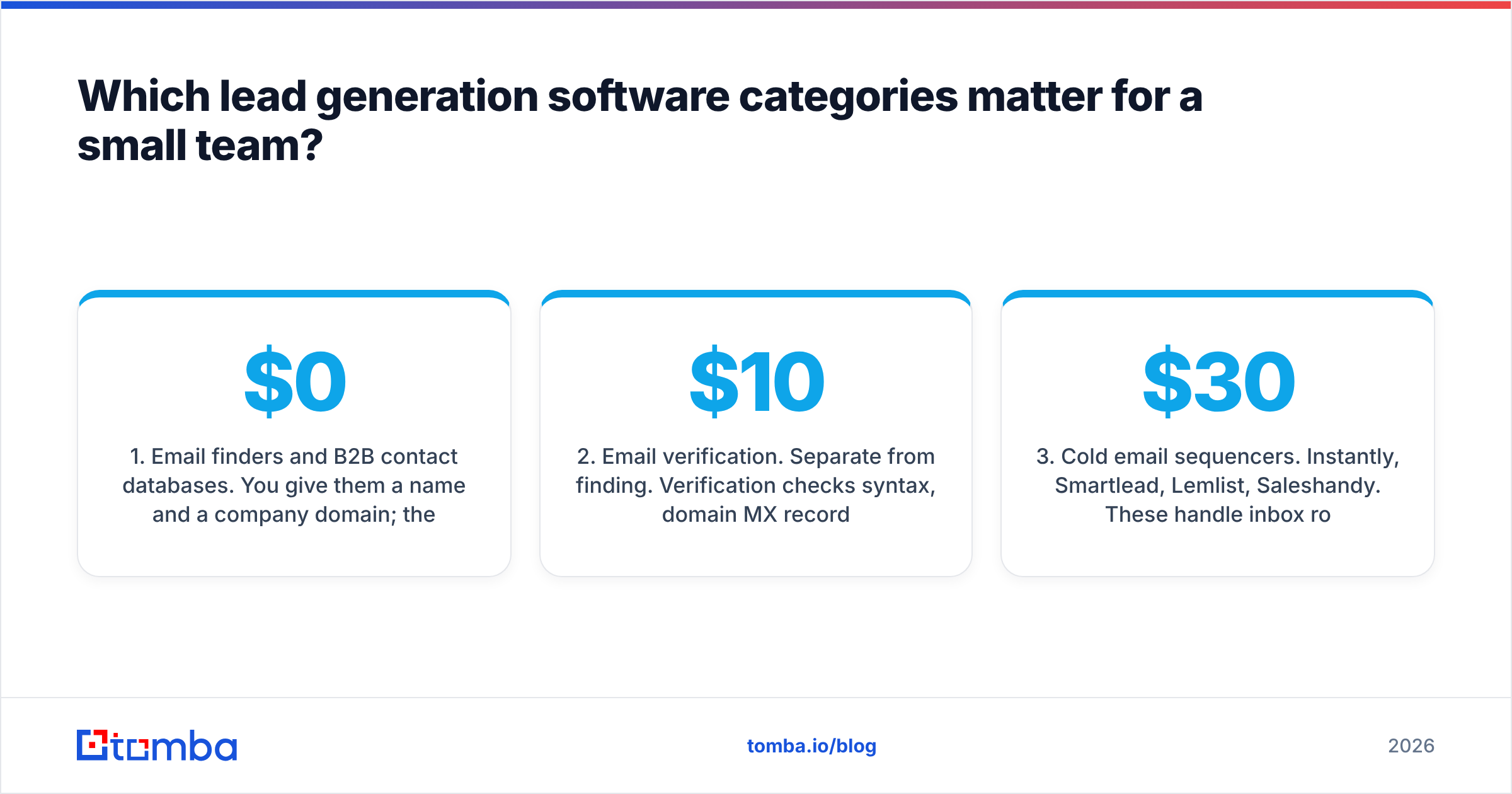
1. Email finders and B2B contact databases. You give them a name and a company domain; they return a verified work email. Options here include Tomba, Hunter, Apollo, RocketReach, and BookYourData — the last of which takes a different approach, selling verified, pay-as-you-go list downloads rather than a subscription seat, which suits teams that prospect in bursts rather than daily. Expect $0-$99/month at small-business volume.
2. Email verification. Separate from finding. Verification checks syntax, domain MX records, catch-all status, and mailbox existence. Some finders include it; standalone tools like ZeroBounce, NeverBounce, and Debounce sell it per-credit. Budget $10-$40/month at 2,000-5,000 verifications.
3. Cold email sequencers. Instantly, Smartlead, Lemlist, Saleshandy. These handle inbox rotation, warmup, sequencing, and reply detection. $30-$100/month for a small team.
4. Website visitor identification. Tools that de-anonymize traffic to company level. Valuable only if you already have meaningful traffic — below roughly 2,000 monthly visitors the signal is too thin to act on.
5. LinkedIn-based prospecting. Sales Navigator plus an extraction layer. Strong for niche targeting, but you are renting access on LinkedIn's terms, and the terms change.
6. CRM with built-in lead gen. HubSpot and Pipedrive both bundle light prospecting. Convenient, rarely best-in-class, but the reduced tool sprawl is a real benefit for a two-person team. HubSpot's free CRM tier is genuinely usable for small businesses.
How do the main small-business options compare on price and fit?#
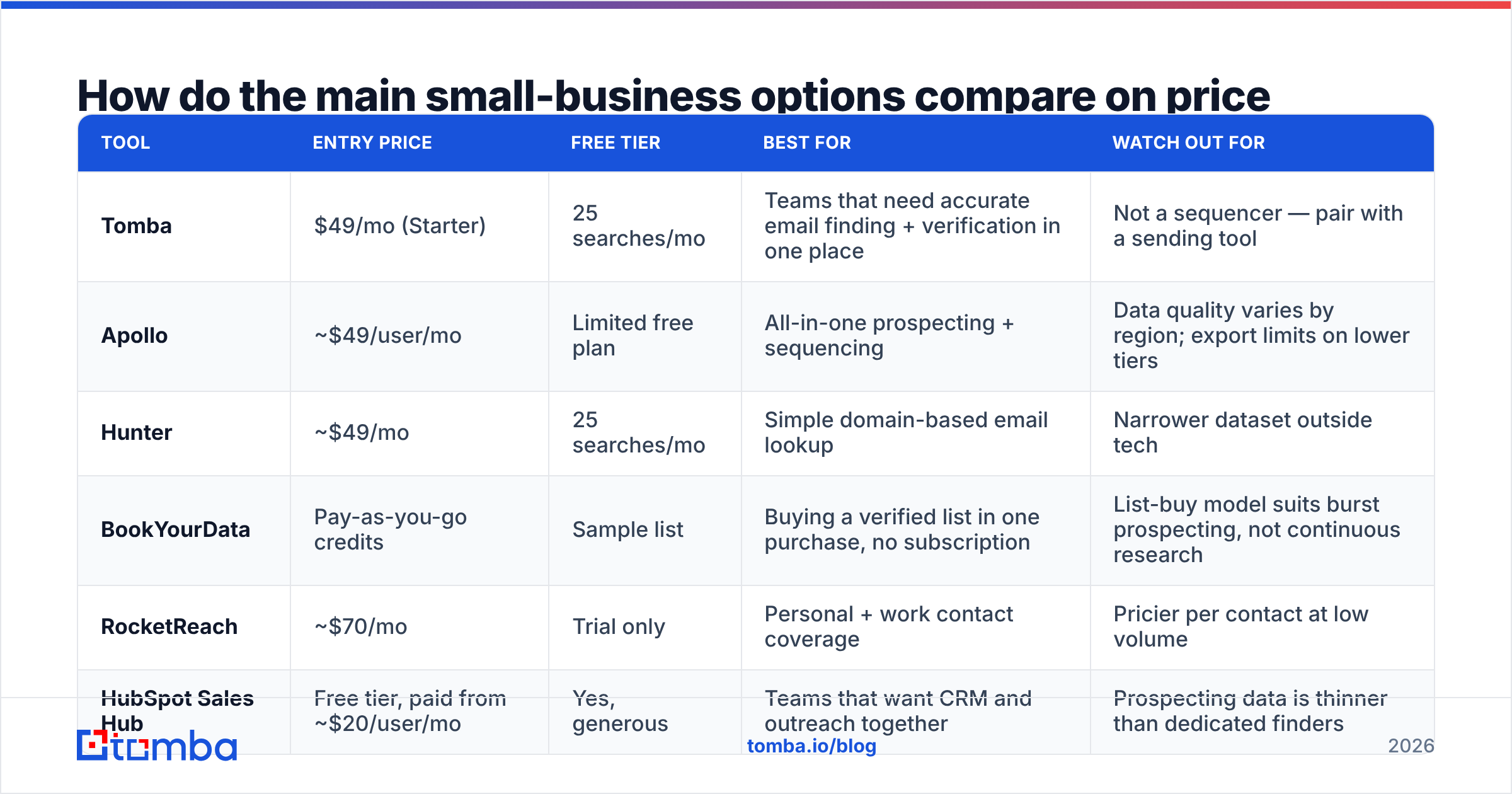
| Tool | Entry price | Free tier | Best for | Watch out for |
|---|---|---|---|---|
| Tomba | $49/mo (Starter) | 25 searches/mo | Teams that need accurate email finding + verification in one place | Not a sequencer — pair with a sending tool |
| Apollo | ~$49/user/mo | Limited free plan | All-in-one prospecting + sequencing | Data quality varies by region; export limits on lower tiers |
| Hunter | ~$49/mo | 25 searches/mo | Simple domain-based email lookup | Narrower dataset outside tech |
| BookYourData | Pay-as-you-go credits | Sample list | Buying a verified list in one purchase, no subscription | List-buy model suits burst prospecting, not continuous research |
| RocketReach | ~$70/mo | Trial only | Personal + work contact coverage | Pricier per contact at low volume |
| HubSpot Sales Hub | Free tier, paid from ~$20/user/mo | Yes, generous | Teams that want CRM and outreach together | Prospecting data is thinner than dedicated finders |
Pricing shifts frequently; check each vendor's page before you commit. The G2 lead intelligence category is a reasonable place to sanity-check current user sentiment across these.
Does data accuracy matter more at small scale?#
Yes, and the math is not intuitive.
A 40-person sales team sending 20,000 emails a month can absorb a 12% bounce rate. It hurts their sender reputation, but they have dedicated domains, warmup infrastructure, and a deliverability consultant on retainer.
You have one domain. Possibly your main company domain — the one your invoices and support replies go out on. A 12% bounce rate on 400 sends is 48 hard bounces, and mailbox providers do not grade on a curve for small senders. Google and Microsoft evaluate bounce ratios, not bounce counts. One bad list can push your primary domain into the spam folder for weeks.
Practical rules for small teams:
- Never send to unverified data. Run every list through verification, even data that arrived "pre-verified." Vendors verify at collection time; a contact found in March may have left in July.
- Treat catch-all domains carefully. Catch-all servers accept everything, so standard verification returns "unknown." Use a dedicated catch-all verifier rather than guessing, or segment those contacts into a lower-volume send.
- Cap at 30-50 cold sends per inbox per day. This is the single most effective deliverability control available to a small team, and it costs nothing.
- Use a separate sending domain. A lookalike domain (yourcompany-mail.com) protects your primary domain's reputation.

What does a $250/month small-business stack look like?#
Concrete build, assuming a two-person team doing roughly 1,000 outbound touches per month.
- Contact discovery — $49/mo. Tomba Starter, or an equivalent email finder. Covers name-to-email lookups, domain searches for a target company, and enough volume for a 2-person team. Free tier available to test first.
- Verification — included or ~$20/mo. Bundled with your finder if possible. Standalone if your finder does not include catch-all handling.
- Sequencer with warmup — $40-$80/mo. Instantly or Smartlead at entry tier. This includes inbox warmup, which you need.
- CRM — $0. HubSpot free or Pipedrive's entry tier. Do not overbuy here; your pipeline is small enough that the free tier is genuinely sufficient.
- Sending domain + inboxes — $15-$30/mo. Two or three Google Workspace or Microsoft 365 mailboxes on a secondary domain.
Total: roughly $125-$180/month, with headroom to $250 as volume grows. Compare that to a single seat of an enterprise sales engagement platform, which typically starts around $100-$150/user/month before data credits.
How do you avoid the common small-business mistakes?#
Buying volume before product-market fit in messaging. If your reply rate is under 2%, more contacts will not fix it. Fix the message on 200 prospects before you buy 20,000 records. A response rate below 2% is a copy problem, not a data problem.
Ignoring the free tier. Most credible vendors offer one. Tomba includes 25 searches per month free; Hunter offers a similar allowance. That is enough to validate whether a tool actually has coverage in your specific niche before you spend a dollar. Vendor coverage varies wildly by industry and geography — a tool with excellent US tech coverage may be thin on European manufacturing.
Stacking overlapping tools. Audit quarterly. Small businesses routinely pay for three tools that each do email finding because different team members signed up for different trials.
Treating credits as unlimited. Bulk-running a 10,000-row list through an enrichment tool on the first day burns a month of credits for data your team will never call. Prospect in weekly batches sized to what you can actually work.
Skipping the tool-to-CRM connection. If moving a contact from your finder to your CRM is a manual CSV export, it will stop happening within three weeks. Check that your stack connects — via native integrations, Zapier, or an email finder API if you have any technical capacity in-house.
When should you upgrade beyond the starter stack?#
Four signals that you have outgrown a minimal setup:
- You are hitting credit limits two weeks into the month, consistently. Not once — consistently. That means demand is real.
- You have hired a dedicated SDR. A full-time prospector needs better tooling than a founder doing outbound between customer calls.
- Your reply rate is stable above 4-5%. The channel works. Now volume compounds.
- You are losing deals to slow follow-up. That is a workflow problem that sequencing and CRM automation genuinely solve.
Until at least two of those are true, added tooling is a cost, not an investment. Forrester's research on B2B buying consistently finds that buying groups have grown larger and slower — which means process discipline beats tool sophistication at small scale.
Frequently asked questions#
Is free lead generation software good enough to start? For the first 60-90 days, often yes. A free email finder tier plus a free CRM plus manual sending from your own mailbox is a legitimate way to test whether outbound works for your offer. You will outgrow it, but you will outgrow it with data instead of assumptions.
Should I buy a list or build one? Build it, with one exception: if you need a large verified list in a single niche and do not want a subscription, a pay-as-you-go list vendor is a reasonable purchase. Built lists are generally more targeted; purchased lists are faster. Verify either one before sending.
Do I need intent data? Not below roughly 10 employees. Intent signals are probabilistic and need enough volume for the probabilities to pay off. At 20 conversations a month, you are better served by better research on those 20.
How many tools is too many? If you cannot name what each tool does in one sentence, you have too many.
Start with the data layer#
Whatever else you buy, the stack collapses if the contact data is wrong. Start there, prove the channel, then add the sending and CRM layers around it.
Tomba Email Finder gives you 25 free searches per month to test coverage in your niche before committing, with verification built in so you are not shipping bounces to your primary domain. Paid plans start at $49/month — see full Tomba pricing for credit allowances and team options. Run 50 prospects through it, send them, and let the reply rate tell you whether to spend more.
Related guides#
// get started
Find, verify and enrich your first contacts today
Start on the free plan with 25 searches a month, then scale when your team is ready.
Free plan · No credit card required · GDPR & CCPA
// about the author