How to Build a Lead Generation System That Fills Pipeline
Most teams buy five tools before they design a single flow. Here's the five-layer architecture behind a lead generation system that produces predictable pipeline — plus real costs, metrics, and a 30-day build order.
TL;DR
- A lead generation system is an architecture, not a tool stack. Five layers — definition, sourcing, enrichment, activation, measurement — and every one of them can be the bottleneck.
- Data quality decides the ceiling. A 30% bounce rate doesn't cost you 30% of replies; it costs you the domain that delivers all of them.
- Budget roughly $300–$1,200/month for a two-rep outbound system in 2026. Most of that is sending infrastructure and data, not software seats.
- Build in this order: ICP → source → verify → activate → measure. Teams that buy a sequencer first almost always rebuild within six months.
- Track cost per qualified meeting, not leads. Lead counts hide the fact that half your "leads" never had a budget line.
What is a lead generation system?#
A lead generation system is the repeatable set of processes, data sources, and tools that turns an undefined market into named, contactable, qualified buyers — on a predictable cadence, without a human deciding what to do next each morning.
The word that matters is system. Most teams do not have one. They have activity: a rep who scrapes LinkedIn on Mondays, a marketer who posts on Thursdays, a spreadsheet nobody trusts, and a CRM that everyone updates two weeks late. Activity produces leads in bursts. A system produces them on a slope.
Think of it like a municipal water supply versus carrying buckets. Buckets work — you get water. But the volume depends entirely on how many people you have carrying, how tired they are, and whether it rained. A pipe network costs more to lay down and then delivers the same volume every day whether anyone is paying attention. Lead generation works identically: the upfront design cost is real, and the payoff is that output stops correlating with effort.
The practical test is simple. If your head of sales left tomorrow, would next quarter's pipeline look the same? If the honest answer is no, you have buckets.
What are the five layers of a lead generation system?#
Every functioning system — B2B SaaS, agency, manufacturer, doesn't matter — contains the same five layers. Diagnosing a broken pipeline means finding which layer is starving the ones downstream.
- Definition layer — who counts as a lead. Your ICP (firmographics, technographics, trigger events) plus the disqualification rules. This layer is free to build and the most commonly skipped. A vague ICP contaminates every layer below it, and no amount of tooling fixes it.
- Sourcing layer — where names come from. Inbound (SEO, content, paid, referral, community), outbound (lists, intent data, scraping, partner databases), and product-led (free tools, trials, website visitor identification). Most healthy systems run at least two sources so one channel's collapse isn't fatal.
- Enrichment layer — turning names into contactable records. A company name is not a lead. You need the person, the role, a verified work email, ideally a direct phone, plus the firmographic context a rep needs to write something non-generic. This is where data enrichment and verification live.
- Activation layer — the actual outreach. Sequencers, dialers, LinkedIn touches, retargeting, lifecycle email. This is the layer vendors sell hardest and the one that matters least in isolation — a perfect sequencer aimed at bad data produces bounces faster.
- Measurement layer — the feedback loop. Attribution from first touch to closed-won, cost per qualified meeting by source, and a review cadence that actually kills underperforming channels. Without this layer you're not running a system, you're running a habit.

The failure pattern is almost always the same: teams over-invest in layer 4 and under-invest in layers 1 and 3. You can spot it in the symptoms — high send volume, low reply rate, rising bounce rate, and a rep who says "the list was bad" in every pipeline review.
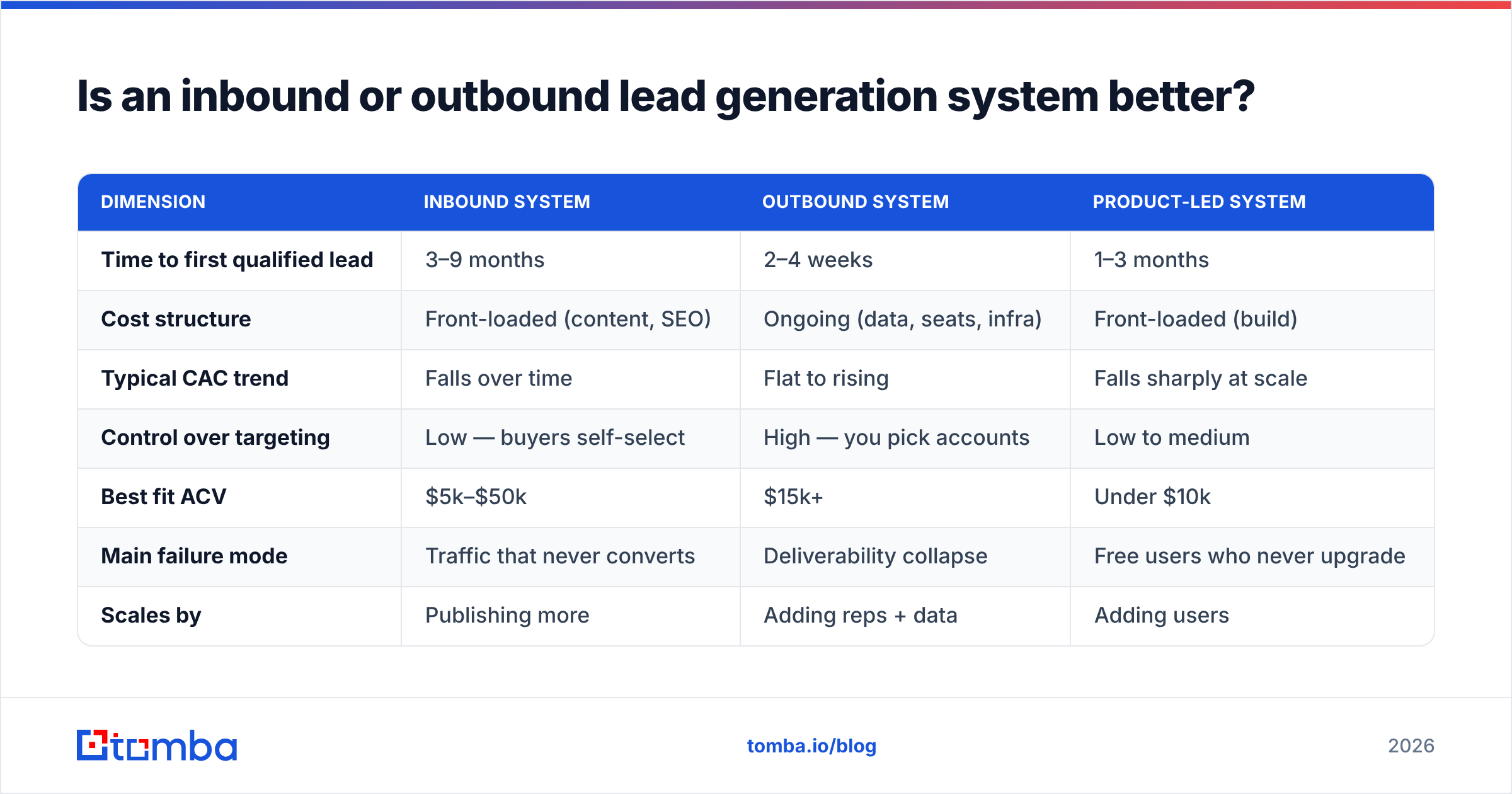
Is an inbound or outbound lead generation system better?#
Neither, and the question is usually a proxy for "which one should I build first?" That depends on deal size, sales cycle, and how long you can survive without pipeline.
| Dimension | Inbound system | Outbound system | Product-led system |
|---|---|---|---|
| Time to first qualified lead | 3–9 months | 2–4 weeks | 1–3 months |
| Cost structure | Front-loaded (content, SEO) | Ongoing (data, seats, infra) | Front-loaded (build) |
| Typical CAC trend | Falls over time | Flat to rising | Falls sharply at scale |
| Control over targeting | Low — buyers self-select | High — you pick accounts | Low to medium |
| Best fit ACV | $5k–$50k | $15k+ | Under $10k |
| Main failure mode | Traffic that never converts | Deliverability collapse | Free users who never upgrade |
| Scales by | Publishing more | Adding reps + data | Adding users |
The realistic answer for most B2B teams under $10M ARR: build outbound first because it produces signal in weeks, and start inbound in parallel because it's the only channel where CAC improves over time. Gartner's research on B2B buying behaviour consistently shows buyers spending the majority of their journey in independent research — which is an argument for inbound existing, not for outbound being dead.
Outbound's risk is concentrated in one place: deliverability. Inbound's risk is concentrated in a different place: time. Pick the risk you can survive.
How does data quality decide whether the system works?#
Data quality is the single highest-leverage variable in the whole architecture, and it's the one most teams treat as a commodity line item.
Here's why the math is brutal. Send 1,000 cold emails from a list with a 25% invalid rate. You get 250 hard bounces. Mailbox providers read hard-bounce rate as the clearest signal of a sender who doesn't know their recipients. Once you cross roughly 2–3% bounces, filtering tightens — and it tightens on all your mail, including the 750 valid addresses that would have replied. You didn't lose 25% of the campaign. You lost the campaign, plus the next one, plus the domain reputation you spent three months warming.
So the enrichment layer needs two distinct steps, and people conflate them constantly:
- Finding — resolving a name plus a company domain into a likely work email. This is pattern inference plus source verification. An email finder does this.
- Verifying — proving that mailbox actually accepts mail, before you send. Syntax check, MX lookup, SMTP handshake, catch-all and disposable detection. An email verifier does this.
Finding without verifying is guessing with extra steps. Verifying without finding leaves you dependent on whatever list someone handed you.

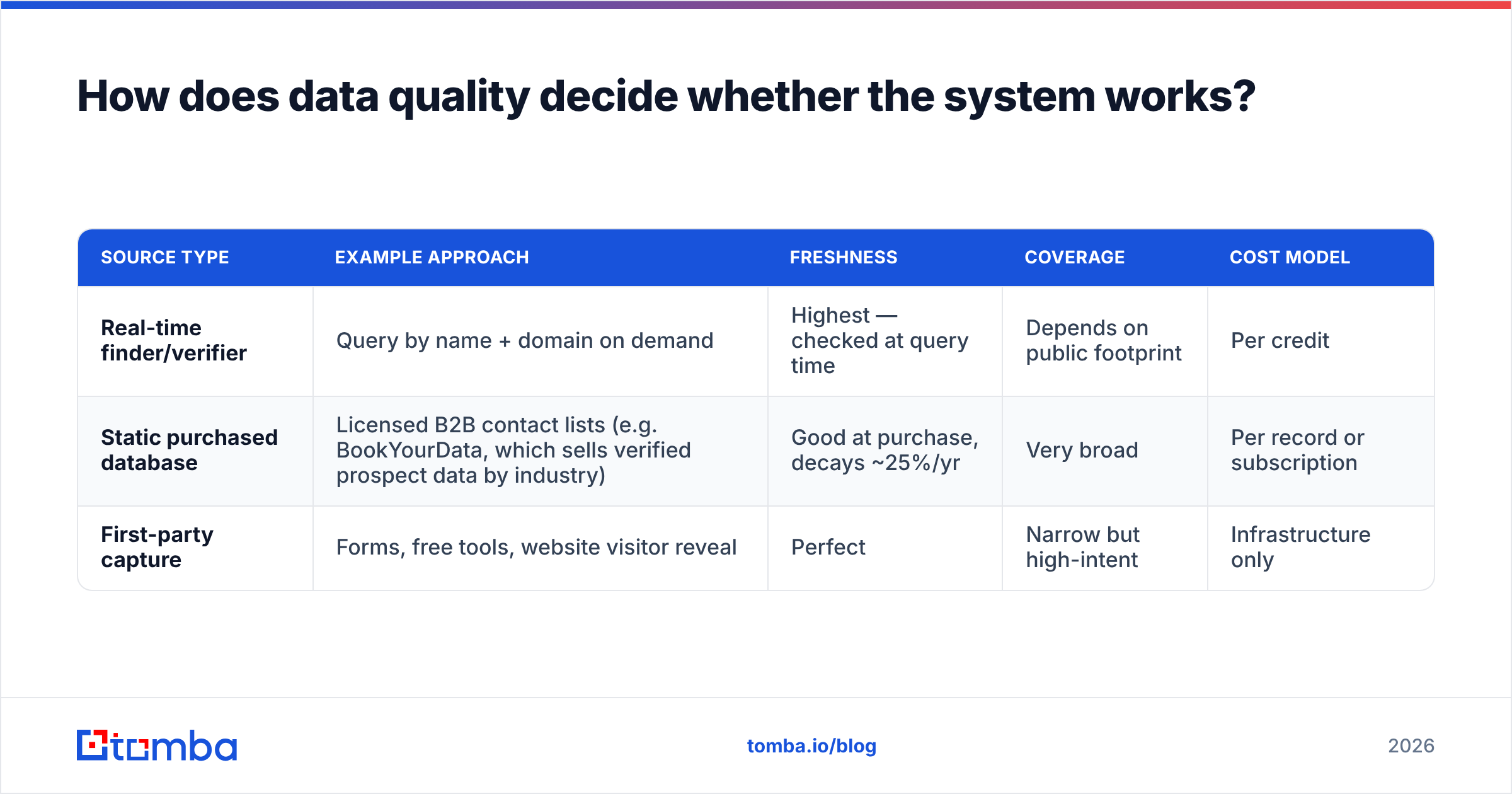
For sourcing, you generally have three options, and mature systems blend them:
| Source type | Example approach | Freshness | Coverage | Cost model |
|---|---|---|---|---|
| Real-time finder/verifier | Query by name + domain on demand | Highest — checked at query time | Depends on public footprint | Per credit |
| Static purchased database | Licensed B2B contact lists (e.g. BookYourData, which sells verified prospect data by industry) | Good at purchase, decays ~25%/yr | Very broad | Per record or subscription |
| First-party capture | Forms, free tools, website visitor reveal | Perfect | Narrow but high-intent | Infrastructure only |
Purchased databases are legitimate and often the fastest way to fill a territory — the discipline is re-verifying before every send, because B2B contact data decays at roughly 2–3% per month through job changes alone. Run any list, bought or scraped, through bulk verify before it touches your sending domain. That single habit is worth more than most sequencer features.
What does a lead generation system cost to run in 2026?#
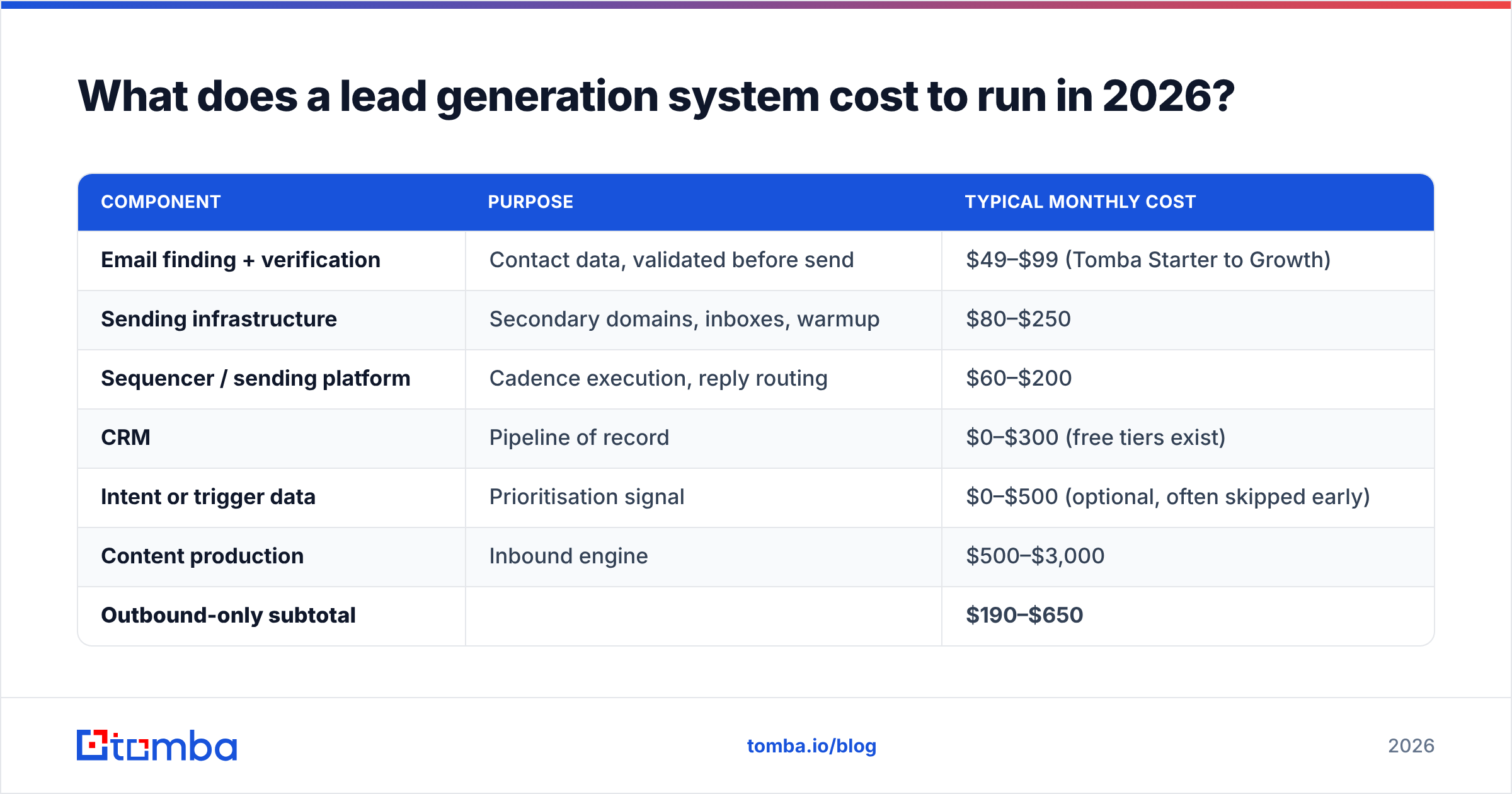
Here's a realistic monthly budget for a two-rep outbound motion doing ~4,000 sends/month, with an inbound foundation. Prices reflect publicly listed 2026 tiers.
| Component | Purpose | Typical monthly cost |
|---|---|---|
| Email finding + verification | Contact data, validated before send | $49–$99 (Tomba Starter to Growth) |
| Sending infrastructure | Secondary domains, inboxes, warmup | $80–$250 |
| Sequencer / sending platform | Cadence execution, reply routing | $60–$200 |
| CRM | Pipeline of record | $0–$300 (free tiers exist) |
| Intent or trigger data | Prioritisation signal | $0–$500 (optional, often skipped early) |
| Content production | Inbound engine | $500–$3,000 |
| Outbound-only subtotal | $190–$650 | |
| Full system subtotal | $690–$4,350 |
Two notes on this table. First, the data layer is usually the cheapest line and the one with the highest marginal return — Tomba pricing starts with a free tier at 25 searches/month, then $49/mo Starter, $99/mo Growth, and $249/mo Pro, which means testing whether better data moves your reply rate costs less than a single lunch meeting. Second, if your "full system" cost is dominated by seats rather than data and content, you've bought software instead of building a system.
Compare tools on outcome per dollar, not credits per dollar. A credit that returns an unverified guess isn't cheaper than one that returns a verified address — it's more expensive, because you pay for it again in deliverability. Vendor-neutral review sites like G2 are useful for spotting where a tool's accuracy claims diverge from what users actually report.
How do you build a lead generation system in 30 days?#
Order matters more than speed. Each week's output is the next week's input.
Week 1 — Definition. Write the ICP in one page: company size band, industry, tech signals, and the three trigger events that make a company buy now. Then write the disqualifiers, which are more useful. Pull your last 20 closed-won and 20 closed-lost deals and check whether the ICP would have predicted them. If it wouldn't, rewrite it before touching a tool.
Week 2 — Sourcing and enrichment. Build one target list of 300–500 accounts that fit the ICP exactly. Not 5,000 — 500. For each, identify one to two named contacts in the buying role. Run domain search to pull the contact footprint for each account, then verify every address. Your acceptance bar: under 2% invalid on the final list. Anything above that, cut the source.
Week 3 — Infrastructure and activation. Register two secondary sending domains, create two to three inboxes on each, and start warmup. Do not send campaign mail from your primary domain. Meanwhile, write three sequences — one per persona — each with a distinct opening line grounded in the trigger events from Week 1. Cap daily volume at 30–40 per inbox. HubSpot's sales research is a reasonable free reference for cadence structure if you're starting cold.
Week 4 — Measurement and launch. Before the first send, define the dashboard: sends, delivery rate, open rate (directional only, now that privacy features inflate it), reply rate, positive reply rate, meetings booked, and cost per qualified meeting. Launch at 25% of planned volume. Hold there for ten days. Read the bounce rate before you read anything else.
A system built this way produces its first meetings in weeks four to six. One built sequencer-first typically produces its first deliverability incident in week three.
What metrics tell you the system is actually working?#
Lead count is the vanity metric of this category. It rewards volume and hides qualification failure. Use these instead:
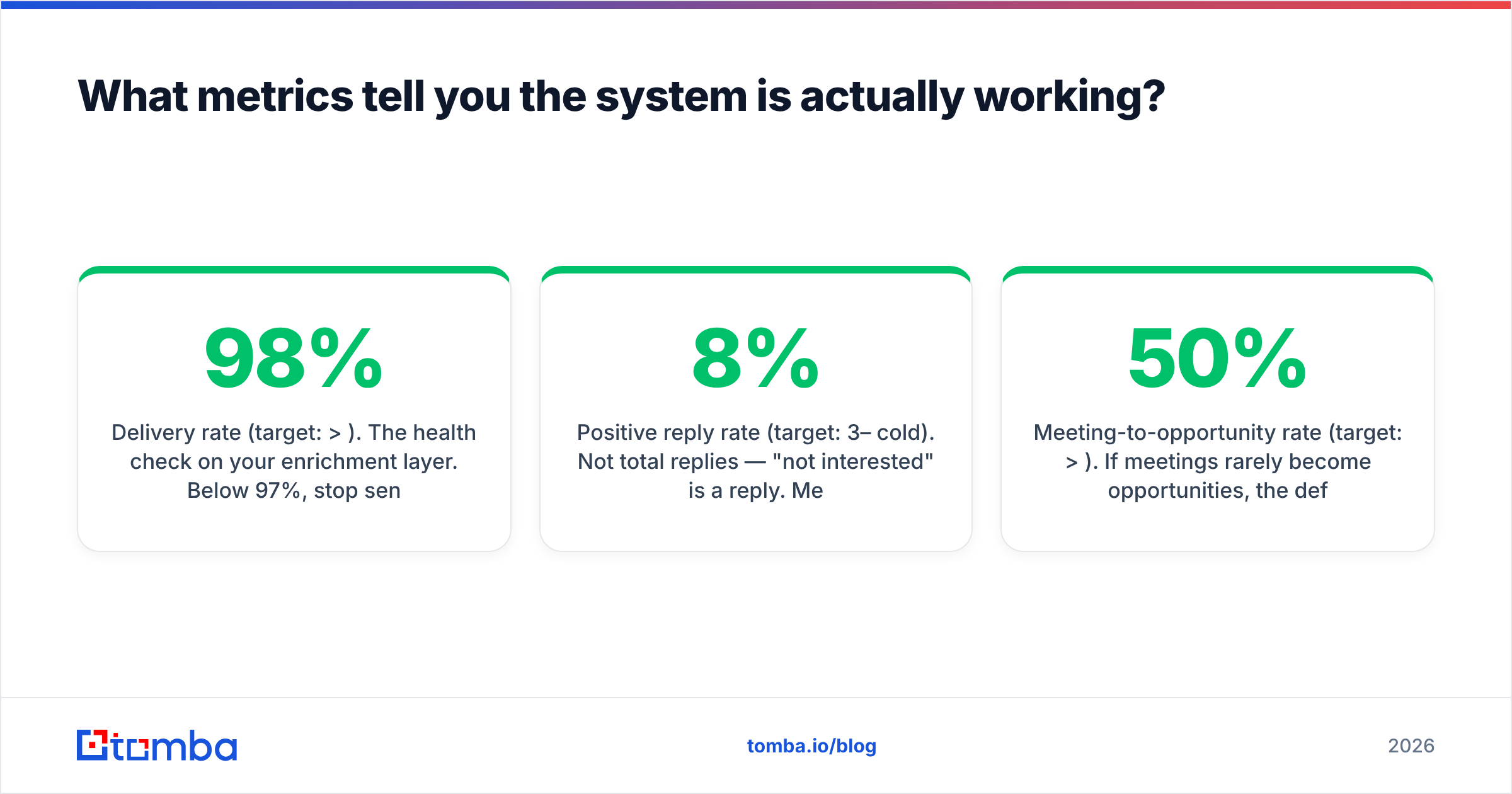
- Delivery rate (target: >98%). The health check on your enrichment layer. Below 97%, stop sending and fix the list.
- Positive reply rate (target: 3–8% cold). Not total replies — "not interested" is a reply. Measure only the ones that continue.
- Meeting-to-opportunity rate (target: >50%). If meetings rarely become opportunities, the definition layer is wrong, not the outreach.
- Cost per qualified meeting (benchmark it, don't chase it). Total system cost divided by meetings that passed qualification. This is the number that lets you compare inbound against outbound honestly.
- Source decay rate. Track how a source's reply rate changes over 90 days. Every list source degrades; the question is how fast, and whether you're re-verifying on a matching cadence.
Review these monthly, not weekly — cold outbound is noisy enough that weekly readings will make you change things that were working.
Where do most lead generation systems break?#
Four places, in rough order of frequency.
The ICP is a description, not a filter. "Mid-market SaaS companies that care about efficiency" cannot be used to build a list. "US-based B2B SaaS, 50–500 employees, using Salesforce, hired a RevOps lead in the last 90 days" can.
The list is bought once and never re-verified. Contact data is perishable. Treat a purchased list like fresh produce with a date on it, not like a book on a shelf.
Sending runs from the primary domain. One aggressive campaign takes down the domain your invoices and support replies go out from. Separate domains are cheap insurance.
Nobody owns the measurement layer. When attribution is everyone's job it's nobody's, and the system slowly reverts to activity. Assign one person and one dashboard.
The common thread: three of the four are data and process problems, not tooling problems. That's the real lesson of building a lead generation system — the software is the easy part, and the layer everyone under-funds is the one holding up everything else.
Where to start#
If you're building from zero, start at the layer with the highest leverage and the lowest cost: getting real, verified contact data behind the accounts you've already decided you want. Define the ICP, build the 500-account list, then run it through Tomba Email Finder to resolve named contacts into verified work emails before a single sequence goes live. The free tier gives you 25 searches a month to test accuracy against your own market, and Starter at $49/mo covers a two-rep motion comfortably. Fix the data layer first — every layer above it inherits the result.
Related guides#
// get started
Find, verify and enrich your first contacts today
Start on the free plan with 25 searches a month, then scale when your team is ready.
Free plan · No credit card required · GDPR & CCPA
// about the author