Lead Generation Tools in 2026: What Actually Works Now
The 2023 lead gen stack is dead. Here's what changed, which categories still matter, and how to rebuild a pipeline engine that survives 2026 deliverability rules without overpaying.
TL;DR
- The 2023 lead generation playbook — buy a big database, blast 2,000 emails a week, hope — stopped working in October 2024 when Google and Yahoo's bulk-sender rules landed and spam-complaint thresholds became enforceable.
- The stack split into five jobs: find, verify, enrich, sequence, route. Buying one all-in-one suite to do all five is usually the most expensive way to do each one badly.
- Data accuracy now matters more than data volume. A 3,000-contact list at 97% valid outperforms a 40,000-contact list at 72% valid, because bounces are what kill your domain.
- Pricing shifted from seat-based to credit-based. Budget roughly $50–$150/month per outbound rep for data, plus $30–$100 for sending infrastructure.
- The honest 2026 answer: pay for precision at the top of the funnel (finder + verifier), keep sequencing cheap, and spend nothing on "intent" until you have 50+ closed deals to calibrate against.
If you landed here from a 2023 listicle, almost everything in it is now wrong — not because the tools disappeared, but because the constraints around them changed. Inbox providers tightened. Scraped LinkedIn data got harder to refresh. Credit pricing replaced seat pricing. And the single biggest differentiator between a stack that works and one that quietly burns your domain is no longer "which tool has the most contacts."
This guide rebuilds the picture from scratch for 2026.
What Are Lead Generation Tools, Exactly?#
Lead generation tools are the software layer between "we know who we want to sell to" and "a real conversation is happening." That's it. Everything else is a subcategory.
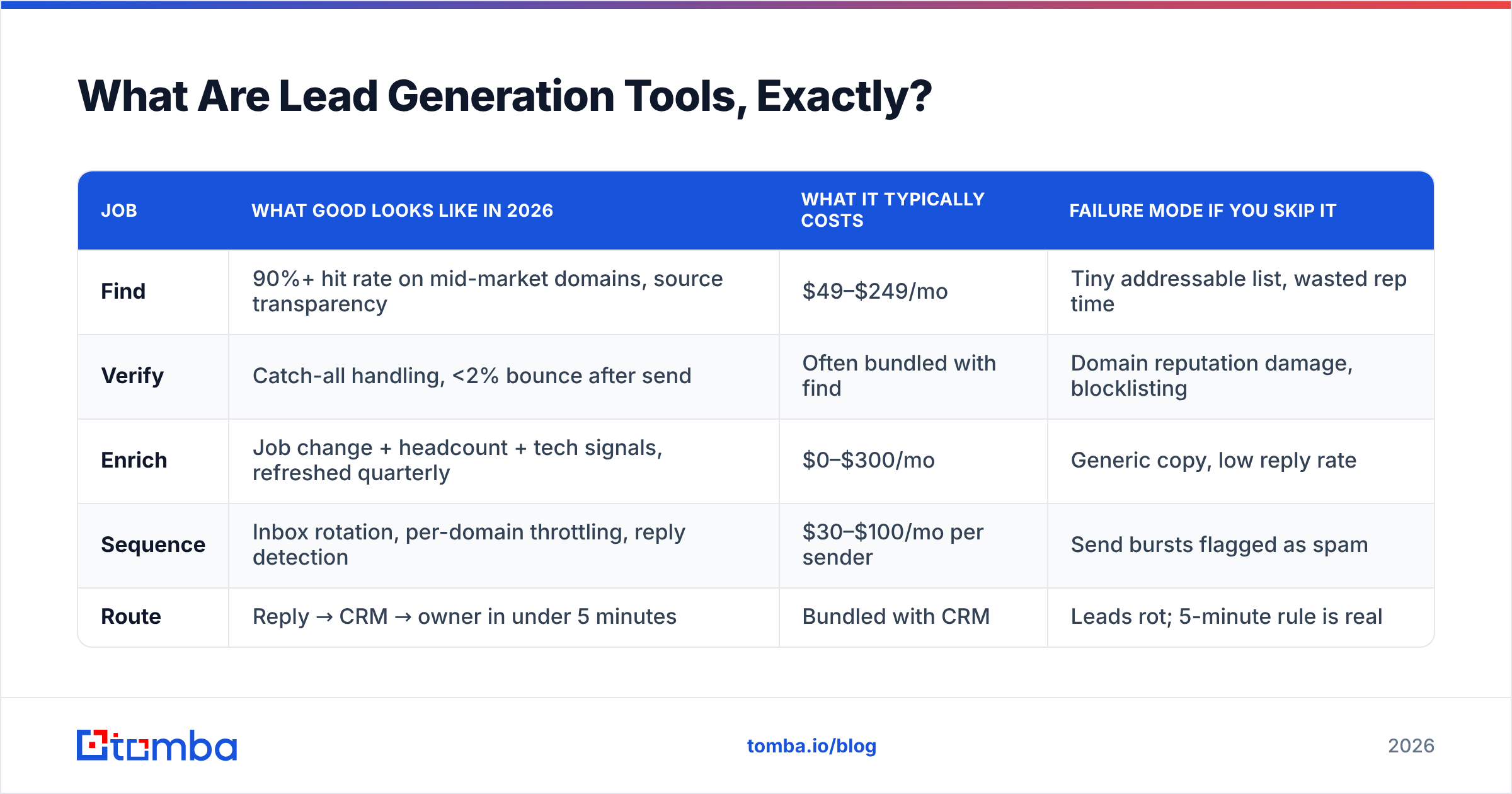
The confusion in most buying guides is that they lump five very different jobs under one label. Separating them is the single most useful thing you can do before spending a dollar:
- Find — turning a company, domain, or person into a reachable contact point (work email, direct dial, LinkedIn profile). This is where accuracy is won or lost.
- Verify — proving that contact point is real and accepting mail before you send to it. The cheapest insurance in outbound.
- Enrich — attaching firmographic, technographic, and role context so your message isn't generic.
- Sequence — actually delivering the messages across email, phone, and social, with follow-up logic.
- Route — getting replies and inbound signals into your CRM and in front of a human within minutes, not days.
Most "all-in-one" platforms are genuinely strong at two of these and mediocre at three. The mediocre three are the ones they bundle to justify the price.
| Job | What good looks like in 2026 | What it typically costs | Failure mode if you skip it |
|---|---|---|---|
| Find | 90%+ hit rate on mid-market domains, source transparency | $49–$249/mo | Tiny addressable list, wasted rep time |
| Verify | Catch-all handling, <2% bounce after send | Often bundled with find | Domain reputation damage, blocklisting |
| Enrich | Job change + headcount + tech signals, refreshed quarterly | $0–$300/mo | Generic copy, low reply rate |
| Sequence | Inbox rotation, per-domain throttling, reply detection | $30–$100/mo per sender | Send bursts flagged as spam |
| Route | Reply → CRM → owner in under 5 minutes | Bundled with CRM | Leads rot; 5-minute rule is real |
Why Did the 2023 Lead Generation Playbook Stop Working?#
Three things broke it, and none of them were subtle.
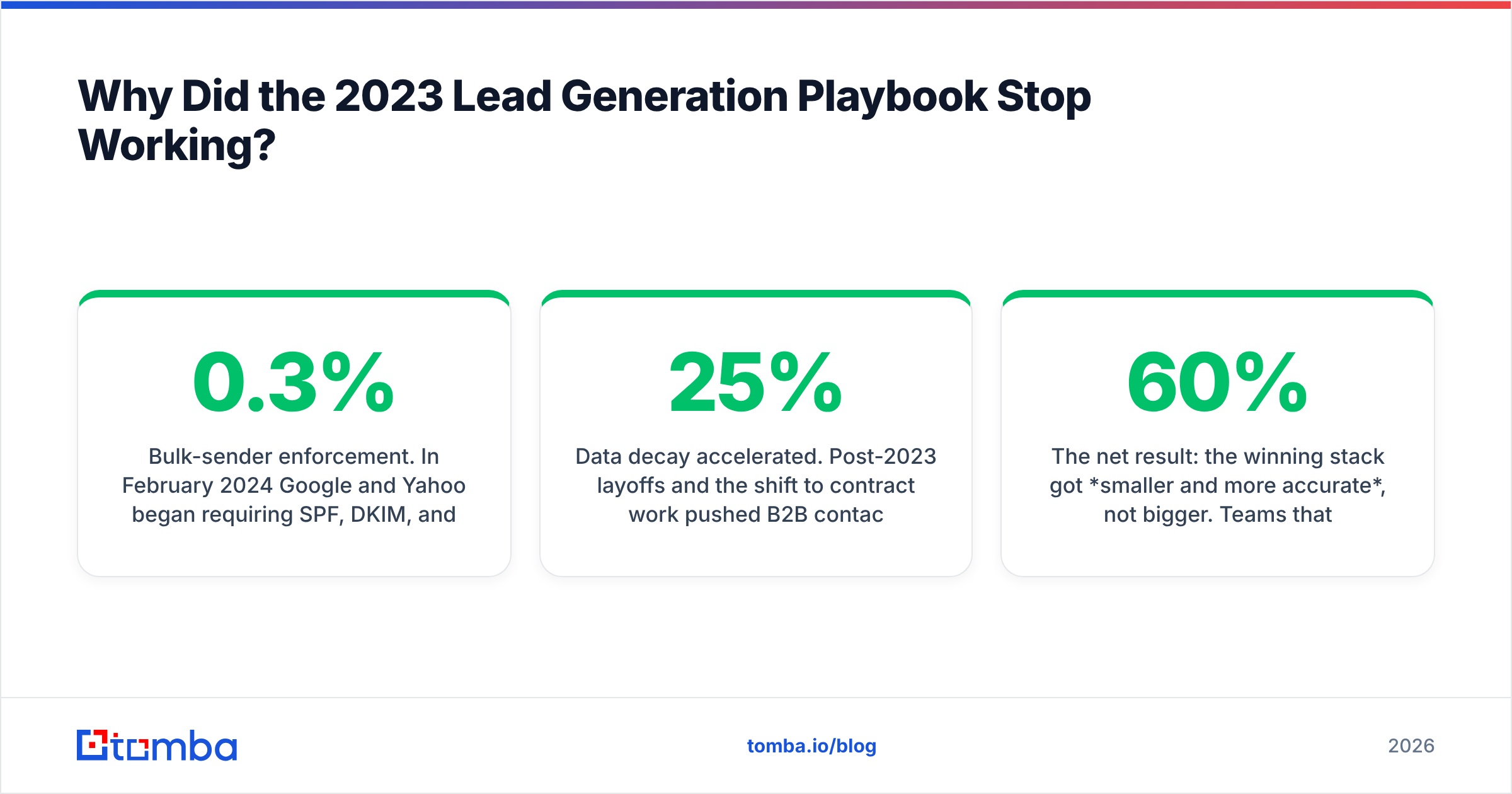
Bulk-sender enforcement. In February 2024 Google and Yahoo began requiring SPF, DKIM, and DMARC alignment, one-click unsubscribe, and — crucially — a spam complaint rate under 0.3% for anyone sending more than 5,000 messages a day to their users. Microsoft followed with its own tightening in 2025. The practical effect: volume-first outbound now has a hard ceiling that punishes you automatically. Google's own bulk sender guidelines remain the reference document, and they haven't loosened since.
Data decay accelerated. Post-2023 layoffs and the shift to contract work pushed B2B contact decay past the old 25%/year rule of thumb. A database snapshot from 18 months ago isn't a discount — it's a liability, because every dead address is a bounce, and bounces are the loudest negative signal you can send a mailbox provider.
Buyers got faster at pattern-matching. A template that mentions "I noticed you're hiring SDRs" reads as automation now, because it was automated to death. Personalization that works in 2026 is specific enough to be un-templatable, which means enrichment quality matters more than sequencing volume.

The net result: the winning stack got smaller and more accurate, not bigger. Teams that cut their contact volume by 60% and raised list accuracy to 95%+ generally saw reply rates hold or improve, because they stopped getting filtered into spam on the way in.
How Do You Pick a Lead Generation Tool in 2026?#
Score candidates on five things, in this order. The order matters — a tool that fails #1 can't be rescued by winning #4.
- Verified hit rate on your ICP, not the vendor's marketing number. Upload 100 real target accounts. Count how many produce a deliverable contact. Anything under 70% on mid-market domains is a no.
- Source transparency. Can the vendor tell you where a record came from and when it was last confirmed? Vendors that dodge this question are reselling stale aggregate data. Tomba publishes its data sources for exactly this reason.
- Verification depth. Syntax and MX checks are table stakes. Ask specifically about catch-all domains — roughly a third of enterprise domains accept everything at the SMTP layer, so a "valid" result there means nothing without deeper inference.
- Pricing that matches usage shape. Bursty prospecting (a big push each quarter) suits credit rollover. Steady daily prospecting suits flat monthly tiers. Paying per seat when only two people prospect is how teams overspend by 3x.
- API and workflow fit. If your RevOps person can't pull contacts into your CRM or a spreadsheet without manual CSV shuffling, the tool will silently stop being used within a quarter.
Worth noting what isn't on that list: total database size. "700 million contacts" is a marketing metric. You will ever touch a few thousand of them, and what matters is whether those few thousand are current.
Which Lead Generation Tools Matter Now?#
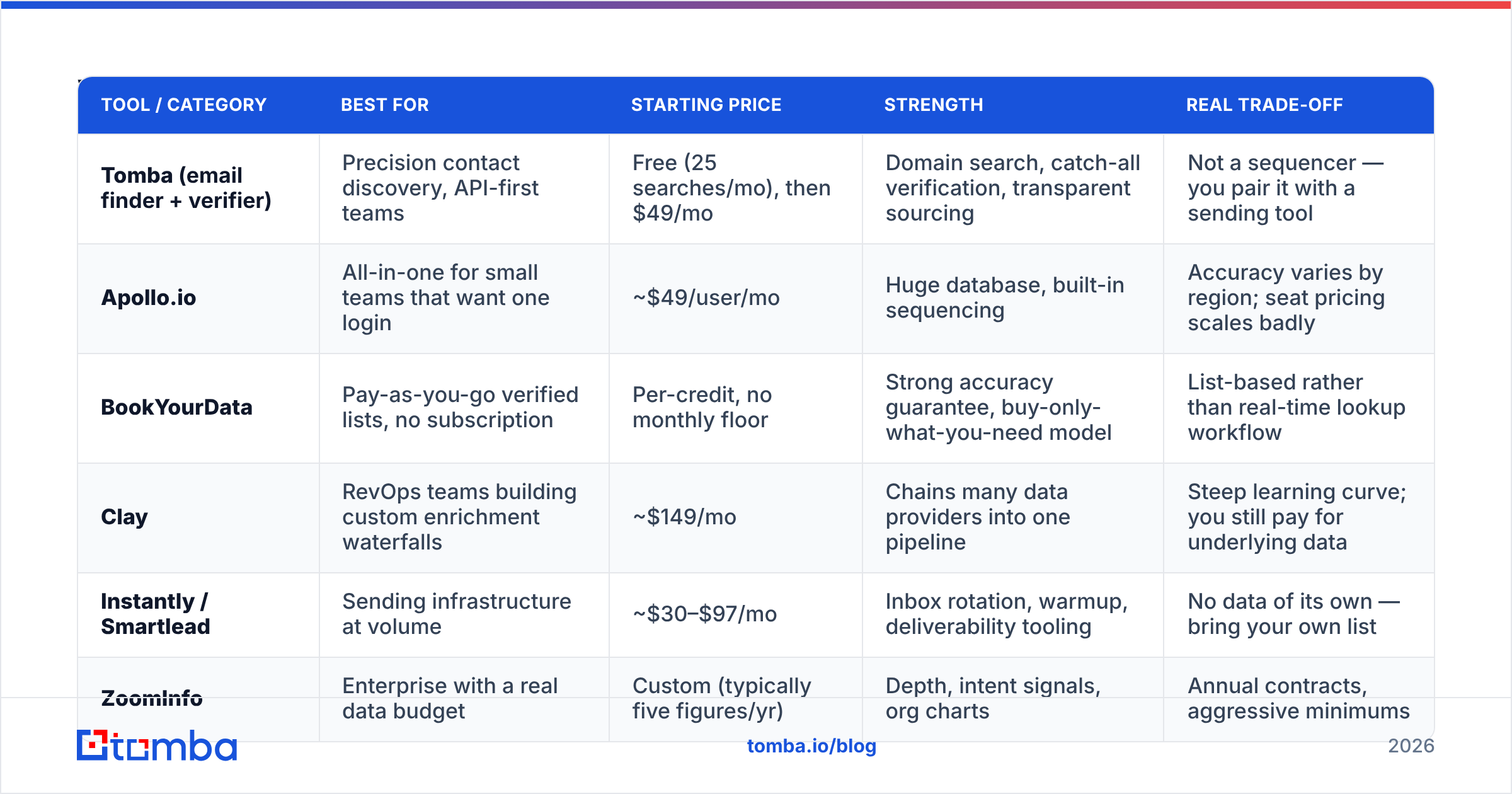
Here's the honest category map, with the trade-offs each option actually forces on you.
| Tool / category | Best for | Starting price | Strength | Real trade-off |
|---|---|---|---|---|
| Tomba (email finder + verifier) | Precision contact discovery, API-first teams | Free (25 searches/mo), then $49/mo | Domain search, catch-all verification, transparent sourcing | Not a sequencer — you pair it with a sending tool |
| Apollo.io | All-in-one for small teams that want one login | ~$49/user/mo | Huge database, built-in sequencing | Accuracy varies by region; seat pricing scales badly |
| BookYourData | Pay-as-you-go verified lists, no subscription | Per-credit, no monthly floor | Strong accuracy guarantee, buy-only-what-you-need model | List-based rather than real-time lookup workflow |
| Clay | RevOps teams building custom enrichment waterfalls | ~$149/mo | Chains many data providers into one pipeline | Steep learning curve; you still pay for underlying data |
| Instantly / Smartlead | Sending infrastructure at volume | ~$30–$97/mo | Inbox rotation, warmup, deliverability tooling | No data of its own — bring your own list |
| ZoomInfo | Enterprise with a real data budget | Custom (typically five figures/yr) | Depth, intent signals, org charts | Annual contracts, aggressive minimums |
Two patterns fall out of that table.
First, the all-in-one vs. best-of-breed decision is really a pricing-model decision. All-in-one suites bill per seat. If you have 12 reps, that's 12 seats even though only four prospect heavily. Best-of-breed stacks bill per credit, so you pay for actual usage. Below roughly six active prospectors, best-of-breed is almost always cheaper.
Second, nobody does both data and sending well. The companies with the best deliverability infrastructure don't own data; the companies with the biggest databases have mediocre sending. Plan for two line items.
How Much Should a Lead Generation Stack Cost?#
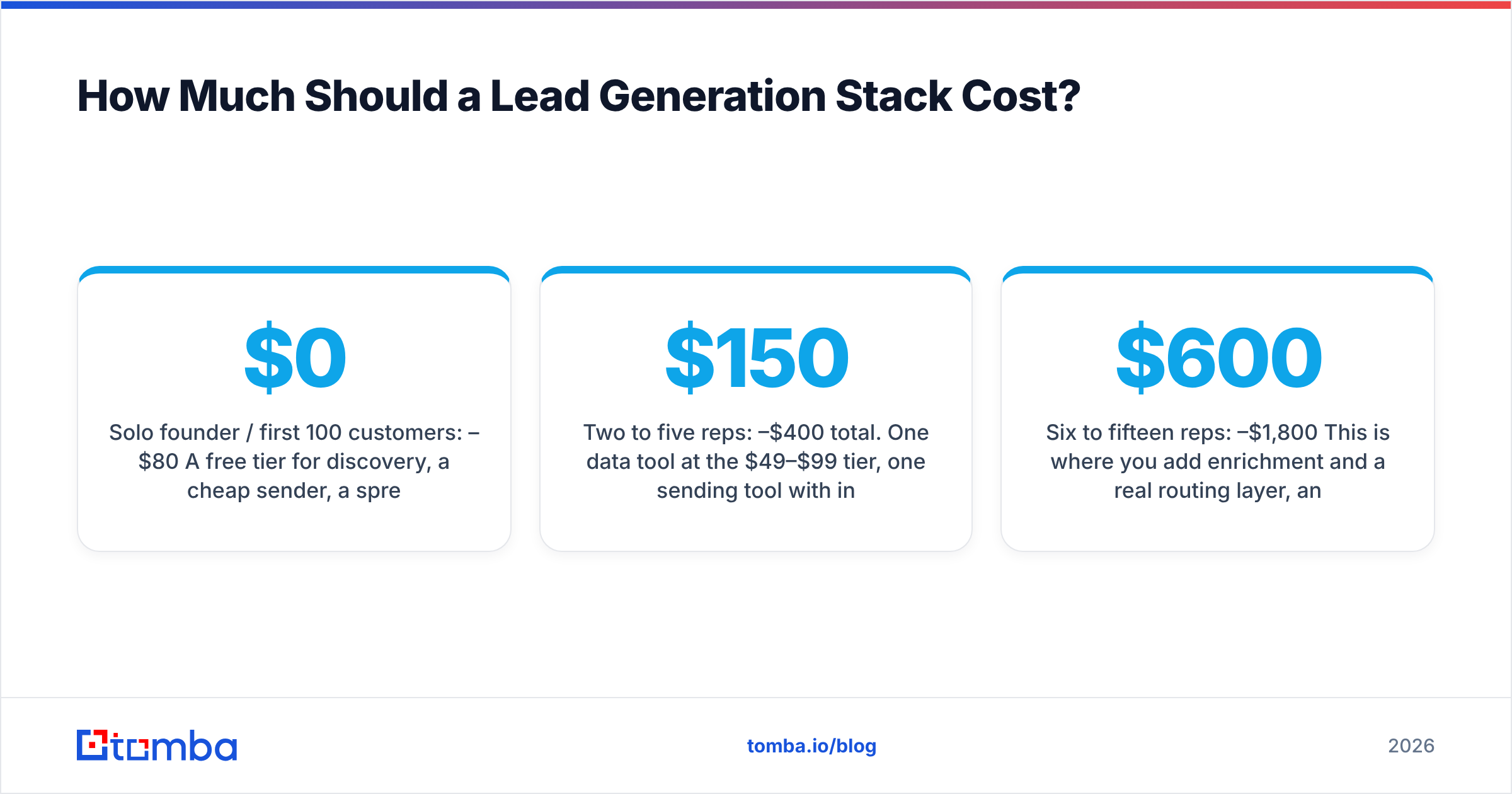
Budget per active prospector, not per employee. A realistic 2026 range:
- Solo founder / first 100 customers: $0–$80/month. A free tier for discovery, a cheap sender, a spreadsheet. Tomba's free tier covers 25 searches a month; that's enough to validate whether your ICP is even reachable by email before you commit.
- Two to five reps: $150–$400/month total. One data tool at the $49–$99 tier, one sending tool with inbox rotation, CRM you already pay for.
- Six to fifteen reps: $600–$1,800/month. This is where you add enrichment and a real routing layer, and where Tomba pricing at the $99/mo Growth or $249/mo Pro tier tends to land against per-seat alternatives that would cost 2–3x for the same query volume.
- Enterprise: custom, and the real cost is implementation time, not license fees.
The line item people underbudget is verification. Teams treat it as optional, then spend three weeks rehabilitating a burned domain — which costs far more in lost pipeline than a year of an email verifier subscription ever would.
The line item people overbudget is intent data. Intent signals are genuinely useful once you have enough closed-won history to know which signals correlate with revenue in your market. Before that, you're paying four figures a month for a random number generator. G2's buyer reports are a reasonable free proxy while you build that history.
What Does a Working 2026 Stack Look Like?#
A concrete build that a five-person sales team can run:
- Define the account list first. 200–400 named accounts beats an unbounded filter query. Filters produce volume; named lists produce focus.
- Find contacts by domain, not by scraping profiles. Run a domain search per account to pull every reachable role, then pick the two or three that matter. This is more reliable than profile scraping because it survives LinkedIn's access changes.
- Verify everything before it touches a sequencer. Non-negotiable. Route catch-all domains to a separate, slower, lower-volume track rather than dropping them — they're often your best accounts.
- Enrich for one specific hook per account. Not eight fields. One thing you can reference in the first line that a competitor couldn't have written.
- Sequence at 20–40 sends per inbox per day, maximum. Add inboxes to scale, not send rate. This is the single most common self-inflicted deliverability wound.
- Route replies to a human in under five minutes. The speed-to-lead research is old but it still holds — HubSpot's data on response timing has been consistent for a decade.
Teams that run that sequence with 3,000 well-chosen contacts routinely beat teams running 30,000 poorly-verified ones, on both replies and cost per meeting.
Is an All-in-One Platform Better Than Separate Tools?#
It depends almost entirely on one variable: how many people actually prospect.
Choose all-in-one when you have a small team where everyone does everything, you value a single login over per-component quality, and your ICP is US mid-market where most databases are strongest. The operational simplicity is real and worth paying for.
Choose best-of-breed when your ICP is outside North America (database coverage drops sharply and per-lookup tools handle the long tail better), when you need API access for automation, when only a subset of your team prospects, or when your deliverability is already fragile and you need genuine verification rather than a bundled checkbox.
The migration cost also runs one way. Moving off an all-in-one means rebuilding sequences, data, and reporting simultaneously. Swapping one component of a modular stack takes an afternoon. If you're uncertain, modular is the lower-regret choice.
What Should You Do First?#
Run a 100-account test before buying anything. Pick 100 real target companies, run them through two or three candidate tools' free tiers, and measure three numbers: percentage that returned a contact, percentage that verified as deliverable, and percentage that bounced when you actually sent. That third number is the only one that isn't marketing.
Then build outward from whichever tool won that test — add sending infrastructure, add enrichment, add routing. In that order. Most teams do it backwards, buying the sequencer first, and then wonder why a beautifully written campaign gets 0.4% replies.
If your bottleneck right now is simply getting accurate contact data into a list you trust, start with the Tomba Email Finder. The free tier gives you 25 searches a month — enough to run the 100-account test on a sample and see real hit rates on your own ICP before committing to anything. Paid plans start at $49/mo, verification is built in rather than sold as an upsell, and everything is available through the Tomba API when you're ready to automate it. Prove the data works first; the rest of the stack is easy once the top of the funnel is clean.
Related guides#
// get started
Find, verify and enrich your first contacts today
Start on the free plan with 25 searches a month, then scale when your team is ready.
Free plan · No credit card required · GDPR & CCPA
// about the author