Lead Generation Tools in Digital Marketing: 2026 Stack Guide
Most teams buy six lead gen tools and use two. Here's how the 2026 digital marketing lead stack actually breaks down by layer, what each layer costs, and where to stop spending.
TL;DR
- Lead generation tools in digital marketing split into five layers: attract, capture, identify, enrich, and route. Most teams over-buy in "attract" and under-buy in "identify + enrich."
- A functional 2026 stack for a 5-person team costs roughly $300–$700/mo. Anything above $2,000/mo usually means you bought a platform to solve a data problem.
- Form fills alone now account for a shrinking share of pipeline. Visitor identification and contact enrichment fill the gap between anonymous traffic and a callable contact.
- Contact data quality is the constraint, not tool count. A 92% deliverable list beats a 400% bigger list with a 60% bounce rate every time.
- Pick one tool per layer, verify it actually exports clean data, and only add the sixth tool when you can name the specific leak it plugs.
What are lead generation tools in digital marketing?#
Lead generation tools in digital marketing are the software that turns anonymous attention into a named, contactable, qualified person in your CRM. That's the whole job. Everything else is packaging.
The confusion starts because vendors all claim the same category. An SEO platform, a chat widget, a webinar host, a database, and a form builder all call themselves "lead generation." They're solving different parts of a chain, and if you buy three tools from one link in that chain, you've spent money without moving pipeline.
Think of it like a water system. Attract is rainfall. Capture is the gutter. Identify is knowing whose roof the water came off. Enrich is testing what's in it. Route is the pipe to the tank. A bigger gutter does nothing if your pipe is disconnected.
Here's the honest map:
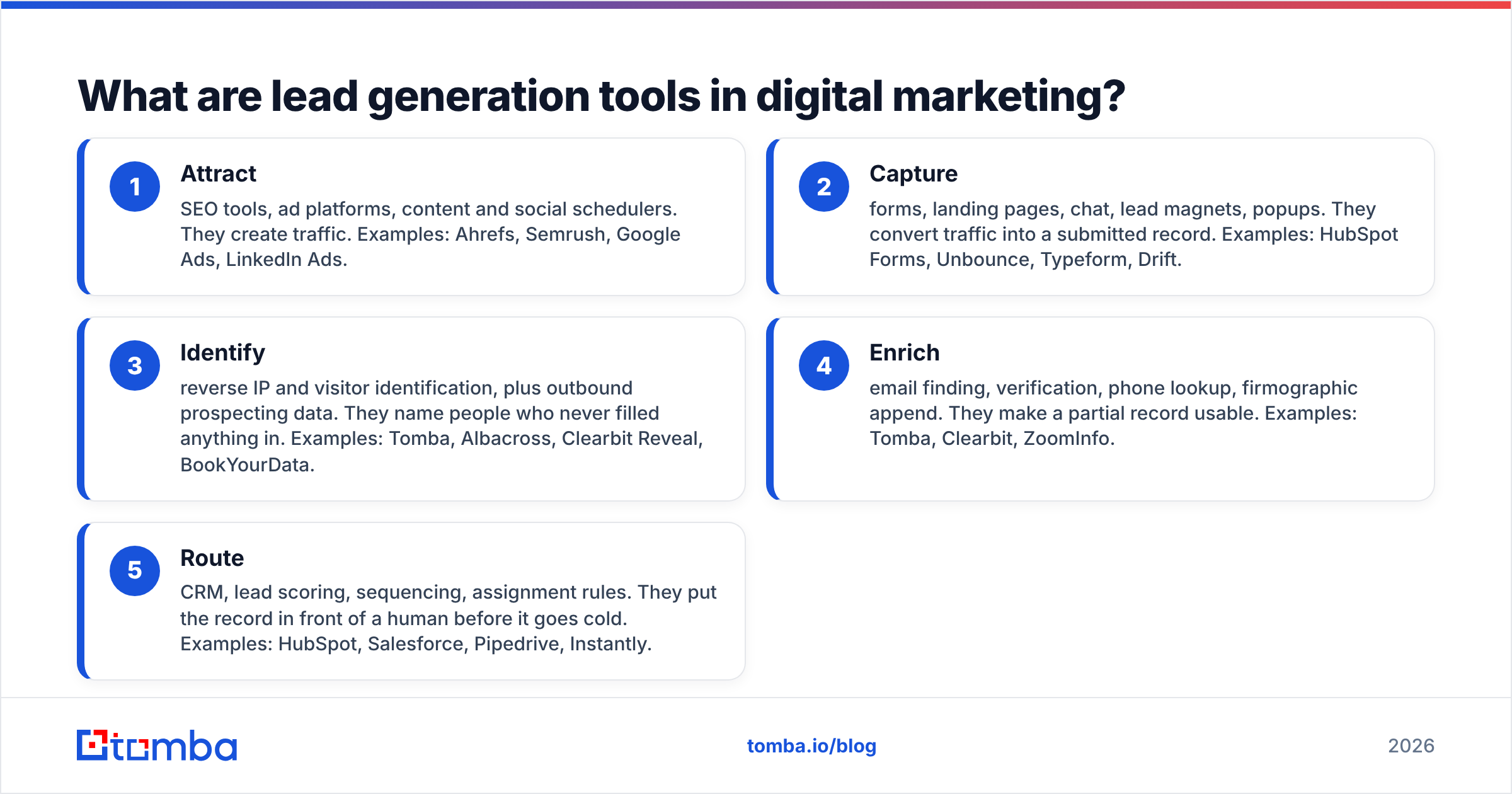
- Attract — SEO tools, ad platforms, content and social schedulers. They create traffic. Examples: Ahrefs, Semrush, Google Ads, LinkedIn Ads.
- Capture — forms, landing pages, chat, lead magnets, popups. They convert traffic into a submitted record. Examples: HubSpot Forms, Unbounce, Typeform, Drift.
- Identify — reverse IP and visitor identification, plus outbound prospecting data. They name people who never filled anything in. Examples: Tomba, Albacross, Clearbit Reveal, BookYourData.
- Enrich — email finding, verification, phone lookup, firmographic append. They make a partial record usable. Examples: Tomba, Clearbit, ZoomInfo.
- Route — CRM, lead scoring, sequencing, assignment rules. They put the record in front of a human before it goes cold. Examples: HubSpot, Salesforce, Pipedrive, Instantly.
Most stacks are heavy in layers 1 and 2, thin in 3 and 4, and inconsistent in 5. That's why so many teams have "plenty of leads" and a flat pipeline.
Why do most digital marketing lead stacks fail?#
They fail at the handoff, not at the source.
The classic breakdown: marketing generates 800 form fills a quarter. 300 are personal Gmail addresses. 200 are competitors, students, or job seekers. 150 bounce because the email was typo'd or the domain is a catch-all. Sales works the remaining 150 and books 11 meetings. Leadership sees "800 leads, 11 meetings" and concludes the top of funnel is broken. It isn't. The middle is.
Three specific leaks account for most of it:
Leak 1: Unverified contact data. Industry-wide, B2B contact data decays at roughly 25–30% per year as people change jobs. A list you bought or built in January is materially worse by October. If you're not running an email verifier before every send, you're paying deliverability tax on stale records.
Leak 2: Anonymous traffic left anonymous. The overwhelming majority of B2B site visitors never fill in a form. If your only capture mechanism is a form, you've decided to ignore the 95%+ who don't. Website visitor reveal exists precisely to convert that dead weight into account-level signal.
Leak 3: No enrichment before routing. A record with an email and nothing else can't be scored, can't be routed to the right rep, and can't be personalized. It lands in a generic sequence and dies there.

Which lead generation tools actually matter in 2026?#
Here's what a real stack looks like by layer, with 2026 list pricing. I've deliberately included both the expensive platform option and the focused-tool option in each row, because the right answer depends on team size, not on what's "best."
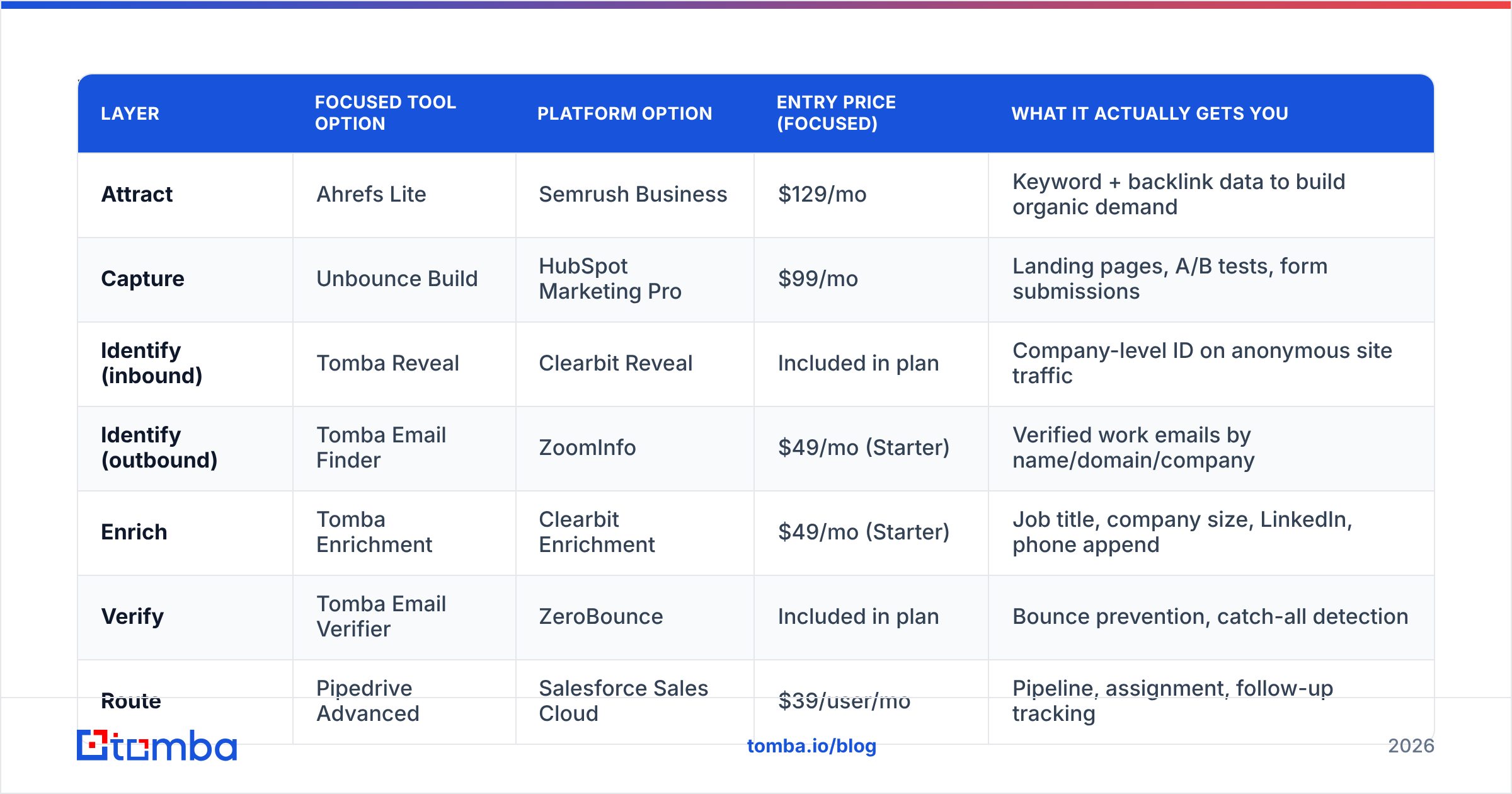
| Layer | Focused tool option | Platform option | Entry price (focused) | What it actually gets you |
|---|---|---|---|---|
| Attract | Ahrefs Lite | Semrush Business | $129/mo | Keyword + backlink data to build organic demand |
| Capture | Unbounce Build | HubSpot Marketing Pro | $99/mo | Landing pages, A/B tests, form submissions |
| Identify (inbound) | Tomba Reveal | Clearbit Reveal | Included in plan | Company-level ID on anonymous site traffic |
| Identify (outbound) | Tomba Email Finder | ZoomInfo | $49/mo (Starter) | Verified work emails by name/domain/company |
| Enrich | Tomba Enrichment | Clearbit Enrichment | $49/mo (Starter) | Job title, company size, LinkedIn, phone append |
| Verify | Tomba Email Verifier | ZeroBounce | Included in plan | Bounce prevention, catch-all detection |
| Route | Pipedrive Advanced | Salesforce Sales Cloud | $39/user/mo | Pipeline, assignment, follow-up tracking |
| Sequence | Instantly Growth | Outreach | $37/mo | Cold email sending, warmup, reply detection |
The pattern worth noticing: the focused column totals around $350–$450/mo for a small team. The platform column starts around $2,500/mo and climbs fast on seat count. Both work. The platform column is a good deal when you have a RevOps person to run it and a bad deal when you don't, because the value of an all-in-one is administrative consolidation, and consolidation only pays off if someone is actually administering it.
For a broader look at how the data vendors specifically compare, G2's lead intelligence category carries enough verified reviews to be useful as a sanity check against vendor claims.
How do you choose between an all-in-one platform and focused tools?#
Decide by team shape, not feature count.
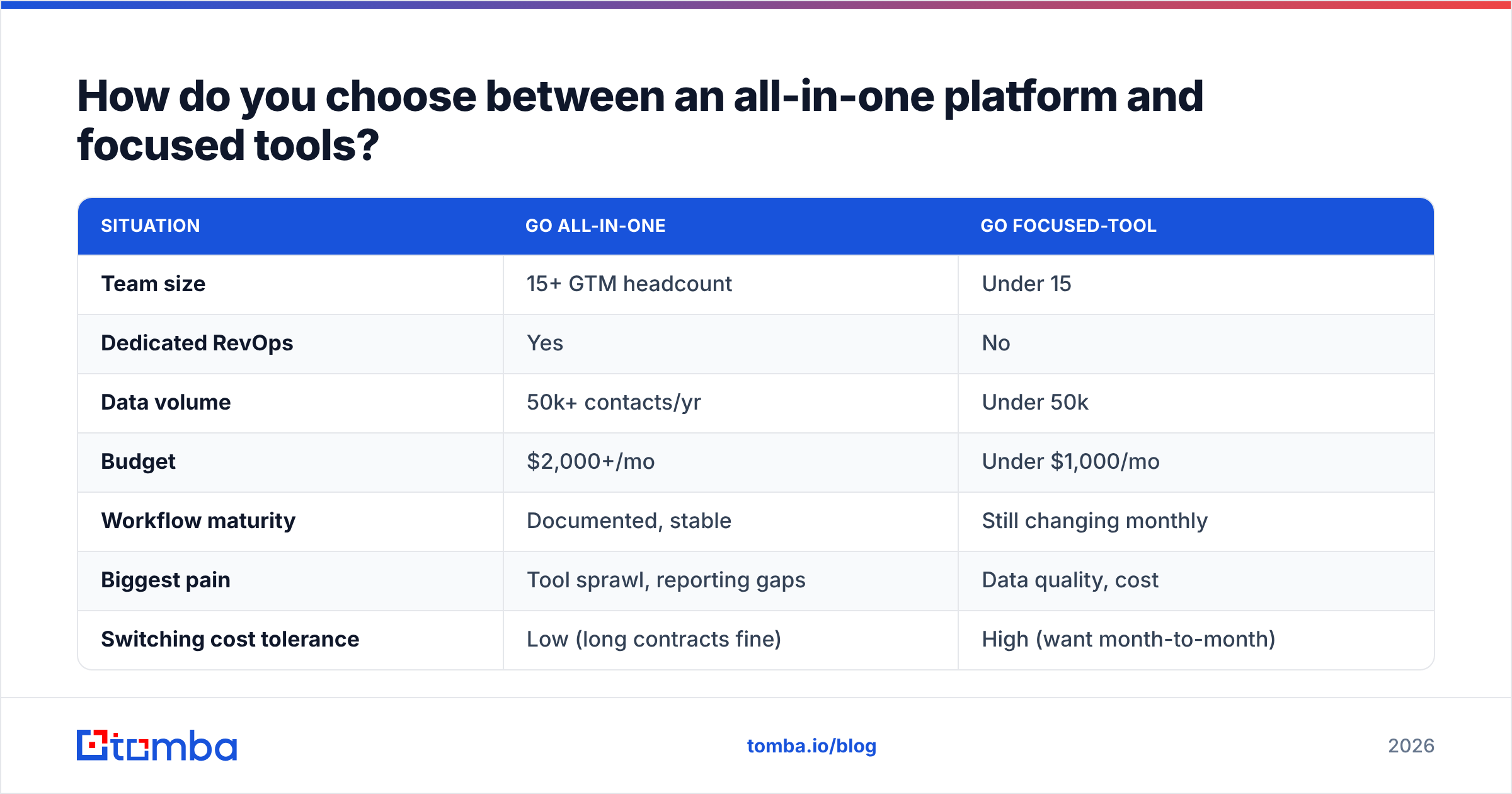
| Situation | Go all-in-one | Go focused-tool |
|---|---|---|
| Team size | 15+ GTM headcount | Under 15 |
| Dedicated RevOps | Yes | No |
| Data volume | 50k+ contacts/yr | Under 50k |
| Budget | $2,000+/mo | Under $1,000/mo |
| Workflow maturity | Documented, stable | Still changing monthly |
| Biggest pain | Tool sprawl, reporting gaps | Data quality, cost |
| Switching cost tolerance | Low (long contracts fine) | High (want month-to-month) |
The trap in the all-in-one column is the bundled data. Platforms that sell you CRM + sequencing + contact data usually have the weakest data of the three. You end up paying platform prices for database-quality contacts and then buying a second email finder anyway to fix the misses. If that's your situation, you've found the argument for unbundling.
The trap in the focused column is integration debt. Seven tools that don't talk to each other is worse than one mediocre platform. Before committing, check that each tool has a native connector or a usable API — Tomba, for example, exposes everything through the Tomba API plus native HubSpot and Zapier paths, which is what makes a focused stack survivable.
What does the identify-and-enrich layer actually do?#
This is the layer most guides skip, so here's what it looks like in practice.
You have a visitor from acme-manufacturing.com who read three pricing-adjacent pages and left. Without an identify tool, you have nothing. With one, you have a company, an industry, a headcount band, and a page-level intent trail.
That's an account, not a lead. To make it workable you need a person. That's where domain-level prospecting comes in: you search the company domain for the roles that matter (VP Operations, Plant Manager), get verified work emails back, and now you have three named humans tied to a real intent signal from last Tuesday.
The escalation looks like this:
- Buying a static list — cheapest, worst signal, highest bounce rate. Acceptable only for broad TAM testing.
- Form-fill capture only — good intent, terrible volume, and biased toward people who were going to convert anyway.
- Visitor identification — great volume, account-level only, needs a person layer on top.
- Identification plus programmatic enrichment — signal, name, verified contact, and a reason to reach out. This is the configuration that actually compounds.
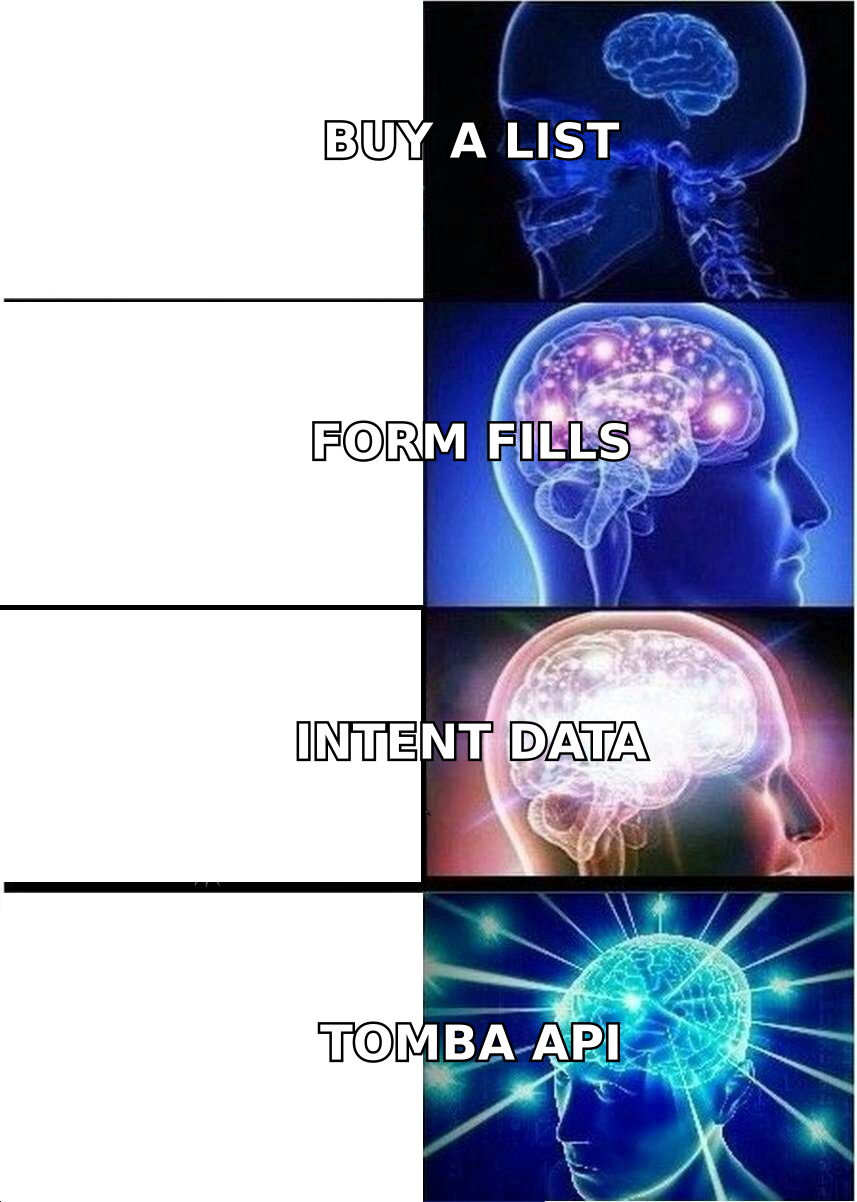
The reason step 4 outperforms isn't sophistication for its own sake. It's that the outreach writes itself. "Saw your team was looking at capacity planning" is a different email from "Hi {{FirstName}}, hope you're well."
What should you actually pay for lead generation tools?#
Benchmark against pipeline contribution, not against other vendors' price pages.
A reasonable rule: your entire lead generation tooling spend should sit somewhere between 3% and 8% of the pipeline it's credited with sourcing. If you're sourcing $2M in pipeline a year, $60k–$160k in tooling is defensible. If you're sourcing $200k, you should be under $16k/yr — which rules out most enterprise platforms immediately.
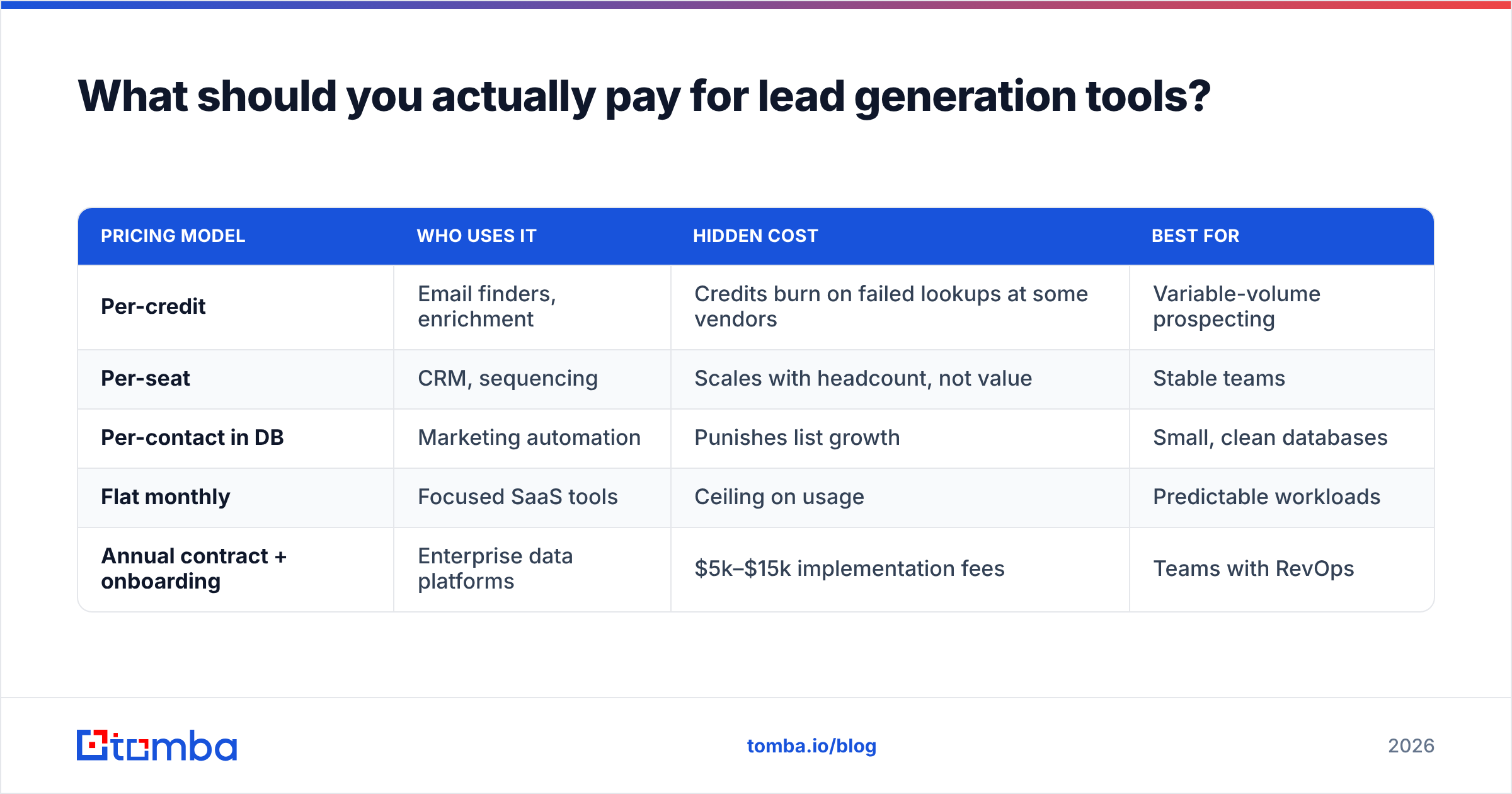
Here's how common pricing models compare on real cost of ownership:
| Pricing model | Who uses it | Hidden cost | Best for |
|---|---|---|---|
| Per-credit | Email finders, enrichment | Credits burn on failed lookups at some vendors | Variable-volume prospecting |
| Per-seat | CRM, sequencing | Scales with headcount, not value | Stable teams |
| Per-contact in DB | Marketing automation | Punishes list growth | Small, clean databases |
| Flat monthly | Focused SaaS tools | Ceiling on usage | Predictable workloads |
| Annual contract + onboarding | Enterprise data platforms | $5k–$15k implementation fees | Teams with RevOps |
On the credit question specifically: check whether the vendor charges for results it couldn't find. Some do. Tomba pricing runs Free (25 searches/mo), Starter at $49/mo, Growth at $99/mo, and Pro at $249/mo, with Enterprise custom — the useful part being that the free tier is enough to test accuracy on your own target accounts before you spend anything. Run 25 lookups against contacts you already know are correct. That's a better evaluation than any G2 grid.
For a broader view of how buying committees are actually evaluating martech spend this cycle, Gartner's marketing technology research is a reasonable neutral starting point, and HubSpot's inbound methodology documentation remains the clearest free explanation of how capture-layer tools are meant to fit together.
How do you evaluate a lead generation tool in 30 minutes?#
Skip the demo. Run this instead.
- The known-contact test. Take 25 contacts you already have confirmed emails for. Run them through the tool. Score accuracy against ground truth. Anything under 85% on your specific ICP is a problem regardless of the marketing claims.
- The catch-all test. A good chunk of B2B domains are catch-all, which means standard verification returns "unknown." Ask how the vendor handles them. If the answer is "we mark them risky and move on," you'll lose real contacts. A dedicated catch-all verifier is the difference between discarding a third of your enterprise targets and keeping them.
- The export test. Export 100 records. Open the CSV. Are the fields clean? Are job titles normalized or raw? Is there a confidence score? Messy exports mean messy CRM, forever.
- The API test. Hit the API with one call. If it takes more than 15 minutes to get a response back, your automation plans just got more expensive.
- The cancellation test. Find the cancel flow before you buy. If it requires emailing a rep, price in the friction.
- The overlap test. Whatever you're about to buy, check what percentage of its output duplicates a tool you already own. Vendors won't tell you. Your data will.
Most teams that run this sequence end up buying fewer tools than they planned to, which is generally the correct outcome.
Which tools should you cut first?#
In audit after audit, the same three categories turn out to be low-yield for small and mid-sized B2B teams:
- Standalone chatbots without a routing plan. A chat widget with no one watching it generates transcripts, not leads.
- Second-tier intent data. Unless you have the headcount to act on intent within 48 hours, you're paying for a signal that expires before you use it.
- Duplicate databases. Running two contact databases "for coverage" sounds prudent and usually means paying twice for a 70% overlap. Test the overlap. Keep the one that wins on your ICP.
What almost never gets cut, and shouldn't: verification. It's the cheapest line item in the stack and it protects the most expensive one — your sending domain reputation. Bounces above 3% start doing structural damage to email deliverability, and recovering a burned domain costs more time than any tool saves.
What does a good 2026 stack look like end to end?#
For a 5–10 person B2B GTM team with under $1,000/mo to spend:
- Attract: one SEO tool, one ad channel. Don't add a third until the first two are saturated.
- Capture: one form/landing page tool wired directly to the CRM. No spreadsheet middleman.
- Identify: visitor reveal on the site, plus domain-based prospecting for outbound.
- Enrich + verify: one provider covering email finding, verification, catch-all handling, and phone append. Consolidating here is where consolidation actually pays, because it's one credit pool and one data model instead of three.
- Route: CRM with assignment rules, plus a sequencing tool that respects sending limits.
That's five tools, not twelve. The discipline is in refusing the sixth until you can articulate exactly which leak it plugs and how you'll measure whether it worked.
Ready to fix the data layer?#
The layer that breaks most often is the one between "I know this company is interested" and "I can email the right person there today." That's a data problem, and it's cheaper to solve than most teams assume.
Start with the Tomba Email Finder. Run the free tier's 25 searches against accounts you already know — your own customers, your current pipeline, the companies that visited last week. Check the accuracy yourself before you spend a dollar. If the hit rate holds on your ICP, the $49/mo Starter plan covers a small team's outbound comfortably, and the API is there when you're ready to wire enrichment into the rest of the stack.
Related guides#
// get started
Find, verify and enrich your first contacts today
Start on the free plan with 25 searches a month, then scale when your team is ready.
Free plan · No credit card required · GDPR & CCPA
// about the author