Lead Generation Tracking Software: The 2026 Buyer's Guide
Most teams buy lead tracking software to fix a reporting problem and end up with a data problem. Here's how the categories actually differ, what they cost, and which one your funnel needs.
TL;DR
- "Lead generation tracking software" is four different product categories wearing one search term: web analytics/attribution, visitor identification, CRM pipeline tracking, and outbound sequence reporting. Buying the wrong one is the most common mistake.
- Tracking tells you which channel produced a lead. It does not tell you who the lead is or whether their contact data is real — that is an enrichment and verification job, and it is where most tracking stacks quietly leak money.
- Expect $0–$99/mo for analytics-grade tracking, $200–$1,500/mo for visitor identification, and $1,000+/mo for full attribution platforms with multi-touch models.
- The three metrics worth instrumenting first: source-to-MQL rate, time-to-first-touch, and deliverable-contact rate. Everything else is decoration.
- Before you spend on attribution, audit your contact data. Tracking a lead you cannot email is a very expensive way to produce a dashboard.
What is lead generation tracking software?#
Lead generation tracking software records where your leads come from, what they did before converting, and what happened to them after they entered your pipeline. Think of it as a flight recorder for demand: it does not fly the plane, but when the numbers go sideways it tells you which decision caused it.
The confusion starts because the phrase covers at least four distinct jobs:
- Source and channel attribution — tying a form fill or demo request back to a campaign, keyword, ad, or referral. Tools: GA4, Dreamdata, HockeyStack, Ruler Analytics.
- Anonymous visitor identification — resolving company-level (sometimes person-level) identity for traffic that never fills a form. Tools: Albacross, Leadfeeder, Clearbit Reveal, and Tomba's website visitor reveal.
- Pipeline and stage tracking — following a known lead through stages, owners, and velocity. This is your CRM doing its actual job.
- Outbound activity tracking — opens, clicks, replies, and sequence performance for cold email and calls. Tools: Instantly, Smartlead, Salesloft, Outreach.
A team asking "what's our best channel?" needs #1. A team asking "who visited our pricing page last week?" needs #2. A team asking "why do leads die in stage three?" needs #3. A team asking "which subject line works?" needs #4. Most vendors will happily sell you their category as the answer to all four.
Which type of lead tracking tool do you actually need?#
Match the tool to the question you cannot currently answer. Here is the honest mapping.
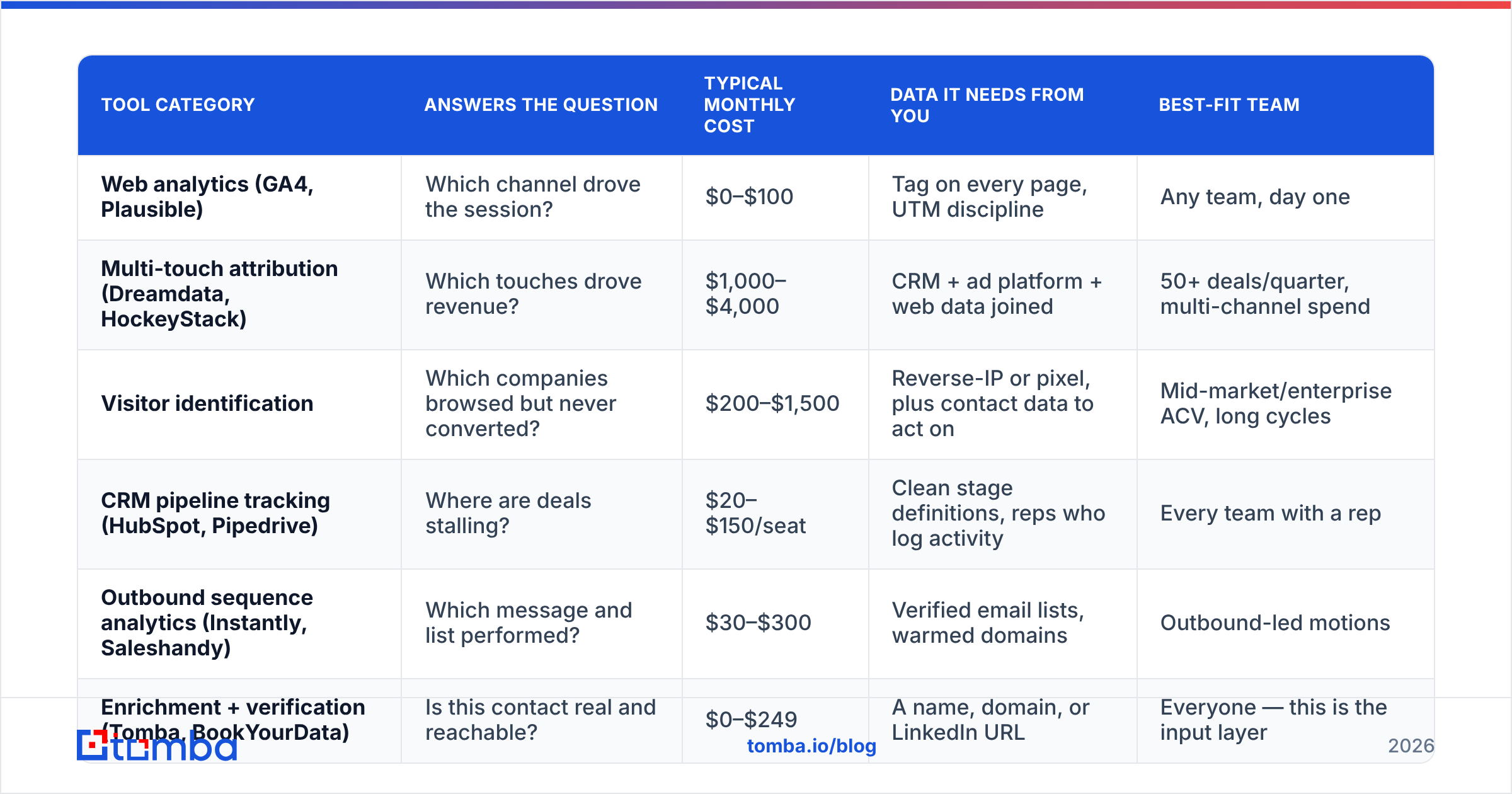
| Tool category | Answers the question | Typical monthly cost | Data it needs from you | Best-fit team |
|---|---|---|---|---|
| Web analytics (GA4, Plausible) | Which channel drove the session? | $0–$100 | Tag on every page, UTM discipline | Any team, day one |
| Multi-touch attribution (Dreamdata, HockeyStack) | Which touches drove revenue? | $1,000–$4,000 | CRM + ad platform + web data joined | 50+ deals/quarter, multi-channel spend |
| Visitor identification | Which companies browsed but never converted? | $200–$1,500 | Reverse-IP or pixel, plus contact data to act on | Mid-market/enterprise ACV, long cycles |
| CRM pipeline tracking (HubSpot, Pipedrive) | Where are deals stalling? | $20–$150/seat | Clean stage definitions, reps who log activity | Every team with a rep |
| Outbound sequence analytics (Instantly, Saleshandy) | Which message and list performed? | $30–$300 | Verified email lists, warmed domains | Outbound-led motions |
| Enrichment + verification (Tomba, BookYourData) | Is this contact real and reachable? | $0–$249 | A name, domain, or LinkedIn URL | Everyone — this is the input layer |
Note the last row. It is not a tracking tool, and that is exactly the point: every row above it degrades when its input data is wrong. Attribution models built on records with bounced emails and missing job titles produce confident, wrong answers.
Wait — that image is a placeholder for the real one:

How does attribution tracking actually work?#
Three mechanisms do almost all the work, and each one breaks differently.
UTM parameters. You append ?utm_source=linkedin&utm_campaign=q4-webinar to a link, the tracking script reads it on landing, and stores it against the session. Simple, free, and fragile — one rep sharing a link without UTMs, one email client stripping query strings, and the touch disappears into "direct."
First-party cookies and session stitching. The tracker sets an ID, watches the visitor across pages and return visits, then merges that history into a single journey when the visitor identifies themselves via a form. With Safari's ITP capping first-party cookie lifetime and Chrome's own privacy changes, cross-session stitching windows have shortened considerably since 2022. Journeys longer than a few weeks routinely fragment.
Server-side and CRM-side joins. The durable version: your form posts the captured source data straight into the CRM record, and attribution is computed from CRM fields rather than browser state. Slower to set up, dramatically more reliable. If you can only do one thing this quarter, do this.
Then there is the fourth mechanism everyone forgets: identity resolution. A tracked session is worthless until it maps to a person or company you can contact. Reverse-IP resolution gives you a company; it does not give you Sarah in procurement. Closing that gap means taking a company domain and running it through a domain search to surface the named roles you actually want, then verifying deliverability before the record ever reaches a rep.
The five tracking fields worth arguing about#
- Original source — first touch, set once, never overwritten. This is your channel-investment signal.
- Last non-direct touch — the touch nearest conversion, excluding direct. Your closing-motion signal.
- Content ID — the specific asset, not just the channel. "LinkedIn" tells you nothing; "LinkedIn → pricing-teardown-carousel" tells you what to make more of.
- First contact timestamp — when a human actually replied, not when the record was created. Speed-to-lead is the single most controllable variable in most funnels.
- Contact verification status — valid, invalid, risky, or catch-all. Without it, your conversion denominators are fiction.
Is expensive attribution software better than a well-configured CRM?#
Usually not, at least not first. The uncomfortable pattern: teams buy a four-figure attribution platform to compensate for a CRM nobody fills in properly, then discover the platform inherits the same gaps and now costs $2,400 a month to display them more attractively.
Attribution platforms earn their price when three conditions hold at once: you run paid spend across three or more channels, your sales cycle involves five or more touches, and you close enough deals per quarter that multi-touch models have statistical meaning. Below roughly 40–50 closed deals a quarter, a multi-touch model is fitting a curve to noise. Forrester's and Gartner's own research on B2B attribution has been consistent for years on this point: model sophistication outruns data quality in most mid-market stacks, and the sophistication is the part that gets funded.
What a well-configured CRM plus disciplined UTMs gets you for under $150/seat:
- Original-source and last-touch fields on every contact
- Stage-by-stage conversion rates and velocity
- Rep-level activity and response-time reporting
- Campaign-level cost-per-opportunity, if you import ad spend monthly
That covers the decisions most teams actually make. HubSpot's free CRM tier will do a meaningful chunk of it before you pay anything, and connecting it to your data layer is a HubSpot integration away.
What breaks lead tracking most often?#
In rough order of how much damage each one causes:
1. Bad contact data at the point of capture. A form fill with a typo'd email, a scraped list with 30% dead addresses, or an enriched record with a stale job title. Every downstream number — conversion rate, cost per MQL, reply rate — is computed against a denominator that includes contacts who were never reachable. Running lists through an email verifier before they enter the CRM is unglamorous and fixes more reporting problems than any dashboard.
2. Catch-all domains counted as valid. Catch-all servers accept mail for any address, so naive verification marks them deliverable. They are not — they are unknown. Treating them as valid inflates your list size and depresses your apparent reply rate. A dedicated catch-all verifier separates genuinely reachable catch-all addresses from the rest, which matters because catch-alls are disproportionately common at exactly the mid-market companies worth prospecting.
3. Form-to-CRM field mismatches. Source data captured in the browser never makes it to the CRM field, or lands in a text field that reporting ignores. Audit this quarterly by submitting a test lead through every live form and checking what actually persists.
4. Deleted or re-created records. Dedupe runs that merge contacts and overwrite original-source in the process. Lock first-touch fields as read-only after creation.
5. Offline and dark-social touches. Podcast mentions, Slack communities, word of mouth. You cannot track these; you can ask about them. A single "how did you hear about us?" free-text field on the demo form consistently produces attribution insight that outperforms six-figure platforms, because it captures the channels no pixel sees.
6. Reps who do not log activity. No tool solves this. Shorter required-field lists and auto-logged email/calendar activity get you most of the way.

How do you set up lead generation tracking in a week?#
A realistic sequence that does not require a new platform.
Day 1 — Define the conversion events. Write down every action that creates a lead: demo form, pricing page form, content download, trial signup, inbound reply, chat conversation. Name them consistently. If marketing calls it "MQL" and sales calls it "lead," fix that first — the definition of a marketing qualified lead should be one sentence both teams can recite.
Day 2 — Instrument the fields. Create locked original_source, original_campaign, last_touch_source, and verification_status fields on the contact object. Hidden form fields populated by your tracking script write into the first three. The fourth comes from your verification step.
Day 3 — Fix UTM discipline. One naming convention, documented, in a shared sheet. Lowercase, hyphens, no spaces. Every link anyone on the team shares in a campaign context gets built from that sheet. This single unsexy exercise typically recovers 15–25% of traffic previously dumped into "direct."
Day 4 — Add verification to the intake path. Every new contact, inbound or outbound, gets checked before a rep touches it. API call on form submit, or a nightly batch. The email verification API handles this in one request per record; for imported lists, bulk verify the file first.
Day 5 — Build three reports, not thirty. Source-to-MQL rate by original source. Median time from record creation to first human reply. Deliverable-contact rate by list source. That is the starter set. Add more only when a specific decision demands it.
Day 6–7 — Backfill and sanity-check. Re-verify your existing database, tag the dead records rather than deleting them, and recompute last quarter's conversion rates against the cleaned denominator. Expect the numbers to move. That movement is the measure of how wrong your reporting was.
What should you track versus what should you ignore?#
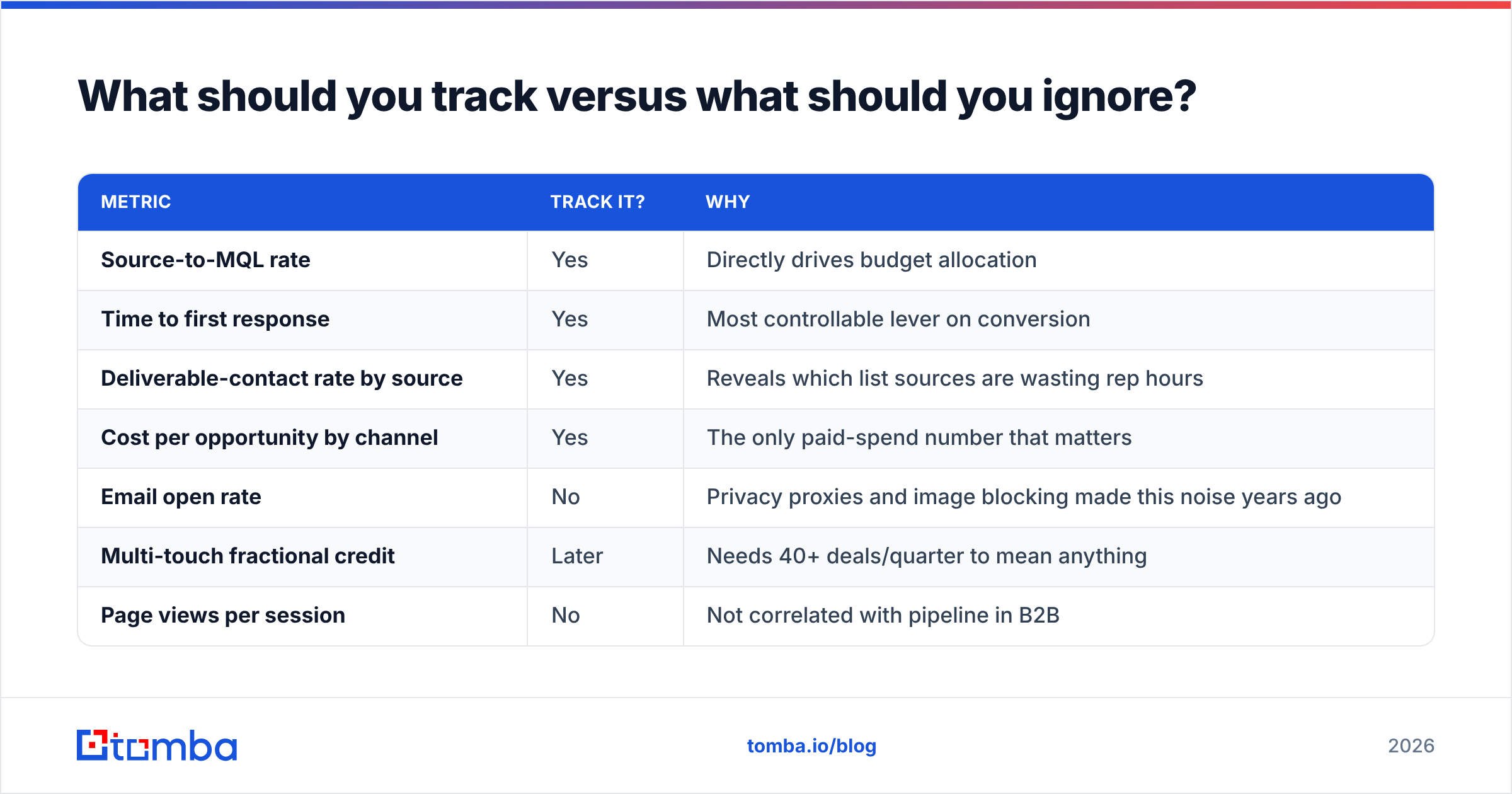
| Metric | Track it? | Why |
|---|---|---|
| Source-to-MQL rate | Yes | Directly drives budget allocation |
| Time to first response | Yes | Most controllable lever on conversion |
| Deliverable-contact rate by source | Yes | Reveals which list sources are wasting rep hours |
| Cost per opportunity by channel | Yes | The only paid-spend number that matters |
| Email open rate | No | Privacy proxies and image blocking made this noise years ago |
| Multi-touch fractional credit | Later | Needs 40+ deals/quarter to mean anything |
| Page views per session | No | Not correlated with pipeline in B2B |
| Individual touch attribution on short cycles | No | If the cycle is two touches, first-touch is enough |
Note the pattern: the metrics worth tracking are the ones attached to a decision you will actually make this month. G2's category reviews for marketing analytics are full of teams reporting the same arc — bought a sophisticated platform, used three reports, churned at renewal.
How do you close the gap between tracking and acting?#
Tracking ends where outreach begins, and the handoff is where most stacks lose their value. You identified that a logistics company in Rotterdam spent eleven minutes on your integrations page. Now what? Reverse-IP gave you a company, not a human, not a mailbox, not a phone number.
Closing that loop is a three-step enrichment path:
- Company → people. Resolve the domain to named contacts in the roles that buy your product. An email finder that works from domain plus role gets you further than guessing patterns, and a LinkedIn finder handles the cases where you have a profile but no address.
- People → verified contact. Confirm deliverability before anyone sends. Also grab a phone number where the motion justifies a call — intent signals decay fast, and a same-day call beats a next-week email.
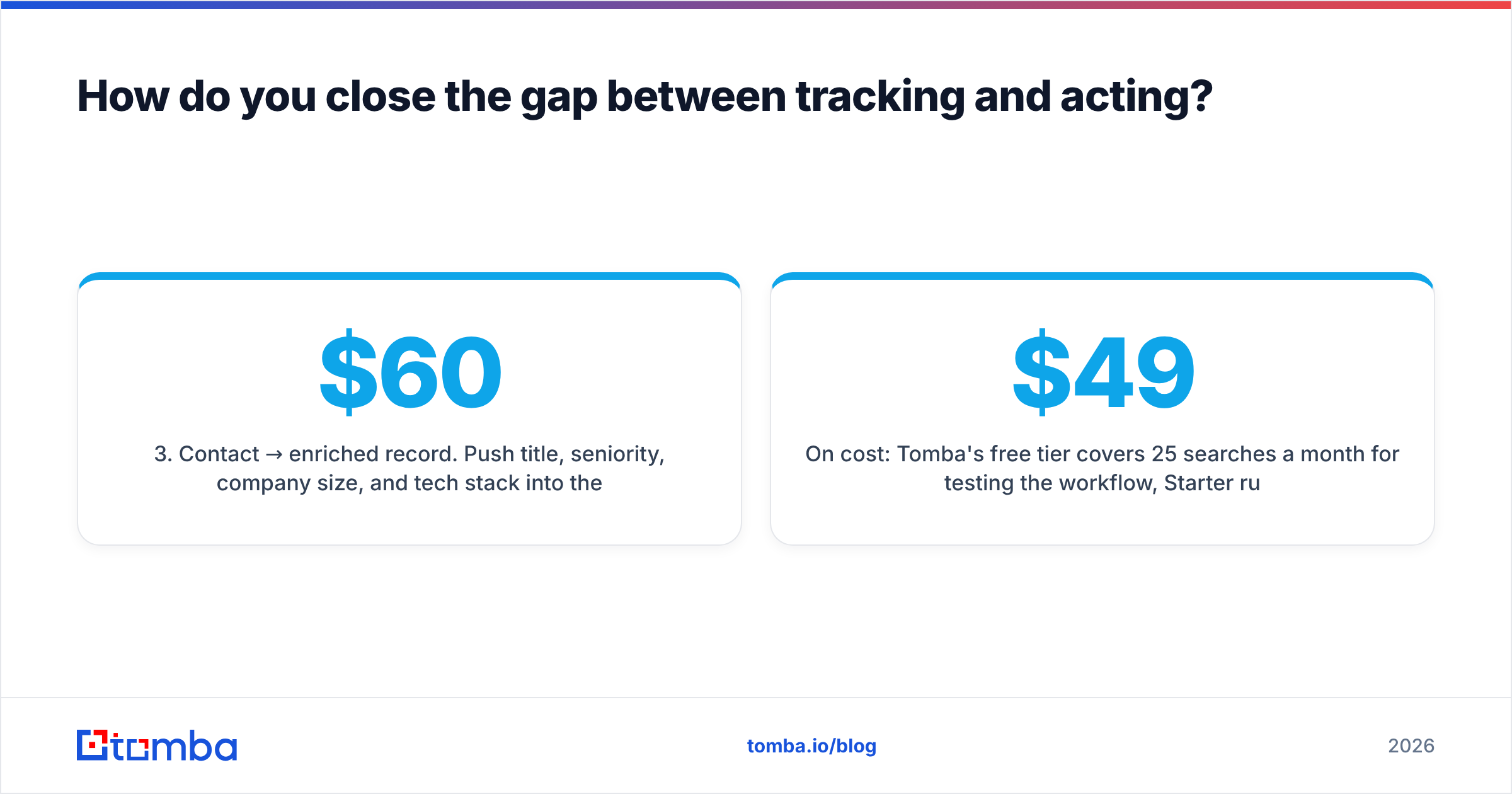
- Contact → enriched record. Push title, seniority, company size, and tech stack into the CRM so scoring and routing have something to work with. Contact enrichment at intake is cheaper than a rep researching manually at $60/hour.
On cost: Tomba's free tier covers 25 searches a month for testing the workflow, Starter runs $49/mo, Growth $99/mo, and Pro $249/mo — the full Tomba pricing breakdown sits alongside credit allowances per plan. For teams that would rather buy a pre-built list than resolve identities themselves, BookYourData is a solid, well-regarded option in that adjacent category; the two approaches complement each other more than they compete, since finder tools excel at targeted resolution and list vendors excel at volume coverage.
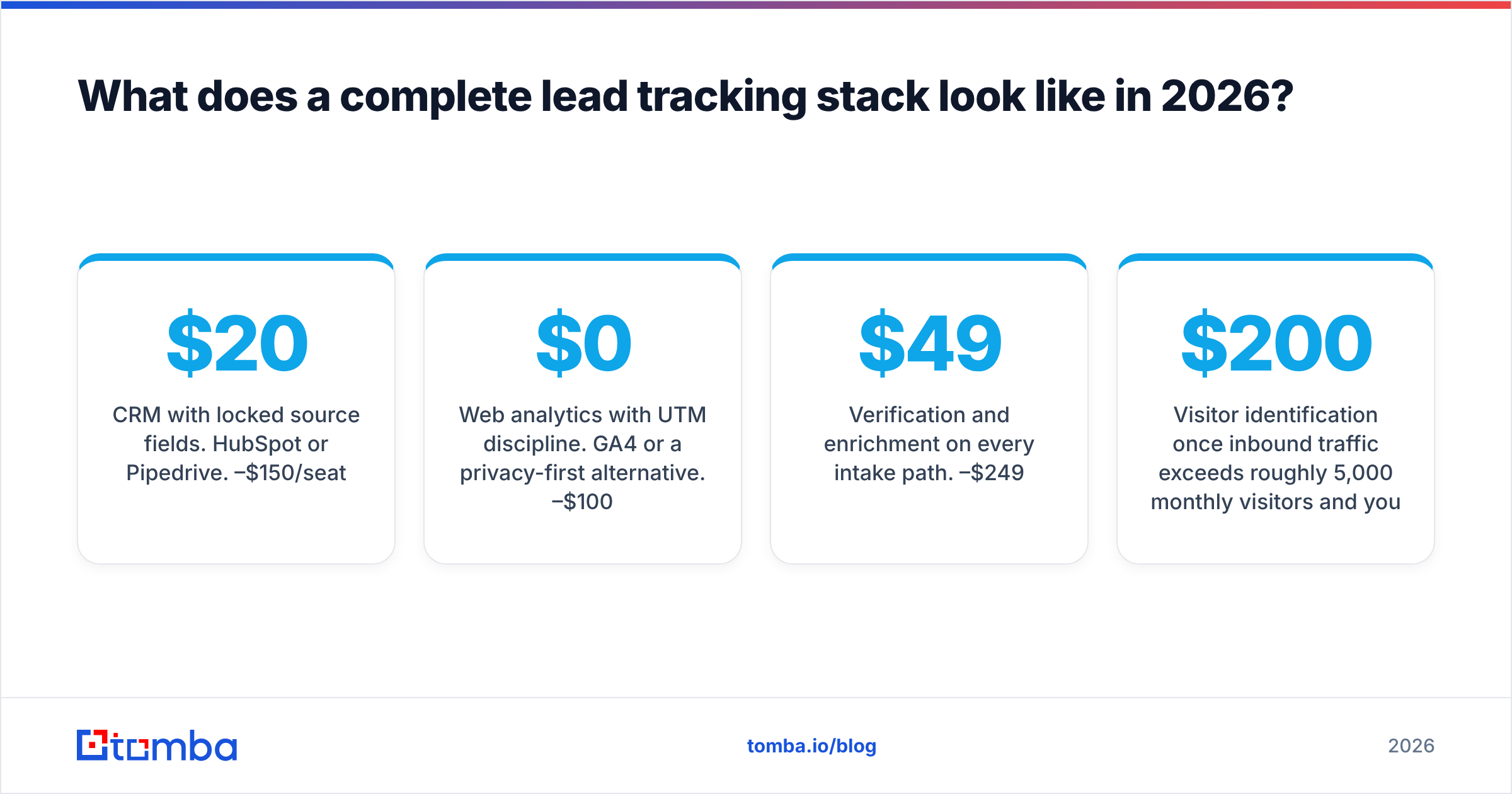
What does a complete lead tracking stack look like in 2026?#
A stack that works for a 10–30 person GTM team, in build order:
- CRM with locked source fields. HubSpot or Pipedrive. $20–$150/seat.
- Web analytics with UTM discipline. GA4 or a privacy-first alternative. $0–$100/mo.
- Verification and enrichment on every intake path. $49–$249/mo.
- Visitor identification once inbound traffic exceeds roughly 5,000 monthly visitors and your ACV justifies chasing anonymous companies. $200+/mo.
- Sequence analytics if outbound is a real motion. $30–$300/mo.
- Multi-touch attribution last, and only if the deal volume supports it. $1,000+/mo.
Total for the first three layers: under $400/month for most teams. That covers the questions that change decisions. The expensive layers are genuinely valuable, but they are amplifiers — they multiply the quality of the data underneath them, including the sign. Feed them bad contact records and they will confidently amplify the wrong conclusion.
One more thing worth building early: a weekly ten-minute review where someone actually looks at the three reports and writes one sentence about what changed. Tracking infrastructure with no review ritual is a very expensive filing cabinet.
Where should you start?#
Start with the input layer, because it is cheap, fast, and everything above it inherits its quality. Before you evaluate a single attribution platform, run your existing contact database through verification and see what percentage is actually reachable. That number reframes every conversion metric you currently report, usually by several points.
Tomba's Email Finder is built for exactly that handoff between tracking and action: feed it a company domain or a name, get back verified, deliverable contacts with confidence scores, and push them into your CRM through native integrations or the API. The free tier gives you 25 searches to test the workflow against a list you already distrust — which is the fastest way to find out whether your tracking problem was ever a tracking problem.
Related guides#
// get started
Find, verify and enrich your first contacts today
Start on the free plan with 25 searches a month, then scale when your team is ready.
Free plan · No credit card required · GDPR & CCPA
// about the author