Lead Generation Websites: How to Build One That Converts
Most B2B sites collect traffic, not leads. Here's the structural difference between a brochure site and a lead generation website — plus the stack, benchmarks, and fixes that actually move form fills.
TL;DR
- A lead generation website is not a brochure site with a contact form bolted on. It is a set of pages engineered so that a specific visitor takes a specific next step, with measurement attached to every step.
- The median B2B website converts somewhere around 2-3% of visitors into leads. The gap between a 0.5% site and a 5% site is almost never design — it is offer relevance, form friction, and speed to follow-up.
- Three page types do most of the work: the money page (bottom-funnel intent), the resource page (mid-funnel trade), and the comparison page (evaluation-stage intent). Everything else is support.
- Forms should ask for the minimum you can enrich. Collect a work email, then fill in company, role, headcount, and phone from data providers instead of asking.
- The website is half the system. The other half is identifying anonymous traffic and finding contact data for accounts that never fill anything in — which is where 95%+ of your traffic sits.
What Is a Lead Generation Website?#
A lead generation website is a site whose primary job is to convert qualified traffic into contactable, routable leads — not to describe your company.
Think of the difference between a restaurant's window display and its host stand. The window display shows the food. The host stand asks how many people are in your party, takes your name, and seats you. Most B2B sites are all window and no host. They look good, they explain the product, and they leave the visitor with nothing to do except "Contact us," which is the digital equivalent of a locked front door with a doorbell nobody answers.
Structurally, a lead generation website has four things a brochure site does not:
- A conversion path per intent stage. Someone Googling "what is lead scoring" and someone Googling "pipedrive vs hubspot pricing" need different next steps. One gets a guide, one gets a demo slot.
- Progressive, enriched forms. Short forms on the page, depth added afterward through enrichment rather than through more fields.
- Routing and speed. A lead that sits for 24 hours is worth a fraction of one contacted in five minutes. The site has to hand off to a system that reacts fast.
- Attribution that survives the handoff. You know which page, which keyword, and which campaign produced each closed deal — not just each form fill.
If your site does the first three but not the fourth, you will optimize blind. If it does the fourth but not the first three, you will have beautiful dashboards showing you very little happening.
Why Do Most B2B Websites Fail to Generate Leads?#
Because they are built to satisfy an internal committee, not a stranger with a problem and eleven browser tabs open.
Here are the failure modes that show up repeatedly in site audits, roughly ordered by how much revenue they cost:
- The offer is asymmetric. You are asking for a 30-minute demo from someone who is four weeks away from even shortlisting vendors. The value exchange doesn't balance. Add a lower-commitment rung to the ladder.
- The form asks for what you could look up. Every field past three cuts completion. Asking for "company size," "industry," and "phone number" when you can derive all three from a work email is a self-inflicted wound.
- The page speaks to everyone. Generic headlines like "Grow your business faster" convert nobody because they describe nothing. Specific headlines naming the role, the problem, and the outcome convert.
- There is no proof near the ask. Logos, numbers, and a named quote placed directly beside the form outperform the same assets buried in a testimonials carousel two screens down.
- Mobile is an afterthought. More than half of B2B research traffic is mobile now, and a three-column form on a phone is a bounce generator.
- The follow-up is slow. The classic lead response study from HBR found firms that responded within an hour were roughly seven times more likely to qualify the lead than those that waited even two hours. Most of that decay happens in the first 30 minutes.

What Pages Should a Lead Generation Website Have?#
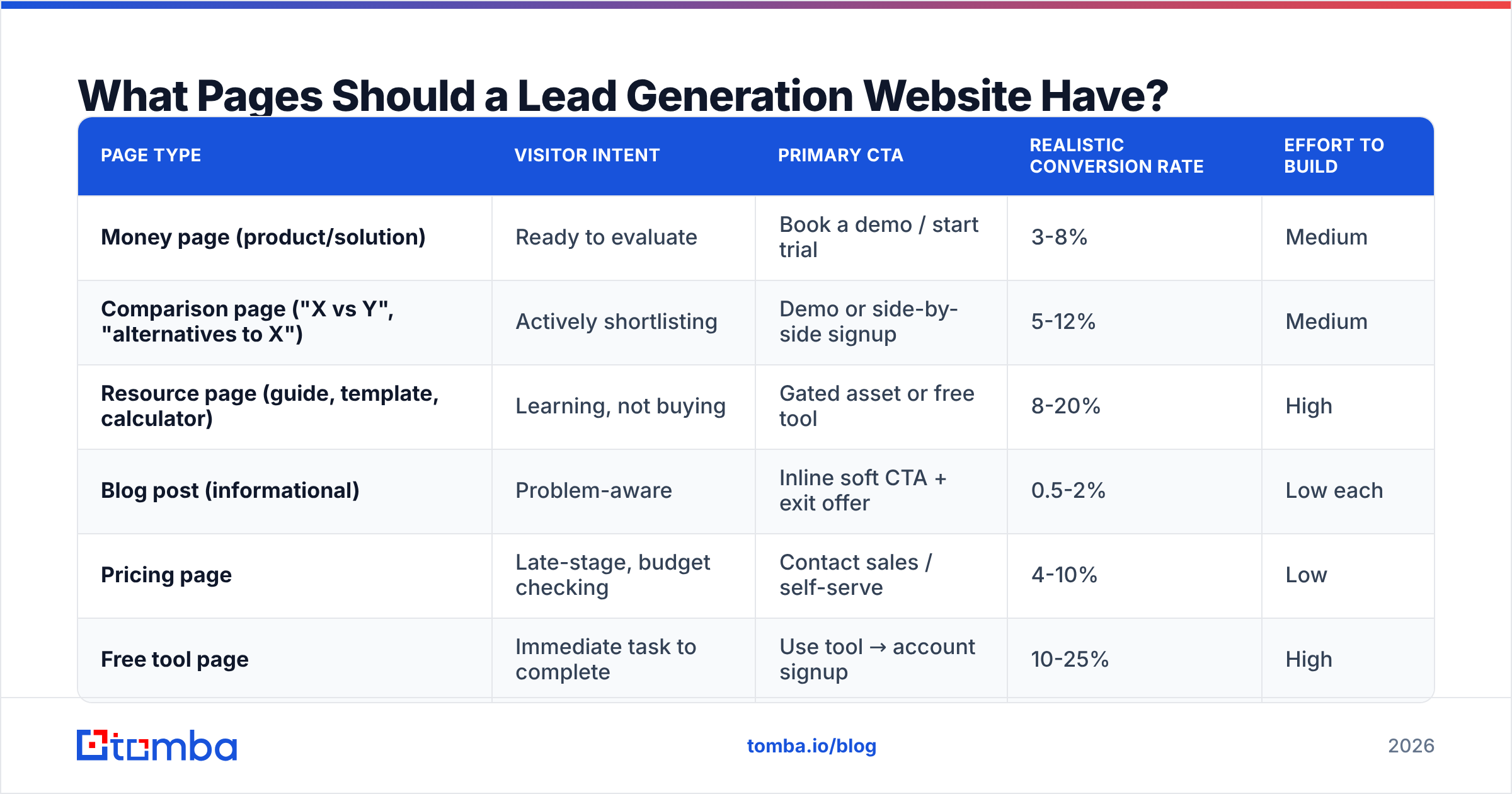
Four page types carry the load. Build these well before you build anything else.
| Page type | Visitor intent | Primary CTA | Realistic conversion rate | Effort to build |
|---|---|---|---|---|
| Money page (product/solution) | Ready to evaluate | Book a demo / start trial | 3-8% | Medium |
| Comparison page ("X vs Y", "alternatives to X") | Actively shortlisting | Demo or side-by-side signup | 5-12% | Medium |
| Resource page (guide, template, calculator) | Learning, not buying | Gated asset or free tool | 8-20% | High |
| Blog post (informational) | Problem-aware | Inline soft CTA + exit offer | 0.5-2% | Low each |
| Pricing page | Late-stage, budget checking | Contact sales / self-serve | 4-10% | Low |
| Free tool page | Immediate task to complete | Use tool → account signup | 10-25% | High |
Two notes on reading that table. First, the ranges are wide because traffic quality varies enormously — a comparison page fed by branded search converts nothing like one fed by a cold display campaign. Second, free tool pages have the best conversion economics in B2B and the worst build economics. They pay off over years, not quarters.
A practical build order for a team of two or three:
- Money page first. One page per core use case, not one per feature. Feature pages rank for nothing and convert nobody.
- Comparison pages second. People searching "[competitor] alternative" have their wallet out. These are the highest-ROI pages most B2B teams never build.
- A single free tool third. Pick the smallest useful job your product does and give it away with no login. It becomes your best backlink magnet and your cheapest lead source.
- Resource library fourth. Gated content works, but only when the asset is genuinely better than a Google search. A recycled blog post in PDF form is not.
- Blog volume last. Volume without the first four is a traffic-collection hobby.
How Do You Design Forms That Actually Convert?#
Ask for as little as possible, then enrich the rest.
The counterintuitive part is that shorter forms do not mean worse lead quality — they mean you move the qualification work off the visitor and onto your data stack. A visitor who types sarah@northwindlogistics.com has told you more than you think. Run that through data enrichment and you get company, domain, headcount range, industry, and often job title without adding a single field.
Field-count guidance that holds up in practice:
- Free tool / newsletter: 1 field (email). Nothing else.
- Content download: 2 fields (email, name). Optionally a single qualifying dropdown if routing genuinely depends on it.
- Demo request: 3-4 fields (email, name, company, one qualifier). Never more.
- Enterprise contact sales: 5 fields maximum, and only because the routing is complex.
Three more rules worth enforcing:
- Block free mailboxes on B2B forms, but do it gently. Reject
@gmail.comwith an inline message, not a page reload that wipes the form. - Validate at the point of entry. A typo'd email is a lead that silently never converts. Running an inline email verifier check on submit catches bad addresses before they enter your CRM and quietly rot there.
- Never use a captcha unless you have a real bot problem. The conversion tax is larger than the spam tax for most sites.
Progressive profiling — where returning visitors see different fields than first-timers — is worth setting up once you have more than one gated asset. Ask for role on visit two, budget timeline on visit three. HubSpot documents the mechanics well in its smart forms documentation, and most modern marketing automation platforms have an equivalent.
What Does a Lead Generation Website Stack Look Like?#
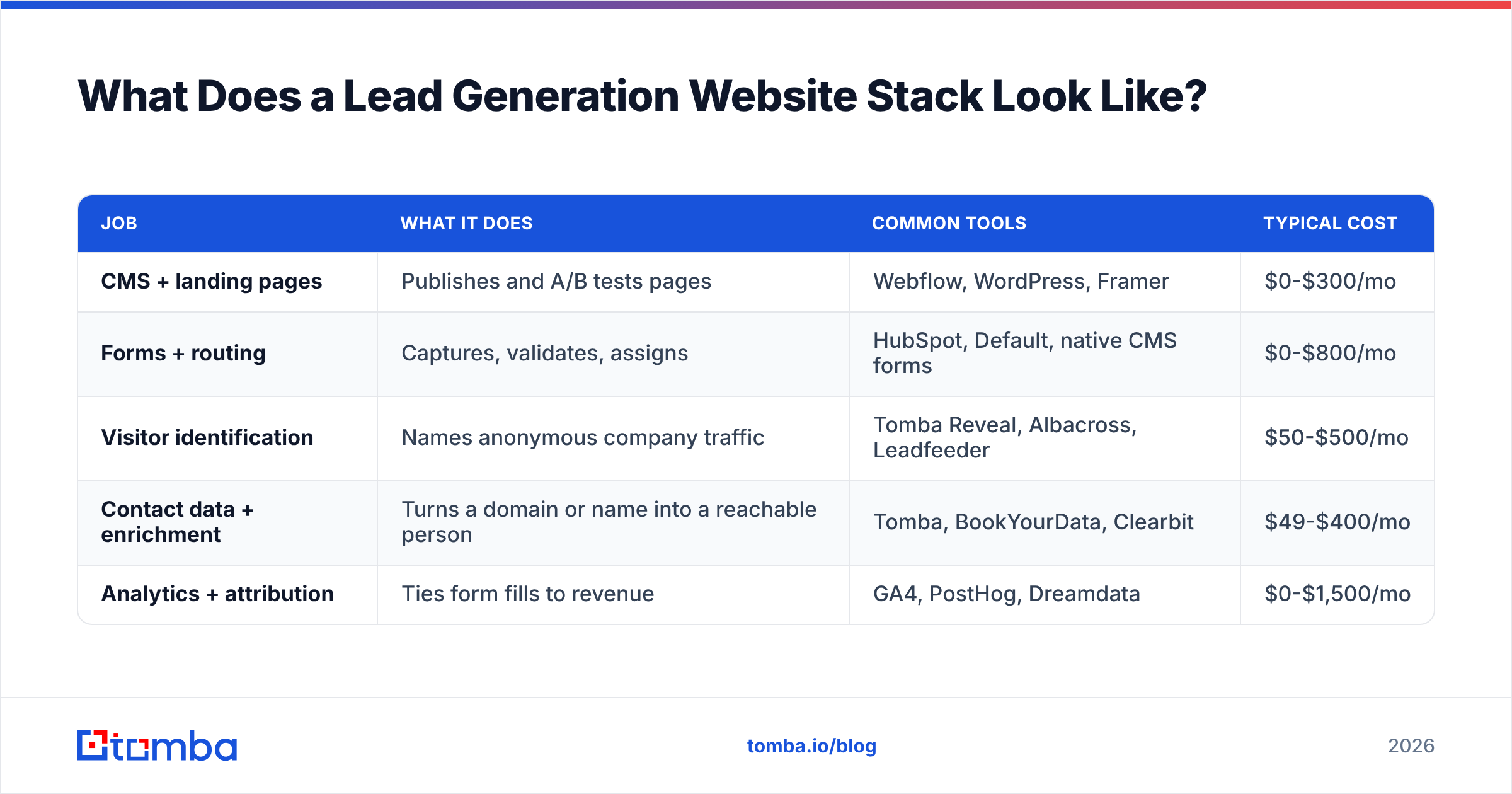
You need five jobs covered. Which vendor you use matters less than making sure no job is orphaned.
| Job | What it does | Common tools | Typical cost |
|---|---|---|---|
| CMS + landing pages | Publishes and A/B tests pages | Webflow, WordPress, Framer | $0-$300/mo |
| Forms + routing | Captures, validates, assigns | HubSpot, Default, native CMS forms | $0-$800/mo |
| Visitor identification | Names anonymous company traffic | Tomba Reveal, Albacross, Leadfeeder | $50-$500/mo |
| Contact data + enrichment | Turns a domain or name into a reachable person | Tomba, BookYourData, Clearbit | $49-$400/mo |
| Analytics + attribution | Ties form fills to revenue | GA4, PostHog, Dreamdata | $0-$1,500/mo |
The line most teams underestimate is visitor identification. On a typical B2B site, between 95% and 98% of visitors leave without filling anything in. Some of them are your best-fit accounts reading your pricing page three times in a week. Website visitor reveal resolves a portion of that anonymous traffic to companies, and from there a domain search gives you the named contacts in the relevant department. That converts a bounce into an outbound play.
The enrichment line is where the two sides of the market differ. Tools like BookYourData lead with a large pre-built purchasable database — useful when you want volume upfront and know your ICP precisely. Real-time finders like Tomba work the other direction: you supply the company or person and the system resolves and verifies the address on demand, which suits site-triggered workflows where you don't know who is coming until they arrive. Plenty of teams run both, using a static database for planned campaigns and a real-time finder for anything reactive.
How Do You Measure a Lead Generation Website?#
Track four numbers and ignore the rest until these are healthy.
- Visitor-to-lead rate, segmented by page type. A single site-wide number hides everything. A 2% average could be a 12% tool page dragged down by 40 useless feature pages.
- Lead-to-qualified rate. If this drops when conversion rate rises, you loosened the form too far or the offer attracted the wrong people. If it stays flat while volume grows, keep going.
- Time to first touch. Measured in minutes, not days. This is usually the single cheapest metric to improve and the one with the largest effect on downstream win rate.
- Cost per qualified lead by channel and by page. The page-level view is the one most teams skip and the one that tells you what to build next.

Set up the measurement before you start optimizing. Running A/B tests on a site with 400 monthly visitors to the test page is theater — you will not reach significance before the seasons change. Below roughly 1,000 conversions per month site-wide, spend your effort on qualitative research (session recordings, five customer interviews, a two-question exit survey) rather than split tests. G2's buyer behavior research is a reasonable external benchmark to sanity-check your own numbers against.
Is a Lead Generation Website Better Than Outbound?#
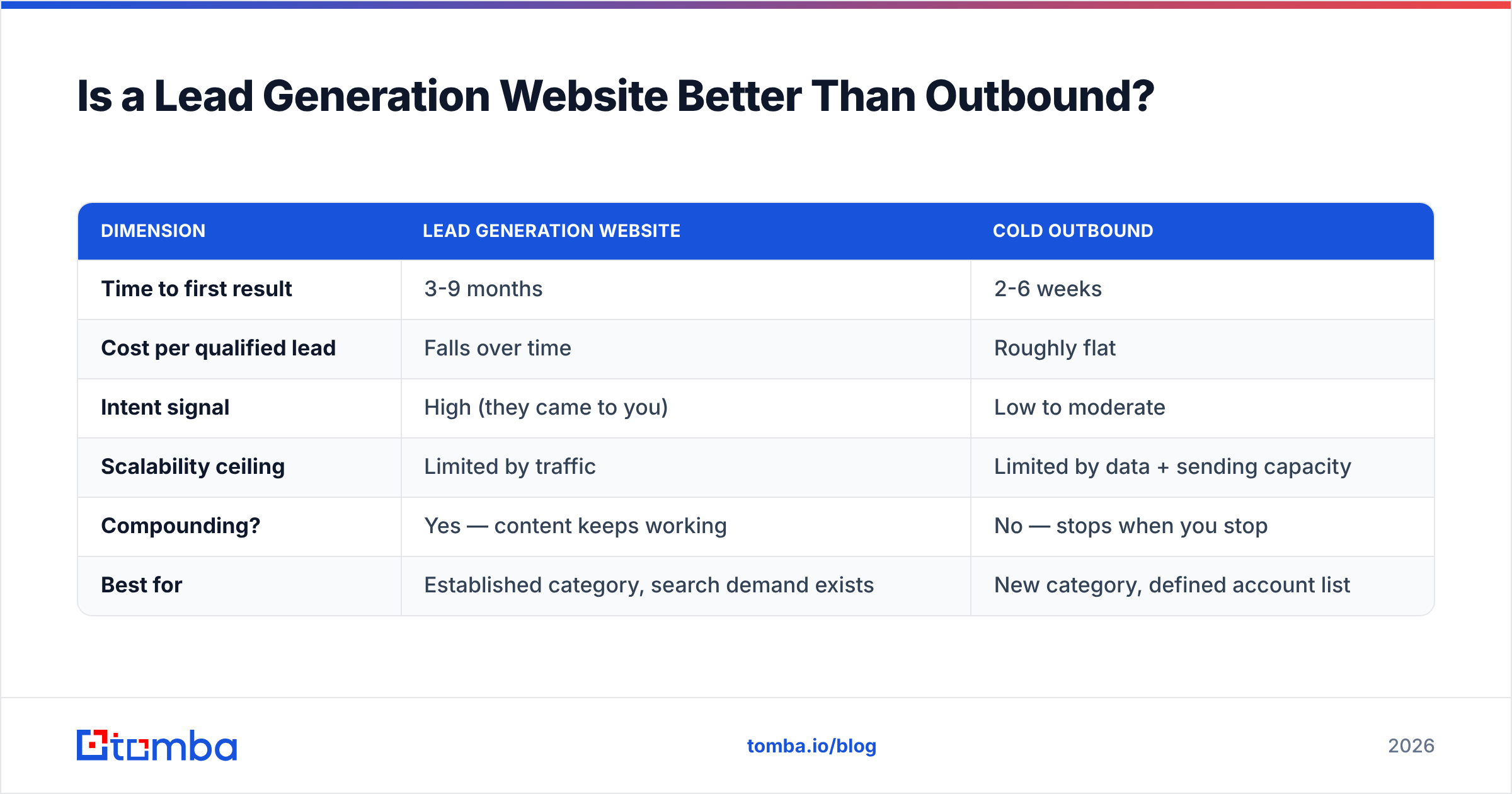
Neither one wins alone, and the teams that treat them as separate budgets underperform the teams that wire them together.
| Dimension | Lead generation website | Cold outbound |
|---|---|---|
| Time to first result | 3-9 months | 2-6 weeks |
| Cost per qualified lead | Falls over time | Roughly flat |
| Intent signal | High (they came to you) | Low to moderate |
| Scalability ceiling | Limited by traffic | Limited by data + sending capacity |
| Compounding? | Yes — content keeps working | No — stops when you stop |
| Best for | Established category, search demand exists | New category, defined account list |
The high-leverage move is the handoff between them. Your site tells you which companies are researching you; outbound reaches the people at those companies who never filled in a form. That requires contact data, which is where an email finder and a bulk email finder sit in the workflow — you feed in the companies your site surfaced and get back verified, routable contacts.
The reverse handoff matters too. Your outbound replies tell you which objections and phrasings land, and those should rewrite your money page headlines. Most teams run these as two separate departments that never exchange notes, which is how you end up with a website that speaks a completely different language than your SDRs.
What Are the Fastest Fixes for an Underperforming Site?#
Ordered by effort-to-impact ratio. Most teams can do the first four in a week.
- Cut every form to four fields or fewer. Measure for two weeks. This is usually worth 20-40% more submissions on its own.
- Add a second, lower-commitment CTA to every money page. "See pricing" or "Watch a 3-minute walkthrough" next to "Book a demo" catches the people who aren't ready to talk to a human.
- Put proof within 200 pixels of every form. One customer number, one logo row, one named quote.
- Fix speed on mobile. Anything over three seconds to interactive is costing you double-digit percentages of mobile conversions.
- Route and respond in under five minutes during business hours. Even an automated "here's a calendar link, a human replies within the hour" beats silence.
- Build one comparison page. Pick the competitor you lose to most. Be honest about where they win — the page converts better when it's credible.
- Verify your existing database. Lists decay at roughly 2% per month as people change jobs. A quarterly pass through a catch-all verifier and standard verification keeps your nurture sends out of the spam folder and protects sender reputation.
Common Mistakes to Avoid#
Gating everything. If your best content is all behind forms, you lose the SEO that would have brought the traffic in the first place. Gate the deep asset, publish the summary.
Treating the website as a launch project. Sites that generate leads are maintained weekly, not relaunched every three years. The relaunch cycle is how companies lose all their rankings and start over.
Optimizing button colors before fixing the offer. Micro-tests are what you do after the fundamentals work. Nobody ever tripled conversions with a shade of green.
Ignoring the 97%. If your only plan for non-converting traffic is a retargeting pixel, you're leaving the majority of your best-fit accounts completely untouched.
Buying data you can't verify. A list is only as good as its bounce rate. Whatever source you use — purchased database or real-time finder — check accuracy claims against your own send results, not against the vendor's marketing page. Tomba publishes its data sources for exactly this reason, and you should expect the same transparency from anyone you buy from.
Frequently Asked Questions#
How long before a lead generation website produces results? Money pages and comparison pages can produce leads within weeks if you have existing traffic. Content-driven organic growth realistically takes six to nine months to compound. Paid traffic to a well-built landing page produces data in days.
What's a good conversion rate for a B2B website? Site-wide, 2-3% is typical and 5%+ is strong. But judge by page type, not by average — a pricing page at 2% is underperforming while a blog post at 2% is excellent.
Should I gate my content? Gate assets with standalone utility (templates, calculators, benchmark data). Don't gate content whose value is the information itself — that content should rank and bring traffic.
Do I still need outbound if my website converts well? Yes, if you have a defined target account list. Inbound covers the accounts already looking; outbound covers the accounts that should be.
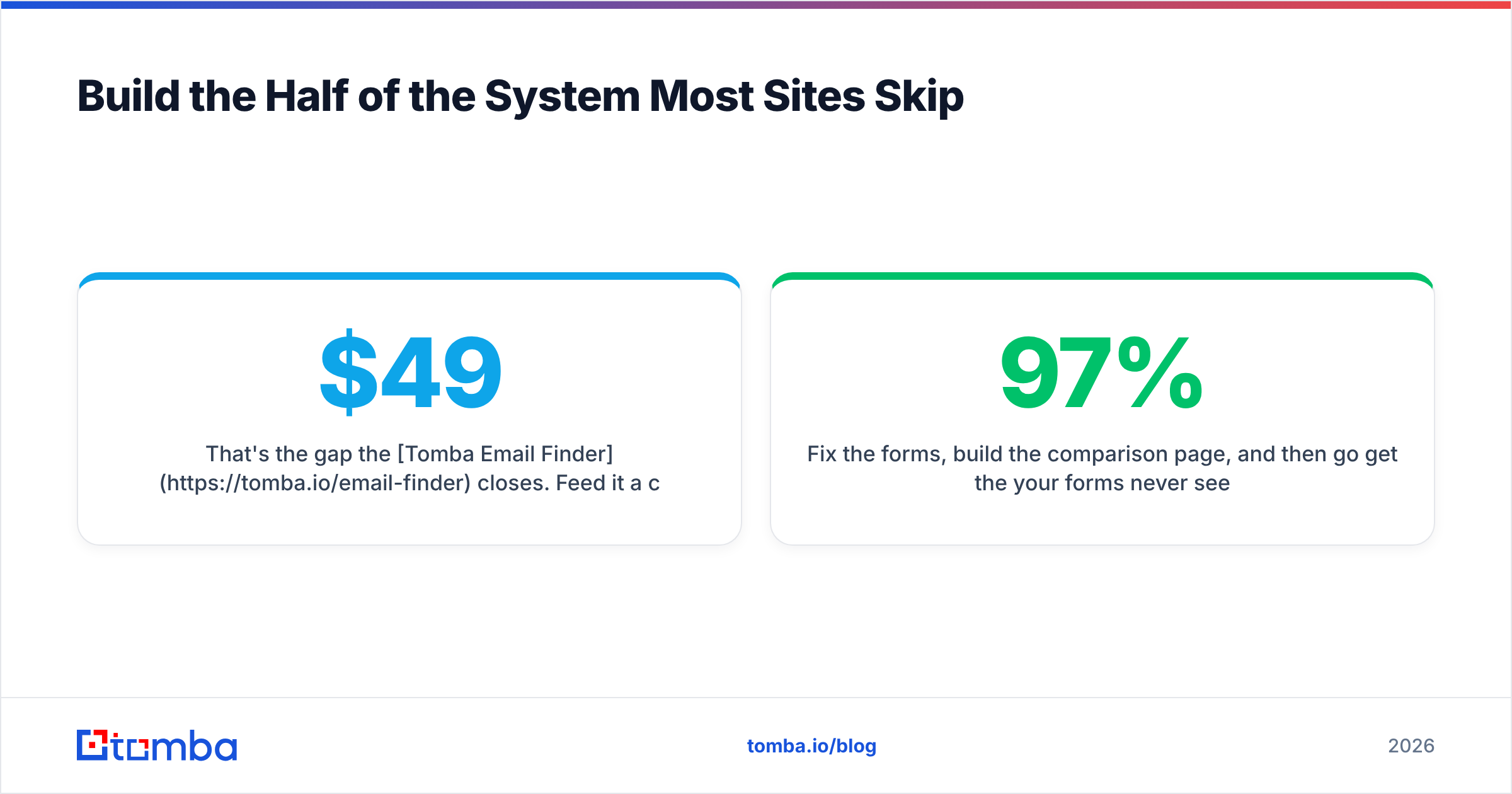
Build the Half of the System Most Sites Skip#
Your website will convert a few percent of visitors on a good month. The question is what happens to the rest. The companies reading your pricing page and leaving are the same companies your SDRs would kill to get a meeting with — you just need names and addresses to act on them.
That's the gap the Tomba Email Finder closes. Feed it a company domain surfaced by your site analytics and get verified, deliverable contacts for the people who matter in that account, without waiting for them to fill in a form they were never going to fill in. The free tier covers 25 searches a month if you want to test the workflow before committing; paid plans start at $49/mo on Starter, with Growth at $99/mo for teams running this at volume. Full Tomba pricing is public, no sales call required.
Fix the forms, build the comparison page, and then go get the 97% your forms never see.
Related guides#
// get started
Find, verify and enrich your first contacts today
Start on the free plan with 25 searches a month, then scale when your team is ready.
Free plan · No credit card required · GDPR & CCPA
// about the author