Lead Generation Without Cold Calling: A 2026 Playbook
Cold calling still works for some teams — it just costs more per meeting than most of the alternatives. Here is the channel-by-channel math, the stack, and the sequence that replaces the dialer.
TL;DR
- Lead generation without cold calling is not a softer version of outbound — it is a different cost structure. You trade rep hours for data quality and channel breadth.
- The four channels that actually replace dials at scale: targeted email, LinkedIn outreach, intent/visitor identification, and partner or community sourcing.
- The bottleneck is almost never the message. It is the list. Bad data kills no-call outbound faster than bad copy kills cold calling.
- A 3-channel sequence (email → LinkedIn → email) run against a verified list typically lands 2–5% meeting rates, versus 0.3–1% per dial hour on the phone.
- Keep the phone for enterprise deals, post-engagement follow-up, and any market where email penetration is genuinely poor.
Why do teams want lead generation without cold calling?#
Because the unit economics stopped working. A full-time SDR in North America costs $65,000–$95,000 fully loaded, dials 50–80 numbers a day, and connects with maybe 5–8 humans. Two of those conversations go anywhere. That is roughly 400 meetings a year at best, and connect rates have been sliding for a decade as mobile carriers got aggressive about spam labeling.
Meanwhile, buyers moved. Gartner's sales research has tracked B2B buyers spending the majority of their purchase journey self-educating, with a small slice reserved for talking to any vendor rep at all. If most of the decision happens before the conversation, the job of outbound shifts from "interrupt and pitch" to "be present, credible, and easy to reply to at the moment of research."
That is what no-call lead generation is optimized for. It is not about being polite. It is about putting more surface area in front of more qualified accounts per hour of human effort.
What actually replaces the phone in a no-cold-call stack?#
Six components do the work the dialer used to do. Each one covers a job the phone was handling implicitly.
- A precise account list. The phone let you be sloppy — you could dial a bad-fit account and disqualify in 20 seconds. Email does not forgive that. Firmographic filters (size, geo, tech stack, hiring signals) do the disqualification work up front.
- Verified contact data. Every bounced email is a small deposit into your future spam folder. A email verifier pass before send is non-negotiable, not a nice-to-have.
- Multi-channel sequencing. Email alone plateaus. Email plus LinkedIn plus one well-timed voicemail-free touch (a comment, a share, a relevant resource) roughly doubles reply rates in most benchmark sets.
- Intent and visitor signals. Website visitor reveal turns anonymous traffic into named accounts. Someone who read your pricing page twice this week is a warmer target than anyone in a cold list.
- Deliverability infrastructure. SPF, DKIM, DMARC, warmed domains, sending caps. This is the part teams skip and then blame the copy.
- A content or community surface. Podcast guesting, LinkedIn posting, niche community participation. Slow to build, but it converts the "who is this person" objection into "oh, I have seen your stuff."
Remove any one of these and the system limps. Remove two and you are back to spraying templates and wondering why nobody replies.
Which no-call channel gets you meetings fastest?#
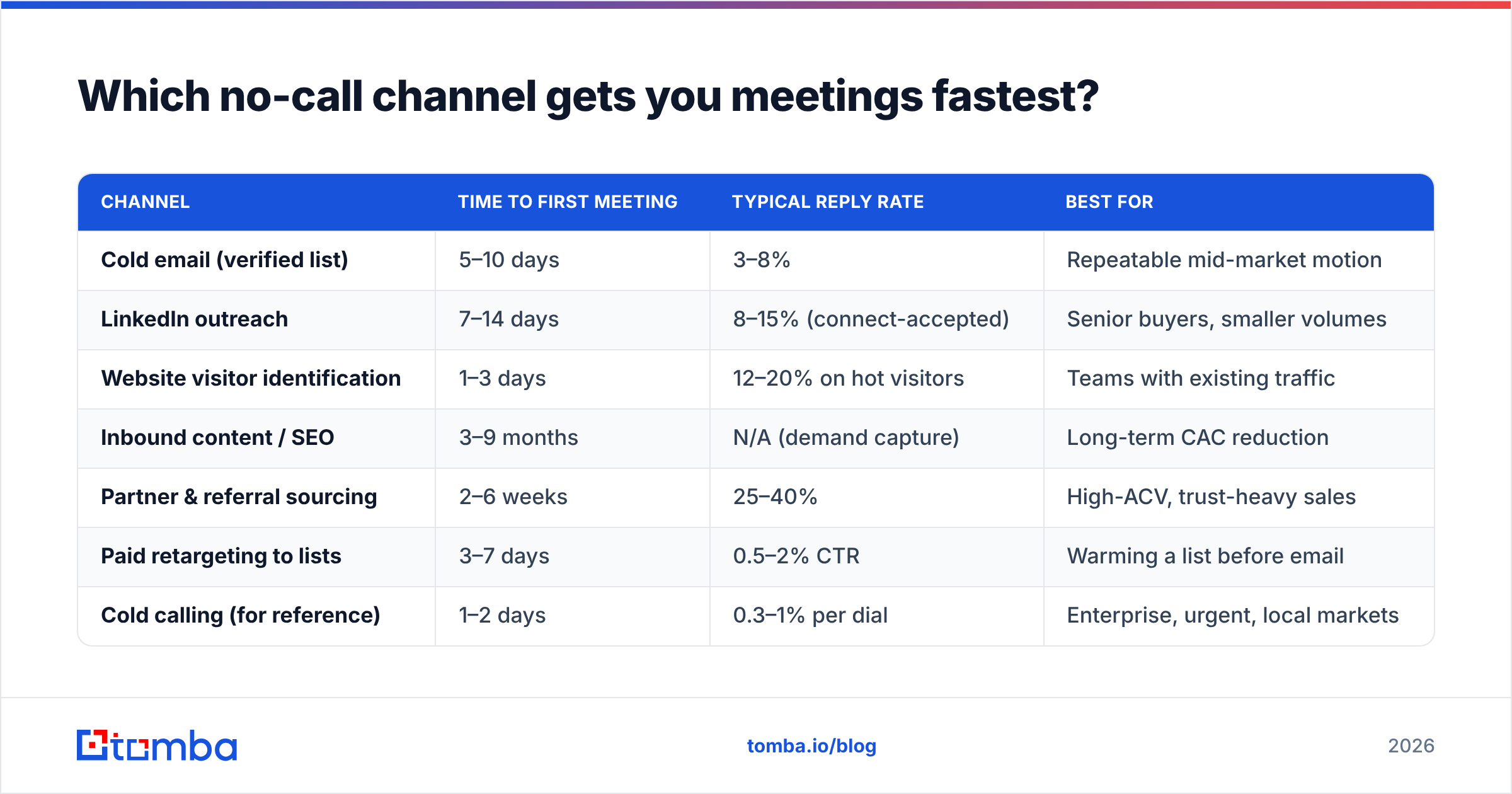
Here is the honest comparison. Numbers are blended medians from B2B SaaS teams selling $5k–$50k ACV deals — your mileage will vary by market maturity.
| Channel | Time to first meeting | Typical reply rate | Best for |
|---|---|---|---|
| Cold email (verified list) | 5–10 days | 3–8% | Repeatable mid-market motion |
| LinkedIn outreach | 7–14 days | 8–15% (connect-accepted) | Senior buyers, smaller volumes |
| Website visitor identification | 1–3 days | 12–20% on hot visitors | Teams with existing traffic |
| Inbound content / SEO | 3–9 months | N/A (demand capture) | Long-term CAC reduction |
| Partner & referral sourcing | 2–6 weeks | 25–40% | High-ACV, trust-heavy sales |
| Paid retargeting to lists | 3–7 days | 0.5–2% CTR | Warming a list before email |
| Cold calling (for reference) | 1–2 days | 0.3–1% per dial | Enterprise, urgent, local markets |
Two things jump out. First, cold calling is genuinely the fastest path to a conversation on day one — if you already have phone numbers and a rep sitting there. Second, every other channel beats it on meetings per hour of human labor once the system is running.
The practical read: if you need a meeting this week and you have a dialer, dial. If you need 40 meetings a month for the next 18 months without hiring three SDRs, build the no-call stack.
How do you build a target list without a dialer?#
Reverse the order most teams use. Do not start with contacts, start with accounts.
Step 1 — define the account filter, not the persona. "Series A–B fintechs in the EU, 30–150 employees, hiring for compliance roles" is a filter. "VP of Operations" is a persona and produces garbage lists on its own.
Step 2 — pull the companies. Job boards, funding databases, G2 category pages, conference exhibitor lists, and your own closed-won patterns. G2's category directories are an underused source — the review pages tell you who is already tool-aware in your space.
Step 3 — find the humans at those companies. This is where a domain search does in seconds what a rep used to do with a switchboard call. Feed a domain, get the email patterns and named contacts at that company, then narrow by role.
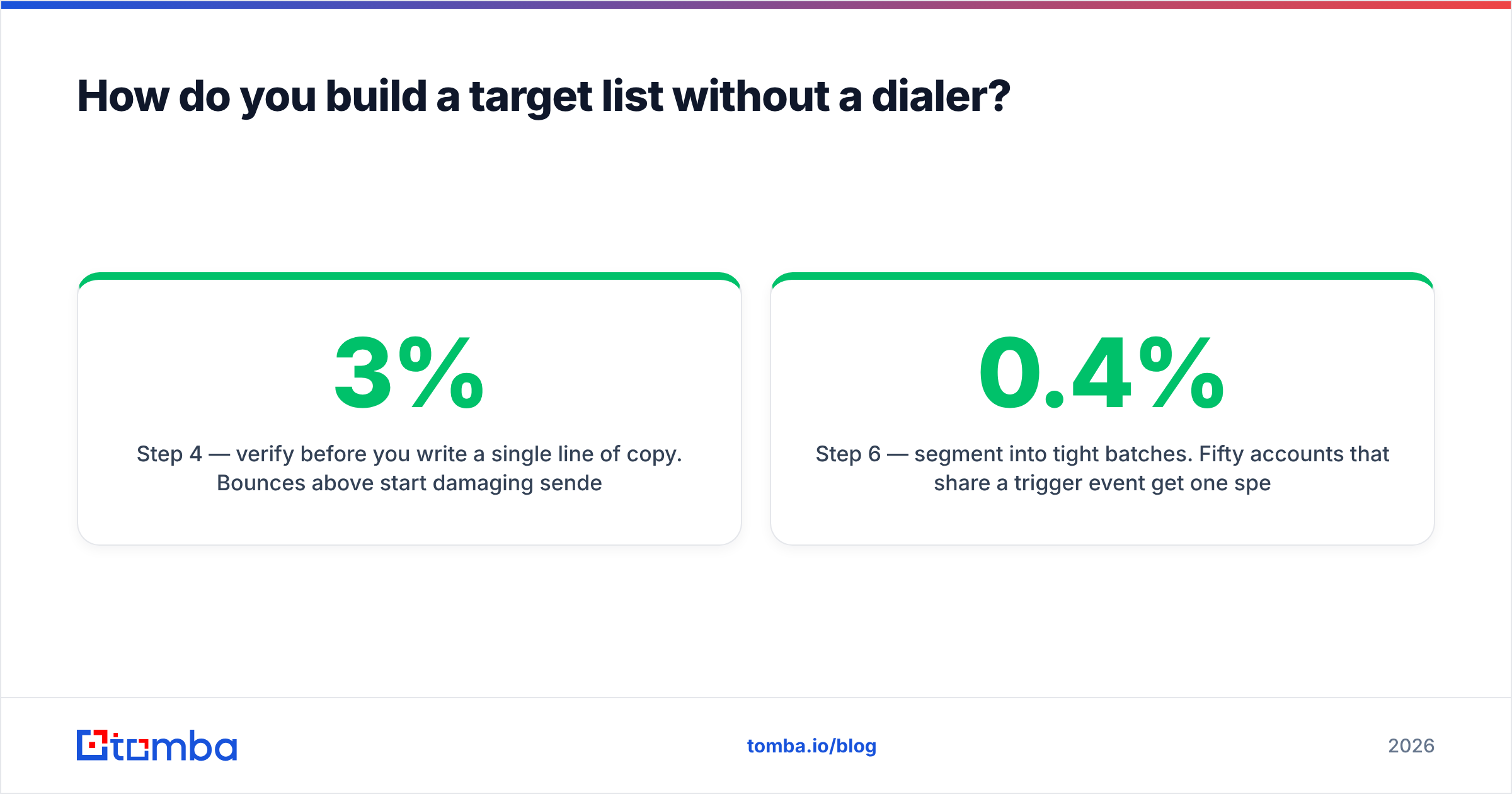
Step 4 — verify before you write a single line of copy. Bounces above 3% start damaging sender reputation. Above 5% you are actively burning the domain.
Step 5 — enrich for personalization hooks. Headcount growth, recent funding, tech stack changes, new leadership. One real hook beats four lines of flattery.
Step 6 — segment into tight batches. Fifty accounts that share a trigger event get one specific message. Five hundred accounts that share nothing get one generic message and a 0.4% reply rate.
A team of two can build a clean 500-account list in a day and a half with this process. The same two people would need three weeks to dial through it.
What does a no-cold-call sequence actually look like?#
Twelve business days, three channels, six touches. Nothing clever — the discipline is in the restraint.
- Day 1 — Email 1. Subject line under 5 words. One observation about their business, one sentence on the outcome you produce for companies like theirs, one low-friction ask. No attachments, no links.
- Day 2 — LinkedIn connect. No note, or a 90-character note referencing the same observation. A note that repeats the email verbatim reads like automation because it is.
- Day 4 — Email 2. A different angle, not a "just bumping this." Share a specific data point or a short case outcome from a comparable company.
- Day 7 — LinkedIn engagement. Comment on something they posted, or share a relevant piece. This is the touch most teams skip and the one that makes the next email land.
- Day 9 — Email 3. The "wrong person?" email. Genuinely ask for a redirect. This generates more replies than any clever hook, and referrals internally carry weight.
- Day 12 — Break-up email. Short, no guilt, leave the door open. Roughly 15–20% of your total replies come from this one.
Good cold email templates help with structure, but do not run a template unchanged across segments. The template is a skeleton; the trigger event is the muscle.

How do you keep emails landing when volume replaces dials?#
This is where no-call programs die. You moved the volume from the phone to the inbox, and inboxes have immune systems.
The rules that matter, in order of impact:
Authenticate properly. SPF, DKIM, and DMARC on every sending domain. Google and Yahoo's 2024 bulk sender requirements made this table stakes, not best practice. HubSpot maintains a solid plain-English breakdown in their sales and email statistics resources if you need to convince a skeptical ops lead.
Use separate sending domains. Never send outbound from your primary corporate domain. Buy lookalikes, warm them for three to four weeks, and keep the main domain clean for transactional and inbound mail.
Cap per-mailbox volume. 30–40 emails per mailbox per day is the ceiling most teams should respect. Want more volume? Add mailboxes, not per-mailbox throughput.
Verify continuously, not once. B2B email data decays at roughly 22–30% per year as people change jobs. A list verified in January is meaningfully stale by September. Re-verify before every major campaign, and use bulk verification for lists over a few hundred rows.
Watch reply rate, not just open rate. Apple Mail Privacy Protection made open rates close to meaningless. Reply rate and positive reply rate are the only metrics that survived.
Handle catch-all domains deliberately. Large enterprises frequently accept all mail at the SMTP layer, which means standard verification returns "unknown." A dedicated catch-all verifier applies pattern confidence scoring so you can send to high-confidence catch-alls instead of discarding a third of your enterprise list.
What does it cost compared to a calling team?#
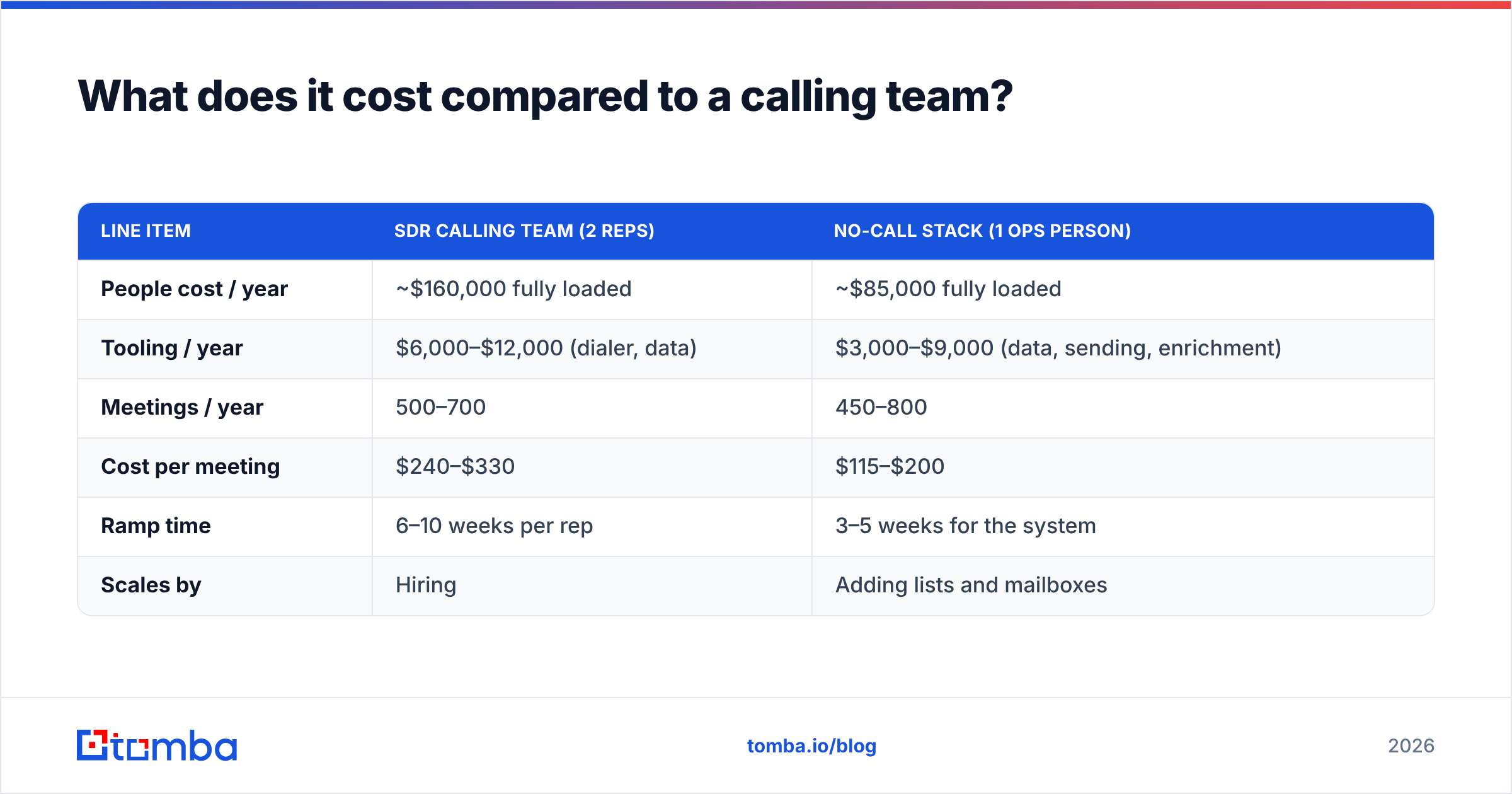
Run the comparison on cost per booked meeting, not cost per tool.
| Line item | SDR calling team (2 reps) | No-call stack (1 ops person) |
|---|---|---|
| People cost / year | ~$160,000 fully loaded | ~$85,000 fully loaded |
| Tooling / year | $6,000–$12,000 (dialer, data) | $3,000–$9,000 (data, sending, enrichment) |
| Meetings / year | 500–700 | 450–800 |
| Cost per meeting | $240–$330 | $115–$200 |
| Ramp time | 6–10 weeks per rep | 3–5 weeks for the system |
| Scales by | Hiring | Adding lists and mailboxes |
The no-call stack is not free — it just concentrates spend in data and infrastructure instead of headcount. And it compounds: the list you build this quarter is still an asset next quarter, while an SDR's dial hours evaporate the moment they stop dialing.
Data pricing varies widely. Tomba's pricing runs a free tier at 25 searches/month, Starter at $49/month, Growth at $99/month, and Pro at $249/month, which covers most sub-enterprise volume needs. Providers like BookYourData take a different approach with pay-as-you-go prebuilt lists, which suits teams that want a one-time list purchase rather than an ongoing search-and-verify workflow. Both models are legitimate — pick based on whether your ICP is stable (buy a list) or constantly re-segmented (run searches continuously).
Is cold calling ever still the right call?#
Yes, in four situations, and pretending otherwise is dishonest.
Enterprise deals above roughly $100k ACV. When a single logo justifies 40 hours of pursuit, the phone earns its keep. Multi-threading a 9-person buying committee is faster by voice.
Markets where email penetration is poor. Construction, logistics, field services, local trades, parts of LATAM and SEA. If your buyers live on WhatsApp and a truck cab, your beautiful sequence is shouting into a void.
Post-engagement follow-up. Someone downloaded the report, attended the webinar, or visited pricing three times. That is not a cold call. That is a warm call, and it converts 5–10x better than a true cold dial.
Time-sensitive triggers. A competitor just had an outage, a regulation just changed, their contract renewal is in 30 days. Email is asynchronous; urgency is not.
The useful framing is not "calling versus not calling." It is "what is the cheapest credible way to start this specific conversation." For most mid-market motions in 2026, that is a verified email plus a LinkedIn touch. For a handful of situations, it is still a phone.
How do you measure whether it is working?#
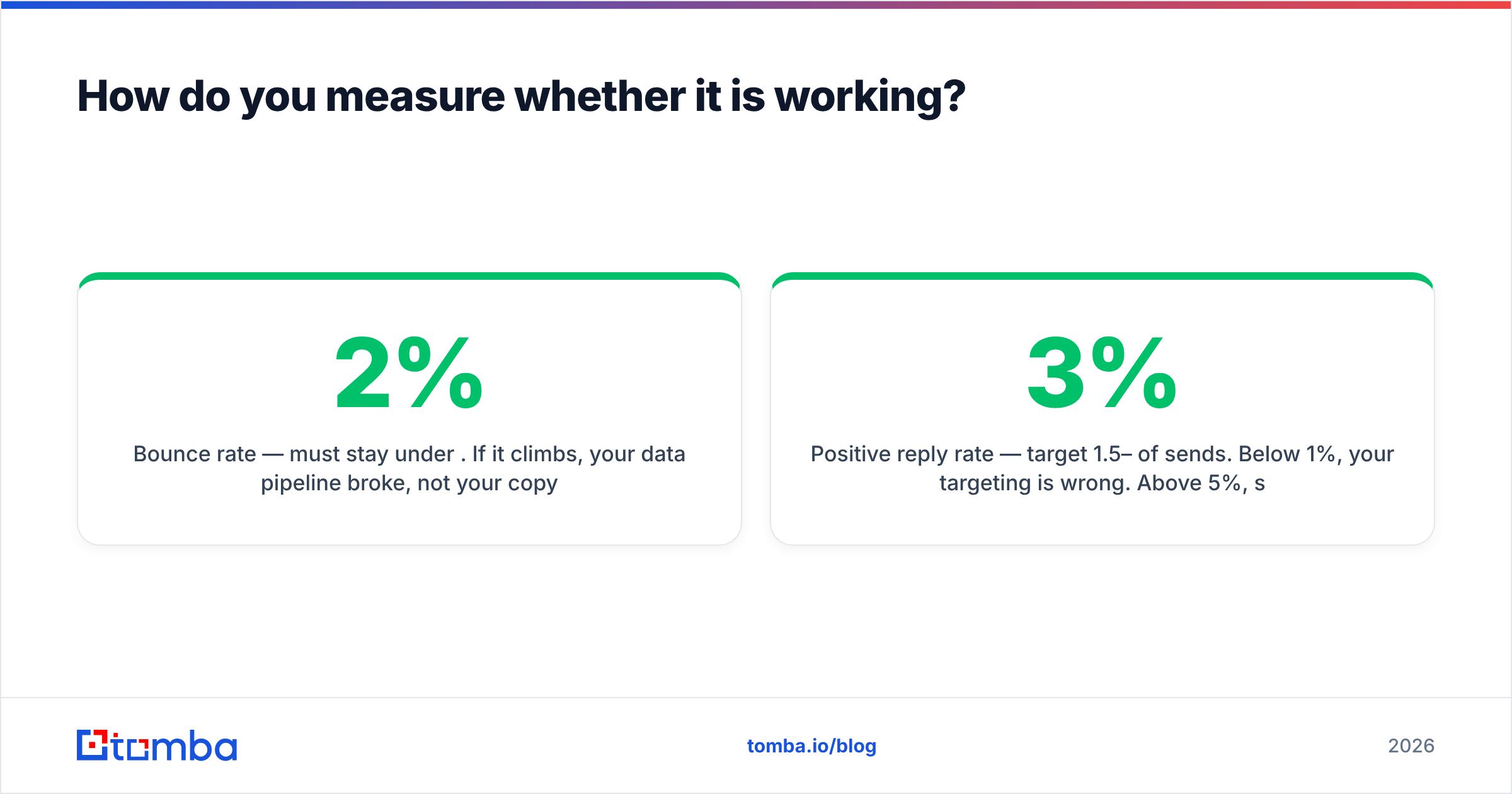
Track four numbers weekly and ignore everything else for the first 90 days:
- Bounce rate — must stay under 2%. If it climbs, your data pipeline broke, not your copy.
- Positive reply rate — target 1.5–3% of sends. Below 1%, your targeting is wrong. Above 5%, scale the segment immediately.
- Meetings per 1,000 contacts touched — the real throughput metric. 8–20 is a healthy band.
- Cost per booked meeting — data spend plus sending spend plus loaded ops salary, divided by meetings. This is the number that tells you whether to go back to the phone.
Give the system a full quarter before judging it. Domain warmup alone eats three to four weeks, and the first two sequence iterations are always worse than the third.
Where to start#
Build the list before you build the sequence. Everything downstream — deliverability, reply rates, cost per meeting — is downstream of whether you are emailing real people who actually fit.
Start with Tomba Email Finder: feed it a company domain or a name, get verified professional email addresses back with confidence scores, and export straight into your sequencer. The free tier covers 25 searches a month if you want to sanity-check your ICP before committing, and Starter at $49/month handles a typical two-person outbound motion. Build one clean 200-account segment, run the 12-day sequence above, and compare the meeting count to what your dialer produced in the same period. The numbers will tell you which motion deserves next quarter's budget.
Related guides#
// get started
Find, verify and enrich your first contacts today
Start on the free plan with 25 searches a month, then scale when your team is ready.
Free plan · No credit card required · GDPR & CCPA
// about the author