Lead Generation Workflow: A 7-Stage System That Converts
Most lead generation workflows fail at the handoff, not the top of funnel. Here are the seven stages, the tools that fit each one, and the metrics that tell you which stage is leaking.
TL;DR
- A lead generation workflow is the repeatable path a stranger takes from first signal to a booked meeting — seven stages, each with an owner, an input, and an exit criterion.
- Most workflows do not fail at the top. They fail at stage 3 (data) and stage 6 (handoff), where leads sit in a spreadsheet or die in an unclaimed queue.
- Verification belongs before outreach, not after. A 5% bounce rate is the ceiling most inbox providers tolerate; scraped lists routinely blow past 20%.
- You need exactly four numbers to debug a workflow: valid-contact rate, reply rate, meeting-held rate, and stage cycle time.
- Tooling is the last decision, not the first. Map the stages, then buy for the gaps.
What is a lead generation workflow?#
A lead generation workflow is the documented sequence of steps your team runs to turn an unknown company into a qualified conversation. Think of it like a commercial kitchen line: prep, sauté, plate, pass. Nobody's hands touch the dish twice, and every station knows what "done" looks like before it slides to the next one. Most sales teams, by contrast, run a home kitchen — everybody cooking everything, nothing labeled, and a fridge full of leads that expired two quarters ago.
The distinction that matters: a workflow is not a funnel. A funnel is a reporting artifact. A workflow is an operating procedure with owners, SLAs, and exit criteria. If you cannot answer "who touches this lead next, and by when?" at every stage, you have a funnel chart and a hope.
Three properties separate a real workflow from a list of activities:
- Every stage has a single owner. Not a team — a role. "Marketing" is not an owner.
- Every stage has a machine-readable exit criterion. "Looks interested" is not a criterion. "Booked a calendar slot" is.
- Every stage emits a metric. If a stage produces no number, you cannot tell whether it is the bottleneck.
Why do most lead generation workflows leak revenue?#
Because the leak is invisible where people look for it. Teams obsess over the top (more traffic, more lists) and the bottom (close rate), while the damage happens in the two stages nobody owns: data hygiene and the marketing-to-sales handoff.
Here is the pattern I see in audit after audit. A rep exports 2,000 contacts from a scraping tool, loads them into a sequencer, and launches on a Monday. By Wednesday the domain reputation is scorched because a third of the addresses never existed. The campaign gets blamed. The copy gets rewritten. The actual defect — unverified data entering the workflow — is never touched.

The second leak is quieter. According to HubSpot's research on sales and marketing alignment, the gap between "lead created" and "lead worked" is where the majority of pipeline evaporates. A lead that sits unclaimed for 48 hours is functionally a cold lead again — the trigger that made them relevant has passed.
Both leaks share a root cause: the workflow was designed as a set of tools rather than a set of transitions. Nobody wrote down what happens between the CRM and the sequencer.
What are the 7 stages of a lead generation workflow?#
Use this as a template and delete what you don't need. The order matters more than the labels.
- Define the trigger. Not "SaaS companies, 50-200 employees." A trigger is an event: hired a VP of Sales, raised a Series A, added a competitor's script to their site, published a job post mentioning your category. Static firmographics produce static results; events produce timing.
- Build the account list. Pull companies matching the trigger from your source of choice — job boards, funding databases, tech-stack detection, or a curated B2B database. Cap it. A list of 200 accounts you actually research beats 5,000 you spray.
- Resolve contacts and verify them. Find the specific humans at those accounts and confirm the addresses resolve before anything leaves your outbox. This is where an email finder and an email verifier do the work that no amount of copywriting can undo later.
- Enrich for personalization. Title, seniority, LinkedIn, recent activity, phone. Enrichment is not decoration — it is what makes stage 5 non-generic. Run it in bulk via data enrichment rather than one rep at a time.
- Sequence the outreach. Multi-channel, 8-14 touches, at least one non-email channel. The first email earns the reply; the rest earn the response rate.
- Route and qualify the reply. An SLA measured in minutes, not days. Every positive reply gets an owner within 15 minutes during business hours. This is the stage most teams skip documenting entirely.
- Feed the result back. Closed-won and closed-lost both return to stage 1 as trigger refinements. A workflow that doesn't learn is a script.
Which tools belong at each stage?#
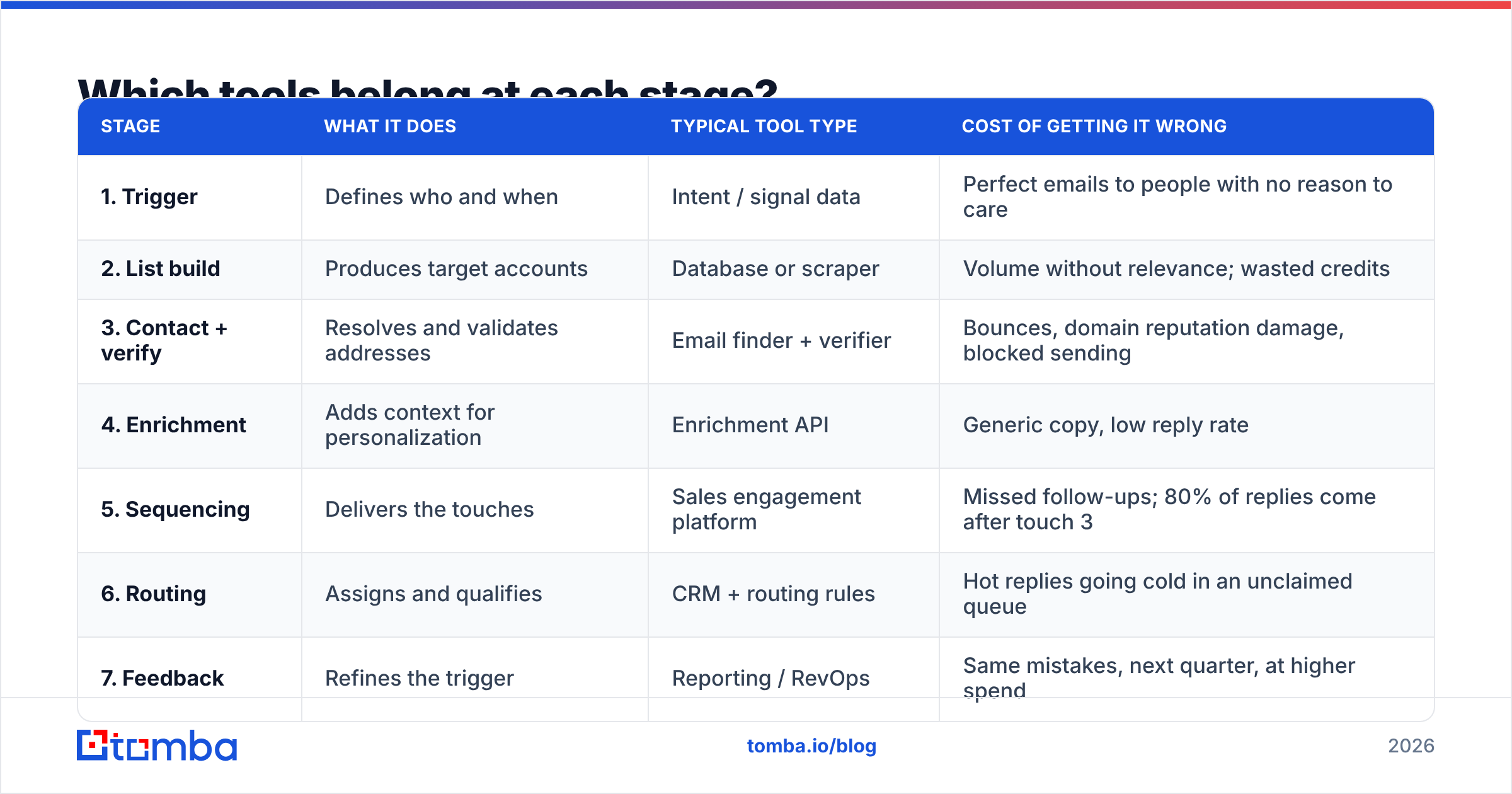
Buy for the gap, not for the category. Here's how the stages map to tooling and what each layer actually costs you if you get it wrong.
| Stage | What it does | Typical tool type | Cost of getting it wrong |
|---|---|---|---|
| 1. Trigger | Defines who and when | Intent / signal data | Perfect emails to people with no reason to care |
| 2. List build | Produces target accounts | Database or scraper | Volume without relevance; wasted credits |
| 3. Contact + verify | Resolves and validates addresses | Email finder + verifier | Bounces, domain reputation damage, blocked sending |
| 4. Enrichment | Adds context for personalization | Enrichment API | Generic copy, low reply rate |
| 5. Sequencing | Delivers the touches | Sales engagement platform | Missed follow-ups; 80% of replies come after touch 3 |
| 6. Routing | Assigns and qualifies | CRM + routing rules | Hot replies going cold in an unclaimed queue |
| 7. Feedback | Refines the trigger | Reporting / RevOps | Same mistakes, next quarter, at higher spend |
Notice that stages 3 and 4 are the only ones where the output quality is objectively measurable before you spend a single send. That makes them the cheapest place to fix a workflow — and the first place to look when reply rates drop.
Is an inbound or outbound workflow the right first build?#
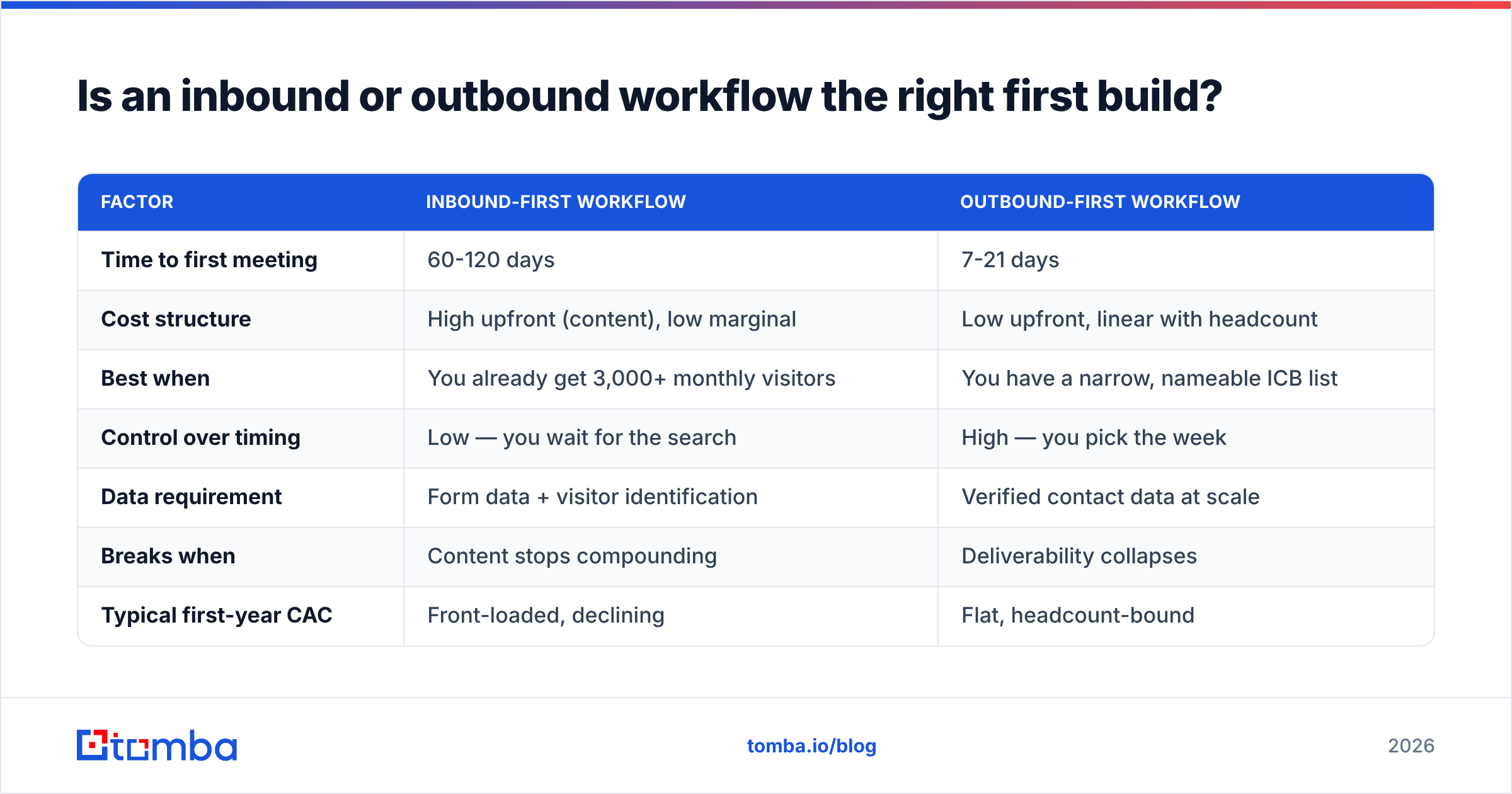
Depends on your cycle length and your current traffic. Neither is universally better, and teams that pick based on ideology rather than math lose a quarter finding out.
| Factor | Inbound-first workflow | Outbound-first workflow |
|---|---|---|
| Time to first meeting | 60-120 days | 7-21 days |
| Cost structure | High upfront (content), low marginal | Low upfront, linear with headcount |
| Best when | You already get 3,000+ monthly visitors | You have a narrow, nameable ICB list |
| Control over timing | Low — you wait for the search | High — you pick the week |
| Data requirement | Form data + visitor identification | Verified contact data at scale |
| Breaks when | Content stops compounding | Deliverability collapses |
| Typical first-year CAC | Front-loaded, declining | Flat, headcount-bound |
The honest answer for most teams under $5M ARR: build outbound first because it produces signal in weeks, then let what you learn about objections write the inbound content. Running both from day one with one RevOps person is how you get two mediocre motions.
How do you keep the data layer from poisoning everything downstream?#
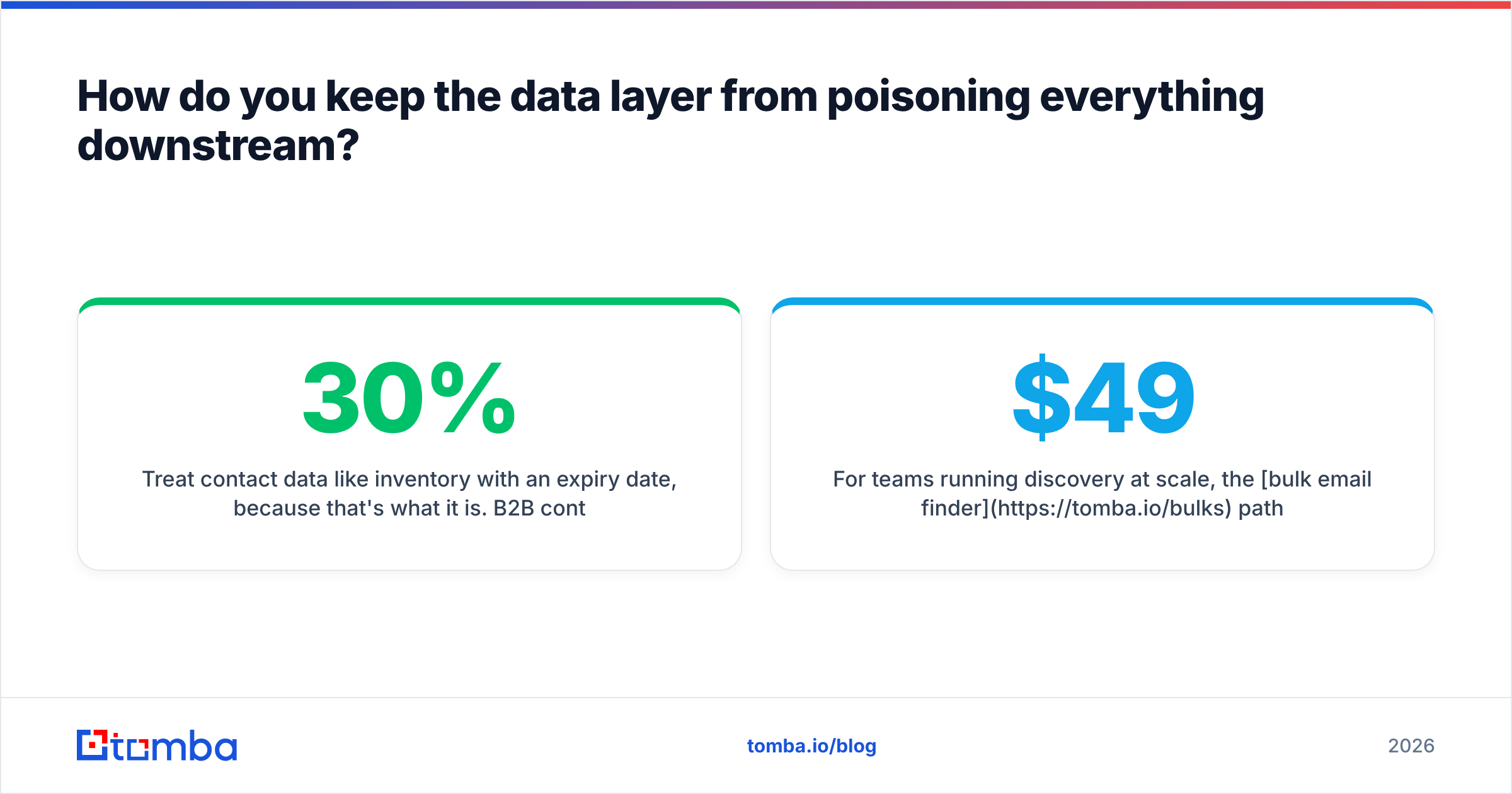
Treat contact data like inventory with an expiry date, because that's what it is. B2B contact data decays at roughly 22-30% per year as people change jobs — which means a list you bought in January is measurably worse in July, and useless by the following January.
Four rules that hold up in practice:
- Verify at the point of entry, not the point of send. Every contact that enters your CRM should be validated on the way in. Retroactive cleanup is ten times the work.
- Treat catch-all domains as their own bucket. A catch-all server accepts everything, so standard verification returns "unknown." Route them through a catch-all verifier and segment them into a lower-volume, higher-caution sending pool rather than deleting or trusting them wholesale.
- Re-verify anything older than 90 days. Cheaper than a bounce, always.
- Kill the manual CSV. Every export-import cycle is an opportunity for stale, duplicated, or malformed data. Use an API or a native integration so the data never sits still long enough to rot.
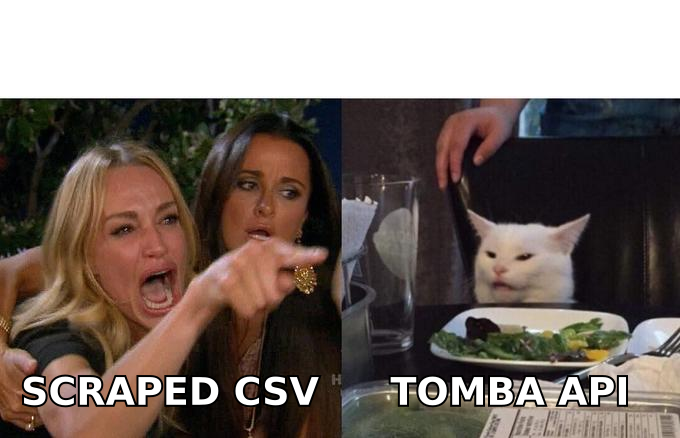
That last point is the one teams resist hardest, and it is the one with the highest return. A scraped CSV is a photograph of a moment; an email finder API call is a live query.
For teams running discovery at scale, the bulk email finder path handles list-level processing without the spreadsheet round-trip, and Tomba pricing starts with a free tier of 25 searches per month before moving to $49/mo Starter, $99/mo Growth, and $249/mo Pro — which matters when you're sizing credits against a monthly list volume rather than a one-time project.
What metrics tell you which stage is broken?#
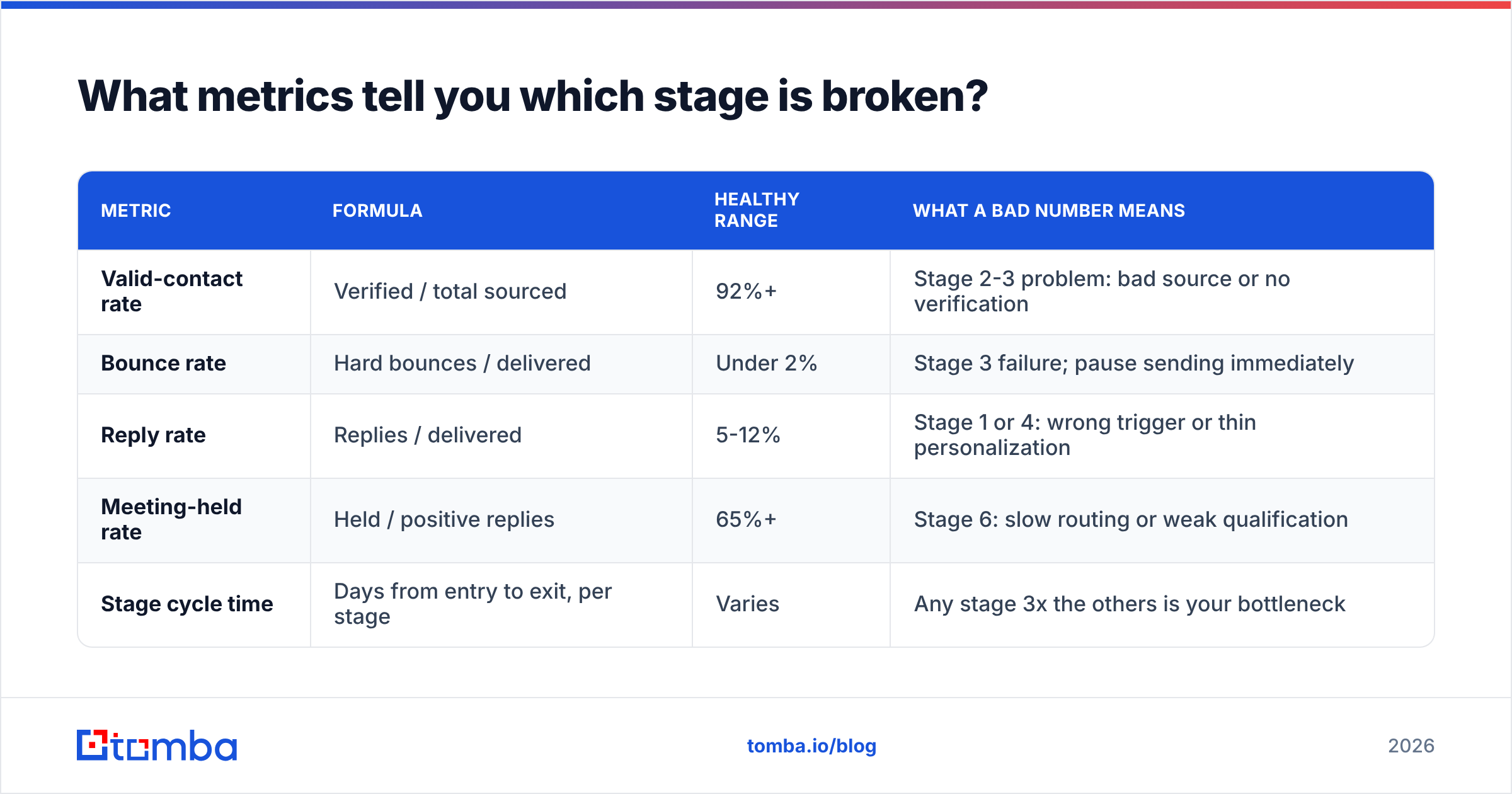
Four numbers. That's it. If you track twenty, you'll act on none.
| Metric | Formula | Healthy range | What a bad number means |
|---|---|---|---|
| Valid-contact rate | Verified / total sourced | 92%+ | Stage 2-3 problem: bad source or no verification |
| Bounce rate | Hard bounces / delivered | Under 2% | Stage 3 failure; pause sending immediately |
| Reply rate | Replies / delivered | 5-12% | Stage 1 or 4: wrong trigger or thin personalization |
| Meeting-held rate | Held / positive replies | 65%+ | Stage 6: slow routing or weak qualification |
| Stage cycle time | Days from entry to exit, per stage | Varies | Any stage 3x the others is your bottleneck |
Read these in order. A reply-rate problem is never worth diagnosing until the valid-contact rate is above 90% — otherwise you're measuring copy quality on an audience that doesn't exist. Gartner's sales research makes a version of this point repeatedly: buying groups have grown to 6-10 stakeholders, which means reach quality compounds far more than message cleverness.
How do you automate the workflow without making it brittle?#
Automate the transitions, keep judgment manual. The rule: if a step has a deterministic input and a deterministic output, automate it. If it requires reading a room, don't.
Safe to automate: contact resolution, verification, enrichment, sequence enrollment, CRM record creation, round-robin routing, re-verification schedules, duplicate merging.
Keep human: trigger definition, first-touch personalization on tier-1 accounts, reply classification for ambiguous responses, disqualification decisions.
The brittleness usually comes from over-automating stage 6. Teams build elaborate reply-classification rules, then discover that "not right now, but ping me in Q3" got auto-archived as a negative. That one misclassification costs more than the hours the automation saved. Route replies automatically; classify them manually, at least until you have a few hundred labeled examples.
On the integration side, connect the data layer directly to where the work happens — HubSpot, Salesforce, or your sequencer — rather than building a middle layer that only one person understands. Vendor comparison sites like G2's lead capture category are useful for shortlisting, but the deciding question is always the same: does this remove a manual transition, or add one?
What does a 30-day rollout look like?#
- Days 1-5: Write the seven stages down. Assign one owner per stage. Define exit criteria. No tool purchases yet.
- Days 6-12: Instrument. Get the four metrics reporting, even if they're ugly at first. You need a baseline before you change anything.
- Days 13-20: Fix the data layer. Verify your existing database, segment catch-alls, kill the CSV workflow. This alone typically moves reply rate 2-4 points without touching copy.
- Days 21-27: Rebuild one sequence against your best-performing trigger. Ship it to 200 verified contacts, not 2,000.
- Days 28-30: Review the four metrics against baseline. Whichever stage has the worst delta is next month's project.
The temptation is to run all five phases in parallel. Don't. You'll change six variables and learn nothing about which one mattered.
Where should you start this week?#
Start at stage 3, because it's the only stage you can fix in an afternoon and measure by Friday. Pull your current list, run it through verification, and look at what percentage survives. If it's under 90%, you've found your bottleneck and every downstream metric has been lying to you.
Then rebuild the sourcing step so bad data never enters again. The Tomba Email Finder handles the resolve-and-verify step in one pass — search by domain, name, or company, get a confidence score on every result, and pipe it straight into your CRM through the API or a native integration instead of a spreadsheet. The free tier gives you 25 searches a month, which is enough to audit a sample list and see exactly how much of your current database is fiction before you commit to a plan.
Related guides#
// get started
Find, verify and enrich your first contacts today
Start on the free plan with 25 searches a month, then scale when your team is ready.
Free plan · No credit card required · GDPR & CCPA
// about the author