What Is a Lead Generator? The 2026 Guide for B2B Teams
A lead generator is any system that turns anonymous demand into a contactable, qualified person. Here is how the five main types actually compare on cost, quality, and speed in 2026.
TL;DR
- A lead generator is any repeatable system — software, service, or motion — that converts anonymous demand into a named, contactable, qualified person. The software category is only one slice of it.
- There are five practical types: inbound capture tools, outbound data platforms, intent/visitor-ID tools, agency/managed services, and marketplace lead sellers. They differ 10x on cost per usable lead.
- The metric that matters is not leads per month. It's cost per qualified conversation. A 50,000-record export that bounces 38% of the time costs more than 800 verified contacts.
- Data decay is the silent tax: B2B contact data degrades roughly 22–30% per year, so any lead generator without a verification layer is selling you a depreciating asset.
- Most teams under $10M ARR do best with a stack, not a single tool: one capture layer, one contact-data layer, one verification layer.
What is a lead generator, actually?#
A lead generator is a system that produces contactable prospects on a predictable schedule.
That's the whole definition. It does not specify software. A referral program is a lead generator. A webinar series is a lead generator. So is a Chrome extension that pulls a work email off a LinkedIn profile. The term got hijacked by SaaS marketing around 2019 and now mostly means "a tool that gives me a list," which is a much smaller idea than the original.
The distinction matters because it changes what you buy. If you think a lead generator is a list tool, you buy a list tool, and then you're confused when your reply rates sit at 0.8%. If you think of it as a system, you notice that the list is one of four components — and the other three (targeting logic, verification, and the outreach motion) are where most of the failure happens.
Useful framing: a lead generator has an input (an audience definition), a mechanism (how it finds or attracts those people), an output (a record with contact details), and a decay rate (how fast that record goes stale). Evaluate any vendor on all four. Most pitches only cover the third.

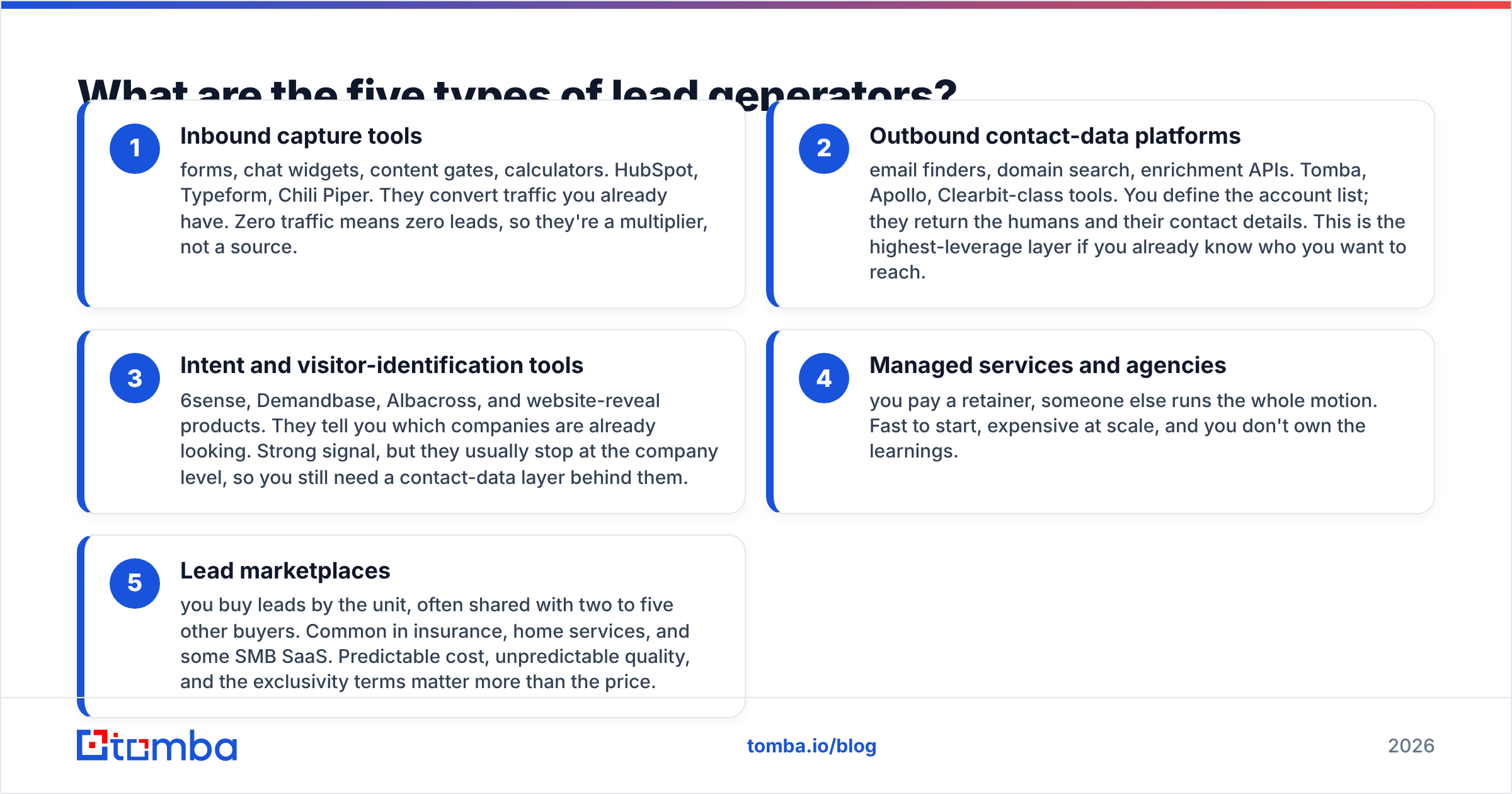
What are the five types of lead generators?#
Here's the honest taxonomy. Every vendor you'll evaluate falls into one of these five buckets, and the buckets behave very differently.
- Inbound capture tools — forms, chat widgets, content gates, calculators. HubSpot, Typeform, Chili Piper. They convert traffic you already have. Zero traffic means zero leads, so they're a multiplier, not a source.
- Outbound contact-data platforms — email finders, domain search, enrichment APIs. Tomba, Apollo, Clearbit-class tools. You define the account list; they return the humans and their contact details. This is the highest-leverage layer if you already know who you want to reach.
- Intent and visitor-identification tools — 6sense, Demandbase, Albacross, and website-reveal products. They tell you which companies are already looking. Strong signal, but they usually stop at the company level, so you still need a contact-data layer behind them.
- Managed services and agencies — you pay a retainer, someone else runs the whole motion. Fast to start, expensive at scale, and you don't own the learnings.
- Lead marketplaces — you buy leads by the unit, often shared with two to five other buyers. Common in insurance, home services, and some SMB SaaS. Predictable cost, unpredictable quality, and the exclusivity terms matter more than the price.
Most confusion in buying decisions comes from comparing a type-2 tool against a type-4 service on price alone. They aren't the same purchase. One is infrastructure you keep; the other is output you rent.
How do the main lead generator types compare on cost and quality?#
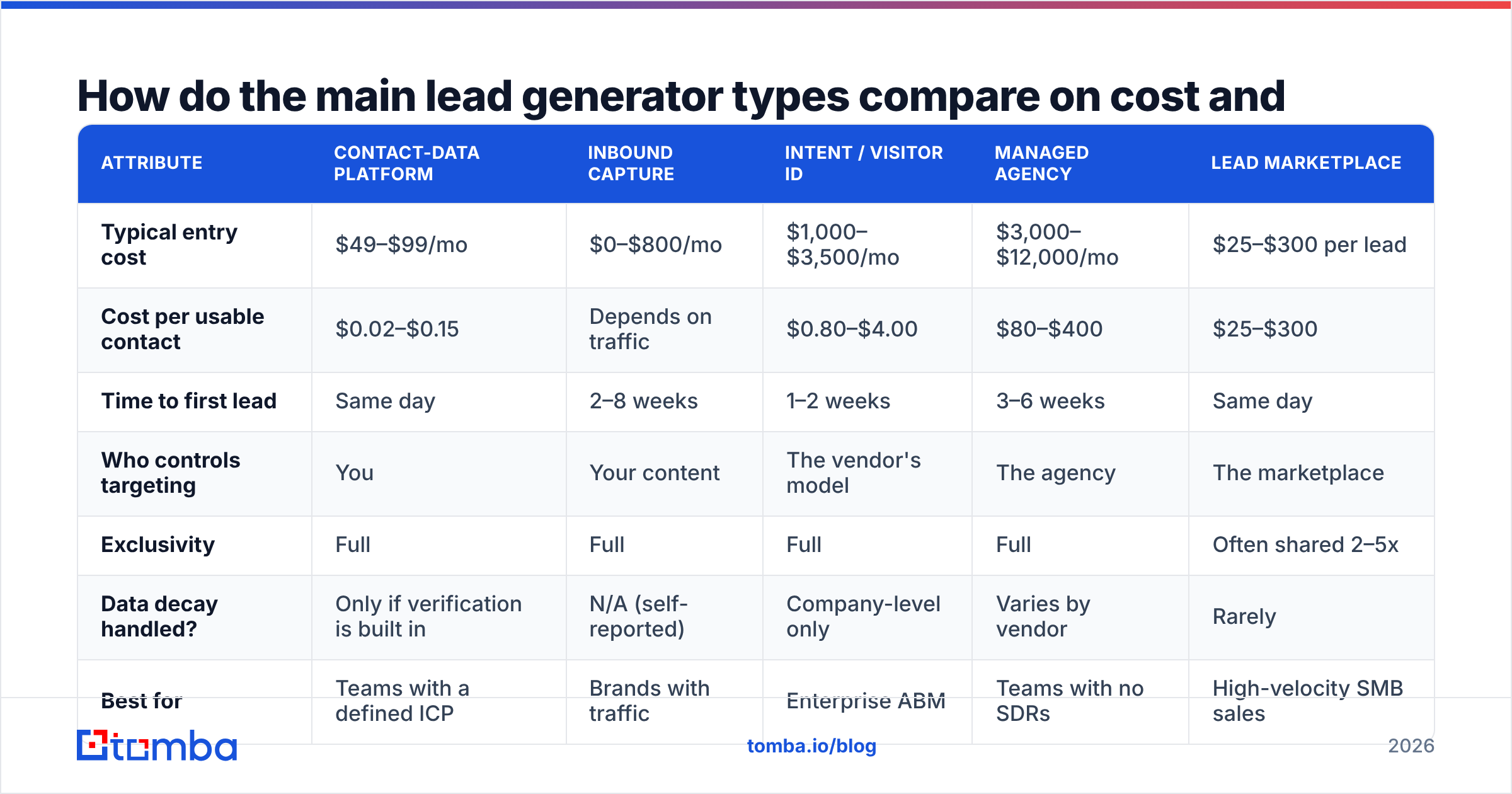
This is where the abstraction has to become numbers. The table below uses typical 2026 market ranges for a B2B team running 2,000–5,000 outbound touches per month.
| Attribute | Contact-data platform | Inbound capture | Intent / visitor ID | Managed agency | Lead marketplace |
|---|---|---|---|---|---|
| Typical entry cost | $49–$99/mo | $0–$800/mo | $1,000–$3,500/mo | $3,000–$12,000/mo | $25–$300 per lead |
| Cost per usable contact | $0.02–$0.15 | Depends on traffic | $0.80–$4.00 | $80–$400 | $25–$300 |
| Time to first lead | Same day | 2–8 weeks | 1–2 weeks | 3–6 weeks | Same day |
| Who controls targeting | You | Your content | The vendor's model | The agency | The marketplace |
| Exclusivity | Full | Full | Full | Full | Often shared 2–5x |
| Data decay handled? | Only if verification is built in | N/A (self-reported) | Company-level only | Varies by vendor | Rarely |
| Best for | Teams with a defined ICP | Brands with traffic | Enterprise ABM | Teams with no SDRs | High-velocity SMB sales |
| Worst failure mode | Stale or guessed emails | No traffic, no leads | Company ≠ person | Retainer with no pipeline | Five reps calling one buyer |
Read the "cost per usable contact" row carefully, because it's the one that reorders the ranking. A contact-data platform at $99/month that returns 5,000 verified contacts costs about two cents per record. A marketplace lead at $120 is 6,000x more expensive per unit — but it arrives pre-qualified with expressed intent. Neither number is wrong. They're buying different things: one buys reach, the other buys intent.
The trap is paying reach prices and expecting intent quality, or paying intent prices for what is effectively a filtered database export.
Why does data quality decide whether a lead generator works?#
Because a lead you can't reach is not a lead — it's a row.
B2B contact data decays continuously. People change jobs, companies rebrand, mail servers get reconfigured, and role-based addresses get retired. Industry estimates put annual B2B database decay in the 22–30% range, and it's worse in high-churn segments like startup sales and marketing roles. That means a list you bought in January is meaningfully wrong by summer, and materially wrong by the following January.
Three practical consequences:
- Bounce rate is a deliverability problem, not just a data problem. Sustained hard bounces above 2–3% start damaging sender reputation, which suppresses the deliverability of your good sends too. One bad list can degrade a quarter of outreach.
- Guessed emails are not found emails. Some tools return a pattern-generated address (
first.last@domain.com) with no validation behind it. That's a coin flip dressed as a data point. A real email verifier checks syntax, domain records, mailbox existence, and catch-all status before it says "valid." - Catch-all domains need their own handling. A large share of enterprise domains accept everything at the SMTP layer, so a naive check reports "valid" for addresses that don't exist. That's why a dedicated catch-all verifier is a separate feature, not a rounding error.
If a lead generator can't tell you its verification method, assume it doesn't have one. Ask specifically: do you validate at query time, or serve cached records? A cached record from 14 months ago has roughly a one-in-three chance of being wrong.

How do you build a lead generator system instead of buying one tool?#
Stop shopping for a single product and assemble four layers. The layers are independent — you can upgrade one without ripping out the others.
Layer 1 — Targeting logic. Write down the account criteria before you touch any tool: industry, headcount band, tech stack, funding stage, geography, trigger events. If you can't express your ICP in six filters, no lead generator will save you. This is the step teams skip, and it's the reason "the data was bad" is the most common and least accurate post-mortem.
Layer 2 — Account sourcing. Turn criteria into a company list. Sources: your CRM's closed-won patterns, a B2B database query, job-board scraping for hiring signals, tech-stack detection, or a visitor-reveal tool for accounts already on your site. Aim for 300–800 accounts per quarter per rep, not 10,000.
Layer 3 — Contact discovery. Convert companies into named people with reachable addresses. This is where domain search does the heavy lifting: give it a company domain and get back the people, roles, and email patterns in one call. For named prospects you already have, an email finder resolves first name + last name + domain into a verified address. Run this layer via API if you're doing more than a few hundred lookups a month — manual CSV shuffling breaks down fast.
Layer 4 — Verification and hygiene. Verify before send, re-verify anything older than 90 days, and suppress role-based addresses unless your motion specifically targets them. This layer costs the least and protects the most.
Build in that order. Teams that start at layer 3 — buy the tool, then figure out the ICP — end up with a large, expensive, unqualified list and a damaged sending domain.

Which lead generator vendors are worth evaluating in 2026?#
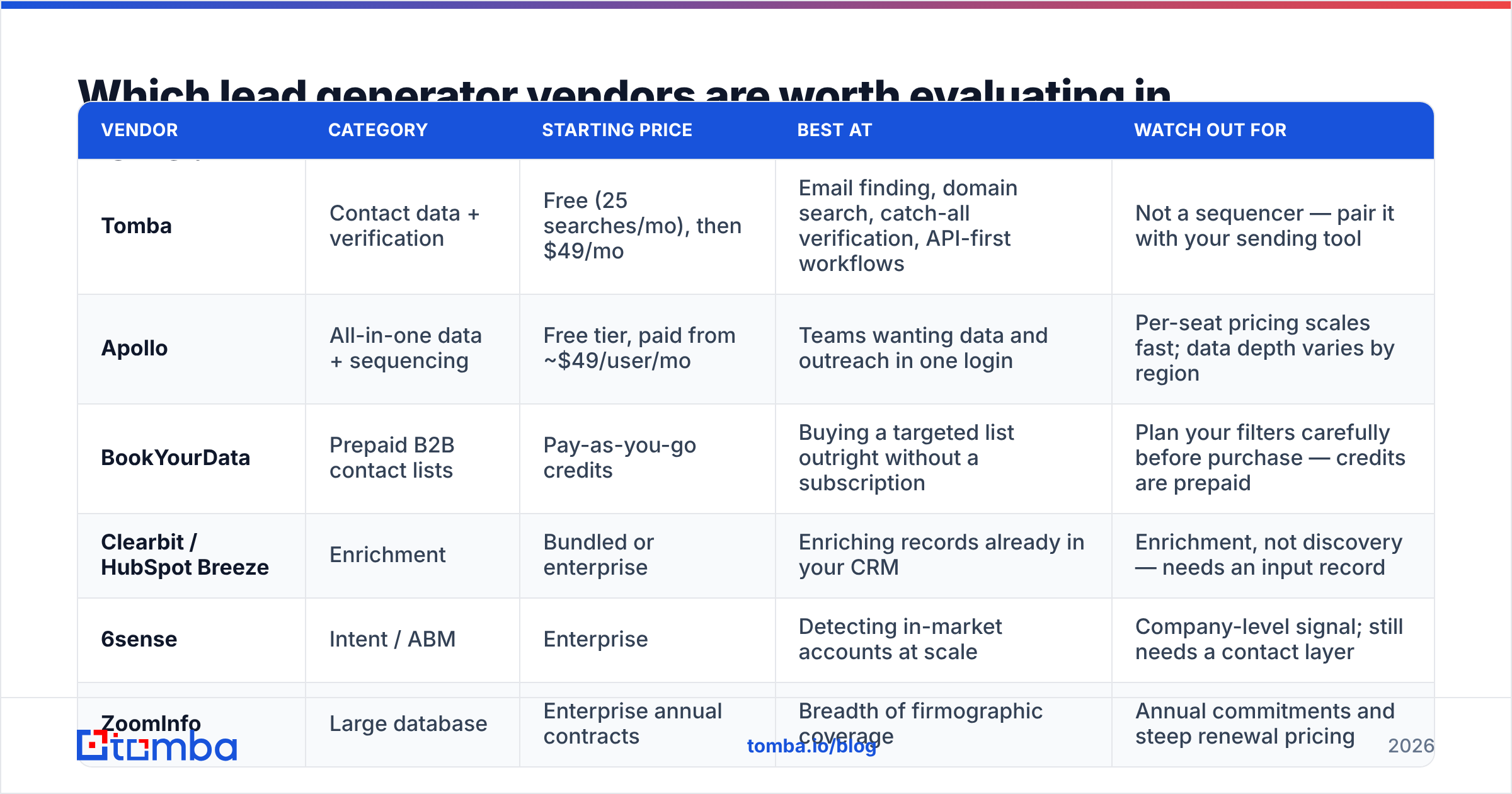
A neutral read on the field, grouped by what each one is genuinely good at.
| Vendor | Category | Starting price | Best at | Watch out for |
|---|---|---|---|---|
| Tomba | Contact data + verification | Free (25 searches/mo), then $49/mo | Email finding, domain search, catch-all verification, API-first workflows | Not a sequencer — pair it with your sending tool |
| Apollo | All-in-one data + sequencing | Free tier, paid from ~$49/user/mo | Teams wanting data and outreach in one login | Per-seat pricing scales fast; data depth varies by region |
| BookYourData | Prepaid B2B contact lists | Pay-as-you-go credits | Buying a targeted list outright without a subscription | Plan your filters carefully before purchase — credits are prepaid |
| Clearbit / HubSpot Breeze | Enrichment | Bundled or enterprise | Enriching records already in your CRM | Enrichment, not discovery — needs an input record |
| 6sense | Intent / ABM | Enterprise | Detecting in-market accounts at scale | Company-level signal; still needs a contact layer |
| ZoomInfo | Large database | Enterprise annual contracts | Breadth of firmographic coverage | Annual commitments and steep renewal pricing |
For email-finding specifically, the useful comparison axes are accuracy on verified results, how catch-all domains are reported, credit rollover policy, and whether the API is first-class or an afterthought. Tomba pricing runs Free (25 searches/mo), Starter at $49/mo, Growth at $99/mo, Pro at $249/mo, and custom Enterprise — with the verifier, domain search, and catch-all tooling included rather than sold as separate SKUs. That bundling matters more than the headline price, because the verification layer is the part you can't skip.

If you want third-party signal rather than vendor claims, G2's lead intelligence category and Capterra's lead generation listings both carry enough review volume to be directionally useful — read the 3-star reviews, not the 5-star ones. For the inbound side, HubSpot's lead generation resources are the clearest free explanation of capture mechanics even if you never buy the product.
How do you measure whether your lead generator is working?#
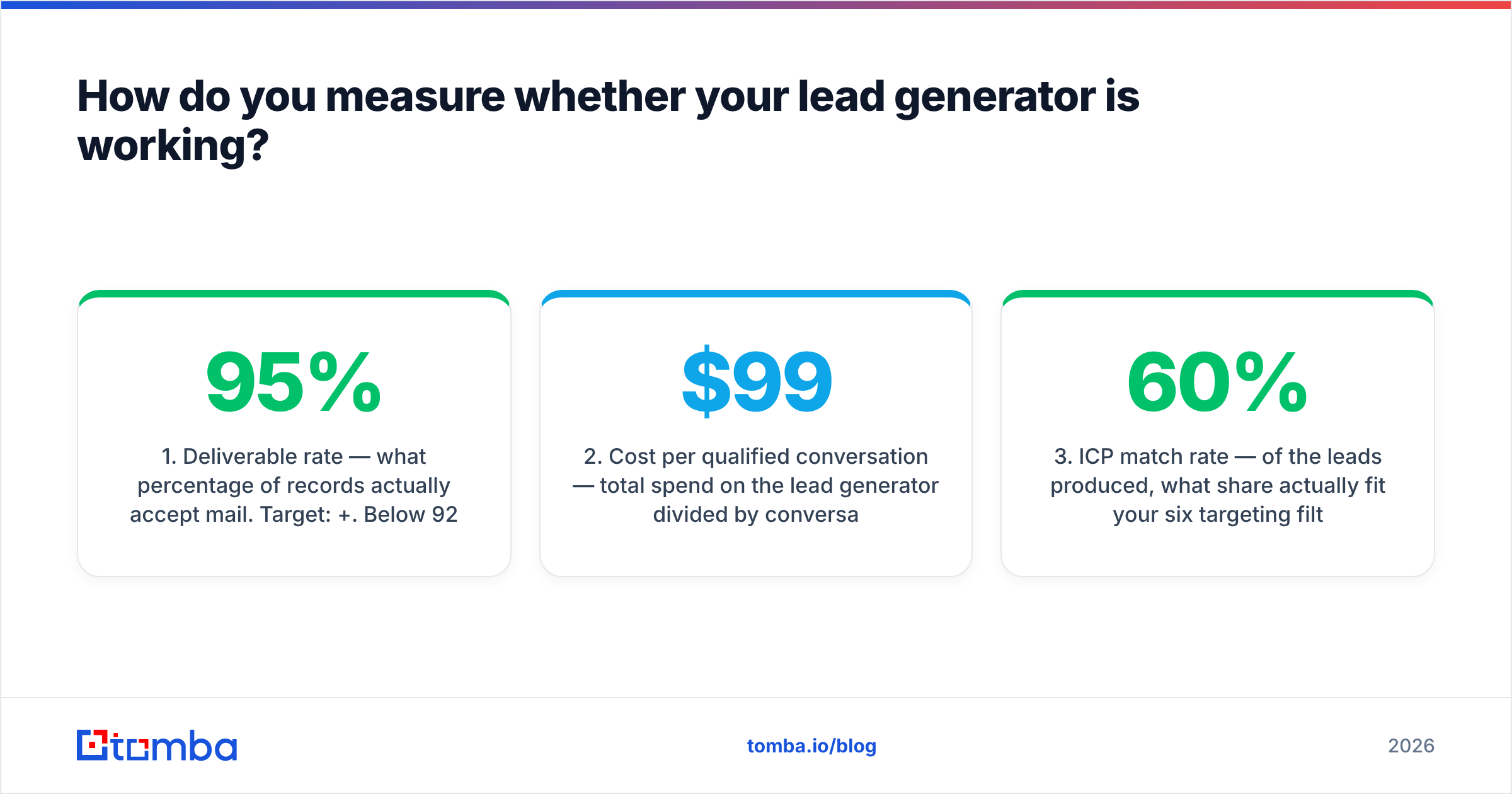
Four metrics, in priority order. Ignore everything else for the first 90 days.
- Deliverable rate — what percentage of records actually accept mail. Target: 95%+. Below 92%, stop sending and fix the data layer before you do anything else.
- Cost per qualified conversation — total spend on the lead generator divided by conversations that reached a discovery call. This is the only number that lets you compare a $99/mo tool against a $6,000/mo agency honestly.
- ICP match rate — of the leads produced, what share actually fit your six targeting filters. Under 60% means your sourcing query is wrong, not your outreach copy.
- Time to first touch — hours between a record entering your system and the first outbound attempt. Speed compounds; a 24-hour lag versus a 5-minute lag changes connect rates materially on inbound leads.
Notice that "leads generated" is absent. Volume is the metric vendors report because it's the one that always looks good. A tool that returns 40,000 records and 3 meetings lost to a tool that returned 900 records and 11 meetings.
Track response rate as a secondary diagnostic — if deliverability is healthy and ICP match is high but replies are flat, the problem has moved to your messaging, not your lead generator.
What mistakes kill lead generation programs?#
- Buying volume because it's cheap per unit. Cheap records are cheap because nobody verified them. The cost shows up later as domain reputation damage.
- Skipping the suppression list. Existing customers, open opportunities, competitors, and past unsubscribes must be filtered out at the source. This is a 20-minute setup that prevents your most embarrassing outreach failures.
- Treating one channel as the whole system. Email-only works until it doesn't. Adding a phone layer via a phone finder or a LinkedIn touch raises connect rates without raising list size.
- Never re-verifying. Set a 90-day re-verification rule and automate it. Decay doesn't pause because your list is in a spreadsheet.
- No feedback loop to targeting. Every closed-lost reason should feed back into your layer-1 filters. Lead generators get better when the ICP definition gets sharper — not when you increase the credit limit.
Should you build, buy, or outsource your lead generator?#
Quick decision rule:
- Under 2 reps, no traffic, no ICP clarity → outsource the first quarter to learn what converts, then bring it in-house. Don't sign past three months.
- Defined ICP, 2–10 reps → buy the layers. A contact-data platform plus your existing sequencer covers almost everything, usually for under $200/month total.
- Strong inbound traffic → invest in capture and routing first. You're leaving money on the table before you spend a dollar on outbound data.
- Enterprise ABM, long cycles → intent data earns its price, but only if you have the headcount to work the accounts it surfaces.
Building your own scraper is almost never right in 2026. Maintaining source coverage, handling SMTP verification at scale, and staying compliant with GDPR and CAN-SPAM is a full-time engineering job. The market price for that capability is under $100/month.
Getting started#
Pick your ICP filters, source 300 accounts, find and verify the contacts, and send. Do that once before you evaluate anything else — the exercise will tell you more about your funnel than any vendor demo.
If the contact-discovery layer is what's missing, start with the Tomba Email Finder. The free tier gives you 25 searches a month to test accuracy against accounts you already know, verification and catch-all checks are built in rather than upsold, and the Tomba API means you can wire it into your CRM once and stop exporting CSVs forever. Test it against your own closed-won list first — if the addresses it returns match the ones that actually worked, you've found your layer 3.
Related guides#
// get started
Find, verify and enrich your first contacts today
Start on the free plan with 25 searches a month, then scale when your team is ready.
Free plan · No credit card required · GDPR & CCPA
// about the author