Lead Grading in 2026: How to Score Fit Before You Send
Lead scoring tells you who is interested. Lead grading tells you who is worth your time. Here is how to build a grading model that actually filters your pipeline — with thresholds, tables, and a working setup.

TL;DR
- Lead grading ranks fit (does this account look like your best customers?). Lead scoring ranks interest (are they engaging?). Running one without the other sends reps into the wrong half of the funnel.
- A working grade is built from 5-7 firmographic and technographic attributes — industry, headcount, revenue band, geography, tech stack, job level, and one negative-signal rule.
- Grades are letters (A/B/C/D) for a reason: they force a routing decision. Scores are numbers, and numbers get argued about.
- Grading collapses without clean contact and company data. Roughly 25-30% of B2B contact records decay per year, so a grade computed on stale firmographics is a guess in a suit.
- Start manual with a 20-row spreadsheet before you buy anything. If the model can't separate your last 20 closed-won from your last 20 closed-lost, no platform will save it.
What is lead grading?#
Lead grading is the practice of assigning each lead a letter grade based on how closely it matches your ideal customer profile — independent of whether that lead has shown any buying interest.
Think of it like a restaurant checking reservations. Scoring asks "how loudly is this person knocking on the door?" Grading asks "do we even serve this kind of party?" A group of forty walk-ins knocking very loudly is still a bad fit for a twelve-seat kitchen. Technically, grading is a deterministic classification over firmographic, technographic, and demographic attributes; scoring is usually a weighted behavioral model over engagement events.
The two outputs are meant to be read together. Most mature demand-gen teams express it as a matrix: A1 means perfect fit plus hot engagement, D4 means wrong company, no interest, ignore. The letter comes from grading, the number from scoring.
Where teams go wrong is treating a high score as permission to route. A junior intern at a 4-person agency who downloaded three whitepapers and opened every email will out-score a VP of Engineering at a 2,000-person enterprise who clicked once. Without grading, your SDR calls the intern.

Why does lead grading matter more in 2026 than it did in 2021?#
Three things changed.
Volume got cheap and quality got expensive. AI-assisted content and list-building mean nearly anyone can put 50,000 contacts into a sequence. The constraint moved from "can we reach them" to "should we." Grading is the filter that reinstates scarcity in your own pipeline.
Buying committees grew. Gartner's long-running research on B2B buying puts the typical enterprise purchase group at six to ten stakeholders, each independently researching. That means a single account produces many leads with wildly different seniority — and grading at the account level, then adjusting per contact, is now table stakes. You can read Gartner's overview of the B2B buying journey for the underlying data.
Deliverability tightened. Google and Yahoo's bulk-sender requirements pushed complaint-rate ceilings low enough that spraying poorly-fit contacts now damages your domain, not just your conversion rate. Bad fit correlates with bad engagement correlates with spam complaints. Grading has become a email deliverability control, not just a prioritization one.
What attributes should go into a grading model?#
Keep it to 5-7. Every attribute you add dilutes the signal of the others and adds a data field someone has to maintain.
- Industry / vertical — the single strongest predictor in most B2B models. Pull it from SIC/NAICS or your own taxonomy, not from a free-text field.
- Company size — headcount bands beat revenue bands for accuracy, because headcount is publicly observable and revenue usually isn't. Use 1-10, 11-50, 51-200, 201-1000, 1000+.
- Job level and function — "VP+ in Revenue or Marketing" is a grade input; "Manager" is a different one. Titles are messy, so normalize to levels before grading.
- Geography — not a vanity field. If you can't legally sell, support a timezone, or invoice in a currency, that's a hard downgrade regardless of everything else.
- Technographics — does the account run a product yours integrates with, replaces, or depends on? This is often the difference between a B and an A.
- Negative signals — competitors, current customers, students, job seekers, and free-mail domains. One rule that caps the grade at D, applied before anything else.
- Data completeness — optional but underrated. A record missing three of the six inputs above shouldn't get an A by default; it should get a "needs enrichment" flag.
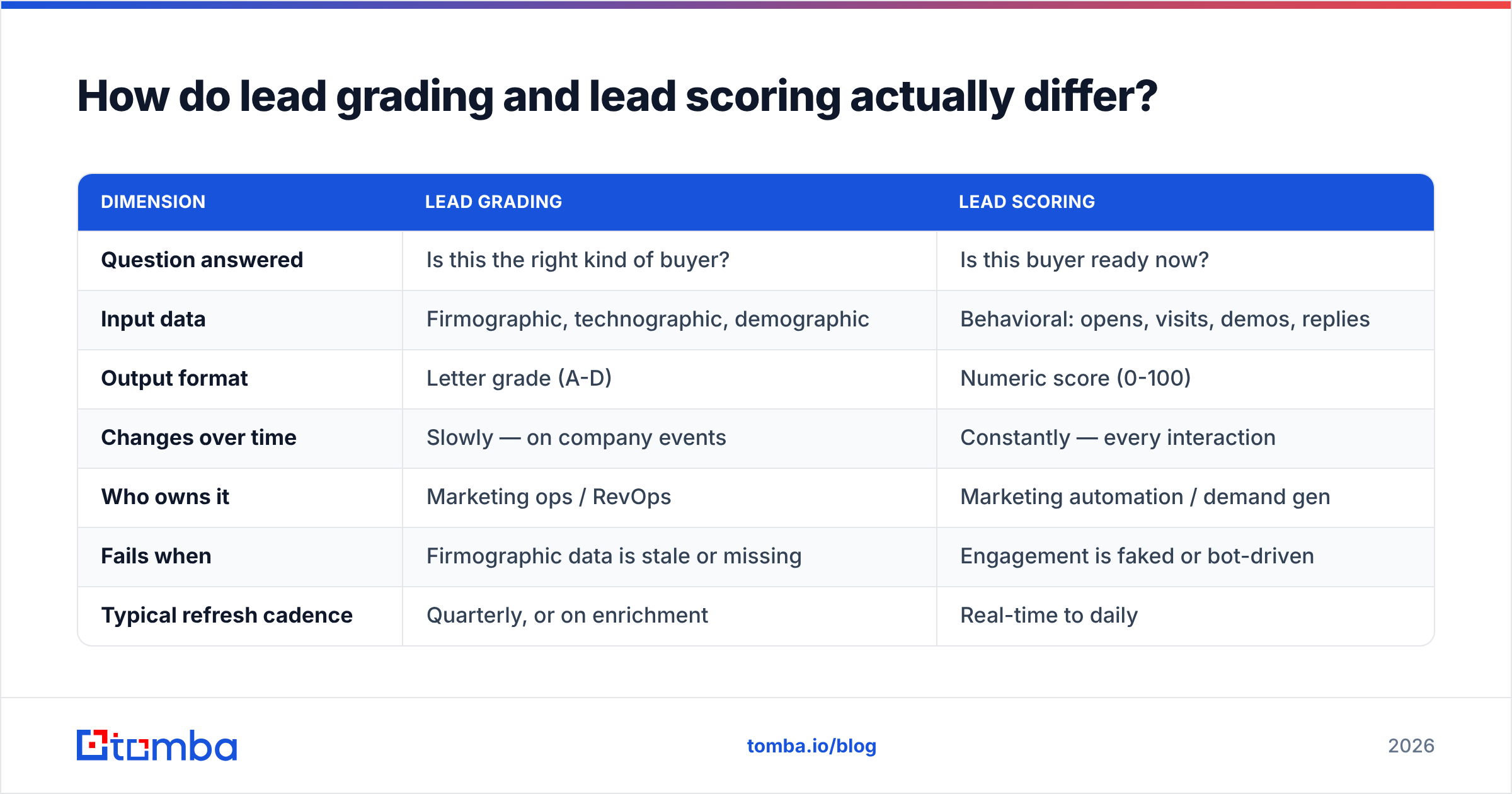
How do lead grading and lead scoring actually differ?#
| Dimension | Lead grading | Lead scoring |
|---|---|---|
| Question answered | Is this the right kind of buyer? | Is this buyer ready now? |
| Input data | Firmographic, technographic, demographic | Behavioral: opens, visits, demos, replies |
| Output format | Letter grade (A-D) | Numeric score (0-100) |
| Changes over time | Slowly — on company events | Constantly — every interaction |
| Who owns it | Marketing ops / RevOps | Marketing automation / demand gen |
| Fails when | Firmographic data is stale or missing | Engagement is faked or bot-driven |
| Typical refresh cadence | Quarterly, or on enrichment | Real-time to daily |
| Decay risk | 25-30% of contact data per year | Score inflation from low-value events |
The practical rule: grading decides whether a lead enters your pipeline, scoring decides when. Reverse those and you'll burn quota on enthusiastic non-buyers.
How do you build a lead grading model from scratch?#
Start with data you already have, not with a vendor.
Step 1 — Pull your last 30 closed-won and 30 closed-lost deals. Put them in a sheet with the seven attributes above as columns. Manually fill them in. Yes, manually. This is the only step where doing it by hand is faster than automating.
Step 2 — Look for separation. For each attribute, ask: does the closed-won column look different from the closed-lost column? If 26 of 30 wins are in software and services but losses are scattered across twelve verticals, industry is a strong attribute. If both groups have identical headcount distributions, headcount is noise — drop it.
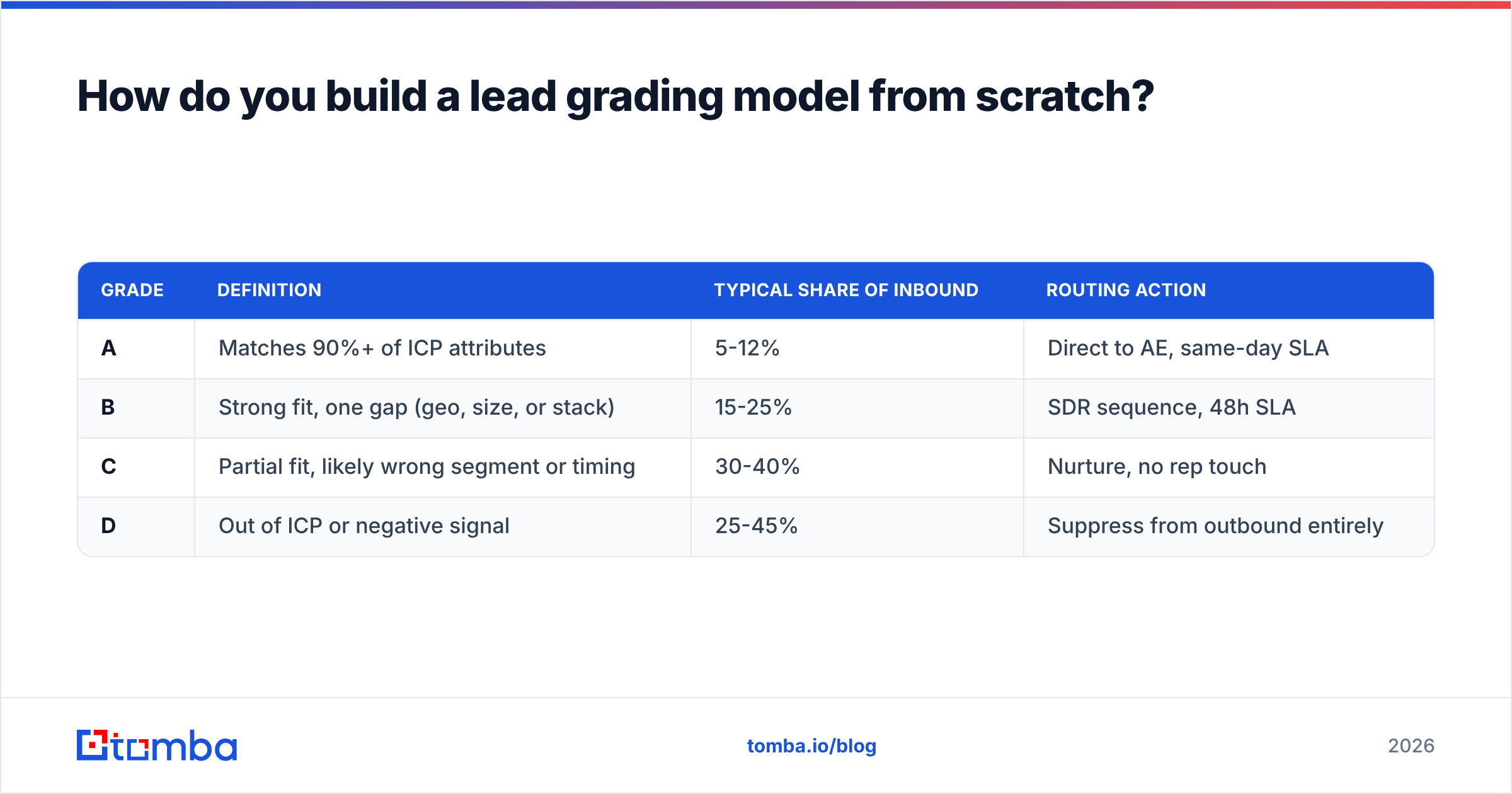
Step 3 — Assign weights, then convert to letters. Give each surviving attribute a point value proportional to its separation. Sum them. Then set letter cutoffs against your actual volume, not against a round number:
| Grade | Definition | Typical share of inbound | Routing action |
|---|---|---|---|
| A | Matches 90%+ of ICP attributes | 5-12% | Direct to AE, same-day SLA |
| B | Strong fit, one gap (geo, size, or stack) | 15-25% | SDR sequence, 48h SLA |
| C | Partial fit, likely wrong segment or timing | 30-40% | Nurture, no rep touch |
| D | Out of ICP or negative signal | 25-45% | Suppress from outbound entirely |
Step 4 — Write the negative rules explicitly. Competitors, existing customers, personal email domains for enterprise offers, and known bot traffic. These override the score.
Step 5 — Test it against a holdout. Take 20 deals you didn't use to build the model. If A-grades don't convert at least 3x C-grades, the model isn't separating anything and you should go back to step 2.

What data do you need — and where does it break?#
Grading is arithmetic. The arithmetic is trivial. The data is where every implementation dies.
You need three layers:
- Company layer — domain, industry, headcount, country, funding stage, tech stack. Sourced from enrichment providers or your own research.
- Contact layer — verified email, job title, seniority, department, and ideally a direct phone. This is the layer that rots fastest.
- Intent layer (optional) — website visits, review-site activity, hiring signals. Useful for ordering within a grade, not for setting the grade itself.
The contact layer is the failure point. People change jobs; companies rebrand; email patterns change after acquisitions. If your CRM holds an email that bounces, your grading model is scoring a ghost. Running a email verifier pass before grading — and again quarterly — keeps the inputs honest. For accounts where you have a domain but no contacts yet, a domain search fills the contact layer in bulk so grading has something to grade.
A practical sequence that works:
- Deduplicate the list (merge on domain + normalized name).
- Enrich company firmographics.
- Find and verify contact emails for the roles that match your ICP.
- Apply negative rules.
- Compute the grade.
- Push grade + grade-reason back to the CRM as two separate fields.
That last point matters more than it sounds. Storing why a lead got a B ("headcount below band") turns grading from a black box into something a rep will actually trust. Reps who don't trust the grade will ignore it, and an ignored model is a deleted model.
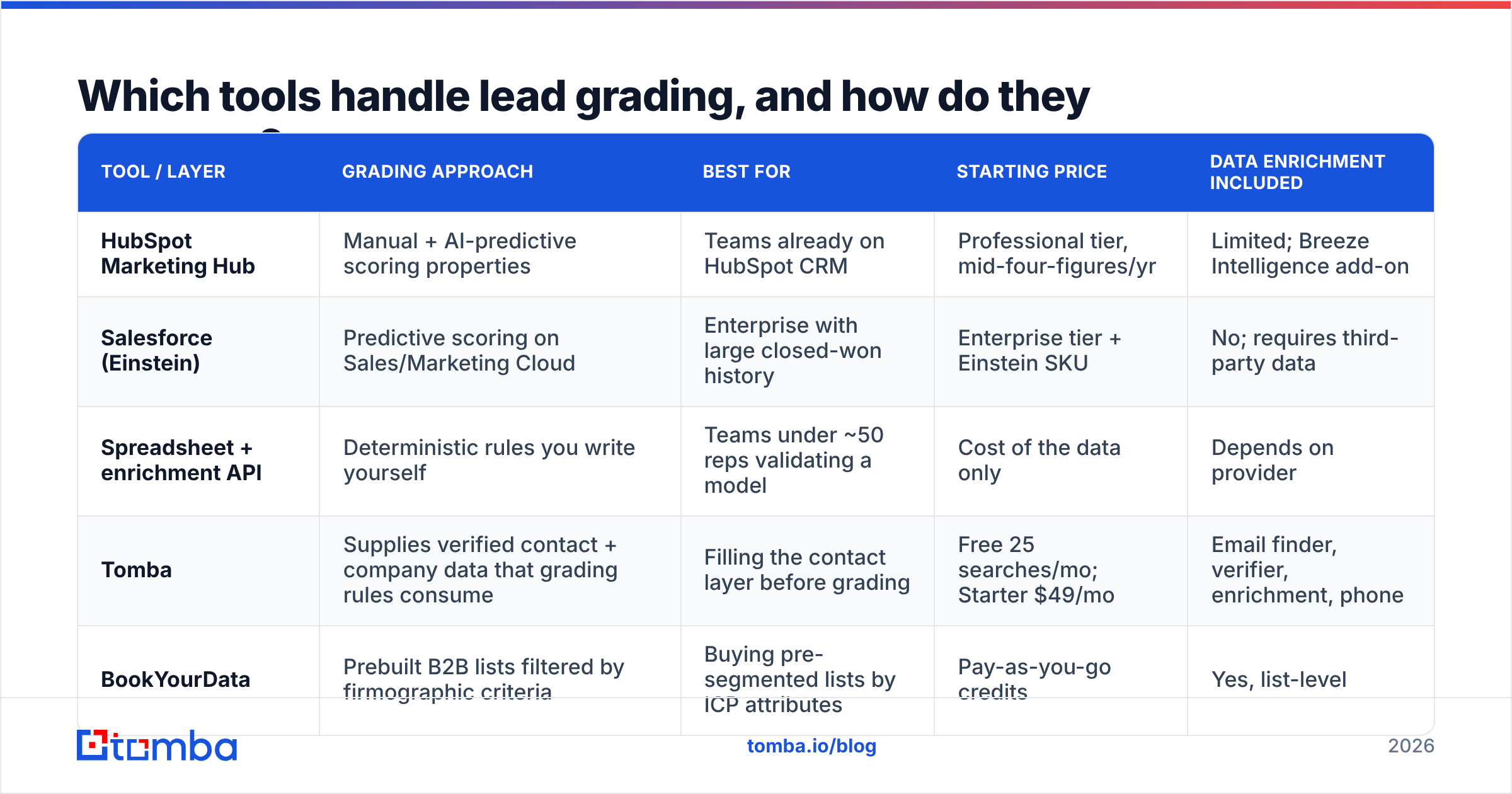
Which tools handle lead grading, and how do they compare?#
Grading lives in three different places depending on your stack maturity: inside the marketing automation platform, inside the CRM, or in a data layer that feeds both.
| Tool / layer | Grading approach | Best for | Starting price | Data enrichment included |
|---|---|---|---|---|
| HubSpot Marketing Hub | Manual + AI-predictive scoring properties | Teams already on HubSpot CRM | Professional tier, mid-four-figures/yr | Limited; Breeze Intelligence add-on |
| Salesforce (Einstein) | Predictive scoring on Sales/Marketing Cloud | Enterprise with large closed-won history | Enterprise tier + Einstein SKU | No; requires third-party data |
| Spreadsheet + enrichment API | Deterministic rules you write yourself | Teams under ~50 reps validating a model | Cost of the data only | Depends on provider |
| Tomba | Supplies verified contact + company data that grading rules consume | Filling the contact layer before grading | Free 25 searches/mo; Starter $49/mo | Email finder, verifier, enrichment, phone |
| BookYourData | Prebuilt B2B lists filtered by firmographic criteria | Buying pre-segmented lists by ICP attributes | Pay-as-you-go credits | Yes, list-level |
Note the split: HubSpot and Salesforce give you the engine, and they're genuinely good at it — HubSpot's lead scoring documentation is a solid reference even if you don't use the product. What neither gives you for free is the fuel. Einstein can't infer a headcount band that isn't in the record. BookYourData is a reasonable route if you'd rather buy lists already filtered against firmographic criteria than assemble and enrich your own. Tomba sits on the fuel side too: it finds and verifies the contacts, and data enrichment fills the firmographic fields your rules read from. Compare Tomba pricing against per-record enrichment costs if you're deciding how to fill that layer.
A note on "AI grading": predictive models are excellent when you have 500+ closed-won records with consistent field hygiene. Below that, they overfit to whatever your best-performing rep happened to sell last quarter. Deterministic rules beat a thin predictive model every time, and they're explainable to the reps who have to act on them.
How often should grades be recalculated?#
Quarterly at minimum, plus event-driven recalculation on:
- Funding or acquisition news — headcount and budget both move.
- Job change on a graded contact — the grade transfers to the new company, not the person's old record. This is a common silent failure.
- ICP redefinition — if sales leadership changes the target segment, every grade is stale the same day.
- Enrichment refresh — when you re-verify contacts, recompute grades on anything whose fields changed.
Build the recalculation as a scheduled job, not a manual project. Teams that grade once during a "lead management initiative" and never again end up with a CRM where 60% of A-grades are two years out of date — which is worse than no grading, because it looks authoritative.
What are the most common lead grading mistakes?#
- Grading on interest signals. If "visited pricing page" affects the grade, you've built a scoring model and mislabeled it.
- Too many attributes. Twelve-attribute models feel rigorous and perform worse than six-attribute ones. Each extra field is another maintenance burden and another opportunity for nulls.
- No D grade. Teams that only grade A/B/C have no mechanism to suppress bad leads, so bad leads keep entering sequences and damaging sender reputation.
- Grading contacts instead of accounts. Grade the account, then modify per contact by role. Grading each contact independently produces contradictory grades within a single company.
- Never showing the grade reason. Reps need the "why" or they'll override the grade with intuition, which is what you were trying to replace.
- Ignoring data decay. A model recomputed on stale inputs produces stale grades with fresh timestamps — the most dangerous kind of wrong.
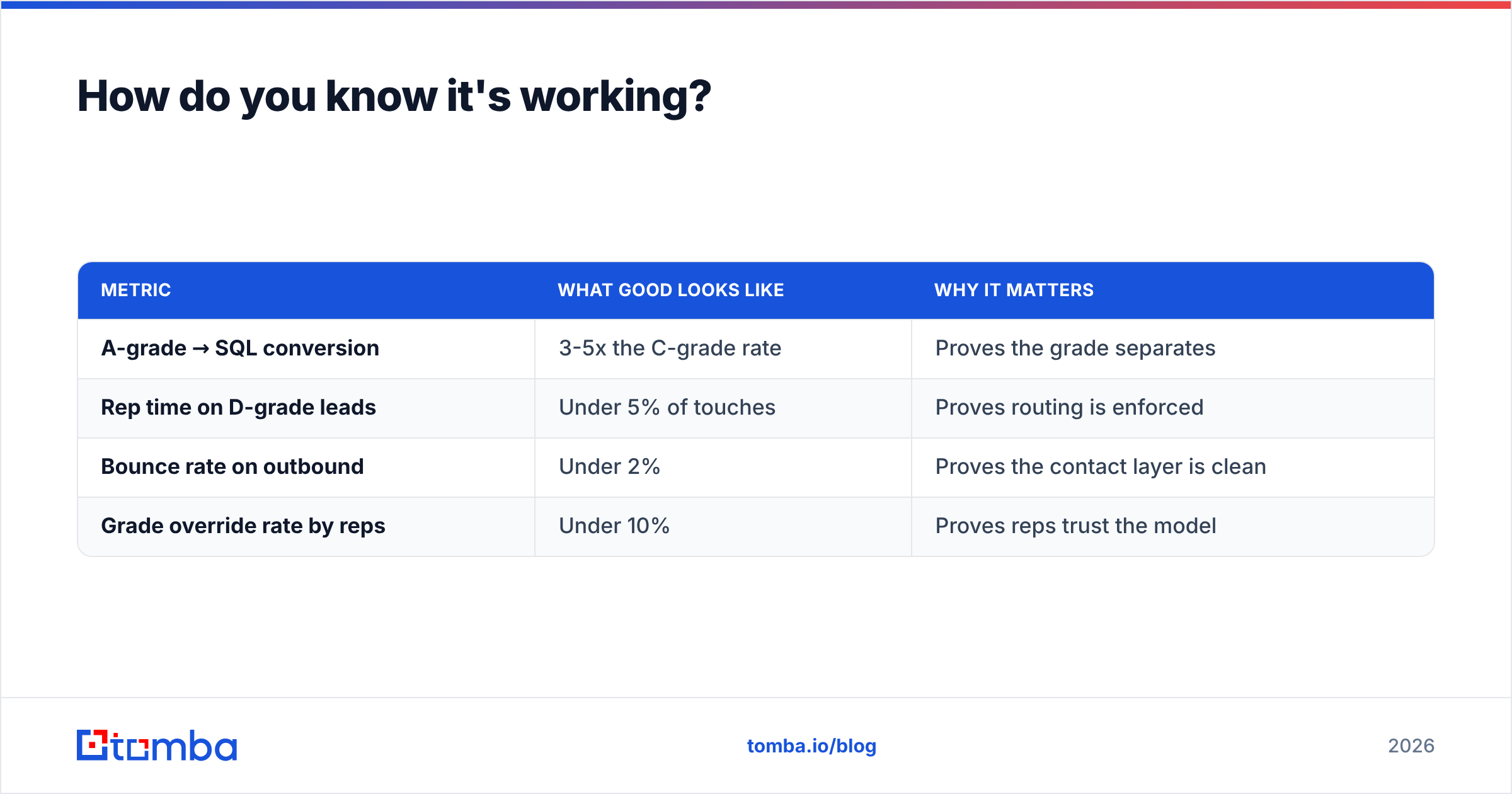
How do you know it's working?#
Track four numbers before and after implementation:
| Metric | What good looks like | Why it matters |
|---|---|---|
| A-grade → SQL conversion | 3-5x the C-grade rate | Proves the grade separates |
| Rep time on D-grade leads | Under 5% of touches | Proves routing is enforced |
| Bounce rate on outbound | Under 2% | Proves the contact layer is clean |
| Grade override rate by reps | Under 10% | Proves reps trust the model |
If the override rate is above 25%, don't argue with the reps — they're usually right, and the model is missing an attribute they can see and you can't. Interview five of them and add what they're actually using.
Where to start this week#
Pick 30 closed-won accounts. Build the sheet. Find the separation. Write four letter cutoffs. Ship it as a CRM field with a reason column. You can do that in two afternoons without buying anything.
The part you probably do need help with is the contact layer — the verified emails, titles, and company data that your grading rules read from. Stale inputs are what turn a good model into an expensive one. Tomba Email Finder finds and verifies professional email addresses by domain, name, or company, so the firmographic and contact fields feeding your grades reflect who's actually there. Start on the free tier with 25 searches a month, or move to Starter at $49/mo when you're grading at volume.
Related guides#
// get started
Find, verify and enrich your first contacts today
Start on the free plan with 25 searches a month, then scale when your team is ready.
Free plan · No credit card required · GDPR & CCPA
// about the author