Lead Intelligence in 2026: How It Works and What It Costs
Lead intelligence is what separates a list of names from a pipeline. Here's how the data layers actually work, what the stack costs in 2026, and where most teams overspend.
TL;DR
- Lead intelligence is the layer that turns a name into a decision: who the person is, what company they work at, whether you can actually reach them, and whether now is the right moment.
- Four layers matter — identity, firmographic, contact, and signal. Most teams buy layer 2 heavily and neglect layers 3 and 4, which is why enriched lists still bounce.
- Contact accuracy is the cheapest lever. A 92% valid rate versus a 74% valid rate changes your effective cost per meeting more than any AI scoring model will.
- A working 2026 stack runs roughly $150–$600/month for a small team. Enterprise "intelligence platforms" start near $15k/year and often duplicate what you already have.
- Buy signals before you buy more records. A 500-contact list filtered by hiring, funding, or tech-stack changes outperforms a 50,000-contact static export.
What is lead intelligence, actually?#
Lead intelligence is the practice of attaching enough verified context to a lead that a rep can decide — in under ten seconds — whether to work it, when to work it, and what to say.
Think of it like a doctor's chart versus a name on a waiting-room list. The list tells you someone is here. The chart tells you their history, current symptoms, and what treatment is likely to work. Both refer to the same person. Only one lets you act.
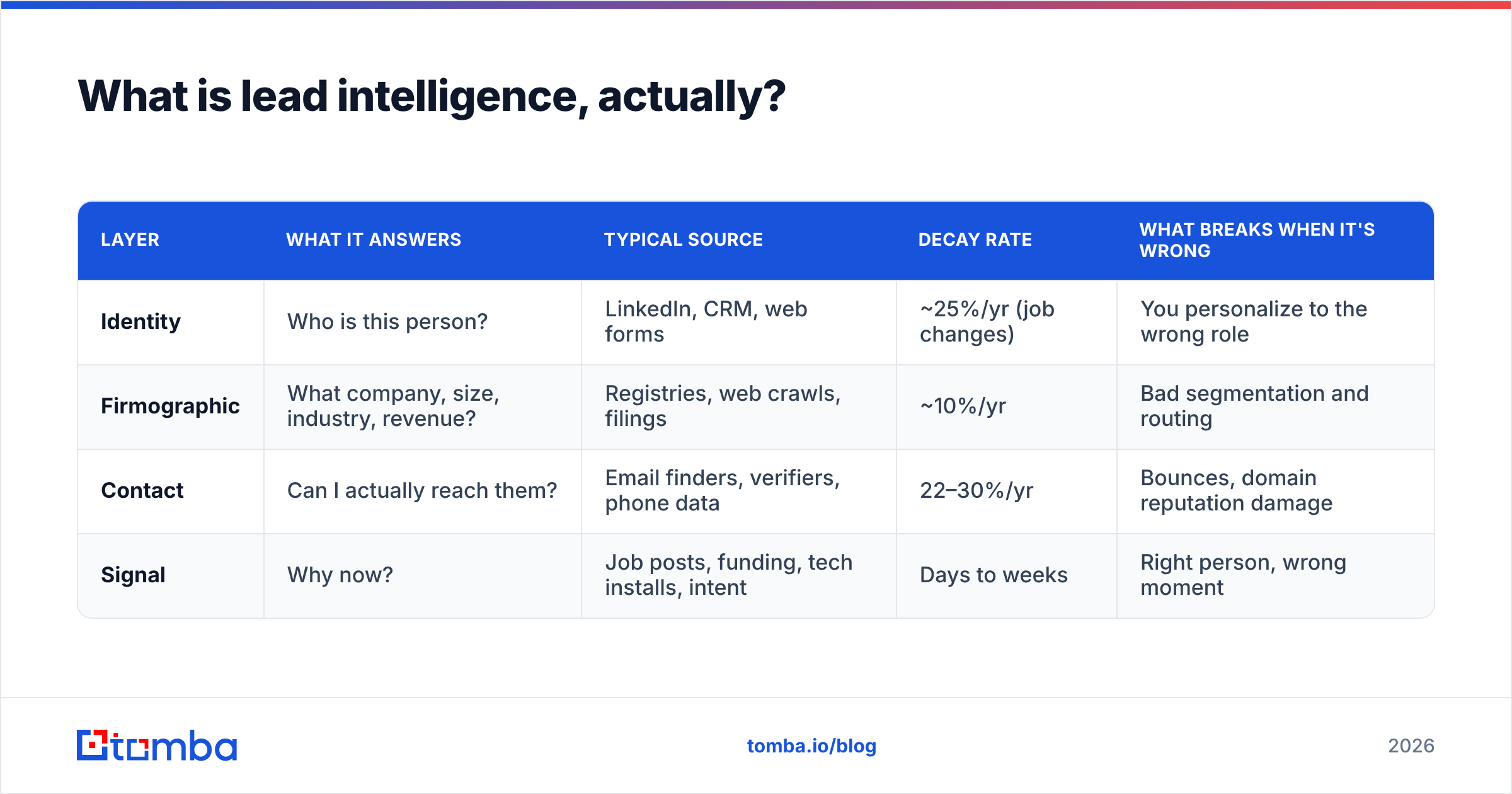
The term gets used loosely. Vendors apply it to everything from a contact database to a predictive AI scoring engine. In practice, lead intelligence breaks into four distinct layers, and they have very different cost curves and failure modes.
| Layer | What it answers | Typical source | Decay rate | What breaks when it's wrong |
|---|---|---|---|---|
| Identity | Who is this person? | LinkedIn, CRM, web forms | ~25%/yr (job changes) | You personalize to the wrong role |
| Firmographic | What company, size, industry, revenue? | Registries, web crawls, filings | ~10%/yr | Bad segmentation and routing |
| Contact | Can I actually reach them? | Email finders, verifiers, phone data | 22–30%/yr | Bounces, domain reputation damage |
| Signal | Why now? | Job posts, funding, tech installs, intent | Days to weeks | Right person, wrong moment |
The decay column is where most budgets leak. A firmographic record you bought in January is still roughly accurate in December. A contact record from January is meaningfully worse — people change jobs, companies migrate mail providers, aliases get retired. If you treat all four layers as one purchase with one refresh cycle, you will overpay for stable data and under-refresh the volatile kind.

Replace the alt text conceptually: the point is that enrichment is not a one-time event.

Why do enriched lists still bounce?#
Because enrichment and verification are different operations, and most stacks only do the first.
Enrichment appends. It takes "Sarah Chen, Acme Corp" and returns a job title, a company size, a LinkedIn URL, and a guessed email. Verification confirms. It asks the receiving mail server whether that address exists right now.
A large share of "enriched" records carry pattern-guessed emails. The vendor knows Acme uses first.last@acme.com, so it constructs sarah.chen@acme.com and returns it with no confidence flag, or with a vague "high confidence" label. If Sarah is actually s.chen@ or left four months ago, you find out when the bounce arrives.
That bounce is not a neutral event. Mailbox providers read hard bounce rates as a signal of list hygiene. Cross roughly 2% sustained and your inbox placement drops for every recipient, including the good addresses. You have converted a data problem into an email deliverability problem, which is far more expensive to unwind.
The fix is boring and effective: separate the two steps. Enrich from whatever source you like, then run every address through an independent email verifier before it touches a sending tool. Treat catch-all domains as their own bucket — a catch-all verifier gives you a probabilistic read instead of a blind accept, which matters because catch-all domains are roughly a quarter of mid-market B2B and rising as more companies sit behind Microsoft 365 and Google Workspace defaults.
The four checks worth running before any send#
- Syntax and domain validity — catches typos and dead domains instantly, costs nothing.
- MX record presence — confirms the domain can receive mail at all. Parked domains fail here.
- SMTP-level mailbox check — the real test. Does this specific mailbox accept mail?
- Catch-all classification — flag domains that accept everything, then score them separately rather than mixing them into your main list.
- Role-account filtering —
info@,sales@,support@rarely convert in outbound and inflate your complaint risk. - Recency stamp — when was this address last confirmed? Anything older than 90 days should be re-checked before a campaign.
Teams that run all six typically land in the low-to-mid 90s for valid rate. Teams that skip to sending after enrichment often sit in the 70s and cannot understand why their reply rate looks fine but their deliverability keeps sliding.
What does a lead intelligence stack cost in 2026?#
Less than most teams assume, if you buy by layer instead of by platform.
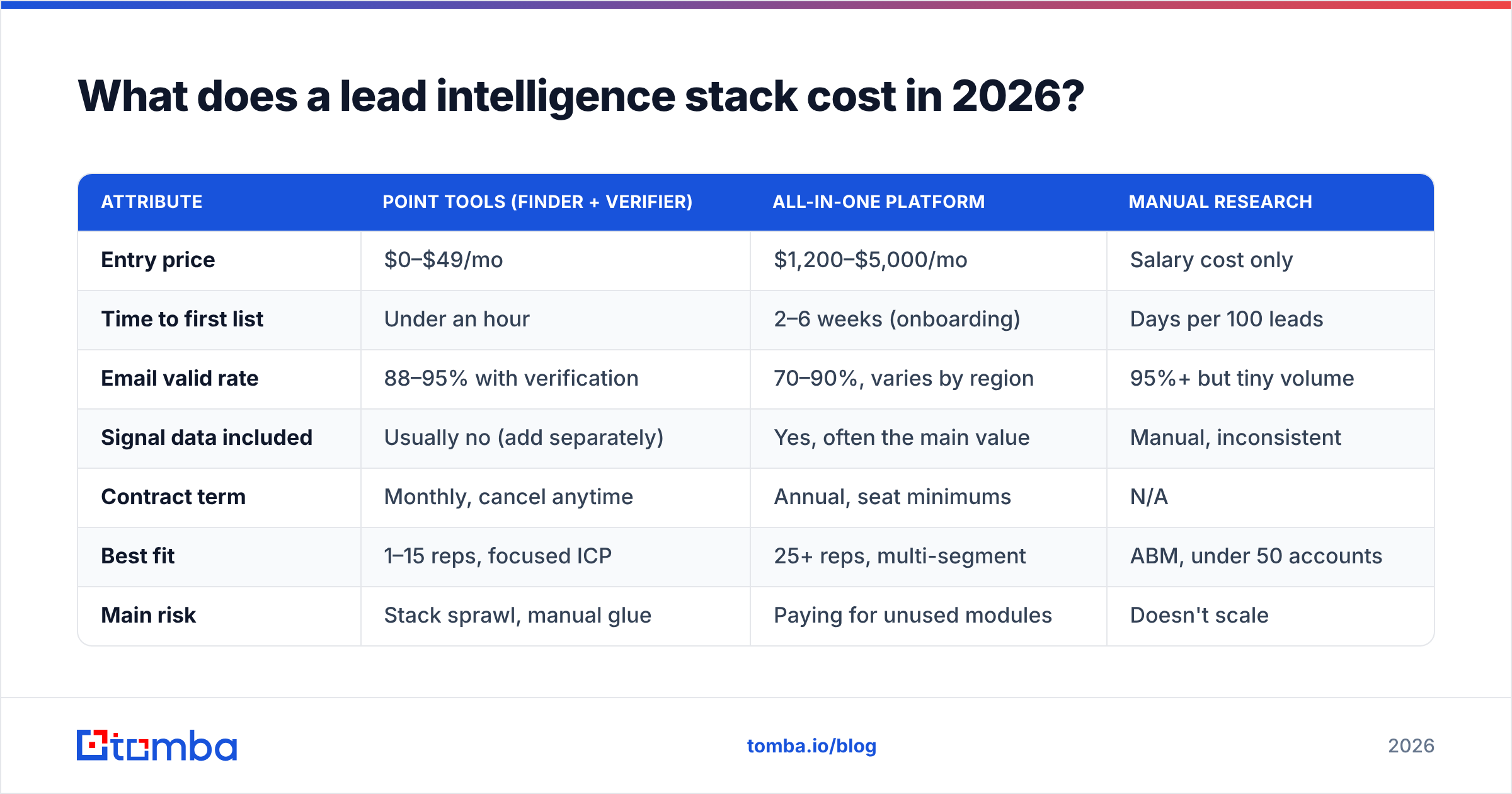
The all-in-one "revenue intelligence platform" pitch bundles all four layers into one annual contract. That is convenient and, for a 40-rep org with complex routing, often correct. For a five-person team it usually means paying enterprise rates for firmographic data you could get for a fraction, plus a scoring model you will not tune.
Here is how the common approaches compare on the attributes that actually drive cost per meeting:
| Attribute | Point tools (finder + verifier) | All-in-one platform | Manual research |
|---|---|---|---|
| Entry price | $0–$49/mo | $1,200–$5,000/mo | Salary cost only |
| Time to first list | Under an hour | 2–6 weeks (onboarding) | Days per 100 leads |
| Email valid rate | 88–95% with verification | 70–90%, varies by region | 95%+ but tiny volume |
| Signal data included | Usually no (add separately) | Yes, often the main value | Manual, inconsistent |
| Contract term | Monthly, cancel anytime | Annual, seat minimums | N/A |
| Best fit | 1–15 reps, focused ICP | 25+ reps, multi-segment | ABM, under 50 accounts |
| Main risk | Stack sprawl, manual glue | Paying for unused modules | Doesn't scale |
A concrete build for a small team in 2026: an email finder and verifier at the $49–$99/month tier, a signal source (job-post scraping or a funding feed) at $50–$200/month, and your CRM's native firmographic enrichment, which you are often already paying for. That is $150–$400/month for a stack that covers all four layers.
For reference, Tomba pricing starts with a free tier at 25 searches per month, then Starter at $49/mo, Growth at $99/mo, and Pro at $249/mo, with Enterprise quoted custom. HubSpot and Salesforce both ship basic company enrichment inside their standard tiers, which covers layer 2 for many teams without a separate line item. If you want third-party validation of vendor claims before committing, G2 category pages remain the least-bad source for volume-weighted user reviews.
Where teams overspend: buying a second contact database because the first one "missed" a segment. Before you do that, measure your actual match rate on a sample of 200 known-good accounts. Most coverage complaints turn out to be a targeting problem — you are searching for a role that does not exist at companies of that size — not a database gap.
Which signals actually predict a reply?#
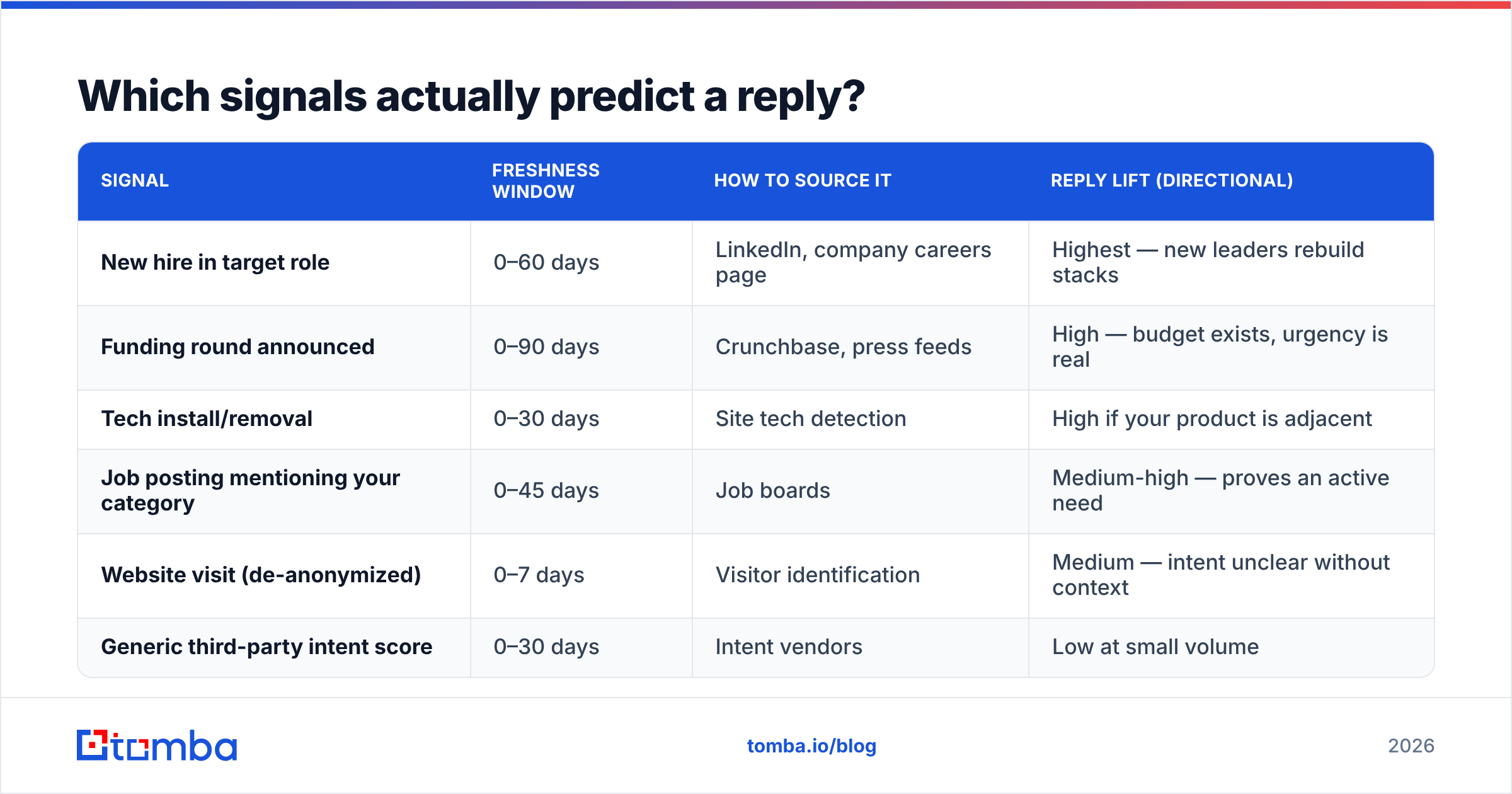
Three, consistently: a relevant hire, new funding, and a tech-stack change that implicates your category.
Everything else in the signal marketplace is noise-adjacent. "Intent data" — aggregated content consumption at the account level — has real value at enterprise scale, where you are choosing which 200 of 5,000 target accounts to work this quarter. At small volumes it mostly tells you that someone at a 4,000-person company read an article, which is not actionable.
| Signal | Freshness window | How to source it | Reply lift (directional) |
|---|---|---|---|
| New hire in target role | 0–60 days | LinkedIn, company careers page | Highest — new leaders rebuild stacks |
| Funding round announced | 0–90 days | Crunchbase, press feeds | High — budget exists, urgency is real |
| Tech install/removal | 0–30 days | Site tech detection | High if your product is adjacent |
| Job posting mentioning your category | 0–45 days | Job boards | Medium-high — proves an active need |
| Website visit (de-anonymized) | 0–7 days | Visitor identification | Medium — intent unclear without context |
| Generic third-party intent score | 0–30 days | Intent vendors | Low at small volume |
The operational pattern that works: define a narrow trigger, monitor it continuously, and enrich only the accounts that fire. You can check a company's stack with a website tech stack lookup, and identify anonymous traffic with visitor identification if your site gets meaningful B2B traffic. Then run contact discovery against just those accounts.
This inverts the usual sequence. Most teams buy 25,000 contacts and then look for reasons to email them. The better order is to find 300 accounts with a live reason, then find the right two people at each. Your total contact spend drops, your valid rate rises because you are enriching fresh, and your messaging writes itself because the trigger is the hook.

How do you build a lead intelligence workflow that holds up?#
Start from the account, not the contact. Five steps, in order.
Step 1 — Define the trigger, not the persona. "VP of Engineering at a Series B SaaS company" is a persona. "Series B SaaS company that posted a platform engineering role in the last 30 days" is a trigger. The trigger has a timestamp, which means it expires, which means you work it now.
Step 2 — Resolve the account. Confirm the domain, size band, and whether they are already in your CRM as an open opportunity or a closed-lost you should not re-touch. This step prevents the most embarrassing outbound failures.
Step 3 — Find the right humans. Use domain search to see the email pattern and who sits behind it, then narrow to the two or three people whose job the trigger touches. More contacts per account is not better — three well-chosen people at 200 accounts beats eight people at 200 accounts, and it halves your complaint exposure.
Step 4 — Verify, then segment by confidence. Valid addresses go to your main sequence. Catch-all and risky addresses go to a lower-volume, slower sequence on a separate sending domain. Unknowns get a LinkedIn touch instead. This single split protects your sender reputation more than any warmup tool.
Step 5 — Write back everything. Every enrichment result, every verification status, every trigger timestamp goes into the CRM. If it lives only in a spreadsheet, you will re-buy it in six months. Most teams wire this with a HubSpot integration or through the Tomba API directly into their own pipeline.
What to measure#
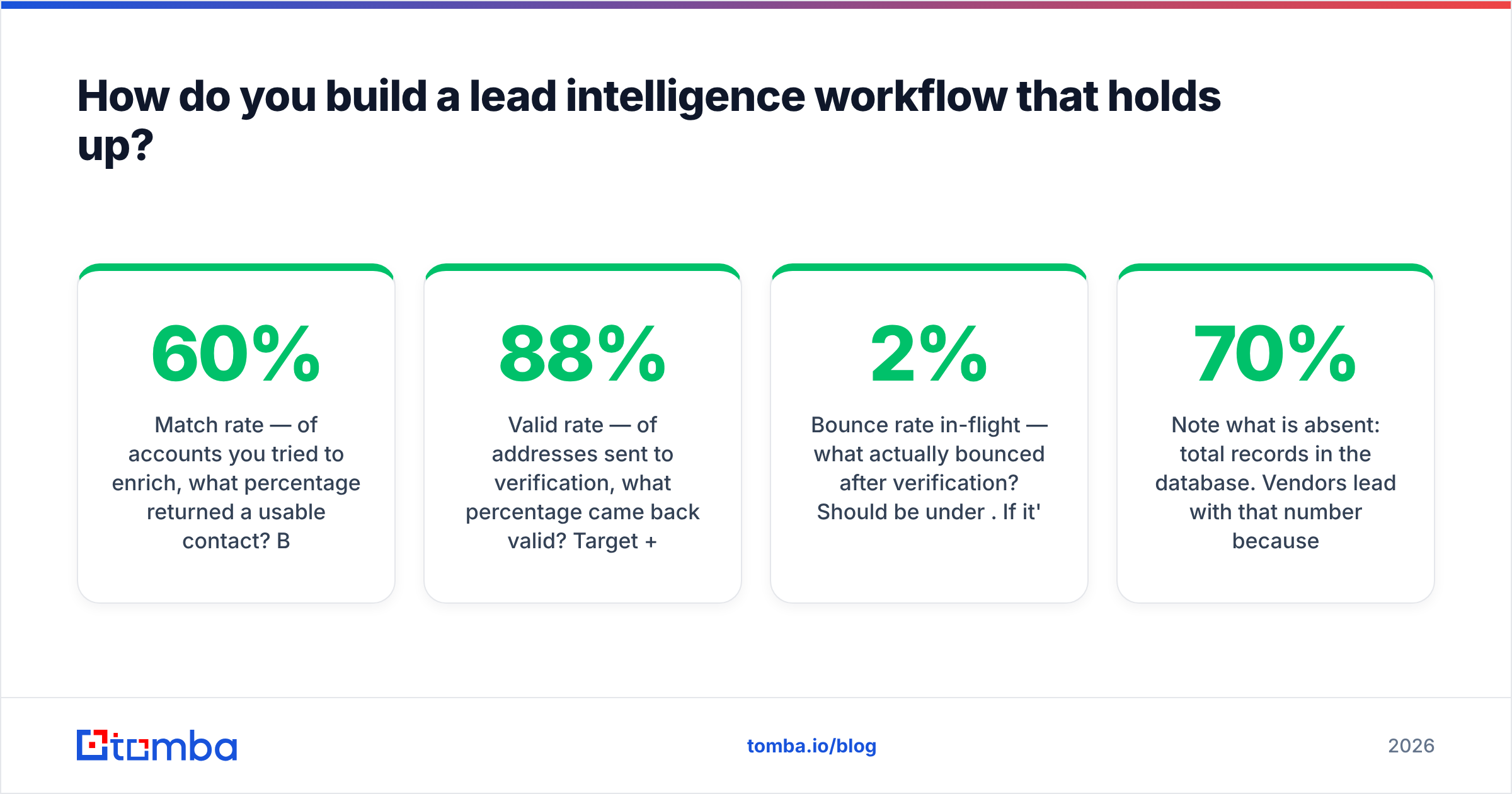
Track four numbers monthly, and only four:
- Match rate — of accounts you tried to enrich, what percentage returned a usable contact? Below 60% means a targeting problem, not a vendor problem.
- Valid rate — of addresses sent to verification, what percentage came back valid? Target 88%+.
- Bounce rate in-flight — what actually bounced after verification? Should be under 2%. If it's higher, your verification step is not doing its job.
- Cost per verified contact reached — total data spend divided by contacts that received a delivered email. This is the number that makes vendor comparisons honest.
Note what is absent: total records in the database. Vendors lead with that number because it is impressive and unfalsifiable. It correlates with nothing you care about. A 40-million-record database with 70% deliverability is worse than a 15-million-record database with 93%, and it costs more.
Is lead intelligence worth it for a small team?#
Yes, but only the layers you will act on.
If you have two reps and a tight ICP, you do not need a predictive scoring model. You need accurate contact data, one or two live triggers, and a place to store what you learn. That is a $100–$300/month problem, and the returns show up within a quarter because bad data costs you sends, reputation, and rep hours simultaneously.
If you have twenty-plus reps across multiple segments, the calculus changes. Routing, territory assignment, and account prioritization become real coordination problems, and a platform that handles all four layers with one data model saves more in operational friction than it costs in license fees. That is the honest case for the expensive tier.
The failure mode for both sizes is the same: buying intelligence you never operationalize. A scoring field nobody filters on, an intent feed nobody checks, a data-enrichment job that runs monthly into a field no sequence reads. Before adding any source, write down the specific decision it will change. If you cannot name the decision, you are buying a dashboard, not intelligence.
Vendors worth knowing in this space span very different shapes — BookYourData built its reputation on pay-as-you-go verified B2B contact lists with no subscription lock-in, which suits teams that buy in bursts rather than continuously. Others lean toward subscription platforms with heavier signal layers. The right shape depends entirely on whether your demand for data is steady or spiky.
Where should you start this week?#
Audit before you buy. Pull 200 contacts your team emailed in the last 90 days, run them through verification, and see what percentage still resolves. That single number tells you whether your problem is coverage, accuracy, or targeting — and it costs almost nothing to find out.
Then fix the highest-decay layer first. That is almost always contact data.
If you want to test that without a procurement cycle, start with the Tomba Email Finder. The free tier gives you 25 searches a month — enough to sample your ICP and measure real match rates — and Starter at $49/mo covers a small team's discovery and verification in one place, with data enrichment, bulk email finder processing, and direct API access when you're ready to wire it into your own workflow. Measure the valid rate yourself. That is the only vendor claim worth trusting.
Related guides#
// get started
Find, verify and enrich your first contacts today
Start on the free plan with 25 searches a month, then scale when your team is ready.
Free plan · No credit card required · GDPR & CCPA
// about the author