Lead Lifecycle Stages Explained: Definitions, Exit Criteria & SLAs
Most pipelines don't leak because of bad leads. They leak at the handoffs between stages. Here's how to define each lead lifecycle stage, set exit criteria, and stop deals from stalling.
TL;DR
- Lead lifecycle stages are the named steps a contact moves through, from first touch to paying customer and beyond. The usual B2B model has seven: Subscriber, Lead, MQL, SQL, Opportunity, Customer, and Evangelist.
- A stage is only useful if it has written exit criteria and an owner. A stage without those is just a label in your CRM.
- Most pipeline leaks happen at the handoffs, especially MQL to SQL, where marketing passes a lead and nobody follows up in time.
- Bad contact data quietly breaks lifecycle reporting. Bounced emails and duplicate records push leads into stages they never earned, or stop them from moving at all.
- Start with fewer stages and strict definitions. Add nuance (SAL, recycled, disqualified) only when your volume calls for it.
What are lead lifecycle stages?#
Lead lifecycle stages are the defined phases a prospect passes through in your go-to-market process. Each stage describes how much you know about the person and how ready they are to buy. They answer a simple operational question: who owns this contact right now, and what should happen next?
Think of them as the lanes on a highway. Marketing drives the early lanes, sales takes over in the middle, and customer success handles the last stretch. The stage property in your CRM says which lane a contact is in. The exit criteria are the signs that say when to change lanes.
Most CRMs ship with a default model. HubSpot popularized the seven-stage version many B2B teams use today, and Salesforce orgs usually build something similar with lead status plus opportunity stages. The names vary between companies. The structure rarely does.
Lifecycle stages are not the same as your sales pipeline stages. A pipeline tracks deals (Discovery, Demo, Proposal, Negotiation). Lifecycle stages track people and companies. One contact at the Opportunity lifecycle stage might sit inside a deal that's anywhere from Discovery to Negotiation.
What are the 7 standard lead lifecycle stages?#
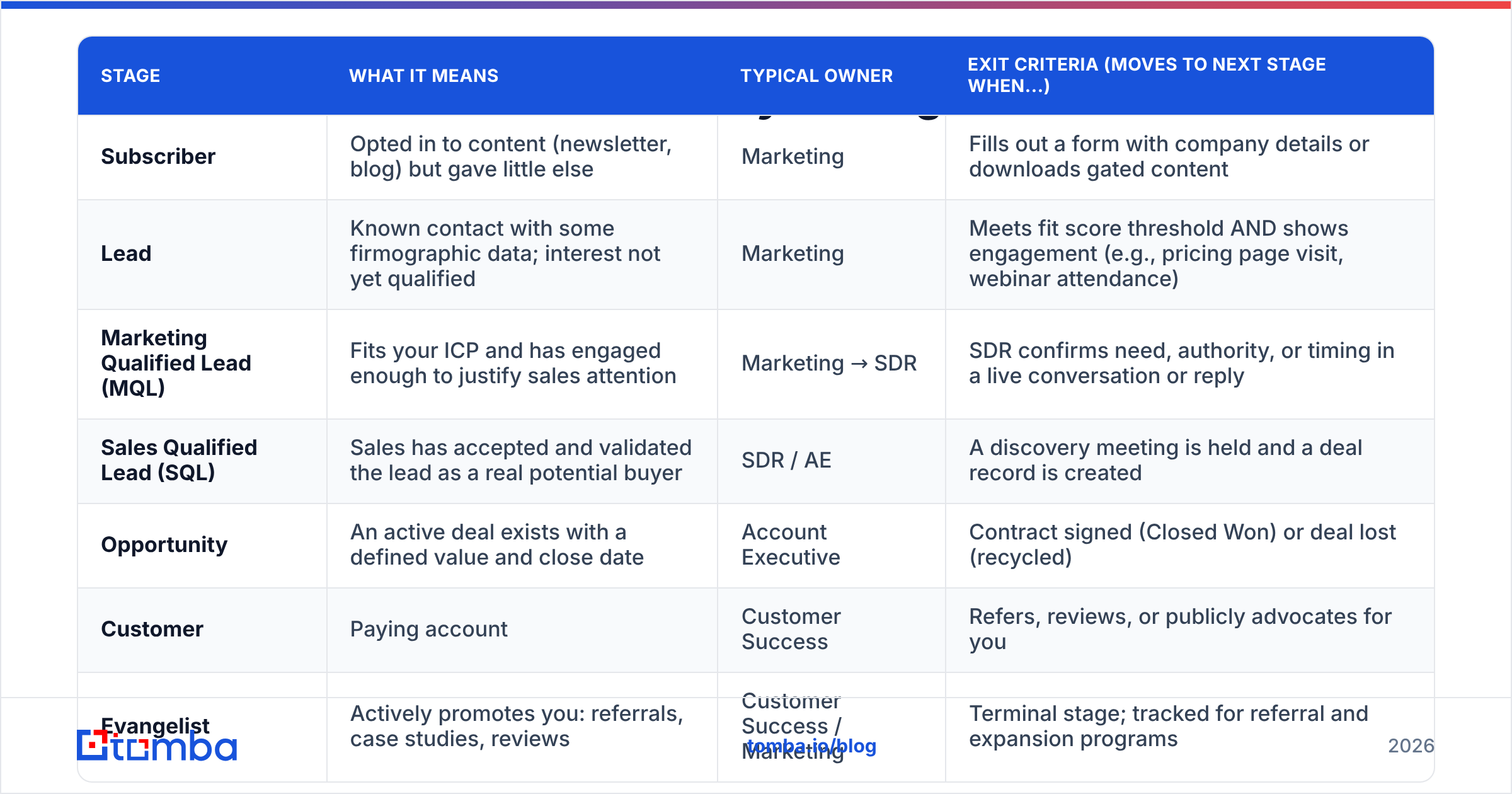
Here is the standard model, with the definition, the owner, and the exit criteria that should move a contact forward. This table is the core of the post, so it's worth copying into your RevOps wiki.
| Stage | What it means | Typical owner | Exit criteria (moves to next stage when...) |
|---|---|---|---|
| Subscriber | Opted in to content (newsletter, blog) but gave little else | Marketing | Fills out a form with company details or downloads gated content |
| Lead | Known contact with some firmographic data; interest not yet qualified | Marketing | Meets fit score threshold AND shows engagement (e.g., pricing page visit, webinar attendance) |
| Marketing Qualified Lead (MQL) | Fits your ICP and has engaged enough to justify sales attention | Marketing → SDR | SDR confirms need, authority, or timing in a live conversation or reply |
| Sales Qualified Lead (SQL) | Sales has accepted and validated the lead as a real potential buyer | SDR / AE | A discovery meeting is held and a deal record is created |
| Opportunity | An active deal exists with a defined value and close date | Account Executive | Contract signed (Closed Won) or deal lost (recycled) |
| Customer | Paying account | Customer Success | Refers, reviews, or publicly advocates for you |
| Evangelist | Actively promotes you: referrals, case studies, reviews | Customer Success / Marketing | Terminal stage; tracked for referral and expansion programs |
Two extra statuses show up in most mature setups. They sit next to the main stages rather than in the sequence:
- Sales Accepted Lead (SAL): an optional stage between MQL and SQL. It records that a rep has acknowledged the lead, which lets you measure speed-to-lead separately from qualification.
- Recycled / Nurture: for leads that were qualified but aren't ready. They go back to marketing with a reason code instead of dying in a rep's inbox.
- Disqualified: for bad-fit contacts such as students, competitors, or companies outside your ICP. You keep them out of reporting without deleting the history.
- Other: a catch-all for partners, vendors, and job applicants who shouldn't pollute funnel metrics.
If you need a refresher on the MQL concept specifically, the marketing qualified lead glossary entry covers the scoring logic in more depth.
How do you define exit criteria for each stage?#
A lifecycle model without exit criteria is a vibes-based funnel. Each rep decides for themselves what "qualified" means, and your conversion rates stop meaning anything. Good exit criteria share three properties:
- Observable. They're based on something recorded in the CRM, like a form fill, a meeting logged, or a deal created. "Seems interested" doesn't count.
- Binary. A contact either meets the criteria or doesn't. No partial credit.
- Owned. One team is accountable for moving the contact, and one team is accountable for receiving it.
Here's what that looks like in practice for the two stages that cause the most arguments:
Lead → MQL. Combine a fit score with an engagement score. Fit covers company size, industry, job title, and region. Engagement covers pricing page views, demo requests, repeated content consumption, and email replies. A common setup requires fit above a threshold and engagement above a threshold. Either one alone isn't enough. A perfect-fit VP who opened one newsletter isn't an MQL. A highly engaged student isn't either.
MQL → SQL. This one should require a human conversation, or at least a human-read reply that confirms a real need. Automation can route and prioritize MQLs. It shouldn't promote them to SQL. Once a rep has verified the problem, the buyer's role in the decision, and a rough timeline, the contact becomes an SQL.
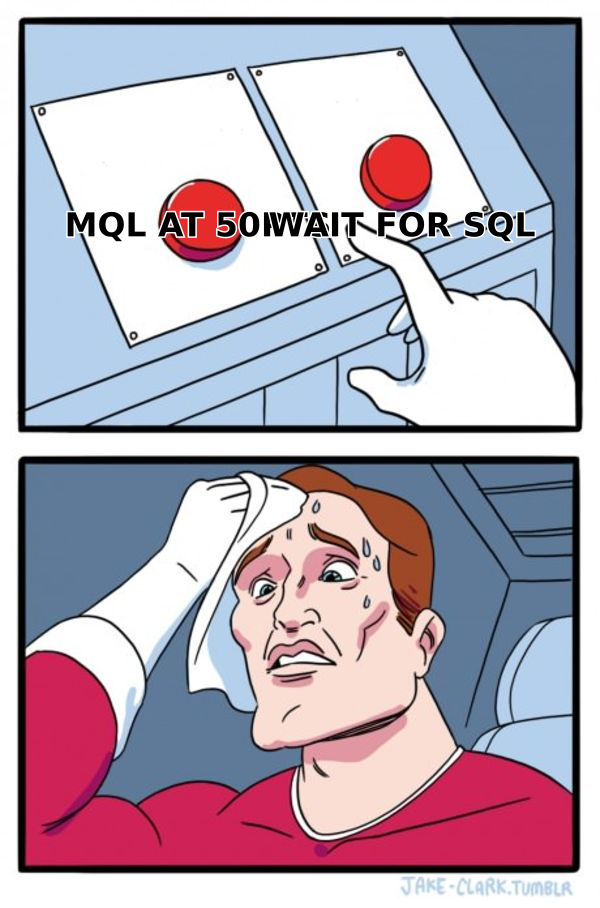
The tension in that meme is real. Set the MQL threshold too low and reps drown in junk, stop trusting marketing, and ignore the queue. Set it too high and good buyers wait days for a response while a competitor books the meeting. Neither side is "right." The fix is to agree on the threshold, review MQL-to-SQL conversion monthly, and adjust.
Where do leads get stuck between lifecycle stages?#
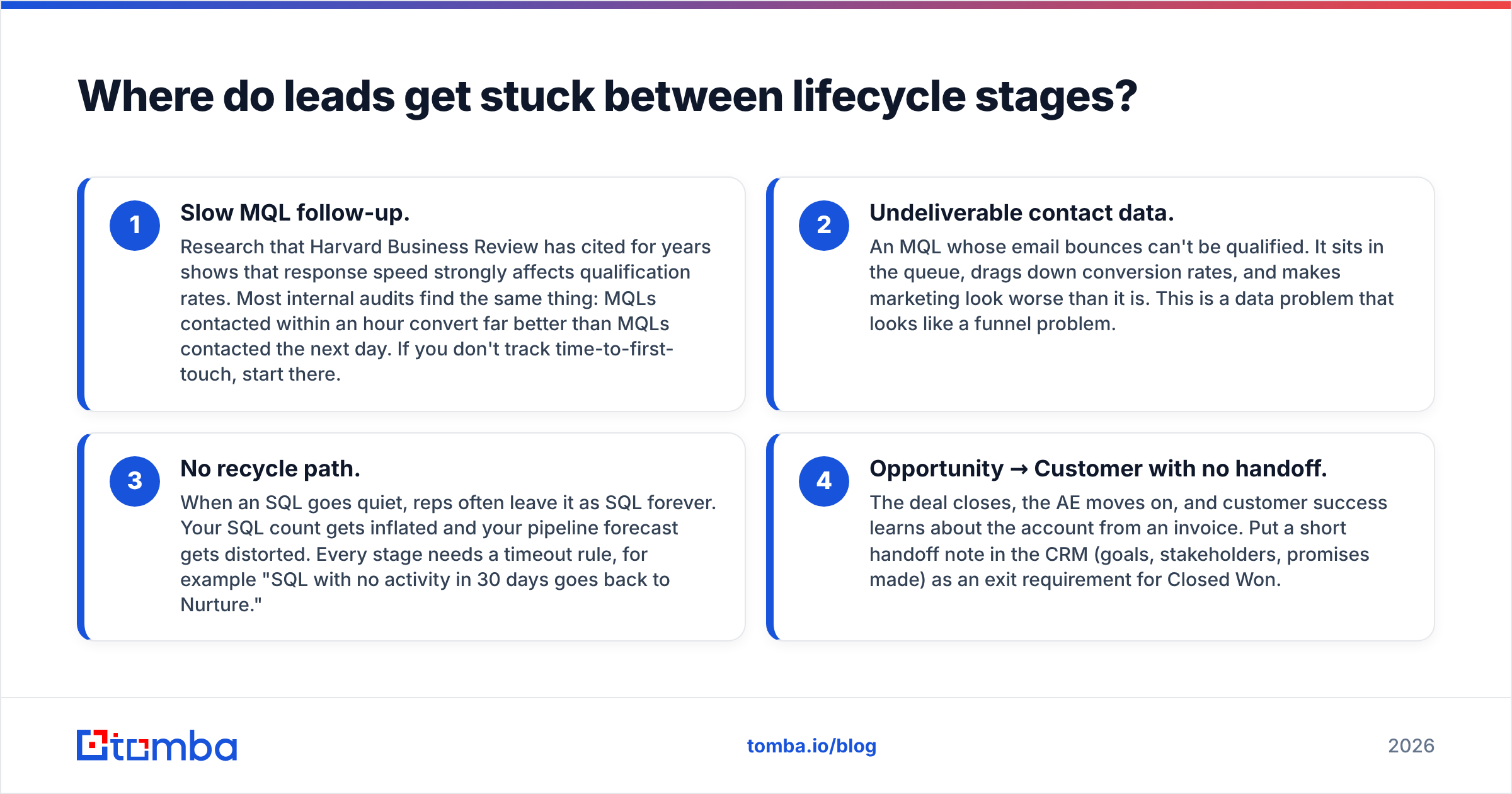
Leads rarely stall inside a stage. They stall at the handoffs. These are the four leaks worth auditing first:
- Slow MQL follow-up. Research that Harvard Business Review has cited for years shows that response speed strongly affects qualification rates. Most internal audits find the same thing: MQLs contacted within an hour convert far better than MQLs contacted the next day. If you don't track time-to-first-touch, start there.
- Undeliverable contact data. An MQL whose email bounces can't be qualified. It sits in the queue, drags down conversion rates, and makes marketing look worse than it is. This is a data problem that looks like a funnel problem.
- No recycle path. When an SQL goes quiet, reps often leave it as SQL forever. Your SQL count gets inflated and your pipeline forecast gets distorted. Every stage needs a timeout rule, for example "SQL with no activity in 30 days goes back to Nurture."
- Opportunity → Customer with no handoff. The deal closes, the AE moves on, and customer success learns about the account from an invoice. Put a short handoff note in the CRM (goals, stakeholders, promises made) as an exit requirement for Closed Won.
How does contact data quality affect lifecycle stages?#
This is the least glamorous part of lifecycle management and the one teams skip most often. Your stage logic runs on contact data. When the data is wrong, the logic still runs, and it produces confident nonsense.
A few failure modes show up again and again:
- Duplicate records. One person exists as two contacts, one at Lead and one at SQL. Scoring splits their engagement across both, so neither record reaches the threshold it should.
- Stale emails. People change jobs constantly. A contact who reached MQL eighteen months ago may now work somewhere else, and your nurture emails are bouncing and hurting your sender reputation.
- Missing firmographics. If company size or industry is blank, the fit score can't be calculated, and a perfect-fit lead stays at "Lead" indefinitely.
- Personal addresses. A gmail.com form fill tells you almost nothing about the company. Without enrichment, the lead can't be scored on fit.
The practical fix is to validate and enrich at the entry point, before a contact gets a lifecycle stage. Running form fills and imported lists through an email verifier catches invalid and risky addresses before they skew your funnel. Pairing that with data enrichment fills in company, title, and size so fit scoring works from day one. Tomba, ZoomInfo, Apollo, and BookYourData all offer versions of this. The right choice depends on your volume, your budget, and whether you need API access or a CRM-native sync.
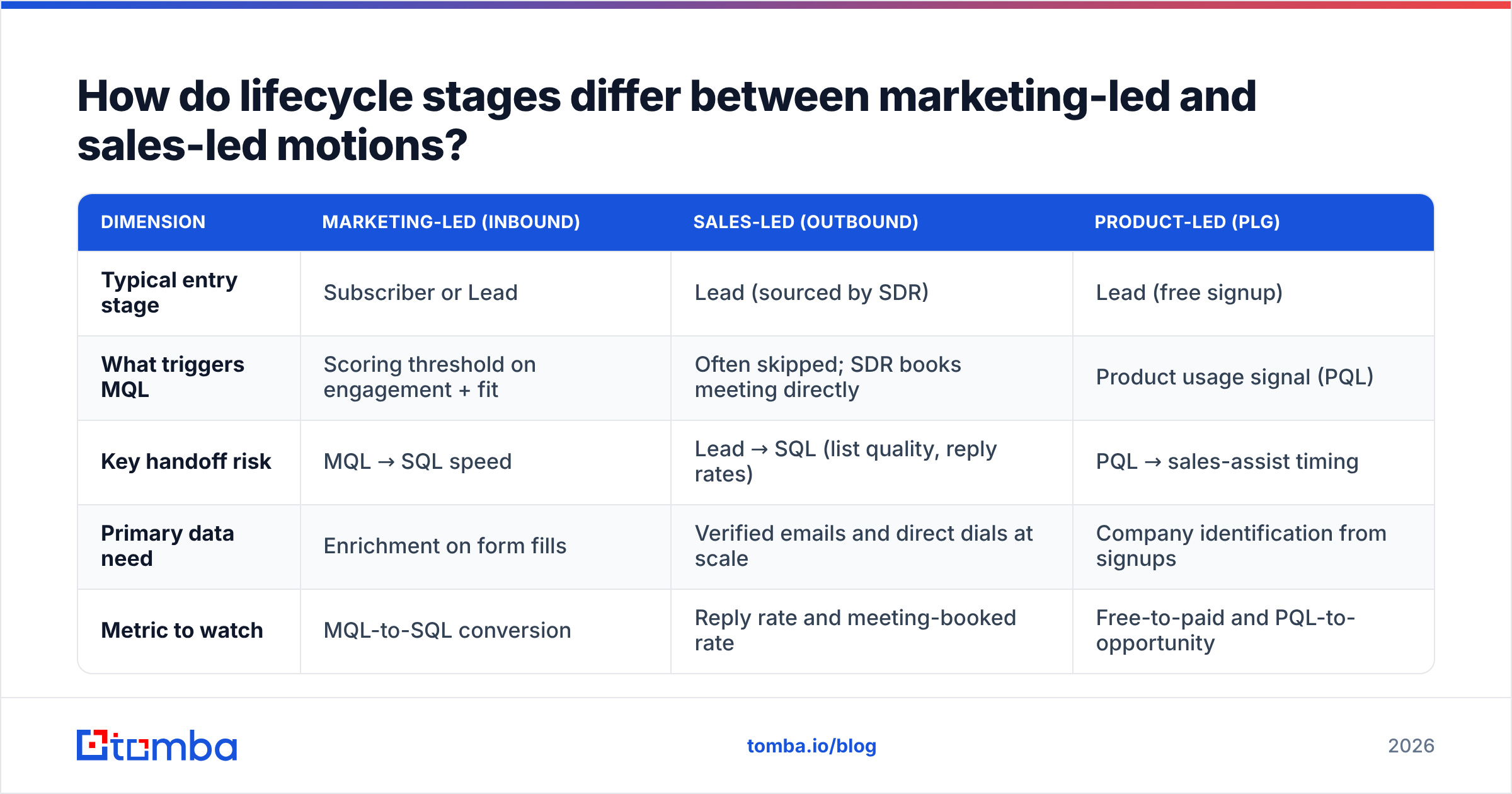
How do lifecycle stages differ between marketing-led and sales-led motions?#
The seven-stage model assumes an inbound, marketing-led motion. Outbound-heavy teams run the same stages but enter the funnel at a different point, and that changes how you should read your metrics.
| Dimension | Marketing-led (inbound) | Sales-led (outbound) | Product-led (PLG) |
|---|---|---|---|
| Typical entry stage | Subscriber or Lead | Lead (sourced by SDR) | Lead (free signup) |
| What triggers MQL | Scoring threshold on engagement + fit | Often skipped; SDR books meeting directly | Product usage signal (PQL) |
| Key handoff risk | MQL → SQL speed | Lead → SQL (list quality, reply rates) | PQL → sales-assist timing |
| Primary data need | Enrichment on form fills | Verified emails and direct dials at scale | Company identification from signups |
| Metric to watch | MQL-to-SQL conversion | Reply rate and meeting-booked rate | Free-to-paid and PQL-to-opportunity |
Outbound teams often skip MQL entirely. An SDR sources a contact, reaches out, and books a meeting, so the contact jumps straight from Lead to SQL. That's fine, as long as you tag the source so your reporting doesn't show a strange "0% of SQLs came from MQLs" gap. For reference, Forrester has published frameworks on B2B demand and revenue waterfalls for years that treat these as parallel streams rather than a single funnel.
Product-led companies usually add a Product Qualified Lead (PQL) stage. It's an MQL defined by usage (invited teammates, hit a usage limit, connected an integration) instead of by content engagement.
How do you set up lead lifecycle stages in your CRM?#
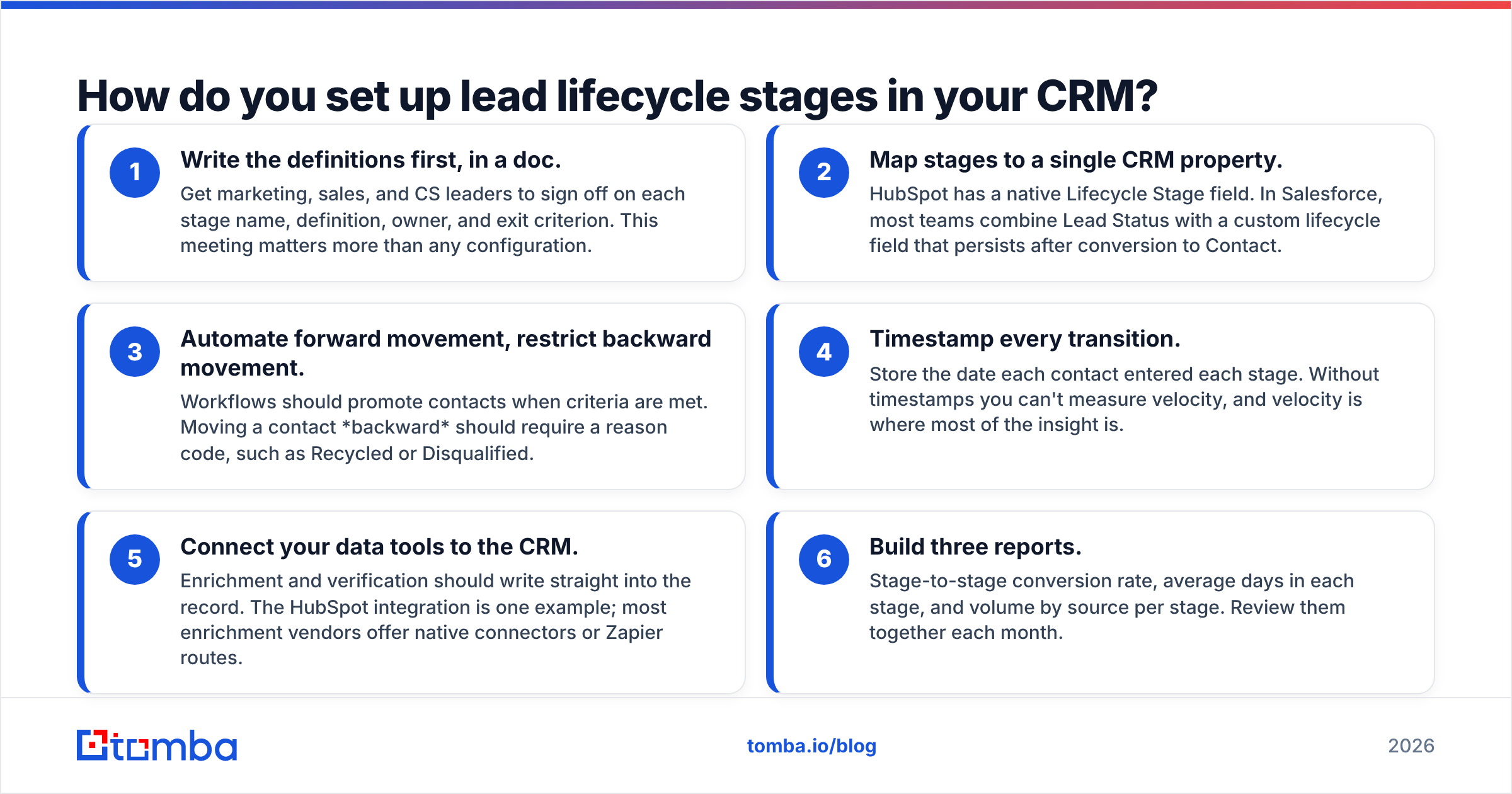
Whether you use HubSpot, Salesforce, Pipedrive, or something else, the setup follows the same sequence:
- Write the definitions first, in a doc. Get marketing, sales, and CS leaders to sign off on each stage name, definition, owner, and exit criterion. This meeting matters more than any configuration.
- Map stages to a single CRM property. HubSpot has a native Lifecycle Stage field. In Salesforce, most teams combine Lead Status with a custom lifecycle field that persists after conversion to Contact.
- Automate forward movement, restrict backward movement. Workflows should promote contacts when criteria are met. Moving a contact backward should require a reason code, such as Recycled or Disqualified.
- Timestamp every transition. Store the date each contact entered each stage. Without timestamps you can't measure velocity, and velocity is where most of the insight is.
- Connect your data tools to the CRM. Enrichment and verification should write straight into the record. The HubSpot integration is one example; most enrichment vendors offer native connectors or Zapier routes.
- Build three reports. Stage-to-stage conversion rate, average days in each stage, and volume by source per stage. Review them together each month.

That meme is the most common operational failure in lifecycle management. Reps naturally chase fresh MQLs because new leads feel promising. Meanwhile, SQLs from three weeks ago quietly go cold. Timeout rules and a weekly "stuck in stage" report are the only reliable fix. Willpower doesn't scale.
What metrics should you track for each lifecycle stage?#
Track three numbers per stage and one number for the whole funnel.
Per stage:
- Conversion rate to next stage. What percentage of MQLs become SQLs? What percentage of SQLs become Opportunities? Benchmarks vary widely by industry and deal size, so your own trend line matters more than any published average.
- Velocity (days in stage). How long do contacts sit before advancing? A sudden jump in days-in-MQL usually means a staffing gap on the SDR team or a routing bug.
- Leakage rate. What percentage exit to Disqualified or Recycled instead of advancing? High leakage from MQL often points to scoring problems. High leakage from Opportunity points to sales execution or pricing.
Whole funnel:
- Lead-to-customer rate by source. This tells you which channels produce revenue, not just volume. A webinar that produces 500 leads and zero customers is worse than a referral program that produces 20 leads and four customers.
A quick note on attribution: lifecycle stage reporting shows where leads go. It doesn't show why. Pair it with conversation data (call notes, reply sentiment, lost-reason codes) before drawing conclusions about what's broken.
Should you customize the default lifecycle stages?#
Yes, but carefully, and later than you think. The default seven-stage model works for most B2B companies under a few hundred employees. Teams tend to customize too early, adding stages for every nuance before the basics are reliable.
Customize when:
- You have a distinct PLG motion. Add PQL.
- SDR response time is a known problem. Add SAL so you can measure acknowledgment separately from qualification.
- You sell to buying committees. Consider account-level lifecycle stages in addition to contact-level ones, since one champion at SQL doesn't mean the account is sales-ready.
- You have a large installed base. Split Customer into Onboarding, Active, and Expansion Candidate.
Don't customize when:
- Your team can't agree on what the current stages mean. More stages just add more room to disagree.
- You don't have timestamps on existing transitions yet. Fix measurement first.
- You're under about 50 MQLs a month. At that volume, gut feel plus a simple model beats a complex one.
For broader context on how the lead concept evolved, the Wikipedia entry on lead generation gives a useful neutral overview of the terminology.
What's the fastest way to improve your lead lifecycle this quarter?#
If you only have time for three changes, make these:
- Write and publish exit criteria for MQL and SQL. One page, signed off by both sales and marketing leadership.
- Add a 30-day timeout on SQL and Opportunity stages with an automatic move to Recycled and a required reason code.
- Clean the data at entry. Verify every new email and enrich every new record before it gets a lifecycle stage. A contact you can't reach can't move through your funnel, however well-designed the stages are.
The third change is the easiest to automate and the one teams most often skip. Lifecycle stages only reflect reality if the contacts inside them are real, reachable, and correctly attributed to a company.
If your lifecycle model keeps stalling at Lead because records arrive without a usable business email, start at the source. Tomba Email Finder finds and verifies professional email addresses from a name and company domain, so new contacts enter your CRM ready to be scored, routed, and contacted. The free tier (25 searches a month) is enough to test it against your current lead flow, and paid plans start at $49/month when you're ready to run it at pipeline scale.
Related guides#
// get started
Find, verify and enrich your first contacts today
Start on the free plan with 25 searches a month, then scale when your team is ready.
Free plan · No credit card required · GDPR & CCPA
// about the author