Lead List Generation: How to Build Lists That Actually Convert
Most lead lists fail because of bad data, not small size. Here is a 7-step lead list generation process covering ICP filters, sources, verification, and cost per contact, so your outbound gets replies instead of bounces.
TL;DR
- Lead list generation means building a targeted, verified list of accounts and contacts that fit your ideal customer profile (ICP). Hitting a volume number is not the goal.
- Most lists fail on data quality. B2B contact data decays by roughly 2–3% a month, so a list that is six months old can already hurt your sender reputation.
- The reliable process is: define the ICP, pick account sources, map buying roles, find emails, verify, enrich, then segment and refresh.
- Building your own list with an email finder plus verification usually costs less per usable contact than buying a bulk list.
- Keep the list small, recent, and segmented. 500 verified, well-fit contacts will beat 10,000 scraped rows.
What is lead list generation?#
Lead list generation is the process of finding the companies and people who match your ideal customer profile and turning them into a structured, contactable list. A usable list has verified email addresses, correct job titles, and enough context to personalize outreach.
A lead list works like a shopping list for a dinner party. If you write "food," you come home with the wrong things. If you write "six ribeyes, two lemons, fresh thyme," you get what the recipe needs. A list that says "SaaS companies" is the first kind. A list that says "Heads of RevOps at 50–200 person B2B SaaS companies in North America that use HubSpot and hired SDRs in the last 90 days" is the second kind.
In practice, lead list generation sits between strategy and execution:
- Upstream is your ICP and positioning, meaning who you sell to and why.
- Downstream are your sequences, calls, and LinkedIn outreach.
When the list is wrong, nothing downstream fixes it. Good copy sent to the wrong person still gets no reply, and a bounced email doesn't get read at all.
Why do most lead lists fail?#
Most lead lists fail because the data is stale, unverified, or poorly targeted. List size is rarely the issue. The three failure modes show up in almost every outbound team:
- Decay. People change jobs, companies rebrand domains, and inboxes get deactivated. Industry estimates put B2B contact decay at roughly 25–30% a year. A list exported in January is partly wrong by June.
- No verification. Unverified lists bounce. Since Google and Yahoo tightened their bulk-sender requirements in 2024, a high bounce rate hurts more than one campaign. It drags down your domain's sender reputation. Google's email sender guidelines spell out what bulk senders now need to meet.
- Loose targeting. "Marketing managers in the US" is a demographic, not an ICP. Broad filters produce big lists with low reply rates, and low engagement is another deliverability signal working against you.
The fix is process, not volume. The rest of this guide covers that process.
What goes into a high-quality lead list?#
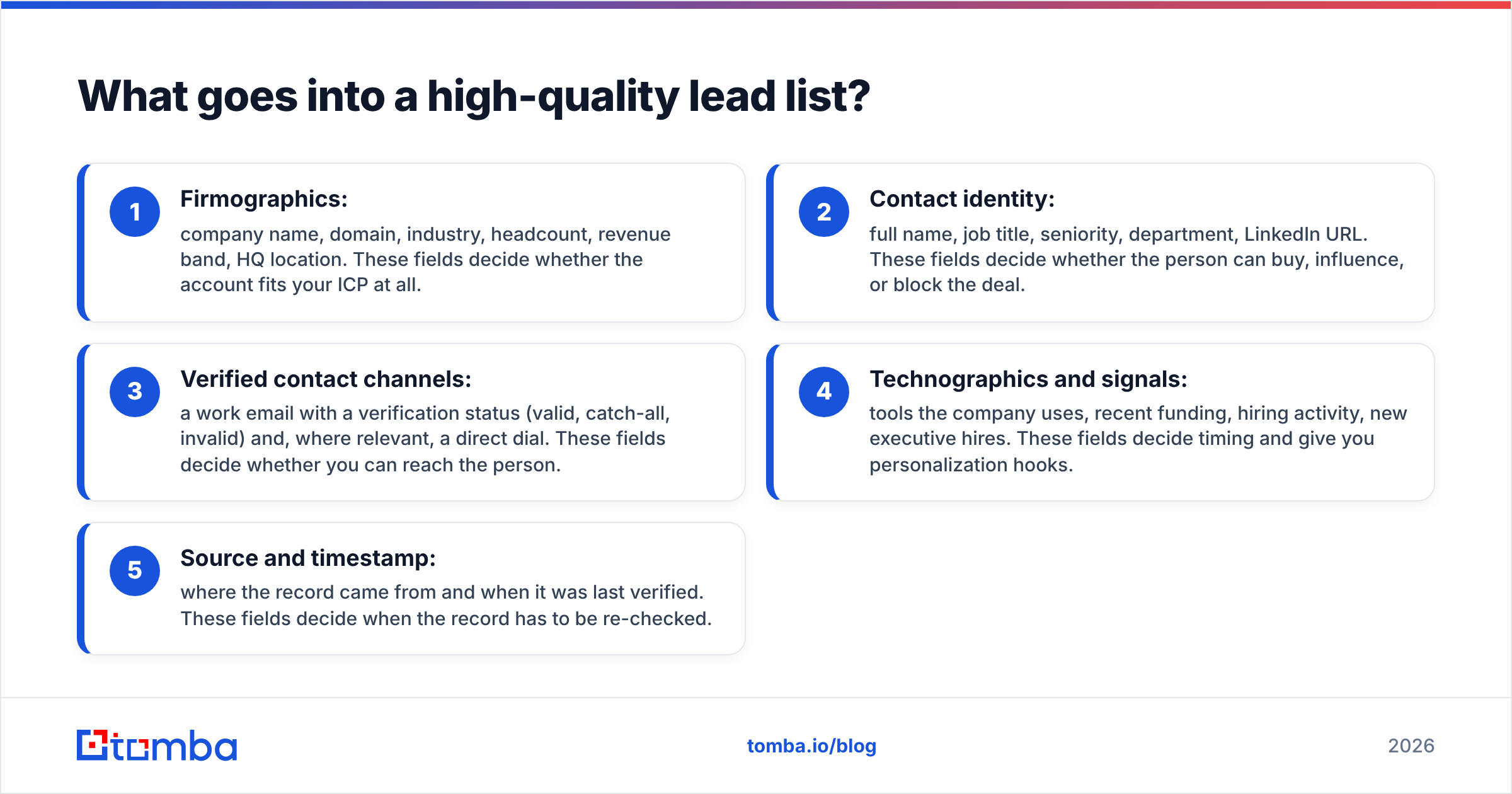
A high-quality lead list has five layers of data, and each one exists for a specific reason. If a field doesn't help you prioritize, personalize, or route a lead, drop it.
- Firmographics: company name, domain, industry, headcount, revenue band, HQ location. These fields decide whether the account fits your ICP at all.
- Contact identity: full name, job title, seniority, department, LinkedIn URL. These fields decide whether the person can buy, influence, or block the deal.
- Verified contact channels: a work email with a verification status (valid, catch-all, invalid) and, where relevant, a direct dial. These fields decide whether you can reach the person.
- Technographics and signals: tools the company uses, recent funding, hiring activity, new executive hires. These fields decide timing and give you personalization hooks.
- Source and timestamp: where the record came from and when it was last verified. These fields decide when the record has to be re-checked.
Teams skip the fifth layer more than any other, and it is the one that stops a list from quietly going bad. If you can't tell when a record was last verified, assume it's stale.
How do you build a lead list in 7 steps?#
You build a reliable lead list by moving from accounts to people to verified channels, in that order. Starting with people ("find me 1,000 VPs of Sales") skips the account fit check and fills your list with contacts at companies that will never buy.
Step 1: Define your ICP in filterable terms#
Write your ideal customer profile as filters a database can actually apply:
- Industry (use specific categories, not "tech")
- Headcount range
- Geography
- Tech stack requirements (for example, "uses Salesforce" or "runs on Shopify")
- A trigger signal (funding, hiring, a new leader in the role)
If you can't express a criterion as a filter, it belongs in your qualification call, not your list.
Step 2: Build the account list first#
Pull companies that match the ICP. Sources include B2B databases, LinkedIn Sales Navigator account search, industry directories, G2 category pages, conference sponsor lists, and your own CRM's closed-won lookalikes. Target 100–300 accounts per segment. Past that size, personalization falls apart.
Step 3: Map the buying committee per account#
For each account, decide which two or three roles to contact. In a typical mid-market deal that means an economic buyer (VP or Head of the function), a champion (manager or lead who feels the pain), and sometimes a technical evaluator. Write these rules down so every rep builds lists the same way.
Step 4: Find email addresses#
This is where most of the effort goes. Your options:
- By name and domain: feed first name, last name, and company domain into an email finder.
- By domain: run a domain search to see every publicly indexed address at a company, along with the company's email pattern (for example
first.last@). - From LinkedIn: use a browser extension while you browse profiles or Sales Navigator results.
Record the confidence score and source for every email you find. They help when you prioritize who to contact first.
Step 5: Verify every address#
Never skip this step. Run the full list through an email verifier before anything goes into a sequencer. Then sort the results:
- Valid: send.
- Catch-all / accept-all: send in small batches or to a secondary domain, and watch bounces.
- Invalid / unknown: remove.
Keep your bounce rate under about 2%. Above 3–5%, inbox providers start treating you as a careless sender.
Step 6: Enrich for personalization and routing#
Add the fields your reps actually use: recent funding, tech stack, headcount growth, and a phone number for multichannel sequences. Enrichment turns a contact list into a lead list, because it gives each row a reason to reach out now.
Step 7: Segment, load, and schedule a refresh#
Split the list by persona and trigger, not just by industry. Load it into your CRM or sequencer with source and verification-date fields. Put a calendar reminder to re-verify anything older than 90 days.
Which lead list sources should you use?#
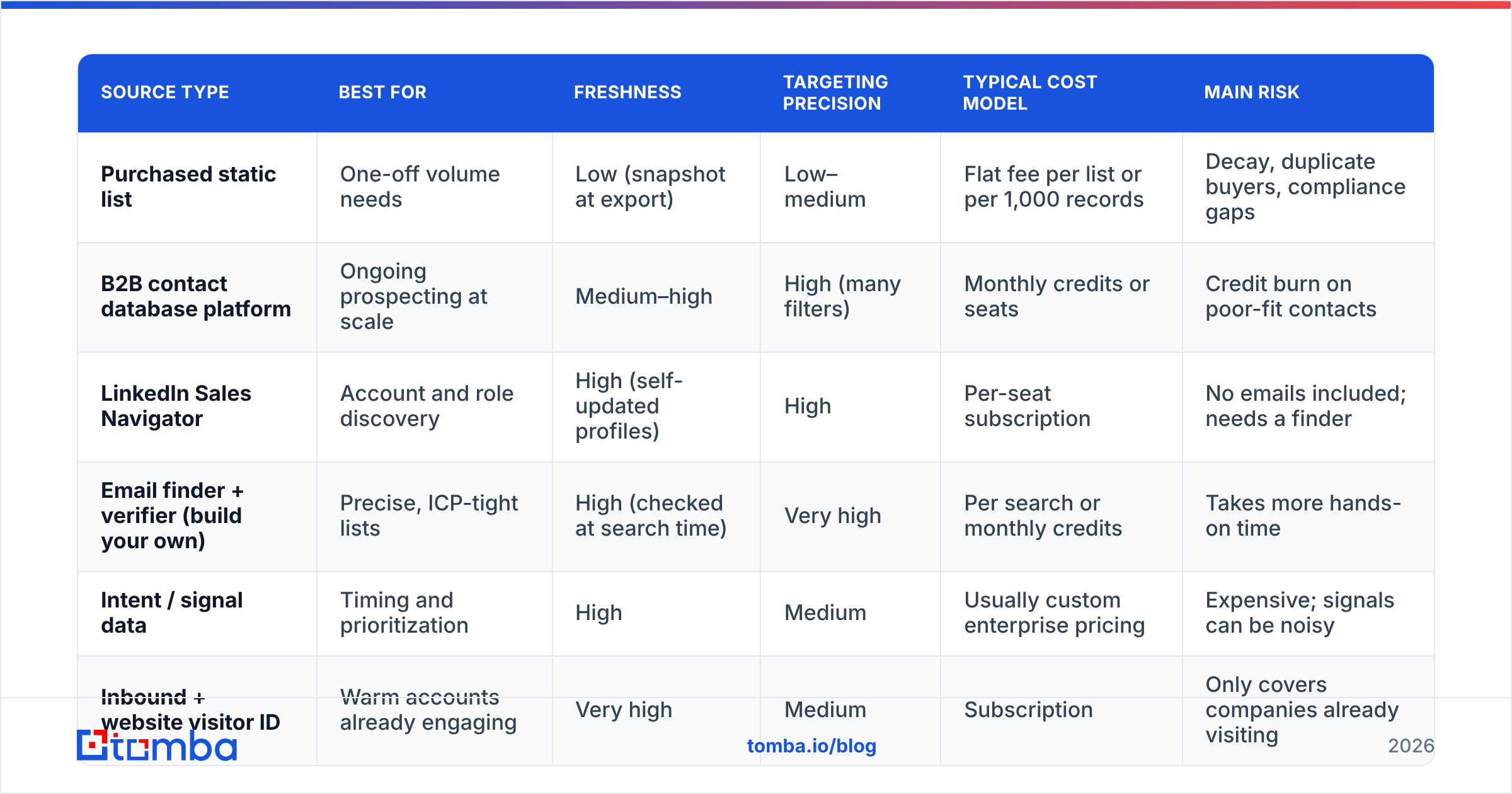
Use a mix of sources. Each one trades off cost, freshness, and targeting precision, and no single source wins on all three.
| Source type | Best for | Freshness | Targeting precision | Typical cost model | Main risk |
|---|---|---|---|---|---|
| Purchased static list | One-off volume needs | Low (snapshot at export) | Low–medium | Flat fee per list or per 1,000 records | Decay, duplicate buyers, compliance gaps |
| B2B contact database platform | Ongoing prospecting at scale | Medium–high | High (many filters) | Monthly credits or seats | Credit burn on poor-fit contacts |
| LinkedIn Sales Navigator | Account and role discovery | High (self-updated profiles) | High | Per-seat subscription | No emails included; needs a finder |
| Email finder + verifier (build your own) | Precise, ICP-tight lists | High (checked at search time) | Very high | Per search or monthly credits | Takes more hands-on time |
| Intent / signal data | Timing and prioritization | High | Medium | Usually custom enterprise pricing | Expensive; signals can be noisy |
| Inbound + website visitor ID | Warm accounts already engaging | Very high | Medium | Subscription | Only covers companies already visiting |
Most efficient outbound teams combine two or three of these. Sales Navigator (or a database) handles account and role discovery, an email finder and verifier fill in the channels, and signal data sets priority.
What tools help with lead list generation?#
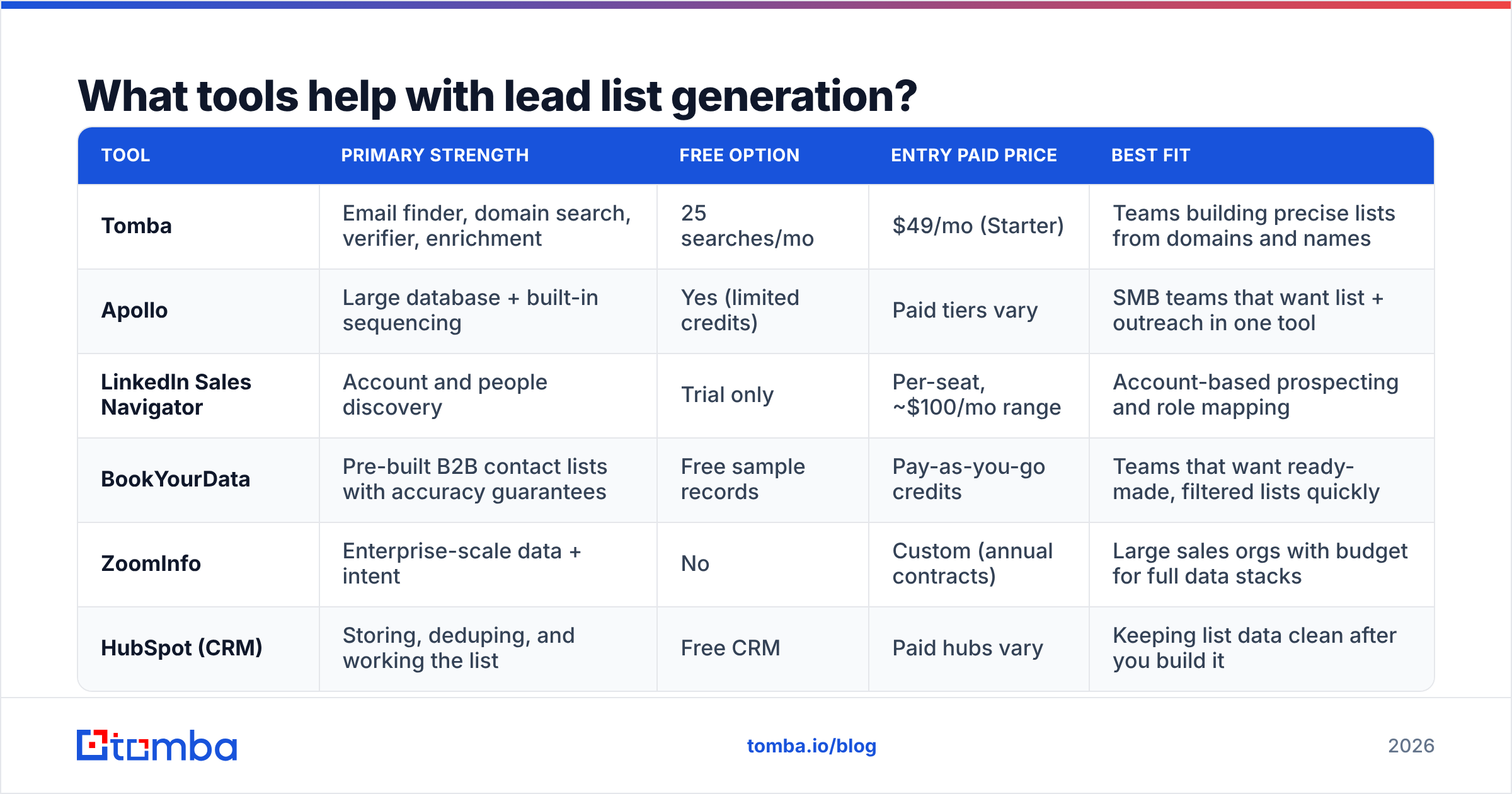
The right tool depends on whether you need a large pre-built database, precise lookups, or both. Here is a neutral snapshot of common options. Pricing changes often, so check each vendor's current page before you buy.
| Tool | Primary strength | Free option | Entry paid price | Best fit |
|---|---|---|---|---|
| Tomba | Email finder, domain search, verifier, enrichment | 25 searches/mo | $49/mo (Starter) | Teams building precise lists from domains and names |
| Apollo | Large database + built-in sequencing | Yes (limited credits) | Paid tiers vary | SMB teams that want list + outreach in one tool |
| LinkedIn Sales Navigator | Account and people discovery | Trial only | Per-seat, ~$100/mo range | Account-based prospecting and role mapping |
| BookYourData | Pre-built B2B contact lists with accuracy guarantees | Free sample records | Pay-as-you-go credits | Teams that want ready-made, filtered lists quickly |
| ZoomInfo | Enterprise-scale data + intent | No | Custom (annual contracts) | Large sales orgs with budget for full data stacks |
| HubSpot (CRM) | Storing, deduping, and working the list | Free CRM | Paid hubs vary | Keeping list data clean after you build it |
A few honest observations:
- All-in-one platforms such as Apollo are convenient, but you often pay credits for contacts you'd never actually email. Filter tightly before revealing emails.
- Ready-made list providers such as BookYourData make sense when speed matters more than building by hand. They also suit you if you prefer not to run lookups yourself.
- Finder-first tools such as Tomba fit when you already know your target accounts and need accurate emails for specific people. That is usually the case for ABM and for high-value deals.
- Your CRM is where list quality lives or dies. HubSpot's CRM and similar tools can dedupe and flag stale records if you set the fields up correctly.
Should you buy a lead list or build one?#
Build your list if deal value is high and your ICP is narrow. Buy (or license database access) if you need volume fast and your ICP is broad. Most teams land on a hybrid.
Buying a big list and dropping it straight into a sequencer is the classic mistake. You pay up front, and then you pay again in bounces, spam complaints, and domain damage.

Use this rule of thumb:
- Build when ACV is above ~$10K, the ICP fits in a few hundred accounts, and reps personalize each touch.
- Buy / license when ACV is low, the ICP is broad (for example, "any US dental practice"), and you run high-volume, lightly personalized campaigns.
- Hybrid for most people: license a database for account discovery, then run key contacts through your own finder and verifier before sending.
Whichever route you choose, verification is not optional. A purchased list still has to go through a verifier before it goes anywhere near your sending domain.
How much does lead list generation cost?#
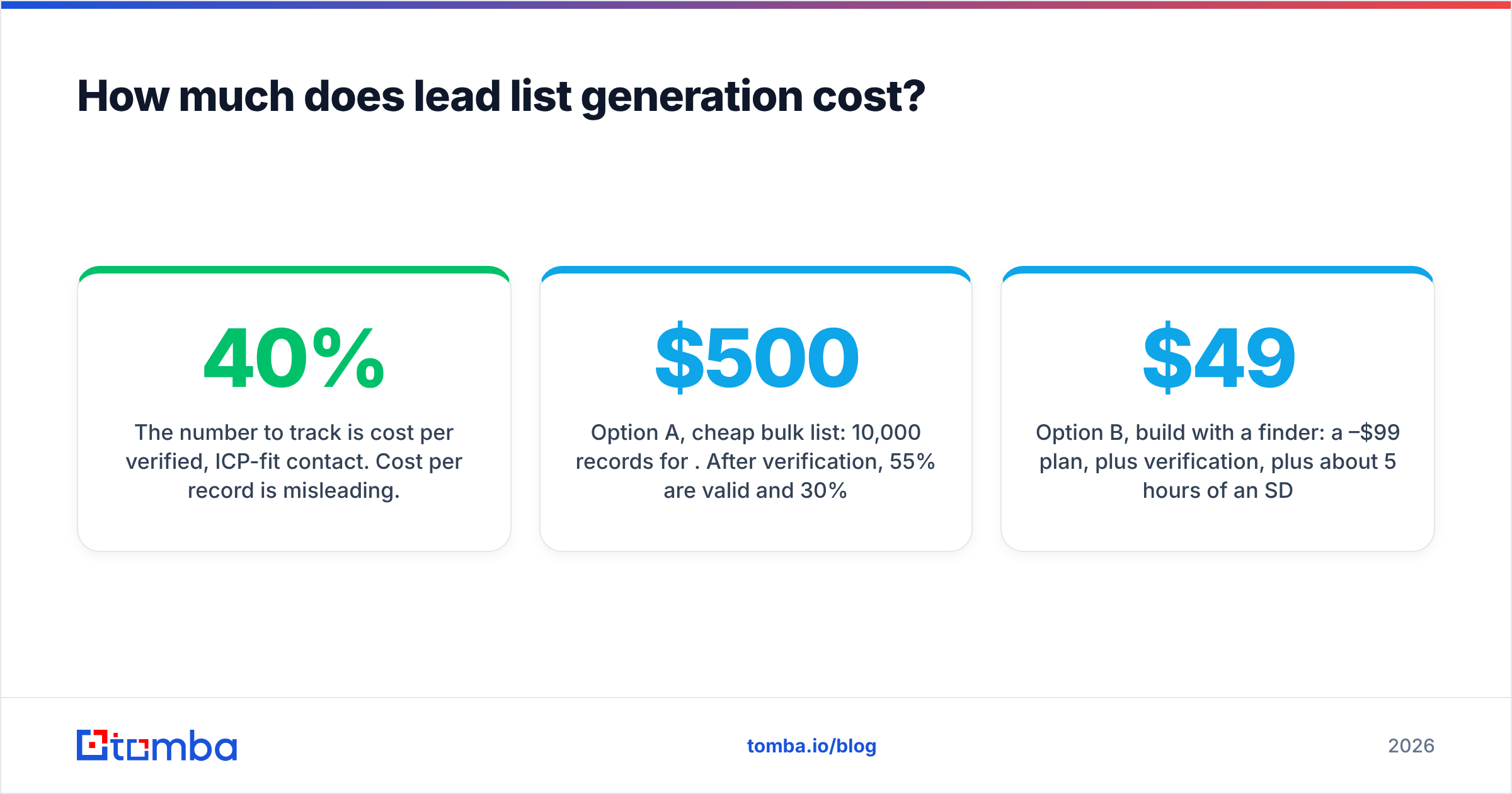
The number to track is cost per verified, ICP-fit contact. Cost per record is misleading. A cheap list that is 40% invalid often costs more per usable contact than a pricier, precise build.
A simple worked example:
- Option A, cheap bulk list: 10,000 records for $500. After verification, 55% are valid and 30% of those actually fit your ICP. That leaves 1,650 usable contacts at about $0.30 each. Add the reputation cost of the invalid rows if they are ever sent unverified.
- Option B, build with a finder: a $49–$99/mo plan, plus verification, plus about 5 hours of an SDR's time. You produce 800 contacts that are all ICP-fit and verified. Even with labor counted, the cost per contact is competitive, and reply rates are usually noticeably higher because targeting is tighter.
The takeaway is not that building always wins. Measure the full cost, including rep time and deliverability risk, not just the invoice. For plan-by-plan numbers on the build route, see Tomba pricing.
How do you keep a lead list fresh and compliant?#
Keep a list fresh by re-verifying on a schedule and removing contacts as soon as they signal a change. Treat the list as a living asset, not a one-time export.
Refresh routine:
- Re-verify any record older than 90 days before it goes into a new sequence.
- Remove hard bounces immediately and never retry them.
- Watch for job-change signals (LinkedIn updates, auto-replies saying "no longer with the company") and re-find the replacement contact at the same account.
- Deduplicate across tools every month, because the same person often shows up from three sources with slightly different titles.
- Use bulk verification for the quarterly clean instead of checking one record at a time.
Compliance basics:
- In the EU and UK, cold B2B email generally relies on "legitimate interest" under GDPR. Document why each segment is relevant to the recipient's job, and honor opt-outs right away.
- In the US, CAN-SPAM requires a physical address, an honest subject line, and a working unsubscribe.
- Store the source of every record. If someone asks where you got their data, you should have an answer within minutes.
This is general guidance, not legal advice. Check with counsel for your specific markets.
Frequently asked questions#
How big should a lead list be?#
Size it to your team's capacity to personalize, not to a vanity number. For account-based outbound, 100–300 accounts per segment with two or three contacts each is plenty. High-volume, low-ACV motions can go larger, but only after verification.
How often should I update my lead list?#
Re-verify every 90 days at minimum, and always right before a new campaign. Contact data decays continuously, so a quarterly clean catches most job changes and dead inboxes before they bounce.
Is it legal to buy B2B lead lists?#
In many jurisdictions it is, but compliance depends on how the data was collected and how you use it. Under GDPR, you still need a lawful basis and must honor opt-outs. Ask any vendor about their data sources and compliance documentation before buying.
What is a good bounce rate for a cold email list?#
Keep it under 2%. Anything above 3–5% signals poor list hygiene to mailbox providers and can hurt deliverability for your whole domain.
Can I generate a lead list for free?#
You can get started. Free tiers from email finders, free CRM tools, and manual research on LinkedIn and company websites will produce a small, high-quality list. Scaling beyond a few dozen contacts a month usually needs a paid plan.
Ready to build a list that actually replies?#
Lead list generation comes down to picking the right accounts, the right people, and verified addresses, in that order. If you already know which companies you want to reach, the fastest way to fill in accurate contacts is to find them by name and domain, verify them, and load them with a timestamp. Tomba Email Finder does exactly that. You can search by domain, name, or company, see confidence scores and sources for each address, and start on the free plan (25 searches a month) before moving to Starter at $49/mo. Build your next 100 contacts the careful way and compare the reply rate with your last bulk list.
Related guides#
// get started
Find, verify and enrich your first contacts today
Start on the free plan with 25 searches a month, then scale when your team is ready.
Free plan · No credit card required · GDPR & CCPA
// about the author