Lead Management in 2026: Stages, Scoring, Tools and Best Practices
Most leads aren't lost to competitors. They're lost in the gap between the form fill and the first call. Here's how to build a lead management process that closes that gap, stage by stage.
TL;DR
- Lead management is the process of capturing, enriching, qualifying, routing, nurturing, and handing off leads until each one closes or gets disqualified. It's a pipeline, not a single tool.
- Most teams lose leads to slow follow-up, bad contact data, and unclear ownership. They rarely lose them for lack of volume.
- Before you buy more software, define your stages and your MQL-to-SQL handoff rules. A CRM only enforces a process you've already agreed on.
- Clean data comes first. Verify and enrich each contact before it reaches a rep, or your scoring model will rank bounced emails and outdated job titles.
- Measure speed-to-lead, stage conversion rates, and lead-to-opportunity rate. Stop tracking raw lead counts as a success metric.
What is lead management?#
Lead management is the system that moves a potential buyer from first contact to a sales outcome. That outcome is either a closed deal or a documented disqualification. It covers every step in between: where leads come from, how they're recorded, how you decide who is worth a rep's time, who owns each lead, and what happens to leads that aren't ready yet.
Think of it like an airport baggage system. Bags (leads) arrive from many flights (channels). Each one gets tagged, scanned, sorted, and sent to the right carousel (rep). A missing tag or a jammed conveyor means the bag sits in a back room while the owner waits. Most lead leakage works the same way. The lead was real. The system just never delivered it to the right person on time.
Wikipedia's lead management entry describes it as a set of methodologies and practices aimed at generating new potential business clientele. That's accurate, but it undersells the operational side. In 2026, lead management is mostly about data quality, routing logic, and timing, not generation.
Why does lead management matter more than lead volume?#
Buying more leads doesn't fix a leaky pipeline. It makes the leak bigger.
The classic evidence is still the Harvard Business Review study "The Short Life of Online Sales Leads". It found that firms contacting inbound leads within an hour were far more likely to qualify them than firms that waited even one hour longer. The same study found many companies took more than a day to respond at all. The tools have changed since then. The dynamic hasn't: interest fades fast, and a slow handoff turns a warm lead into a cold one.
Weak lead management usually shows up in three ways:
- Wasted rep time. Reps chase unqualified contacts because nobody defined what "qualified" means.
- Bounced outreach. Contacts are captured with typos, role-based addresses, or emails from people who left the company, and they go straight into sequences.
- Orphaned leads. Nobody owns a lead that arrived through a new channel, a partner, or a territory gap, so it sits untouched.

What are the stages of the lead management process?#
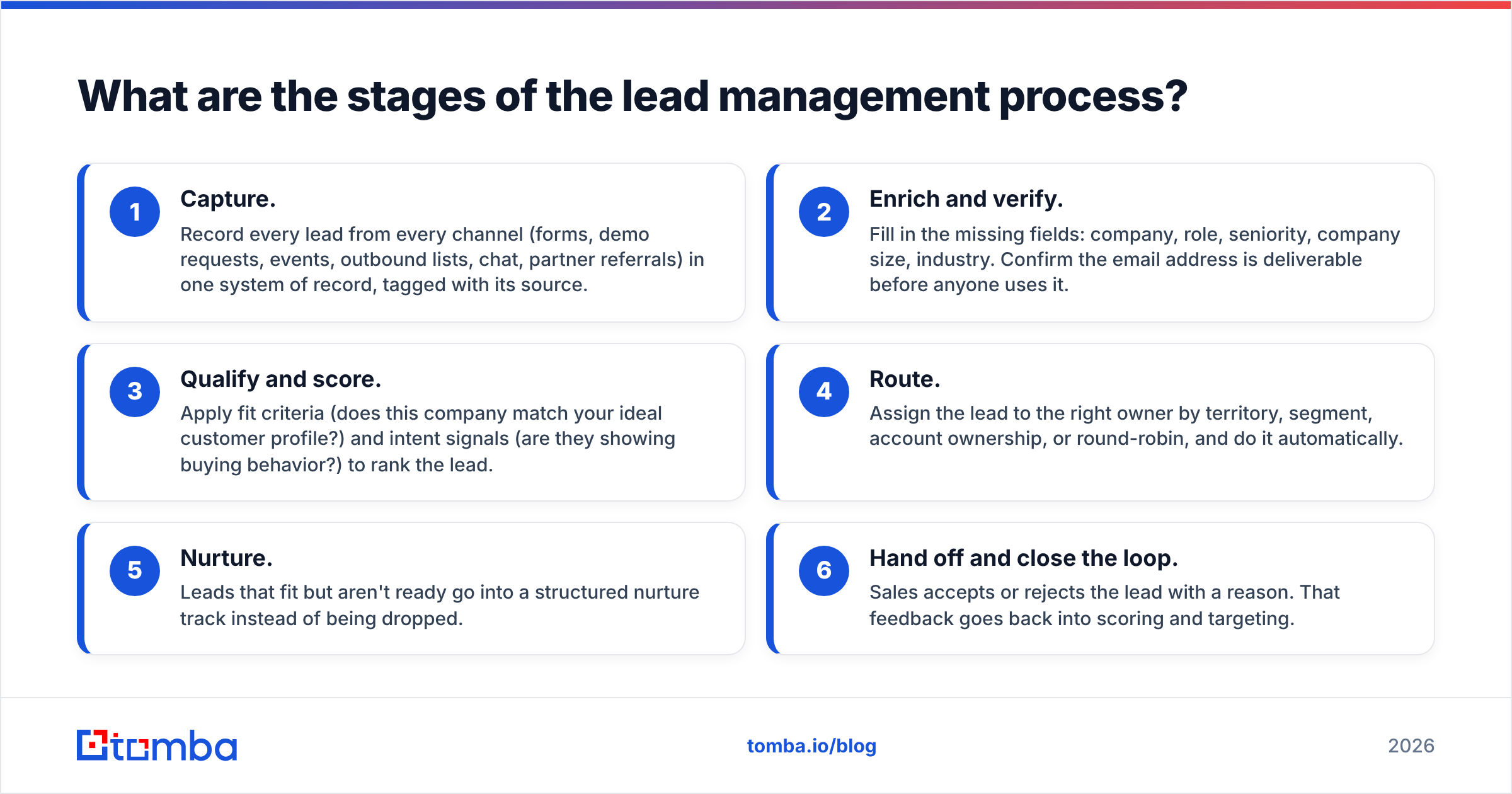
Every team names these slightly differently, but the underlying sequence is consistent. Here's the six-stage model most B2B teams can adapt:
- Capture. Record every lead from every channel (forms, demo requests, events, outbound lists, chat, partner referrals) in one system of record, tagged with its source.
- Enrich and verify. Fill in the missing fields: company, role, seniority, company size, industry. Confirm the email address is deliverable before anyone uses it.
- Qualify and score. Apply fit criteria (does this company match your ideal customer profile?) and intent signals (are they showing buying behavior?) to rank the lead.
- Route. Assign the lead to the right owner by territory, segment, account ownership, or round-robin, and do it automatically.
- Nurture. Leads that fit but aren't ready go into a structured nurture track instead of being dropped.
- Hand off and close the loop. Sales accepts or rejects the lead with a reason. That feedback goes back into scoring and targeting.
Stage 6 is where most processes break. If sales never records why it rejected a lead, marketing keeps sending the same kind of leads, and the argument about lead quality never ends.
How do MQLs, SQLs, and SALs differ?#
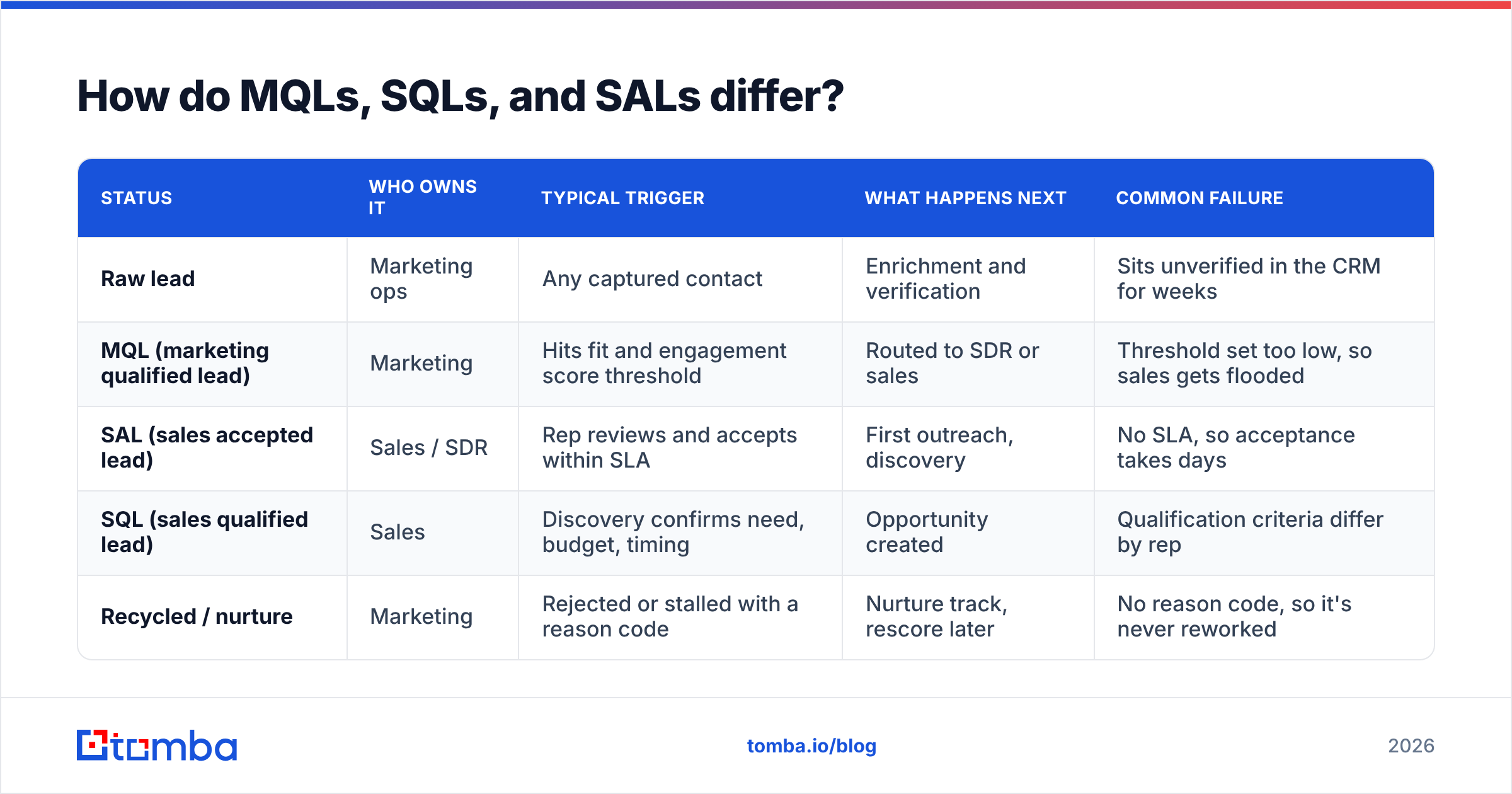
Your handoff rules depend on shared definitions. Here's how the common lead statuses compare:
| Status | Who owns it | Typical trigger | What happens next | Common failure |
|---|---|---|---|---|
| Raw lead | Marketing ops | Any captured contact | Enrichment and verification | Sits unverified in the CRM for weeks |
| MQL (marketing qualified lead) | Marketing | Hits fit and engagement score threshold | Routed to SDR or sales | Threshold set too low, so sales gets flooded |
| SAL (sales accepted lead) | Sales / SDR | Rep reviews and accepts within SLA | First outreach, discovery | No SLA, so acceptance takes days |
| SQL (sales qualified lead) | Sales | Discovery confirms need, budget, timing | Opportunity created | Qualification criteria differ by rep |
| Recycled / nurture | Marketing | Rejected or stalled with a reason code | Nurture track, rescore later | No reason code, so it's never reworked |
If your team debates what an MQL is, start with a written definition. Tomba's glossary entry on the marketing qualified lead is a good baseline to adapt. Get both teams to sign off on the definition before you change any scoring weights.
How should you score leads?#
Lead scoring combines two separate questions, and you should keep them separate:
- Fit score: Does this person and company match who you sell to? This is based on firmographic and role data: industry, headcount, geography, tech stack, job title, seniority.
- Intent/engagement score: Are they showing buying behavior right now? This is based on behavior: pricing page visits, demo requests, repeated email replies, trial activity.
A VP at a perfect-fit company who has never engaged is an outbound target, not an MQL. A student downloading every ebook has high engagement and zero fit. Blending both into one number hides that difference. A simple 2x2 (high/low fit versus high/low intent) routes better than a 100-point score that nobody trusts.
Some practical rules:
- Start with fewer than 10 scoring criteria. You can add more once you see which ones actually predict conversion.
- Use negative scoring. Competitor domains, personal email addresses on enterprise forms, job titles like "student" or "intern," and unsubscribes should all lower the score.
- Decay engagement scores. A pricing-page visit from six months ago shouldn't still count as intent.
- Recalibrate every quarter against closed-won data, not against intuition.
Fit scoring depends entirely on data quality. If half your leads are missing company size or job title, the fit score is guessing. That's why enrichment sits before scoring in the process, not after it.
Why is data quality the foundation of lead management?#
Every later stage depends on the fields captured at the start. Routing by territory fails without a location. Scoring by seniority fails without a job title. Outreach fails without a deliverable email.
Two data problems cause most of the damage:
Invalid or risky emails. Form submissions include typos, disposable addresses, and fake "test@" entries. Purchased or scraped lists include people who left their jobs long ago. Sending sequences to these addresses raises your bounce rate and hurts sender reputation for the whole domain. Run every new lead through an email verifier at capture, before it gets routed. Don't wait for a quarterly cleanup.
Missing firmographic and role data. Short forms convert better, so you ask for less. That leaves gaps in your records. Data enrichment fills in company, role, industry, and social profiles from an email or domain, so a lead captured with only an email address can still be scored and routed properly.
A useful rule: no lead reaches a rep's queue unless it's verified and enriched. Build that as an automated step in your CRM workflow, not a manual task someone does when they remember.
Which lead management tools should you use?#
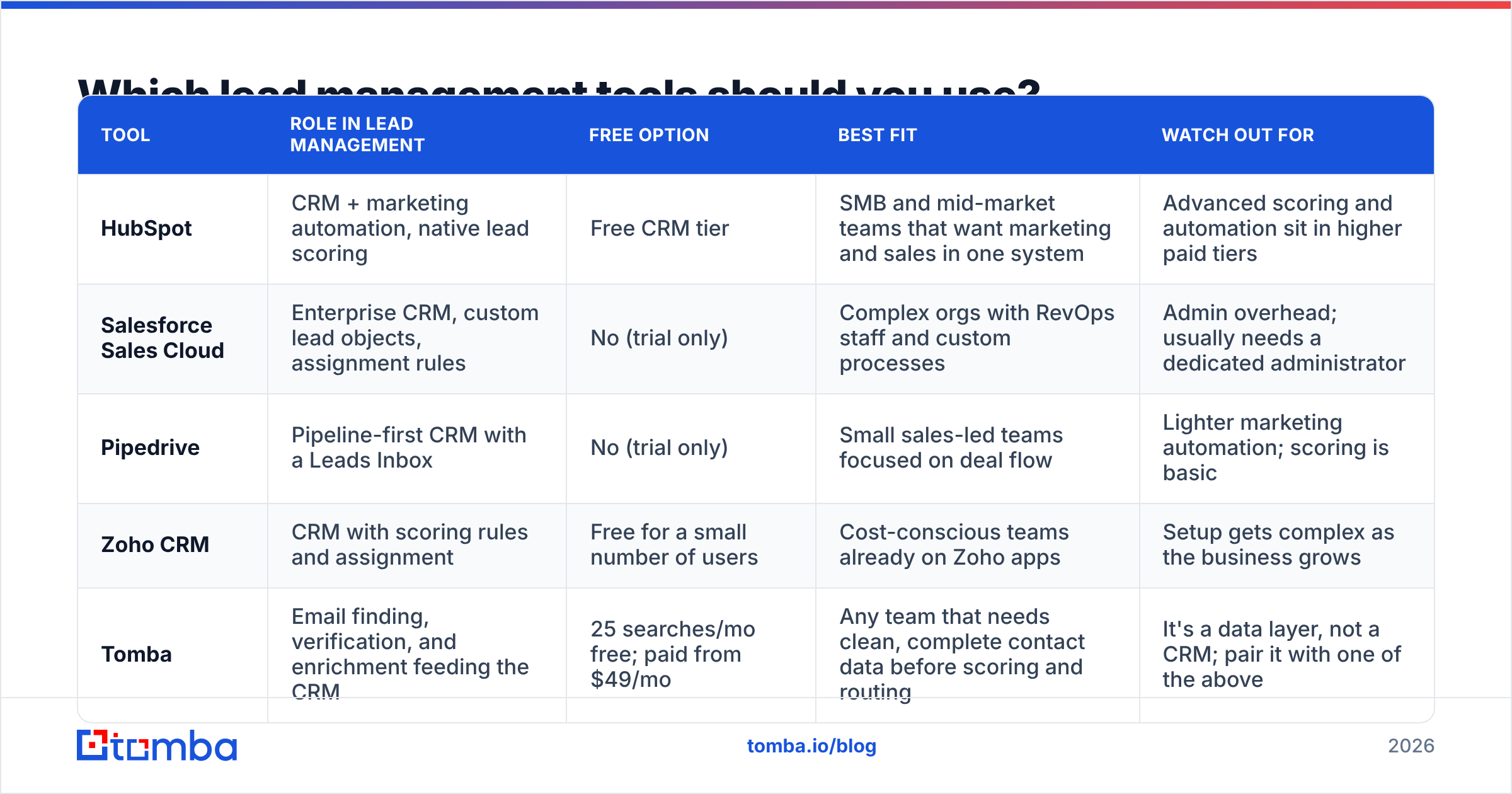
Lead management usually runs on a CRM, with specialist tools added for data, routing, and engagement. The CRM is the system of record. Everything else either feeds it or acts on it.
| Tool | Role in lead management | Free option | Best fit | Watch out for |
|---|---|---|---|---|
| HubSpot | CRM + marketing automation, native lead scoring | Free CRM tier | SMB and mid-market teams that want marketing and sales in one system | Advanced scoring and automation sit in higher paid tiers |
| Salesforce Sales Cloud | Enterprise CRM, custom lead objects, assignment rules | No (trial only) | Complex orgs with RevOps staff and custom processes | Admin overhead; usually needs a dedicated administrator |
| Pipedrive | Pipeline-first CRM with a Leads Inbox | No (trial only) | Small sales-led teams focused on deal flow | Lighter marketing automation; scoring is basic |
| Zoho CRM | CRM with scoring rules and assignment | Free for a small number of users | Cost-conscious teams already on Zoho apps | Setup gets complex as the business grows |
| Tomba | Email finding, verification, and enrichment feeding the CRM | 25 searches/mo free; paid from $49/mo | Any team that needs clean, complete contact data before scoring and routing | It's a data layer, not a CRM; pair it with one of the above |
Check each vendor's current pricing page before you commit. CRM tiers and bundles change often. HubSpot's CRM overview is a useful reference for what a free-tier CRM covers and where paid automation starts.
A few selection principles:
- Choose the CRM for the process you have now and expect in the next 18 months, not the process you might need in five years. Migrating CRMs is painful. Paying for enterprise complexity you never use is also painful.
- Check native integrations between your data tools and your CRM. A HubSpot integration that enriches and verifies on record creation beats a CSV export-import loop every time.
- Keep one system of record. If leads live in the CRM, a spreadsheet, and the SDR tool at the same time, ownership becomes unclear and duplicates pile up.
How do you route leads without dropping them?#
Routing is where speed-to-lead is won or lost. Automate it. Manual assignment by a manager who checks the queue twice a day is a delay built into your process.
Common routing models:
- Round-robin: Even distribution across a pool of reps. Simple and fair, but it ignores specialization.
- Territory-based: By geography or region. It needs clean location data, which is another reason to enrich first.
- Account-based: If the company already has an owner, the new lead goes to that owner. This prevents two reps from contacting the same account.
- Segment-based: By company size or industry, so enterprise leads reach enterprise reps.
Whatever model you pick, add two safeguards:
- An SLA with an escalation path. For example: accept or reject within 4 business hours, or the lead reassigns automatically and the manager gets notified.
- A catch-all owner. Leads that match no rule go to a named person, not into an unassigned void.

How do you nurture leads that aren't ready yet?#
Most fit-qualified leads aren't ready to buy when they first appear. That's normal. The mistake is treating "not now" as "no."
A workable nurture setup:
- Segment by reason, not just by score. "No budget until Q1" and "evaluating a competitor" need different content and different follow-up timing.
- Send useful content, not check-ins. Case studies for their industry, benchmarks, and product updates relevant to their stated problem. "Just following up" doesn't count as nurture.
- Define re-entry triggers. A return visit to the pricing page, a reply, or a new hire in a relevant role should push the lead back to sales automatically.
- Re-verify before re-engaging. A lead that has sat in nurture for nine months may have changed jobs. Check the contact before sales reaches out again.
Which lead management metrics actually matter?#
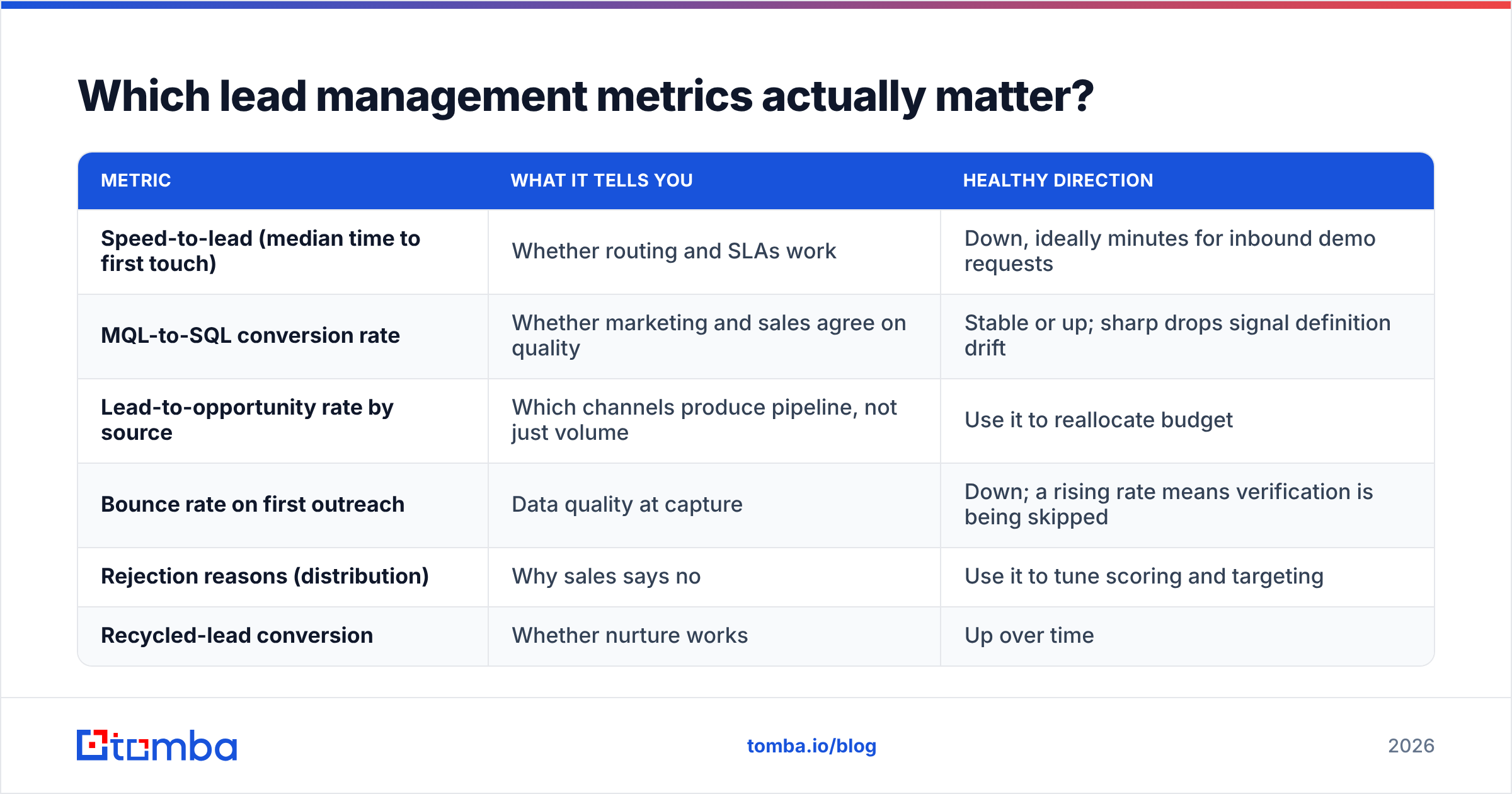
Stop reporting total leads as the main success metric. Track these instead:
| Metric | What it tells you | Healthy direction |
|---|---|---|
| Speed-to-lead (median time to first touch) | Whether routing and SLAs work | Down, ideally minutes for inbound demo requests |
| MQL-to-SQL conversion rate | Whether marketing and sales agree on quality | Stable or up; sharp drops signal definition drift |
| Lead-to-opportunity rate by source | Which channels produce pipeline, not just volume | Use it to reallocate budget |
| Bounce rate on first outreach | Data quality at capture | Down; a rising rate means verification is being skipped |
| Rejection reasons (distribution) | Why sales says no | Use it to tune scoring and targeting |
| Recycled-lead conversion | Whether nurture works | Up over time |
Review these monthly with both marketing and sales in the room. The rejection-reason breakdown will usually spark the most useful conversation.
What are the most common lead management mistakes?#
- Buying software before defining stages. A CRM can't enforce rules nobody wrote down.
- Scoring on incomplete data. Without enrichment, your fit score mostly reflects which fields people bothered to fill in.
- No closed-loop feedback. If sales doesn't log rejection reasons, marketing can't improve.
- Treating all sources the same. A demo request and a webinar attendee shouldn't follow the same path or the same SLA.
- Ignoring duplicates. The same person submitting three forms becomes three leads, three owners, and three awkward emails.
- Letting data decay. B2B contact data goes stale as people change jobs and companies restructure. Schedule periodic re-verification.
How do you get started this quarter?#
If your current process is "leads go into the CRM and someone picks them up," don't try to rebuild everything at once. Work in this order:
- Write down your stage definitions (raw, MQL, SAL, SQL, recycled) and get marketing and sales to agree on them.
- Add verification and enrichment at capture so every downstream step works with clean records.
- Automate routing with an SLA and a catch-all owner.
- Launch a simple fit + intent score with fewer than 10 criteria.
- Require rejection reason codes and review them monthly.
- Build one nurture track for "good fit, bad timing" leads, then expand from there.
Each step makes the next one work better. Routing depends on enriched data, scoring depends on agreed definitions, and nurture depends on rejection reasons.
Where does Tomba fit in your lead management stack?#
A lead management process is only as reliable as the contact data behind it. If your team spends time on bounced emails, missing job titles, or leads that arrive with nothing but a first name and a Gmail address, fix the data layer first. The Tomba Email Finder finds verified professional email addresses by name, domain, or company, so outbound lists and incomplete inbound records reach your CRM ready to score and route. It works alongside verification and enrichment, connects to the CRMs covered above, and starts with a free tier of 25 searches a month (paid plans from $49/mo). Try it on your last 50 unworked leads and see how many were actually reachable.
Related guides#
// get started
Find, verify and enrich your first contacts today
Start on the free plan with 25 searches a month, then scale when your team is ready.
Free plan · No credit card required · GDPR & CCPA
// about the author