Lead Management Software Features: 10 That Matter in 2026
Most lead management tools list 40+ features. Only about 10 change how fast your reps reach good leads. Here are the ones worth paying for, the ones to skip, and how to test them before you buy.
TL;DR
- Ten lead management software features do most of the work: capture, deduplication, enrichment, scoring, routing, lifecycle stages, activity tracking, sequences, reporting, and integrations.
- Enrichment and data hygiene decide whether the other nine are useful. Scoring built on missing job titles and dead email addresses produces wrong scores, fast.
- Routing speed matters more than routing complexity. A simple round-robin that fires in seconds beats a clever territory model that takes an hour.
- Before you sign, run a 2-week pilot with 200 real leads. Measure time-to-first-touch and bounce rate, not how good the demo looked.
- You don't need an all-in-one suite. A light CRM paired with a dedicated data tool is often cheaper and cleaner than an enterprise plan.
What is lead management software, really?#
Lead management software tracks a potential buyer from first contact to a sales-ready opportunity or a disqualification. It sits between your marketing sources (forms, ads, events, outbound lists) and your sales team. Its job is to make sure every lead gets captured, cleaned, prioritized, assigned, and followed up. No lead should slip through, and no lead should get contacted twice by two reps who don't know about each other.
Wikipedia's entry on lead management describes it as a set of methodologies, systems, and practices. That's accurate but vague. In practice it's usually one of three things:
- A module inside your CRM (HubSpot, Salesforce, Pipedrive, Zoho).
- A feature set inside a marketing automation platform (Marketo, ActiveCampaign, HubSpot Marketing Hub).
- A standalone tool that handles routing, scoring, or enrichment and syncs back to the CRM.
Most teams end up with a mix. That's fine, as long as you know which system is the source of truth for each field.
Which lead management software features actually matter?#
Vendors compete on feature count. Your reps care about one thing: whether the next lead they open is worth calling. These ten features decide that, roughly in the order they touch a lead.
- Lead capture. Forms, chat, imports, API, and browser extensions that create records automatically, with source attribution attached.
- Deduplication and merge rules. Matching on email, domain, and name so one person doesn't end up as three records owned by three reps.
- Data enrichment. Filling in job title, company size, industry, phone, and a verified email when a lead arrives with only half the information.
- Lead scoring. Combining fit (who they are) and intent (what they did) into a number or grade that decides priority.
- Routing and assignment. Getting the lead to the right owner within minutes, based on territory, segment, round-robin, or account ownership.
- Lifecycle stages. Clear definitions for subscriber, MQL, SQL, and opportunity, with automatic stage changes.
- Activity tracking. Logging emails, calls, meetings, and page visits on the record without making reps enter them by hand.
- Sequences and tasks. Automated follow-up cadences and reminders so a lead doesn't go cold after one touch.
- Reporting. Conversion by source, stage velocity, speed-to-lead, and rep-level follow-up rates.
- Integrations and API. Two-way sync with your email, calendar, dialer, data tools, and billing system.
Everything else (AI summaries, gamified leaderboards, social listening) is nice to have. Pay for it only after these ten work.
How do these features compare across tool types?#
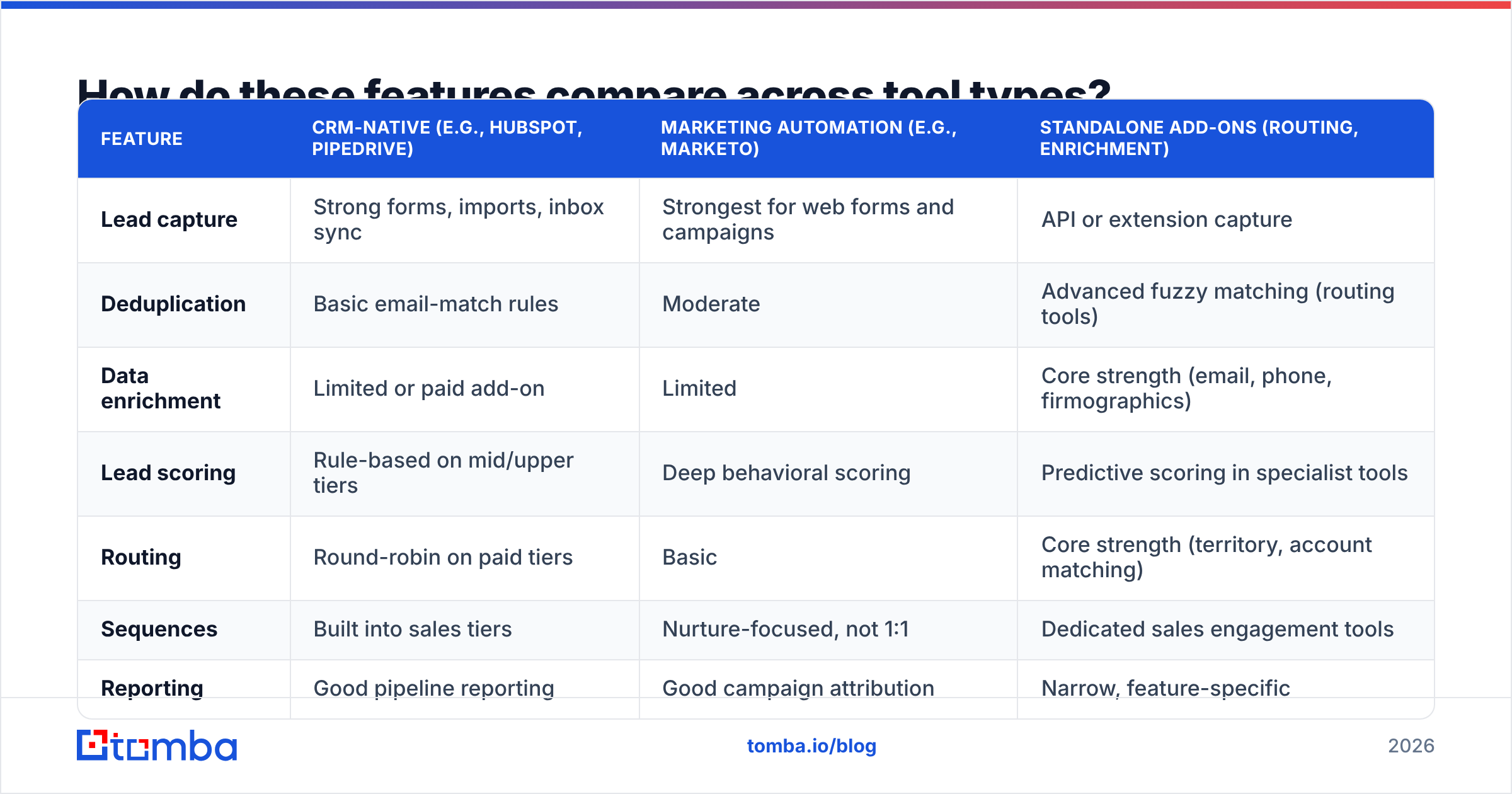
The same feature can be deep in one kind of tool and shallow in another. This table shows where each capability tends to be strongest, so you know where you'll need to fill a gap.
| Feature | CRM-native (e.g., HubSpot, Pipedrive) | Marketing automation (e.g., Marketo) | Standalone add-ons (routing, enrichment) |
|---|---|---|---|
| Lead capture | Strong forms, imports, inbox sync | Strongest for web forms and campaigns | API or extension capture |
| Deduplication | Basic email-match rules | Moderate | Advanced fuzzy matching (routing tools) |
| Data enrichment | Limited or paid add-on | Limited | Core strength (email, phone, firmographics) |
| Lead scoring | Rule-based on mid/upper tiers | Deep behavioral scoring | Predictive scoring in specialist tools |
| Routing | Round-robin on paid tiers | Basic | Core strength (territory, account matching) |
| Sequences | Built into sales tiers | Nurture-focused, not 1:1 | Dedicated sales engagement tools |
| Reporting | Good pipeline reporting | Good campaign attribution | Narrow, feature-specific |
| Typical buyer | SMB to mid-market sales teams | Marketing-led orgs | RevOps teams patching gaps |
The pattern holds up: CRMs are strong at the record and the pipeline, marketing automation at behavior, and point tools at data quality and routing. If you're checking reviews, G2's lead management category is useful for seeing which vendors real users rate highly on each of these features.
Why does enrichment decide whether scoring works?#
Lead scoring is only as good as the fields it reads. A typical fit model gives points for job title, seniority, company size, and industry. If half your inbound leads arrive with a Gmail address and no company name, the model gives them zero fit points. Some of them are VPs at your ideal accounts who happened to use a personal email.
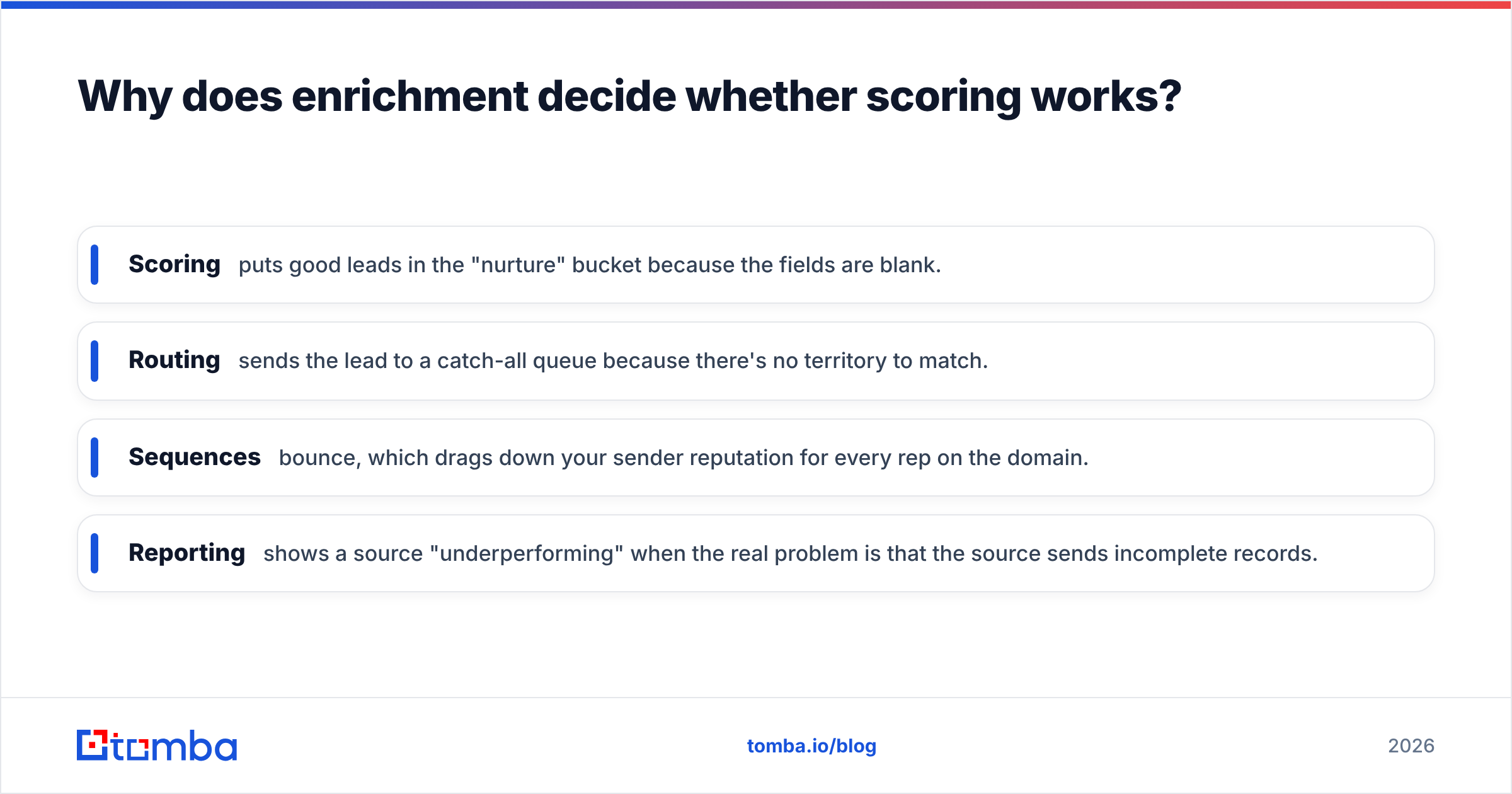
Here's what bad data does downstream:
- Scoring puts good leads in the "nurture" bucket because the fields are blank.
- Routing sends the lead to a catch-all queue because there's no territory to match.
- Sequences bounce, which drags down your sender reputation for every rep on the domain.
- Reporting shows a source "underperforming" when the real problem is that the source sends incomplete records.
That's why data enrichment belongs near the top of your evaluation, not tacked on at the end. Look for enrichment that runs automatically on record creation, fills the company from the email domain, adds a verified work email when you only have a name and company, and flags which fields came from enrichment, so reps know what to double-check.
Check the verification step too. An enriched email that was never verified is a guess. Running new records through an email verifier before they enter a sequence keeps bounce rates under the roughly 2% that most mailbox providers tolerate.
What should good lead scoring look like?#
Good scoring is boring and explainable. If a rep can't tell you why a lead scored 82, they won't trust it, and they'll go back to working their inbox in date order.
A setup that holds up for most B2B teams:
- Two dimensions, not one. Score fit (A–D) and engagement (1–4) separately. An A1 is a hot, well-matched lead. A D1 is a busy tire-kicker. A combined score hides that difference.
- Negative scoring. Subtract points for competitor domains, students, job seekers visiting your careers page, and unsubscribes.
- Decay. Engagement points should expire. A whitepaper download from eight months ago isn't intent.
- A threshold with an owner. When a lead crosses the MQL line, a named person or queue gets it with an SLA attached.
HubSpot's documentation on lead scoring is a good reference for how rule-based and predictive scoring differ inside a CRM. Predictive scoring sounds appealing, but it needs a few hundred closed-won deals to learn from. Below that volume, rule-based scoring you can explain is usually more accurate.
How fast does lead routing need to be?#
Fast. Speed-to-lead is one of the most consistent findings in sales research: contacting an inbound lead within minutes gives you a much better chance of a conversation than contacting them the next day. The exact multiplier varies by study, but the direction never does.
So judge routing features on three things:
- Latency. How many seconds from form submit to owner assigned and notified? Test it yourself during the trial.
- Account matching. Does the tool check whether the lead's company already has an owner before it round-robins? Without this, two reps end up working the same account and the buyer notices.
- Fallbacks. What happens when the assigned rep is on vacation, or the territory field is blank? A good tool reassigns automatically. A weak one leaves the lead sitting in someone's queue.
Complex routing (weighted round-robin, capacity caps, territory by headcount and region) is worth it once you have 10 or more reps. Below that, simple round-robin with account matching covers 90% of what you need.
Which features are overrated?#
Some features look great in a demo and barely get used after rollout. Be skeptical of:
- AI-generated lead summaries. Useful when the record has rich activity history. On a fresh inbound lead with three fields, there's nothing to summarize.
- Social listening modules. Rarely connected to real buying signals for B2B, and expensive to maintain.
- Gamification. Leaderboards boost activity counts, which isn't the same as pipeline.
- Over-engineered custom objects. Every custom object is something RevOps has to maintain. Start with the defaults.
- Built-in contact databases bundled into CRM plans. Convenient, but coverage and freshness vary a lot. Test them against a dedicated data provider before you rely on them.
None of these are bad. They just shouldn't decide which tool you buy.
How do you evaluate lead management software before buying?#
Don't buy from the demo. Run a structured pilot. Here's a two-week plan that works for teams of 3 to 30 reps:
Week 1: Setup and data
- Import 200 real leads from the last 90 days, including messy ones (personal emails, missing companies, duplicates).
- Turn on dedupe rules and enrichment. Record how many duplicates were caught and what percentage of blank fields got filled.
- Build a simple two-dimension scoring model and one routing rule.
Week 2: Live traffic
- Route real inbound leads through the tool.
- Measure time-to-first-touch, bounce rate on the first sequence step, and how many leads each rep actually worked.
- Ask reps one question: "Did the tool tell you who to call next, and were you right to trust it?"
Then compare against your current setup. If the new tool doesn't clearly improve speed-to-lead or data completeness, the extra features won't make up for it.
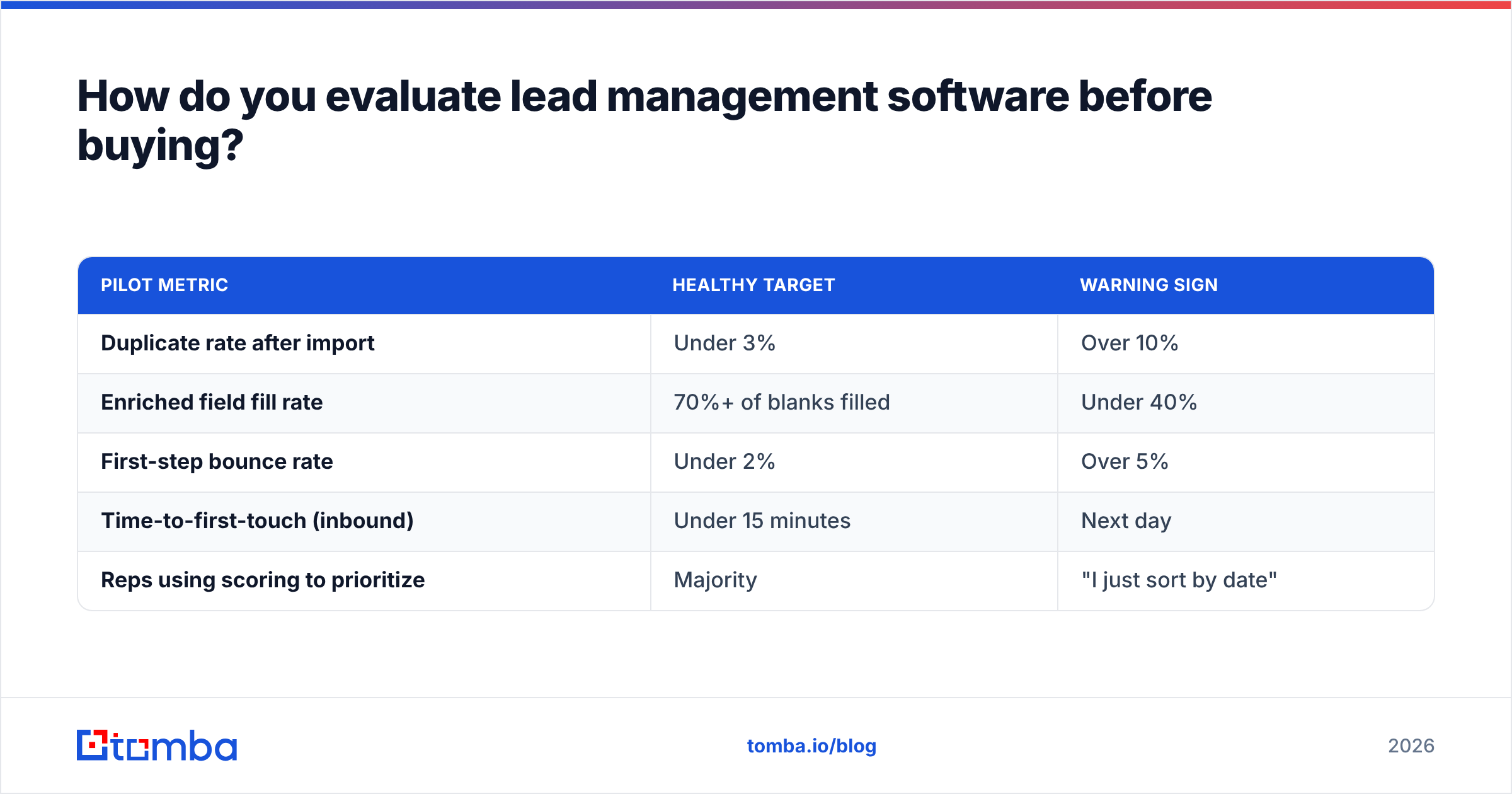
| Pilot metric | Healthy target | Warning sign |
|---|---|---|
| Duplicate rate after import | Under 3% | Over 10% |
| Enriched field fill rate | 70%+ of blanks filled | Under 40% |
| First-step bounce rate | Under 2% | Over 5% |
| Time-to-first-touch (inbound) | Under 15 minutes | Next day |
| Reps using scoring to prioritize | Majority | "I just sort by date" |
Do you need an all-in-one platform or a stack?#
It depends on team size and who owns the system.
All-in-one suites like Salesforce or HubSpot's upper tiers put scoring, routing, sequences, and reporting in one place. The upside is one data model and one vendor. The downside is price: advanced routing and predictive scoring usually sit on the most expensive seats, and you pay for them on every user.
A lean stack usually looks like this: a mid-tier CRM for the record and pipeline, a dedicated data tool for enrichment and verification, and a sales engagement tool for sequences. It takes a little more integration work, but you pick the best option for each job and only pay for data you actually use.
Some rules of thumb:
- Under 10 reps, no RevOps hire: CRM-native features plus an enrichment tool connected through native integration or Zapier.
- 10–50 reps, one RevOps person: CRM plus dedicated routing and enrichment. This is where the stack approach usually saves the most money.
- 50+ reps, full RevOps team: Enterprise suite, with specialist tools only where the suite is weakest (usually data quality).
Whichever route you take, look at how the data layer connects. A HubSpot integration or Salesforce connector that enriches records on creation is worth more than a dozen dashboard widgets.
What does a good lead management setup cost in 2026?#
Costs split into three buckets:
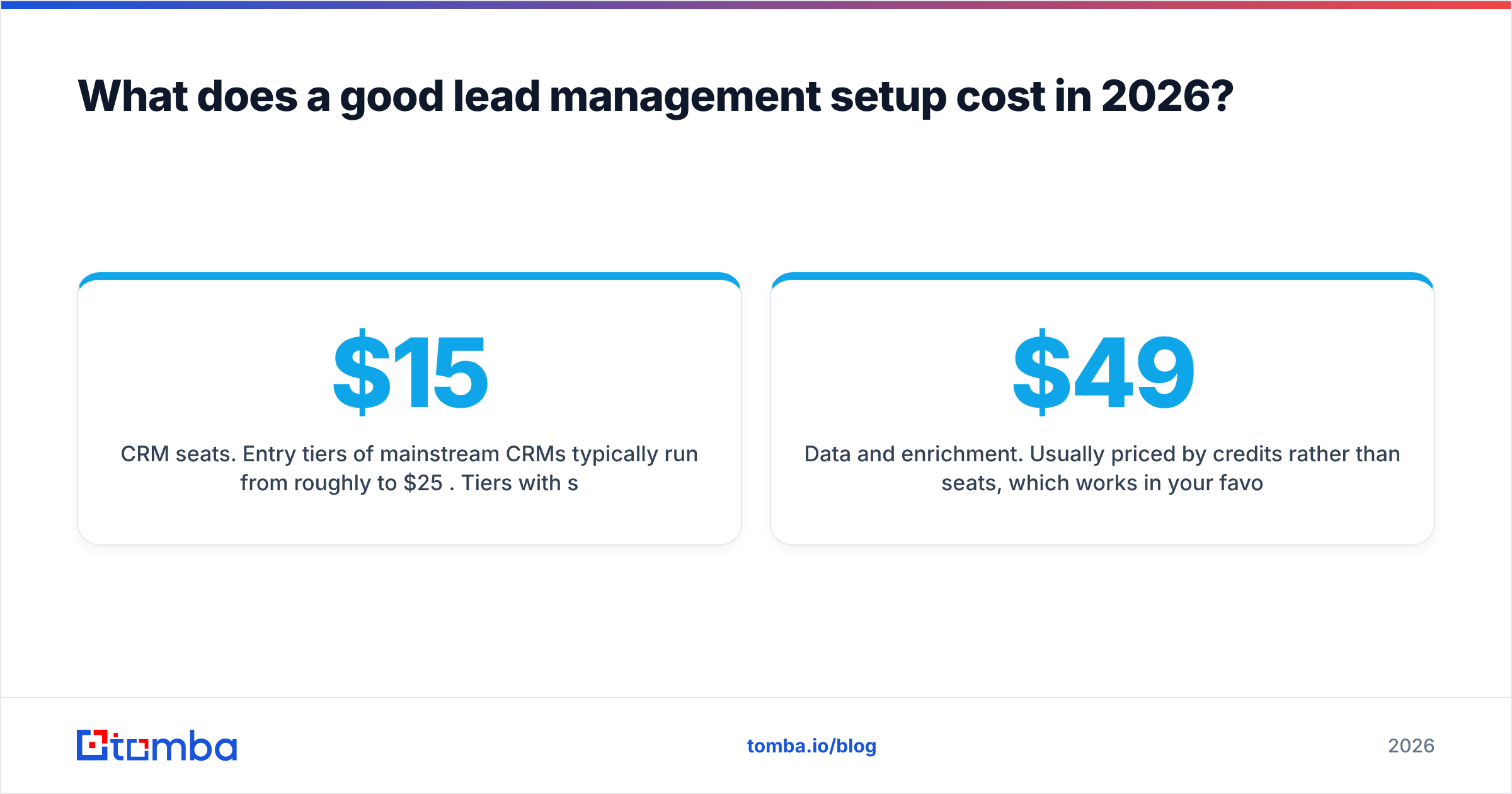
- CRM seats. Entry tiers of mainstream CRMs typically run from roughly $15 to $25 per user per month. Tiers with scoring and routing jump to around $90 to $150 per user. Enterprise plans go higher. Check current pricing on each vendor's site, because it changes often.
- Data and enrichment. Usually priced by credits rather than seats, which works in your favor: one RevOps admin can enrich records for the whole team. For example, Tomba plans start with a free tier of 25 searches a month, then Starter at $49/mo, Growth at $99/mo, and Pro at $249/mo.
- Sales engagement. Per-seat, usually in the same range as a mid-tier CRM seat.
The hidden cost is admin time. A tool that needs 10 hours a week of RevOps upkeep costs more than its license. During the pilot, track how long the setup takes and how often rules break.
What's the bottom line on lead management software features?#
Buy for the basics, not the demo. Capture, dedupe, enrich, score, route, and follow up: if a tool does those six reliably, your reps will reach better leads faster. Reporting and integrations keep it honest. Everything else is optional.
Put the most weight on data quality. It's the feature buyers overlook most often, and it causes the most downstream problems when it's missing. Scoring, routing, and sequences all run on the fields in the record. If those fields are empty or wrong, every automation you build on top just spreads the mistake faster.
If your CRM already handles pipeline and routing well but your records keep showing up half-empty, you don't need a new platform. You need better data going in. Tomba Email Finder finds and verifies professional email addresses from a name and company or domain, so every new lead reaches scoring and routing with a contact that actually works. Start with the free tier, run it on your next 25 inbound leads, and compare the fill rate with what your CRM produces on its own.
Related guides#
// get started
Find, verify and enrich your first contacts today
Start on the free plan with 25 searches a month, then scale when your team is ready.
Free plan · No credit card required · GDPR & CCPA
// about the author