Lead Management System: How to Choose and Set One Up in 2026
Most teams already own a lead management system. The trouble is it's full of duplicates and dead emails, and leads get routed too slowly. Here's how to pick the right system, set it up, and keep the data clean.
TL;DR
- A lead management system tracks every prospect from first touch to closed deal. It handles five jobs: capture, enrichment, scoring, routing, and nurturing.
- Most failures come from bad process and bad data. Duplicates, unverified emails, and slow routing lose more pipeline than weak features do.
- Small teams usually do well with HubSpot, Pipedrive, or Zoho. Enterprise and complex routing setups tend to end up on Salesforce, often with add-ons.
- Speed matters more than a clever score. Contact inbound leads within minutes, not hours.
- Verify and enrich contacts before they enter the system. Everything downstream depends on data quality.
What is a lead management system?#
A lead management system is the software and process that takes a raw lead (a form fill, a list import, a business card, a LinkedIn conversation) and moves it until it becomes a customer or gets disqualified. It records who the lead is and where they came from. It tracks how interested they are, who owns them, and what should happen next.
In practice, "lead management system" can mean three things:
- A CRM with lead features. Examples are HubSpot, Salesforce, Pipedrive, and Zoho CRM. This is what most B2B teams use.
- A dedicated lead management platform. LeadSquared, for example, is built around high-volume lead routing and follow-up.
- A stack. A CRM plus a data tool, a scoring model, a routing tool, and a sequencer, connected by integrations.
The label matters less than the job. If a lead can arrive in your company and sit untouched for three days without anyone noticing, you don't have a lead management system. You have a database.
What does a lead management system actually do?#
Every working lead management setup covers the same five stages. Weakness in one stage hurts the next one, so it's worth looking at each separately.
- Capture. Pull leads in from every source (forms, chat, events, imports, ads, outbound lists) and tag the source automatically. If source attribution is missing, you can't tell which channels deserve budget.
- Enrich and verify. Add company size, industry, role, and a valid email before a rep sees the lead. An unverified email that bounces on the first touch wastes the lead and damages your sender reputation.
- Score and qualify. Combine fit (does this company match your ICP?) with intent (did they visit pricing, open three emails, request a demo?) to separate a marketing qualified lead from a curious student.
- Route and assign. Send each lead to the right owner by territory, segment, round-robin, or account ownership, and alert that owner right away.
- Nurture and track. Put leads that aren't ready into sequences or nurture tracks. Log every touch and report on conversion by stage.
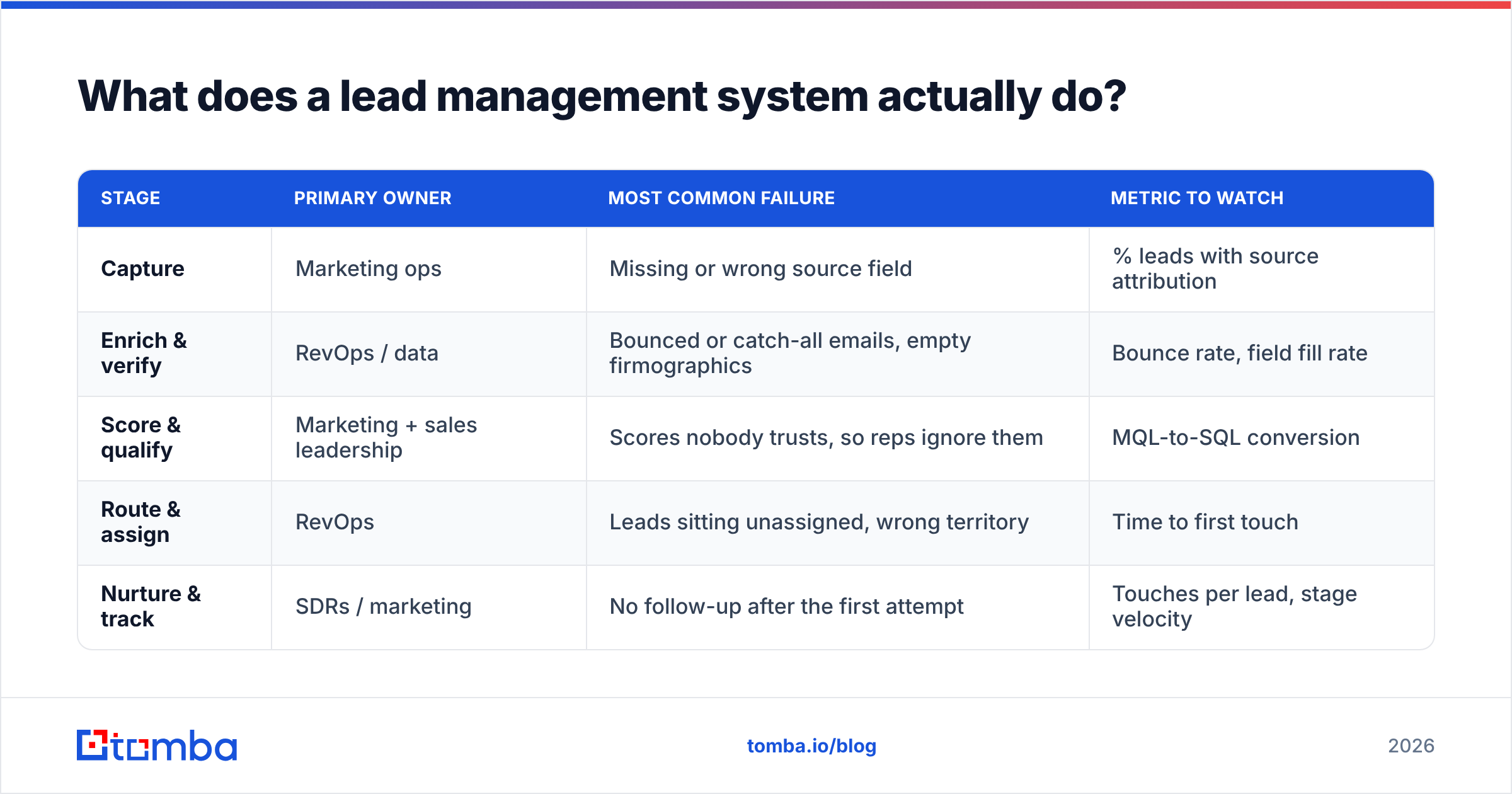
Here's how the five stages compare on owner, failure mode, and the metric to watch:
| Stage | Primary owner | Most common failure | Metric to watch |
|---|---|---|---|
| Capture | Marketing ops | Missing or wrong source field | % leads with source attribution |
| Enrich & verify | RevOps / data | Bounced or catch-all emails, empty firmographics | Bounce rate, field fill rate |
| Score & qualify | Marketing + sales leadership | Scores nobody trusts, so reps ignore them | MQL-to-SQL conversion |
| Route & assign | RevOps | Leads sitting unassigned, wrong territory | Time to first touch |
| Nurture & track | SDRs / marketing | No follow-up after the first attempt | Touches per lead, stage velocity |
Why do most lead management systems fail?#
Few teams fail because they picked the "wrong" CRM. The system usually breaks down in the same few places, whichever vendor logo is on it.
Slow response. The most cited research here is still the Harvard Business Review study on the short life of online sales leads. It found that firms contacting leads within an hour were far more likely to qualify them than firms that waited even one hour longer. The study is old, but the pattern still shows up in pipeline data: the first responder tends to get the meeting. If your routing adds a manual review step before assignment, that step costs you meetings.
Dirty data at the door. A lead with a typo'd email, a personal Gmail on a B2B form, or a contact who left the company six months ago will sink your scoring. It will also skew your reporting and burn a rep's time. Most teams clean data after the fact, once a campaign has already bounced.
Duplicates. One person fills out two forms, gets imported from an event list, and turns up again in an outbound list. Now three reps own the same person. Nobody trusts the dashboard, and the prospect gets three different intros in one week.
Scoring nobody believes. A score built in a workshop and never checked against closed-won data turns into noise. Reps learn to ignore it, and that's worse than having no score.
The fix for the first three is plain operations work: automated routing, verification at the point of entry, and a dedupe rule on email plus domain. The fourth needs a quarterly review of your scoring model against actual wins.
Which lead management system should you choose?#
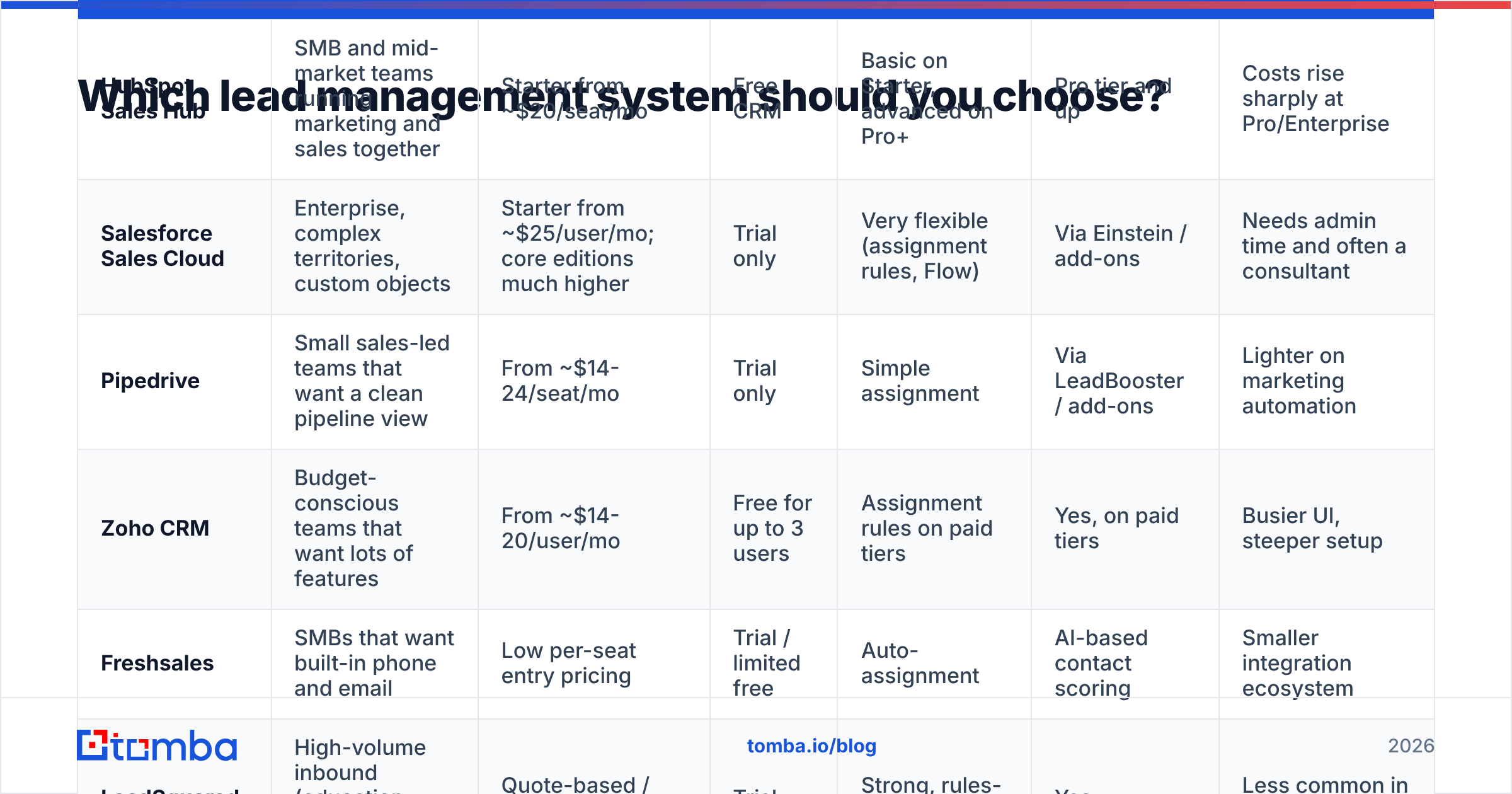
Pick the tool that matches how your team already sells, then add what's missing. Here are the main options for B2B teams in 2026. Pricing changes often and is usually per seat, so treat these as starting points and check each vendor's pricing page before you buy.
| Tool | Best for | Entry pricing (approx.) | Free option | Lead routing | Built-in scoring | Main trade-off |
|---|---|---|---|---|---|---|
| HubSpot Sales Hub | SMB and mid-market teams running marketing and sales together | Starter from ~$20/seat/mo | Free CRM | Basic on Starter, advanced on Pro+ | Pro tier and up | Costs rise sharply at Pro/Enterprise |
| Salesforce Sales Cloud | Enterprise, complex territories, custom objects | Starter from ~$25/user/mo; core editions much higher | Trial only | Very flexible (assignment rules, Flow) | Via Einstein / add-ons | Needs admin time and often a consultant |
| Pipedrive | Small sales-led teams that want a clean pipeline view | From ~$14-24/seat/mo | Trial only | Simple assignment | Via LeadBooster / add-ons | Lighter on marketing automation |
| Zoho CRM | Budget-conscious teams that want lots of features | From ~$14-20/user/mo | Free for up to 3 users | Assignment rules on paid tiers | Yes, on paid tiers | Busier UI, steeper setup |
| Freshsales | SMBs that want built-in phone and email | Low per-seat entry pricing | Trial / limited free | Auto-assignment | AI-based contact scoring | Smaller integration ecosystem |
| LeadSquared | High-volume inbound (education, finance, healthcare) | Quote-based / tiered | Trial | Strong, rules-based | Yes | Less common in pure B2B SaaS |
Some quick guidance:
- Under 10 reps, inbound-heavy: HubSpot's free CRM or Starter tier gets capture, forms, and basic assignment working in an afternoon. The HubSpot CRM docs are thorough for self-setup.
- Sales-led, outbound-heavy, under 20 reps: Pipedrive or Zoho. You'll add a data tool and a sequencer, but you won't pay for marketing features you don't use.
- Multiple segments, territories, or products: Salesforce. Its Sales Cloud routing and customization handle complexity that the lighter tools can't, as long as you budget for admin time.
- Want peer reviews first? The G2 lead management category is a useful way to shortlist, especially for filtering reviews by company size.
How do you set up a lead management system step by step?#
Whatever tool you pick, the rollout follows the same order. Skipping steps is how teams end up rebuilding the whole thing a year later.
1. Define what a "lead" is, in writing#
Agree on the definitions of lead, MQL, SQL, and opportunity with both marketing and sales leadership. Write down the entry and exit criteria for each stage. If two people would disagree about whether a record is an SQL, the definition isn't finished.
2. Map every lead source#
List every place leads come from: website forms, chat, demo requests, webinars, trade shows, partner referrals, outbound lists, product signups. Each source gets a required lead_source value. Make the field mandatory on every form and import template.
3. Put verification and enrichment at the front door#
This step gets skipped most often, and it matters most. Before a record reaches a rep's queue, run the email through an email verifier and fill in firmographics with data enrichment. Doing it at entry costs less than cleaning up a bounced campaign later. It also means your scoring runs on real company data, not whatever the prospect typed into a form.
For outbound lists, do the same before import. A 10,000-row list with a 12% bounce rate carries 1,200 records that will hurt your domain on day one.
4. Set dedupe rules#
Match on email first, then on domain plus name. Decide who wins a conflict: the older record, the one with more activity, or the one tied to an open opportunity. Most CRMs have native duplicate rules, so turn them on before you import anything.
5. Build a simple scoring model#
Start with two dimensions:
- Fit score (0-50): company size, industry, role seniority, geography, and technology signals.
- Engagement score (0-50): pricing page visits, demo requests, email replies, webinar attendance.
Demo requests should skip scoring and route straight to a rep. After 90 days, pull closed-won deals and check whether high scorers actually converted better. If they didn't, change the weights.
6. Automate routing and alerts#
Assign leads with rules, not by hand. Round-robin works for a single segment. Territory or account-based routing works once you have named accounts. Every assignment should trigger an alert in the rep's inbox or in Slack. Set an SLA (say, 5 minutes for demo requests and 24 hours for MQLs) and report on breaches every week.
7. Connect sequencing and nurture#
Leads that aren't sales-ready go into nurture tracks. Sales-ready leads that don't respond go into a multi-touch sequence. Make sure activity syncs back to the CRM so the record shows the full history. If you run HubSpot, the HubSpot integration keeps verified contact data flowing into the same records your sequences use.
8. Report on the funnel, not just the top#
Track four numbers every week: lead volume by source, time to first touch, MQL-to-SQL conversion, and SQL-to-opportunity conversion. The weakest ratio tells you what to fix next.
Is lead scoring worth it for small teams?#
Often it isn't, at least not at first. If you get fewer than a few hundred inbound leads a month, a rep can look at every one. A complex score adds process without adding signal. Use a simple fit filter instead: disqualify obvious non-ICP leads such as students, competitors, and tiny companies outside your market, then work everything else fast.
Scoring starts to pay off when volume goes beyond what reps can triage, or when you have enough closed-won history to show which attributes actually predict a deal. At that point the model rests on evidence instead of guesses.
How does data quality affect lead management?#
Every stage of a lead management system assumes the record is accurate. When it isn't, each stage fails in a different way:
- Scoring gives high scores to leads whose "VP of Sales" title is two jobs out of date.
- Routing sends a lead to the wrong territory because the company's HQ field is empty.
- Sequencing sends to addresses that bounce, and each bounce hurts your sender reputation.
- Reporting double-counts duplicates and hides which channels really produce pipeline.
B2B contact data decays steadily as people change jobs, get promoted, and companies rebrand or get acquired. Treat data quality as ongoing maintenance. Re-verify active records before major campaigns, enrich new records on entry, and set a rule that archives or re-checks contacts with no engagement in 12 months.
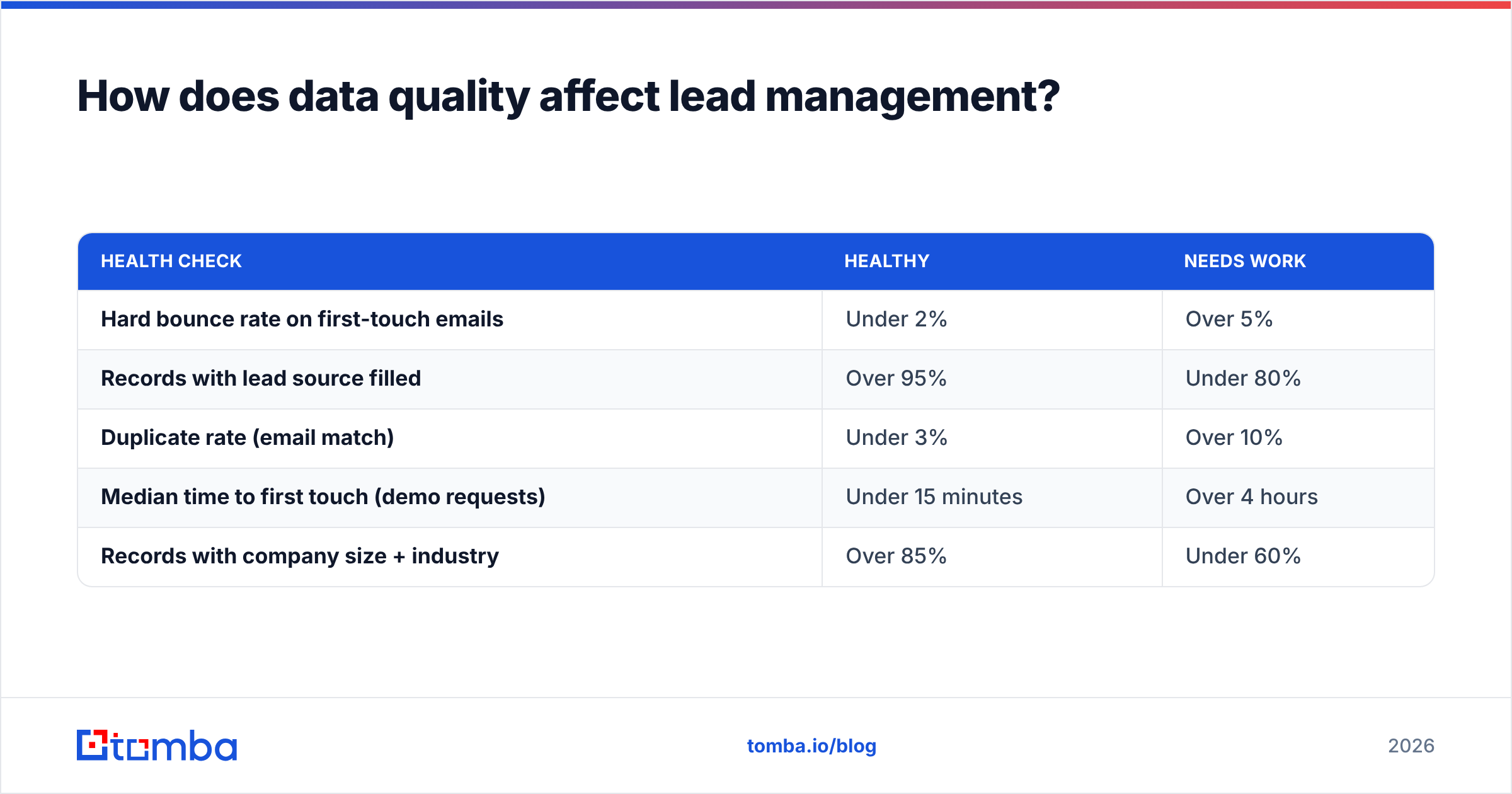
Here's a quick way to check where you stand:
| Health check | Healthy | Needs work |
|---|---|---|
| Hard bounce rate on first-touch emails | Under 2% | Over 5% |
| Records with lead source filled | Over 95% | Under 80% |
| Duplicate rate (email match) | Under 3% | Over 10% |
| Median time to first touch (demo requests) | Under 15 minutes | Over 4 hours |
| Records with company size + industry | Over 85% | Under 60% |
If two or more of these land in "needs work," fix data and routing before you evaluate new software. A new CRM loaded with the same records will have the same problems.
What does a lead management system cost in total?#
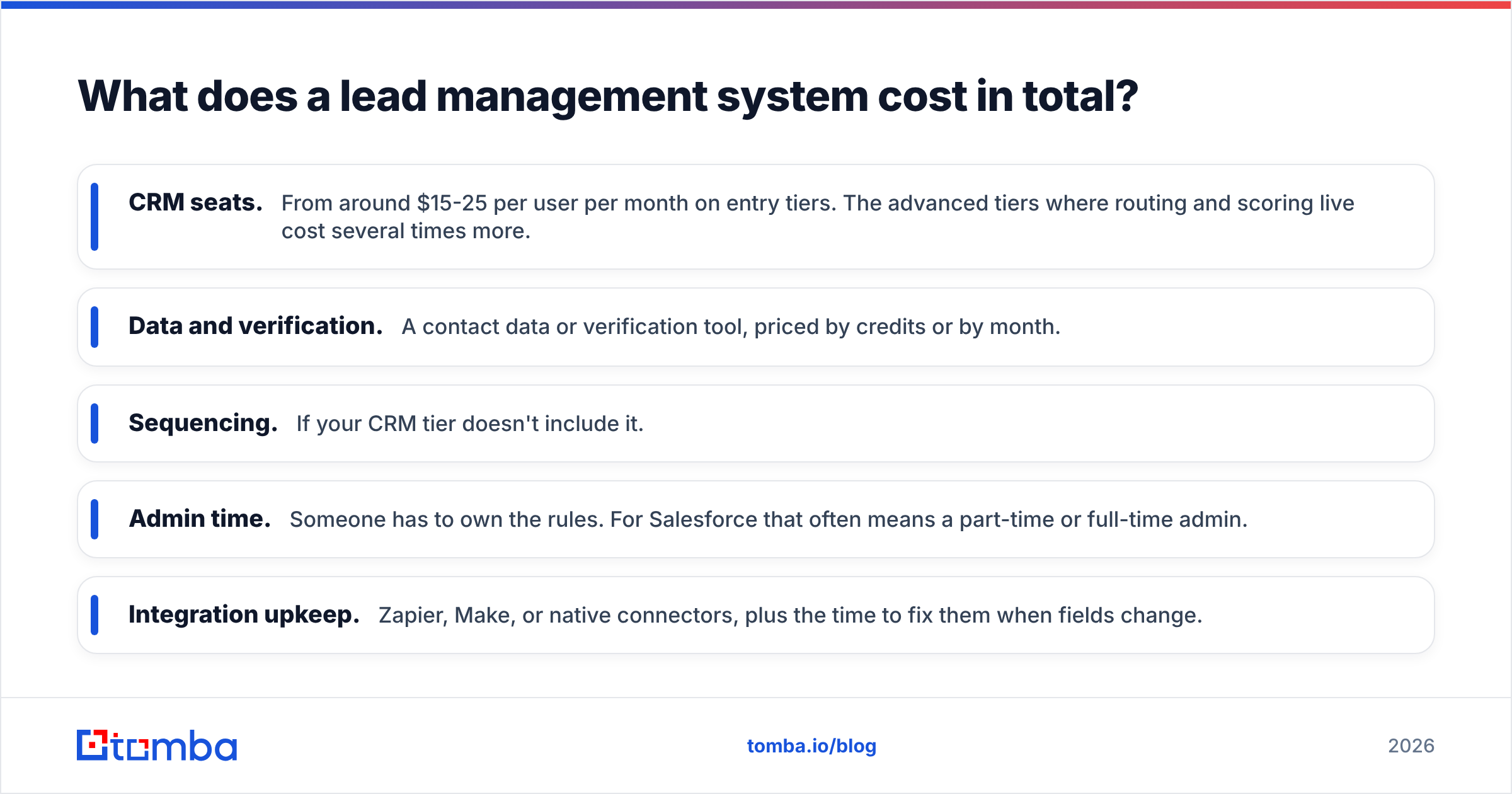
The license is usually the smallest line item. Budget for:
- CRM seats. From around $15-25 per user per month on entry tiers. The advanced tiers where routing and scoring live cost several times more.
- Data and verification. A contact data or verification tool, priced by credits or by month.
- Sequencing. If your CRM tier doesn't include it.
- Admin time. Someone has to own the rules. For Salesforce that often means a part-time or full-time admin.
- Integration upkeep. Zapier, Make, or native connectors, plus the time to fix them when fields change.
A small team can run a solid setup on a free or entry-tier CRM plus a verification and enrichment tool for well under $200 a month. The mistake to avoid is paying for enterprise features while the data feeding them is bad.
Frequently asked questions#
What is the difference between a CRM and a lead management system?#
A CRM manages relationships with contacts, accounts, and deals across the whole customer lifecycle. A lead management system focuses on the early part: capturing, qualifying, and routing leads before they become opportunities. Most modern CRMs include lead management features, so for most B2B teams the CRM is the lead management system.
How fast should sales respond to a new lead?#
For high-intent leads like demo requests, within minutes. Research on lead response time consistently shows that qualification rates drop sharply after the first hour. Set a written SLA and report on it weekly.
Do I need a separate tool for lead enrichment?#
Usually, yes. Native CRM enrichment is often limited or costs extra on higher tiers. A dedicated enrichment and verification tool that syncs with your CRM keeps records accurate without manual research.
How often should I review my lead scoring model?#
Quarterly, at minimum. Compare scores against closed-won and closed-lost deals, and adjust weights where high scores didn't turn into revenue.
Where does Tomba fit in your lead management system?#
Tomba doesn't replace your CRM. It makes sure the records going into your CRM are real, reachable people. Use the Tomba Email Finder to find verified professional emails by name, domain, or company before leads reach your pipeline. Pair it with verification and enrichment so scoring, routing, and sequences run on accurate data. You can start on the free tier with 25 searches a month and move to Starter at $49/mo once it's part of your daily workflow.
Related guides#
// get started
Find, verify and enrich your first contacts today
Start on the free plan with 25 searches a month, then scale when your team is ready.
Free plan · No credit card required · GDPR & CCPA
// about the author