Lead Marketing Automation: The 2026 Guide to Workflows and Tools
Most lead marketing automation fails before the first email goes out, because it runs on bad data. This guide covers the five-stage workflow, the tools, what they cost, and the mistakes to avoid.
TL;DR
- Lead marketing automation is the set of rules and tools that capture, enrich, score, nurture, and route leads so a person doesn't have to do each step by hand.
- It works in five stages. Most teams automate stages 1 and 4 (capture and nurture). They skip stage 2 (enrichment), and that's usually why their scoring and routing fail.
- Your automation platform matters less than what you feed it. An unverified list with half-empty records will get you bounces, bad scores, and angry reps, whatever software you run.
- Small teams can build a working stack for under $150/month. Mid-market teams usually spend $800 to $3,000/month once they add a full marketing automation platform (MAP).
- Start with one workflow (inbound demo request → enrich → score → route in 5 minutes). Get it working, then add more.
What is lead marketing automation?#
Lead marketing automation means using software to move a lead from first contact to a sales-ready conversation without someone doing every step manually. Someone fills out a form, downloads a guide, or visits your pricing page. The system then records them, fills in the missing details, rates how well they fit, sends them relevant follow-ups, and passes them to a rep when the timing is right.
It isn't the same thing as email marketing. Email marketing sends the same messages to a list. Lead marketing automation makes decisions based on data: who the lead is, what they did, and what should happen next. Wikipedia's overview of marketing automation traces the category back to the early 2000s. The basic idea hasn't changed much: take repeatable judgment calls off your team's plate.
What has changed is the data layer. In 2026, a typical B2B inbound lead shows up with an email address and maybe a first name. Everything else your automation needs, like company size, industry, job title, and a verified phone number, has to come from somewhere else. That's why enrichment now matters as much as the platform itself.
How does lead marketing automation actually work?#
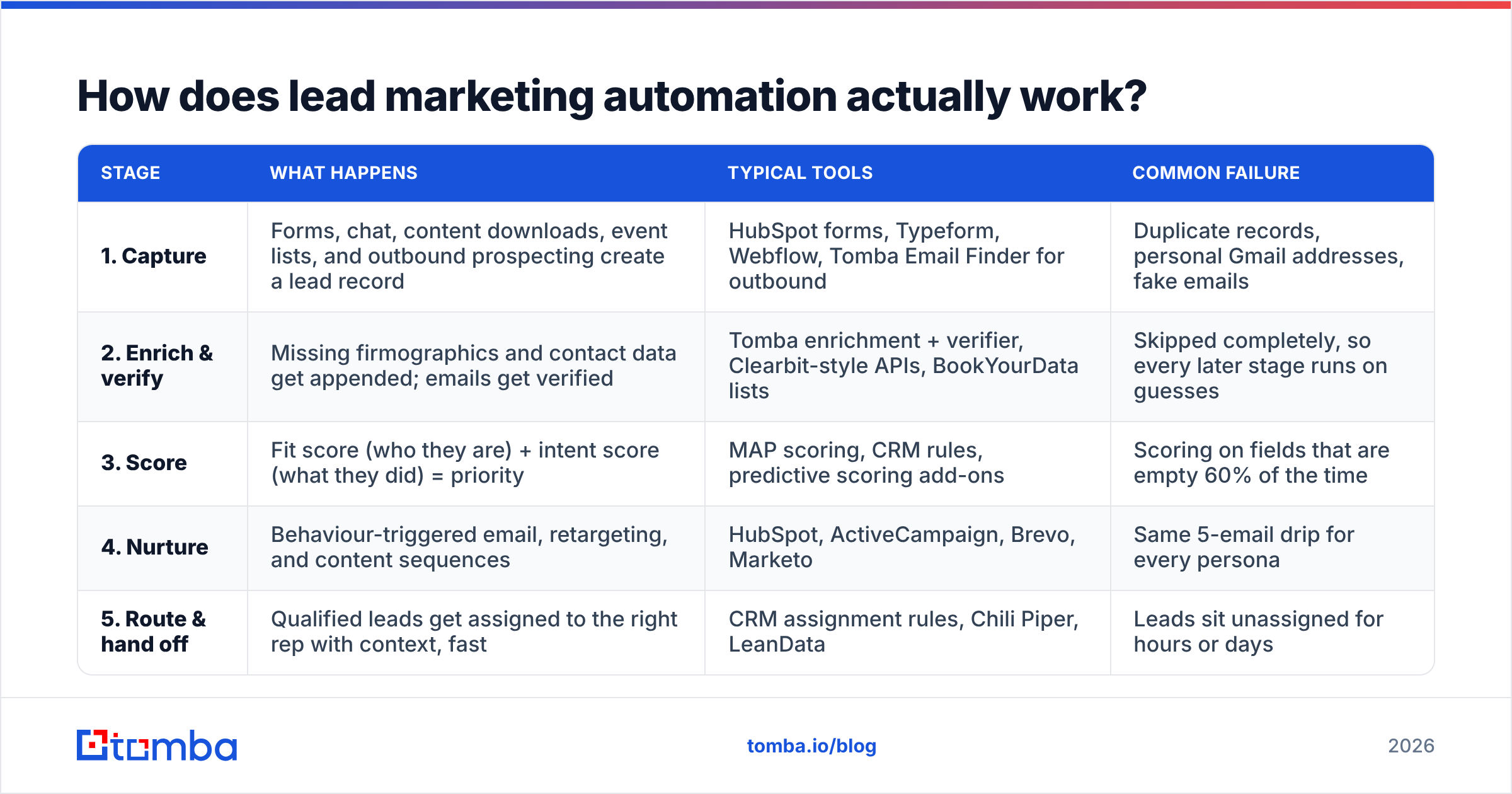
Every working setup follows the same five stages. The tools change from team to team, but the order doesn't.
| Stage | What happens | Typical tools | Common failure |
|---|---|---|---|
| 1. Capture | Forms, chat, content downloads, event lists, and outbound prospecting create a lead record | HubSpot forms, Typeform, Webflow, Tomba Email Finder for outbound | Duplicate records, personal Gmail addresses, fake emails |
| 2. Enrich & verify | Missing firmographics and contact data get appended; emails get verified | Tomba enrichment + verifier, Clearbit-style APIs, BookYourData lists | Skipped completely, so every later stage runs on guesses |
| 3. Score | Fit score (who they are) + intent score (what they did) = priority | MAP scoring, CRM rules, predictive scoring add-ons | Scoring on fields that are empty 60% of the time |
| 4. Nurture | Behaviour-triggered email, retargeting, and content sequences | HubSpot, ActiveCampaign, Brevo, Marketo | Same 5-email drip for every persona |
| 5. Route & hand off | Qualified leads get assigned to the right rep with context, fast | CRM assignment rules, Chili Piper, LeanData | Leads sit unassigned for hours or days |
The way to read this table: a problem at one stage causes a bigger problem at the next. If capture lets a mistyped email through and enrichment doesn't catch it, the lead gets a zero score, a nurture sequence that bounces, and it never reaches a rep. Nobody sees it happen.

Why does enrichment decide whether automation works?#
Scoring and routing rules are only as good as the fields they read. A typical fit rule looks like "+20 if employee count is 50–500, +15 if title contains VP or Head, +10 if industry = SaaS." If a lead arrives with only jane@acme.io, that rule scores zero. The lead drops into a low-priority nurture track even if Jane is the exact buyer you want.
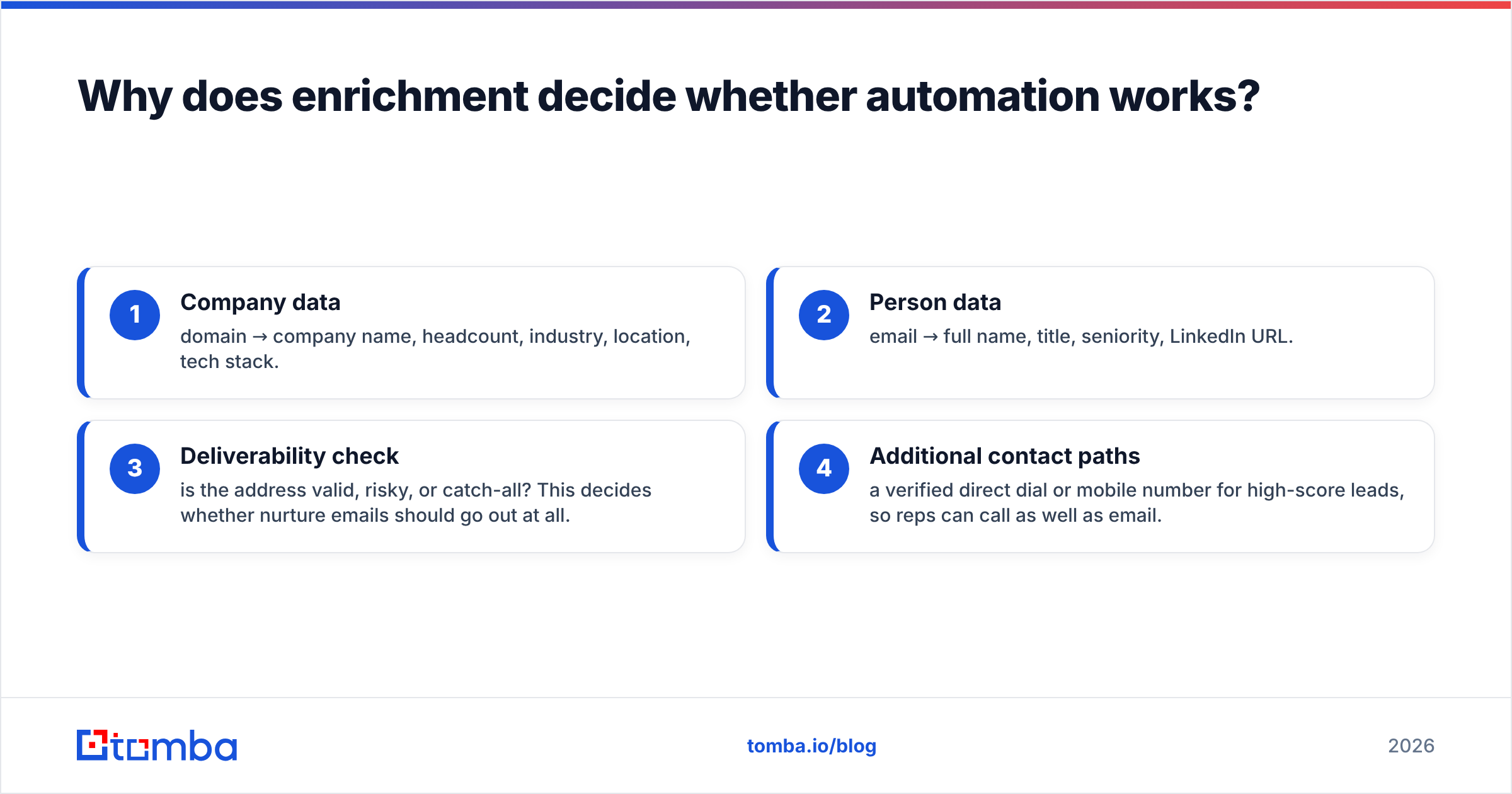
Enrichment fixes this by filling in the blank fields as soon as the lead is created:
- Company data: domain → company name, headcount, industry, location, tech stack.
- Person data: email → full name, title, seniority, LinkedIn URL.
- Deliverability check: is the address valid, risky, or catch-all? This decides whether nurture emails should go out at all.
- Additional contact paths: a verified direct dial or mobile number for high-score leads, so reps can call as well as email.
Tomba's data enrichment endpoint handles steps 1 and 2 from just a domain or email. The email verifier handles step 3. If you'd rather buy a pre-built list than enrich leads one at a time, BookYourData is a solid choice: it sells filtered, verified B2B contact lists, which works well for seeding account-based campaigns. Neither approach is always better. Real-time enrichment suits inbound leads. List purchases suit planned outbound pushes.
One practical rule: verify before a lead enters any email sequence, not after the first bounce. Mailbox providers track your bounce rate, and every hard bounce from an automated sequence hurts the sender reputation your whole domain relies on.
Which lead marketing automation tools should you consider?#
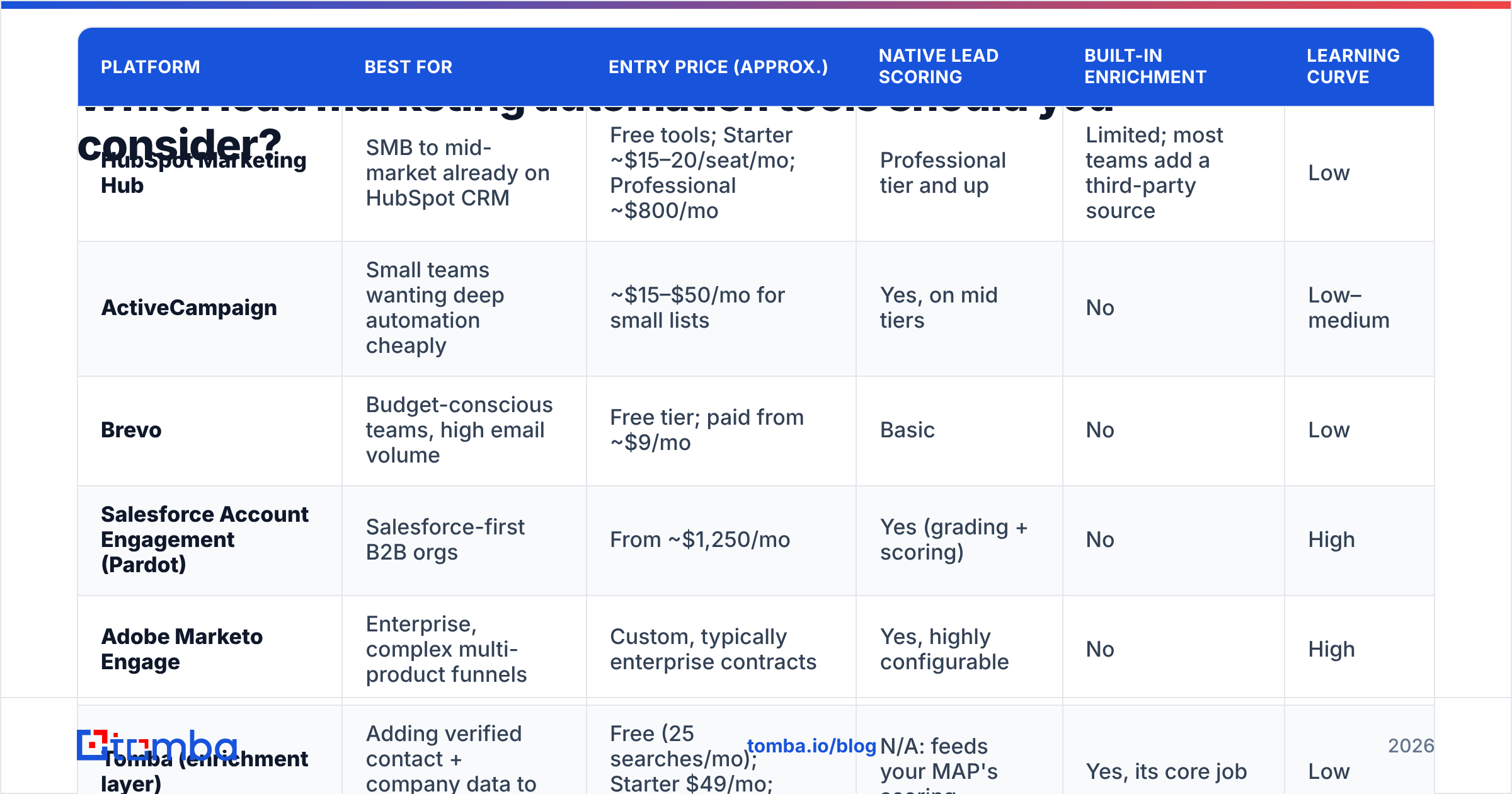
Your choice depends on team size, CRM, and how much control you need over scoring logic. The table below compares the platforms B2B teams shortlist most often. Pricing is based on public list prices as of 2026 and changes often, so confirm on each vendor's site before you budget.
| Platform | Best for | Entry price (approx.) | Native lead scoring | Built-in enrichment | Learning curve |
|---|---|---|---|---|---|
| HubSpot Marketing Hub | SMB to mid-market already on HubSpot CRM | Free tools; Starter ~$15–20/seat/mo; Professional ~$800/mo | Professional tier and up | Limited; most teams add a third-party source | Low |
| ActiveCampaign | Small teams wanting deep automation cheaply | ~$15–$50/mo for small lists | Yes, on mid tiers | No | Low–medium |
| Brevo | Budget-conscious teams, high email volume | Free tier; paid from ~$9/mo | Basic | No | Low |
| Salesforce Account Engagement (Pardot) | Salesforce-first B2B orgs | From ~$1,250/mo | Yes (grading + scoring) | No | High |
| Adobe Marketo Engage | Enterprise, complex multi-product funnels | Custom, typically enterprise contracts | Yes, highly configurable | No | High |
| Tomba (enrichment layer) | Adding verified contact + company data to any of the above | Free (25 searches/mo); Starter $49/mo; Growth $99/mo | N/A: feeds your MAP's scoring | Yes, its core job | Low |
Most platforms in the "built-in enrichment" column say no or limited. MAPs are built to orchestrate. They aren't built to source data. That's why nearly every serious stack pairs a MAP with a separate data provider. For independent user reviews, the G2 marketing automation category lets you filter by company size and compare satisfaction scores side by side.
How much does a realistic stack cost?#
- Solo founder / 1–3 person team: Brevo or ActiveCampaign (
$30–50) + Tomba Starter ($49) + Zapier ($20–30). Roughly $100–130/month. - Growing SMB (5–15 people): HubSpot Marketing Hub Starter or Professional + Tomba Growth ($99) + a scheduling/routing tool. Roughly $300–1,200/month depending on HubSpot tier.
- Mid-market / enterprise: Marketo or Account Engagement + enrichment + routing + analytics. Easily $3,000+/month, and usually on annual contracts.
How do you build your first automated lead workflow?#
Don't try to automate your whole funnel in one sprint. Pick the workflow with the highest value per lead, which for most B2B companies is the inbound demo or pricing request. Build it end to end first.
Step 1: Define "sales-ready" in writing#
Agree with sales on the exact criteria before you build anything. Example: company 20–1,000 employees, title at Manager level or above, business email (not Gmail/Yahoo), and either a demo request or 3+ pricing-page visits in 14 days. If you skip this step, marketing will call leads qualified and sales will reject them, which is the old MQL argument.
Step 2: Enrich on create#
Trigger enrichment as soon as the contact record exists. With the Tomba HubSpot integration or a Zapier/Make scenario, new contacts get company and person fields filled in before any scoring workflow runs. Put a short delay (60–120 seconds) on the scoring workflow so enrichment has time to finish.
Step 3: Verify, then branch#
Run email verification and branch on the result:
- Valid: continue into scoring and nurture.
- Catch-all / risky: allow into low-volume nurture only, and flag for manual review if high-fit.
- Invalid: suppress from email; if the company fits, try to find a working address for someone else at that account.
Step 4: Score fit and intent separately#
Keep two numbers instead of one combined score. A lead with high fit and low intent needs nurturing. A lead with low fit and high intent is probably a student or a competitor. A lead with high fit and high intent should get a call today. Combining the two into one score hides the difference between these cases.
Step 5: Route with a time limit#
When a lead crosses the threshold, assign it to a rep, notify them in Slack or email with the enriched context attached, and create a task that's due within the hour. Research reported by Harvard Business Review found that companies contacting leads within an hour were far more likely to qualify them than those who waited longer. That study is old, but the pattern still holds.
Step 6: Nurture everything else by segment#
Anything that doesn't route goes into a nurture track based on persona and funnel stage. Three tracks (for example: technical evaluator, economic buyer, early-stage researcher) almost always beat one generic drip. Re-score after each engagement so warming leads come back into routing automatically.
What mistakes break lead marketing automation?#
Most failed implementations fail in the same few ways:
- Automating a broken process. If your manual lead handling doesn't work, automating it just makes it fail faster. Fix the logic on paper first.
- Scoring on empty fields. Check what share of new leads actually have each field populated before you give it points. If industry is filled on only 35% of records, an industry-based rule is mostly noise until you add enrichment.
- No verification gate. Sending automated sequences to unverified addresses is the quickest way to damage sender reputation. It also hurts every other email your company sends from that domain.
- Too many workflows, no owner. Audits regularly find 150 active workflows that nobody can explain, several of which contradict each other. Assign one owner per workflow and review them every quarter.
- Measuring opens instead of pipeline. Apple Mail Privacy Protection made open rates unreliable years ago. Track meetings booked, pipeline created, and lead-to-opportunity conversion per workflow.
- Letting data decay. B2B contact data goes stale constantly as people change jobs and companies restructure. Re-verify and re-enrich your nurture database at least twice a year.

Is lead marketing automation worth it for small teams?#
Yes, if you keep it small. A three-person team doesn't need Marketo. It needs a few reliable automations: capture into CRM, enrich, verify, notify a human for hot leads, and run one nurture track for everyone else. That setup takes an afternoon to build and saves hours of manual research every week.
The costs go the other way. An oversized platform with unused features costs money every month and adds complexity, and the problem it actually solves is small. Start with the cheapest tool that can do conditional branching and a webhook. Upgrade when your volume or segmentation outgrows it, not before.
For teams that also do outbound, the same enrichment layer serves both motions. You can find email addresses for target accounts, push them through the same verification gate, and drop them into the same scoring model. Inbound and outbound leads then get judged by the same criteria.
How do you measure whether it's working?#
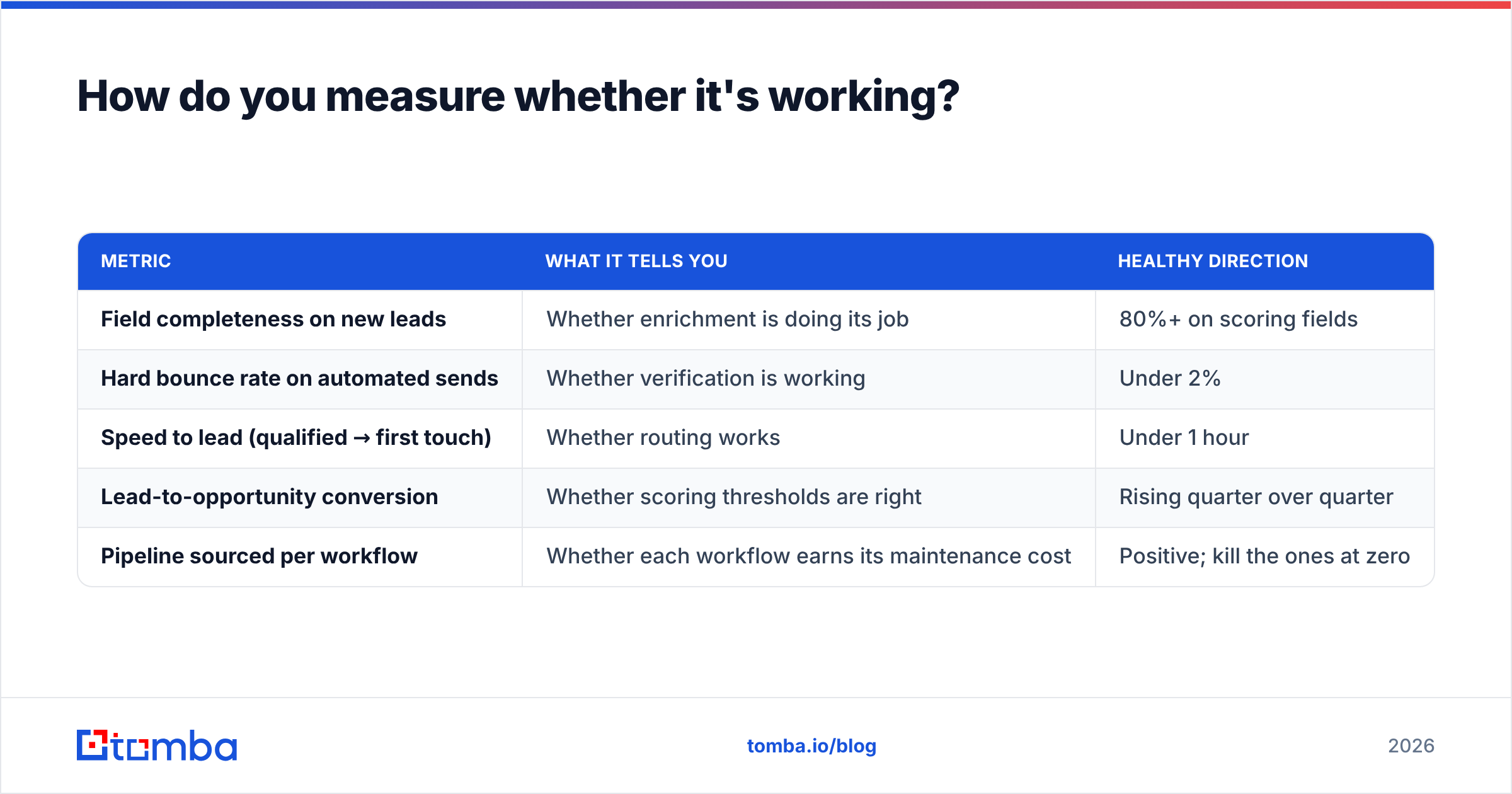
Track these five metrics per workflow, monthly:
| Metric | What it tells you | Healthy direction |
|---|---|---|
| Field completeness on new leads | Whether enrichment is doing its job | 80%+ on scoring fields |
| Hard bounce rate on automated sends | Whether verification is working | Under 2% |
| Speed to lead (qualified → first touch) | Whether routing works | Under 1 hour |
| Lead-to-opportunity conversion | Whether scoring thresholds are right | Rising quarter over quarter |
| Pipeline sourced per workflow | Whether each workflow earns its maintenance cost | Positive; kill the ones at zero |
If field completeness is low, fix enrichment before changing anything else. Every other metric on this list depends on it.
Where should you start?#
Lead marketing automation doesn't really come down to picking the perfect platform. It depends on whether the data feeding that platform is complete and accurate enough to make good decisions. Get capture and enrichment right, add a verification gate, score fit and intent separately, and route fast. Most of the value comes from that.
If your automation is short on accurate contact data, start with the Tomba Email Finder. It finds and verifies professional email addresses from a name, a domain, or a company, and connects to HubSpot, Salesforce, Pipedrive, Zapier, and Make, so enriched records reach your workflows before scoring runs. The free plan includes 25 searches a month, enough to test it on your own lead flow before you commit to a paid tier.
Related guides#
// get started
Find, verify and enrich your first contacts today
Start on the free plan with 25 searches a month, then scale when your team is ready.
Free plan · No credit card required · GDPR & CCPA
// about the author