Lead Mining Software: How It Works and 7 Tools Worth Using
Lead mining software promises a full pipeline from a few filters. Here's how it works, where the data comes from, and which of 7 tools fits your team and budget in 2026.
TL;DR
- Lead mining software pulls contacts and company data from public web sources, B2B databases, and social profiles. It then filters, enriches, and verifies that data so you can use it for outreach.
- Tools fall into four types: email finders, all-in-one databases, scrapers/automators, and enrichment orchestrators. Pick the type that fixes your bottleneck before you compare brands.
- Accuracy matters more than volume. A 10,000-row list with a 12% bounce rate does more damage than a 2,000-row list you've verified.
- For most small and mid-size teams, an email finder with built-in verification (like Tomba, Hunter, or Apollo's finder) covers about 80% of the need. Clay and PhantomBuster only pay off once you have an ops person to run them.
- Budget roughly $49–$150/month for a solo seller. Data costs scale with credits, not seats, so estimate your monthly contact volume first.
What is lead mining software?#
Lead mining software finds, extracts, and structures information about potential buyers so your sales or marketing team can reach them. It's called "mining" because the raw material is already out there, spread across company websites, press releases, author bylines, LinkedIn profiles, job boards, public registries, and commercial B2B databases. The software's job is to dig it up, remove the junk, and hand you something you can use.
A useful lead mining tool does three things:
- Discovery. It finds companies and people who match your ideal customer profile (ICP).
- Contact resolution. It turns "Jane Doe, VP Finance at Acme" into a working email address, and sometimes a phone number.
- Quality control. It verifies deliverability, removes duplicates, and flags stale or risky records before they reach your sequencer.
Plenty of tools only do the first step well. Those are prospect browsers, not lead miners. The value sits in steps two and three, because that's where most of your bounce rate, spam-folder placement, and wasted rep time comes from.
How does lead mining software actually find leads?#
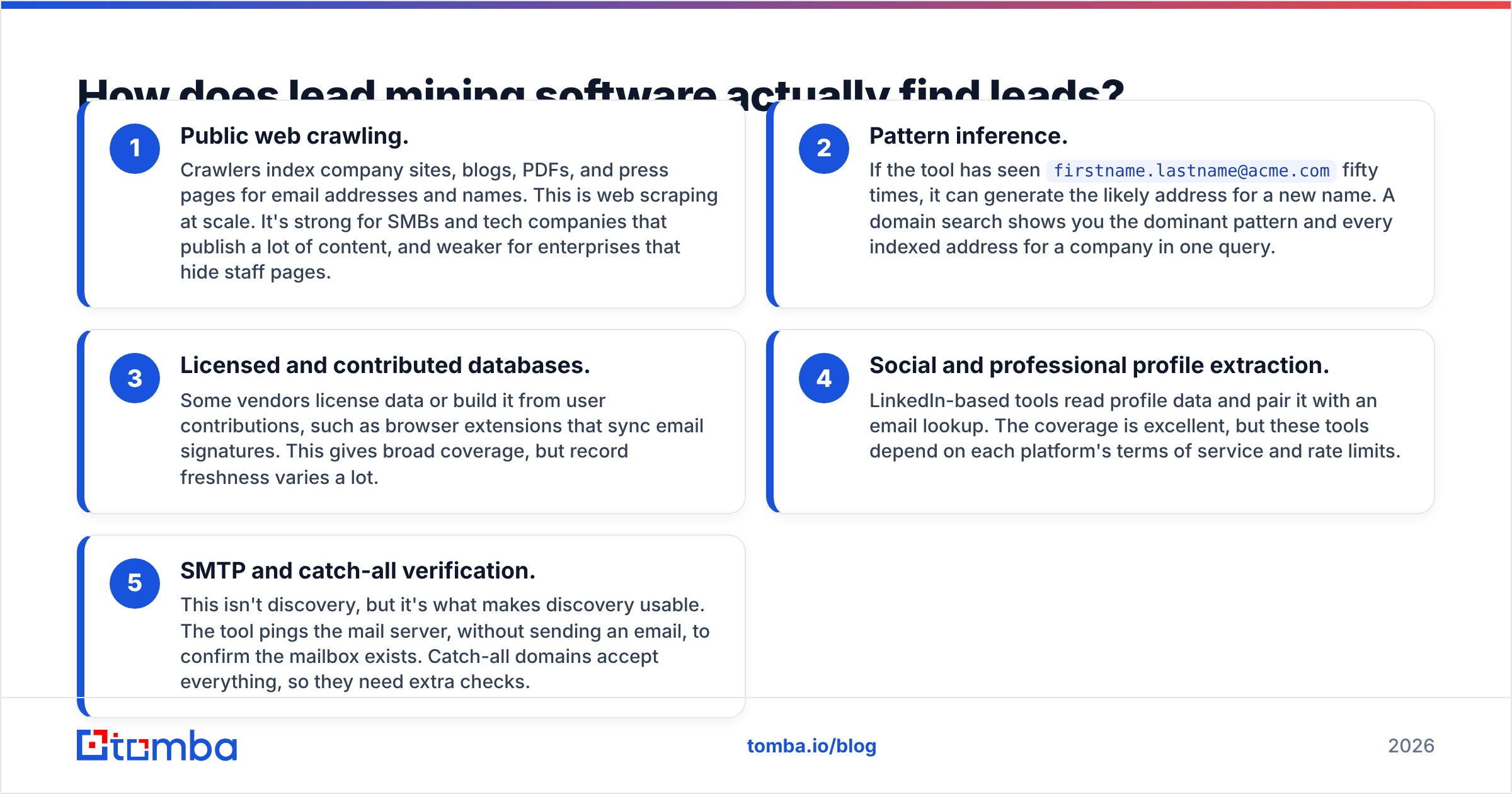
Under the hood, almost every tool uses some mix of the same five methods. When you know which methods a vendor relies on, you can predict where its data will be strong and where it will be weak.
- Public web crawling. Crawlers index company sites, blogs, PDFs, and press pages for email addresses and names. This is web scraping at scale. It's strong for SMBs and tech companies that publish a lot of content, and weaker for enterprises that hide staff pages.
- Pattern inference. If the tool has seen
firstname.lastname@acme.comfifty times, it can generate the likely address for a new name. A domain search shows you the dominant pattern and every indexed address for a company in one query. - Licensed and contributed databases. Some vendors license data or build it from user contributions, such as browser extensions that sync email signatures. This gives broad coverage, but record freshness varies a lot.
- Social and professional profile extraction. LinkedIn-based tools read profile data and pair it with an email lookup. The coverage is excellent, but these tools depend on each platform's terms of service and rate limits.
- SMTP and catch-all verification. This isn't discovery, but it's what makes discovery usable. The tool pings the mail server, without sending an email, to confirm the mailbox exists. Catch-all domains accept everything, so they need extra checks.
Most tools combine two or three of these methods. The best ones are open about which method produced each record and how confident they are in it.

What types of lead mining software exist?#
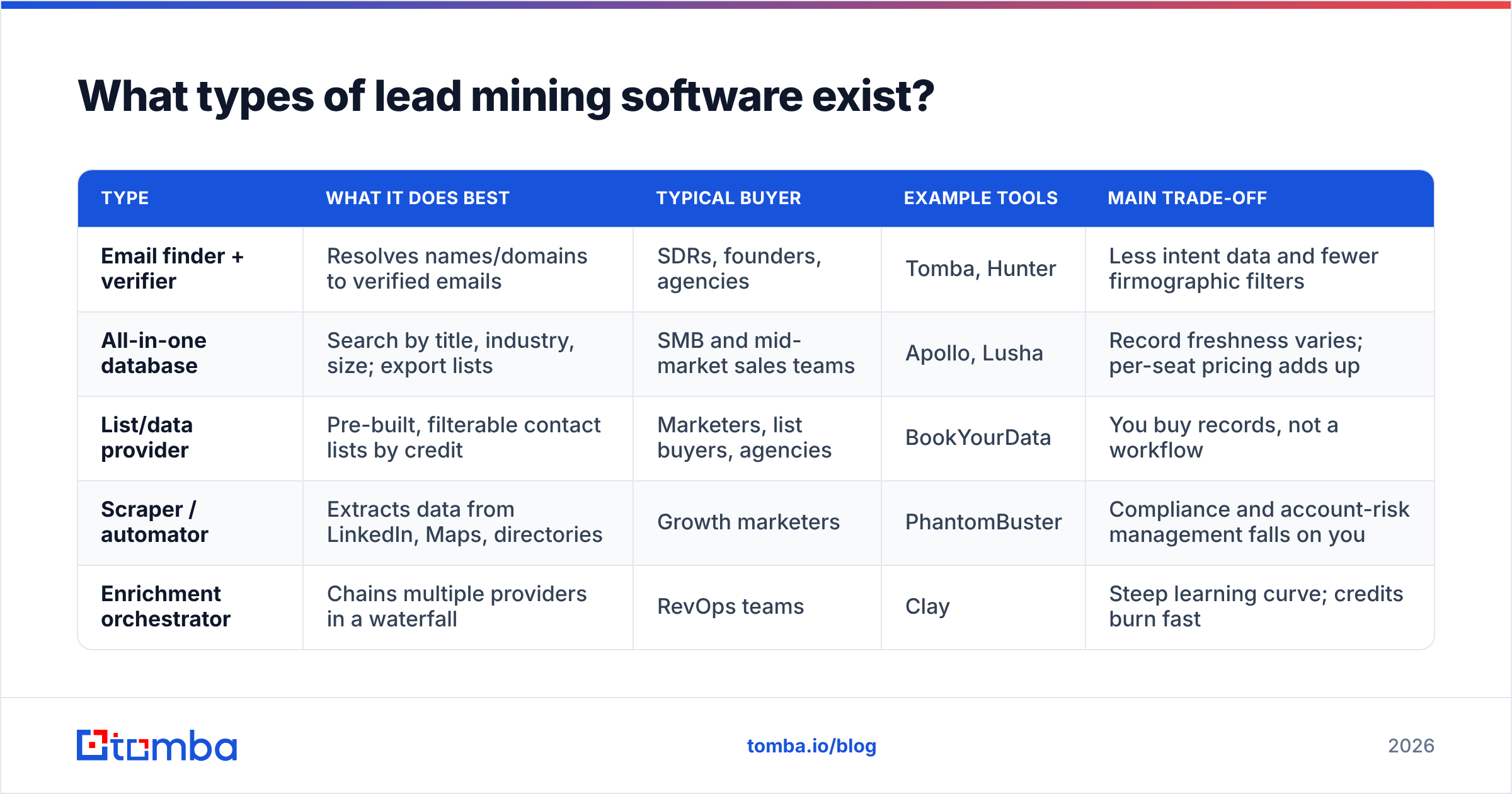
Before you compare brand names, work out which category you're shopping in. Comparing Clay to Hunter is like comparing a kitchen to a knife.
| Type | What it does best | Typical buyer | Example tools | Main trade-off |
|---|---|---|---|---|
| Email finder + verifier | Resolves names/domains to verified emails | SDRs, founders, agencies | Tomba, Hunter | Less intent data and fewer firmographic filters |
| All-in-one database | Search by title, industry, size; export lists | SMB and mid-market sales teams | Apollo, Lusha | Record freshness varies; per-seat pricing adds up |
| List/data provider | Pre-built, filterable contact lists by credit | Marketers, list buyers, agencies | BookYourData | You buy records, not a workflow |
| Scraper / automator | Extracts data from LinkedIn, Maps, directories | Growth marketers | PhantomBuster | Compliance and account-risk management falls on you |
| Enrichment orchestrator | Chains multiple providers in a waterfall | RevOps teams | Clay | Steep learning curve; credits burn fast |
If your team already knows who to target and just needs working emails, you're shopping for the first type. If you don't yet know who to target, you need the second or third type. If you have a RevOps person and complex scoring logic, the fifth type starts to make sense.
Which lead mining software is best in 2026?#
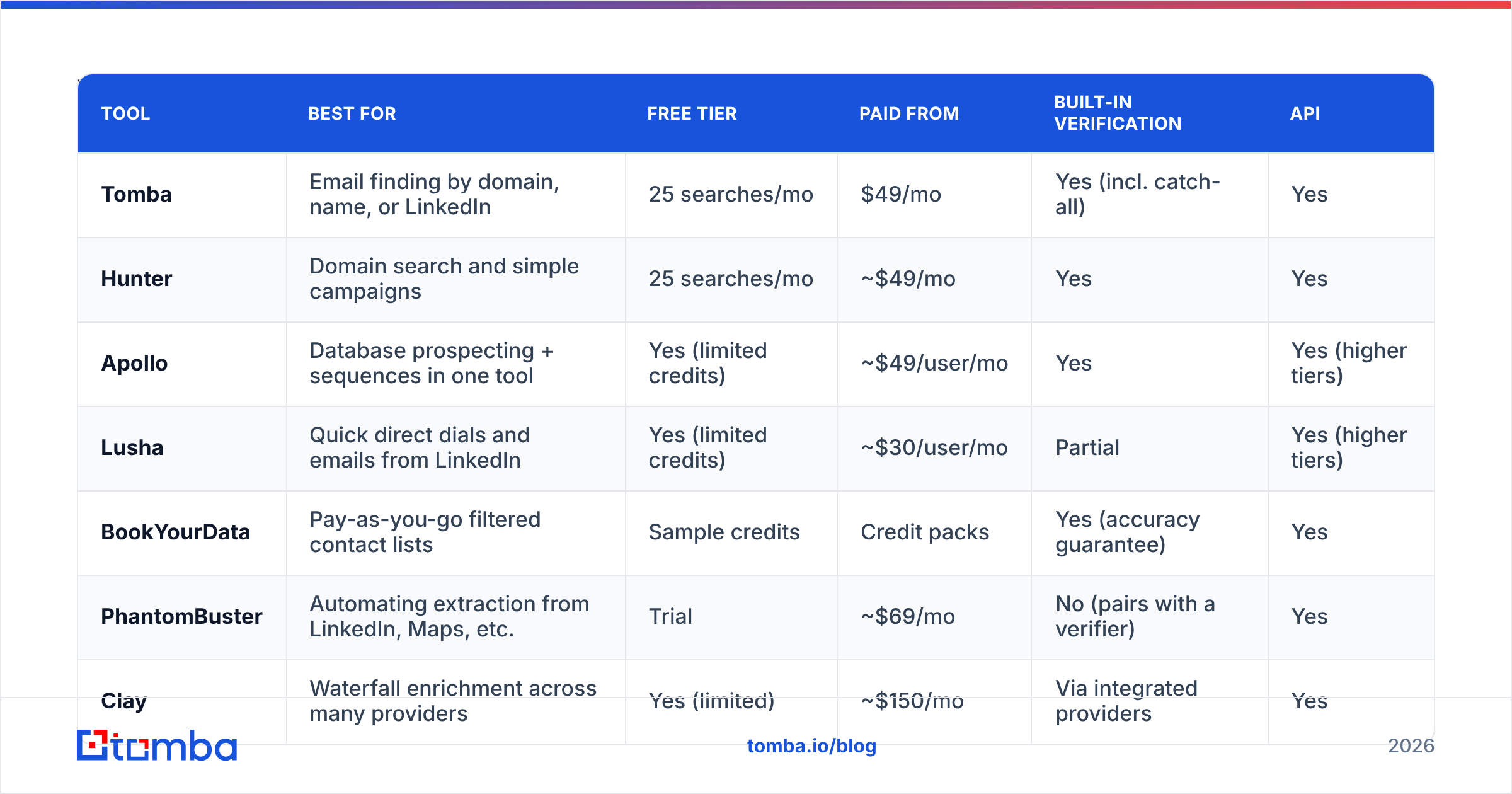
Here are seven tools that each fit a real use case. Pricing is based on public pricing pages at the time of writing. Vendors change plans often, so check before you buy.
| Tool | Best for | Free tier | Paid from | Built-in verification | API |
|---|---|---|---|---|---|
| Tomba | Email finding by domain, name, or LinkedIn | 25 searches/mo | $49/mo | Yes (incl. catch-all) | Yes |
| Hunter | Domain search and simple campaigns | 25 searches/mo | ~$49/mo | Yes | Yes |
| Apollo | Database prospecting + sequences in one tool | Yes (limited credits) | ~$49/user/mo | Yes | Yes (higher tiers) |
| Lusha | Quick direct dials and emails from LinkedIn | Yes (limited credits) | ~$30/user/mo | Partial | Yes (higher tiers) |
| BookYourData | Pay-as-you-go filtered contact lists | Sample credits | Credit packs | Yes (accuracy guarantee) | Yes |
| PhantomBuster | Automating extraction from LinkedIn, Maps, etc. | Trial | ~$69/mo | No (pairs with a verifier) | Yes |
| Clay | Waterfall enrichment across many providers | Yes (limited) | ~$150/mo | Via integrated providers | Yes |
Tomba#
Tomba's core product is its email finder. You enter a domain, a name plus company, or a LinkedIn URL, and it returns an address with a confidence score and the public sources where the address appeared. The verifier, catch-all verifier, phone finder, and data enrichment run on the same credit balance, so you don't need a separate verification subscription. Plans are Free (25 searches/mo), Starter at $49/mo, Growth at $99/mo, and Pro at $249/mo. It works well for agencies and outbound teams that want accurate contact resolution without paying for a full sales-engagement suite. It doesn't try to be a sequencer, which is a plus if you already have one and a minus if you don't.
Hunter#
Hunter made domain search popular and is still a clean, dependable choice. Its source-attribution approach is similar to Tomba's, and it includes a lightweight campaign sender. Coverage is strongest for content-heavy companies. If you need deeper firmographic filtering, you'll hit its limits sooner than with a database tool.
Apollo#
Apollo combines a large contact database, filters, intent signals, and sequencing in one product. For a small team that needs to go from "no list" to "emails going out" this week, it's the fastest option. The catch is data freshness in some segments and per-seat costs once you grow. Many teams use Apollo for discovery and run exports through a separate verifier before sending.
Lusha#
Lusha is built for speed at the point of prospecting. Open a LinkedIn profile, click the extension, and get a direct dial and email. It's strongest for phone data in North America and Europe. As a bulk list builder it's less flexible.
BookYourData#
BookYourData takes a list-provider approach. You filter by industry, title, geography, and company size, then pay per contact with credits instead of a monthly seat. That works well for teams with irregular volume, such as a quarterly campaign push or an agency with seasonal clients, and its accuracy guarantee lowers the risk of buying data upfront. It's a solid option when you want finished lists more than a prospecting workflow.
PhantomBuster#
PhantomBuster automates extraction from LinkedIn searches, Sales Navigator lists, Google Maps, and other sources. It doesn't find or verify emails itself. You chain it into a finder and verifier. It's powerful for growth marketers, but you're responsible for managing platform limits and account risk.
Clay#
Clay is a spreadsheet-style orchestrator that queries multiple data providers in sequence (a "waterfall") until one returns a result, then lets you add AI research, scoring, and custom logic. For RevOps teams, nothing matches its flexibility. For a solo founder it's usually overkill, and credits can run out fast if your workflows aren't tight.
How accurate is lead mining software, really?#
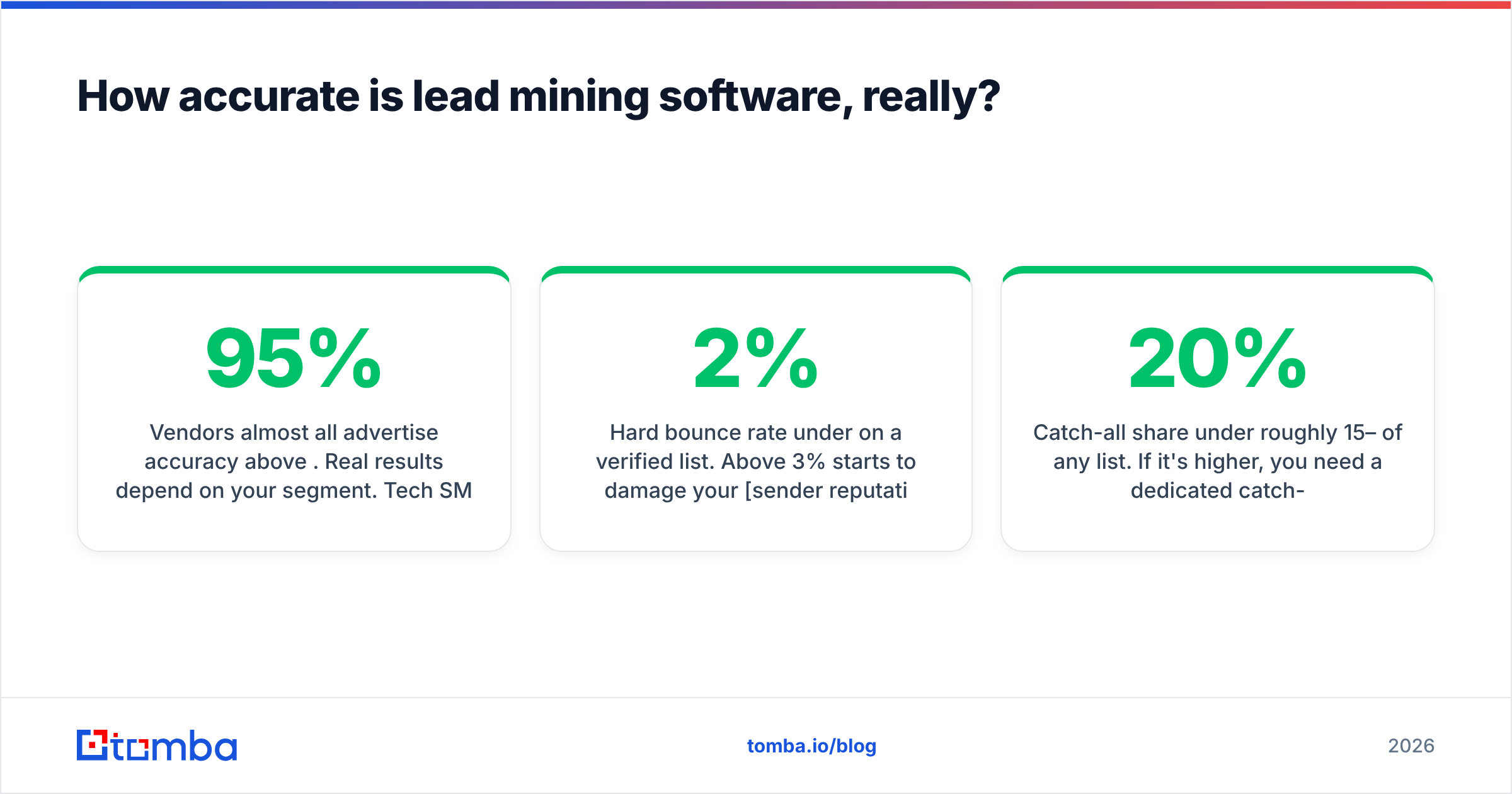
Vendors almost all advertise accuracy above 95%. Real results depend on your segment. Tech SMBs with public team pages resolve well. Enterprise finance, healthcare, and government contacts resolve badly on every tool, because those organizations publish little and often run catch-all mail servers.
Some practical benchmarks you can hold any tool to:
- Hard bounce rate under 2% on a verified list. Above 3% starts to damage your sender reputation.
- Catch-all share under roughly 15–20% of any list. If it's higher, you need a dedicated catch-all check or you'll be guessing.
- Source transparency. Can the tool show where it found an address? If it can't, you can't judge how stale it is.
The easiest way to test a vendor: take 200 contacts you already know are valid, such as closed-won customers or recent replies. Delete the emails, run the names and companies through each tool's free tier, and compare what comes back. That takes an afternoon and tells you more than any review site. For outside opinions, G2's lead intelligence category is a reasonable place to read user complaints about data decay by segment.
Is lead mining legal under GDPR and CAN-SPAM?#
Usually yes, if you have a lawful basis and handle the data responsibly. The rules differ by region:
- EU/UK (GDPR): B2B outreach typically relies on "legitimate interest." You need a documented reason your offer is relevant to the person's role, a clear opt-out, and a way to honor deletion requests. Only store what you need.
- US (CAN-SPAM): Cold B2B email is allowed. You need an accurate sender identity, a physical address, a working unsubscribe link, and prompt handling of opt-outs.
- Platform terms: Scraping LinkedIn directly can break its user agreement even when the data itself is public. The legal risk and the risk to your account are separate problems.
Choose vendors that document their data sources and support suppression lists. A vendor that won't say where its data comes from is a compliance risk you inherit.
How do you choose the right lead mining tool?#
Go through these questions in order. Each one narrows the field.
- Do you already know your target accounts? If yes, you need contact resolution (a finder plus a verifier). If no, you need a searchable database first.
- What's your monthly contact volume? Under 500 per month means free tiers and entry plans are enough. Between 1,000 and 5,000 per month means credit-based pricing beats per-seat pricing. Above that, look at API access and bulk plans.
- Where do the leads go next? Check native integrations with your CRM and sequencer. Moving CSVs by hand adds a 10-minute tax to every list.
- Who maintains the workflow? Clay and PhantomBuster need an owner. Finders and databases don't.
- What's your tolerance for bounces? If you send from your primary domain, verification isn't optional. Build it into the tool you choose, or budget for a separate email verifier.

What does a good lead mining workflow look like?#
A tool is only as good as the process around it. Here's a lean workflow that works for most outbound teams:
- Define the ICP in filters, not prose. Write it as industry codes, headcount bands, geography, tech stack, and three to five target titles. Vague ICPs produce noisy lists.
- Mine accounts first, then people. Build a company list (from a database, a technology lookup, or your CRM's closed-lost segment), then resolve the decision-makers at each domain.
- Resolve and verify in one pass. Run names and domains through your finder and keep only "valid" results, plus catch-all results that pass a secondary check.
- Enrich only what you'll use. Add title, seniority, company size, and one personalization hook. Every extra field costs credits and adds little.
- Deduplicate against your CRM. Suppress existing customers, open opportunities, and anyone who has opted out.
- Re-verify before each send. Business email data decays at roughly 2–3% per month from job changes alone. A list mined in January needs re-checking by April.
Teams that follow these six steps usually see bounce rates under 2% and reply rates two to three times higher than teams that export a raw database search and send right away.
What mistakes should you avoid with lead mining software?#
- Optimizing for list size. More rows means more bounces, more spam complaints, and lower domain reputation. Aim for a precise list, not a big one.
- Skipping catch-all handling. Treating catch-all addresses as "valid" is the most common reason a list that "verified clean" still bounces at 6%.
- Buying seats instead of credits. If three reps each mine 300 contacts a month, per-seat tools cost you far more than a shared credit pool.
- Running scrapers on your main LinkedIn account. Use the platform's limits, or accept that the account can be restricted.
- Never re-mining. Contacts leave their jobs. Schedule quarterly re-verification of any active list.
Final verdict: which lead mining software should you pick?#
If you're a founder, SDR, or agency that knows its target accounts and needs verified emails without a steep learning curve, start with an email finder that has built-in verification. If you're starting from zero and want discovery plus sending in one tool, Apollo is the fast path. If you buy data in irregular bursts, a credit-based list provider like BookYourData fits that pattern well. Only once you have a dedicated ops owner and complex enrichment logic does Clay's extra power justify its cost.
Whatever you pick, measure it on your own data: known-good contacts, the bounce rate on the first send, and cost per verified contact, not cost per row.
If contact resolution is your bottleneck, try the Tomba Email Finder. Search by domain, name, or LinkedIn URL, see the public sources behind each address, and verify every result, catch-all domains included, from the same account. The free plan gives you 25 searches a month to test against your own known-good contacts, and paid plans start at $49/mo when you're ready to scale. See the full Tomba pricing to match a plan to your monthly volume.
Related guides#
// get started
Find, verify and enrich your first contacts today
Start on the free plan with 25 searches a month, then scale when your team is ready.
Free plan · No credit card required · GDPR & CCPA
// about the author