Lead Nurturing and Lead Scoring: A Practical 2026 Playbook
Scoring tells you who is ready to buy. Nurturing gets the rest of your leads there. Here is how to build both as one system, with a sample points model, hand-off rules, and the data fixes most teams skip.
TL;DR
- Lead scoring ranks leads by how well they fit your buyer profile and how engaged they are. Lead nurturing moves leads that aren't ready yet toward a buying decision. You need both, run as one system.
- A working model has two axes: fit (who the lead is) and intent (what they do). If you blend them into one number, you'll send the wrong people to sales.
- Match your nurture tracks to score bands. High fit with low intent needs education. Low fit with high intent needs qualifying, not a sales call.
- Most scoring models fail because of bad data (missing job titles, dead emails, personal Gmail addresses), not bad math. Enrich and verify records before you score them.
- Review the model every quarter against closed-won deals. If your MQLs don't turn into pipeline, the thresholds are wrong.
What are lead nurturing and lead scoring?#
Lead scoring gives each lead a number based on two things: how closely they match your ideal customer profile (ICP) and how much buying intent they've shown. A VP of Operations at a 300-person SaaS company who opened your pricing page twice this week should rank well above a student who downloaded one ebook. For a formal definition and some history of the practice, see the Wikipedia entry on lead scoring.
Lead nurturing is the set of planned touches you use to build a relationship with leads who aren't ready to buy yet. That includes email sequences, retargeting, webinars, case studies, and occasional personal outreach from an SDR. The aim is to stay useful until the timing is right, not to push people toward a demo.
In practice the two work as a loop. The score tells you which nurture track a lead goes into. Nurturing produces engagement, and that engagement changes the score. When the score crosses a threshold, the lead becomes a marketing qualified lead (MQL) and goes to sales. If sales rejects the lead, it goes back into nurturing with a reason code attached.
Why do lead nurturing and lead scoring need to work together?#
Each one breaks down when you run it alone:
- Scoring without nurturing produces a ranked list where most leads sit in the middle forever. You know who's lukewarm, but you have nothing that makes them warmer.
- Nurturing without scoring sends everyone the same drip. Your best-fit accounts get the same beginner content as tire-kickers, and sales has no signal for when to step in.
Put together, you get a clear rule for every lead: fit decides whether you pursue someone, and intent decides when. Scoring gives you that rule, and nurturing carries it out.
One more practical reason: both run on the same data in your CRM. If marketing owns scoring in one tool and sales runs sequences in another with separate field definitions, the two drift apart within a few months. Keep one scoring field and one lifecycle stage field as the shared source of truth.
How does a lead scoring model actually work?#
The most useful structure is a two-axis model. Score fit and intent separately, then combine them in a grid.
- Fit score (explicit data). Points for firmographic and demographic attributes: company size, industry, geography, tech stack, job title, seniority. This data comes from form fields, enrichment, or your database. It rarely changes.
- Intent score (implicit data). Points for behavior: pricing page visits, demo page views, repeat sessions, email replies, webinar attendance, free-trial activation. This data changes daily and should decay over time.
- Negative scoring. Subtract points for disqualifiers such as competitors, students, job seekers visiting your careers page, personal email domains on B2B forms, and addresses that hard-bounce.
- Score decay. Remove intent points after a set period of inactivity, for example 25% after 30 days with no activity. Without decay, a lead who was active 8 months ago still looks hot.
- Thresholds and routing rules. Decide which combination of fit and intent triggers an MQL, which triggers a nurture track, and which gets recycled or suppressed.
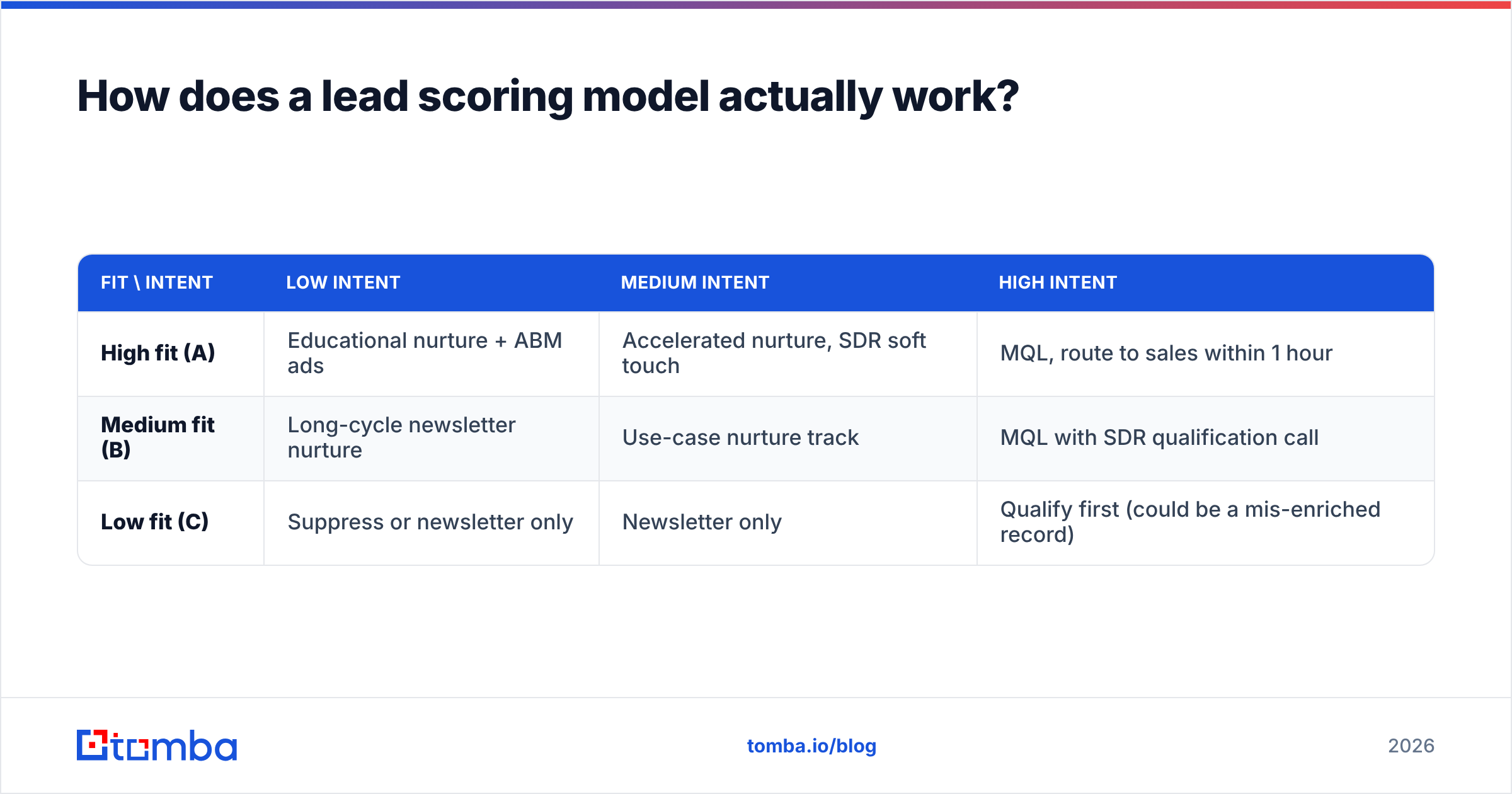
A simple starting grid looks like this:
| Fit \ Intent | Low intent | Medium intent | High intent |
|---|---|---|---|
| High fit (A) | Educational nurture + ABM ads | Accelerated nurture, SDR soft touch | MQL, route to sales within 1 hour |
| Medium fit (B) | Long-cycle newsletter nurture | Use-case nurture track | MQL with SDR qualification call |
| Low fit (C) | Suppress or newsletter only | Newsletter only | Qualify first (could be a mis-enriched record) |
The bottom-right cell matters more than it looks. A low-fit lead with high intent is often a good prospect whose record is wrong: a missing title, a personal email address, or a parent company that was never matched. Fix the record before you disqualify the lead.
What should you score, and how many points?#
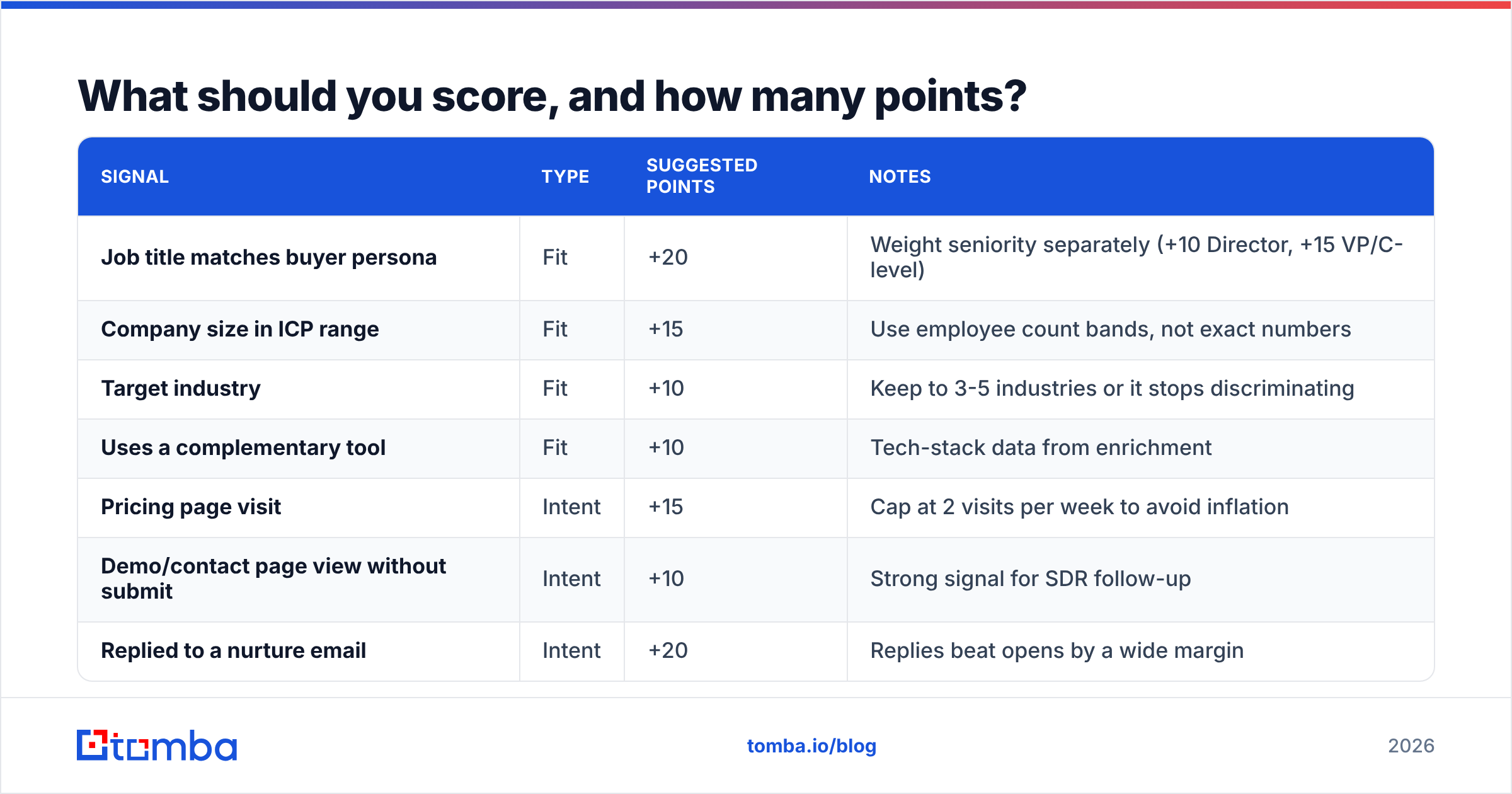
There isn't one correct points table. Start with the one below, then adjust it against your closed-won data after a quarter.
| Signal | Type | Suggested points | Notes |
|---|---|---|---|
| Job title matches buyer persona | Fit | +20 | Weight seniority separately (+10 Director, +15 VP/C-level) |
| Company size in ICP range | Fit | +15 | Use employee count bands, not exact numbers |
| Target industry | Fit | +10 | Keep to 3-5 industries or it stops discriminating |
| Uses a complementary tool | Fit | +10 | Tech-stack data from enrichment |
| Pricing page visit | Intent | +15 | Cap at 2 visits per week to avoid inflation |
| Demo/contact page view without submit | Intent | +10 | Strong signal for SDR follow-up |
| Replied to a nurture email | Intent | +20 | Replies beat opens by a wide margin |
| Email open | Intent | +1 | Treat as noise; privacy features inflate opens |
| Webinar attended (not just registered) | Intent | +10 | |
| Personal email domain on B2B form | Negative | -15 | Or try to find their work email first |
| Hard bounce | Negative | -50 | Also suppress from nurture immediately |
| Competitor domain | Negative | -100 | Auto-suppress |
Two things to notice. First, email opens get almost no weight. Apple Mail Privacy Protection and similar features pre-load tracking pixels, so opens no longer mean a person read your email. Replies and clicks are much more reliable. Second, the negative scores are large on purpose. One competitor domain should outweigh any amount of engagement.
How do you build nurture tracks that match score bands?#
Build nurture tracks around where a lead sits in the grid, not around which asset they downloaded. A practical set for most B2B teams:
- A-fit, low-intent: "problem education" track. 5-7 touches over 6-8 weeks. Share content that frames the problem, benchmarks, and short case studies from similar companies. One soft CTA per email. Add LinkedIn and display retargeting for the account.
- A/B-fit, medium-intent: "use-case" track. 4-5 touches over 3 weeks. Focus on specific workflows, comparison content, and ROI calculators. The CTA moves from "read" to "see how it works."
- Recycled SQLs: "not now" track. For leads sales qualified who said the timing was wrong. Send a monthly light-touch email plus a trigger-based alert (new funding, new hire in the buyer role, pricing page revisit) that tells the rep to re-engage by hand.
- Low-fit, any intent: "qualify or release" track. One or two emails that ask a qualifying question, such as team size or current tool. Reply data updates the fit score. If there's no reply, the lead drops to newsletter-only.
Keep each email short and plain-text where you can. A nurture email should read like a useful note from a person, not a newsletter. If you track response rate per track, you'll quickly see which tracks are producing conversations and which are just producing unsubscribes.
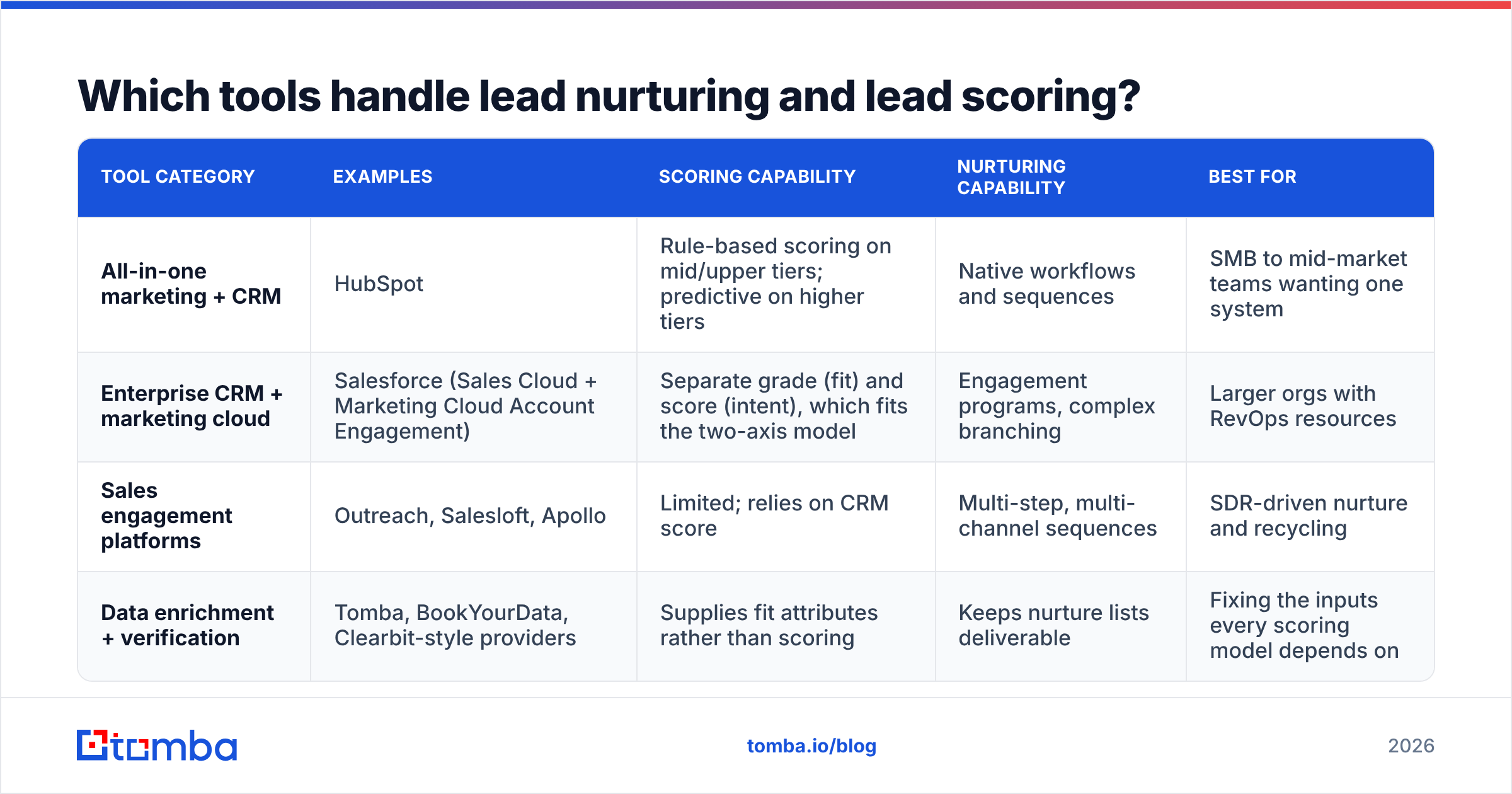
Which tools handle lead nurturing and lead scoring?#
Most teams run this inside their marketing automation platform or CRM, with a data layer feeding clean records into it. Here's how the common options compare:
| Tool category | Examples | Scoring capability | Nurturing capability | Best for |
|---|---|---|---|---|
| All-in-one marketing + CRM | HubSpot | Rule-based scoring on mid/upper tiers; predictive on higher tiers | Native workflows and sequences | SMB to mid-market teams wanting one system |
| Enterprise CRM + marketing cloud | Salesforce (Sales Cloud + Marketing Cloud Account Engagement) | Separate grade (fit) and score (intent), which fits the two-axis model | Engagement programs, complex branching | Larger orgs with RevOps resources |
| Sales engagement platforms | Outreach, Salesloft, Apollo | Limited; relies on CRM score | Multi-step, multi-channel sequences | SDR-driven nurture and recycling |
| Data enrichment + verification | Tomba, BookYourData, Clearbit-style providers | Supplies fit attributes rather than scoring | Keeps nurture lists deliverable | Fixing the inputs every scoring model depends on |
Your automation platform matters less than people think. A mid-tier HubSpot setup fed with clean, enriched records will beat an enterprise stack scoring half-empty contact records. If you're on HubSpot, pushing enriched data in through the Tomba HubSpot integration keeps fit fields filled without manual research.
Why do most lead scoring models fail?#
In nearly every audit, the model itself is reasonable and the data feeding it is not. Common failure modes:
Missing fit data. If job title is blank on a large share of records, your fit score is a coin flip. Short forms help conversion but leave gaps. Data enrichment closes them: you give it an email or a domain, and it returns title, seniority, company size, industry, and social profiles, which are exactly the fields your fit score needs.
Dead email addresses. Leads collected at events, through gated content, or from list imports decay steadily as people change jobs. Scoring a lead whose inbox no longer exists wastes SDR time. Nurturing it hurts your sender reputation, and the rest of your nurture emails reach inboxes less often as a result. Run the list through an email verifier before it enters any nurture track, and re-verify dormant segments before you reactivate them.
Personal email addresses on B2B forms. Someone who signs up with a Gmail address may be a perfectly good buyer. Scoring them as low-fit throws away a real lead. A better approach is to use their name and company to find their work email, then enrich that address.
Opens treated as intent. Covered above. If opens carry real points in your model, your "hot" list will be full of bots and privacy proxies.
No decay. Scores only ever go up, so after a year half your database looks sales-ready.
No feedback loop from sales. If reps can't reject an MQL with a reason code, marketing never learns which signals are misleading.

How do you set MQL thresholds and hand-off rules?#
Set thresholds based on outcomes. Don't pick a round number because it feels right.
- Pull your last 2-4 quarters of closed-won and closed-lost opportunities. Look at what fit and intent attributes those leads had before they became opportunities.
- Score them retroactively with your draft model. Find the threshold where a meaningful share of closed-won deals sit above the line and most of the junk sits below it.
- Agree on a service-level agreement (SLA) with sales. A typical version: MQLs get first contact within one business day (within an hour for A-fit, high-intent), and every MQL gets accepted or rejected with a reason within five business days.
- Define recycle rules. Rejected for "bad timing" goes to the "not now" track. "Wrong person" means finding the right contact at the same account. "Bad data" means fixing the record and re-scoring.
- Measure MQL-to-SQL and SQL-to-won rates by score band every month. If A-fit MQLs convert no better than B-fit ones, the fit model isn't separating good leads from weak ones.
The "wrong person" recycle path deserves attention. Often the lead who downloaded your guide is a researcher or an individual contributor, and the actual buyer is two levels up. Rather than dropping the account, use a domain search to find the relevant decision-makers at that company and add them to an account-based track. The original lead's engagement then counts toward account-level intent.
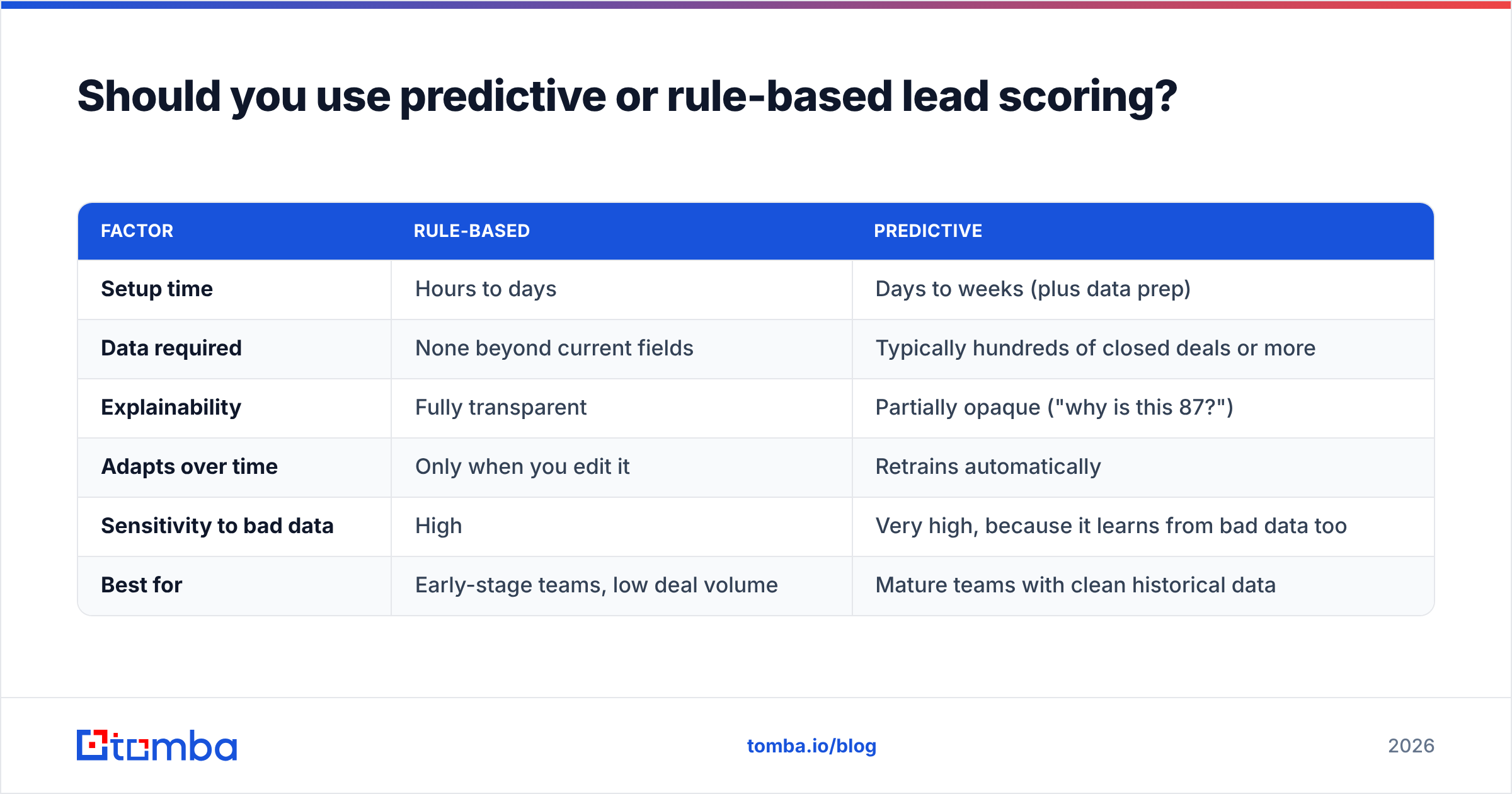
Should you use predictive or rule-based lead scoring?#
Rule-based scoring is transparent, and you can set it up in an afternoon. Predictive scoring uses machine learning on your historical CRM data to weight signals automatically. Both HubSpot and Salesforce offer versions of it on higher tiers.
| Factor | Rule-based | Predictive |
|---|---|---|
| Setup time | Hours to days | Days to weeks (plus data prep) |
| Data required | None beyond current fields | Typically hundreds of closed deals or more |
| Explainability | Fully transparent | Partially opaque ("why is this 87?") |
| Adapts over time | Only when you edit it | Retrains automatically |
| Sensitivity to bad data | High | Very high, because it learns from bad data too |
| Best for | Early-stage teams, low deal volume | Mature teams with clean historical data |
The honest recommendation: start with rules. Switch to predictive once you have enough closed deals and a CRM clean enough that the model won't learn from junk. Predictive scoring doesn't fix bad data. It learns from it, so garbage in means confidently wrong output.
What metrics tell you the system is working?#
Track these monthly by score band and nurture track:
- MQL-to-SQL acceptance rate. Low acceptance means your thresholds are too loose or your fit data is wrong.
- Time from MQL to first sales touch. SLA compliance matters as much as scoring accuracy.
- Nurture-to-MQL conversion rate per track. This shows which tracks produce qualified leads and which just keep people busy.
- Bounce rate and unsubscribe rate per track. Rising bounces mean list decay. Rising unsubscribes mean the content or cadence doesn't match the audience.
- Pipeline and win rate by original score band. This is the check that matters most. If A-band leads don't win more often than B-band leads, rebuild the model.
Where should you start this week?#
If you have nothing in place, do these four things in order:
- Clean and verify your existing lead database so you aren't scoring dead records.
- Enrich missing fit fields (title, seniority, company size, industry).
- Build a simple fit × intent grid with the points table above, with decay and negative scoring switched on.
- Launch two nurture tracks: A-fit/low-intent education, and a "not now" recycle track. Add more once those produce data.
Getting a basic system live this month is worth more than designing the perfect model for another quarter.
Every scoring model and nurture track depends on accurate contact data: the right person, a real work email, and a complete record. If your pipeline is full of personal Gmail sign-ups, blank job titles, or "wrong person" rejections from sales, Tomba Email Finder helps you find the verified professional email for the actual decision-maker by name, company, or domain. Your fit scores then reflect reality, and your nurture emails reach real inboxes. Start with the free tier (25 searches a month) and test it on your recycled leads first.
Related guides#
// get started
Find, verify and enrich your first contacts today
Start on the free plan with 25 searches a month, then scale when your team is ready.
Free plan · No credit card required · GDPR & CCPA
// about the author