Lead Nurturing Automation: How to Build Sequences That Convert
Most nurture programs don't fail because of the software. They fail because the contact data is bad, the triggers are generic, and nobody told sales when to step in. This guide shows you how to build lead nurturing automation that moves B2B deals forward.
TL;DR
- Lead nurturing automation sends the right message to a prospect based on what they did, not on a fixed calendar. Behavior triggers beat time-based drips almost every time.
- Most nurture programs fail before the first email goes out. Bad contact data, no segmentation, and no handoff rule to sales are the usual causes.
- Build five or six focused tracks instead of one long drip for everyone. Each track needs a trigger, a goal, and a way out.
- Pick your platform by where your contacts live (CRM or marketing tool) and how much branching logic you need, not by feature count.
- Measure pipeline created and time-to-opportunity. Open rates don't tell you much anymore.
What is lead nurturing automation?#
Think of it like a good bookstore clerk. They don't hand every visitor the same book. They notice what you pick up, suggest the next title, and leave you alone when you're just browsing. Lead nurturing automation does the same job with software. It watches what a prospect does (downloads a guide, visits the pricing page, goes quiet for 30 days) and responds with the next useful message, task, or alert.
Technically, it's a set of rules that sits on top of your CRM or marketing automation platform. Each rule has three parts:
- Trigger: an event or a condition, like "form submitted," "lead score crossed 50," or "no activity in 21 days."
- Action: send an email, create a sales task, update a field, add the contact to a LinkedIn audience, or notify a rep in Slack.
- Exit condition: the contact books a meeting, unsubscribes, becomes an opportunity, or finishes the track.
Lead nurturing automation is different from cold outbound. Cold sequences go to people who have never heard of you. Nurture goes to people who have already raised their hand in some small way, such as a webinar signup, a free trial, a content download, or a stalled deal. The tone, frequency, and goal are all different, and mixing the two is one of the fastest ways to burn a list.
Why does most lead nurturing automation underperform?#
Most of the problems are upstream of the email copy. Here are the ones that come up most often in B2B teams.
The data is wrong. Form fills bring in personal Gmail addresses, typos, role accounts like info@, and job titles that went stale a year ago. When a large share of your nurture list bounces or lands with the wrong person, your sender reputation drops, and even your good leads stop seeing your emails.
Everyone gets the same drip. A CFO who downloaded an ROI calculator and an intern who grabbed a template get the same seven emails. Neither of them finds the sequence useful.
There's no handoff rule. Marketing keeps nurturing a lead who visited the pricing page three times this week, and sales never finds out. That hot lead gets a generic newsletter when it should get a phone call.
Nothing ever ends. Contacts stay in "nurture" forever and get emailed indefinitely. Engagement decays, spam complaints go up, and deliverability suffers for every campaign you send.
None of these problems gets fixed by switching tools. They get fixed by design, which is what the rest of this guide covers.
What nurture tracks should you automate first?#
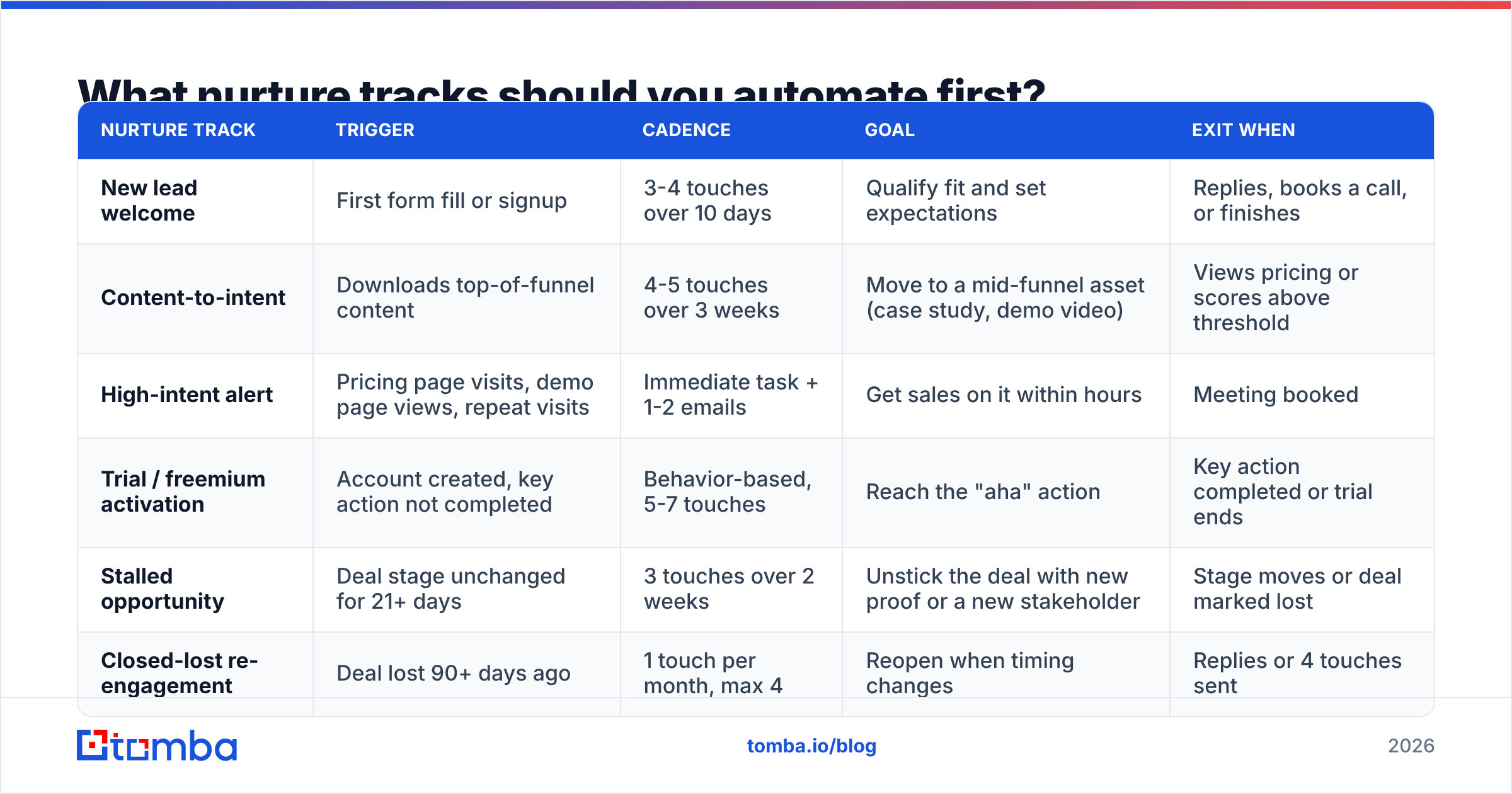
Start with a small set of tracks tied to real buying signals. The table below covers the six that tend to pay back fastest for B2B teams. Build them in roughly this order.
| Nurture track | Trigger | Cadence | Goal | Exit when |
|---|---|---|---|---|
| New lead welcome | First form fill or signup | 3-4 touches over 10 days | Qualify fit and set expectations | Replies, books a call, or finishes |
| Content-to-intent | Downloads top-of-funnel content | 4-5 touches over 3 weeks | Move to a mid-funnel asset (case study, demo video) | Views pricing or scores above threshold |
| High-intent alert | Pricing page visits, demo page views, repeat visits | Immediate task + 1-2 emails | Get sales on it within hours | Meeting booked |
| Trial / freemium activation | Account created, key action not completed | Behavior-based, 5-7 touches | Reach the "aha" action | Key action completed or trial ends |
| Stalled opportunity | Deal stage unchanged for 21+ days | 3 touches over 2 weeks | Unstick the deal with new proof or a new stakeholder | Stage moves or deal marked lost |
| Closed-lost re-engagement | Deal lost 90+ days ago | 1 touch per month, max 4 | Reopen when timing changes | Replies or 4 touches sent |
A few rules that apply to every track:
- One goal per track. If an email asks someone to read a case study, book a demo, and follow you on LinkedIn, they'll most likely do none of those things.
- Short beats long. Four well-timed touches outperform a twelve-email drip that people tune out by email five.
- Always give sales a way in. Any track that detects strong intent should create a task or alert. It shouldn't just send another email.
How do you build a lead nurturing automation workflow step by step?#
Here's a practical build order that works in HubSpot, Salesforce, ActiveCampaign, or most sequencing tools.
1. Clean and enrich the contacts before they enter any track#
This is the step most teams skip. Before a contact enters a workflow, run an automatic check:
- Verify the email address. Remove invalid addresses, flag risky ones, and handle catch-all domains separately. An email verifier connected at the form or CRM level catches most of these problems before they cost you reputation.
- Fill in the fields your branching logic needs, such as company size, industry, job title, and seniority. If your forms ask for only an email address, which is good for conversion, you'll need data enrichment to add the rest.
- Swap personal addresses for work addresses where possible. Someone who signed up with a Gmail address but gave a company name can often be matched to their work email.
If you skip this step, your segmentation runs on empty fields, and every branch falls through to the generic path.
2. Define your segments and scoring#
Segment by fit first (who they are), then by intent (what they did). A simple two-axis model works well:
- Fit score: industry match, company size in your ICP range, a decision-maker title.
- Engagement score: pricing visits, content downloads, email replies, webinar attendance.
When both scores clear a threshold, the lead becomes a marketing qualified lead and routes to sales. Write the thresholds down, get sales to agree to them, and review them every quarter.
3. Map triggers to tracks#
Use the table above as a starting point. Each trigger should put the contact into exactly one active track at a time. Most platforms let you set "suppression" or "enrollment exclusion" rules. Use them so a lead doesn't get the welcome sequence and the trial activation sequence on the same day.
4. Write the content around one job per email#
Every email should answer a single question the prospect probably has at that stage:
- Welcome: "What happens now, and is this for me?"
- Content-to-intent: "Has someone like me actually gotten results?"
- Stalled deal: "What's changed since we last talked?"
Plain-text emails from a named person tend to beat heavily designed templates in B2B nurture, especially for mid- and late-funnel tracks.
5. Set exit and handoff rules#
Every workflow needs:
- A goal exit, such as a meeting booked or a deal stage moved.
- A negative exit, such as an unsubscribe, a hard bounce, or a "not interested" reply.
- A handoff trigger that creates a task for the owner when intent spikes.
6. Launch small, then expand#
Put 10-20% of eligible contacts into the new track first. Compare meetings booked and pipeline created against a holdout group that gets no nurture. If the lift is real, roll it out to everyone.
Which lead nurturing automation tools should you consider?#
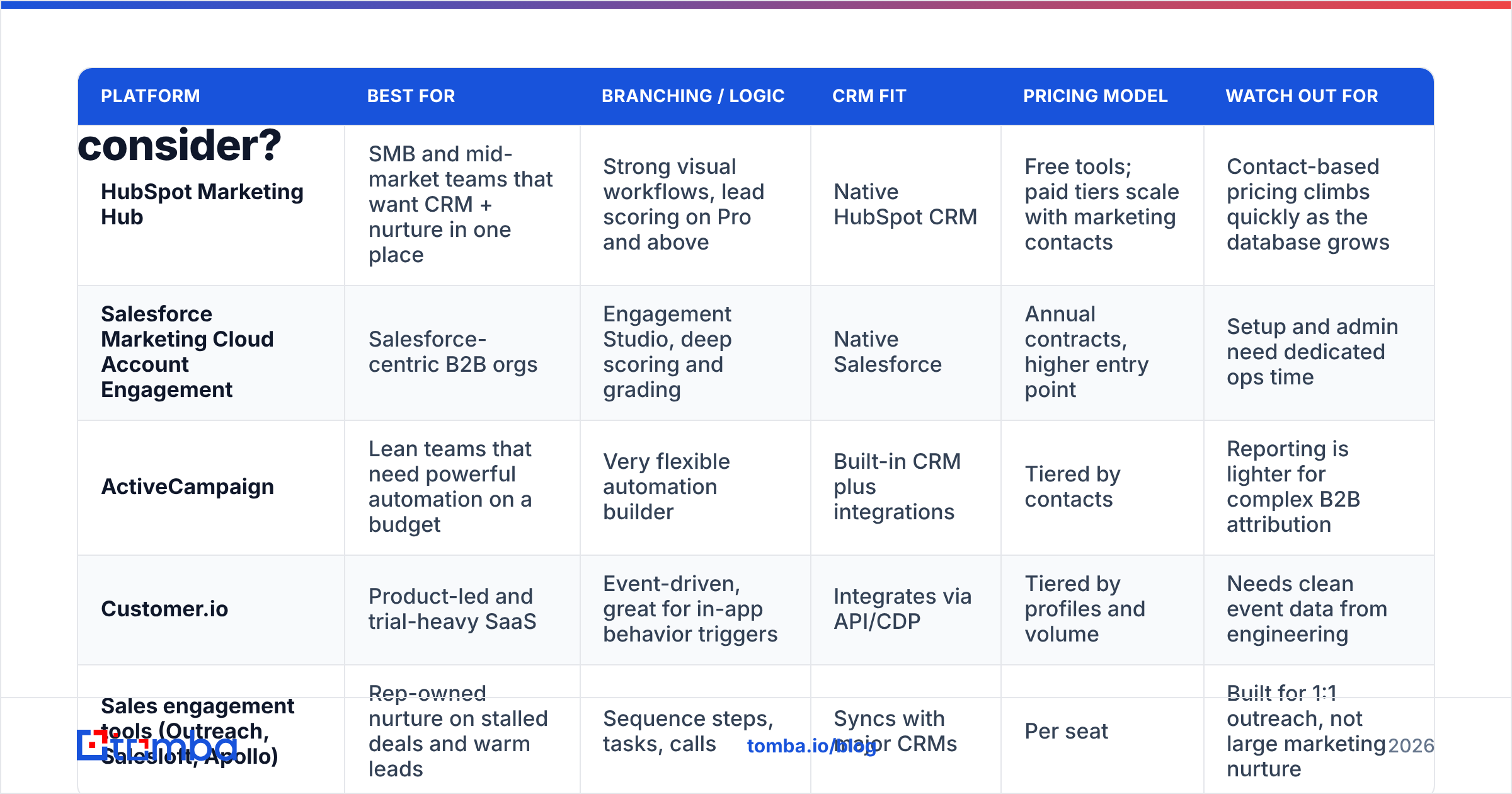
Your best tool is usually the one closest to where your contact data already lives. Here's how the common options compare for B2B nurture specifically. Always check each vendor's pricing page for current numbers, because tiers change often.
| Platform | Best for | Branching / logic | CRM fit | Pricing model | Watch out for |
|---|---|---|---|---|---|
| HubSpot Marketing Hub | SMB and mid-market teams that want CRM + nurture in one place | Strong visual workflows, lead scoring on Pro and above | Native HubSpot CRM | Free tools; paid tiers scale with marketing contacts | Contact-based pricing climbs quickly as the database grows |
| Salesforce Marketing Cloud Account Engagement | Salesforce-centric B2B orgs | Engagement Studio, deep scoring and grading | Native Salesforce | Annual contracts, higher entry point | Setup and admin need dedicated ops time |
| ActiveCampaign | Lean teams that need powerful automation on a budget | Very flexible automation builder | Built-in CRM plus integrations | Tiered by contacts | Reporting is lighter for complex B2B attribution |
| Customer.io | Product-led and trial-heavy SaaS | Event-driven, great for in-app behavior triggers | Integrates via API/CDP | Tiered by profiles and volume | Needs clean event data from engineering |
| Sales engagement tools (Outreach, Salesloft, Apollo) | Rep-owned nurture on stalled deals and warm leads | Sequence steps, tasks, calls | Syncs with major CRMs | Per seat | Built for 1:1 outreach, not large marketing nurture |
For peer reviews and feature grids, G2's marketing automation category is a useful place to shortlist. If you're already on HubSpot, its marketing automation documentation shows how its workflows and scoring fit together.
A practical pattern many B2B teams use is to run marketing nurture in the marketing platform and deal-stage nurture in a sales engagement tool, with the CRM as the single record of truth. Connect your data layer through native integrations so enrichment and verification happen automatically when a record is created, not in a quarterly cleanup project.
How do you keep nurture emails out of spam?#
Automation makes it easy to send a lot of email to people who have stopped caring. Inbox providers notice that. Protect deliverability with a few rules:
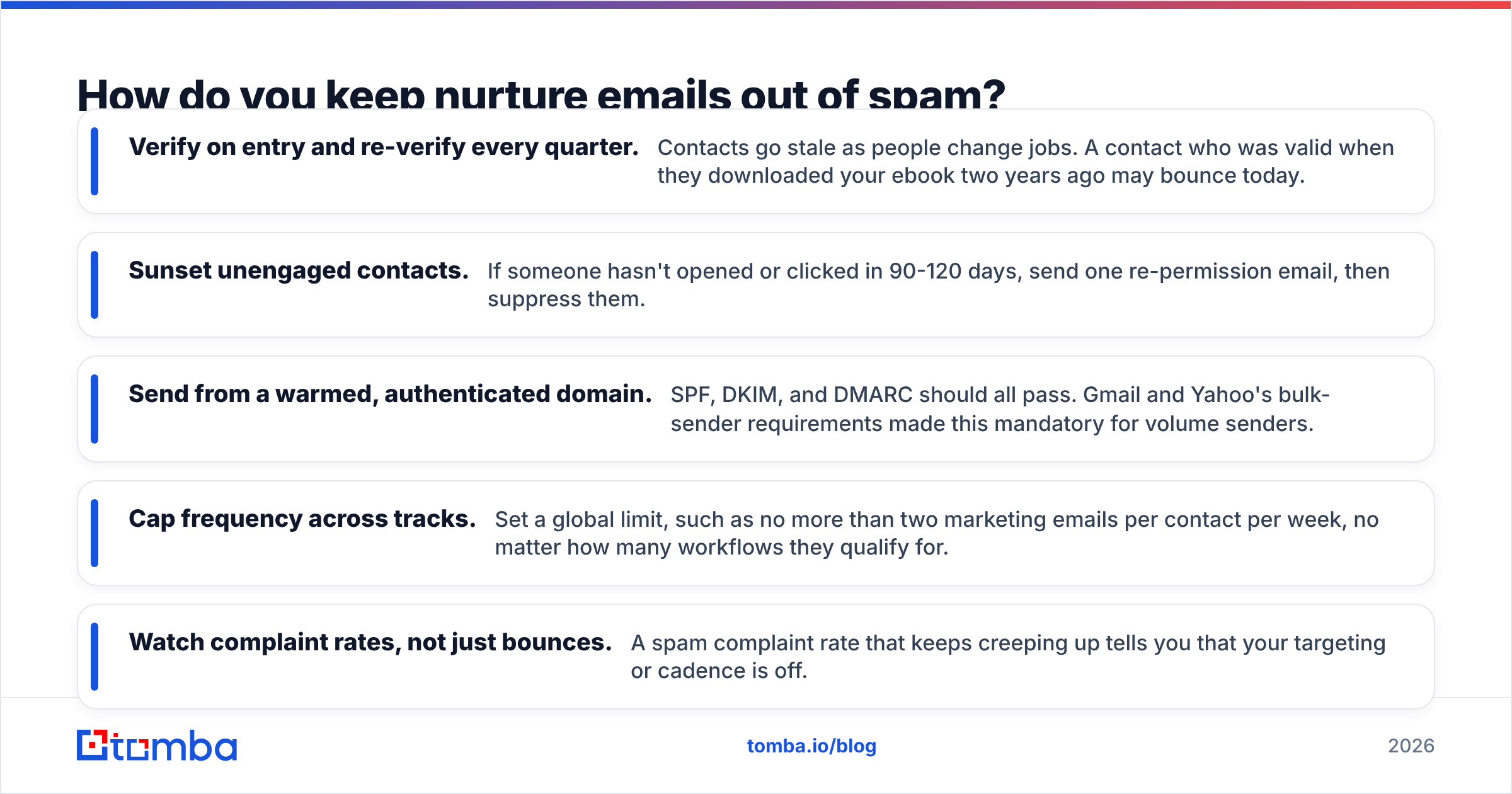
- Verify on entry and re-verify every quarter. Contacts go stale as people change jobs. A contact who was valid when they downloaded your ebook two years ago may bounce today.
- Sunset unengaged contacts. If someone hasn't opened or clicked in 90-120 days, send one re-permission email, then suppress them.
- Send from a warmed, authenticated domain. SPF, DKIM, and DMARC should all pass. Gmail and Yahoo's bulk-sender requirements made this mandatory for volume senders.
- Cap frequency across tracks. Set a global limit, such as no more than two marketing emails per contact per week, no matter how many workflows they qualify for.
- Watch complaint rates, not just bounces. A spam complaint rate that keeps creeping up tells you that your targeting or cadence is off.
What metrics prove lead nurturing automation is working?#
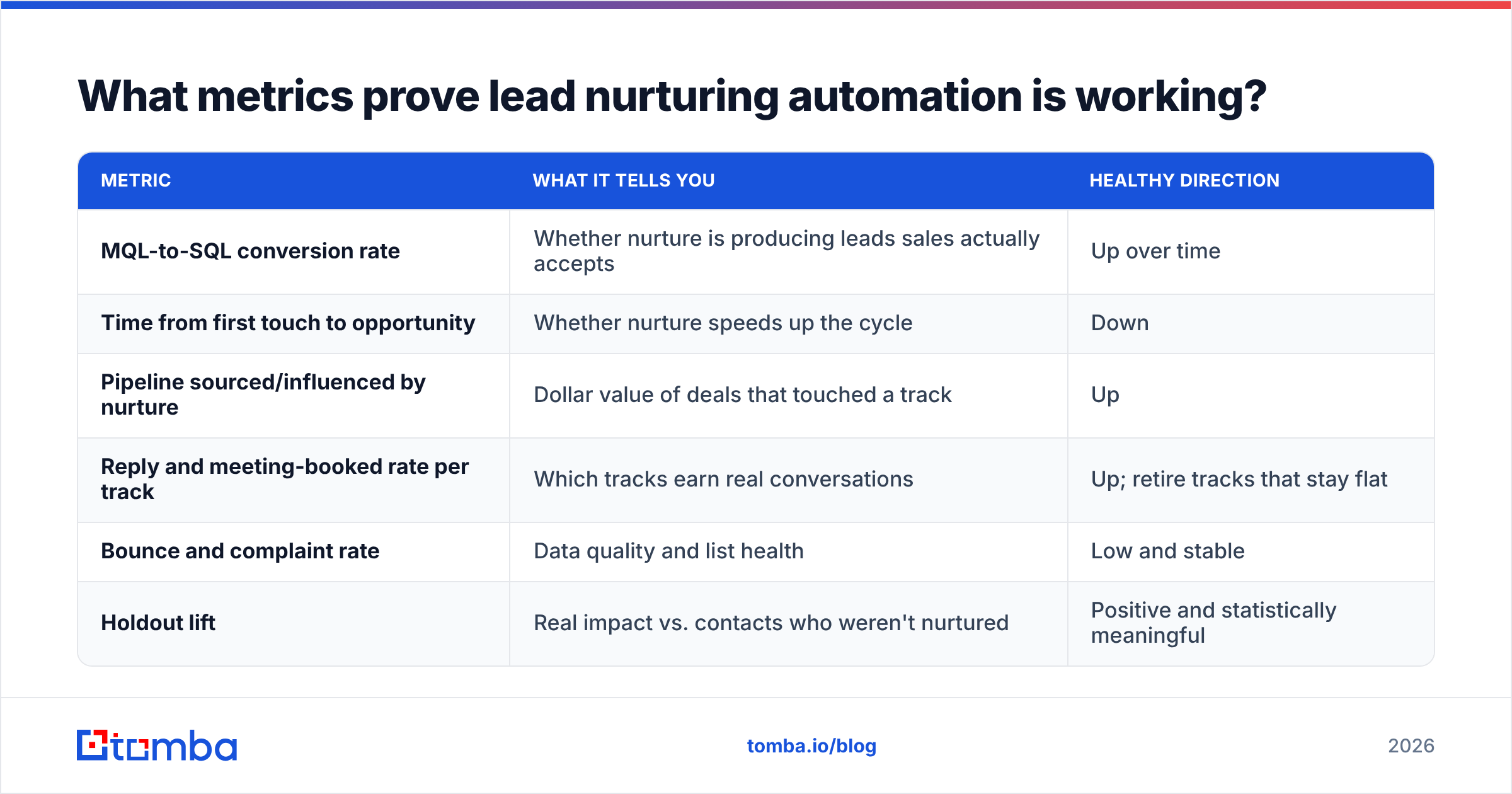
Open rates have become unreliable because of privacy features that pre-load images. Focus on metrics that connect to revenue:
| Metric | What it tells you | Healthy direction |
|---|---|---|
| MQL-to-SQL conversion rate | Whether nurture is producing leads sales actually accepts | Up over time |
| Time from first touch to opportunity | Whether nurture speeds up the cycle | Down |
| Pipeline sourced/influenced by nurture | Dollar value of deals that touched a track | Up |
| Reply and meeting-booked rate per track | Which tracks earn real conversations | Up; retire tracks that stay flat |
| Bounce and complaint rate | Data quality and list health | Low and stable |
| Holdout lift | Real impact vs. contacts who weren't nurtured | Positive and statistically meaningful |
Industry analysts like Gartner frame marketing automation value around pipeline and efficiency, not activity. Your dashboards should do the same. Report on tracks, not individual emails, and retire any track that doesn't show lift after two or three months.
Is lead nurturing automation worth it for small B2B teams?#
Yes, if you keep it small. A two-person sales team doesn't need twenty workflows. It needs three:
- A welcome track for every new inbound lead.
- A high-intent alert that pings the founder or AE when someone hits the pricing page.
- A stalled-deal track that sends one useful piece of proof after two weeks of silence.
Those three can run on a free or entry-level CRM, and together they cover most of the pipeline leakage a small team experiences. Add complexity only when you have enough volume to test whether a new track actually helps.
What small teams can't afford is feeding bad data into those three tracks. With a list of a few hundred contacts, a handful of bounces or wrong-person emails is a much bigger share of your reputation and your pipeline.
What are the most common lead nurturing automation mistakes?#
- Nurturing leads who should be called. High intent should trigger a human, not another email.
- Building the workflow before the data model. If "industry" is a free-text field with 400 variations, branching on it won't work.
- No global frequency cap. Overlapping workflows can hit one person five times in a week.
- Treating unsubscribes as failures. An unsubscribe is useful information. It removes someone who was never going to buy, and it protects your deliverability.
- Never auditing tracks. Content gets outdated, links break, and products change. Review every active track at least twice a year.
- Ignoring the buying committee. B2B deals involve several people. If your nurture only reaches the one person who filled out the form, you're missing the rest of the decision-makers. Use account-level enrichment to find and add the other stakeholders.
How does Tomba fit into a lead nurturing automation stack?#
Tomba isn't a nurture platform, and it doesn't try to be one. It sits at the start of the pipeline and makes sure the contacts entering your workflows are real, reachable, and complete. In practice, that means:
- Finding the work email for leads who signed up with a personal address.
- Verifying addresses before they enter a track, including catch-all handling.
- Identifying other stakeholders at an account, so stalled-deal tracks can reach the economic buyer and not only the original champion.
- Pushing all of this into HubSpot, Salesforce, Pipedrive, or your sheets through native integrations and the API.
Pricing starts with a free tier of 25 searches a month, and paid plans begin at $49/mo. Full details are on the Tomba pricing page.
Ready to feed your nurture tracks better data?#
Lead nurturing automation only works as well as the contacts you put into it. If your workflows are branching on empty fields, bouncing on stale addresses, or reaching only one person per buying committee, fix the input before you rewrite another email. Tomba Email Finder finds verified professional email addresses by name, domain, or company, so every lead entering your welcome, intent, and stalled-deal tracks can actually be reached. You can start free with 25 searches a month and see how many more of your nurture emails reach the right inbox.
Related guides#
// get started
Find, verify and enrich your first contacts today
Start on the free plan with 25 searches a month, then scale when your team is ready.
Free plan · No credit card required · GDPR & CCPA
// about the author