Lead Nurturing Email Examples: 10 Templates That Move Deals
Most nurture sequences read like newsletters nobody asked for. Here are 10 lead nurturing email examples, each tied to a trigger, a goal, and a send time, with copy you can adapt this week.
TL;DR
- A lead nurturing email does one job: it moves a lead one step closer to a sales conversation. If an email can't name its next step, it doesn't belong in the sequence.
- The 10 examples below cover the full journey: welcome, education, social proof, objection handling, re-engagement, and the breakup email. Each one comes with copy you can adapt.
- Base timing on triggers, not on the calendar. A pricing-page visit tells you more than "day 7" does.
- Keep nurture emails short and plain-text, with one CTA. Personalize them using real data about the lead's company, not just
{first_name}. - Most nurture programs that fail do so because of bad contact data, not bad copy. Verify the list before you send anything.
What is a lead nurturing email?#
A lead nurturing email is a message you send to someone who has shown interest but isn't ready to buy. They might have downloaded a guide, signed up for a trial, attended a webinar, or replied "not right now" to a cold email. The nurture sequence keeps you relevant until the timing works, and it helps speed that timing up.
Nurture is different from a newsletter. A newsletter goes out to everyone on a schedule. A nurture email is triggered by what one lead did, and it's written for the stage that lead is at. Wikipedia's entry on drip marketing describes the mechanics: pre-written messages released over time according to rules. The rules are where the skill lies.
A useful way to think about it: a newsletter is a radio station that plays whatever is scheduled. A nurture sequence is closer to a good account manager who remembers your last conversation and follows up on it.
How do you structure a lead nurturing sequence?#
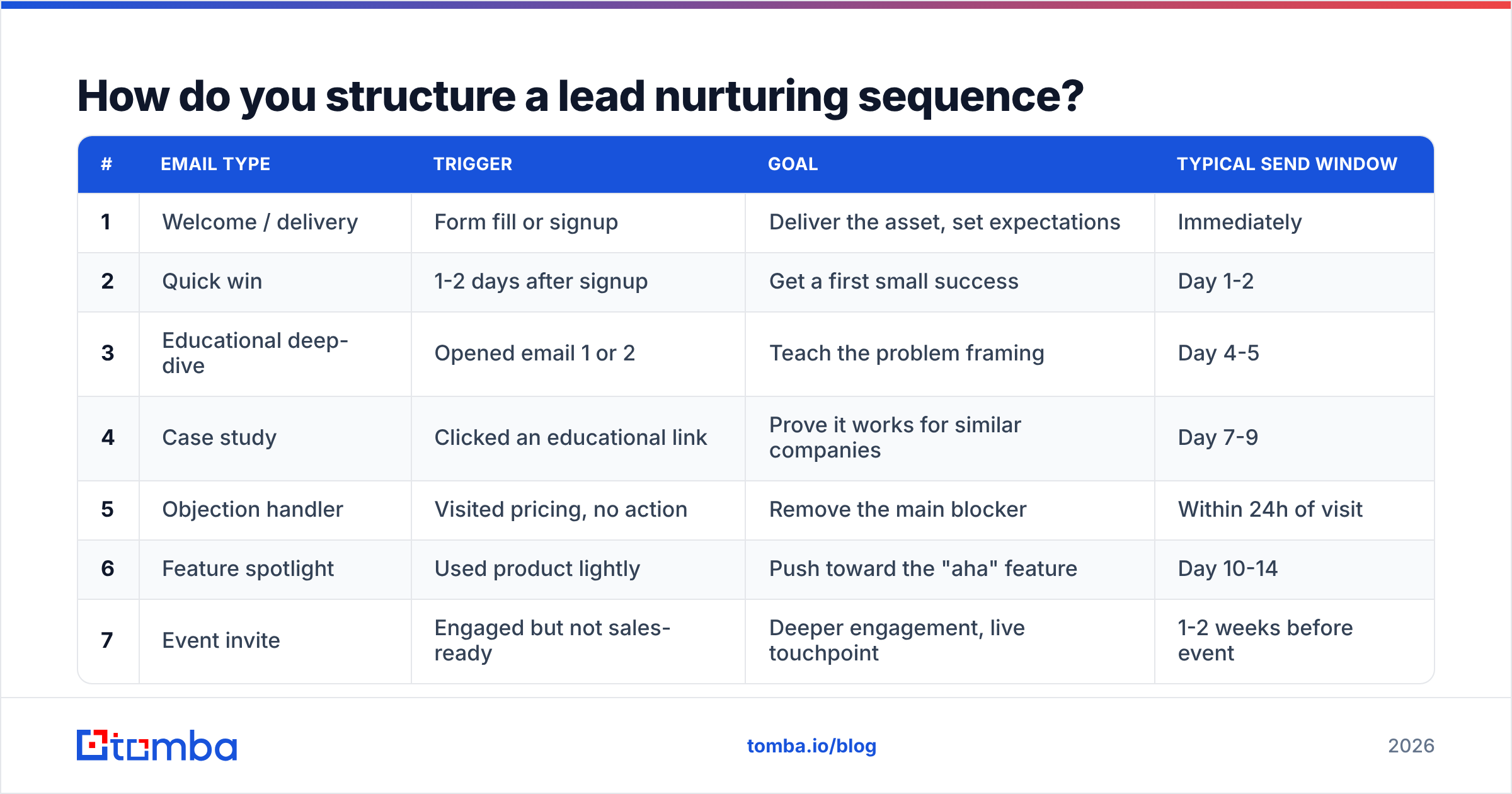
Before the examples, you need a map. Each email in a sequence should have a trigger (why the lead gets it), a goal (what you want them to do next), and a send window. If any of those three is missing, the email is filler.
| # | Email type | Trigger | Goal | Typical send window |
|---|---|---|---|---|
| 1 | Welcome / delivery | Form fill or signup | Deliver the asset, set expectations | Immediately |
| 2 | Quick win | 1-2 days after signup | Get a first small success | Day 1-2 |
| 3 | Educational deep-dive | Opened email 1 or 2 | Teach the problem framing | Day 4-5 |
| 4 | Case study | Clicked an educational link | Prove it works for similar companies | Day 7-9 |
| 5 | Objection handler | Visited pricing, no action | Remove the main blocker | Within 24h of visit |
| 6 | Feature spotlight | Used product lightly | Push toward the "aha" feature | Day 10-14 |
| 7 | Event invite | Engaged but not sales-ready | Deeper engagement, live touchpoint | 1-2 weeks before event |
| 8 | Sales handoff | Lead score crosses threshold | Book a call | Within 1 hour of trigger |
| 9 | Re-engagement | No opens for 30+ days | Confirm interest or clean the list | Day 30-45 |
| 10 | Breakup | No response to re-engagement | Final reply or unsubscribe | 5-7 days after #9 |
You don't have to send all ten to every lead. A trial user and a content downloader go down different branches, and some leads will skip straight to email 8. The table is a menu to pick from, not a fixed schedule.
What are the best lead nurturing email examples?#
Each example below comes with the context, the copy, and why it works. Replace the bracketed parts with your own details. If you want more starting points, Tomba's library of cold email templates covers the first-touch emails that come before a nurture sequence starts.
1. The welcome email that actually delivers#
Subject: Your [asset name] + one thing to try first
Hi [First name],
Here's the [guide/checklist] you asked for: [link].
If you only read one section, make it page 4 on [specific topic]. That's where most [role]s at [company size] companies find the fastest fix.
Over the next couple of weeks I'll send a few short notes on [problem area]. No fluff, and you can opt out anytime.
[Your name]
Why it works: The email delivers what was promised in the first line and points to one specific page, so the lead has a reason to open the asset right away. It also tells them what's coming next, which reduces unsubscribes later in the sequence.
2. The quick-win email#
Subject: A 10-minute fix for [pain point]
Hi [First name],
Quick one. Most teams we talk to lose [time/money] on [specific task] because [root cause].
The fastest fix: [one concrete step, 2-3 sentences].
Try it this week and reply with what you see. I read every answer.
[Your name]
Why it works: It gives value without asking for anything in return. Inviting a reply matters twice: it starts a conversation, and replies are a positive engagement signal for inbox providers.
3. The educational deep-dive#
Subject: Why [common approach] stops working at [scale]
Hi [First name],
[Common approach] works fine until you hit [threshold]. After that, [specific problem] shows up, usually as [symptom the reader will recognize].
We wrote up the three patterns we see most often: [link].
The second one surprises most [role]s.
[Your name]
Why it works: It reframes a problem the lead thinks they already understand. The "second one surprises most" line creates a curiosity gap you can actually pay off, which is different from clickbait.
4. The case study email#
Subject: How [similar company] cut [metric] by [result]
Hi [First name],
[Similar company] had the same setup you do: [team size], [tool stack], [problem].
In [timeframe], they [result]. The change that mattered most was [one specific action], not the tool itself.
Full breakdown here (4-min read): [link]
Worth a look if [problem] is on your list this quarter.
[Your name]
Why it works: Social proof only persuades when the reader recognizes themselves in it. Matching on team size, stack, and industry does more than a famous logo. This is where enrichment pays off: if you know the lead's headcount and tech stack through contact enrichment, you can pick the case study that fits best instead of sending everyone the same one.
5. The objection handler (pricing-page trigger)#
Subject: The question people ask before they buy
Hi [First name],
When someone looks at our pricing, the question we get most is "[top objection]?"
Short answer: [direct answer in one sentence].
Longer answer: [2-3 sentences with specifics, a number, or a guarantee].
If there's a different question holding you back, just reply and ask. You'll get a straight answer.
[Your name]
Why it works: A pricing-page visit is one of the strongest intent signals you get. This email reacts to it without being creepy. It never says "I saw you on our pricing page"; it answers the question the lead probably has.
6. The feature spotlight#
Subject: You haven't tried [feature] yet
Hi [First name],
You've been using [product] for [X days], mostly for [observed use]. Nice.
The feature that changes things for most teams is [feature]. It [one-sentence outcome].
Here's a 90-second walkthrough: [link]
[Your name]
Why it works: It uses real product behavior and points to the next step that makes the product valuable. It fits product-led trials best, where activation predicts conversion better than any sales email.
7. The event invite#
Subject: [Date]: [specific session topic], 30 min, live Q&A
Hi [First name],
On [date] we're running a 30-minute session on [narrow topic], with [speaker + credential].
You'll leave with [specific takeaway, e.g., a template, a benchmark, a checklist].
Save a seat: [link]. Can't make it? Register anyway and we'll send the recording.
[Your name]
Why it works: A narrow topic, a stated time commitment, and a concrete takeaway. The recording fallback turns "I'm busy" into a registration.
8. The sales handoff email#
Subject: Worth a quick call about [their initiative]?
Hi [First name],
I'm [name], I work with [role]s at [industry] companies on [problem].
Based on what you've been looking at ([topic of content consumed]), it sounds like [initiative] is on your radar. I can show you how [similar company] handled it in 20 minutes.
Does [day] or [day] work? If not, no pressure. The content emails will keep coming either way.
[Your name]
Why it works: This is where marketing hands the lead to sales, so it comes from a person, not a brand. It references what the lead actually engaged with, offers two specific times, and takes the pressure off. The handoff should fire when a lead score or behavior threshold is crossed. Your CRM should handle this automatically, not a rep checking a dashboard on Fridays.
9. The re-engagement email#
Subject: Still working on [problem]?
Hi [First name],
It's been a while since you opened anything from us, which usually means one of three things:
- [Problem] got solved. Congrats.
- It's still a problem but not a priority right now.
- Our emails are landing in the wrong place.
Just reply with 1, 2, or 3 and I'll adjust. Or do nothing and I'll assume it's #1.
[Your name]
Why it works: Replying with a single number is about as easy as it gets. Every answer is useful: #1 tells you to stop, #2 tells you to slow down, #3 tells you there's a deliverability issue.
10. The breakup email#
Subject: Closing the loop
Hi [First name],
I haven't heard back, so I'll assume the timing isn't right and stop emailing about [topic].
If that changes, my calendar is here: [link]. And if I got it wrong and you'd like to stay on the list, reply "keep me" and I will.
Thanks for reading this far.
[Your name]
Why it works: Loss aversion gets people to respond, and respecting their silence protects your sender reputation. Breakup emails often get replies from leads who never replied to anything before, because this is the first email where not replying has a cost.
What makes a nurture email effective?#
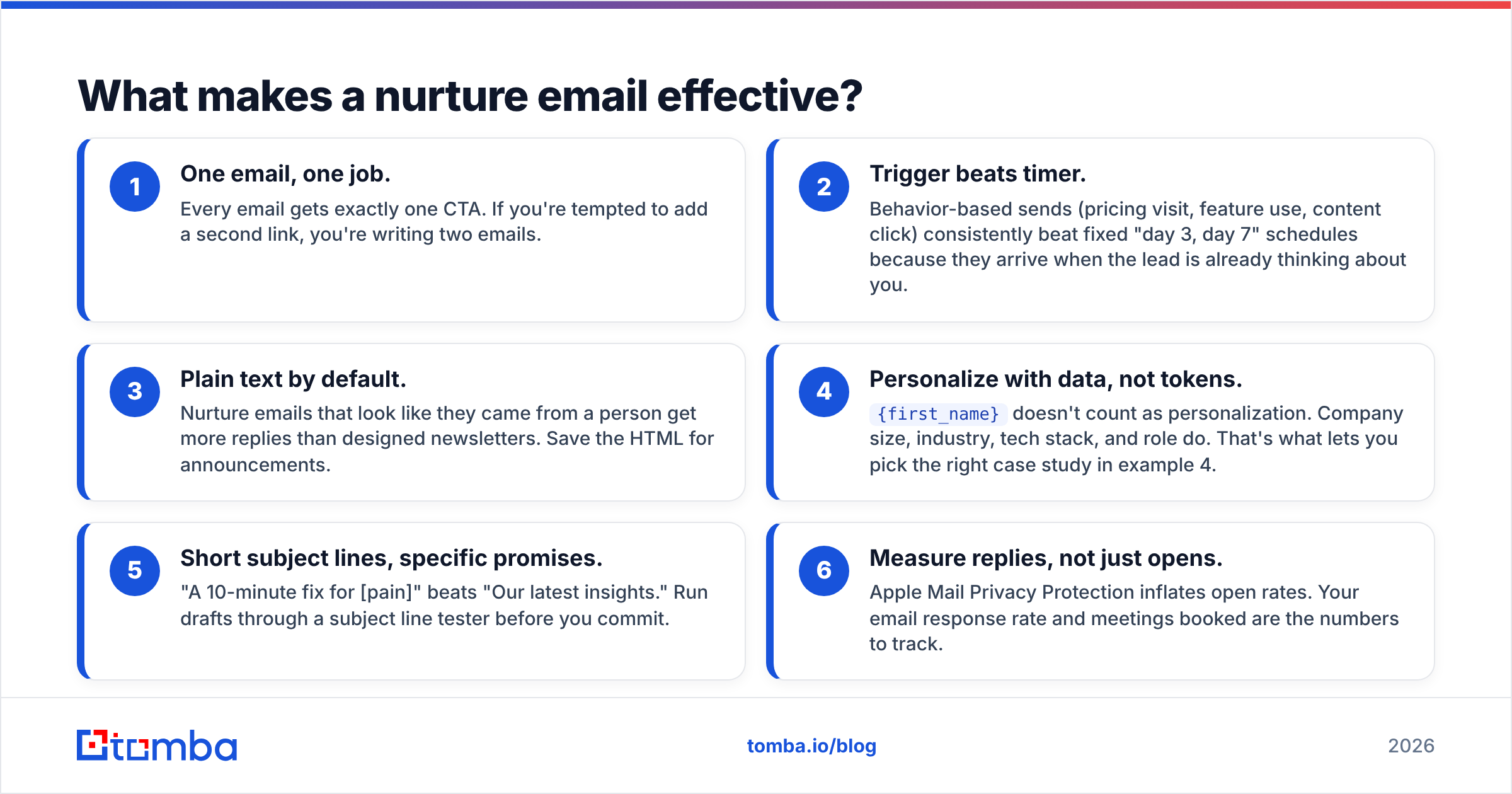
Across all ten examples, the same principles apply. Use them as a checklist before any email goes into your automation:
- One email, one job. Every email gets exactly one CTA. If you're tempted to add a second link, you're writing two emails.
- Trigger beats timer. Behavior-based sends (pricing visit, feature use, content click) consistently beat fixed "day 3, day 7" schedules because they arrive when the lead is already thinking about you.
- Plain text by default. Nurture emails that look like they came from a person get more replies than designed newsletters. Save the HTML for announcements.
- Personalize with data, not tokens.
{first_name}doesn't count as personalization. Company size, industry, tech stack, and role do. That's what lets you pick the right case study in example 4. - Short subject lines, specific promises. "A 10-minute fix for [pain]" beats "Our latest insights." Run drafts through a subject line tester before you commit.
- Measure replies, not just opens. Apple Mail Privacy Protection inflates open rates. Your email response rate and meetings booked are the numbers to track.
How often should you send lead nurturing emails?#
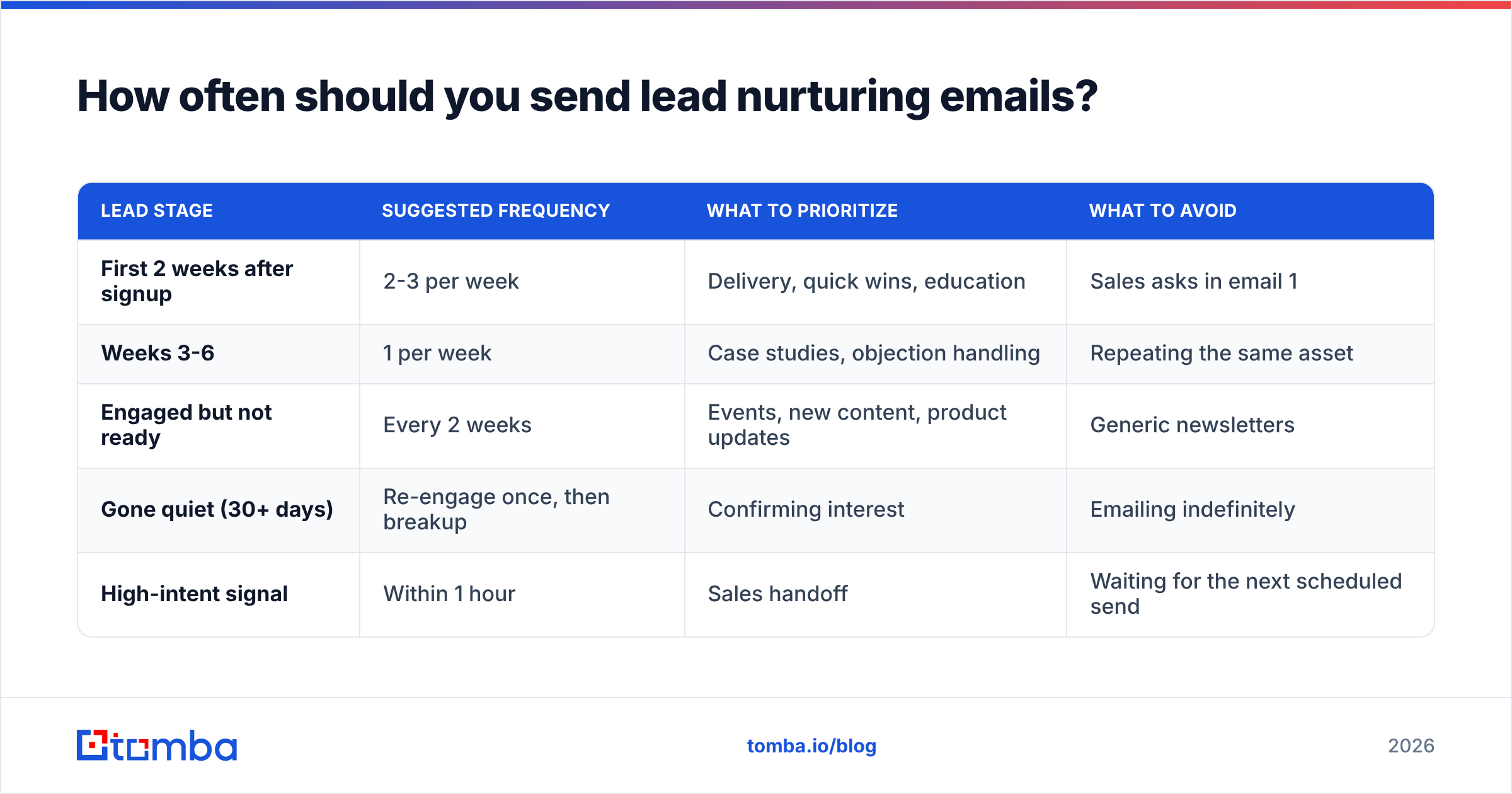
There's no universal cadence, but a few patterns hold up well:
| Lead stage | Suggested frequency | What to prioritize | What to avoid |
|---|---|---|---|
| First 2 weeks after signup | 2-3 per week | Delivery, quick wins, education | Sales asks in email 1 |
| Weeks 3-6 | 1 per week | Case studies, objection handling | Repeating the same asset |
| Engaged but not ready | Every 2 weeks | Events, new content, product updates | Generic newsletters |
| Gone quiet (30+ days) | Re-engage once, then breakup | Confirming interest | Emailing indefinitely |
| High-intent signal | Within 1 hour | Sales handoff | Waiting for the next scheduled send |
The last row matters most. When a lead does something that signals buying intent, your fixed schedule should give way. Platforms like HubSpot and most marketing automation tools let you add intent-based branches that interrupt the regular cadence. Set them up.
Why do lead nurturing sequences fail?#
Usually not because of the copy. The common reasons, roughly from most to least damaging:
Bad contact data. Leads type fake emails into gated forms, people change jobs, and domains get retired. Every hard bounce hurts your sender reputation, and a sequence sending to a dirty list slowly moves your good emails into spam. Google's email sender guidelines spell out the authentication and spam-rate thresholds bulk senders have to meet. You won't stay under them with an unverified list.

The fix is simple. Run new leads through an email verifier at the point of capture, and re-verify dormant segments before a re-engagement push. If a lead gave you a personal Gmail address on a form, an email finder can often surface their work address, which reaches them where buying decisions are actually made.
No sales handoff. Marketing nurtures forever, and sales never gets told when a lead is ready. Set a score threshold, wire it to a task or notification, and agree on how fast sales responds.
One sequence for everyone. A founder at a 10-person startup and a VP at a 5,000-person enterprise shouldn't get the same case study. Segment by at least company size and role.
No exit criteria. Leads who book a call, buy, or unsubscribe should leave the nurture flow immediately. Nothing kills a deal faster than a "still thinking about it?" email the day after they signed.
Measuring the wrong thing. Optimizing for opens gets you clickbait subject lines. Optimize for replies, meetings, and pipeline created.
Should you use AI to write nurture emails?#
Yes for drafts, no for sending without review. AI is good at producing variations on a proven structure, like the ten above, and at rewriting a case study summary for a different industry. It's bad at knowing which objection your buyers actually raise, what your product really does well, and when a claim crosses into overpromising.
A workable approach: write the structure and the core claim yourself, use AI to generate two or three variants of the subject line and opening, then A/B test them. Keep a human reading every email before it goes into a live sequence.
How do you get started this week?#
You don't need a 10-email sequence on day one. Start with three:
- The welcome email (example 1), which fires on signup.
- The objection handler (example 5), triggered by a pricing-page visit.
- The breakup email (example 10), which cleans your list and brings back quiet leads.
Those three cover the moment of highest attention, the moment of highest intent, and list hygiene. Add education and case studies once you know which topics your leads actually click on.
Before you switch anything on, audit the list. A nurture program is only as good as the addresses it sends to. If you're filling gaps in your lead data (missing work emails, personal addresses from gated forms, contacts who've changed companies), Tomba Email Finder finds verified professional email addresses by name and company domain, so your nurture emails reach the person who'll actually make the decision. The free tier includes 25 searches a month, enough to test it on your highest-value leads before you commit to a plan.
Related guides#
// get started
Find, verify and enrich your first contacts today
Start on the free plan with 25 searches a month, then scale when your team is ready.
Free plan · No credit card required · GDPR & CCPA
// about the author