Lead Nurturing Email Templates: 9 Proven Examples for 2026
Nine copy-ready lead nurturing email templates, one for each funnel stage, with send timing, subject lines, and the data rules that decide whether they reach the inbox.
TL;DR
- Lead nurturing email templates work when each email does one job for one funnel stage: welcome, teach, prove, qualify, or ask. They fail when every email is a demo pitch.
- The nine templates below cover the full path from first touch to re-engagement. Each has a subject line, body copy, send timing, and the signal that should move the lead to the next stage.
- Space the emails 3–7 days apart early on, then 10–14 days apart. Stop the sequence as soon as a lead replies, books a call, or goes cold.
- Bad data sinks good copy. Verify every address before it enters a nurture flow, because bounces damage the sender reputation that gets your later emails into the inbox.
- Personalise with real context (role, company, trigger event), not only
[First name]. The table in section three shows which fields each template needs.
What is a lead nurturing email, really?#
A lead nurturing email is a planned message sent to someone who has shown interest but isn't ready to buy. It might go to someone who downloaded a guide, signed up for a webinar, started a trial, or replied "not now" to a cold email. The goal is to build trust and give the lead a reason to come back when the timing works for them. Closing the deal is not the job of any single email.
Nurture sequences are a close relative of drip marketing, but there's one important difference. A drip campaign sends the same emails on a fixed schedule. A good nurture flow branches based on behaviour. Someone who clicks your pricing page should get a different next email than someone who has ignored three messages.
The difference from cold email matters too. A cold email is written for a stranger. A nurture email goes to someone who already knows who you are, so you can afford to be more useful and less guarded. That doesn't mean you can be longer or lazier.
Why do most lead nurturing emails get ignored?#
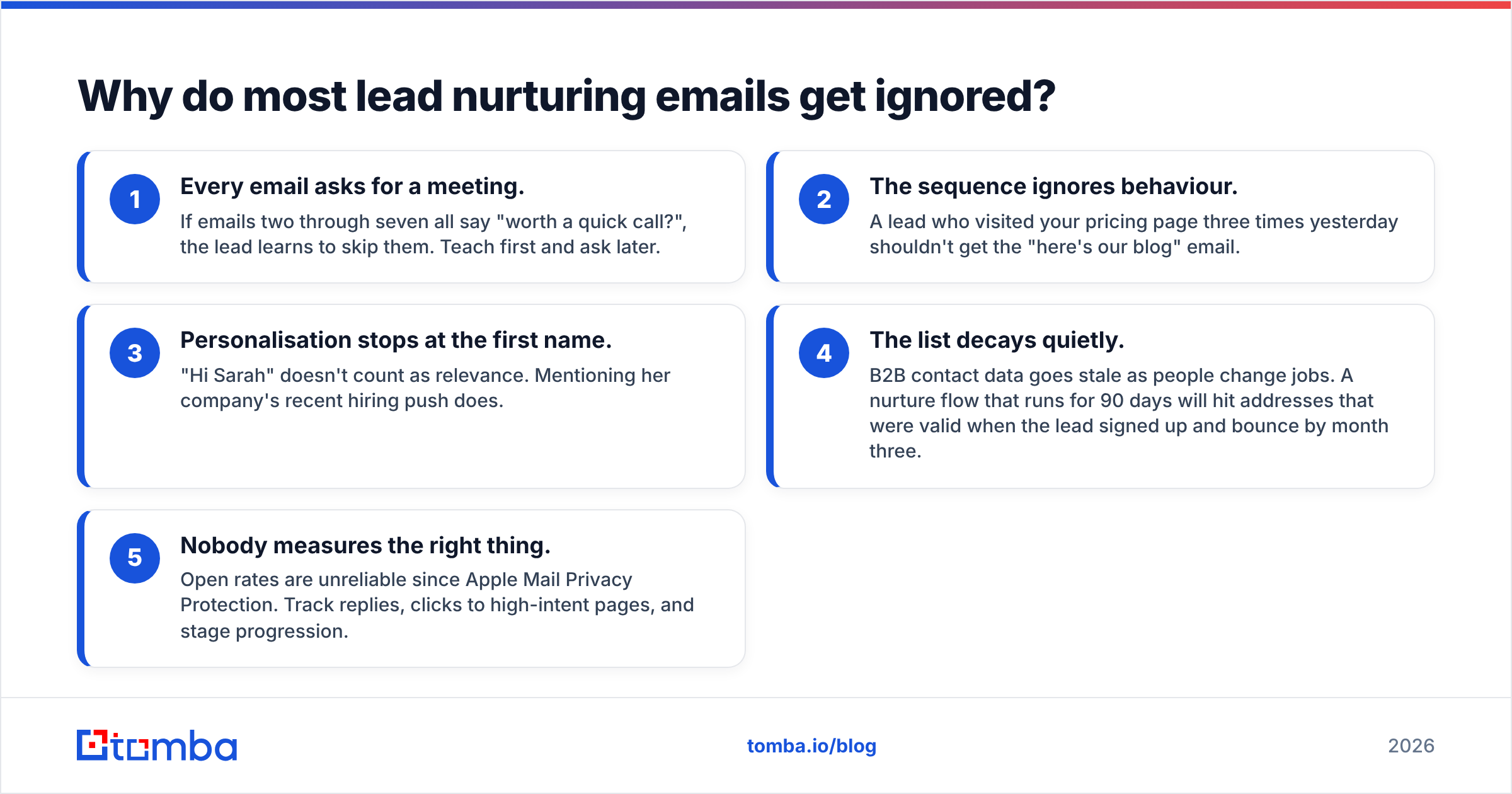
Most nurture sequences fail for predictable reasons, and none of them are about wording.
- Every email asks for a meeting. If emails two through seven all say "worth a quick call?", the lead learns to skip them. Teach first and ask later.
- The sequence ignores behaviour. A lead who visited your pricing page three times yesterday shouldn't get the "here's our blog" email.
- Personalisation stops at the first name. "Hi Sarah" doesn't count as relevance. Mentioning her company's recent hiring push does.
- The list decays quietly. B2B contact data goes stale as people change jobs. A nurture flow that runs for 90 days will hit addresses that were valid when the lead signed up and bounce by month three.
- Nobody measures the right thing. Open rates are unreliable since Apple Mail Privacy Protection. Track replies, clicks to high-intent pages, and stage progression.

The fix is structural. Map each email to a stage, give it one job, and define the signal that moves the lead forward. The next section does exactly that.
Which lead nurturing email templates do you need for each funnel stage?#
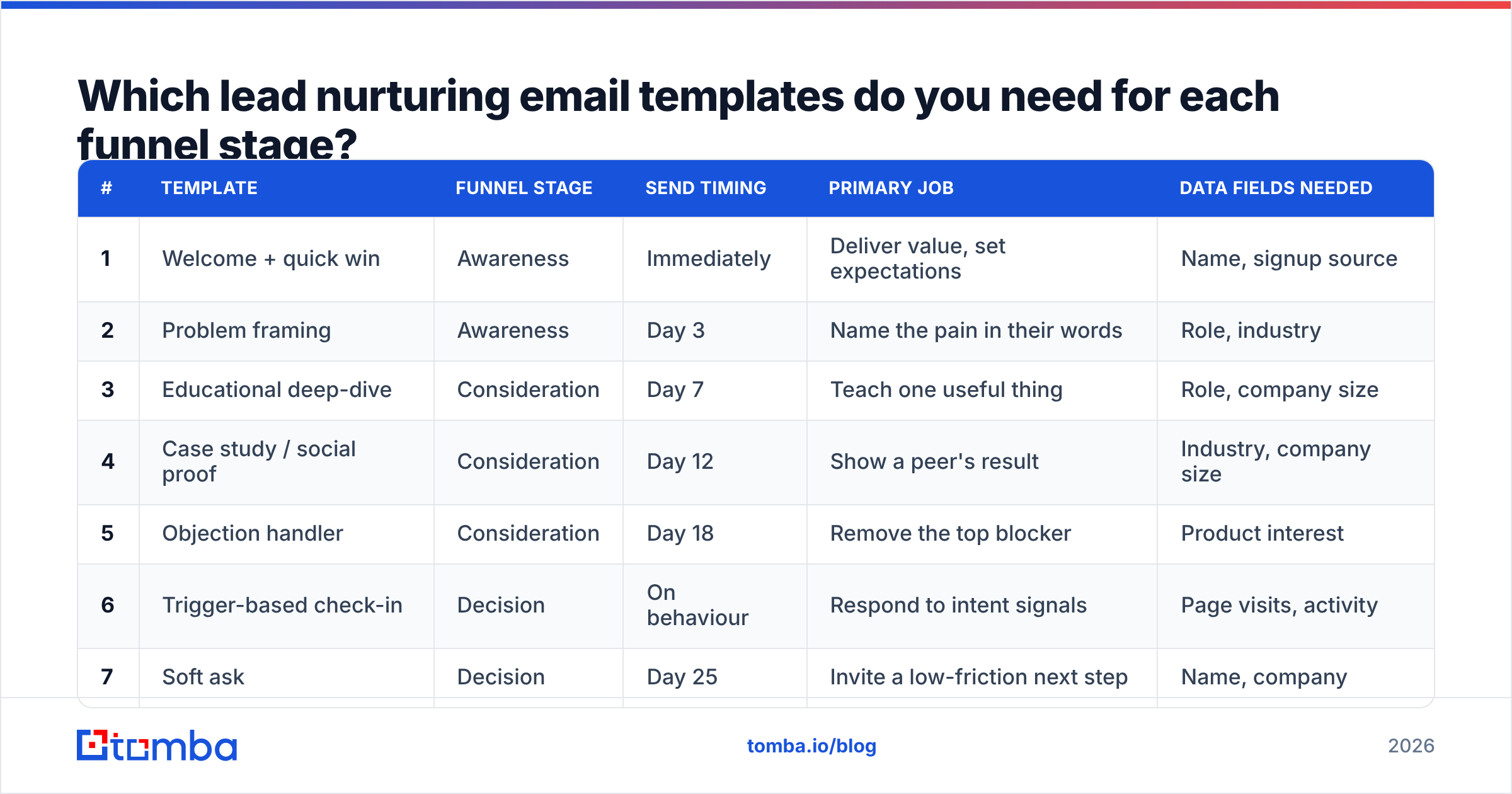
You need at least one template per stage, plus a breakup and a re-engagement email to handle the tail. Here's the full set at a glance:
| # | Template | Funnel stage | Send timing | Primary job | Data fields needed |
|---|---|---|---|---|---|
| 1 | Welcome + quick win | Awareness | Immediately | Deliver value, set expectations | Name, signup source |
| 2 | Problem framing | Awareness | Day 3 | Name the pain in their words | Role, industry |
| 3 | Educational deep-dive | Consideration | Day 7 | Teach one useful thing | Role, company size |
| 4 | Case study / social proof | Consideration | Day 12 | Show a peer's result | Industry, company size |
| 5 | Objection handler | Consideration | Day 18 | Remove the top blocker | Product interest |
| 6 | Trigger-based check-in | Decision | On behaviour | Respond to intent signals | Page visits, activity |
| 7 | Soft ask | Decision | Day 25 | Invite a low-friction next step | Name, company |
| 8 | Breakup | Exit | Day 35 | Get a yes, no, or later | Name |
| 9 | Re-engagement | Revival | Day 90+ | Restart a cold thread | Updated role, company |
Treat the timings as defaults, not rules. A product-led trial might compress the whole sequence into 14 days, while an enterprise sale can stretch it over a quarter. If you'd like more starting points outside the nurture context, Tomba's free email templates library covers cold outreach and follow-ups.
What do the 9 templates look like?#
Copy them, then rewrite the brackets with real context. If an email still reads fine after you swap in a different company name, it isn't personalised enough.
1. Welcome + quick win (awareness, immediately)#
Subject: Your [resource name] + one thing to try today

Hi [First name],

Here's the [resource name] you requested: [link].

If you only have five minutes, skip to page [X]. That's the section
[role]s at [company size] companies tell us saves them the most time.

Over the next few weeks I'll send a handful of short, practical notes
on [topic]. No fluff. If a note isn't useful, reply and tell me.

[Your name]
Moves forward when: they open the resource or click the link. Why it works: it delivers on the promise straight away and sets expectations, so later emails don't feel like an ambush.
2. Problem framing (awareness, day 3)#
Subject: The [problem] tax most [role]s don't measure

Hi [First name],

Most [role]s we talk to lose [specific time/cost] a week to [problem],
but it rarely shows up in a report because it's spread across
[task A], [task B], and [task C].

Quick gut check: does this sound like [company] right now?

- [Symptom 1]
- [Symptom 2]
- [Symptom 3]

If two of those land, the next email will be useful.

[Your name]
Why it works: it names the pain in the reader's own language before offering anything. People engage more with emails that describe their problem accurately than with emails that describe your product.
3. Educational deep-dive (consideration, day 7)#
Subject: How [peer company type] fixed [problem] in 3 steps

Hi [First name],

Here's the framework we see work most often:

1. [Step one — concrete action]
2. [Step two — concrete action]
3. [Step three — concrete action]

The step most teams skip is #2, and it's usually where the gains are.
Full walkthrough with examples here: [link].

[Your name]
Why it works: it's genuinely useful even if they never buy. That earns attention for the emails that come after it.
4. Case study / social proof (consideration, day 12)#
Subject: How [peer company] cut [metric] by [X]%

Hi [First name],

[Peer company] is a [size] [industry] team — similar to [company].
Before: [specific pain, with a number].
After [timeframe]: [specific result, with a number].

The change that mattered most wasn't the tool. It was [process insight].

Two-minute read: [link]

[Your name]
Why it works: proof from a peer is more convincing than any claim you make about yourself. Pick a case study that matches the lead's industry and size. A mismatch hurts more than having no case study at all.
5. Objection handler (consideration, day 18)#
Subject: "We tried something like this before"

Hi [First name],

That's the most common thing we hear from [role]s, and it's fair.
Usually the first attempt stalled because of [real reason].

Here's what's different when it works:
- [Difference 1]
- [Difference 2]

If a different concern is holding you back — budget, timing,
internal buy-in — reply with one word and I'll send something specific.

[Your name]
Why it works: it raises the objection before the lead has to, and the "reply with one word" line makes replying easy. Replies are also a strong positive deliverability signal.

6. Trigger-based check-in (decision, on behaviour)#
Subject: Quick question about [page/feature they viewed]

Hi [First name],

Noticed you were looking at [pricing / integration / feature] —
people usually do that when they're comparing options or scoping
a rollout.

Happy to answer the one question that's blocking a decision.
What is it?

[Your name]
Why it works: timing does most of the work. Send it within 24 hours of the trigger, and never quote the exact page views back at them. "Noticed you visited pricing four times" reads like surveillance.
7. Soft ask (decision, day 25)#
Subject: Worth 15 minutes, or not yet?

Hi [First name],

Based on what you've looked at, I think [specific outcome] is realistic
for [company] within [timeframe].

If you want, I can walk you through how [peer company] set it up —
15 minutes, no deck. Here's my calendar: [link].

If now isn't the time, no problem. Just let me know and I'll
check back in [month].

[Your name]
Why it works: it's a low-friction ask with an easy "not now" path. Leads who say "later" are still in your pipeline, and a lead who feels cornered just unsubscribes.
8. Breakup (exit, day 35)#
Subject: Should I close your file?

Hi [First name],

I haven't heard back, which usually means one of three things:

1. Bad timing — reply "later" and I'll check in next quarter.
2. Not a fit — reply "no" and I'll stop emailing.
3. Buried inbox — reply "yes" and I'll send the one-page summary.

Any of those is a good answer.

[Your name]
Why it works: it makes a one-word reply feel acceptable, and breakup emails often get more replies than anything earlier in the sequence. Respect the answer you get.
9. Re-engagement (revival, 90+ days)#
Subject: [Company] + [new trigger: funding / new hire / launch]

Hi [First name],

Congrats on [trigger event]. Teams usually revisit [problem] right
after [trigger], because [reason].

A lot has changed on our side since we last spoke: [one relevant
update]. Worth a fresh look?

[Your name]
Why it works: it's anchored to a real event, not a calendar reminder. Before you send it, check that the person is still at the company. This is where stale data hurts most, and running the lead through data enrichment first catches job changes that would otherwise bounce.
How do you personalise nurture emails beyond [First name]?#
Relevance comes from context, not tokens. Rank your personalisation layers like this:
- Trigger events. Funding rounds, new executive hires, product launches, and job changes are the strongest hooks because they explain why you're emailing now.
- Role-specific pain. A VP of Sales and a RevOps manager at the same company care about different things. Segment your nurture tracks by persona, or at least by department.
- Company context. Industry, headcount, and tech stack let you pick the right case study (template 4) and the right objection (template 5).
- Behavioural signals. Pages viewed, content downloaded, and emails clicked should decide the branch, as with template 6.
Most of this data isn't in your form fill. A signup form that asks for eight fields converts worse than one that asks for an email address. The usual pattern is to capture the email, then enrich the rest (company, role, size, LinkedIn) in the background before the second nurture email goes out.
How do you keep nurture emails out of spam?#
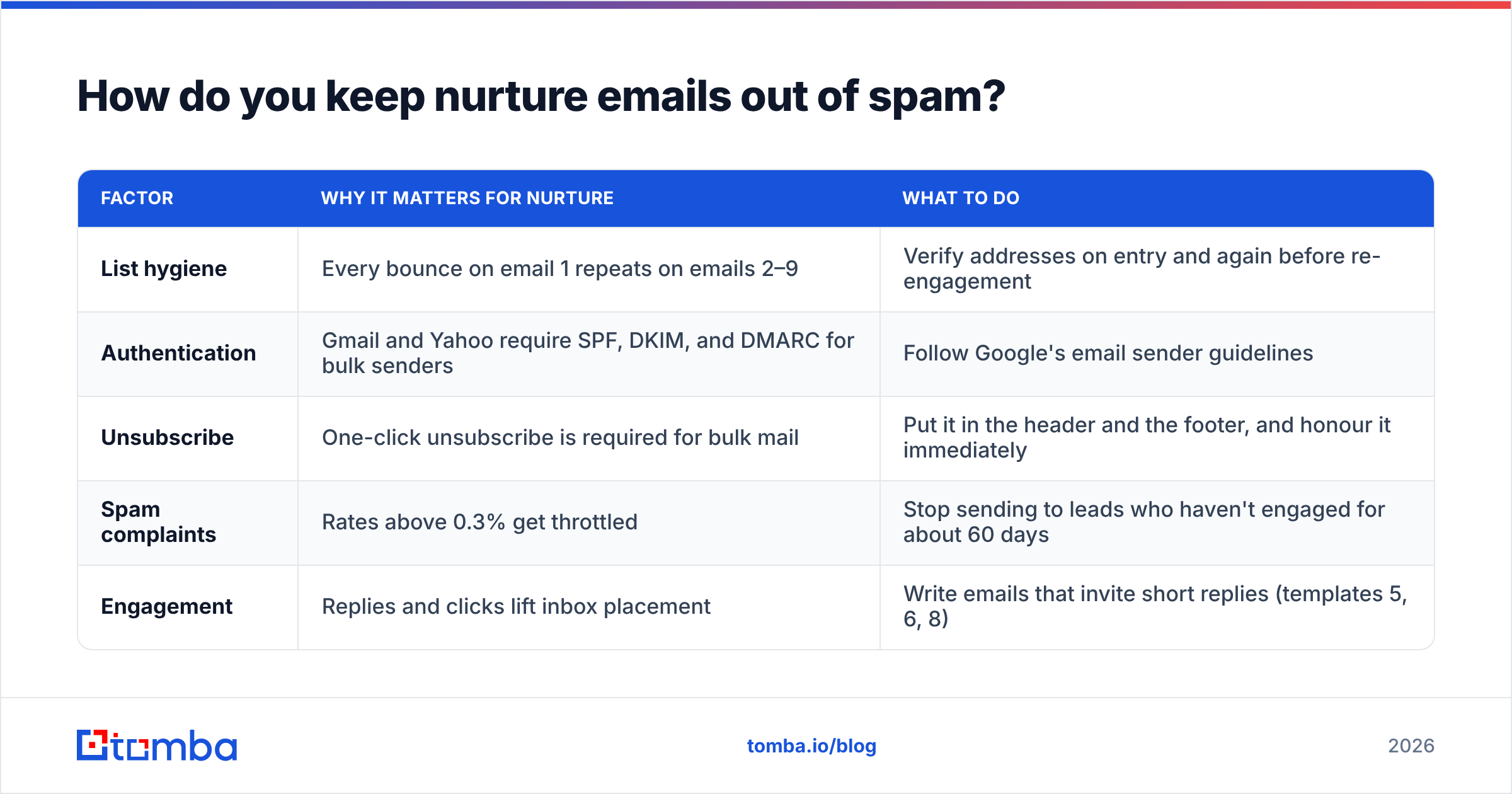
Good copy doesn't help if the email lands in the promotions tab or the spam folder. Nurture flows carry a particular risk because they send to the same list many times over weeks, so a small bounce problem grows with every step.
The basics that matter most in 2026:
| Factor | Why it matters for nurture | What to do |
|---|---|---|
| List hygiene | Every bounce on email 1 repeats on emails 2–9 | Verify addresses on entry and again before re-engagement |
| Authentication | Gmail and Yahoo require SPF, DKIM, and DMARC for bulk senders | Follow Google's email sender guidelines |
| Unsubscribe | One-click unsubscribe is required for bulk mail | Put it in the header and the footer, and honour it immediately |
| Spam complaints | Rates above 0.3% get throttled | Stop sending to leads who haven't engaged for about 60 days |
| Engagement | Replies and clicks lift inbox placement | Write emails that invite short replies (templates 5, 6, 8) |
The list-hygiene row does the most work. A lead who signed up with a typo, a role address, or an address on a domain that has since shut down will bounce every time your sequence fires. Running an email verifier at the point of entry, and again before any re-engagement send, keeps the whole flow clean. Catch-all domains need extra care because they accept every address at the SMTP level, so a standard check can't tell whether a specific inbox exists.
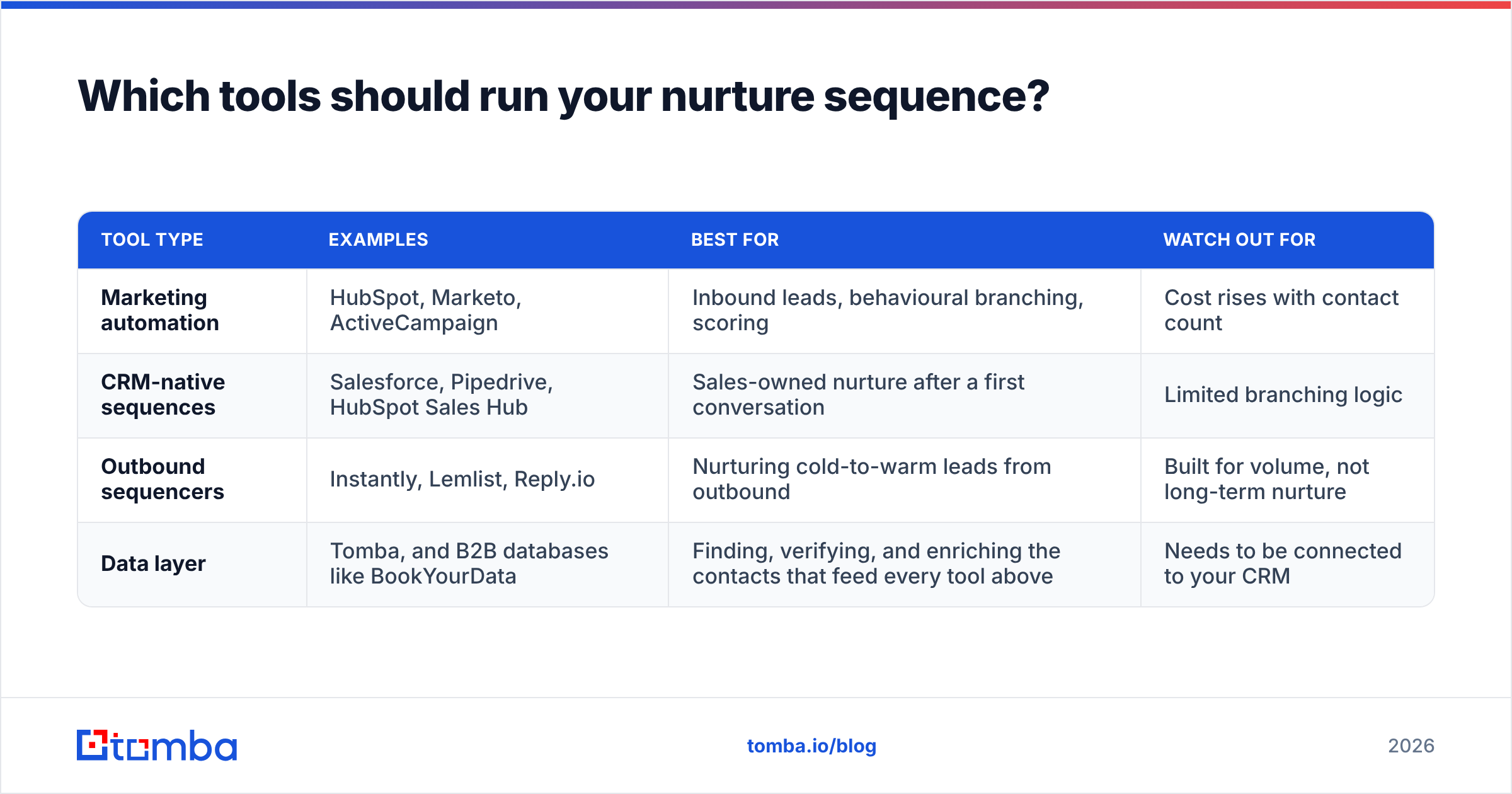
Which tools should run your nurture sequence?#
The copy is portable. The tool is mostly a question of where your leads already live.
| Tool type | Examples | Best for | Watch out for |
|---|---|---|---|
| Marketing automation | HubSpot, Marketo, ActiveCampaign | Inbound leads, behavioural branching, scoring | Cost rises with contact count |
| CRM-native sequences | Salesforce, Pipedrive, HubSpot Sales Hub | Sales-owned nurture after a first conversation | Limited branching logic |
| Outbound sequencers | Instantly, Lemlist, Reply.io | Nurturing cold-to-warm leads from outbound | Built for volume, not long-term nurture |
| Data layer | Tomba, and B2B databases like BookYourData | Finding, verifying, and enriching the contacts that feed every tool above | Needs to be connected to your CRM |
HubSpot's marketing automation is the usual default for inbound-heavy teams because the forms, scoring, and branching all live in one place. Outbound-heavy teams often run nurture inside their sequencer and sync outcomes to the CRM. In both cases the data layer is shared. Whatever platform sends the emails, it depends on the addresses and firmographic fields you feed it.
What metrics tell you a nurture sequence is working?#
Stop reporting open rates as your headline metric. Privacy features inflate them, and they don't correlate well with pipeline. Track these instead:
- Reply rate per template. This shows which emails start conversations. If template 5 gets triple the replies of template 3, study why.
- Stage progression rate. This is the percentage of leads that move from awareness to consideration to decision within the sequence window.
- Click-to-high-intent-page rate. Clicks to pricing, integrations, or demo pages count for more than clicks to blog posts.
- Bounce rate per send. Anything above 2% means your list is decaying and needs re-verification.
- Unsubscribe rate per template. A spike on one email means that email is off-tone or too pushy.
- Sourced pipeline. This is the revenue from opportunities where the nurture sequence was a meaningful touch. It's the number leadership actually cares about.
Review the numbers every month and rewrite the weakest template each cycle. Sequences decay as markets and buyers change, so plan to refresh them regularly rather than treating them as finished.
Where should you start?#
If you don't have a nurture flow yet, start with templates 1, 4, 7, and 8: welcome, proof, soft ask, and breakup. That four-email core covers the essential jobs. Add the educational, objection, trigger, and re-engagement emails once you can see where leads drop off.
Before any of it goes live, make sure the contacts entering the sequence are real, current, and reachable. Tomba Email Finder finds verified professional addresses by name, domain, or company, and the same account covers verification and enrichment, so your nurture flow starts on clean data and stays clean. There's a free tier with 25 searches a month, and paid plans start at $49/mo if you want to see how your current list holds up before your next sequence launches.
Related guides#
// get started
Find, verify and enrich your first contacts today
Start on the free plan with 25 searches a month, then scale when your team is ready.
Free plan · No credit card required · GDPR & CCPA
// about the author