Lead Nurturing Emails: Sequences, Examples, and Timing for B2B
Most lead nurturing emails fail because of bad timing, generic content, or bad data, not bad copy. Here is the 6-email B2B sequence, the send cadence, and the metrics to fix each one.
TL;DR
- Lead nurturing emails are a planned series sent to leads who aren't ready to buy yet. Their job is to build trust and get the lead to the next step: a demo, a trial, or a reply.
- A B2B sequence that works usually has 5-7 emails spread over 3-6 weeks. Each email has one job, and the pace is set by what the lead does, not by the calendar.
- The fastest gains come from segmentation and data quality, not from better copy. If an address bounces, the email never gets read.
- Stop sending to leads who stay cold after the sequence. Move them to a lower-frequency newsletter so they don't drag down your sender reputation.
- Track reply rate, click-to-meeting rate, and unsubscribe rate for each email, not just open rate.
What are lead nurturing emails?#
Lead nurturing emails are automated or semi-automated messages sent to people who have shown interest but aren't ready for a sales conversation. They downloaded a guide, attended a webinar, started a trial and stalled, or replied "not right now" to a cold email.
A cold email opens a conversation. A nurture email keeps one going. The lead already knows who you are, so each message has to earn the next open by being useful, specific, and timed to where the lead is in their buying process.
In B2B this matters because buying cycles are long and several people are involved. Most leads that enter your funnel won't buy this quarter. Without nurturing, the lead you paid to acquire is forgotten within two weeks, and a competitor who kept in touch gets the deal when the budget opens up. For more background on how nurturing fits into the wider funnel, the Wikipedia overview of lead generation is a good starting point.
How is a nurture email different from a newsletter or a cold email?#
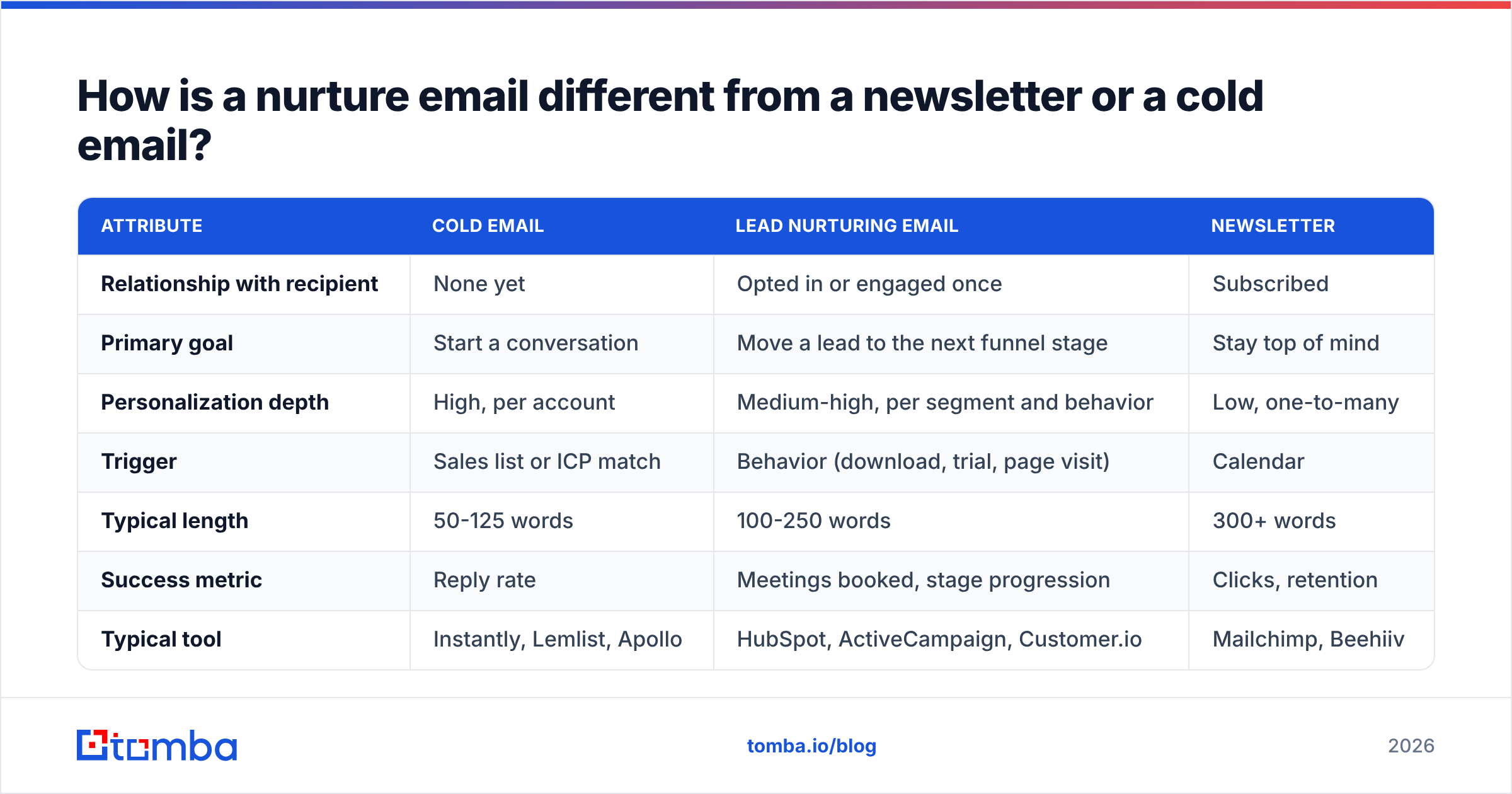
People mix these three up all the time, and that's why many "nurture sequences" are really newsletters sent on a schedule. Here's the difference:
| Attribute | Cold email | Lead nurturing email | Newsletter |
|---|---|---|---|
| Relationship with recipient | None yet | Opted in or engaged once | Subscribed |
| Primary goal | Start a conversation | Move a lead to the next funnel stage | Stay top of mind |
| Personalization depth | High, per account | Medium-high, per segment and behavior | Low, one-to-many |
| Trigger | Sales list or ICP match | Behavior (download, trial, page visit) | Calendar |
| Typical length | 50-125 words | 100-250 words | 300+ words |
| Success metric | Reply rate | Meetings booked, stage progression | Clicks, retention |
| Typical tool | Instantly, Lemlist, Apollo | HubSpot, ActiveCampaign, Customer.io | Mailchimp, Beehiiv |
The key difference is the trigger. A nurture email is sent because of something the lead did. A newsletter is sent because it's Tuesday.
What does a high-performing lead nurturing sequence look like?#
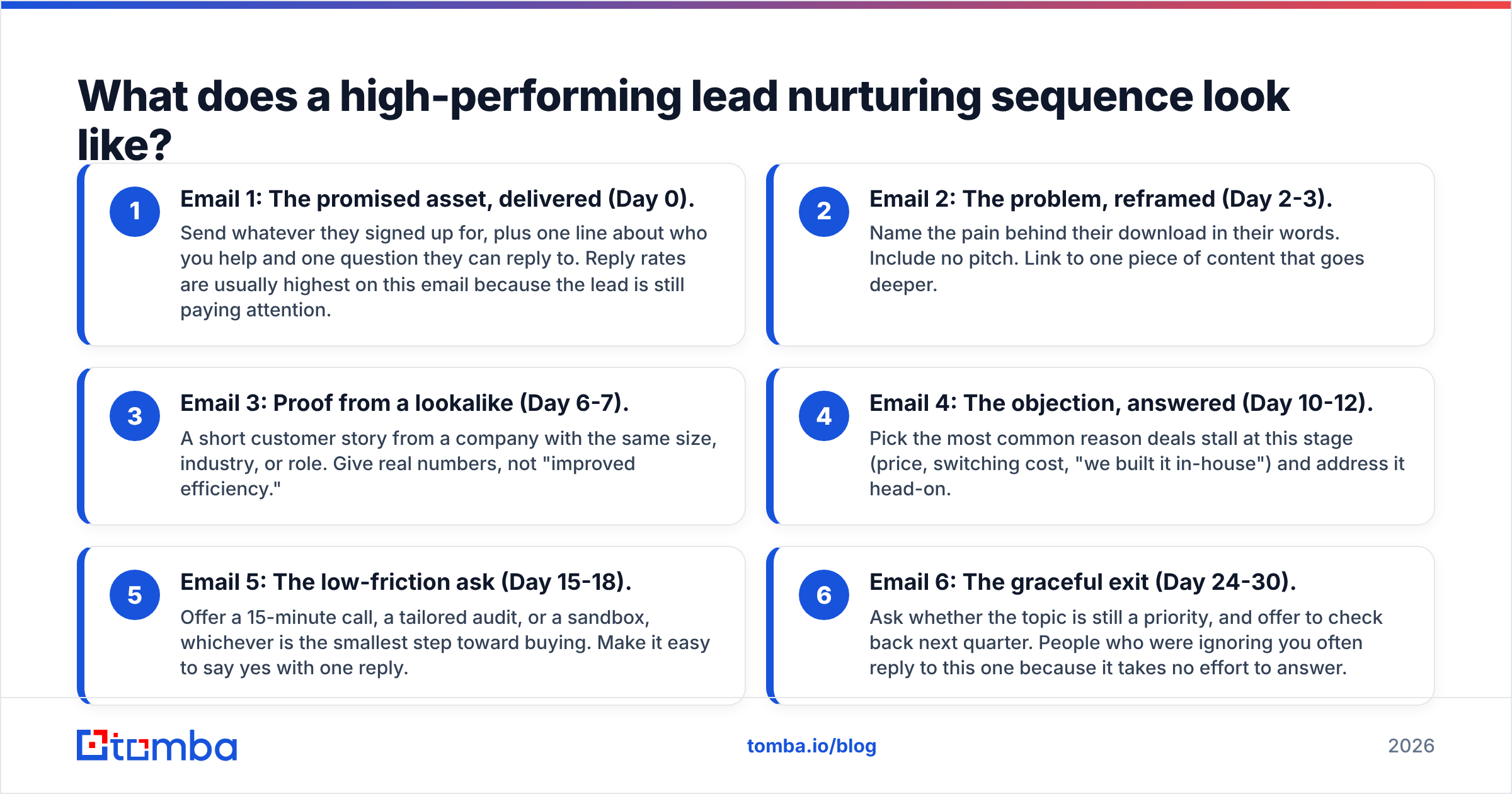
Here's a structure that works for most B2B SaaS and service companies. Each email has one job. If you can't say what that job is in one sentence, cut the email.
- Email 1: The promised asset, delivered (Day 0). Send whatever they signed up for, plus one line about who you help and one question they can reply to. Reply rates are usually highest on this email because the lead is still paying attention.
- Email 2: The problem, reframed (Day 2-3). Name the pain behind their download in their words. Include no pitch. Link to one piece of content that goes deeper.
- Email 3: Proof from a lookalike (Day 6-7). A short customer story from a company with the same size, industry, or role. Give real numbers, not "improved efficiency."
- Email 4: The objection, answered (Day 10-12). Pick the most common reason deals stall at this stage (price, switching cost, "we built it in-house") and address it head-on.
- Email 5: The low-friction ask (Day 15-18). Offer a 15-minute call, a tailored audit, or a sandbox, whichever is the smallest step toward buying. Make it easy to say yes with one reply.
- Email 6: The graceful exit (Day 24-30). Ask whether the topic is still a priority, and offer to check back next quarter. People who were ignoring you often reply to this one because it takes no effort to answer.
Adjust the timing to your sales cycle. A $50/month self-serve tool can compress this into 10 days. A six-figure platform deal might stretch it across 8 weeks with extra content emails between steps 3 and 5.

Why do most lead nurturing emails fail?#
It's rarely the copy. When a nurture program underperforms, the cause is usually one of these, roughly in order of how often they show up:
Bad data at the top of the funnel. Form fills include typos, personal Gmail addresses, and role accounts like info@. Imported lists include people who left the company a year ago. Every hard bounce hurts your sender reputation, and once inbox providers start routing you to spam, it doesn't matter how good the copy is. Run new leads through an email verifier before they enter any sequence, and re-verify lists older than 90 days.
Everyone gets the same sequence. A CFO who downloaded your pricing calculator and a junior marketer who grabbed a template don't need the same six emails. Segment by at least one of these: role, company size, or the action that triggered entry.
Time-based instead of behavior-based. If a lead visits your pricing page twice on Day 3, waiting until Day 15 for the "book a call" email means you missed the moment. The best programs branch: high-intent actions skip ahead, and silence slows the pace down.
No exit logic. A lead who books a demo on Day 4 and gets "Still thinking it over?" on Day 10 now thinks your team is disorganized. Every sequence needs stop conditions tied to CRM stage changes.
Measuring opens. Apple Mail Privacy Protection and corporate security scanners inflate open rates, so the number is close to meaningless. Measure replies, clicks to a meaningful page, and meetings booked instead.
How do you personalize lead nurturing emails without writing each one by hand?#
You write for segments and fill in variables from data you already have. There are three layers:
- Firmographic: company name, industry, headcount band, tech stack. This lets Email 3 pull the case study that matches their vertical.
- Role-based: job function and seniority. A VP gets outcome and ROI framing. A practitioner gets workflow and time-saved framing.
- Behavioral: what they downloaded, which pages they viewed, which email they clicked. This drives branching.
The first two layers depend on having clean, complete contact records. Most form fills give you a name and an email, nothing more. Data enrichment fills in company, title, and industry from the email address, so your segmentation rules have something to work with. Without it, half your leads end up in the "generic" branch.
A practical rule: if a merge field is missing for more than about 20% of a segment, don't use it in the subject line. A subject line reading "Quick idea for {Company}" with the company field empty does more damage than a subject line with no personalization at all.
Which tools are best for sending lead nurturing emails?#
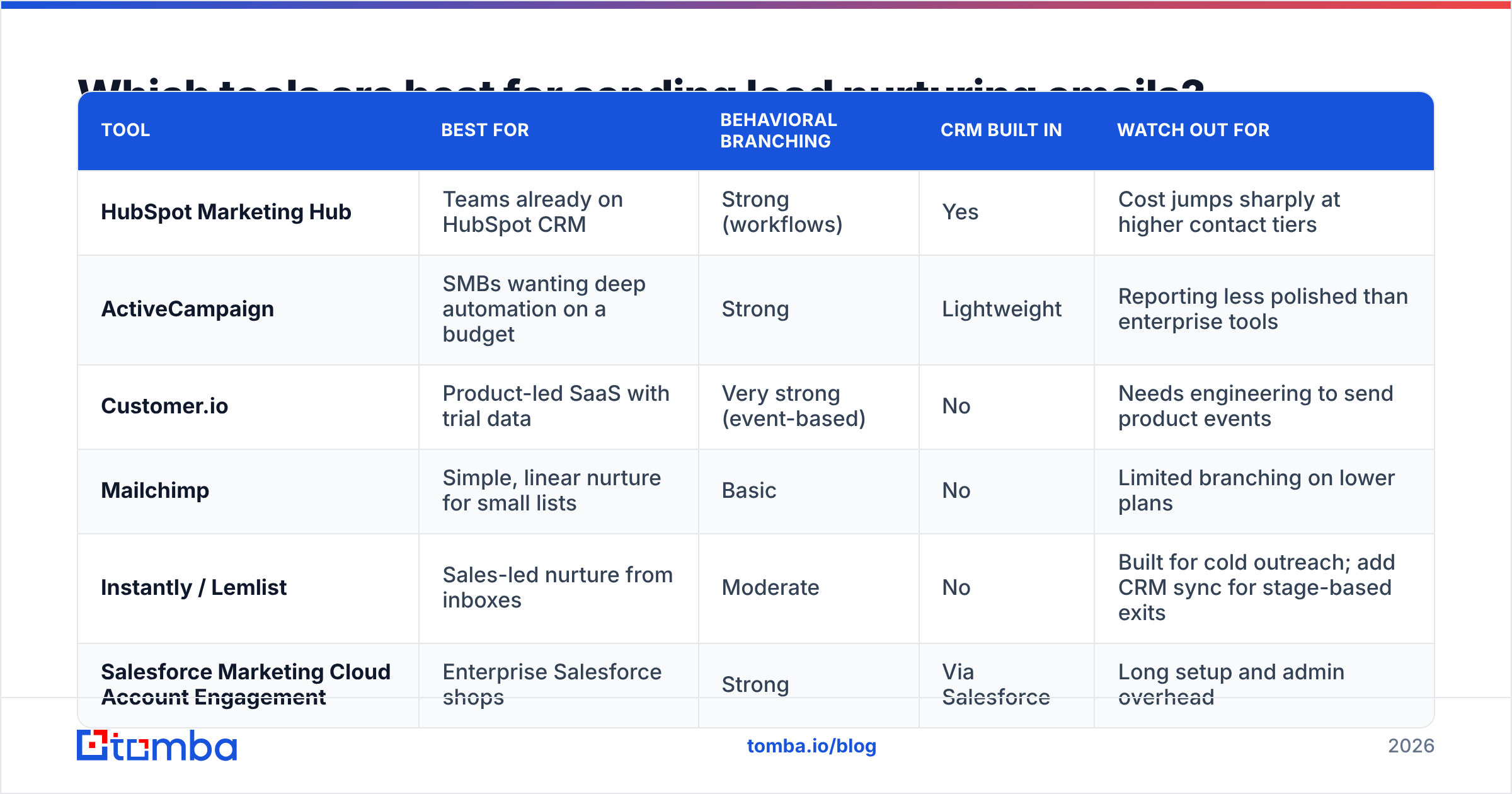
The right tool depends on where your leads live and how much branching you need. This is a neutral snapshot. Check each vendor's current pricing page before you buy, because plans change often.
| Tool | Best for | Behavioral branching | CRM built in | Watch out for |
|---|---|---|---|---|
| HubSpot Marketing Hub | Teams already on HubSpot CRM | Strong (workflows) | Yes | Cost jumps sharply at higher contact tiers |
| ActiveCampaign | SMBs wanting deep automation on a budget | Strong | Lightweight | Reporting less polished than enterprise tools |
| Customer.io | Product-led SaaS with trial data | Very strong (event-based) | No | Needs engineering to send product events |
| Mailchimp | Simple, linear nurture for small lists | Basic | No | Limited branching on lower plans |
| Instantly / Lemlist | Sales-led nurture from inboxes | Moderate | No | Built for cold outreach; add CRM sync for stage-based exits |
| Salesforce Marketing Cloud Account Engagement | Enterprise Salesforce shops | Strong | Via Salesforce | Long setup and admin overhead |
If you run nurture from HubSpot, Tomba's HubSpot integration can enrich and verify contacts as they're created, so bad records never reach a workflow.
What should each lead nurturing email actually say?#
Here are condensed examples for three of the six steps. Adapt them. Don't copy them word for word, because your leads have seen the templated versions already.
Email 2 — The problem, reframed
Subject: The part of {topic} nobody budgets for
Hi {FirstName},
Most {role}s we talk to after downloading the {asset} say the hard part isn't {obvious task}. It's {hidden cost}: the hours spent {specific painful activity} every week.
We wrote up how three {industry} teams cut that down: {link}
No pitch in there. Just the process.
Email 4 — The objection, answered
Subject: "We'll just build it ourselves"
Hi {FirstName},
Fair instinct. {Customer} thought the same and spent two quarters on an internal version before switching. The build wasn't the problem. Maintaining it was: {specific maintenance burden}.
Here's the cost breakdown they shared with us: {link}
Email 6 — The graceful exit
Subject: Close the loop?
Hi {FirstName},
I haven't heard back, which usually means {topic} has slipped down the list. Totally normal.
Should I check back in {next quarter}, or take you off this thread?
All three are short, have a single link or a single question, and sound like a person wrote them. If you need a starting library, Tomba's free email templates cover several nurture and follow-up scenarios.
How often should you send lead nurturing emails?#
For most B2B sequences, send every 3-5 days in the first two weeks, then every 5-7 days after that. Engagement should set the pace, not a fixed schedule:
- Clicked or replied: speed up. Move them to the next step within 24-48 hours, or hand them to sales.
- Opened but no action: keep the standard pace.
- No engagement for three emails in a row: slow down or pause. Continuing to send to people who never engage teaches inbox providers that your mail isn't wanted.
Volume matters too. Google's and Yahoo's bulk-sender requirements, which have applied since 2024, expect authenticated mail (SPF, DKIM, DMARC), one-click unsubscribe, and spam complaint rates kept well below 0.3%. Google's email sender guidelines spell out the details. A nurture program that ignores these rules will end up in the spam folder no matter how good the content is.
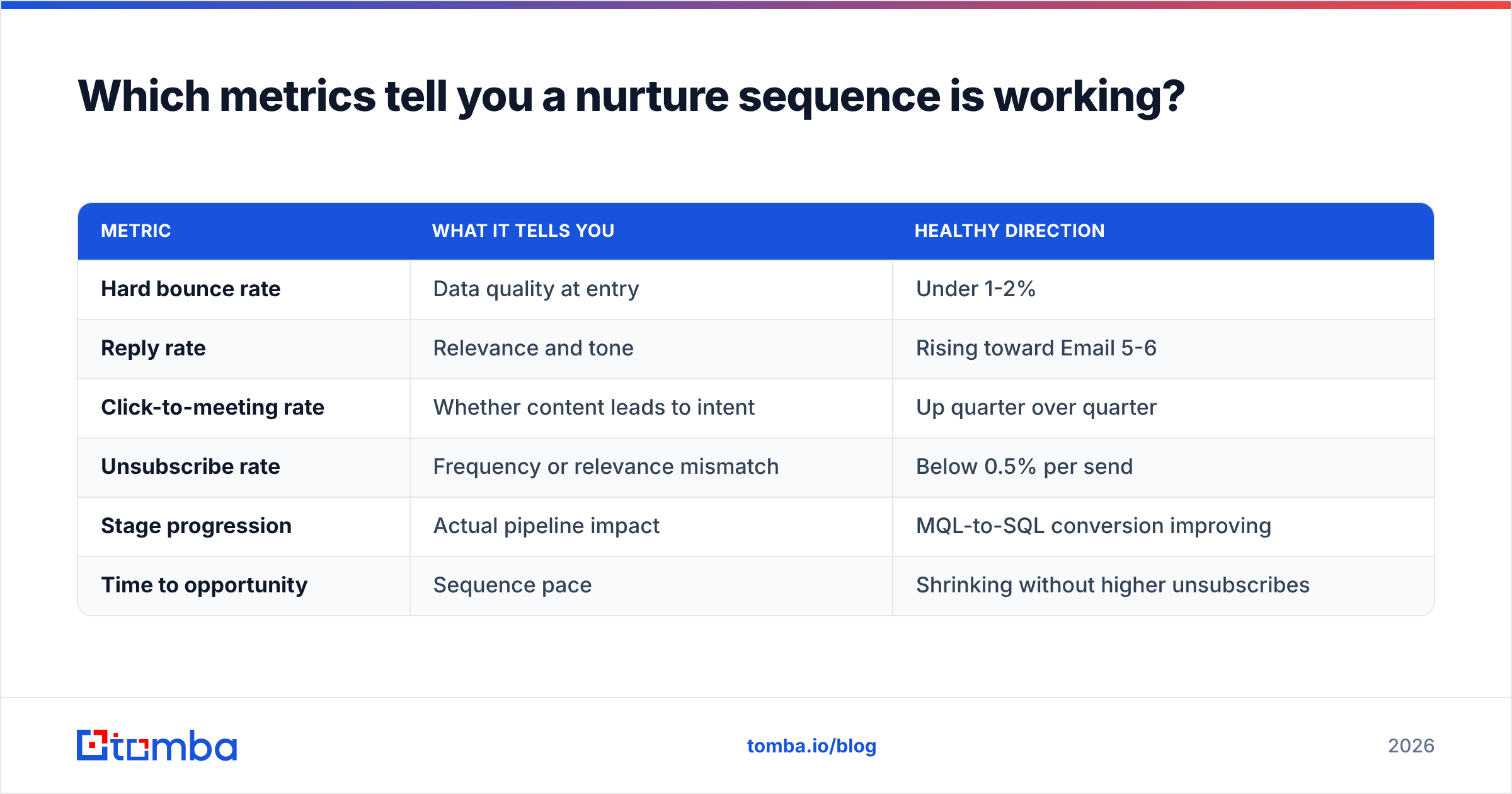
Which metrics tell you a nurture sequence is working?#
Track these per email and per segment, not only as a blended program average:
| Metric | What it tells you | Healthy direction |
|---|---|---|
| Hard bounce rate | Data quality at entry | Under 1-2% |
| Reply rate | Relevance and tone | Rising toward Email 5-6 |
| Click-to-meeting rate | Whether content leads to intent | Up quarter over quarter |
| Unsubscribe rate | Frequency or relevance mismatch | Below 0.5% per send |
| Stage progression | Actual pipeline impact | MQL-to-SQL conversion improving |
| Time to opportunity | Sequence pace | Shrinking without higher unsubscribes |
If one email has a spike in unsubscribes, rewrite that email. Don't rebuild the whole program. If bounces go above 2%, stop and clean the list before sending anything else. Reply rate is the best early signal. Tomba's glossary entry on email response rate covers how to calculate it consistently across tools.
Should sales or marketing own lead nurturing emails?#
Both, split by stage. Marketing usually owns the top-of-funnel nurture (Emails 1-4), which is content-led, automated, and sent from a brand or marketing address. Sales takes over once a lead crosses an intent threshold, such as a pricing-page visit, a reply, or a lead score above your cutoff. From there, the emails come from a named rep's inbox and read like one-to-one messages.
The handoff is where most programs break. Write the rules down and put them in your CRM:
- What score or behavior moves a lead from marketing nurture to sales follow-up?
- Who pulls the lead out of the automated sequence, and does it happen automatically?
- If sales goes quiet, when does the lead go back to marketing nurture?
Teams that agree on these three answers see far fewer leads getting double-emailed or dropped entirely.
Frequently asked questions#
How many emails should a lead nurturing sequence have? Usually 5-7 for a single campaign. Longer sequences work for enterprise deals, but add content emails in the middle rather than more asks.
Can you nurture leads you found through prospecting, not inbound? Yes, but only after they've engaged. A cold prospect who replied "not now" can move into a nurture track. A cold prospect who never engaged shouldn't be added to marketing automation without consent, particularly under GDPR.
What's a good reply rate for nurture emails? It varies a lot by industry and list quality. Compare against your own baseline over time rather than published averages, and look at the trend per email.
Should nurture emails include images and HTML design? Keep them light. Plain-text or lightly formatted emails tend to feel more personal and often land in the primary inbox more reliably than heavy templates.
Where does Tomba fit into your nurture program?#
A nurture sequence can't do better than the contact data feeding it. If your inbound forms collect personal addresses, your event lists are half-empty, or sales has names and companies but no emails, the Tomba Email Finder finds verified professional addresses by name and domain, so every lead that enters your sequence can actually receive it. Start with the free tier (25 searches per month) to test it on your current backlog, then move up to Starter at $49/mo once you're running nurture at volume.
Related guides#
// get started
Find, verify and enrich your first contacts today
Start on the free plan with 25 searches a month, then scale when your team is ready.
Free plan · No credit card required · GDPR & CCPA
// about the author