Lead Nurturing Examples: 9 B2B Sequences That Actually Convert
Nine B2B lead nurturing examples, each with its trigger, timing, message angle, and handoff rule, plus the data problems that quietly break most nurture programs.
TL;DR
- Good lead nurturing starts from a trigger, which is something the lead did or something that changed about them. Sequences that run on a calendar alone tend to get ignored.
- The nine lead nurturing examples below cover the full funnel: content download, webinar no-show, pricing-page visit, free-trial stall, closed-lost revival, new-hire champion, event follow-up, expansion, and dormant database.
- Every example includes timing, the angle of each touch, and a clear exit rule for when the lead goes to sales or leaves the sequence.
- Most nurture programs fail because of bad data, not bad copy. Bounced addresses, missing job titles, and stale contacts ruin segmentation before your first email goes out.
- Clean and enrich the list first. Then personalize by role and stage. Personalizing by first name alone is not personalization.
What is lead nurturing, really?#
Lead nurturing means building a relationship with a prospect who isn't ready to buy yet. You keep sending useful, relevant messages until their timing and your offer line up. Think of a good bartender who remembers your usual order. They don't push a drink at you every thirty seconds, but they're there when you look up.
In B2B, nurturing sits between lead capture and the sales conversation. Someone downloads a guide, attends a webinar, or visits your pricing page. Most of them won't book a demo that week. Nurturing is how you stay useful to them until they become a marketing qualified lead and sales can step in without being a nuisance.
Most teams run nurturing inside a marketing automation platform such as HubSpot's marketing hub or Salesforce's tools. The tool matters less than the logic: who enters, what they receive, when they receive it, and what gets them out.
Why do most lead nurturing sequences get ignored?#
Most programs break for one of three reasons:
- The trigger is weak or missing. Everyone who touched the website at any point gets the same seven-email "welcome series," whether they're a student, a competitor, or a VP with budget.
- The data is dirty. Some emails bounce, job titles are blank, and company size is a guess. That makes role-based segmentation impossible, and every bounce hurts your email deliverability.
- There's no exit rule. Leads stay in a sequence after they've replied, booked a call, or clearly stopped caring. That's how a prospect ends up with a "just checking in" email two days after signing.
The examples below are built to avoid all three. Each one has a specific trigger, a short sequence with a job for every touch, and an explicit rule for when the lead exits.
Which lead nurturing examples work best in B2B?#
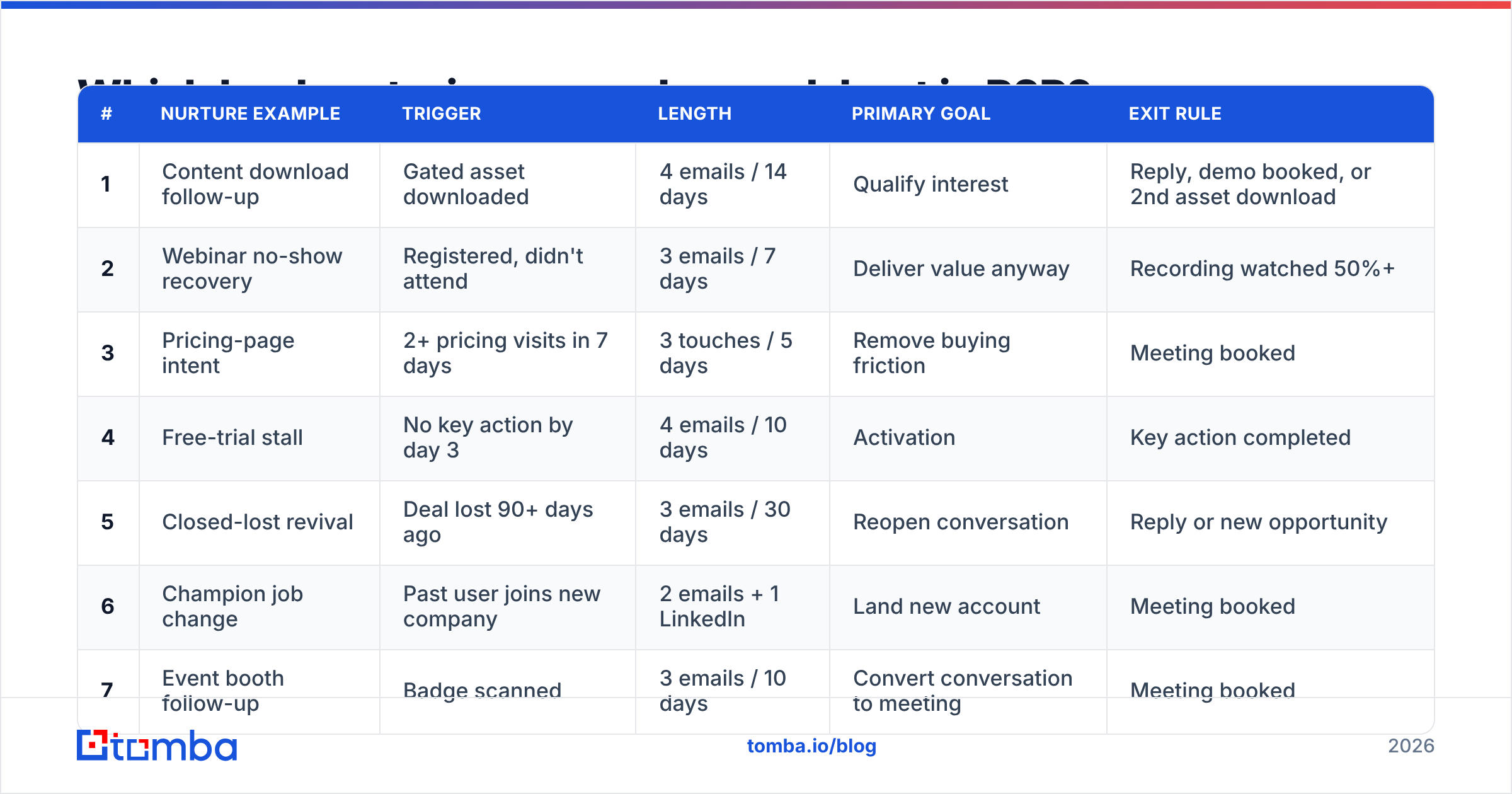
Here's the overview before the detail. Use it to pick the two or three sequences that fit your funnel, and don't try to launch all nine in one quarter.
| # | Nurture example | Trigger | Length | Primary goal | Exit rule |
|---|---|---|---|---|---|
| 1 | Content download follow-up | Gated asset downloaded | 4 emails / 14 days | Qualify interest | Reply, demo booked, or 2nd asset download |
| 2 | Webinar no-show recovery | Registered, didn't attend | 3 emails / 7 days | Deliver value anyway | Recording watched 50%+ |
| 3 | Pricing-page intent | 2+ pricing visits in 7 days | 3 touches / 5 days | Remove buying friction | Meeting booked |
| 4 | Free-trial stall | No key action by day 3 | 4 emails / 10 days | Activation | Key action completed |
| 5 | Closed-lost revival | Deal lost 90+ days ago | 3 emails / 30 days | Reopen conversation | Reply or new opportunity |
| 6 | Champion job change | Past user joins new company | 2 emails + 1 LinkedIn | Land new account | Meeting booked |
| 7 | Event booth follow-up | Badge scanned | 3 emails / 10 days | Convert conversation to meeting | Meeting booked |
| 8 | Customer expansion | Usage threshold hit | 2 emails + CSM call | Upsell | Upgrade or CSM owns it |
| 9 | Dormant database re-engagement | No engagement 6+ months | 3 emails / 21 days | Clean list + revive | Click, or suppress |
1. Content download follow-up#
Trigger: someone downloads an ebook, report, or template.
This is the most common nurture, and it's usually done badly. The standard version says "Thanks for downloading!" and then pitches a demo. The better version assumes the lead downloaded the asset to solve a specific problem, and it helps them solve it.
- Day 0: Deliver the asset and point out the one section most relevant to their role. This is only possible if you know their role, so enrich the lead at capture.
- Day 3: Send a short case study or worked example that applies the asset's framework.
- Day 7: Ask one question: "Are you tackling X this quarter or just researching?" Replies to this email are pure qualification data.
- Day 14: Offer a related asset one step deeper in the funnel, such as a calculator, checklist, or comparison.
Exit: a reply, a booked demo, or a second download. A second download is a strong intent signal, so move that lead to a higher-priority track.
2. Webinar no-show recovery#
Trigger: registered for a webinar and didn't attend.
No-shows told you they were interested. They just had a calendar conflict. Treat them like busy attendees, not like people who abandoned you.
- Day 0 (same day): Send the recording plus three timestamped key moments so they can skim.
- Day 2: Send the single most useful slide or chart as a standalone image with a two-line takeaway.
- Day 6: Invite them to the next session, or offer a 15-minute Q&A with the presenter.
Exit: they watched half the recording or more, or they booked the Q&A.
3. Pricing-page intent#
Trigger: two or more pricing-page visits in seven days by a known contact. For anonymous traffic, website visitor reveal can identify the company so you can find the right person there.
This is a high-intent lead. Nurture here should be short and should remove friction, not teach basics.
- Touch 1 (email, within 24h): "Most teams at your size pick plan X. Here's why, and here's what they usually ask before buying." Link to an FAQ covering security, contracts, and onboarding.
- Touch 2 (day 2, rep email): A plain-text note from a real person offering a 15-minute pricing walkthrough.
- Touch 3 (day 5): A comparison page or ROI calculator, depending on the objection you think is blocking them.
Exit: meeting booked. If there's no engagement after touch 3, move them back to a lighter educational track. Don't keep pushing.
4. Free-trial stall#
Trigger: a trial user hasn't completed your activation event (first integration, first report, first team invite) by day 3.
- Day 3: Name the exact step they skipped and link directly to it.
- Day 5: Share a 60-second video of someone at a similar company doing that step.
- Day 7: Offer a live onboarding slot.
- Day 10: Offer a trial extension in exchange for a short call.
Exit: the activation event happens. At that point they move to a "power user" track that introduces advanced features.
5. Closed-lost revival#
Trigger: a deal marked closed-lost at least 90 days ago, ideally where the loss reason was "timing" or "budget," not "chose competitor, happy."
Your CRM likely holds a pile of these, and many of the contacts have since changed jobs. Re-verify every address before this sequence runs. Old closed-lost lists bounce a lot, and one high-bounce send can hurt your sender reputation for weeks.
- Email 1: "Since we last talked, we shipped X, which addresses the concern you raised about Y." Only send this if it's true.
- Email 2 (day 10): A customer story from their industry.
- Email 3 (day 30): A direct, low-pressure question: "Is this back on the roadmap for next quarter?"
Exit: a reply or a new opportunity created.
6. Champion job change#
Trigger: a former user, champion, or buyer moves to a new company.
This is often one of the highest-converting nurture flows in B2B because the person already trusts you. The challenge is purely operational. You have to spot the move and find their new work email fast, before a competitor does. Tools that track job changes plus an email finder that can look up the new address from name and company handle this.
- Email 1: Congratulate them and say one sentence about how you can help them win quickly in the new role.
- LinkedIn touch (day 3): Connect with a short personal note.
- Email 2 (day 7): "Want me to set up the same workflow you had at [old company]?"
Exit: meeting booked.
7. Event booth follow-up#
Trigger: badge scanned at a trade show or conference.
Badge-scan data is notoriously messy: personal Gmail addresses, typos, and missing titles. Clean it before import.
- Day 1: Reference something specific from the booth conversation. Have reps log a one-line note per scan so this is possible.
- Day 4: Send the resource you promised at the booth. You did promise one, right?
- Day 10: Ask for a meeting while the event is still fresh.
Exit: meeting booked. Anyone left goes into the content nurture track.
8. Customer expansion#
Trigger: an account hits a usage threshold, such as 80% of seats, API limits, or credit consumption.
Nurturing doesn't stop at the sale. Expansion nurture treats the customer's success as the trigger.
- Email 1: "You're getting a lot out of X. Here's what teams do when they hit this level."
- Email 2 (day 5): Features available on the next tier, with a usage-based ROI note.
- CSM call: A human conversation replaces automation from here.
Exit: upgrade, or the CSM takes ownership.
9. Dormant database re-engagement#
Trigger: no opens or clicks in six months or more.
This one works like spring cleaning. The goal is partly to revive leads and partly to identify dead weight you should stop mailing.
- Before sending: Run the whole segment through an email verifier and remove invalid and risky addresses. Mailing a stale list unverified is a common way to land in spam.
- Email 1: "Still interested in X? Here's the one thing that changed."
- Email 2 (day 10): Your single best-performing asset of the year.
- Email 3 (day 21): A breakup email: "Should I close your file?" This often gets more replies than the first two.
Exit: click, meaning they return to an active track, or no engagement, meaning you suppress them.
How is lead nurturing different from cold outreach?#
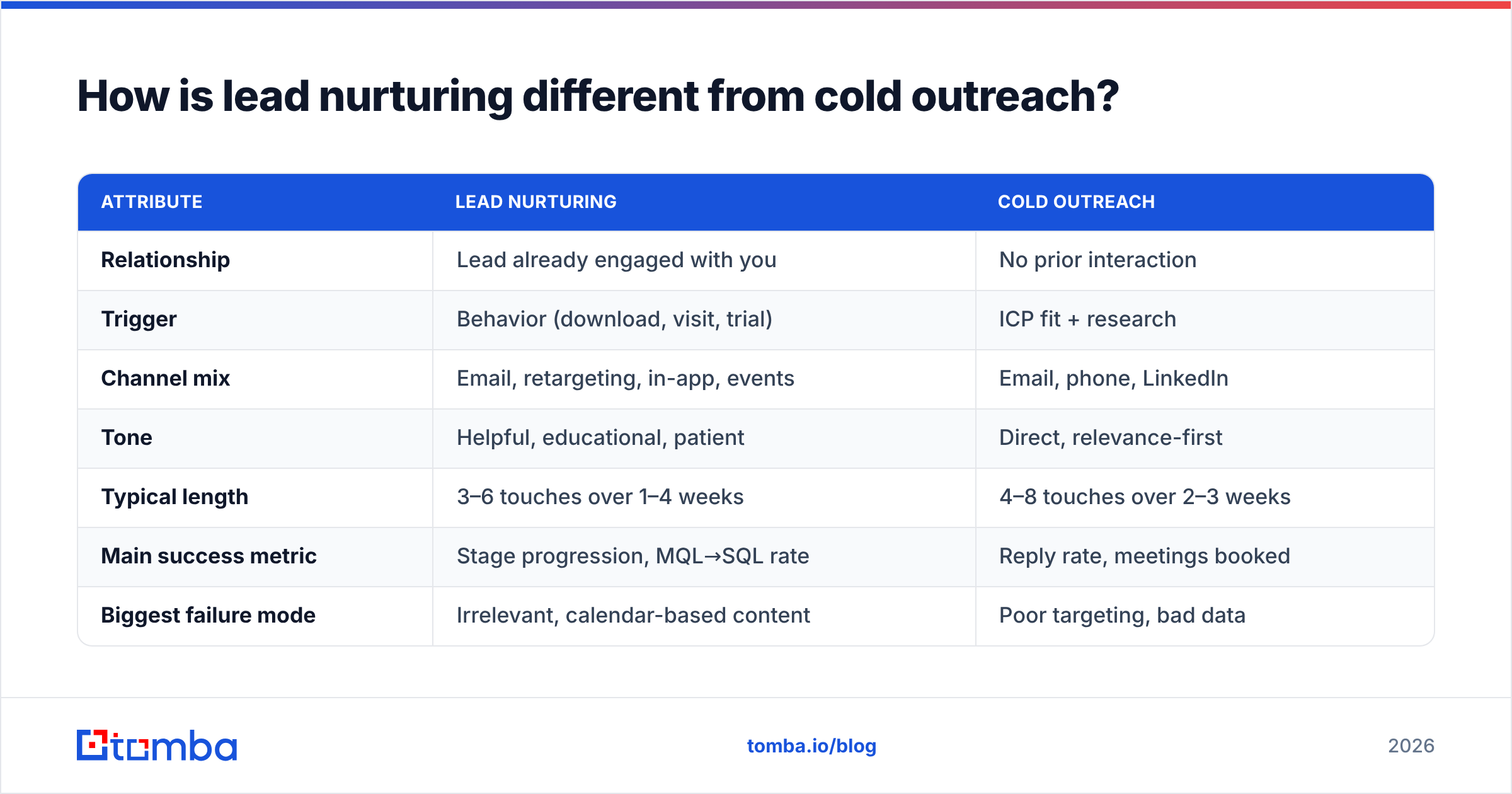
People mix the two up constantly, and the confusion causes bad sequencing decisions.
| Attribute | Lead nurturing | Cold outreach |
|---|---|---|
| Relationship | Lead already engaged with you | No prior interaction |
| Trigger | Behavior (download, visit, trial) | ICP fit + research |
| Channel mix | Email, retargeting, in-app, events | Email, phone, LinkedIn |
| Tone | Helpful, educational, patient | Direct, relevance-first |
| Typical length | 3–6 touches over 1–4 weeks | 4–8 touches over 2–3 weeks |
| Main success metric | Stage progression, MQL→SQL rate | Reply rate, meetings booked |
| Biggest failure mode | Irrelevant, calendar-based content | Poor targeting, bad data |
Both have the same weak point: data quality. A cold list with a 10% bounce rate is a problem. A nurture list with the same bounce rate is also a problem, and it's more embarrassing, because those people chose to give you their details.
What data do you need before any of these examples will work?#
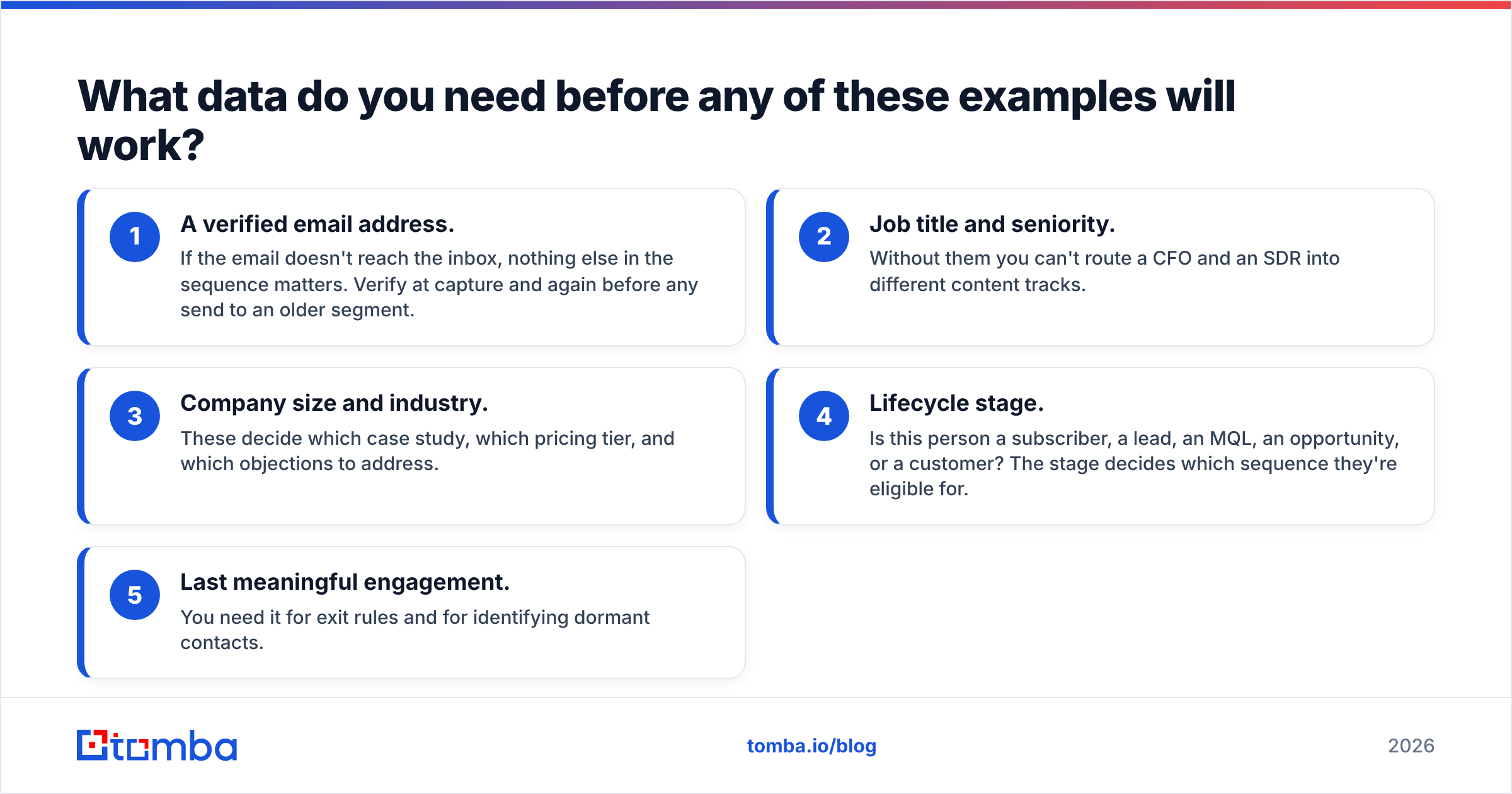
Every example above depends on knowing more than an email address. These are the minimum fields that make segmentation possible:
- A verified email address. If the email doesn't reach the inbox, nothing else in the sequence matters. Verify at capture and again before any send to an older segment.
- Job title and seniority. Without them you can't route a CFO and an SDR into different content tracks.
- Company size and industry. These decide which case study, which pricing tier, and which objections to address.
- Lifecycle stage. Is this person a subscriber, a lead, an MQL, an opportunity, or a customer? The stage decides which sequence they're eligible for.
- Last meaningful engagement. You need it for exit rules and for identifying dormant contacts.
Short forms convert better, so most teams only ask for name and email. The fix is data enrichment after capture. You keep the form to one or two fields and fill in title, company, and size automatically. That's how example #1 can highlight a role-specific section on day zero without asking the lead for their job title.

How do you measure whether a nurture sequence is working?#
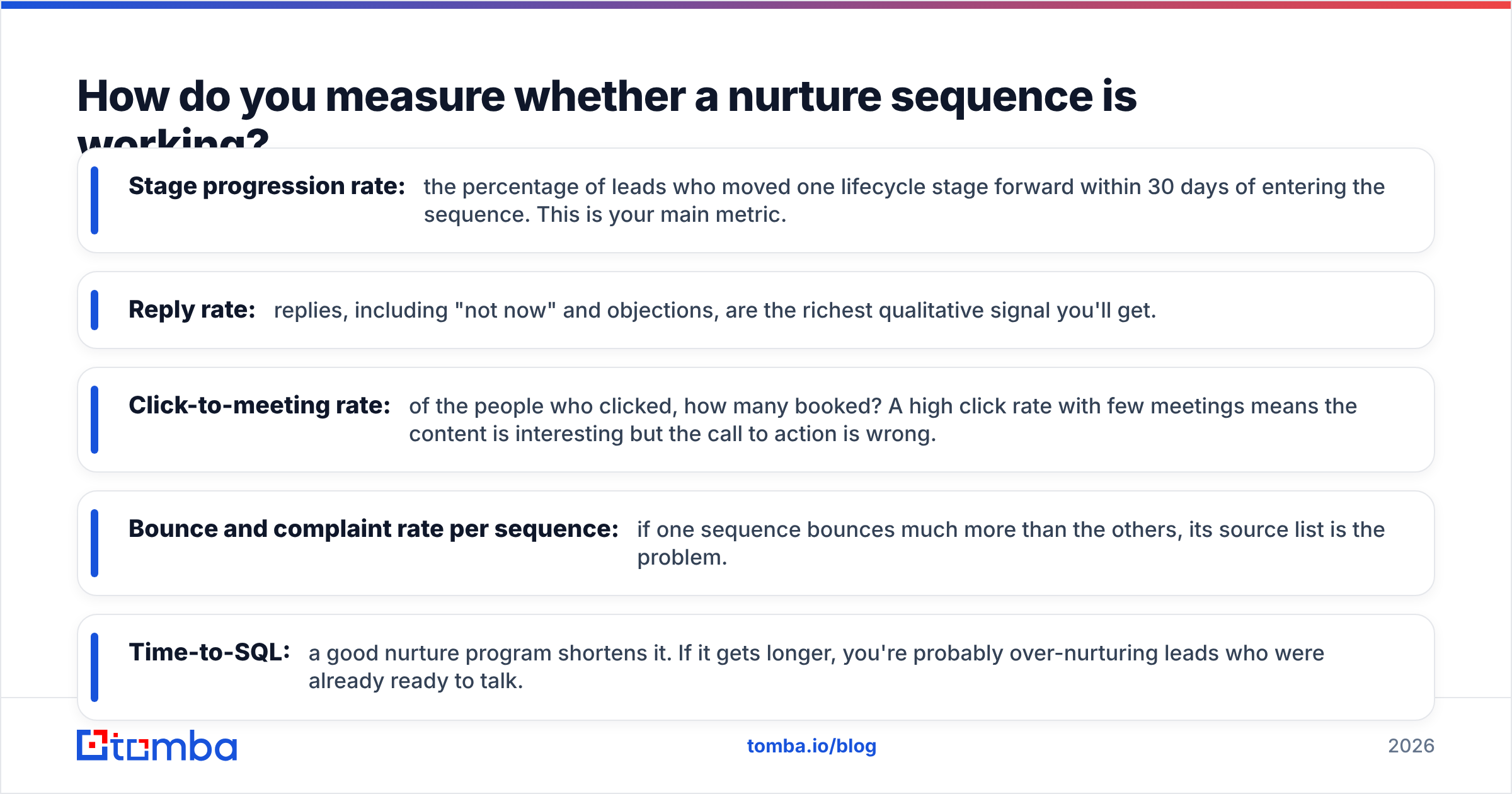
Open rates are no longer reliable because privacy features inflate them. Track these instead:
- Stage progression rate: the percentage of leads who moved one lifecycle stage forward within 30 days of entering the sequence. This is your main metric.
- Reply rate: replies, including "not now" and objections, are the richest qualitative signal you'll get.
- Click-to-meeting rate: of the people who clicked, how many booked? A high click rate with few meetings means the content is interesting but the call to action is wrong.
- Bounce and complaint rate per sequence: if one sequence bounces much more than the others, its source list is the problem.
- Time-to-SQL: a good nurture program shortens it. If it gets longer, you're probably over-nurturing leads who were already ready to talk.
Review each sequence every quarter. Kill the bottom performer, clone the top performer to a new trigger, and test one variable at a time.
Should you use AI to write lead nurturing emails?#
AI is useful for drafting variants, rewriting for different roles, and summarizing a long asset into a three-line email. It's weak at the thing nurturing depends on most: knowing what actually changed for this lead and why it matters to them. Use AI for the first draft, but have a person own the angle and the trigger logic.
A practical split looks like this:
- Humans decide: triggers, segments, exit rules, the core insight for each touch.
- AI assists: subject line variants, role-based rewrites, shortening, tone checks.
- Systems handle: enrichment, verification, routing, suppression.
What are the most common lead nurturing mistakes?#
A quick checklist to run against your existing sequences:
- No exit rule. Leads get "checking in" emails after booking a demo.
- Too many sequences at once. One lead gets enrolled in three flows and receives five emails in a week. Set a global frequency cap.
- Pitching in email one. The lead asked for a guide, not a demo invite.
- Ignoring replies. Automation keeps running after a human replied "not until Q3." Pause on reply, always.
- Mailing unverified lists. Bounces damage deliverability for your whole domain, including your sales team's one-to-one emails.
- Personalizing only by first name. Real personalization means role, industry, stage, and trigger.
Where should you start?#
Don't build nine sequences. Pick the one closest to revenue that you don't run yet. For most B2B teams that's pricing-page intent (#3) or champion job change (#6). Get the data foundation right first: verified emails, enriched titles, clean lifecycle stages. Then build a three-touch version, measure stage progression for 30 days, and iterate. Once the first one works, add the next.
Most of these sequences need the same thing before they can work: a correct, current email address for the right person. For examples #3 (identifying the buyer behind a pricing-page visit), #5 (closed-lost contacts who have moved on), #6 (champions at new companies), and #7 (messy badge scans), you need a way to find that address quickly and trust it. Tomba Email Finder finds professional email addresses from a name and company or domain, and the free tier lets you test it on your own nurture lists before paying. You can try it on the leads in your CRM that were closest to buying.
Related guides#
// get started
Find, verify and enrich your first contacts today
Start on the free plan with 25 searches a month, then scale when your team is ready.
Free plan · No credit card required · GDPR & CCPA
// about the author