Lead Nurturing Marketing Automation: A Practical 2026 Playbook
Most nurture programs fail because of the data going in, not the copy. Here's how to build workflows, triggers, and scoring that move B2B leads to sales-ready.
TL;DR
- Lead nurturing marketing automation means sending the right message to a lead at the right moment, based on what they do, without someone on your team pressing send each time.
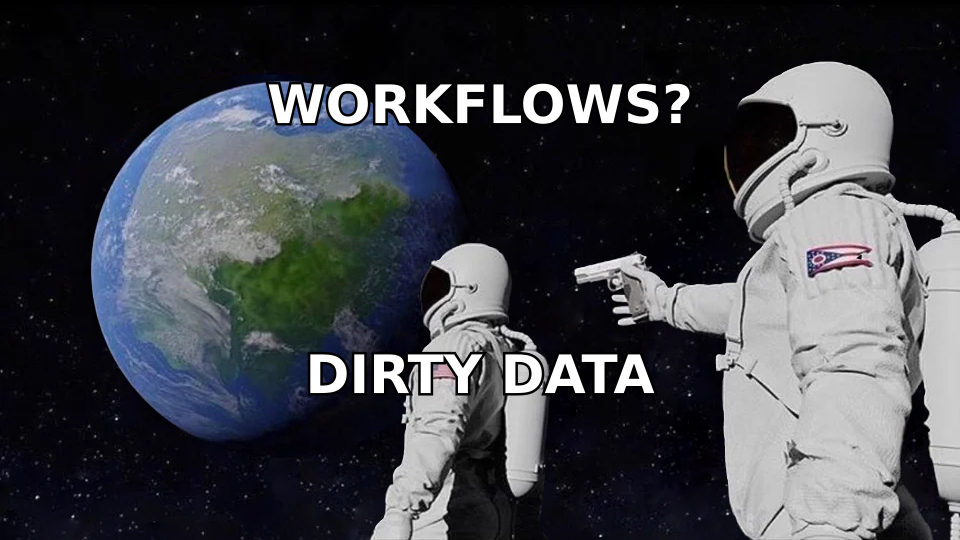
- Most nurture programs fail on data, not copy. If emails bounce, records are missing job titles, or duplicates split one person's activity across two contacts, your triggers fire on the wrong people.
- Build 4-6 core workflows first (welcome, content-to-demo, re-engagement, post-demo, closed-lost recycle). Skip the 40-branch flowchart.
- Choose your platform based on your CRM and deal size, not the feature list. HubSpot, ActiveCampaign, Salesforce Marketing Cloud Account Engagement and Brevo each suit a different kind of team.
- Enrich and verify contacts before they enter a sequence. It's the cheapest way to improve deliverability, scoring accuracy and handoff quality.
What is lead nurturing marketing automation?#
Lead nurturing is how you build a relationship with a prospect who isn't ready to buy yet. Marketing automation is the software that runs it for you: it watches behaviour, applies rules and sends messages or creates tasks when the conditions are met.
Put them together and you have a system that recognises when someone downloads a pricing guide, visits your integrations page twice in a week, or goes quiet for 60 days. Then it responds without a human in the loop. The Wikipedia entry on marketing automation calls the category software that automates repetitive marketing tasks across channels. In B2B, most of that work is nurturing.
The point is timing. B2B buying cycles run for weeks or months and involve several stakeholders. A lead who downloaded an ebook today probably won't take a sales call tomorrow. They might in six weeks, after they've read three more pieces and their budget cycle opens. Nurturing keeps you top of mind during that gap, and automation makes it affordable at scale.
It isn't a newsletter blast. A newsletter treats every subscriber the same way. A nurture program branches on behaviour, firmographics and lifecycle stage, so a VP of Sales at a 500-person SaaS company gets a different path from a solo founder, even if both signed up through the same form.
How does an automated nurture workflow actually work?#
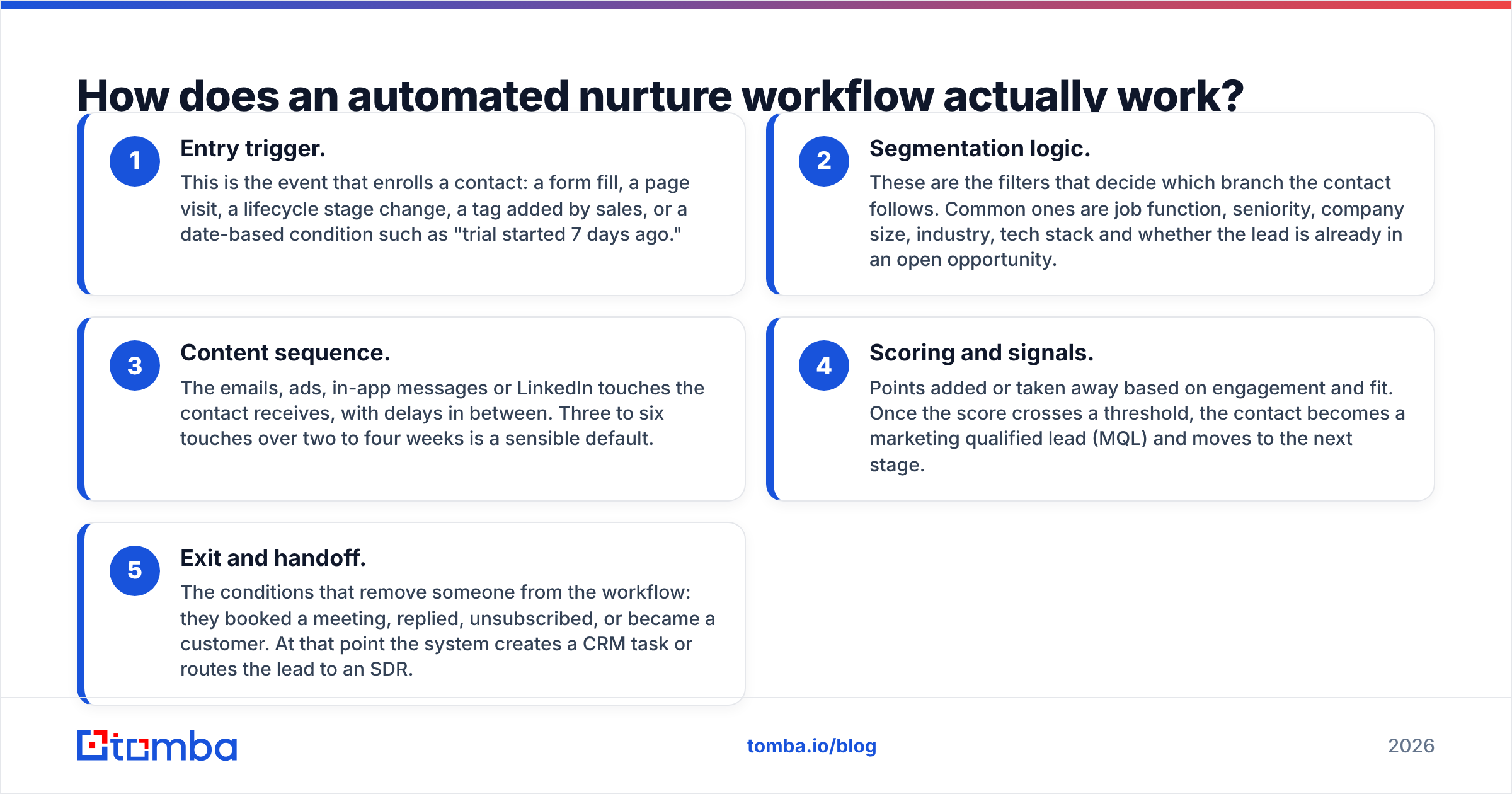
Every nurture workflow, however sophisticated it looks, is built from the same five parts. If you get these right, the tool you pick matters much less.
- Entry trigger. This is the event that enrolls a contact: a form fill, a page visit, a lifecycle stage change, a tag added by sales, or a date-based condition such as "trial started 7 days ago."
- Segmentation logic. These are the filters that decide which branch the contact follows. Common ones are job function, seniority, company size, industry, tech stack and whether the lead is already in an open opportunity.
- Content sequence. The emails, ads, in-app messages or LinkedIn touches the contact receives, with delays in between. Three to six touches over two to four weeks is a sensible default.
- Scoring and signals. Points added or taken away based on engagement and fit. Once the score crosses a threshold, the contact becomes a marketing qualified lead (MQL) and moves to the next stage.
- Exit and handoff. The conditions that remove someone from the workflow: they booked a meeting, replied, unsubscribed, or became a customer. At that point the system creates a CRM task or routes the lead to an SDR.
Most broken nurture programs are missing step five. The system keeps sending "Still interested?" emails to someone who signed a contract last Tuesday. Build the exit conditions before you write any of the content.
Which lead nurturing workflows should you build first?#
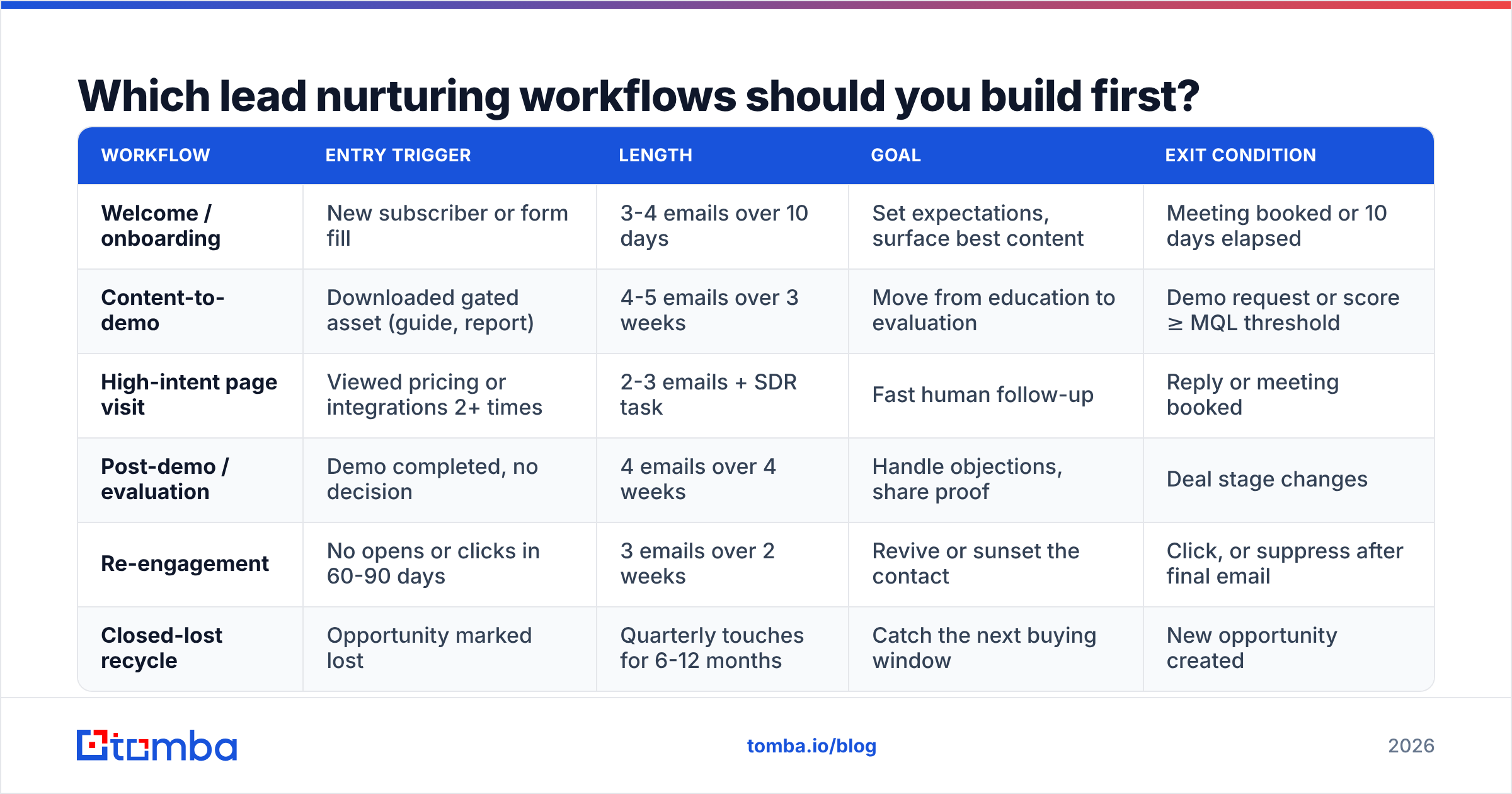
You don't need 30 workflows. Most B2B teams get 80% of the value from five or six. This is the order I'd build them in, with what each one is for:
| Workflow | Entry trigger | Length | Goal | Exit condition |
|---|---|---|---|---|
| Welcome / onboarding | New subscriber or form fill | 3-4 emails over 10 days | Set expectations, surface best content | Meeting booked or 10 days elapsed |
| Content-to-demo | Downloaded gated asset (guide, report) | 4-5 emails over 3 weeks | Move from education to evaluation | Demo request or score ≥ MQL threshold |
| High-intent page visit | Viewed pricing or integrations 2+ times | 2-3 emails + SDR task | Fast human follow-up | Reply or meeting booked |
| Post-demo / evaluation | Demo completed, no decision | 4 emails over 4 weeks | Handle objections, share proof | Deal stage changes |
| Re-engagement | No opens or clicks in 60-90 days | 3 emails over 2 weeks | Revive or sunset the contact | Click, or suppress after final email |
| Closed-lost recycle | Opportunity marked lost | Quarterly touches for 6-12 months | Catch the next buying window | New opportunity created |
Two rules make this work. First, one person should only ever be active in one "primary" nurture at a time, and you enforce that with suppression lists or workflow priority. Second, the high-intent workflow should always create a human task. Automation is good at catching intent and bad at closing on it.
Which marketing automation platform fits your team?#
This is where most guides turn into a feature matrix. The honest answer is simpler: the platform that syncs cleanly with your CRM wins, because nurture logic relies on deal-stage and owner data that lives in the CRM.
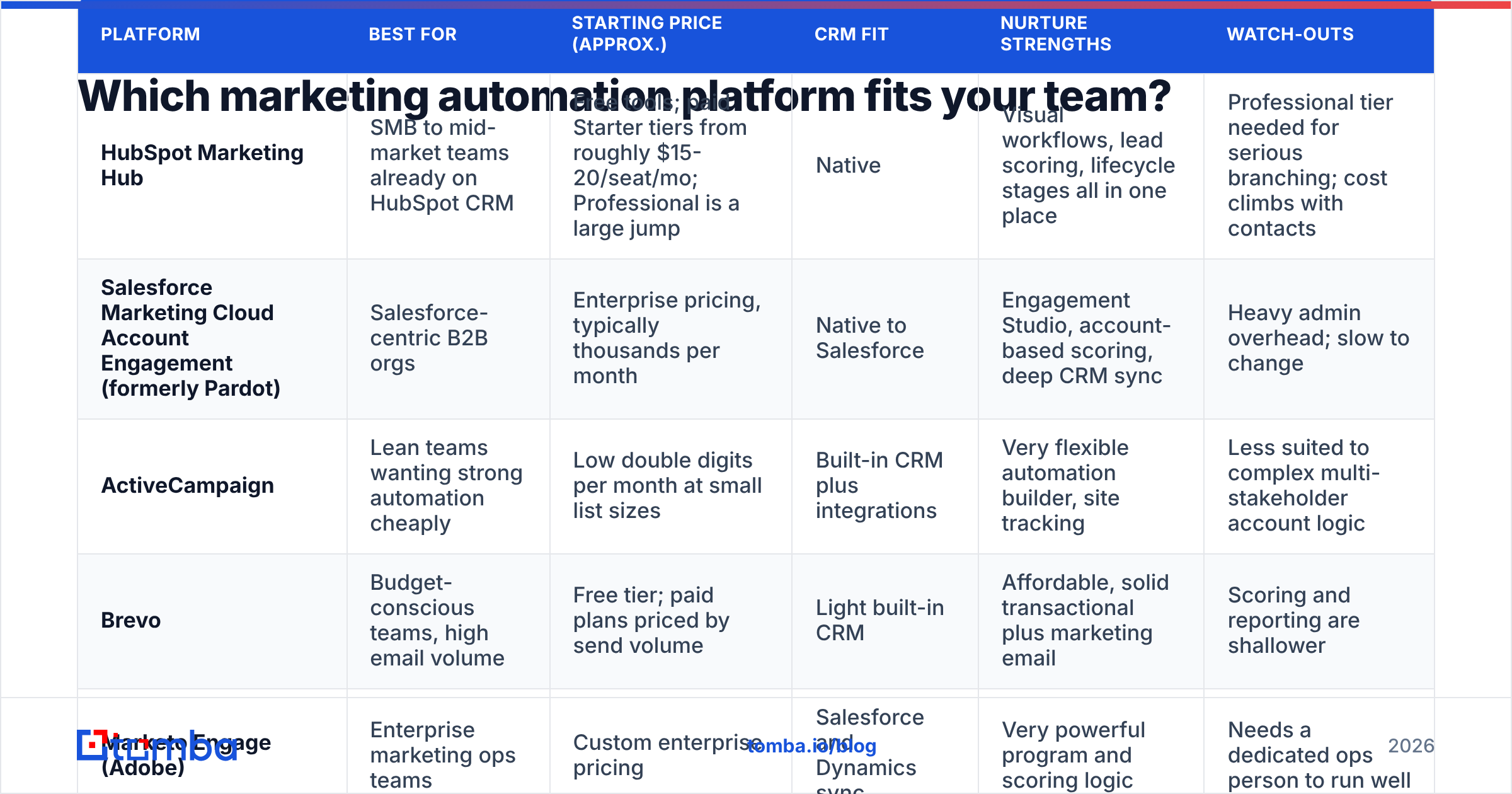
Here's how the common options compare for B2B nurturing:
| Platform | Best for | Starting price (approx.) | CRM fit | Nurture strengths | Watch-outs |
|---|---|---|---|---|---|
| HubSpot Marketing Hub | SMB to mid-market teams already on HubSpot CRM | Free tools; paid Starter tiers from roughly $15-20/seat/mo; Professional is a large jump | Native | Visual workflows, lead scoring, lifecycle stages all in one place | Professional tier needed for serious branching; cost climbs with contacts |
| Salesforce Marketing Cloud Account Engagement (formerly Pardot) | Salesforce-centric B2B orgs | Enterprise pricing, typically thousands per month | Native to Salesforce | Engagement Studio, account-based scoring, deep CRM sync | Heavy admin overhead; slow to change |
| ActiveCampaign | Lean teams wanting strong automation cheaply | Low double digits per month at small list sizes | Built-in CRM plus integrations | Very flexible automation builder, site tracking | Less suited to complex multi-stakeholder account logic |
| Brevo | Budget-conscious teams, high email volume | Free tier; paid plans priced by send volume | Light built-in CRM | Affordable, solid transactional plus marketing email | Scoring and reporting are shallower |
| Marketo Engage (Adobe) | Enterprise marketing ops teams | Custom enterprise pricing | Salesforce and Dynamics sync | Very powerful program and scoring logic | Needs a dedicated ops person to run well |
Pricing changes often and depends on contact volume, so check each vendor's current page before you commit. HubSpot's marketing product page and Salesforce's Account Engagement page list the current tiers.
A practical shortcut: if you're under about 20 people in go-to-market and on HubSpot CRM, stay in HubSpot. If you're a Salesforce shop with a marketing ops hire, Account Engagement or Marketo makes sense. If you mainly need an inexpensive, capable automation engine, look at ActiveCampaign or Brevo.
Why do most automated nurture programs underperform?#
Teams blame the copy, the send time or the subject line. Usually the real problem sits upstream: bad contact data coming into good workflows.
Here's how that plays out:
- Invalid emails wreck deliverability. Imported lists and old form fills contain dead addresses. Every hard bounce hurts your sender reputation, and once it drops, even your valid contacts start landing in spam. Your nurture emails stop being seen, and your reports show "low engagement" when the actual cause is low inbox placement.
- Missing firmographics break segmentation. If half your records have no job title or company size, your "VP-level" branch fires on 30% of the people who should be in it. The rest fall into the generic path.
- Duplicates split engagement. One person with a work email and a personal email becomes two records. Each has half the activity, so neither reaches the scoring threshold.
- Catch-all domains hide risk. Some corporate domains accept every address at the server level. A basic check says "valid," and then the message silently disappears or bounces later.
- Stale data decays. B2B contact data goes out of date as people change jobs. A nurture sequence that runs for six months will reach people who have since left the company.

The fix is dull, and it works: verify and enrich every contact before it enters a workflow. Run new imports through an email verifier to remove invalid and risky addresses. Then fill in missing job titles, seniority, company size and industry with data enrichment, so your branching logic has something to act on. If you're on HubSpot, the Tomba HubSpot integration can do this at the point of entry, so no one has to remember a manual cleanup step.
How should you score leads inside an automated nurture?#
Scoring is what connects nurture to sales. Without it, marketing sends leads over by gut feel and sales ignores them. With a bad scoring model, marketing sends junk and sales ignores it anyway.
A workable model has two axes:
Fit score (who they are). Job title, seniority, company size, industry, geography, tech stack. This comes almost entirely from contact and company data, which is another reason enrichment matters. A lead can't score on seniority if the seniority field is empty.
Engagement score (what they do). Email clicks, pricing page visits, webinar attendance, repeat site visits, reply to an email. Weight high-intent actions heavily: a pricing page visit should be worth several times an email open. Since Apple Mail Privacy Protection started inflating open counts, treat opens as a weak signal at best.
Some guidelines that hold up across most B2B teams:
- Require both axes. A perfect-fit CFO who has never engaged isn't an MQL, and neither is a student who clicked every link. Set a minimum on each.
- Add score decay. Take points away after 30-60 days of inactivity so old engagement doesn't keep someone above the threshold indefinitely.
- Include negative scoring. Competitors, job seekers visiting the careers page, and personal email domains on a B2B form should lose points.
- Review against closed-won deals every quarter. Pull the last 20 wins and check what their scores were at the point of handoff. If the pattern doesn't match your model, change the model.
How do you keep automation from feeling automated?#
Buyers can tell when they're in a drip sequence. You won't fully avoid that, and you don't need to. You do need to avoid sounding like a machine that isn't paying attention.
- Write from a person, not a brand. Plain-text emails from a named marketer or SDR usually beat designed HTML newsletters in nurture sequences, especially in the middle and bottom of the funnel.
- Reference the trigger. "You grabbed our pricing benchmark last week" is more relevant than a generic "Hope you're well." Your automation already knows why the lead enrolled, so use it.
- Cut the number of touches before you cut the gaps between them. Four useful emails over three weeks beat eight thin ones over ten days.
- Give every email one job. One idea, one link, one ask. Several CTAs in a nurture email split attention and make click data hard to read.
- Let replies stop the workflow. Any reply, even "not now," should pull the contact out of automation and send it to a human. Nothing damages trust faster than an automated follow-up landing right after someone has replied.
How do you measure whether lead nurturing is working?#
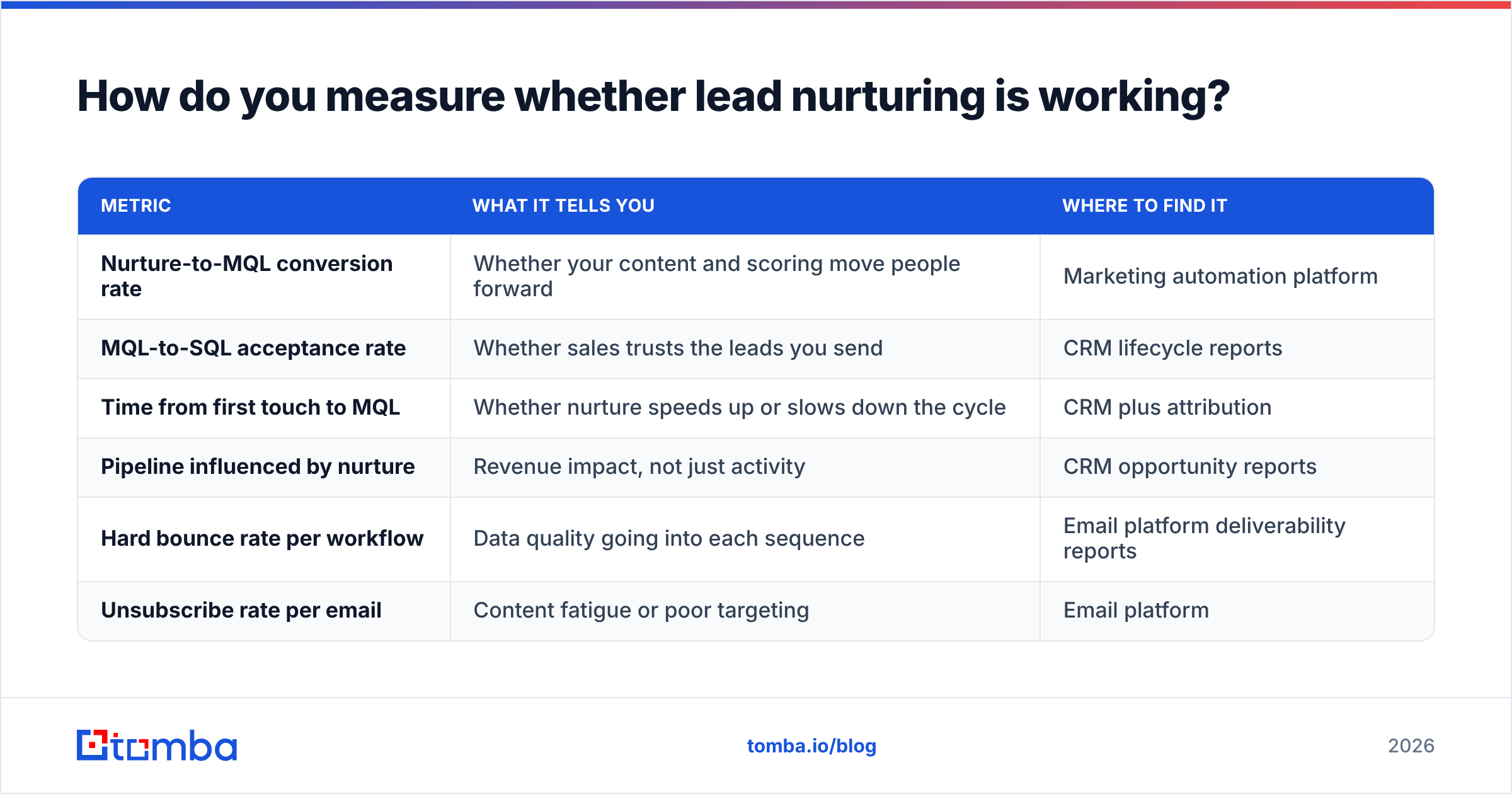
Vanity metrics hide nurture problems. Open rate is unreliable now, and click rate says little about pipeline. Track these instead:
| Metric | What it tells you | Where to find it |
|---|---|---|
| Nurture-to-MQL conversion rate | Whether your content and scoring move people forward | Marketing automation platform |
| MQL-to-SQL acceptance rate | Whether sales trusts the leads you send | CRM lifecycle reports |
| Time from first touch to MQL | Whether nurture speeds up or slows down the cycle | CRM plus attribution |
| Pipeline influenced by nurture | Revenue impact, not just activity | CRM opportunity reports |
| Hard bounce rate per workflow | Data quality going into each sequence | Email platform deliverability reports |
| Unsubscribe rate per email | Content fatigue or poor targeting | Email platform |
Hard bounce rate per workflow is the one to watch. If one workflow bounces far more than the others, the source list feeding it is the problem, not the workflow.
Is lead nurturing marketing automation worth it for small B2B teams?#
Yes, if you keep it small. A three-person team with a welcome sequence, a content-to-demo path and a re-engagement flow will usually outperform a team manually chasing every download. It also frees your SDRs for the high-intent leads that need a human.
It isn't worth it if you automate before you have a clear ideal customer profile, a clean contact base and at least one proven piece of content people actually want. Automation amplifies whatever you feed it. Feed it an unverified, half-enriched list and you'll send poor emails to the wrong people faster than you ever could by hand.
Start with data quality, then build five workflows, then add scoring. Review everything against closed-won deals every quarter. That order holds regardless of which platform you pick.
Ready to feed your nurture workflows better data?#
Every workflow above depends on reaching real people at real addresses. If your nurture program starts with list imports, event badge scans, or accounts you want to open outbound, the Tomba Email Finder finds verified professional emails by name, domain or company before those contacts enter your automation. It pairs with Tomba's verification and enrichment tools, so you can clean, complete and route leads in one pass. You can start on the free tier with 25 searches a month and test it against your current list before moving to a paid plan.
Related guides#
// get started
Find, verify and enrich your first contacts today
Start on the free plan with 25 searches a month, then scale when your team is ready.
Free plan · No credit card required · GDPR & CCPA
// about the author