Lead Nurturing Workflows: 7 Proven Sequences for B2B in 2026
Most nurture sequences fail for boring reasons: bad data, no exit rules, and emails that ignore what the lead just did. Here are seven lead nurturing workflows that fix that, each with its trigger, timing, and handoff rule.
TL;DR
- A lead nurturing workflow is an automated sequence of messages and actions. A specific behavior starts it, a specific outcome ends it, and each step has a clear job.
- Seven workflows cover almost every B2B stage: welcome, content-download, trial or demo no-show, stalled opportunity, closed-lost re-engagement, high-intent page visit, and post-purchase expansion.
- Every workflow needs three things most teams skip: an entry trigger, an exit rule, and a sales handoff threshold.
- Data quality comes first. If 15% of the emails in a nurture list bounce, your sender reputation drops before your copy ever gets a chance.
- Start with two workflows, measure reply and meeting rates over one full sales cycle, then add more.
What are lead nurturing workflows?#
A lead nurturing workflow is a set of rules that decides what a lead receives next, based on who they are and what they just did. Think of it as a series of if-then branches, not a newsletter. Someone downloads a pricing guide, so they get a comparison case study two days later. If they click it, a rep gets a task. If they don't, they get a shorter follow-up a week after that. If they visit the pricing page twice, the sequence stops and a human steps in.
The difference between a workflow and a drip campaign is reactivity. A drip sends message 3 on day 7 no matter what happened. A workflow branches. That branching is why well-built workflows tend to beat static sequences on reply and meeting rates: every touch is tied to a signal the lead gave you.
Most marketing automation platforms (HubSpot, Marketo, Pardot/Account Engagement, ActiveCampaign) and sales engagement tools (Outreach, Salesloft, Apollo, Instantly) can build them. HubSpot's workflow documentation is a good reference for the building blocks: enrollment triggers, delays, if/then branches, and goal criteria. Those four concepts carry over to every tool.
What does every lead nurturing workflow need before you build it?#
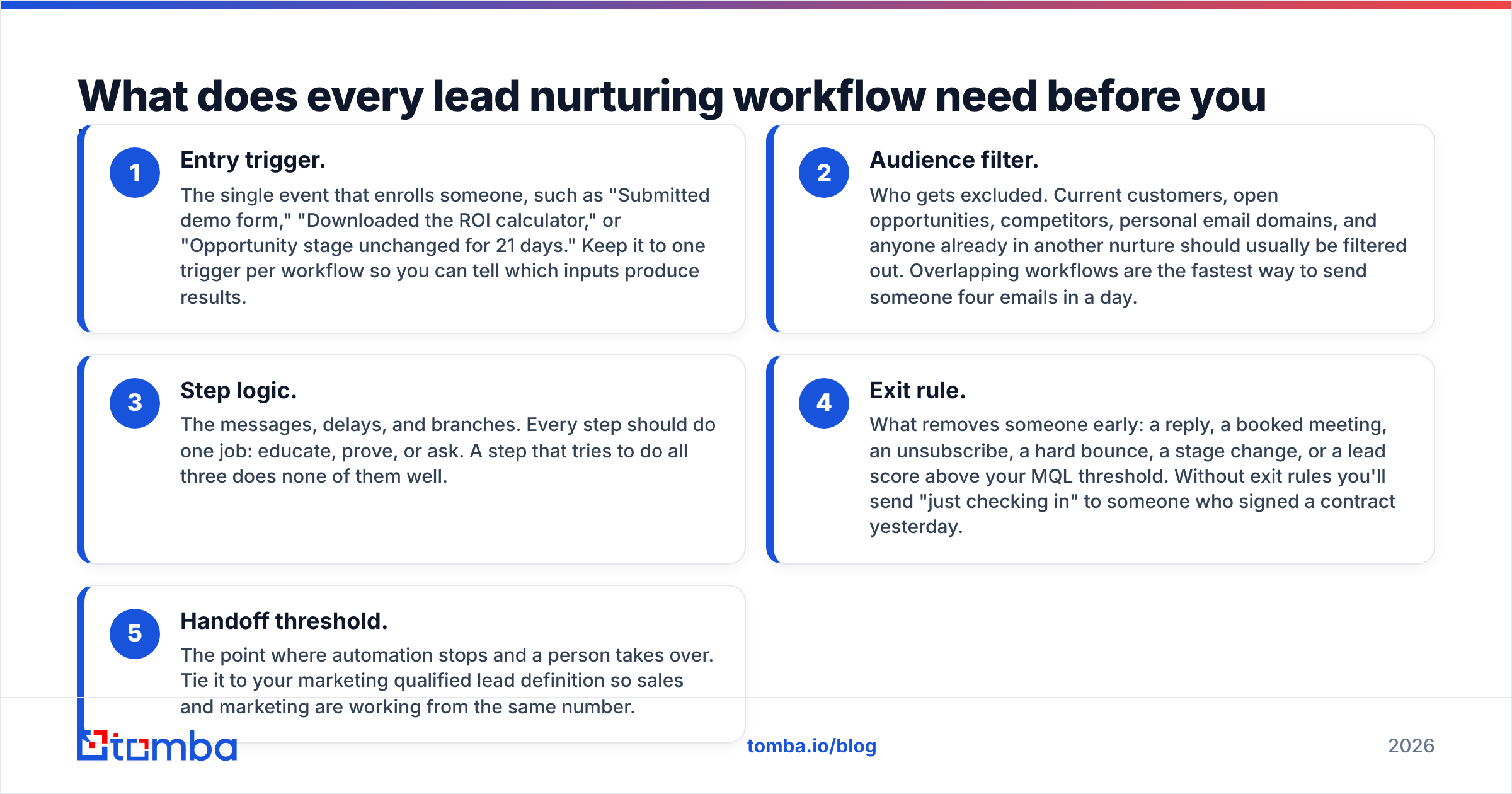
Before you open the workflow builder, write down these five components. If you can't fill one in, the workflow isn't ready.
- Entry trigger. The single event that enrolls someone, such as "Submitted demo form," "Downloaded the ROI calculator," or "Opportunity stage unchanged for 21 days." Keep it to one trigger per workflow so you can tell which inputs produce results.
- Audience filter. Who gets excluded. Current customers, open opportunities, competitors, personal email domains, and anyone already in another nurture should usually be filtered out. Overlapping workflows are the fastest way to send someone four emails in a day.
- Step logic. The messages, delays, and branches. Every step should do one job: educate, prove, or ask. A step that tries to do all three does none of them well.
- Exit rule. What removes someone early: a reply, a booked meeting, an unsubscribe, a hard bounce, a stage change, or a lead score above your MQL threshold. Without exit rules you'll send "just checking in" to someone who signed a contract yesterday.
- Handoff threshold. The point where automation stops and a person takes over. Tie it to your marketing qualified lead definition so sales and marketing are working from the same number.
One component sits under all five: clean contact data. A workflow that enrolls 2,000 contacts with 12% invalid addresses sends roughly 240 hard bounces in its first step. Mailbox providers notice. Run every list through an email verifier before enrollment, and re-verify anything older than about 90 days. B2B data goes stale quickly as people change jobs.
Which 7 lead nurturing workflows should B2B teams run?#
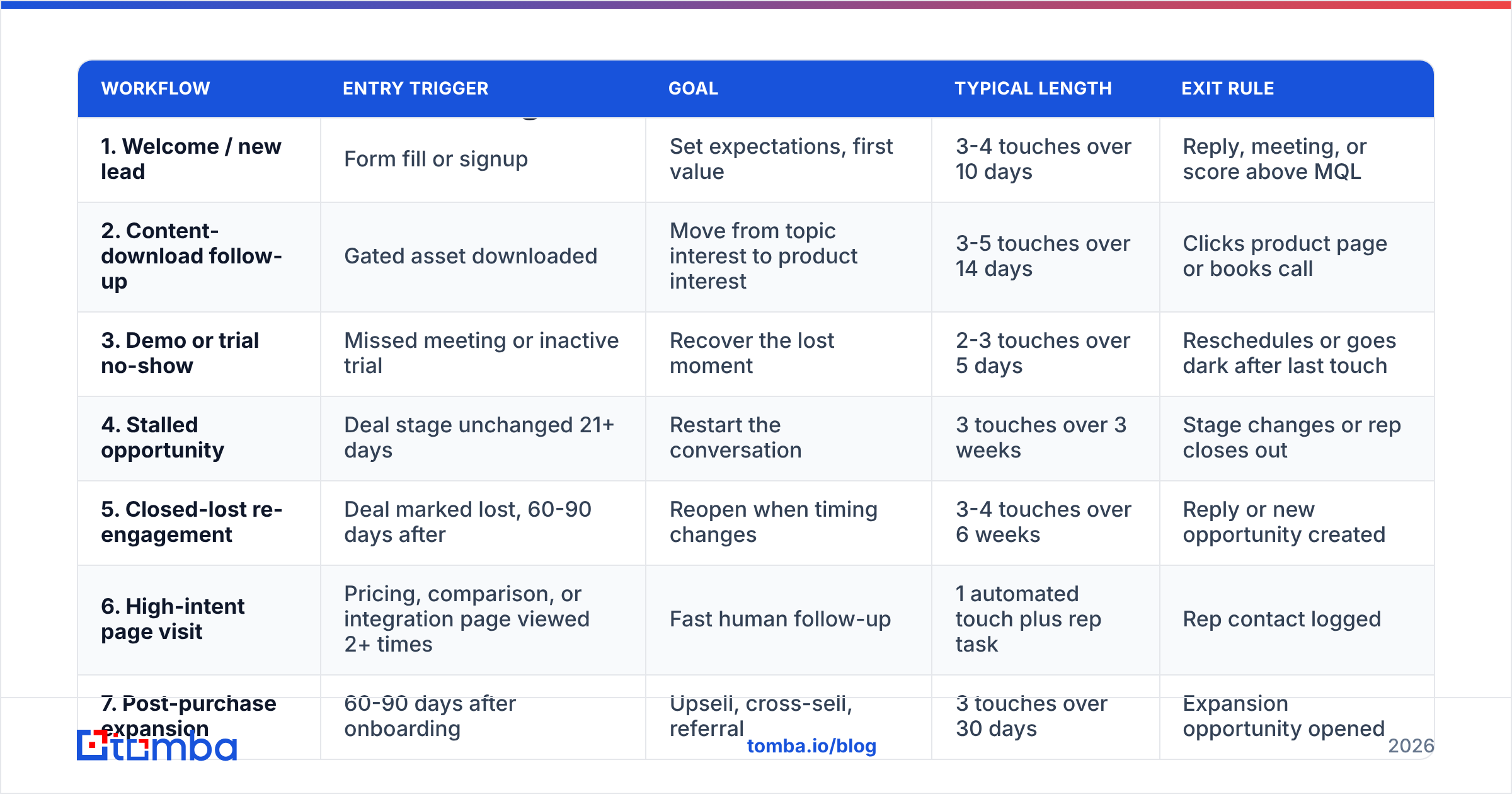
The table gives you the overview. Details for each workflow follow below it.
| Workflow | Entry trigger | Goal | Typical length | Exit rule |
|---|---|---|---|---|
| 1. Welcome / new lead | Form fill or signup | Set expectations, first value | 3-4 touches over 10 days | Reply, meeting, or score above MQL |
| 2. Content-download follow-up | Gated asset downloaded | Move from topic interest to product interest | 3-5 touches over 14 days | Clicks product page or books call |
| 3. Demo or trial no-show | Missed meeting or inactive trial | Recover the lost moment | 2-3 touches over 5 days | Reschedules or goes dark after last touch |
| 4. Stalled opportunity | Deal stage unchanged 21+ days | Restart the conversation | 3 touches over 3 weeks | Stage changes or rep closes out |
| 5. Closed-lost re-engagement | Deal marked lost, 60-90 days after | Reopen when timing changes | 3-4 touches over 6 weeks | Reply or new opportunity created |
| 6. High-intent page visit | Pricing, comparison, or integration page viewed 2+ times | Fast human follow-up | 1 automated touch plus rep task | Rep contact logged |
| 7. Post-purchase expansion | 60-90 days after onboarding | Upsell, cross-sell, referral | 3 touches over 30 days | Expansion opportunity opened |
1. Welcome workflow#
This is the first workflow to build, because new leads are the most responsive leads you'll ever have. Send the first message within minutes of the form fill. It should confirm what they signed up for, give one useful resource, and offer one next step. Leave out the company history and the five links.
Branch on firmographics. If the lead matches your ICP (company size, industry, role), offer a short call in the second touch. If they don't, keep them on educational content. That's where data enrichment pays off: a form with only a name and email becomes a record with company size, industry, and job title, and you can route on those without making the form longer.
2. Content-download follow-up#
Someone who downloaded your "State of Outbound" report wants the topic, not necessarily your product. So the first follow-up should expand on the report: one finding, one chart, one question. The second touch connects the topic to a problem your product solves. The third offers a relevant case study.
Watch for the bridge click. If they click through to a product or pricing page, move them to workflow 6 or hand them to a rep. If they never click anything product-related after 14 days, move them into a lower-frequency newsletter. Don't restart the sequence.
3. Demo or trial no-show#
No-shows aren't necessarily rejections. People get pulled into meetings or forget. Send the first touch within an hour and keep it short. Say nothing to guilt them. Include a rescheduling link, and optionally a two-minute recorded walkthrough so they get value without committing to another slot.
For inactive trials, trigger on missing activation events rather than on time. "Signed up but never connected an integration" calls for a different email than "signed up and ran three searches, then stopped."
4. Stalled opportunity#
Deals stall when the champion loses momentum internally. Automated emails won't fix that alone, but they can give the rep a reason to reach out. Build this one as rep-assisted: the workflow creates tasks and drafts, and the rep sends from their own inbox. Useful content here: a business case template, a security or procurement FAQ, or a short note from a customer in the same industry.
Set the trigger at your median stage duration plus about 50%. If deals usually sit in "Proposal" for 14 days, trigger at 21.
5. Closed-lost re-engagement#
Lost deals are warm leads with a timer on them. The most common loss reasons are "no budget," "bad timing," and "went with a competitor," and all three can change within a quarter. Wait 60 to 90 days, then send something based on the reason recorded in your CRM: a new feature that fills the gap they mentioned, a pricing change, or a question about how the alternative is working out.
Before re-enrolling, check that the contact still works at the company. After three to six months, a meaningful share of your champions will have moved on. Re-verify the address, and if they've left, find their replacement instead of emailing an inbox nobody reads.
6. High-intent page visit#
This is the highest-value workflow on the list, and it's mostly human. When a known contact views pricing twice in a week, or reads a "vs competitor" page, automation should do two things: send one light, relevant message ("Saw you were comparing plans; here's the one-page breakdown"), and create a high-priority task for the owner.
Tracking this requires identified traffic. Form-fill cookies catch some visits. Visitor identification tools can surface the company behind anonymous sessions, and you can then find the right contact at that account.
7. Post-purchase expansion#
Nurturing doesn't end at the contract. Customers who hit their first success milestone are your best source of upsells, referrals, and case studies. Trigger on product usage, not on calendar date: "Used 80% of monthly credits two months in a row" is an expansion signal. "Day 60" isn't one.
How do you time and space nurture emails?#
There's no universal cadence, but a few patterns hold across most B2B audiences:
- Front-load the sequence. Put the first two touches close together (same day, then day 2 or 3). Space later touches further apart (5 to 7 days).
- Match urgency to intent. A no-show sequence runs over days. A closed-lost sequence runs over weeks.
- Cap total frequency. Set a global rule of no more than two to three automated emails per contact per week across all workflows. Most platforms support suppression or frequency caps. Use them.
- Send from a person. Plain-text emails from a named rep generally get more replies than designed HTML newsletters in B2B nurture, especially from mid-funnel onward.
Protect your email deliverability as volume grows. Authenticate your sending domain (SPF, DKIM, DMARC), warm up new domains gradually, and watch bounce and complaint rates per workflow. A single workflow with a bad list can damage reputation for every email your domain sends, including rep-to-customer mail.
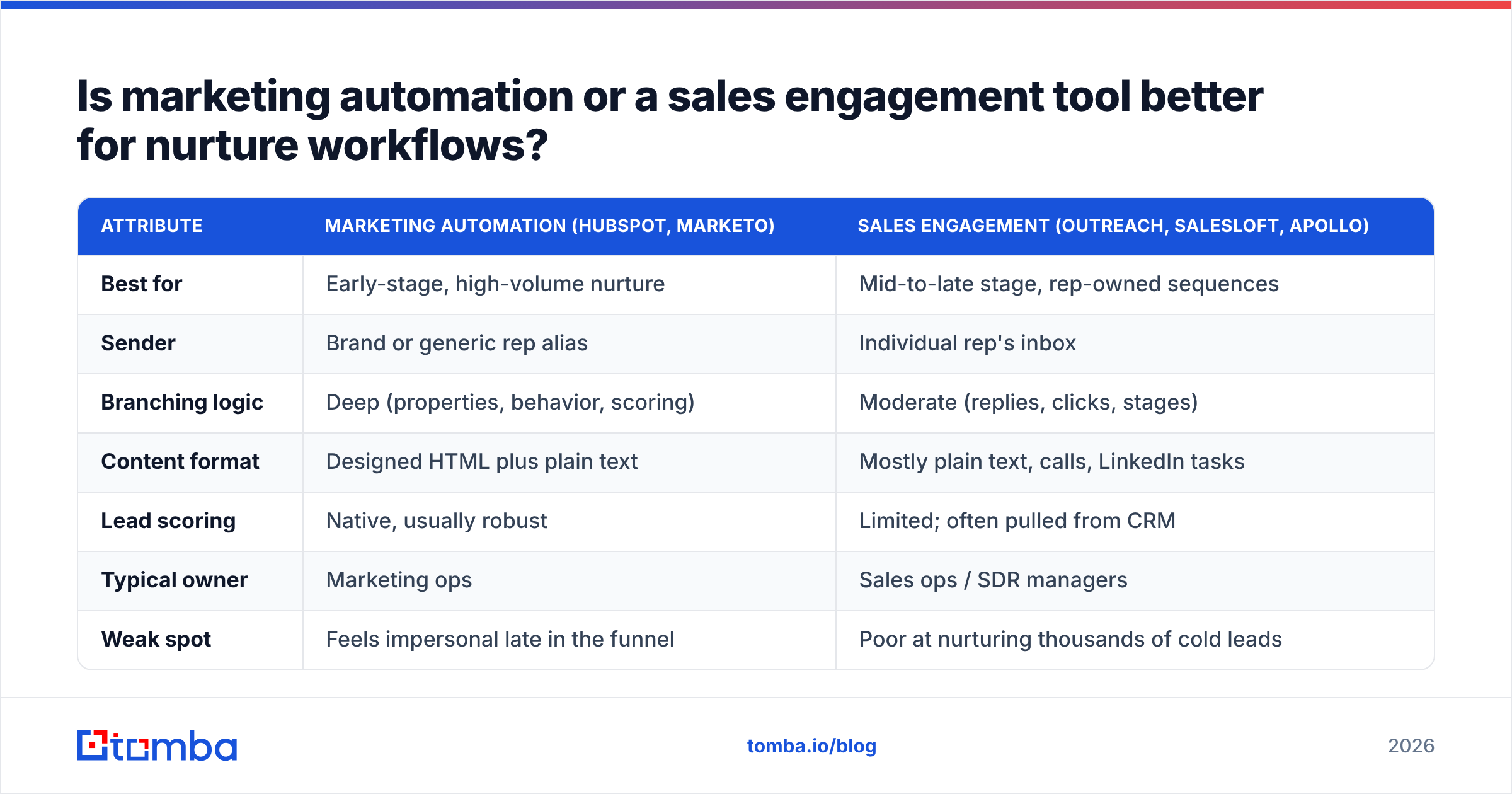
Is marketing automation or a sales engagement tool better for nurture workflows?#
It depends on who owns the stage. Most mature teams use both, with a clear handoff between them.
| Attribute | Marketing automation (HubSpot, Marketo) | Sales engagement (Outreach, Salesloft, Apollo) |
|---|---|---|
| Best for | Early-stage, high-volume nurture | Mid-to-late stage, rep-owned sequences |
| Sender | Brand or generic rep alias | Individual rep's inbox |
| Branching logic | Deep (properties, behavior, scoring) | Moderate (replies, clicks, stages) |
| Content format | Designed HTML plus plain text | Mostly plain text, calls, LinkedIn tasks |
| Lead scoring | Native, usually robust | Limited; often pulled from CRM |
| Typical owner | Marketing ops | Sales ops / SDR managers |
| Weak spot | Feels impersonal late in the funnel | Poor at nurturing thousands of cold leads |
A practical split: marketing automation runs workflows 1, 2, and 5. Sales engagement runs 3, 4, and 6. Workflow 7 usually belongs to customer success, often in a CS platform. Whatever tools you choose, sync them through your CRM so an exit in one system suppresses the lead in the other. Tomba's HubSpot integration and similar CRM connectors can enrich and verify contacts at the point of entry, before any workflow sends the first message.
For broader context on where nurture fits in the funnel, Gartner's B2B buying research is useful. It shows buyers spending much of their journey researching on their own, and that's exactly the gap nurture content is meant to fill.
How do you measure whether a nurture workflow is working?#
Open rates are unreliable since Apple Mail Privacy Protection, and they were never a good proxy for revenue anyway. Measure these instead, per workflow:
- Reply rate. This is the cleanest engagement signal for plain-text sequences. Track positive replies separately from "remove me."
- Meeting or MQL conversion rate. The percentage of enrolled contacts who hit the handoff threshold. This is your primary KPI.
- Time to conversion. Does the workflow speed leads up compared with a control group that didn't get it?
- Pipeline and revenue influenced. Attribute opportunities created within 30 to 90 days of a workflow touch.
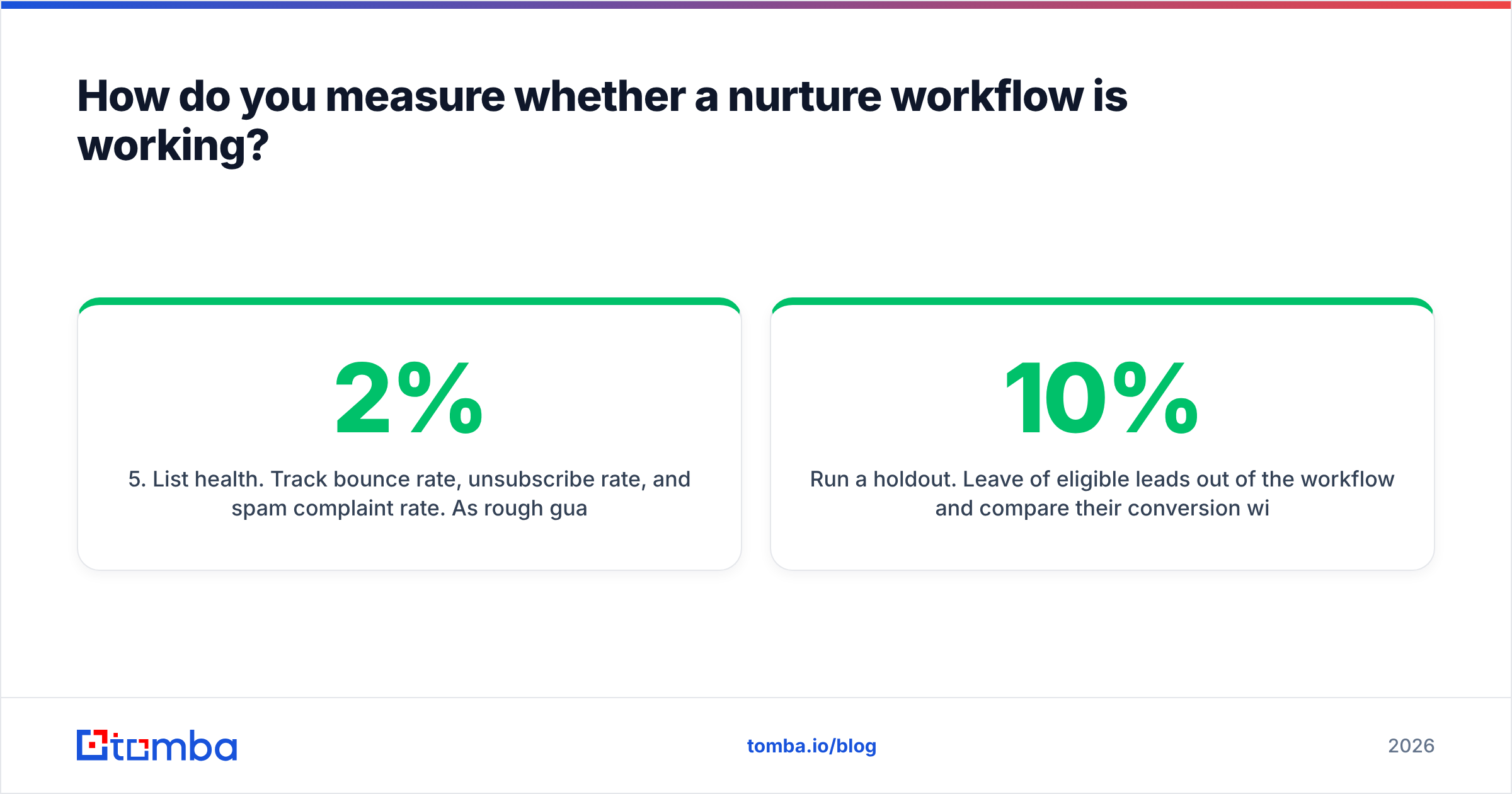
- List health. Track bounce rate, unsubscribe rate, and spam complaint rate. As rough guardrails, keep bounces under 2% and complaints well under 0.1%. Google's sender guidelines treat 0.3% as a hard ceiling for bulk senders.
Run a holdout. Leave 10% of eligible leads out of the workflow and compare their conversion with the enrolled group. Without a holdout, you can't tell whether the workflow drives conversions or just takes credit for leads that would have converted anyway.
What are the most common lead nurturing workflow mistakes?#
- Enrolling unverified or purchased lists. Nurture is for people who showed some interest, or at least match your ICP with a valid address. Uploading an old list straight into a workflow is how domains end up on blocklists.
- No exit on reply. Nothing hurts credibility faster than an automated "bumping this up" sent the day after the prospect answered.
- Too many workflows, too early. Seven workflows with 40 branches is impossible to debug. Launch welcome plus one high-intent workflow, run them for a full sales cycle, then expand.
- Content that ignores the trigger. If someone downloaded a guide about cold calling, don't send them your email deliverability webinar.
- Set-and-forget. Review each workflow quarterly. Links break, offers expire, and a case study from 2023 reads as stale in 2026.
- Ignoring job changes. Contacts go stale fast. Re-enrich long-running segments at least twice a year and replace departed contacts rather than suppressing the whole account.
How do you get started this week?#
Here's a realistic one-week plan:
- Day 1: Audit your current sequences. Write down trigger, exit rule, and handoff threshold for each. Kill anything without an exit rule.
- Day 2: Clean the data. Verify every contact that will enter a workflow, enrich missing firmographics, and deduplicate.
- Day 3: Build the welcome workflow: three touches, one branch on ICP fit, exit on reply or meeting.
- Day 4: Build the high-intent page-visit workflow with a rep task as its main action.
- Day 5: Set up the dashboard (reply rate, conversion to meeting, bounce rate) and a 10% holdout.
Then leave it alone for a full sales cycle before judging. Most workflows that get labeled failures were changed too early.
Where does Tomba fit in your nurture stack?#
Every workflow above depends on reaching the right person at a working address. That applies to the welcome email, the closed-lost check-in, and the replacement contact when your champion leaves. Tomba Email Finder finds professional emails by name, company, or domain, and it pairs with Tomba's verifier and enrichment tools so contacts are validated and filled in before they enter a sequence. The free tier includes 25 searches a month, so you can test it on your current closed-lost list and see how many champions have moved on before you commit to a paid plan. Paid plans start at $49/mo, and there's a full breakdown in Tomba pricing.
Related guides#
// get started
Find, verify and enrich your first contacts today
Start on the free plan with 25 searches a month, then scale when your team is ready.
Free plan · No credit card required · GDPR & CCPA
// about the author