Lead Pipeline Management: Stages, Metrics, and Fixes for 2026
Most pipelines don't die from a lack of leads. They leak through vague stages, stale data, and deals nobody owns. Here's how to define stages, track the right metrics, and plug the leaks.
TL;DR
- Lead pipeline management means moving each lead through defined stages, each with an entry rule, an exit rule, and a named owner. Without those rules, you have a list, not a pipeline.
- Most pipelines leak in three places: bad contact data at the top, vague qualification in the middle, and stalled deals nobody closes out at the bottom.
- Track five numbers every week: stage conversion rate, average time in stage, pipeline coverage, velocity, and win rate. Most other pipeline metrics are secondary.
- Your CRM stores the pipeline, but it can't fix bad data. Verify and enrich contacts before they enter stage one.
- Review deals every week and set an aging rule. A deal with no activity for 30 days gets moved forward or marked closed-lost.
What is lead pipeline management?#
Lead pipeline management is how you track, prioritize, and move potential buyers from first contact to closed deal. It covers the stages you define, the rules for moving leads between them, the data attached to each lead, and the routine your team uses to review and clean it all up.
It's not the same as your CRM. A CRM like HubSpot or Salesforce is where the pipeline lives. The management part is the set of decisions around it: what counts as "qualified," who owns the next step, how long a deal can sit before someone steps in, and which leads get dropped.
People often mix up a lead pipeline and a sales pipeline. In practice:
- A lead pipeline covers early-funnel stages like new, contacted, engaged, and qualified. Marketing and SDRs usually own it.
- A sales pipeline covers opportunity stages like discovery, proposal, negotiation, and close. AEs usually own it.
Plenty of teams run both in one view. That works as long as the handoff between them is explicit. The handoff from a marketing qualified lead (MQL) to a sales-accepted opportunity is where many companies lose the most pipeline without noticing.
What are the stages of a lead pipeline?#
The stage names don't matter much. The exit criteria do. If two reps can't agree on whether a deal belongs in "Qualified" or "Discovery," the stage is too vague and your conversion data will be wrong.
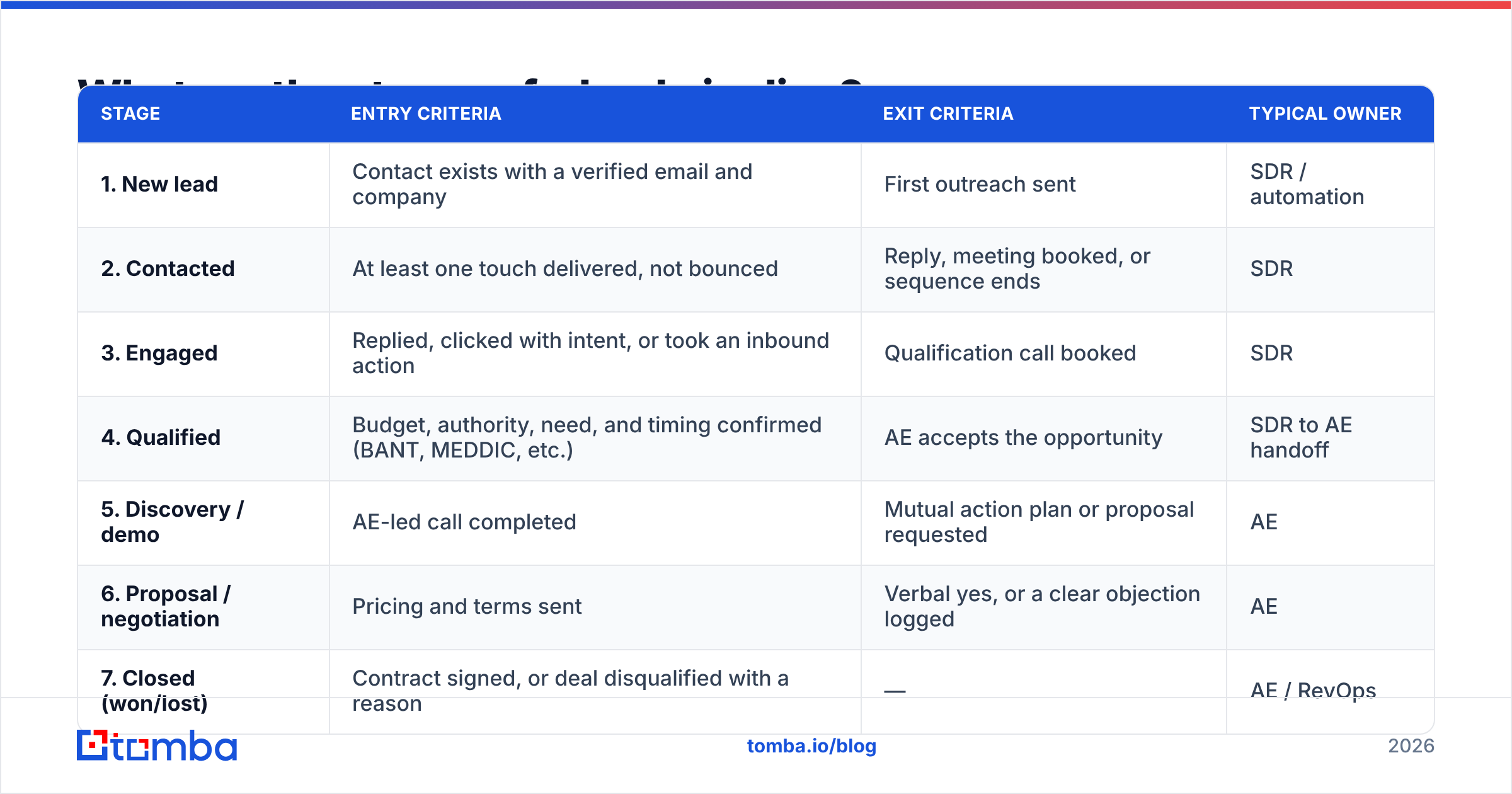
Here's a standard seven-stage B2B model with the criteria that make each stage auditable:
| Stage | Entry criteria | Exit criteria | Typical owner |
|---|---|---|---|
| 1. New lead | Contact exists with a verified email and company | First outreach sent | SDR / automation |
| 2. Contacted | At least one touch delivered, not bounced | Reply, meeting booked, or sequence ends | SDR |
| 3. Engaged | Replied, clicked with intent, or took an inbound action | Qualification call booked | SDR |
| 4. Qualified | Budget, authority, need, and timing confirmed (BANT, MEDDIC, etc.) | AE accepts the opportunity | SDR to AE handoff |
| 5. Discovery / demo | AE-led call completed | Mutual action plan or proposal requested | AE |
| 6. Proposal / negotiation | Pricing and terms sent | Verbal yes, or a clear objection logged | AE |
| 7. Closed (won/lost) | Contract signed, or deal disqualified with a reason | — | AE / RevOps |
Two details in this table matter more than they look.
Stage 1 requires a verified email. That's intentional. If a lead enters the pipeline with a guessed or unverified address, it can bounce at stage 2 and you'll never know if it was a real prospect. It also inflates your top-of-funnel numbers, so every conversion rate below it looks worse than it really is.
Stage 7 requires a loss reason. "Closed-lost, no reason" tells you nothing. Use a short dropdown (no budget, no decision, lost to competitor, bad timing, bad fit, unresponsive) so the data is useful at quarter-end.
Why do lead pipelines leak?#
Nearly every leaky pipeline has the same few causes. They show up at predictable stages, so you can find them.
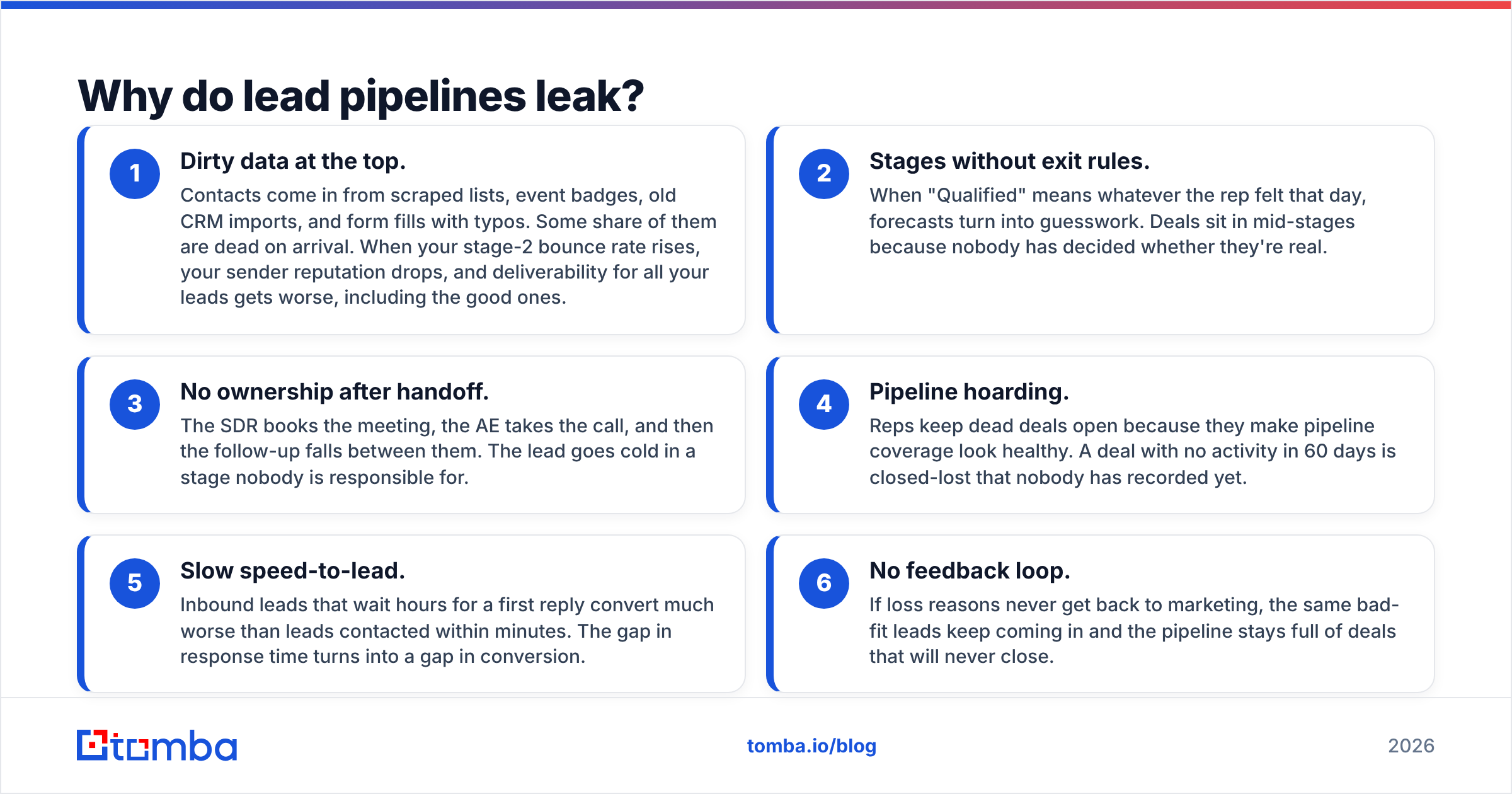
- Dirty data at the top. Contacts come in from scraped lists, event badges, old CRM imports, and form fills with typos. Some share of them are dead on arrival. When your stage-2 bounce rate rises, your sender reputation drops, and deliverability for all your leads gets worse, including the good ones.
- Stages without exit rules. When "Qualified" means whatever the rep felt that day, forecasts turn into guesswork. Deals sit in mid-stages because nobody has decided whether they're real.
- No ownership after handoff. The SDR books the meeting, the AE takes the call, and then the follow-up falls between them. The lead goes cold in a stage nobody is responsible for.
- Pipeline hoarding. Reps keep dead deals open because they make pipeline coverage look healthy. A deal with no activity in 60 days is closed-lost that nobody has recorded yet.
- Slow speed-to-lead. Inbound leads that wait hours for a first reply convert much worse than leads contacted within minutes. The gap in response time turns into a gap in conversion.
- No feedback loop. If loss reasons never get back to marketing, the same bad-fit leads keep coming in and the pipeline stays full of deals that will never close.
Fix these in order. Top-of-funnel data problems make every other number less reliable, so they come first.
Which lead pipeline metrics actually matter?#
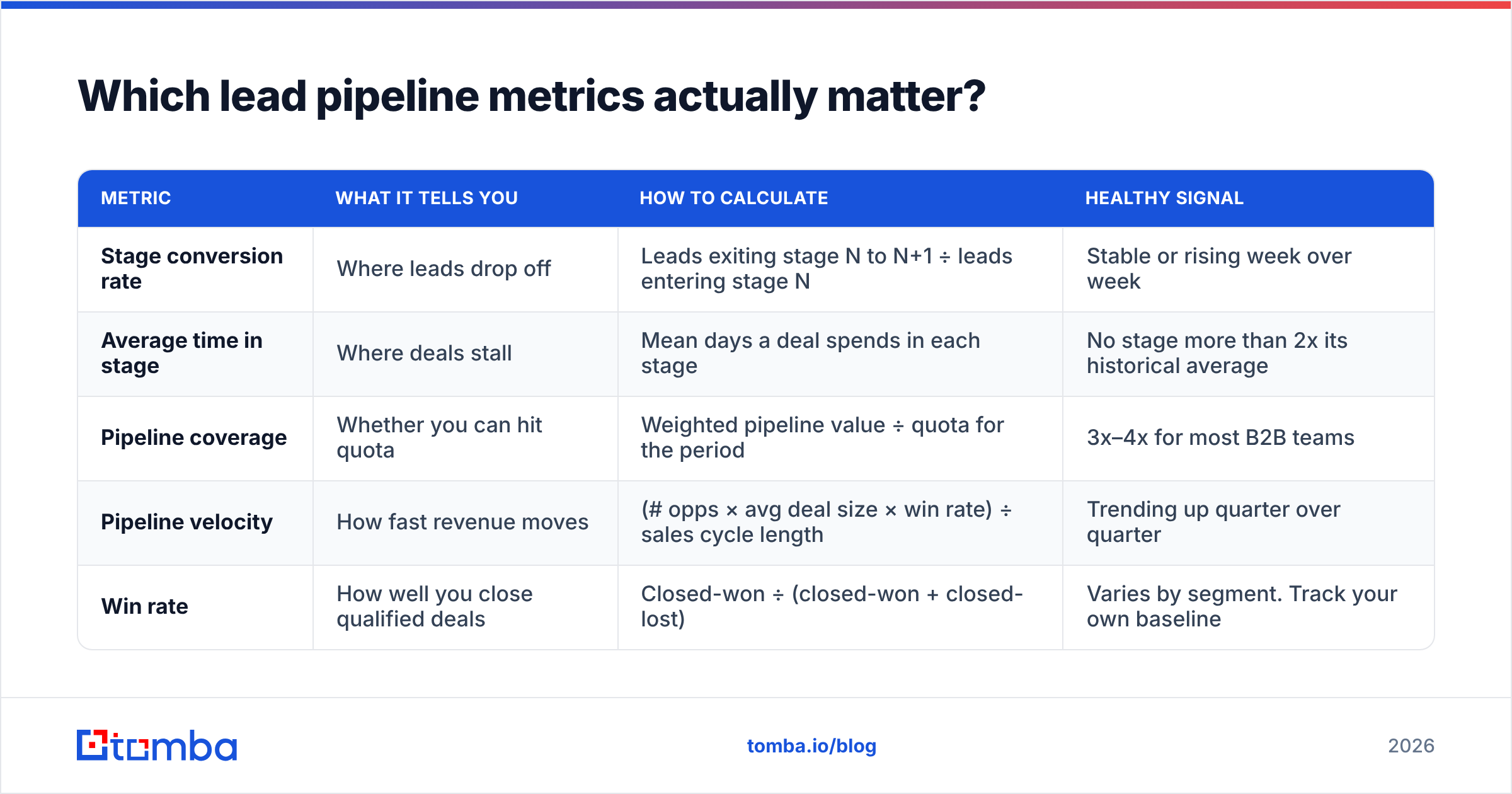
Most CRM dashboards show twenty metrics. You need about five, reviewed every week.
| Metric | What it tells you | How to calculate | Healthy signal |
|---|---|---|---|
| Stage conversion rate | Where leads drop off | Leads exiting stage N to N+1 ÷ leads entering stage N | Stable or rising week over week |
| Average time in stage | Where deals stall | Mean days a deal spends in each stage | No stage more than 2x its historical average |
| Pipeline coverage | Whether you can hit quota | Weighted pipeline value ÷ quota for the period | 3x–4x for most B2B teams |
| Pipeline velocity | How fast revenue moves | (# opps × avg deal size × win rate) ÷ sales cycle length | Trending up quarter over quarter |
| Win rate | How well you close qualified deals | Closed-won ÷ (closed-won + closed-lost) | Varies by segment. Track your own baseline |
A few notes on reading these:
- Conversion rate is the diagnostic. If stage 2 to stage 3 drops sharply, look at messaging and data quality. If stage 5 to stage 6 drops, look at discovery quality and pricing fit.
- Time in stage is the early warning. Deals rarely die suddenly. They sit in one stage too long first. Set an alert when a deal goes past twice the average for its stage.
- Coverage without hygiene is misleading. 4x coverage made up of stale deals is really 1.5x. Clean the pipeline before you trust this number.
- Win rate should be segmented. A blended win rate across SMB and enterprise hides the fact that one segment may be doing well while the other is losing money.
Analyst firms like Gartner have argued for years that forecast accuracy depends more on consistent stage definitions and data quality than on the forecasting method. In practice, your forecast is only as good as your stage rules.
How do you manage a lead pipeline week to week?#
Having a process matters more than having a perfect one. Here's a weekly cadence that works for teams of 3 to 30 reps.
- Monday: hygiene pass (30 minutes). Every rep reviews their own deals. Anything with no activity in 30 days gets a next step with a date, or gets closed-lost with a reason. No exceptions.
- Tuesday: pipeline review (45 minutes). The manager goes through deals in stages 4–6 only. Earlier stages are too noisy to review one by one. For each deal, ask three questions: what's the next step, when is it, and what could kill it?
- Wednesday: top-of-funnel refill. Look at stage-1 volume against the target. If you're short, build new lists. Verify every contact before it enters the CRM.
- Thursday: conversion check. Compare this week's stage conversions with the trailing 4-week average. Look into any stage that dropped more than 20%.
- Friday: forecast commit. Reps commit to deals closing this month. Compare commits with what actually closes to calibrate each rep's forecast accuracy over time.
The Monday hygiene pass has the biggest payoff. Teams that skip it end up with pipelines where half the value is fiction, and every downstream number is off.
How does data quality affect pipeline management?#
Every stage depends on the stage before it. If the data coming into stage 1 is bad, every stage after it performs worse.
Here's what happens in practice. You import 1,000 leads. If 15% of the emails bounce, you've lost 150 leads in stage 2 before anyone had a conversation. Worse, a high bounce rate damages your sending domain, so the other 850 are more likely to land in spam. Your stage-2 to stage-3 conversion falls, and it looks like a messaging problem when it's actually a data problem.
The fix is simple. Put a data gate in front of the pipeline:
- Find emails from sources, not guesses. Pattern-guessing (
firstname.lastname@) looks right until it hits a catch-all domain or a company that uses initials. - Verify before import. Run every address through an email verifier and only let "valid" results into stage 1. Send risky or catch-all results to a separate, lower-volume sequence.
- Enrich before routing. Job title, company size, industry, and tech stack decide who owns a lead and how it's prioritized. Contact enrichment fills in those fields before routing rules run, not after a rep has wasted a call on a bad fit.
- Re-verify stale records. B2B contact data decays every year as people change jobs. Re-verify any lead that has sat in your CRM for more than 90 days before you re-sequence it.
Which tools help with lead pipeline management?#
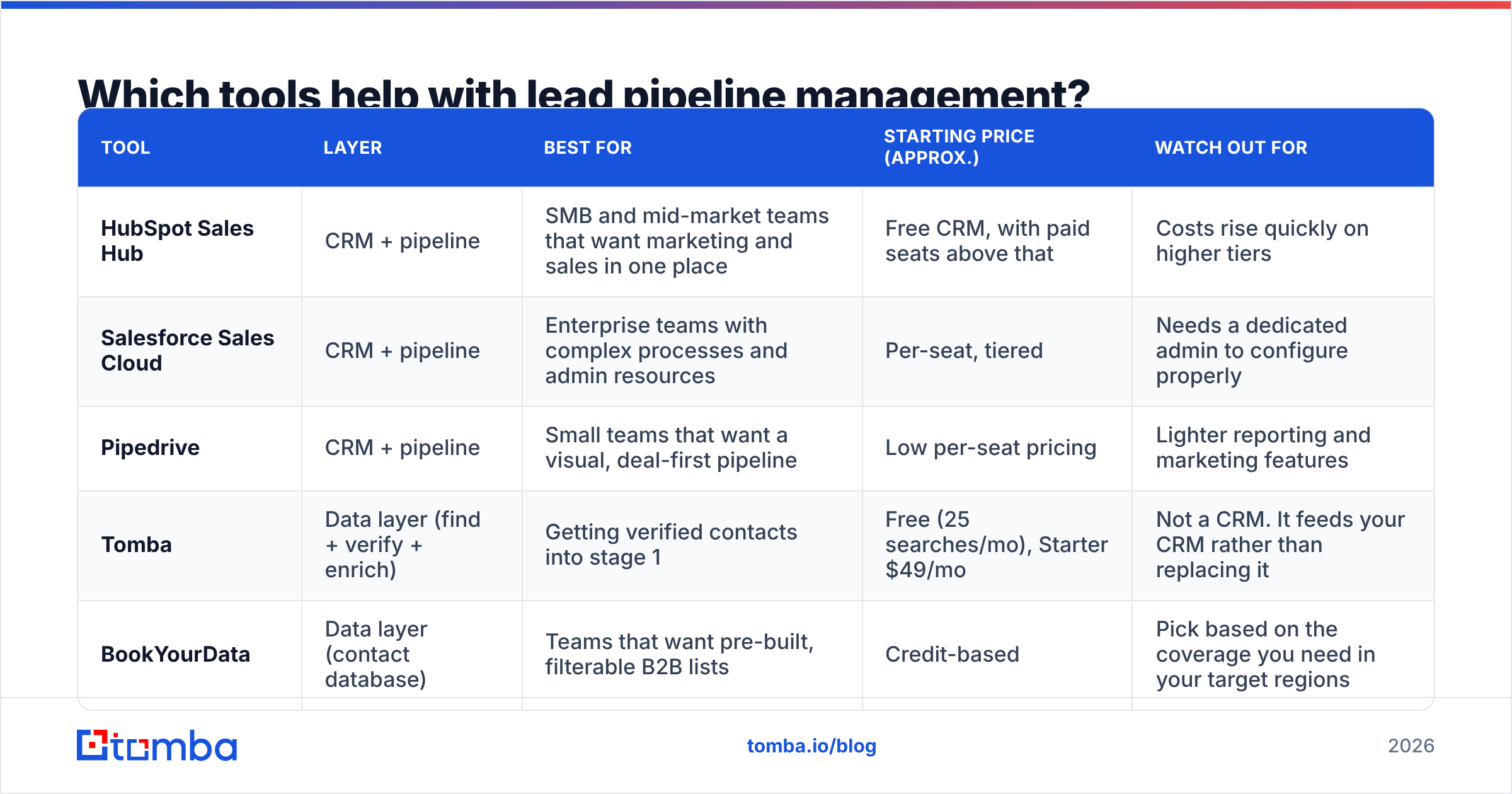
There isn't one tool that covers everything. Most teams use three layers: a CRM for the pipeline, an engagement tool for outreach, and a data tool for finding and verifying contacts. Here's how the main options compare by layer.
| Tool | Layer | Best for | Starting price (approx.) | Watch out for |
|---|---|---|---|---|
| HubSpot Sales Hub | CRM + pipeline | SMB and mid-market teams that want marketing and sales in one place | Free CRM, with paid seats above that | Costs rise quickly on higher tiers |
| Salesforce Sales Cloud | CRM + pipeline | Enterprise teams with complex processes and admin resources | Per-seat, tiered | Needs a dedicated admin to configure properly |
| Pipedrive | CRM + pipeline | Small teams that want a visual, deal-first pipeline | Low per-seat pricing | Lighter reporting and marketing features |
| Tomba | Data layer (find + verify + enrich) | Getting verified contacts into stage 1 | Free (25 searches/mo), Starter $49/mo | Not a CRM. It feeds your CRM rather than replacing it |
| BookYourData | Data layer (contact database) | Teams that want pre-built, filterable B2B lists | Credit-based | Pick based on the coverage you need in your target regions |
A few selection rules:
- Choose the CRM based on process complexity, not features. If your sales cycle has five stages and one product, Salesforce is probably more than you need. If you have territories, channel partners, and multiple product lines, Pipedrive will limit you.
- Choose the data tool based on where your leads come from. If you mostly prospect by company domain, a domain-first finder is a better fit. If you work from pre-filtered lists, a contact database may suit you better. Many teams use both.
- Check the integrations before you buy. Your data tool should push verified contacts straight into your CRM. Manual CSV exports and imports are where records get duplicated and fields get lost.
For a line-by-line breakdown of what each Tomba plan includes, see Tomba pricing.
Should you automate your lead pipeline?#
Automate the repetitive steps and keep people on the judgment calls. Too much automation fills your pipeline with activity that doesn't turn into revenue.
Good candidates for automation:
- Lead routing based on enriched fields (territory, company size, industry)
- Moving a lead to stage 2 when the first email is delivered
- Alerts when a deal goes past its time-in-stage threshold
- Re-verification of stale contacts before re-sequencing
- Logging calls, emails, and meetings to the CRM record
Keep a person on these:
- Qualification decisions (stage 3 to stage 4)
- Closed-lost reasons (automated reasons are nearly always "unresponsive," which tells you nothing)
- Forecast commits
- Any step where a buyer expects a personal reply
Before you automate a stage, ask whether a rep would ever make a different call than the rule would. If they would, keep a person on it.
What does a healthy lead pipeline look like?#
A healthy pipeline is predictable. When you look at it, you should be able to answer these questions without opening a spreadsheet:
- How many deals do we need in stage 4 this month to hit next quarter's number?
- Which stage has the worst conversion right now, and why?
- Which deals will close-lost this week if nobody acts?
- What share of stage-1 leads came in verified?
If you can't answer those, the problem usually isn't your CRM. The stages need exit rules, the Monday hygiene pass needs to happen every week, and the data coming into stage 1 needs to be verified. Fix those three and most other pipeline problems become much easier.
Where should you start?#
Start with the stage that feeds every other stage. A pipeline built on verified contacts converts better at each step, because your emails reach inboxes, your routing rules have real data, and your reps spend their time on real buyers.
Tomba Email Finder finds professional email addresses by name, company, or domain, and verifies them before they reach your CRM, so stage 1 starts with contacts that won't bounce. The free plan includes 25 searches a month, which is enough to test it against your current list source. If your stage-2 bounce rate drops, you'll know the leak was at the top of your pipeline.
Related guides#
// get started
Find, verify and enrich your first contacts today
Start on the free plan with 25 searches a month, then scale when your team is ready.
Free plan · No credit card required · GDPR & CCPA
// about the author