Lead Profiles: What to Include and How to Build Them in 2026
Most lead profiles have either too many fields or data that went out of date months ago. Here are the 12 fields that actually get replies, how to fill them in, and how to keep them accurate once reps start using them.
TL;DR
- A lead profile is the working record of one person: who they are, whether they fit your ICP, how to reach them and why they might care right now.
- You need about 12 fields to get replies. More than 30 usually means most of them are empty or out of date.
- Split fields into four groups: identity, fit, contactability and intent. If a group is missing, you get a predictable failure. Missing fit data wastes reps' time. Missing contact data leads to bounces. Missing intent data leads to generic pitches.
- Enrich automatically, verify emails before any send, and re-check profiles every 90 days. B2B contact data goes stale fast.
- Pick tools by the job you need done: finding contacts, enriching records or scoring leads. One vendor rarely does all three well.
What is a lead profile?#
A lead profile is a structured record of one prospect. It holds the facts a rep needs to decide whether to reach out, how to reach out and what to say. It usually lives in your CRM as a contact record, with company data attached.
Lead profiles are often confused with two other things:
- Ideal customer profile (ICP): a description of the type of company you sell to best, such as "B2B SaaS, 50-500 employees, selling to finance teams." It describes a segment, not a person.
- Buyer persona: a semi-fictional picture of a role, such as "the VP Finance who owns the close process." It describes a job, not a named contact.
A lead profile is the concrete version: Maria Chen, VP Finance at Northwind, maria.chen@northwind.com, 180 employees, just moved to NetSuite, visited your pricing page twice this week. The ICP and persona tell you who to look for. The lead profile tells you whether this specific person matches, and what to say to her.
If your team uses lifecycle stages, the lead profile is what moves a contact from raw lead toward a marketing qualified lead and then to a sales-accepted opportunity. Scoring models only work as well as the fields they read.
Why do most lead profiles fail?#
Lead profiles rarely fail from missing data. They fail from bad data. Three patterns show up over and over:
- Field bloat. A RevOps team builds a 45-field contact object. Reps fill in six of them. Scoring models end up reading blank fields as zeros, and nobody trusts the score.
- Decay. People change jobs, companies rebrand, domains move. Any record older than a couple of quarters needs checking before you rely on it. See the Wikipedia overview of lead generation for why list quality matters so much downstream.
- No "why now." The profile says who, but nothing about timing. Reps then send the same template to everyone who matches a job title, and response rates fall.

The fix is not to collect more data. Pick a small set of fields, give each one a clear owner, and set a date for re-checking it.
Which fields should a lead profile include?#
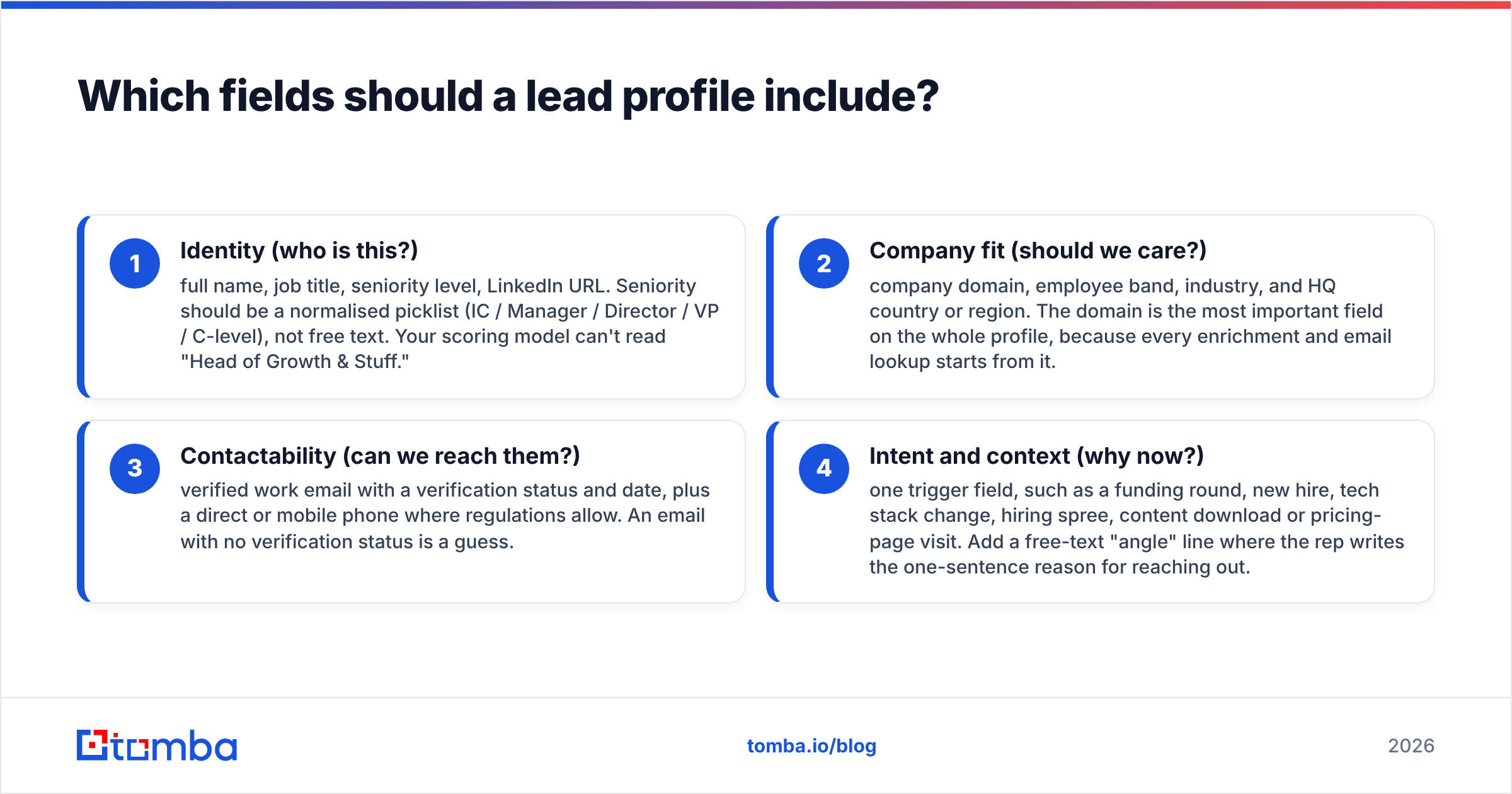
Here are the 12 fields that do most of the work, grouped into four categories. Each group answers one question a rep asks before sending anything.
- Identity (who is this?): full name, job title, seniority level, LinkedIn URL. Seniority should be a normalised picklist (IC / Manager / Director / VP / C-level), not free text. Your scoring model can't read "Head of Growth & Stuff."
- Company fit (should we care?): company domain, employee band, industry, and HQ country or region. The domain is the most important field on the whole profile, because every enrichment and email lookup starts from it.
- Contactability (can we reach them?): verified work email with a verification status and date, plus a direct or mobile phone where regulations allow. An email with no verification status is a guess.
- Intent and context (why now?): one trigger field, such as a funding round, new hire, tech stack change, hiring spree, content download or pricing-page visit. Add a free-text "angle" line where the rep writes the one-sentence reason for reaching out.
That's 12 core fields: four identity, four fit, two contact and two context. Everything else (tech stack details, revenue estimate, reporting line) is optional. Add a field when a specific play needs it, not because a vendor offers it.
How do lead profile depths compare?#
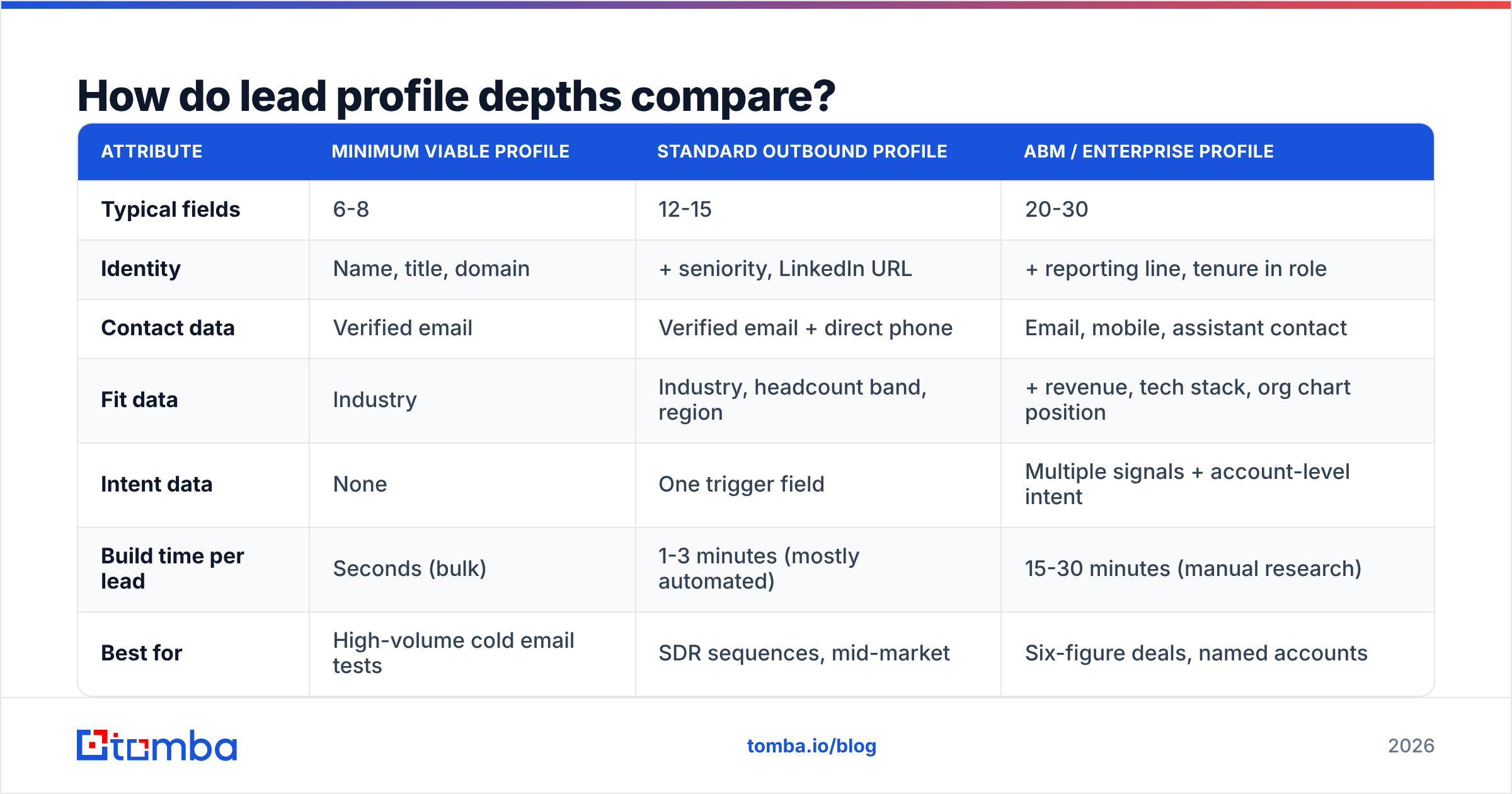
Not every lead needs the same depth. A high-volume outbound motion and a 30-account ABM program need very different profiles. Use the tier that matches the deal size.
| Attribute | Minimum viable profile | Standard outbound profile | ABM / enterprise profile |
|---|---|---|---|
| Typical fields | 6-8 | 12-15 | 20-30 |
| Identity | Name, title, domain | + seniority, LinkedIn URL | + reporting line, tenure in role |
| Contact data | Verified email | Verified email + direct phone | Email, mobile, assistant contact |
| Fit data | Industry | Industry, headcount band, region | + revenue, tech stack, org chart position |
| Intent data | None | One trigger field | Multiple signals + account-level intent |
| Build time per lead | Seconds (bulk) | 1-3 minutes (mostly automated) | 15-30 minutes (manual research) |
| Best for | High-volume cold email tests | SDR sequences, mid-market | Six-figure deals, named accounts |
| Main risk | Generic messaging | Stale trigger data | Research cost outweighs deal value |
A good rule is to spend research time in proportion to the average contract value. A $3,000/year deal does not justify 30 minutes of manual research per contact. A $200,000 deal does.
How do you build a lead profile step by step?#
Here's the workflow most outbound teams end up with, in the order that avoids wasted credits.
Step 1: Start from the account, not the person#
Filter companies against your ICP first: industry, headcount, region and any tech or hiring signals. Only then look for people inside those accounts. Going company-first stops you from enriching contacts at companies you would never sell to.
Step 2: Find the right contacts at each account#
Map the buying committee for your motion. That's usually one economic buyer, one champion and one user. Search by domain and filter by department and seniority. A domain search or email finder returns the addresses and roles tied to a company, so you're not guessing at email formats.
Step 3: Enrich identity and firmographics automatically#
Don't let reps type headcount or industry by hand. Run each new record through a data enrichment step on create. That fills in seniority, company size, location and social profiles from the email or domain. Standardise the output to picklists so scoring can read it.
Step 4: Verify every email before it touches a sequence#
This is the step that protects your domain. Run each address through an email verifier and store both the result (valid / risky / catch-all / invalid) and the date. Only "valid" should enter an automated sequence. Route catch-all results to a smaller, slower send or to manual outreach.
Step 5: Add one "why now" field#
Pick the single most relevant trigger for the lead and write it down: "Posted 4 SDR roles in August," "Migrated from Salesforce to HubSpot," "Raised Series B in July." That one line is what separates a personalised first line from a mail-merge.
Step 6: Push to CRM and set a re-check date#
Sync the profile into your CRM with a "last enriched" and "last verified" timestamp. HubSpot and Salesforce both support custom date properties for this. HubSpot's CRM documentation covers property setup if you're starting from scratch. Then create a workflow that re-enriches any record older than 90 days before it goes back into a sequence.
Which tools help you build lead profiles?#
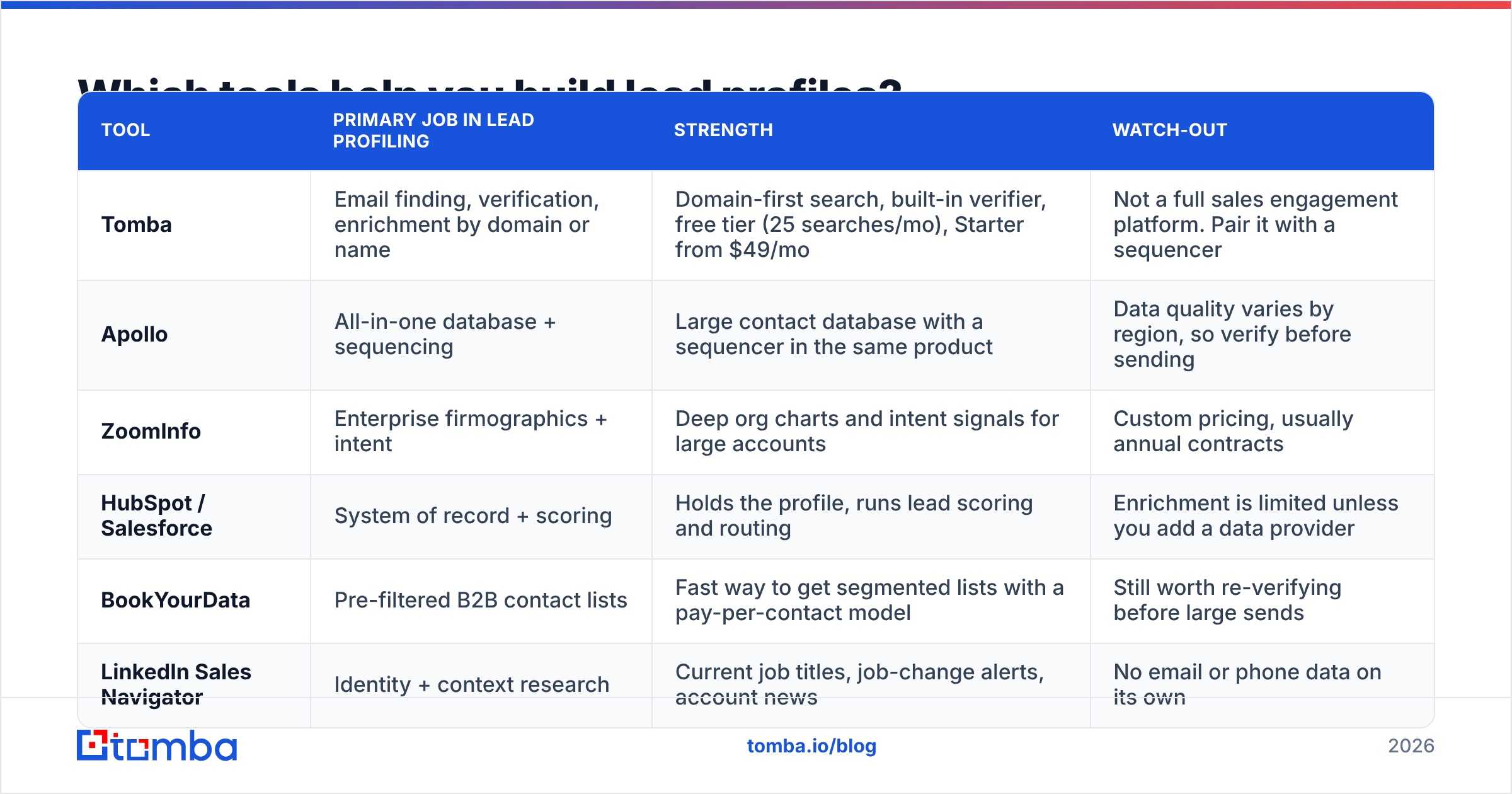
Most teams use two or three tools, one for each job: finding contacts, enriching records, and scoring or routing leads. Here's how the common options divide up. Check current pricing on each vendor's site, because plans change often.
| Tool | Primary job in lead profiling | Strength | Watch-out |
|---|---|---|---|
| Tomba | Email finding, verification, enrichment by domain or name | Domain-first search, built-in verifier, free tier (25 searches/mo), Starter from $49/mo | Not a full sales engagement platform. Pair it with a sequencer |
| Apollo | All-in-one database + sequencing | Large contact database with a sequencer in the same product | Data quality varies by region, so verify before sending |
| ZoomInfo | Enterprise firmographics + intent | Deep org charts and intent signals for large accounts | Custom pricing, usually annual contracts |
| HubSpot / Salesforce | System of record + scoring | Holds the profile, runs lead scoring and routing | Enrichment is limited unless you add a data provider |
| BookYourData | Pre-filtered B2B contact lists | Fast way to get segmented lists with a pay-per-contact model | Still worth re-verifying before large sends |
| LinkedIn Sales Navigator | Identity + context research | Current job titles, job-change alerts, account news | No email or phone data on its own |
The pattern that works for most mid-market teams: CRM as the system of record, one finding-and-verification tool feeding it, and Sales Navigator for the "why now" research on top-tier leads.
How do lead profiles feed lead scoring?#
A scoring model reads the profile, so the fields you choose decide what the model can score. Split scoring along the same lines as the field groups:
- Fit score reads identity and company fields: seniority, headcount band, industry and region. It rarely changes, so compute it once on enrichment.
- Engagement score reads activity: email opens and clicks, site visits, content downloads and replies. It changes daily and should decay over time.
- Contactability gate is not a score. It's a yes/no check. A lead with no verified email and no phone shouldn't be routed to an SDR, no matter how high its fit score is.

Teams that fold all three into one number get odd results. A C-level contact with an invalid email scores 85 and wastes a rep's morning. Keep the gate separate and the two scores visible side by side, for example "A2" for strong fit and moderate engagement.
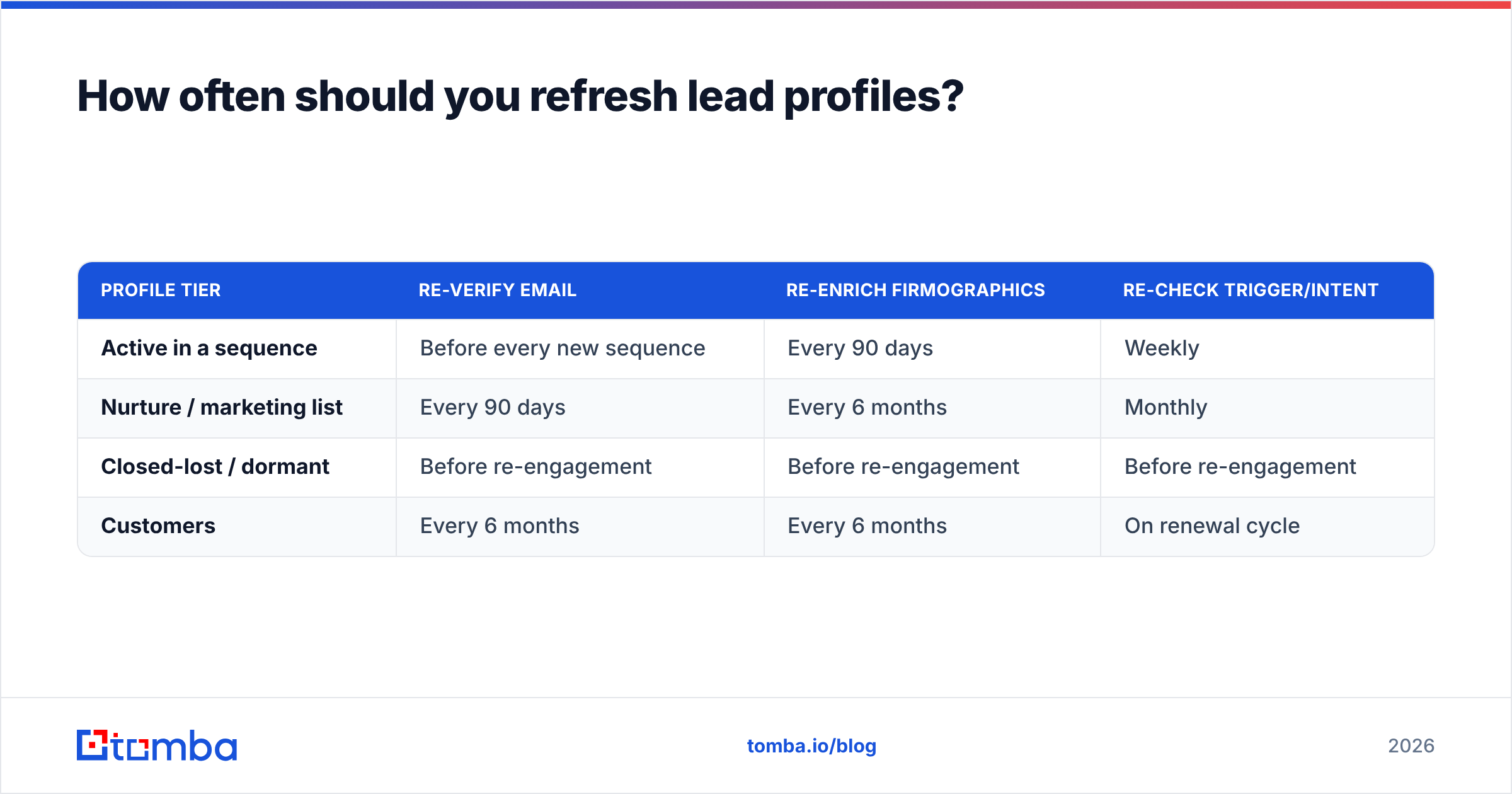
How often should you refresh lead profiles?#
Use a tiered refresh schedule rather than one global rule:
| Profile tier | Re-verify email | Re-enrich firmographics | Re-check trigger/intent |
|---|---|---|---|
| Active in a sequence | Before every new sequence | Every 90 days | Weekly |
| Nurture / marketing list | Every 90 days | Every 6 months | Monthly |
| Closed-lost / dormant | Before re-engagement | Before re-engagement | Before re-engagement |
| Customers | Every 6 months | Every 6 months | On renewal cycle |
The trigger to act on is not the calendar. It's any bounce, any job-change alert, or any "no longer with the company" auto-reply. Build a CRM workflow that flags these and queues the record for re-enrichment automatically.
What about privacy and compliance?#
Lead profiles are personal data, even in B2B. Under the EU's General Data Protection Regulation, you need a lawful basis for processing (usually legitimate interest for B2B outreach). You also need to honour opt-outs and deletion requests, and you should only store what you actually use.
Practical rules that keep you safe without slowing reps down:
- Store the source. Record where each email and phone number came from. If someone asks, you can answer.
- Minimise. The 12-field approach is a compliance advantage as well as an efficiency one. Don't store personal mobile numbers or home addresses when you'll never use them.
- Suppress globally. An unsubscribe in one sequence should suppress the contact everywhere, including re-imports from list vendors.
- Respect regional rules. Cold calling and SMS rules differ by country, so keep a country field and route by it.
What does a good lead profile look like in practice?#
Here's a complete standard-tier profile, the kind a rep can act on in under a minute:
| Field | Value |
|---|---|
| Name | Maria Chen |
| Title / seniority | VP Finance / VP |
| linkedin.com/in/example | |
| Company domain | northwind.example |
| Headcount band | 101-250 |
| Industry | B2B SaaS |
| Region | US-West |
| Work email | maria.chen@northwind.example (valid, verified 2026-09-12) |
| Direct phone | On file, validated |
| Trigger | Posted 3 FP&A roles in last 30 days |
| Angle | Scaling close process ahead of audit; our tool cuts close time |
| Fit / engagement | A / 2 |
Every field has a clear purpose. The rep knows who Maria is, that she fits the ICP, that the email won't bounce, and what to open with. That's the standard to aim for: a small set of fields, each one current and useful.
How do you get started this week?#
You don't need a data warehouse project. Do this:
- Audit your current contact object. List every field and its fill rate. Hide anything below 20% fill that no workflow reads.
- Add the missing fields from the 12-field set, especially verification status, verification date and a trigger field.
- Set up enrichment on record creation and a verification check before sequence enrollment.
- Build the 90-day re-check workflow.
- Rebuild your scoring model so it reads only the fields you actually maintain.
If the contactability layer is your weak spot, fix it first. Tomba Email Finder lets you find professional email addresses by domain, name or company, and it verifies them in the same workflow. You can test it on your own ICP accounts with the free plan (25 searches a month) before committing to Starter at $49/mo.
Related guides#
// get started
Find, verify and enrich your first contacts today
Start on the free plan with 25 searches a month, then scale when your team is ready.
Free plan · No credit card required · GDPR & CCPA
// about the author