Lead Profiling: How to Build B2B Lead Profiles That Convert
Most lead profiles collect 50 fields and use five. This guide covers the data points that actually predict deals, a five-step lead profiling framework, and how to fill the gaps without paying for a data warehouse.
TL;DR
- Lead profiling means building a structured picture of a prospect (company, person, context, intent) so you can decide whether to pursue them and how.
- The best profiles are short. Eight to twelve fields that predict fit and timing beat fifty fields that nobody reads.
- Profile in layers: firmographics first, then the person, then technographics, then intent signals. Each layer should change what you do next.
- Contact data is the layer that breaks most often. If you can't reach the person on your profile, the rest of the work is wasted.
- Review your profile fields every quarter against closed-won deals, and cut any field that doesn't predict outcomes.
What is lead profiling?#
Lead profiling is the process of collecting, organizing, and interpreting information about a prospect so your sales team can judge fit, set priority, and personalize outreach. It sits between lead generation (getting names into your pipeline) and lead scoring (ranking those names by likelihood to buy).
Think of it like a doctor's intake form. The form doesn't diagnose you. It gathers the right facts so the diagnosis is fast and accurate. A lead profile does the same for your reps: it gathers the facts that let them decide in 30 seconds whether a lead deserves a call, a sequence, or nothing.
A complete lead profile usually answers four questions:
- Is this company a fit? Industry, size, geography, revenue, growth stage.
- Is this person the right contact? Role, seniority, department, buying authority.
- Can we work with their setup? Tech stack, existing vendors, integrations.
- Is now the right time? Hiring spikes, funding, website visits, content engagement, job changes.
If your profile can't answer all four, you're guessing on at least one axis. That guessing shows up later as low reply rates and stalled deals.
How is lead profiling different from lead scoring and ICP work?#
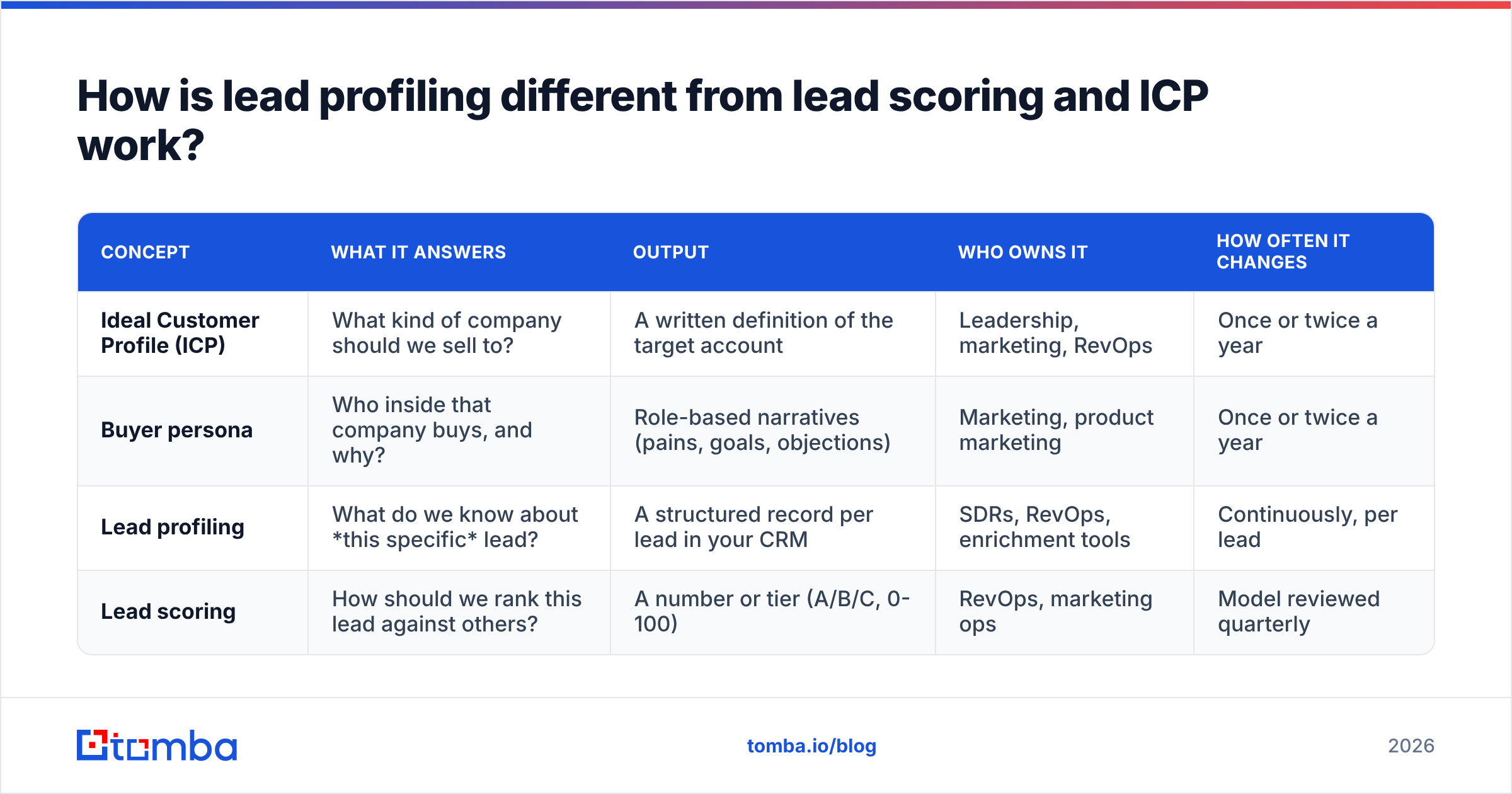
These three terms get used interchangeably, and that causes real confusion in RevOps meetings. They are related but they do different jobs.
| Concept | What it answers | Output | Who owns it | How often it changes |
|---|---|---|---|---|
| Ideal Customer Profile (ICP) | What kind of company should we sell to? | A written definition of the target account | Leadership, marketing, RevOps | Once or twice a year |
| Buyer persona | Who inside that company buys, and why? | Role-based narratives (pains, goals, objections) | Marketing, product marketing | Once or twice a year |
| Lead profiling | What do we know about this specific lead? | A structured record per lead in your CRM | SDRs, RevOps, enrichment tools | Continuously, per lead |
| Lead scoring | How should we rank this lead against others? | A number or tier (A/B/C, 0-100) | RevOps, marketing ops | Model reviewed quarterly |
Your ICP is the template. Lead profiling fills that template in for each real lead. Lead scoring turns the filled-in profile into a priority. If profiling is weak, scoring breaks no matter how clever the model is, because you're scoring incomplete data.
This matters most at the handoff between marketing and sales. A marketing qualified lead with a thin profile (just a name and a Gmail address) gets rejected by sales, and both teams blame each other. Usually the real problem is the missing profile.
What data points belong in a lead profile?#
This is where most teams go wrong. They copy a 50-field template from a CRM vendor, fill in whatever enrichment returns, and end up with records that look complete but don't help anyone decide anything.
Build your profile in layers. Each layer should include only fields that change a decision.
Layer 1: Firmographics (company fit)
- Industry or vertical
- Employee count band
- Headquarters country or region
- Revenue band (if relevant to your pricing)
- Company type (SaaS, agency, manufacturer, public sector)
Layer 2: Contact details (person fit and reachability)
- Full name and job title
- Seniority (IC, manager, director, VP, C-level)
- Department
- Verified business email
- Direct phone (if you call)
- LinkedIn URL
Layer 3: Technographics (setup fit)
- CRM in use (Salesforce, HubSpot, Pipedrive, etc.)
- Tools that complement or compete with yours
- Hosting or platform stack if your product integrates with it
Layer 4: Intent and timing signals
- Recent funding or acquisition
- Hiring for roles that signal your use case
- Leadership change in the buying department
- Website visits to pricing or comparison pages
- Engagement with your emails, content, or events
You don't need every field in every layer. A company selling a Salesforce add-on cares a lot about Layer 3. A company selling recruiting software cares mostly about hiring signals in Layer 4. Start from your closed-won deals and ask which of these fields they had in common.
For the technographic layer, a free website tech stack lookup is often enough to confirm whether a prospect runs the tools you integrate with, without paying for a full technographics subscription.
How do you build a lead profiling framework step by step?#
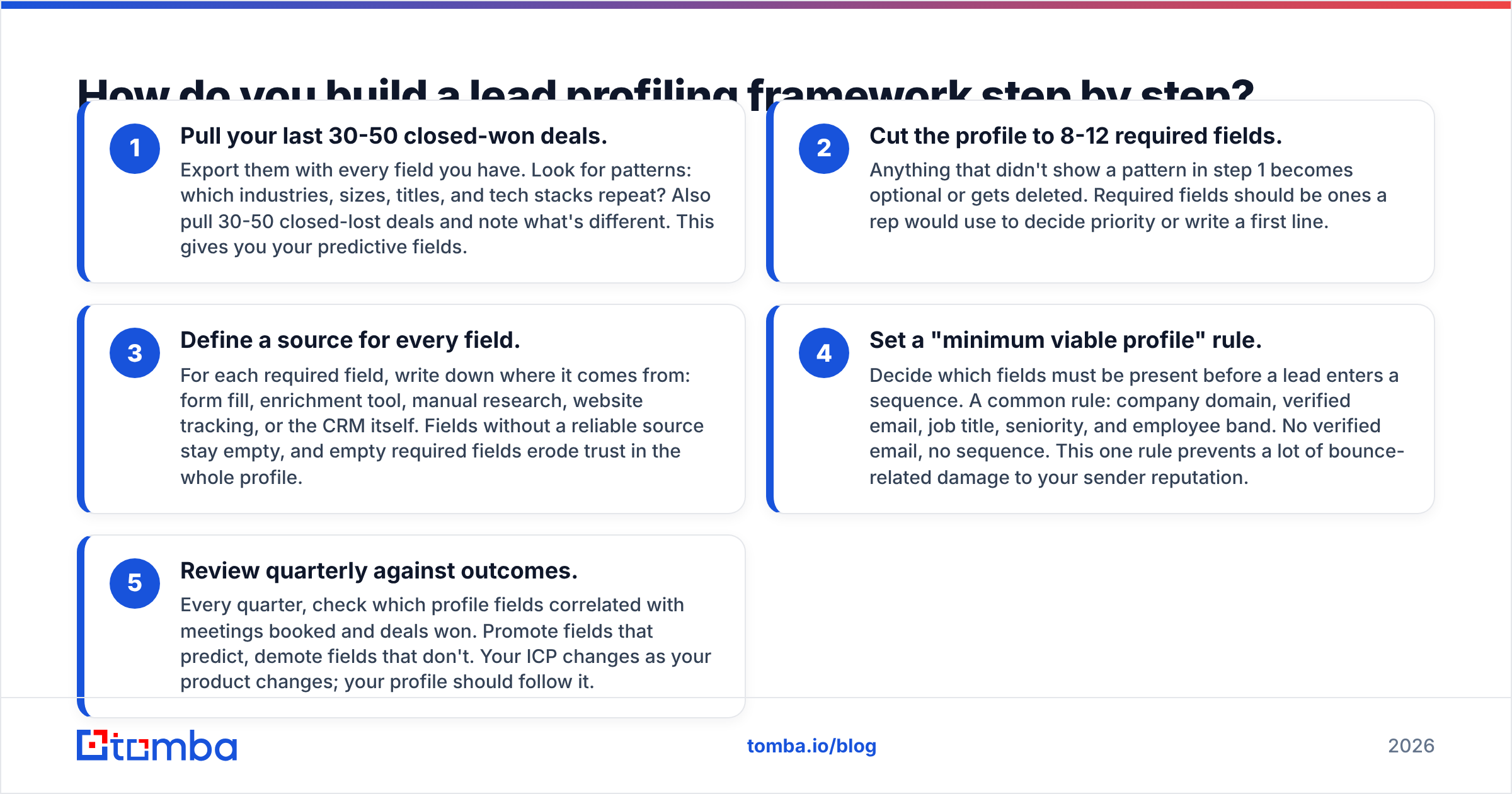
Here is a five-step framework that works for SDR teams of any size. It's deliberately simple, because a framework your reps actually follow beats a sophisticated one they skip.
Pull your last 30-50 closed-won deals. Export them with every field you have. Look for patterns: which industries, sizes, titles, and tech stacks repeat? Also pull 30-50 closed-lost deals and note what's different. This gives you your predictive fields.
Cut the profile to 8-12 required fields. Anything that didn't show a pattern in step 1 becomes optional or gets deleted. Required fields should be ones a rep would use to decide priority or write a first line.
Define a source for every field. For each required field, write down where it comes from: form fill, enrichment tool, manual research, website tracking, or the CRM itself. Fields without a reliable source stay empty, and empty required fields erode trust in the whole profile.
Set a "minimum viable profile" rule. Decide which fields must be present before a lead enters a sequence. A common rule: company domain, verified email, job title, seniority, and employee band. No verified email, no sequence. This one rule prevents a lot of bounce-related damage to your sender reputation.
Review quarterly against outcomes. Every quarter, check which profile fields correlated with meetings booked and deals won. Promote fields that predict, demote fields that don't. Your ICP changes as your product changes; your profile should follow it.
The step teams skip most often is step 3. They define the fields but not the sources. Then reps spend 15 minutes per lead Googling revenue figures that don't change what they do next.
Where does lead profiling data come from?#
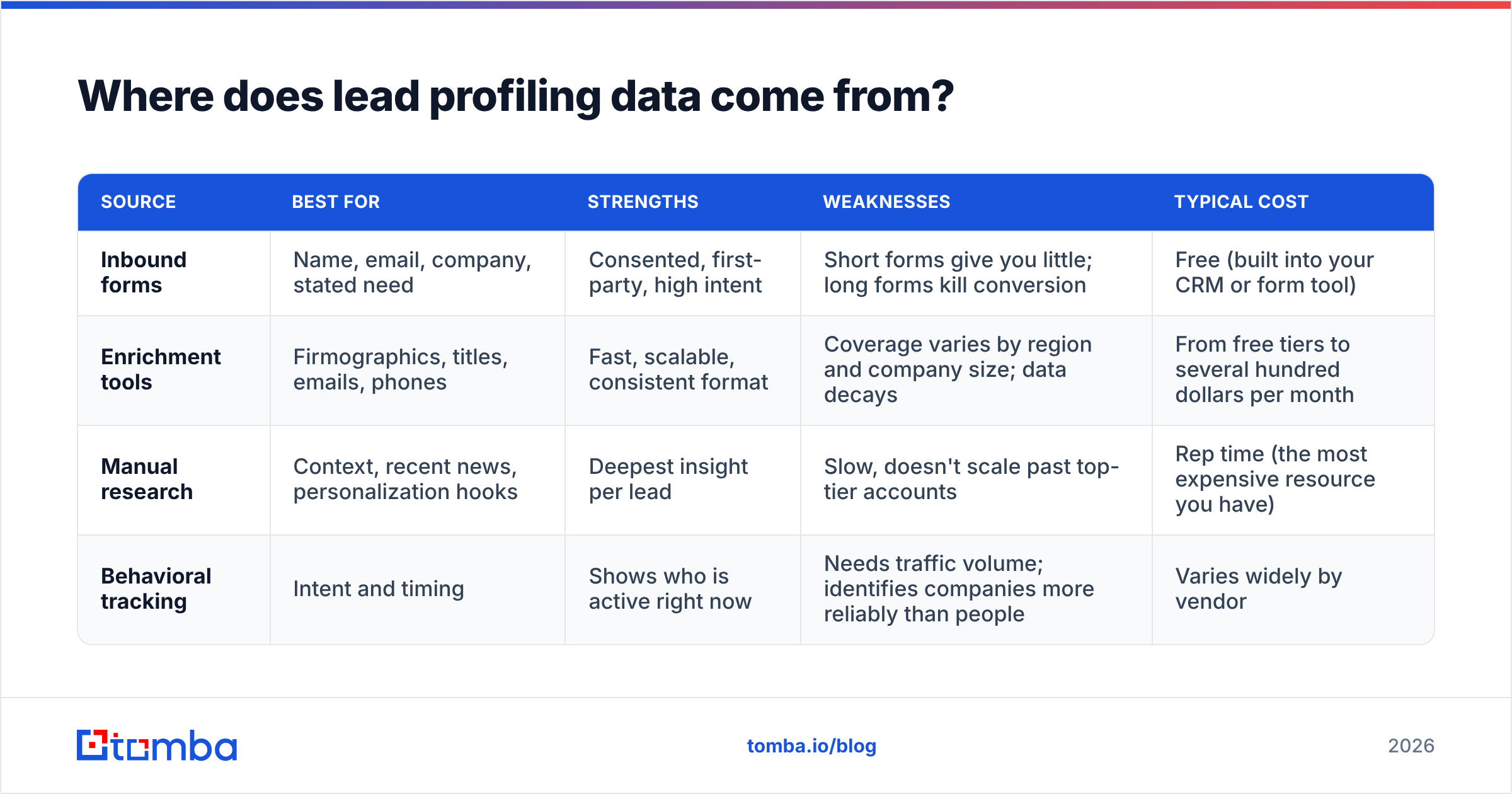
You have four realistic sources, and most teams use a mix of them.
| Source | Best for | Strengths | Weaknesses | Typical cost |
|---|---|---|---|---|
| Inbound forms | Name, email, company, stated need | Consented, first-party, high intent | Short forms give you little; long forms kill conversion | Free (built into your CRM or form tool) |
| Enrichment tools | Firmographics, titles, emails, phones | Fast, scalable, consistent format | Coverage varies by region and company size; data decays | From free tiers to several hundred dollars per month |
| Manual research | Context, recent news, personalization hooks | Deepest insight per lead | Slow, doesn't scale past top-tier accounts | Rep time (the most expensive resource you have) |
| Behavioral tracking | Intent and timing | Shows who is active right now | Needs traffic volume; identifies companies more reliably than people | Varies widely by vendor |
The practical pattern is to automate Layers 1-3 with enrichment, use behavioral data for Layer 4, and save manual research for your highest-value accounts only.
When you're picking an enrichment source, test it on your own leads instead of trusting vendor coverage claims. Take 100 leads you already know well, run them through the tool, and count how many fields come back correct. Independent review sites like G2 are useful for shortlisting, but your own test set is the only accuracy number that matters for your market.
Tomba's data enrichment covers the firmographic and contact layers from a domain or email. Tools like Apollo, ZoomInfo, Clearbit (now part of HubSpot), and BookYourData also cover these layers, each with different strengths by region and segment. Which one fits depends on where your buyers are and how much you need phone data versus email data.
Why do most lead profiles fail?#
After watching a lot of SDR teams build profiling processes, the same four failure patterns keep showing up.
Too many fields. When a profile has 50 fields, reps stop reading it. They go straight to LinkedIn and start over. The profile becomes a data-entry chore instead of a decision tool.
Stale data. B2B contact data decays constantly: people change jobs, companies get acquired, email domains change. A profile that was accurate six months ago may now point at someone who left. Re-verify contact fields before any new sequence, not just at import.
No verified contact route. This is the most expensive failure. A rep builds a perfect profile, writes a personalized email, and it bounces. If your profile doesn't include a verified email, it isn't finished. Run addresses through an email verifier before they enter a sequence, and treat "unknown" or catch-all results as a separate bucket rather than a pass.
Profiles disconnected from action. If nothing in your process changes based on a profile field, that field is decoration. Every required field should map to a routing rule, a sequence choice, a score adjustment, or a personalization line.

How should lead profiling feed your CRM and scoring model?#
Your profile is only useful if it lives where reps work. For most teams that means the CRM, with fields mapped cleanly and enrichment running on create.
A clean setup looks like this:
- Enrich on create. When a lead enters the CRM (form fill, import, or rep-added), enrichment runs automatically and fills Layers 1-3.
- Verify before sequence. A workflow checks email validity before the lead can be enrolled. Invalid emails get flagged, not sequenced.
- Score from profile fields. Your scoring model reads firmographic and seniority fields for fit, plus behavioral fields for timing. Keep fit and timing as separate scores, because a perfect-fit account that isn't active needs a different play than an active account that barely fits.
- Route by tier. A-tier leads go to senior reps or account executives. B-tier goes into sequences. C-tier goes to nurture.
- Log manual research in structured fields. If a rep finds a trigger event, it goes into a "trigger" field, not a free-text note nobody can report on.
HubSpot's documentation on lead scoring is a solid reference for how fit and engagement properties can be combined inside a CRM, even if you use a different platform.
Is manual or automated lead profiling better?#
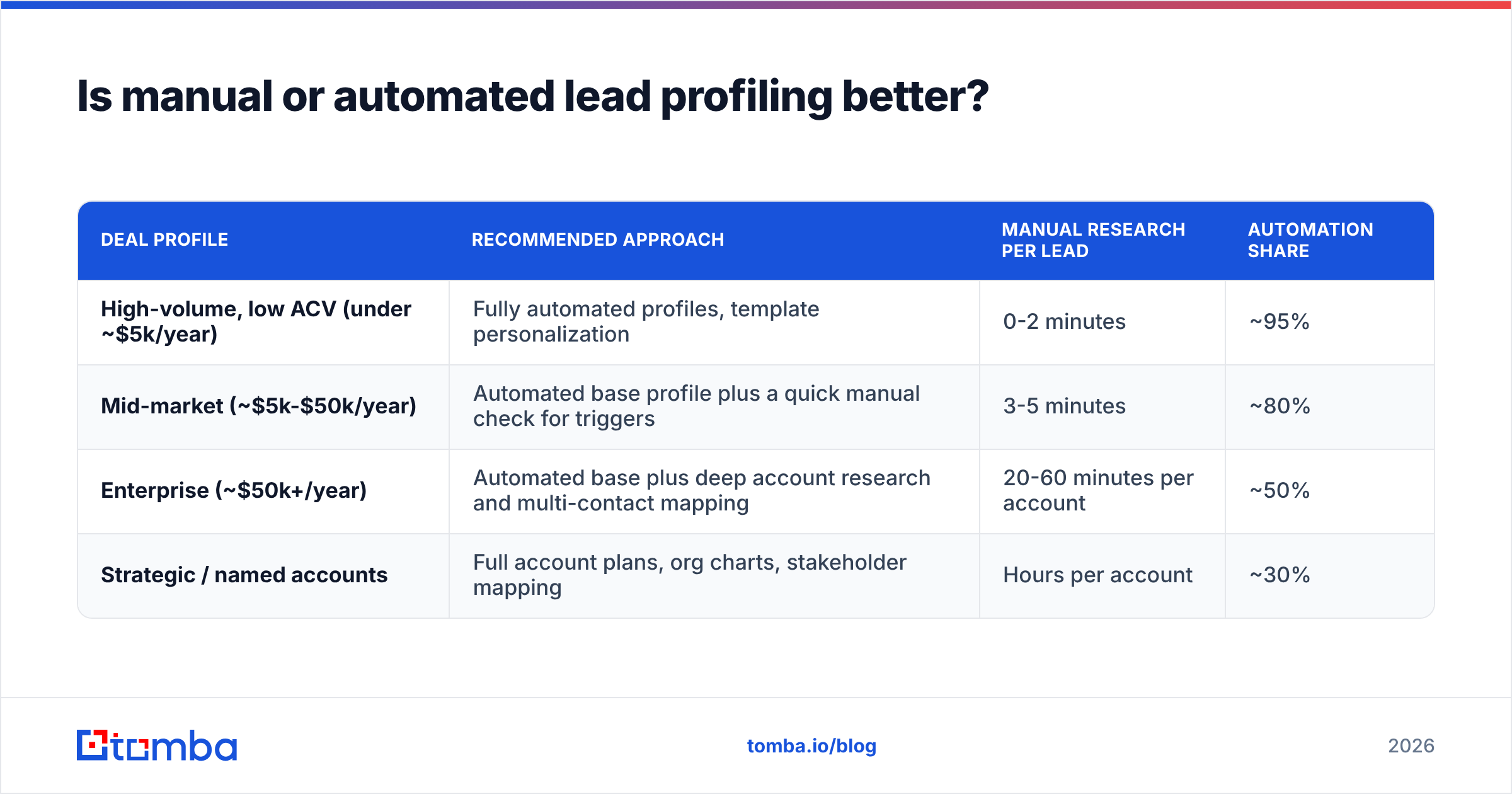
Neither wins outright. The right mix depends on deal size.
| Deal profile | Recommended approach | Manual research per lead | Automation share |
|---|---|---|---|
| High-volume, low ACV (under ~$5k/year) | Fully automated profiles, template personalization | 0-2 minutes | ~95% |
| Mid-market (~$5k-$50k/year) | Automated base profile plus a quick manual check for triggers | 3-5 minutes | ~80% |
| Enterprise (~$50k+/year) | Automated base plus deep account research and multi-contact mapping | 20-60 minutes per account | ~50% |
| Strategic / named accounts | Full account plans, org charts, stakeholder mapping | Hours per account | ~30% |
The logic is simple: rep time is expensive, so spend it where one deal justifies it. For high-volume motions, the profile's job is to route and personalize at scale. For enterprise, the profile's job is to give the rep a head start before the deep research.
Whatever your motion, automate the parts that are the same for every lead: company data, titles, email discovery, and verification. Nobody should be manually hunting for an email address in 2026 when an email finder can return a verified address from a name and a domain in seconds.
What does a good lead profile look like in practice?#
Here is an example of a concise, decision-ready profile for a mid-market SaaS lead:
- Company: Northwind Logistics, freight software, 180 employees, HQ in Rotterdam
- Contact: Head of Revenue Operations, director level, reports to CRO
- Email: verified, business domain
- Tech stack: Salesforce, Outreach, Snowflake
- Trigger: hiring two SDRs and a RevOps analyst in the last 30 days
- Engagement: visited pricing page twice this week
- Fit score: A (industry, size, and stack all match closed-won pattern)
- Timing score: High (hiring + pricing visits)
- Next action: AE call within 24 hours, reference the SDR hiring as the opener
That's nine fields. A rep can read it in 20 seconds and knows exactly what to do. Compare that with a 50-field record where half the values are blank and the other half are outdated, and the difference in rep productivity is obvious.
Research from Gartner has repeatedly pointed out that B2B buyers spend only a small share of their buying journey talking to vendors. That makes the moments you do get more valuable, and a sharp profile is how you make the first one count.
How do you keep lead profiles accurate over time?#
Profiles decay, so build maintenance into the process instead of treating it as a cleanup project.
- Re-verify emails before every new sequence, not just at import. A 90-day-old address is a risk.
- Watch for job changes. When a champion moves companies, that's both a lost contact and a new opportunity at their new employer.
- Re-enrich accounts on a schedule. Quarterly for active pipeline, twice a year for the wider database.
- Deduplicate regularly. Duplicate records split engagement history and break scoring.
- Archive, don't hoard. Leads that bounced, unsubscribed, or clearly don't fit should leave active views so they stop distorting your metrics.
The goal is a database your reps trust. Once they stop trusting it, they rebuild profiles by hand, and you've lost the efficiency that justified the process in the first place.
Where should you start?#
If you do only one thing after reading this, cut your lead profile to the 8-12 fields that show up in your closed-won deals, and make "verified email" a hard requirement before any lead enters a sequence. That single change fixes the two most common failures at once: bloated profiles and unreachable contacts.
For the contact layer specifically, the Tomba Email Finder takes a name and company domain and returns a professional email address with a confidence score, so every profile you build has a working way to reach the person. It runs from the web app, a browser extension, Google Sheets, or the API, and it plugs into HubSpot, Salesforce, and Pipedrive. You can test it on the free tier (25 searches a month) before committing, and paid plans start at $49/month on Tomba pricing.
Related guides#
// get started
Find, verify and enrich your first contacts today
Start on the free plan with 25 searches a month, then scale when your team is ready.
Free plan · No credit card required · GDPR & CCPA
// about the author