Lead Prospecting in 2026: A Practical Playbook That Books Meetings
Most lead prospecting fails before the first email goes out, because of a vague ICP, stale data or no trigger. Here is a 7-step system, a channel comparison and the tools that fit each stage.
TL;DR
- Lead prospecting means finding and qualifying the people most likely to buy, before you contact them. It is research first and outreach second.
- Most prospecting fails upstream. The usual causes are a vague ideal customer profile (ICP), stale contact data and no reason to reach out now.
- The 7-step system below goes from ICP to trigger signals, account lists, the right contacts, verified data, multichannel outreach and a review loop.
- Keep bounce rates under about 2% and write a first line that could only be sent to that one person. Those two habits do more than any single tool.
- Match tools to stages: a database for account discovery, an email finder and verifier for contact data, and a sequencer for outreach.
What is lead prospecting?#
Lead prospecting is the work of finding potential buyers who fit your ideal customer profile, checking that they could plausibly buy, and getting accurate contact details for them so a rep can start a conversation.
It sits between marketing-generated demand and a sales-qualified opportunity. Inbound leads come to you. Prospecting is how you go and find the accounts that have not raised their hand yet but should be talking to you.
It helps to separate three terms that often get mixed up:
- Lead generation covers every way you create interest: content, ads, events, referrals.
- Lead prospecting is the outbound research: who to target, why now, and how to reach them.
- Lead qualification filters the people who respond, often using frameworks like BANT or MEDDICC.
You can run lead generation without prospecting. You can't run outbound without it.
Why does lead prospecting fail for most teams?#
Reps rarely fail at prospecting because they send too few emails. They fail because the inputs are bad. Watch for three problems:
- The ICP is a demographic, not a hypothesis. "SaaS companies with 50–500 employees" describes tens of thousands of accounts and tells a rep nothing about pain or timing.
- The data is stale. B2B contact data decays fast because people change jobs, companies rebrand and domains move. If you send to a list that was accurate last year, you get bounces, and bounces damage your email deliverability.
- There's no trigger. Without a reason to reach out this week, such as a funding round, a new hire, a tech-stack change or an expansion, your email is an interruption instead of something the reader finds relevant.
Each step of the system below fixes one of these problems.
What is the 7-step lead prospecting process?#
The process runs in order, and each step feeds the next. If you skip one, the problem shows up later as low reply rates.
- Define an ICP you can test. Write it as a hypothesis: "Series A–C B2B SaaS companies hiring their first RevOps lead, running HubSpot, with 3+ SDRs." Every clause should be something you can filter or check.
- Pick 2–3 trigger signals. Choose events that raise buying intent for your product, such as new leadership, job postings, funding, a tech install or removal, or a regulatory change.
- Build the account list. Pull the companies that match both the ICP and a live trigger. Start with 100–300 accounts, not 5,000.
- Map the buying committee. Find 2–4 relevant roles per account: the economic buyer, the day-to-day user and the champion. Titles differ between companies, so search by function as well as exact title.
- Find and verify contact data. Get work emails (and phone numbers where you call), then verify every address before it goes into a sequence.
- Run personalized multichannel outreach. Combine email, LinkedIn and phone over 2–3 weeks. Lead with the trigger and keep the first line specific to the person.
- Review and refine weekly. Track reply rate by segment and trigger. Drop the triggers that don't convert and double down on the ones that do.
Step 1–2: ICP and triggers in practice#
A useful test is whether a new SDR could read your ICP and build the same list you would. If not, it's too vague. Pair it with triggers you can actually observe. A job post for "Head of Revenue Operations" is observable. "Struggling with pipeline visibility" isn't, until you connect it to a public signal.
Step 3–4: From accounts to people#
Account-first prospecting is almost always more efficient than contact-first. Once you have a target account, a domain search returns the publicly known email addresses at that company along with their roles. That makes mapping the buying committee a quick filter instead of an afternoon of LinkedIn scrolling. Tools like LinkedIn Sales Navigator help you confirm titles, reporting lines and recent moves.
Step 5: Data you can actually send to#
This is where most teams cut corners. Run each named prospect through an email finder, then through an email verifier before you import them. Treat catch-all domains, which accept every address, as a separate risk tier. Send to them in smaller volumes, or confirm them with a second signal first.
Which lead prospecting channels work best in 2026?#
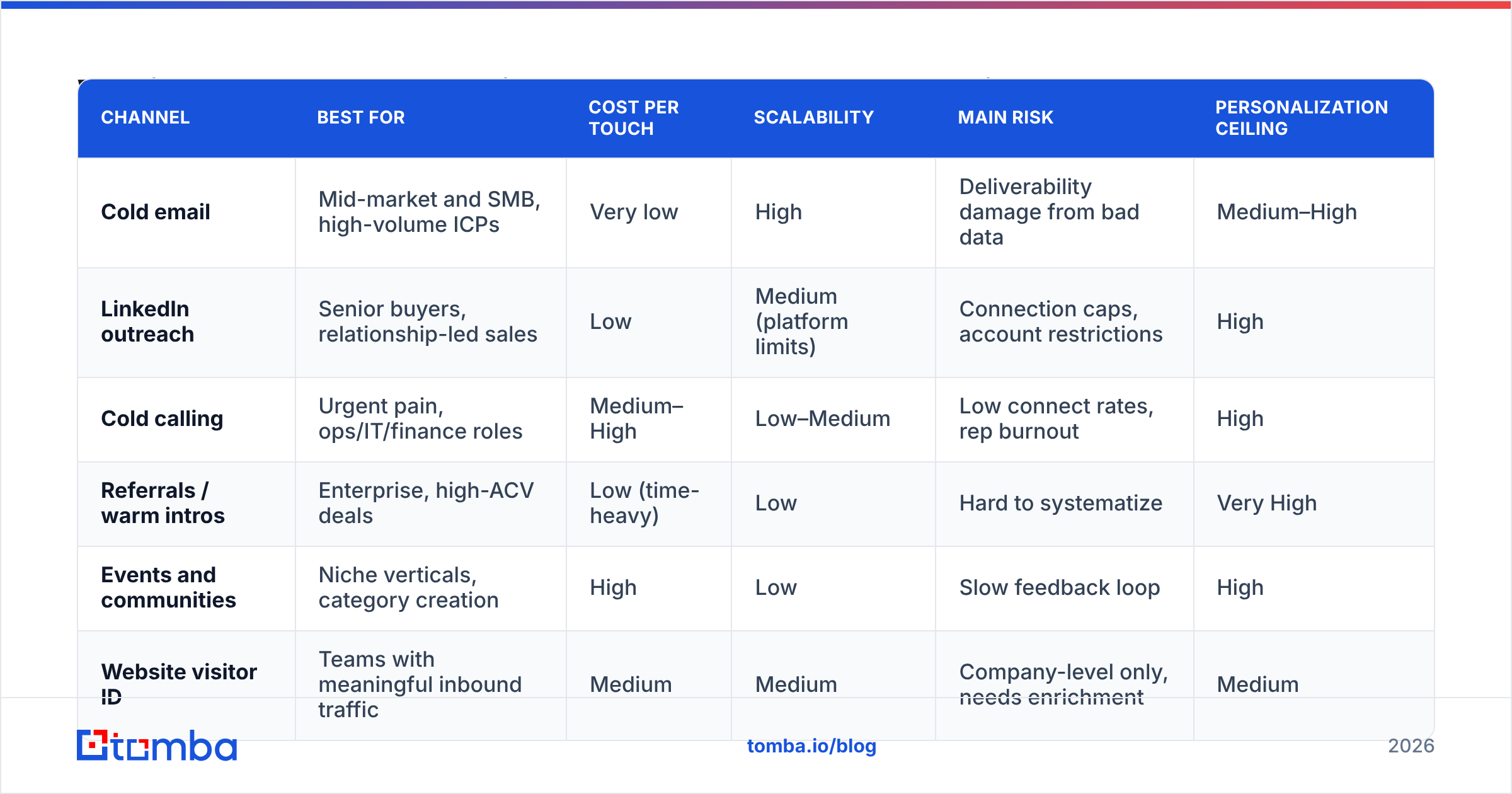
No single channel wins everywhere. What works depends on your average deal size, how senior your buyer is and how many touches you can afford. The comparison below reflects common patterns across B2B teams, not guarantees.
| Channel | Best for | Cost per touch | Scalability | Main risk | Personalization ceiling |
|---|---|---|---|---|---|
| Cold email | Mid-market and SMB, high-volume ICPs | Very low | High | Deliverability damage from bad data | Medium–High |
| LinkedIn outreach | Senior buyers, relationship-led sales | Low | Medium (platform limits) | Connection caps, account restrictions | High |
| Cold calling | Urgent pain, ops/IT/finance roles | Medium–High | Low–Medium | Low connect rates, rep burnout | High |
| Referrals / warm intros | Enterprise, high-ACV deals | Low (time-heavy) | Low | Hard to systematize | Very High |
| Events and communities | Niche verticals, category creation | High | Low | Slow feedback loop | High |
| Website visitor ID | Teams with meaningful inbound traffic | Medium | Medium | Company-level only, needs enrichment | Medium |
In practice, the strongest outbound programs use cold email as the backbone and add LinkedIn outreach and phone for their top-tier accounts. For a deeper look at how each channel fits into a full sales motion, HubSpot's sales resources are a solid, vendor-agnostic starting point.
What tools do you need for lead prospecting?#
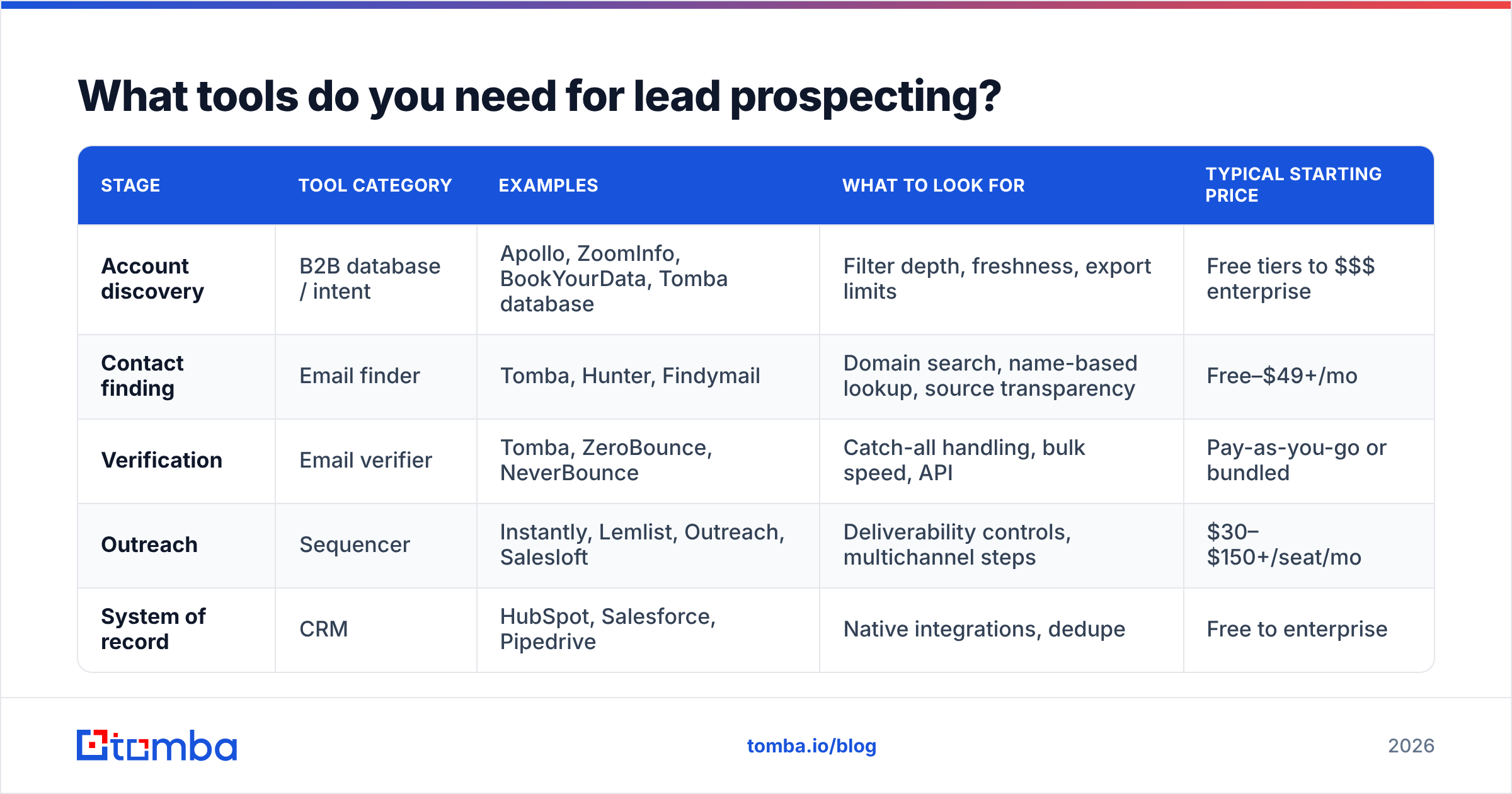
You don't need a 12-tool stack. You need one tool per job, and the tools need to pass data cleanly to each other. Here's how the categories break down:
| Stage | Tool category | Examples | What to look for | Typical starting price |
|---|---|---|---|---|
| Account discovery | B2B database / intent | Apollo, ZoomInfo, BookYourData, Tomba database | Filter depth, freshness, export limits | Free tiers to $$$ enterprise |
| Contact finding | Email finder | Tomba, Hunter, Findymail | Domain search, name-based lookup, source transparency | Free–$49+/mo |
| Verification | Email verifier | Tomba, ZeroBounce, NeverBounce | Catch-all handling, bulk speed, API | Pay-as-you-go or bundled |
| Outreach | Sequencer | Instantly, Lemlist, Outreach, Salesloft | Deliverability controls, multichannel steps | $30–$150+/seat/mo |
| System of record | CRM | HubSpot, Salesforce, Pipedrive | Native integrations, dedupe | Free to enterprise |
Some things to know when choosing:
- All-in-one platforms such as Apollo bundle a database and a sequencer. They're convenient, but the data depth varies by region and industry. Always spot-check a sample before you commit.
- List providers such as BookYourData are useful for pre-built, filterable contact lists when you need volume in a defined segment quickly. Verify anything you import, as you would with any source.
- Specialist email finders tend to win on accuracy for named prospects, because finding and verifying an address is their core product. Tomba covers finding, domain search and verification in one place, with a free tier of 25 searches a month and paid plans from $49/mo. See Tomba pricing for tier details.
- Review sites such as G2 are worth checking for recent user complaints about data quality in your specific market before you buy annual contracts.
How do you personalize prospecting at scale without sounding robotic?#
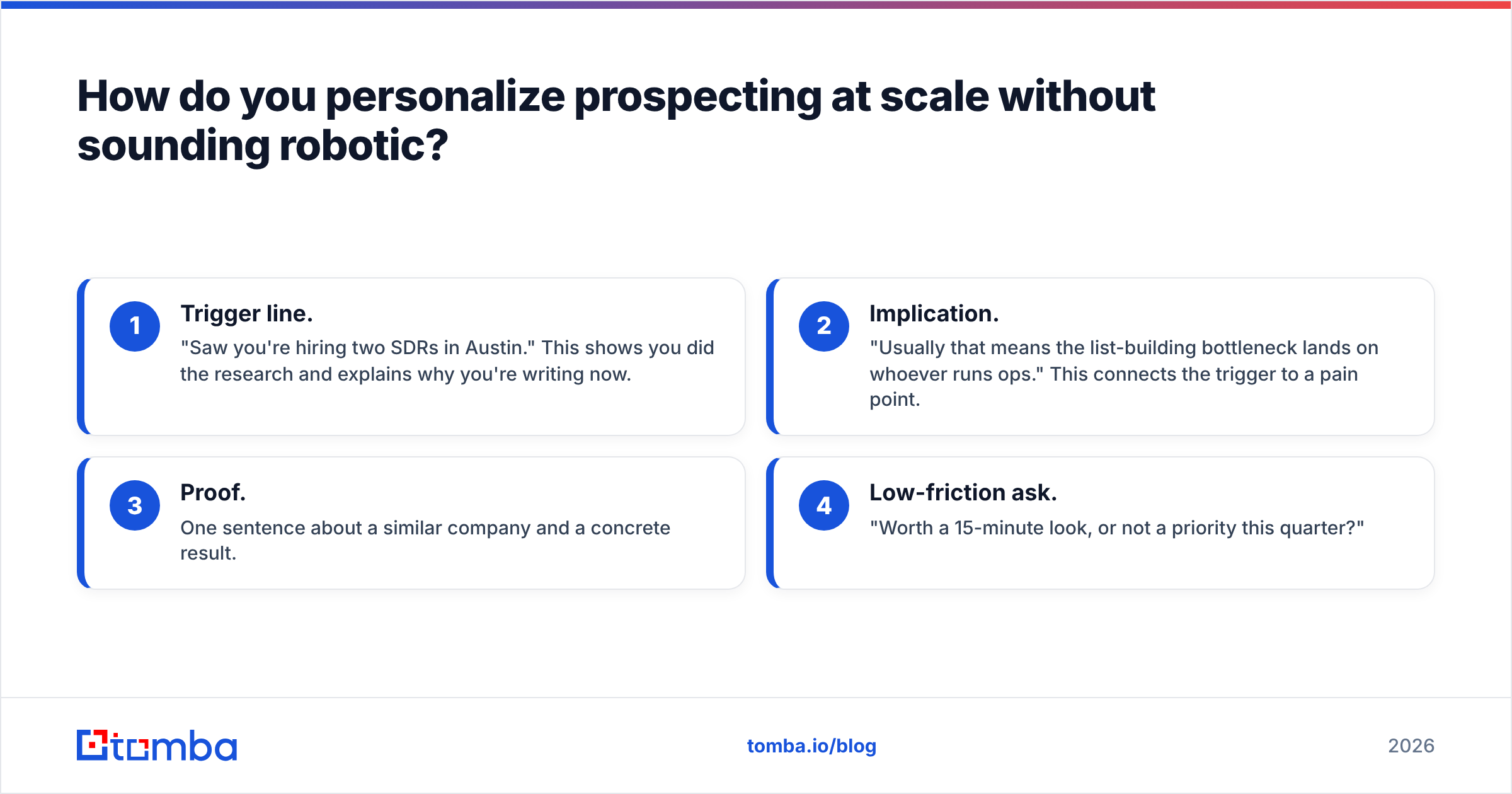
Personalizing at scale means putting relevant context in front of the reader. Mentioning their alma mater doesn't count. A reliable structure:
- Trigger line. "Saw you're hiring two SDRs in Austin." This shows you did the research and explains why you're writing now.
- Implication. "Usually that means the list-building bottleneck lands on whoever runs ops." This connects the trigger to a pain point.
- Proof. One sentence about a similar company and a concrete result.
- Low-friction ask. "Worth a 15-minute look, or not a priority this quarter?"
Keep it under 100 words. Put your effort into the first two lines. Everything else can be templated by segment.
A useful trick is to personalize by segment first and by individual second. If every account in a batch shares the same trigger, 80% of the message can be shared. The last 20% (one specific detail) is what makes it read as written by a human.
What metrics should you track for lead prospecting?#
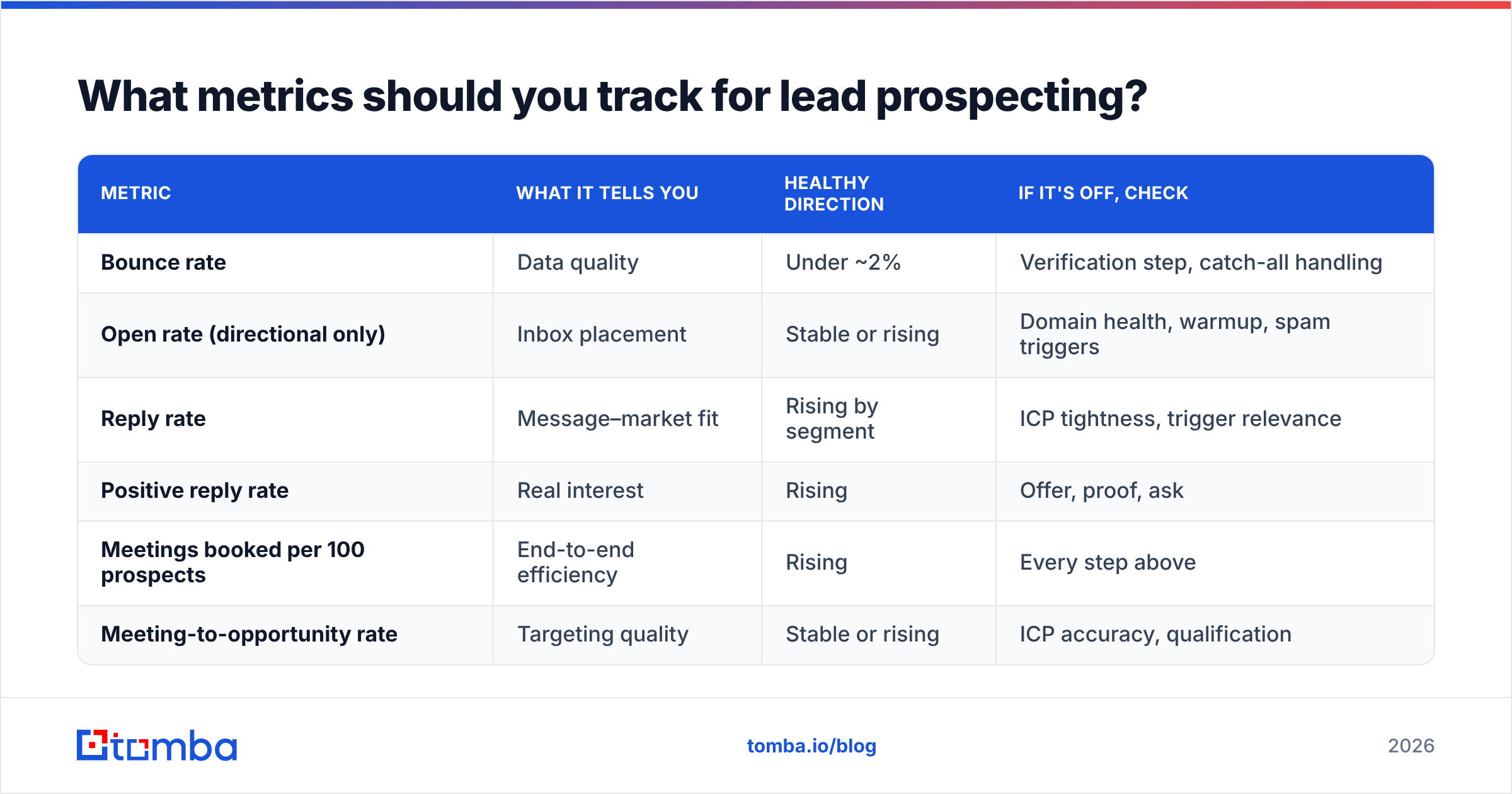
Track fewer metrics, but break each one down by segment and trigger so you can see what's working.
| Metric | What it tells you | Healthy direction | If it's off, check |
|---|---|---|---|
| Bounce rate | Data quality | Under ~2% | Verification step, catch-all handling |
| Open rate (directional only) | Inbox placement | Stable or rising | Domain health, warmup, spam triggers |
| Reply rate | Message–market fit | Rising by segment | ICP tightness, trigger relevance |
| Positive reply rate | Real interest | Rising | Offer, proof, ask |
| Meetings booked per 100 prospects | End-to-end efficiency | Rising | Every step above |
| Meeting-to-opportunity rate | Targeting quality | Stable or rising | ICP accuracy, qualification |
Open rates have become unreliable because of privacy features in major mail clients, so treat them as a rough directional signal only. Reply rate and meetings per 100 prospects are the numbers that tell you whether your prospecting works.
How much time should reps spend on lead prospecting?#
It depends on the role. A common pattern:
- SDRs/BDRs spend most of the day on prospecting, split roughly between research and list building on one side and outreach on the other.
- Full-cycle AEs usually protect a fixed block each day, often 60–90 minutes, so the pipeline doesn't dry up while they're closing.
- Founders doing founder-led sales should batch research weekly and send daily, so they don't switch contexts all the time.
The main lever is automating the research, not the conversations. Automate list pulls, email finding, verification and CRM syncing. Keep humans on picking triggers, writing first lines and taking calls. Analyst firms like Gartner have repeatedly noted that sellers spend a large share of their time on non-selling tasks. Prospecting research is one of the best places to take that time back.
What are the most common lead prospecting mistakes?#
- Buying a big list and blasting it. You'll burn a domain faster than you'll book meetings.
- Skipping verification to save credits. A 10% bounce rate costs far more in lost sender reputation than verification ever costs.
- Contacting one person per account. Buying committees are multi-threaded. If your one contact ignores you, the account goes cold.
- Personalizing the wrong things. "Loved your post" with no connection to your offer reads as filler.
- Never pruning. If a trigger or segment has produced zero positive replies after about 200 touches, retire it.
- Leaving data outside the CRM. Prospects kept in spreadsheets end up duplicated, contacted twice and eventually lost.
Is lead prospecting still worth it with AI and intent data?#
Yes. AI and intent data change how you prospect, not whether you prospect.
AI is good at the repetitive parts: summarizing a company's recent news, drafting a first-line variant or classifying replies. Intent data is good at narrowing which accounts are in-market. Neither one fixes a bad ICP or a list full of invalid addresses. If anything, AI raises the bar. Buyers now get more generic "personalized" email than ever, so messages that are genuinely relevant and land in the inbox stand out more.
The teams that do well in 2026 treat prospecting as a data problem first. They use tight targeting, clear triggers and verified contacts, then let humans do the parts that need judgment.
Where should you start this week?#
If you only have time for one improvement, fix your data layer. Take your current target list and run it through verification. Look at how many addresses are invalid or risky, and remove them before your next send. Then write a one-sentence ICP hypothesis and pick a single trigger to test with 100 accounts.
When you're ready to build that list properly, Tomba Email Finder lets you find professional email addresses by domain, name or company. It verifies them in the same workflow, so every prospect that enters your sequence is someone you can actually reach. You can start on the free tier with 25 searches a month and upgrade only once the process is booking meetings.
Related guides#
// get started
Find, verify and enrich your first contacts today
Start on the free plan with 25 searches a month, then scale when your team is ready.
Free plan · No credit card required · GDPR & CCPA
// about the author