Lead Providers: How to Choose the Right B2B Data Vendor in 2026
Most lead providers sell roughly the same promise: accurate contacts, fast. The real differences are in where their data comes from, how fresh it is, and how they charge you. Here's how to tell them apart.
TL;DR
- Lead providers come in five main types: self-serve B2B databases, enterprise intelligence platforms, pay-per-lead marketplaces, done-for-you list builders, and build-your-own email-finding tools. Each one suits a different team size and motion.
- How fresh the data is and how it gets verified matter more than how big the database is. A 200M-contact database won't help you if a large share of those emails bounce.
- Pricing models vary a lot: per seat, per credit, per lead, or custom annual contracts. Work out your cost per verified, reachable contact, not your cost per record.
- Plenty of teams get the best results by combining a broad provider with an email finder and verifier they control.
- Before you sign anything longer than 30 days, run a 200-contact pilot and measure bounce rate, match rate, and how well the data fits your ideal customer profile (ICP).
What are lead providers?#
A lead provider is any company that sells you contact and company data on potential buyers. That usually means names, job titles, work emails, phone numbers, and firmographics. They're sometimes called B2B data vendors or lead generation companies. What they sell you is access: records you can filter, export, and load into your outreach tools.
In the broader lead generation world, "lead" can mean anything from an anonymous website visitor to a demo request. This guide covers outbound lead providers, the vendors that supply the contacts your SDRs and founders reach out to directly.
The category is crowded. Browse G2's lead generation category and you'll find hundreds of tools, most claiming "95%+ accuracy." Because those claims are nearly identical, you have to judge providers on things they can't easily fake: where the data comes from, how it's verified, how often it's refreshed, and what you actually pay for each usable contact.
What types of lead providers exist?#
This is the most important distinction in the whole guide. Most buying mistakes happen because a team picks the wrong type of provider, not the wrong brand.
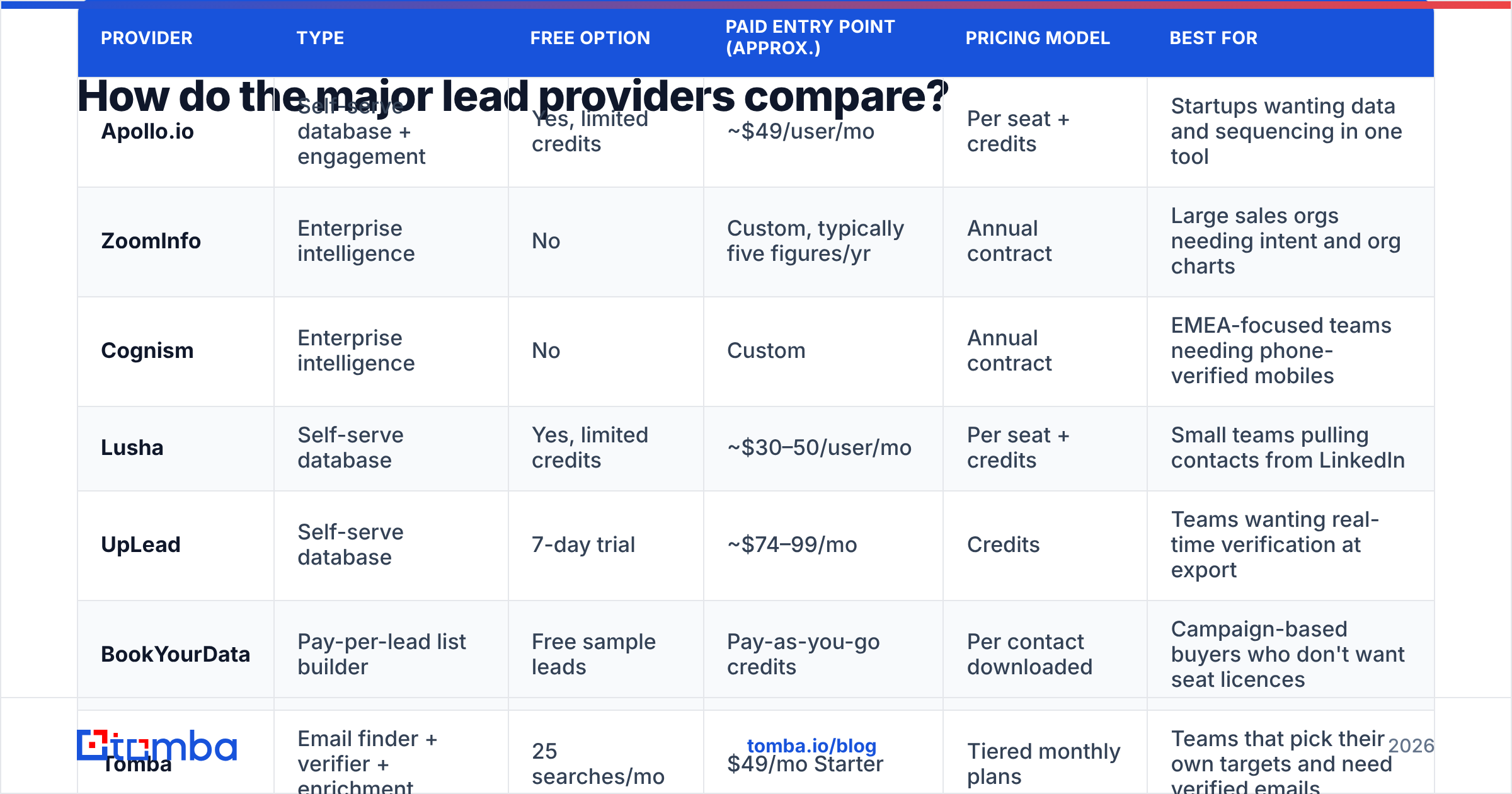
- Self-serve B2B databases. Large, searchable contact databases with filters for title, industry, headcount, and tech stack. Apollo, Lusha, and UpLead are typical. They're fast to start with and priced per seat or per credit. Accuracy varies by region and seniority.
- Enterprise intelligence platforms. ZoomInfo, Cognism, and similar vendors combine contact data with intent signals, org charts, and CRM enrichment. They're the most complete option and the most expensive, usually sold on annual contracts after a sales call.
- Pay-per-lead and list marketplaces. Providers such as BookYourData let you build a targeted list and pay only for the contacts you download, with no seat licence. This works well for teams that run campaigns in bursts rather than prospecting every day.
- Done-for-you list building services. Agencies and freelance researchers build custom lists by hand to your spec. This is useful for niche verticals where databases have poor coverage, but it's slow and gets expensive at volume.
- Build-your-own email finding tools. Tools like Tomba, Hunter, and Findymail don't sell you a pre-built list. They find and verify the email for the specific people and companies you have already chosen, using domain patterns, public sources, and SMTP checks.
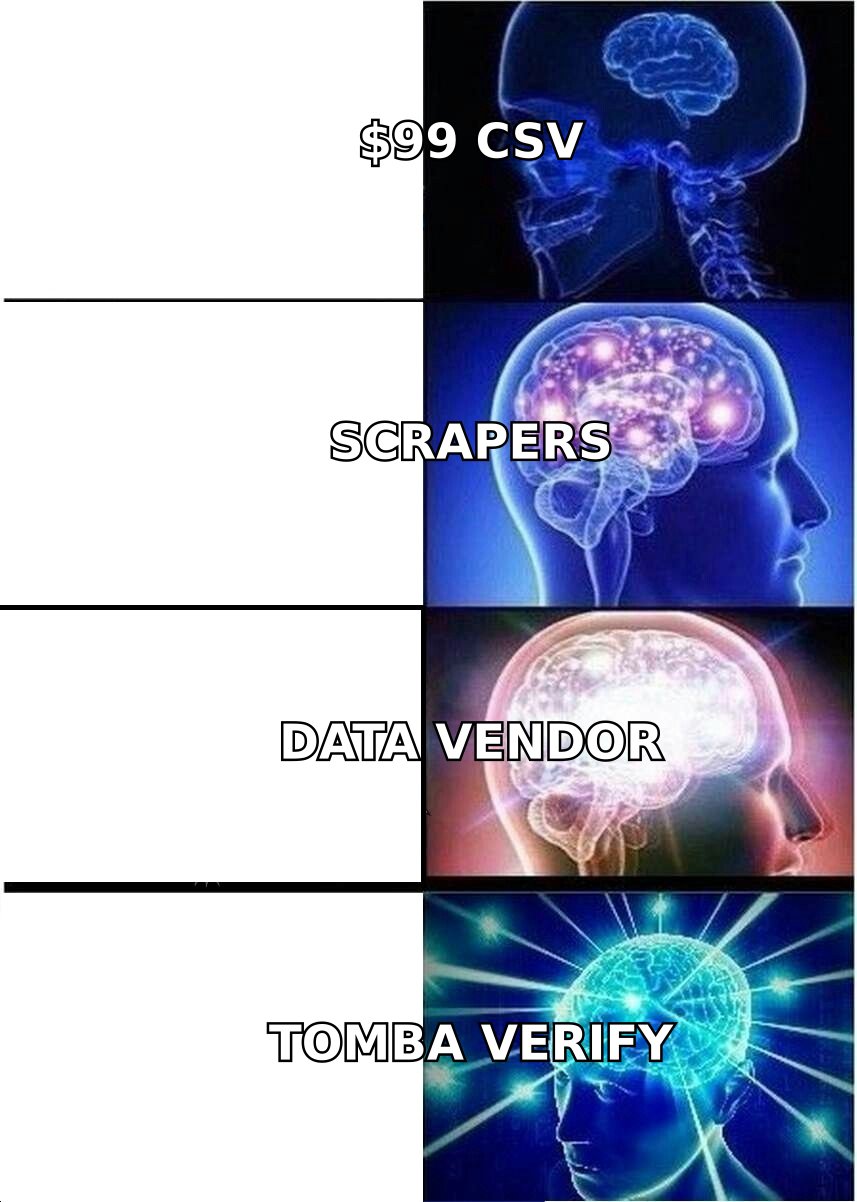
Most mature outbound teams use at least two of these. A common setup is a database for discovery (finding who to target) plus an email finder and verifier for contact accuracy (making sure you can reach them).
How do the major lead providers compare?#
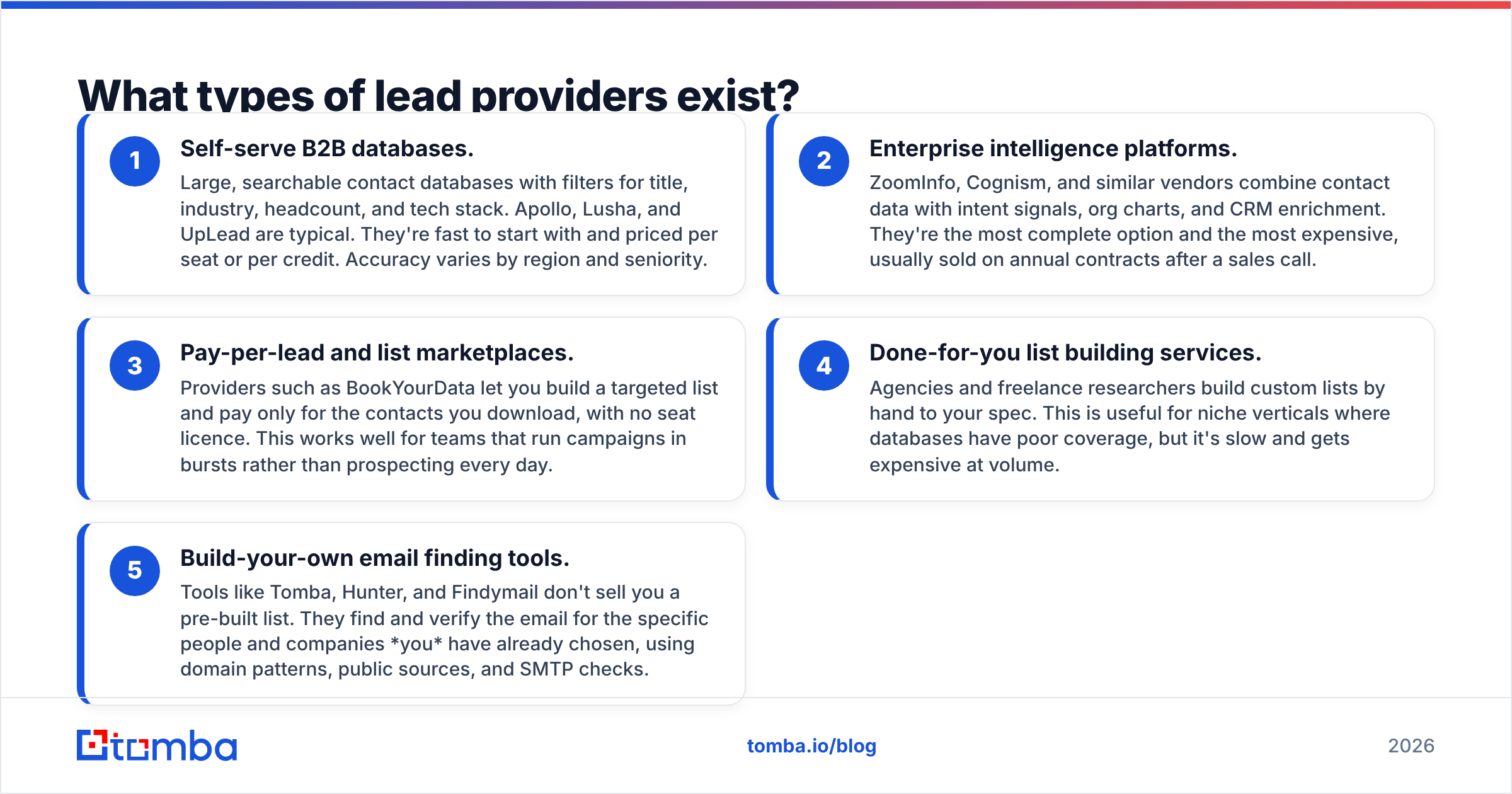
The table below compares widely used providers on the attributes that matter most when you buy. Pricing changes often, so treat these figures as approximate starting points and check each vendor's pricing page before you commit.
| Provider | Type | Free option | Paid entry point (approx.) | Pricing model | Best for |
|---|---|---|---|---|---|
| Apollo.io | Self-serve database + engagement | Yes, limited credits | ~$49/user/mo | Per seat + credits | Startups wanting data and sequencing in one tool |
| ZoomInfo | Enterprise intelligence | No | Custom, typically five figures/yr | Annual contract | Large sales orgs needing intent and org charts |
| Cognism | Enterprise intelligence | No | Custom | Annual contract | EMEA-focused teams needing phone-verified mobiles |
| Lusha | Self-serve database | Yes, limited credits | ~$30–50/user/mo | Per seat + credits | Small teams pulling contacts from LinkedIn |
| UpLead | Self-serve database | 7-day trial | ~$74–99/mo | Credits | Teams wanting real-time verification at export |
| BookYourData | Pay-per-lead list builder | Free sample leads | Pay-as-you-go credits | Per contact downloaded | Campaign-based buyers who don't want seat licences |
| Tomba | Email finder + verifier + enrichment | 25 searches/mo | $49/mo Starter | Tiered monthly plans | Teams that pick their own targets and need verified emails |
| Custom research agency | Done-for-you | No | Per project | Per list / hourly | Niche verticals with thin database coverage |
Two patterns stand out. Enterprise platforms give you the most context, such as intent data, technographics, and org charts, but they lock you into annual spend before you've proved ROI. Self-serve and pay-per-lead options let you test cheaply, though you'll need to bring your own verification discipline.
How do lead providers get their data?#
This question tells you more about data quality than any accuracy percentage on a landing page. Ask every vendor directly. Their answer will usually combine these sources:
- Public web crawling. Company websites, press releases, author bylines, and public profiles. It has broad coverage, but it goes stale unless it's re-crawled often.
- Contributory networks. Users of a browser extension or email plugin share contact data from their inboxes, usually with consent terms. This is powerful for coverage and raises compliance questions you should understand before you buy.
- Human research teams. Researchers manually check titles and phone numbers. It's accurate and costly, which is why it's common in enterprise tiers.
- Pattern inference plus SMTP verification. The provider works out the likely email format for a domain (for example,
first.last@company.com) and then checks deliverability against the mail server. This is the core method behind domain search and email-finder tools. - Third-party licensing. Many smaller providers resell or blend data from bigger upstream sources. There's nothing wrong with that, but it means two "different" vendors can hand you the same stale record.
B2B contact data decays constantly. People change jobs, companies rebrand domains, and mailboxes get shut down. Industry estimates commonly put annual decay somewhere between 20% and 30%. A vendor's database size tells you nothing unless you also know when each record was last verified.
Is a bigger database better than a more accurate one?#
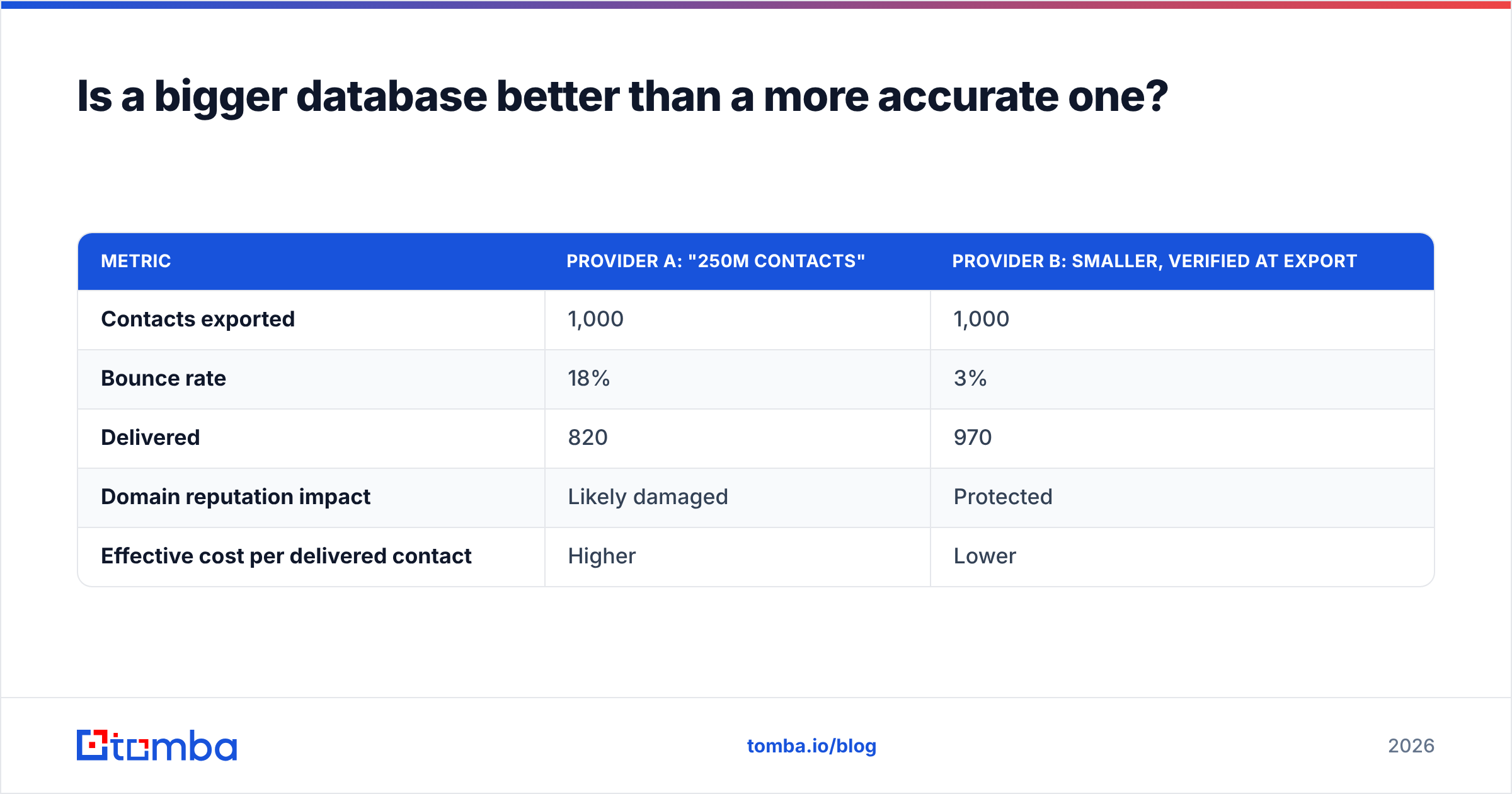
No, at least not for outbound email. Database size matters when you're in the discovery phase and trying to map a whole market. Once you start sending, the only number that counts is how many contacts actually receive your message.
Compare two scenarios:
| Metric | Provider A: "250M contacts" | Provider B: smaller, verified at export |
|---|---|---|
| Contacts exported | 1,000 | 1,000 |
| Bounce rate | 18% | 3% |
| Delivered | 820 | 970 |
| Domain reputation impact | Likely damaged | Protected |
| Effective cost per delivered contact | Higher | Lower |
A bounce rate in the high teens does more than waste credits. It hurts your email deliverability across your whole sending domain, which means your good contacts start landing in spam too. That's why many teams run every exported list through an email verifier before it goes near a sequencer, whichever provider it came from.
Catch-all domains are the other hidden trap. On those domains the mail server accepts every address, so a basic SMTP check reports "valid" even when the mailbox doesn't exist. Ask your provider how they label catch-all results. "Valid" and "accept-all" are very different risk categories.
How much do lead providers actually cost?#
List price is only a small part of the cost. Here's what to model before you compare vendors:
- Seat vs. credit economics. A per-seat tool with "unlimited" searches often caps exports or email reveals. A credit-based tool charges per reveal. If three reps each need 500 contacts a month, calculate both models.
- Annual lock-in. Enterprise contracts usually require 12-month commitments, often with auto-renewal clauses and notice windows. If you miss the cancellation window, you've paid for another year.
- Credit expiry. Some monthly plans reset unused credits. Pay-as-you-go models (common with list builders like BookYourData) usually suit irregular campaign schedules better.
- Re-verification costs. If your provider doesn't verify at export, you'll pay a verifier separately. Include that in your cost per contact.
- Enrichment add-ons. Phone numbers, intent data, and technographics are often extra credit multipliers or separate SKUs.
The number to calculate is cost per verified, in-ICP contact. Take total spend, then divide by the number of contacts that are (a) deliverable and (b) actually match your target profile. Vendors almost never show this figure. You'll have to work it out yourself during a pilot.

Are lead providers GDPR and CCPA compliant?#
Some are more careful than others, and in most jurisdictions the legal responsibility for how you use the data stays with you. Before you buy, ask:
- What lawful basis does the vendor rely on to process EU contact data? (Legitimate interest is common for B2B, but it needs a documented assessment.)
- Does the vendor honour opt-out and deletion requests, and do those requests propagate to customers who already exported the record?
- Where is the data stored, and is there a signed Data Processing Agreement available?
- Is contributory-network data collected with clear consent from the users who share it?
Enterprise vendors tend to have mature compliance documentation, because procurement teams demand it. With smaller providers, ask for their privacy policy and DPA up front. If a vendor can't explain where a record came from, don't send to it.
How do you evaluate a lead provider before signing?#
Run a structured pilot. Don't make the decision off a demo. A two-week test with a fixed sample tells you more than any sales deck will.
Step 1: Define a test segment. Pick 200 contacts that match your real ICP, such as "VP Marketing at 50–500 person SaaS companies in the US and UK." Use the same segment for every vendor you test.
Step 2: Measure match rate. How many of your target accounts does each provider actually have contacts for? Coverage gaps show up fast in niche industries and outside North America.
Step 3: Measure accuracy. Run exported emails through an independent verifier, then send a small warm-domain test. Record hard bounces. Spot-check 20 job titles against the company's own website to see whether the role data is still current.
Step 4: Measure ICP fit. Filters aren't perfect. Count how many returned contacts genuinely match your targeting. A "Head of Growth" at a 3-person agency isn't the same buyer as one at a 300-person SaaS company.
Step 5: Calculate true cost. Divide the pilot spend by verified, in-ICP contacts. This number decides the purchase.
Step 6: Test the workflow. Check whether it syncs cleanly with your CRM, whether it dedupes existing records, and whether reps can use the browser extension without friction. A slightly less accurate tool that people actually use can beat a perfect one nobody opens.
Should you use one lead provider or combine several?#
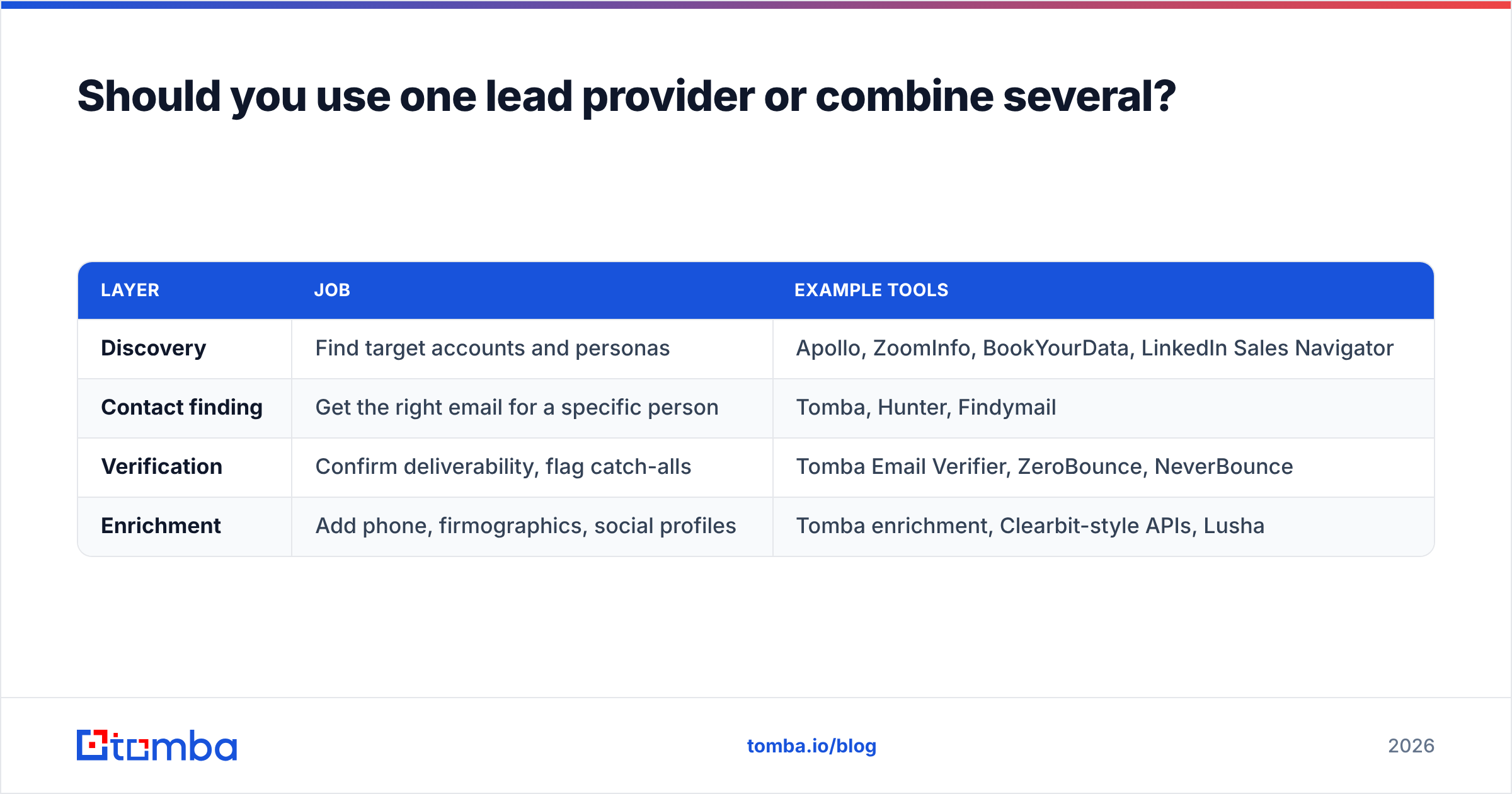
For most teams under about 50 reps, the most efficient setup has layers:
| Layer | Job | Example tools |
|---|---|---|
| Discovery | Find target accounts and personas | Apollo, ZoomInfo, BookYourData, LinkedIn Sales Navigator |
| Contact finding | Get the right email for a specific person | Tomba, Hunter, Findymail |
| Verification | Confirm deliverability, flag catch-alls | Tomba Email Verifier, ZeroBounce, NeverBounce |
| Enrichment | Add phone, firmographics, social profiles | Tomba enrichment, Clearbit-style APIs, Lusha |
Splitting jobs this way means you aren't stuck with one vendor's weakest area. If your database has poor email accuracy for DACH mid-market companies, you can fill that gap with an email finder instead of switching platforms. If you already have a target account list from events, partners, or your own research, you may not need a big database at all. You can enrich leads you already have and find emails for the specific people you care about.
The trade-off is operational overhead. More tools means more integrations, more logins, and more places for data to drift out of sync. Keep the stack as small as your targeting allows.
Which lead provider is right for you?#
It comes down to your motion:
- Early-stage founder doing their own outbound: A free or low-cost self-serve database for discovery, plus an email finder and verifier. Skip annual contracts until you've found a repeatable ICP.
- Growing SDR team (5–20 reps): A mid-tier database with seat pricing, a dedicated verification step, and a CRM integration. Check your bounce rate every month.
- Enterprise sales org: An intelligence platform like ZoomInfo or Cognism, if you'll actually use intent data and org charts. Negotiate hard on seat count and renewal terms.
- Agency or campaign-based buyer: Pay-per-lead list builders such as BookYourData, where you're not paying for idle seats between campaigns.
- Account-based teams with a defined target list: An email finder and domain search tool, because you already know who you want. You just need to reach them.
Whichever lead providers you choose, run the numbers yourself. Accuracy claims are marketing. Your own bounce rate is evidence.
Where does Tomba fit in your lead provider stack?#
If you already know which companies and people you want to reach, or you're pulling targets from a database but don't trust its emails, the Tomba Email Finder closes that gap. Enter a name and domain, or search a whole company by domain, and you'll get the professional email with a verification status attached, including catch-all detection. You can start on the free tier with 25 searches a month to test it against your current provider on the same contacts, then move to a paid plan from $49/mo once the bounce-rate difference shows up in your own data. See Tomba pricing for plan details.
Related guides#
// get started
Find, verify and enrich your first contacts today
Start on the free plan with 25 searches a month, then scale when your team is ready.
Free plan · No credit card required · GDPR & CCPA
// about the author