Lead Qualification Form: Fields, Templates, and Scoring Rules
Most lead qualification forms ask too much and learn too little. Here's which fields actually predict pipeline, which ones to cut, and how to fill the gaps with enrichment and simple scoring rules.
TL;DR
- A lead qualification form has one job: separate prospects your sales team should call today from everyone else. It isn't there to collect a full profile.
- Keep what the visitor types to 4–6 fields. Every extra field lowers completion, and firmographic data like company size, industry and tech stack can be added afterwards with enrichment.
- The fields that best predict pipeline are work email, the problem they're trying to solve, timeline and role. Budget questions usually get dishonest answers.
- Score submissions with simple, visible rules (fit plus intent), then route high scorers to a human within minutes.
- Verify the email at submission. A form that accepts fake or throwaway addresses gives you bad lead data, not qualified leads.
What is a lead qualification form?#
A lead qualification form is a web form that collects just enough information to decide what happens next with a prospect. Depending on the answers, they get routed to sales, put into a nurture sequence, or politely turned away. You'll usually find it on a demo request page, a pricing page, a "talk to sales" modal, or behind a high-intent asset like an ROI calculator.
It is not a newsletter signup or an ebook gate. Those forms maximize volume. A qualification form deliberately trades some volume for signal. It exists to answer three questions:
- Is this a real person at a real company? (identity)
- Does this company match the customers we can serve well? (fit)
- Do they have a problem they want solved soon? (intent)
If your form can't answer all three, sales ends up doing it on a discovery call, which is the most expensive place to do it. If your form asks far more than those three questions need, you lose the buyers who were ready.
The concept sits inside the broader discipline of lead generation. Its output usually feeds a lead-scoring model that decides whether a submission becomes a marketing qualified lead (MQL) or goes straight to an SDR.
Which fields should a lead qualification form include?#
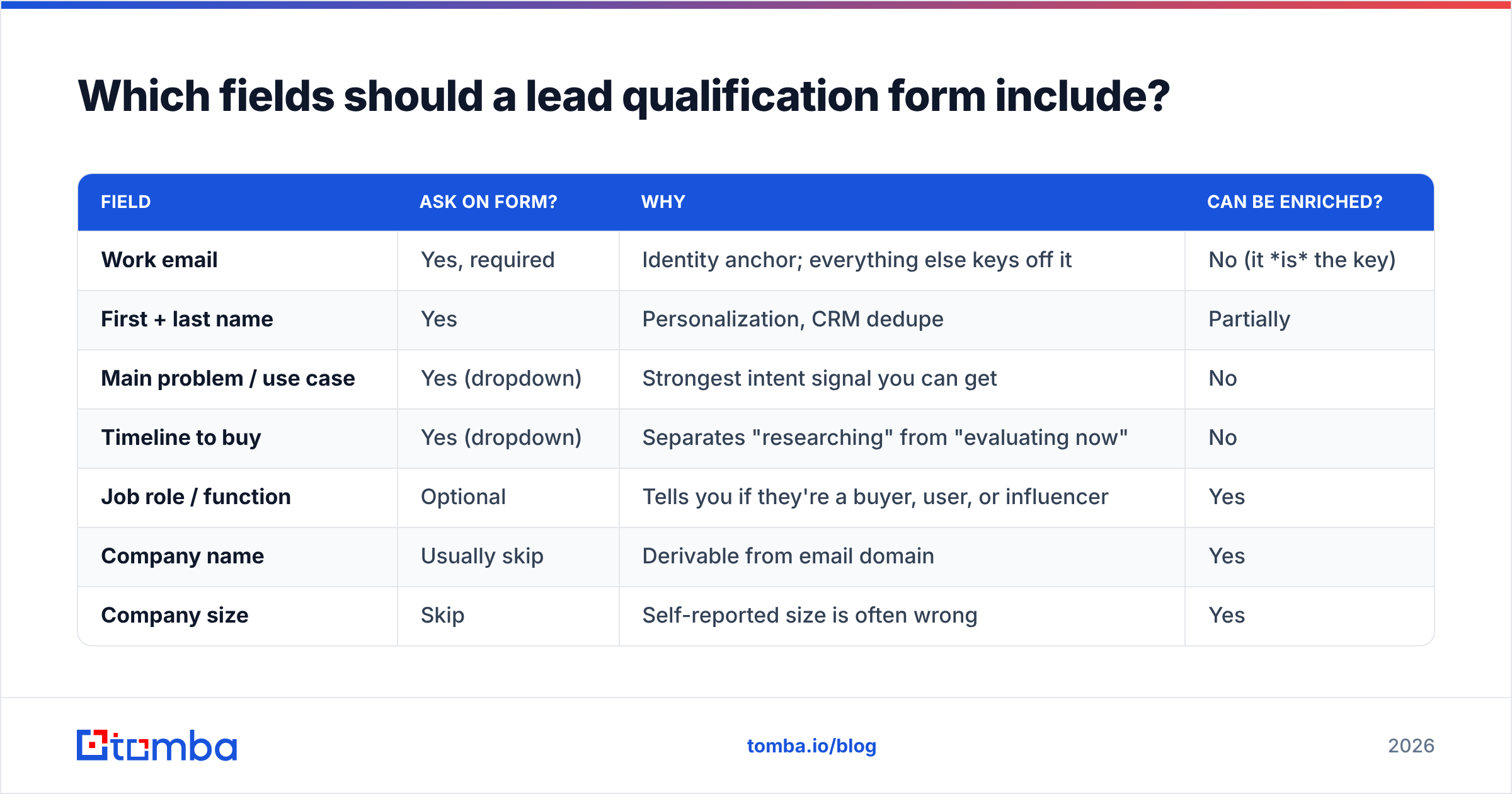
Sort fields into two groups: what only the prospect can tell you, and what you can find out yourself. Ask for the first group. Enrich the second.
| Field | Ask on form? | Why | Can be enriched? |
|---|---|---|---|
| Work email | Yes, required | Identity anchor; everything else keys off it | No (it is the key) |
| First + last name | Yes | Personalization, CRM dedupe | Partially |
| Main problem / use case | Yes (dropdown) | Strongest intent signal you can get | No |
| Timeline to buy | Yes (dropdown) | Separates "researching" from "evaluating now" | No |
| Job role / function | Optional | Tells you if they're a buyer, user, or influencer | Yes |
| Company name | Usually skip | Derivable from email domain | Yes |
| Company size | Skip | Self-reported size is often wrong | Yes |
| Industry | Skip | Dropdowns rarely match your ICP taxonomy | Yes |
| Phone number | Optional, only for high-touch sales | Big friction; many people give fake numbers | Yes |
| Budget | Usually skip | Answers are unreliable and it scares off early buyers | No |
| Current tools / tech stack | Skip | Visible from their website | Yes |
The pattern is clear. Of eleven common fields, only three or four have to come from the prospect. The rest are data-entry chores you've handed to the visitor, and each one costs you completions.
Why work email matters most#
Work email is the join key for everything else. With it you can pull company size, industry, location, and often the person's title and LinkedIn profile. A form with a verified work email and two good intent questions tells you more than a form with twelve self-reported fields and a Gmail address.
Validate it in real time. Block obvious disposable domains, flag free-mail domains (whether to reject them or just route them differently depends on your market), and run an SMTP-level check so typos like jon@acme.con get caught before the thank-you page. An email verifier connected through an API or webhook takes care of this without any custom infrastructure.
How many fields should a lead qualification form have?#
For most B2B inbound forms, aim for four to six visible fields. Go longer only if your sales motion truly needs pre-call context and your traffic is high-intent enough to put up with it.

Some practical guidelines:
- Demo request / talk to sales: 4–6 fields. These visitors already chose to talk to you, so don't make them re-apply.
- Free trial signup: 2–3 fields, then collect qualification data inside the product once they're activated.
- Gated high-value asset (benchmark report, calculator): 3–5 fields, with one intent question.
- Enterprise RFP / partner application: 8+ fields is fine. The visitor expects paperwork.
Field count isn't the only factor. Type matters too. A dropdown with five options is far easier to complete than an open text box. A required phone field hurts completion much more than an optional role dropdown. If you add something, make it a click, not typing.
Should you use multi-step forms?#
Often, yes. A two-step form that asks for email first and qualification questions second tends to convert better than a single long page. Part of that is the commitment effect: once someone has typed their email, they tend to finish. It also means you capture the email even if they drop off at step two, which gives you a partial lead you can enrich and nurture.
Tools like HubSpot Forms support progressive profiling natively. Returning visitors see new questions in place of the ones they already answered, so you build up the profile over several visits.
What questions actually predict a qualified lead?#
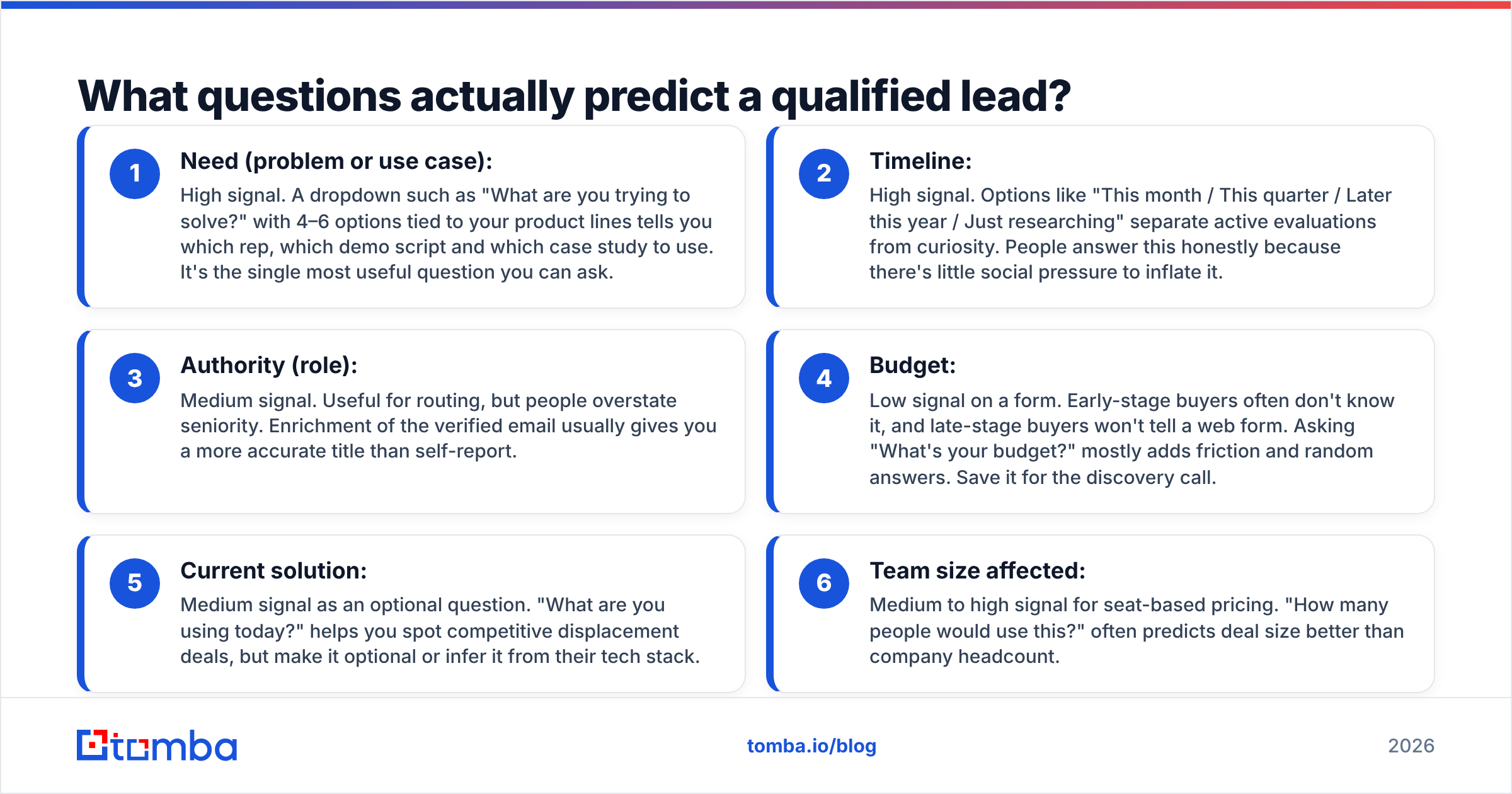
Frameworks like BANT (budget, authority, need, timeline) were built for sales calls, not forms. Copying them onto a form field by field gives you poor data. Here's how each element holds up on a web form:
- Need (problem or use case): High signal. A dropdown such as "What are you trying to solve?" with 4–6 options tied to your product lines tells you which rep, which demo script and which case study to use. It's the single most useful question you can ask.
- Timeline: High signal. Options like "This month / This quarter / Later this year / Just researching" separate active evaluations from curiosity. People answer this honestly because there's little social pressure to inflate it.
- Authority (role): Medium signal. Useful for routing, but people overstate seniority. Enrichment of the verified email usually gives you a more accurate title than self-report.
- Budget: Low signal on a form. Early-stage buyers often don't know it, and late-stage buyers won't tell a web form. Asking "What's your budget?" mostly adds friction and random answers. Save it for the discovery call.
- Current solution: Medium signal as an optional question. "What are you using today?" helps you spot competitive displacement deals, but make it optional or infer it from their tech stack.
- Team size affected: Medium to high signal for seat-based pricing. "How many people would use this?" often predicts deal size better than company headcount.
The takeaway: ask about need and timeline directly, infer fit from enrichment, and leave budget to a conversation.
How do you score submissions from a lead qualification form?#
Scoring turns answers into a routing decision. Keep the model simple enough that your SDRs can explain it. If nobody knows why a lead scored 73, nobody trusts the score.
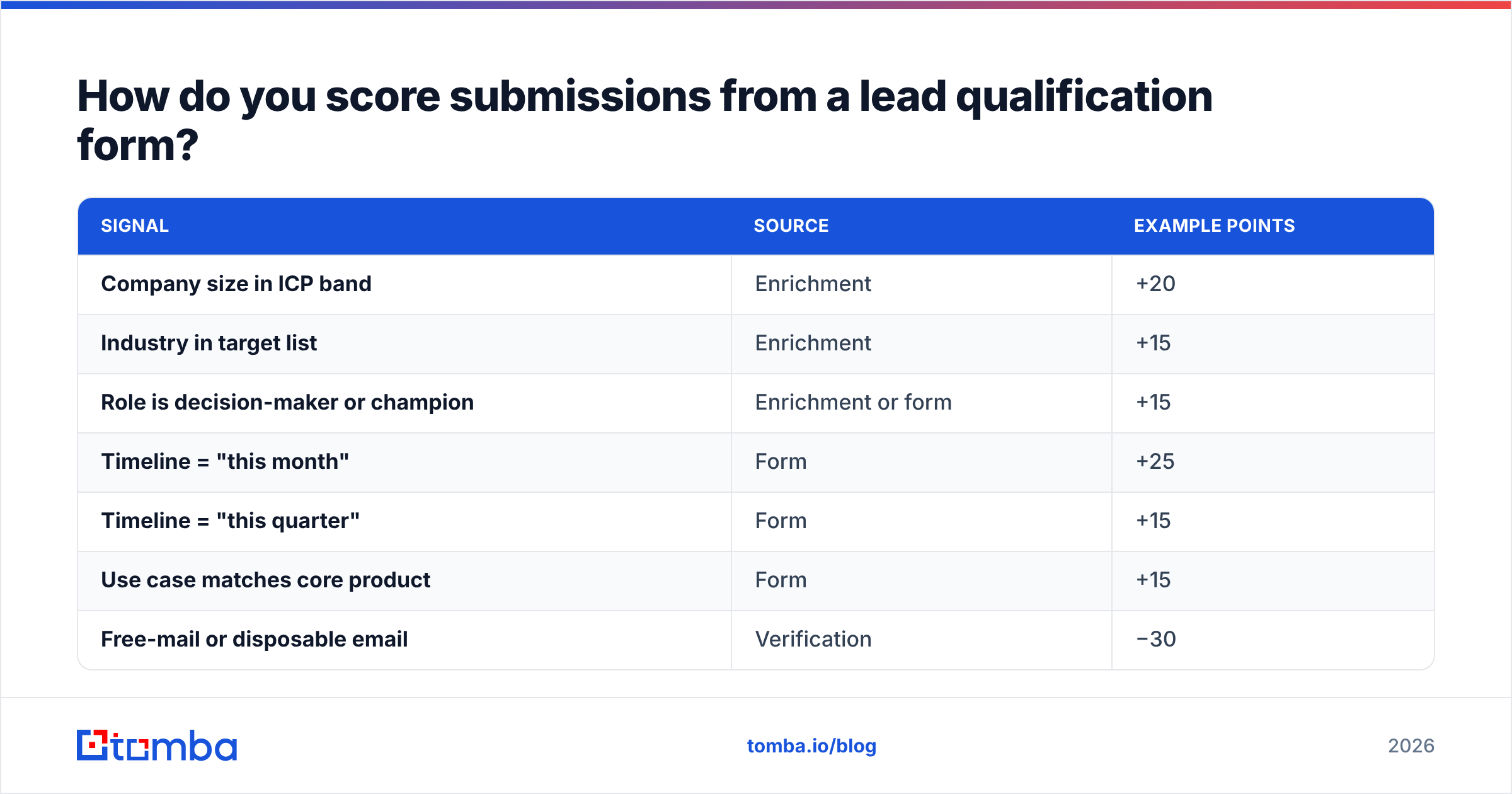
A workable starting model splits points between fit (who they are) and intent (what they told you):
| Signal | Source | Example points |
|---|---|---|
| Company size in ICP band | Enrichment | +20 |
| Industry in target list | Enrichment | +15 |
| Role is decision-maker or champion | Enrichment or form | +15 |
| Timeline = "this month" | Form | +25 |
| Timeline = "this quarter" | Form | +15 |
| Use case matches core product | Form | +15 |
| Free-mail or disposable email | Verification | −30 |
| Email fails verification | Verification | Reject / hold |
| Competitor or student domain | Enrichment | −50 |
Then set thresholds:
- 70+ → route to an SDR or AE immediately (Slack alert, round-robin assignment, calendar link on the thank-you page)
- 40–69 → marketing nurture with a relevant case study, plus a sales touch if they engage again
- Under 40 → self-serve resources, no sales time
Revisit the weights every quarter against closed-won data. If "this quarter" leads close at the same rate as "this month" leads, merge them. If a use-case option never converts, remove it or rewrite it.
For a deeper look at how form data flows into your pipeline and CRM, the HubSpot integration pattern is a good reference. Enrichment and verification run on submission, and the scored record lands in the CRM already populated.
How does enrichment replace form fields?#
Think of enrichment like a coat check. The visitor hands over one ticket (their email), and you retrieve everything else from the back room without making them carry it to the desk.
Here's the flow:
- Visitor submits email, name, use case and timeline.
- Verification runs in real time: syntax, domain, mailbox and catch-all status. Invalid emails get an inline error before submission completes.
- Data enrichment runs on the verified email: company name, size, industry, location, job title, LinkedIn URL, and sometimes phone.
- Scoring runs on the combined record.
- Routing fires: CRM record created, owner assigned, alert sent.
This is how you get the "ask four fields, know twenty" outcome. It's also the answer to the usual objection from sales ("but I need company size before the call"). They still get company size. The prospect just doesn't have to type it.
Two caveats:
- Enrichment isn't perfect. Coverage is weaker for very small companies, new startups and some regions. Have a fallback, such as a single optional "Company size" dropdown that only shows up when enrichment returns nothing.
- Privacy rules still apply. Under regimes like the GDPR, you need a lawful basis for processing enriched data and a clear privacy notice on the form. Enrichment doesn't exempt you from disclosure.
What are the most common lead qualification form mistakes?#

Most broken forms fail in predictable ways:
- Asking for budget as a required field. You'll get "$0–$10k" from everyone who wants to get past the form, and some good buyers will leave.
- Allowing any email. Without verification, your "qualified" list fills with
test@test.com, typos and throwaway inboxes. Your scoring model then trains on garbage. - Mirroring the CRM schema. Just because Salesforce has 40 lead fields doesn't mean the form needs 40 inputs. The form serves the visitor, and the CRM gets filled downstream.
- No immediate next step. A high-scoring lead who submits and sees a static "thanks, we'll be in touch" page cools off fast. Offer a calendar embed right away for leads above your threshold.
- Same form everywhere. A pricing-page visitor and a blog-sidebar visitor have different intent. Use different forms, or at least a different default for the timeline question.
- Never auditing results. If you haven't compared form answers against closed-won deals in six months, your scoring weights are guesses.
- Ignoring mobile. Long dropdowns and tiny tap targets eat conversions on mobile. Test the form on a phone before launch.
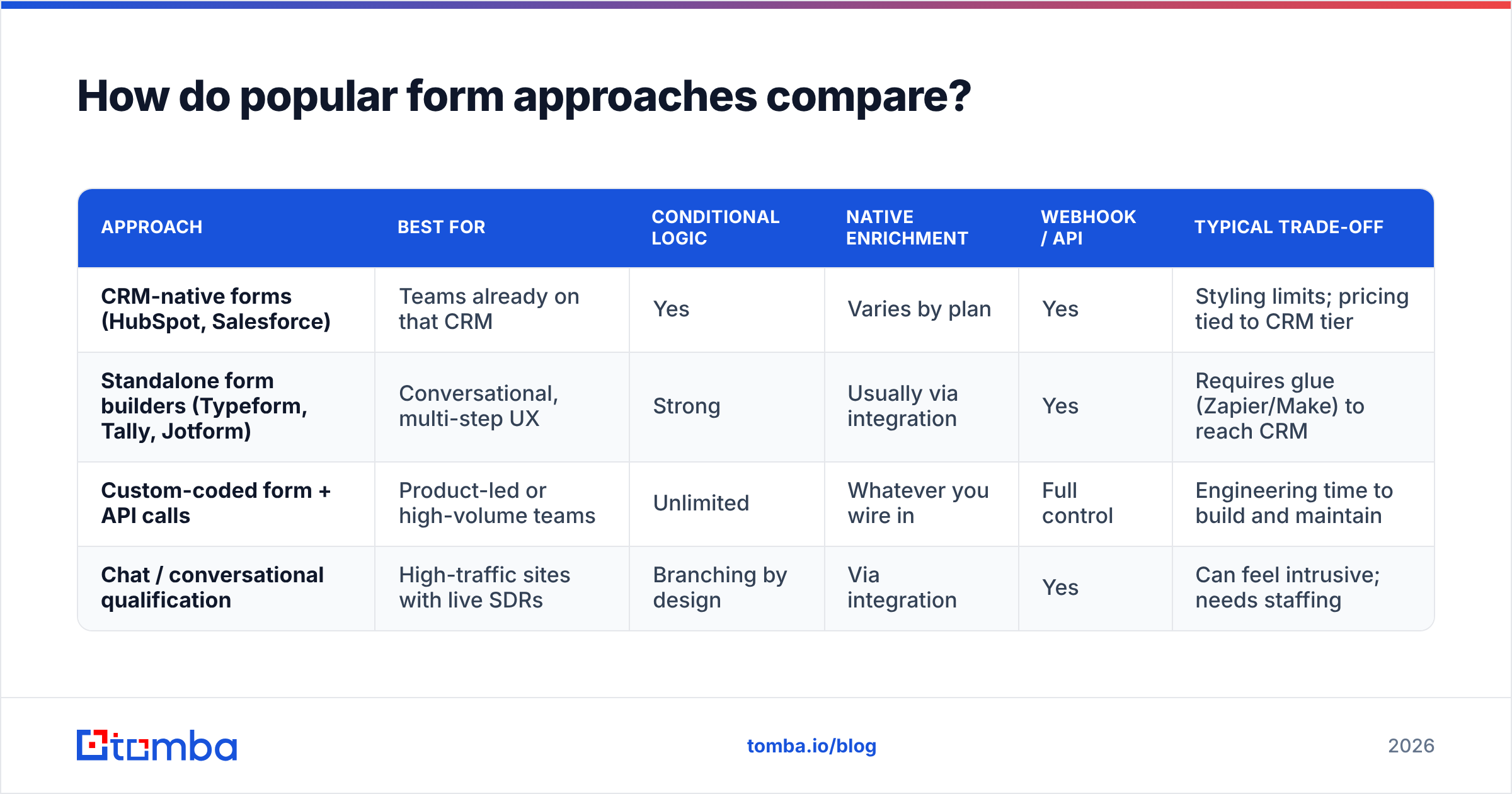
How do popular form approaches compare?#
You don't need a specialized tool to build a good lead qualification form. What matters is whether the tool supports conditional logic, hidden fields, webhooks, and enrichment or verification on submit.
| Approach | Best for | Conditional logic | Native enrichment | Webhook / API | Typical trade-off |
|---|---|---|---|---|---|
| CRM-native forms (HubSpot, Salesforce) | Teams already on that CRM | Yes | Varies by plan | Yes | Styling limits; pricing tied to CRM tier |
| Standalone form builders (Typeform, Tally, Jotform) | Conversational, multi-step UX | Strong | Usually via integration | Yes | Requires glue (Zapier/Make) to reach CRM |
| Custom-coded form + API calls | Product-led or high-volume teams | Unlimited | Whatever you wire in | Full control | Engineering time to build and maintain |
| Chat / conversational qualification | High-traffic sites with live SDRs | Branching by design | Via integration | Yes | Can feel intrusive; needs staffing |
Whichever approach you pick, the setup is the same: collect a small set of fields, verify and enrich on submit, score, and route. You can connect verification and enrichment into any of these through integrations like Zapier, Make or a direct API call.
What does a good lead qualification form template look like?#
Here's a template you can adapt for a B2B SaaS demo-request page:
Step 1
- Work email (required, verified in real time)
Step 2
- First name (required)
- Last name (required)
- What are you looking to solve? (required dropdown, 4–6 options tied to your use cases)
- When are you hoping to have a solution in place? (required dropdown: This month / This quarter / This year / Just exploring)
- Anything we should know before the call? (optional text)
Hidden fields
- UTM source, medium, campaign
- Landing page URL
- Enriched: company, size, industry, title, country
Post-submit logic
- Score ≥ 70 → show calendar embed, alert assigned rep
- Score 40–69 → show relevant case study, add to nurture
- Score < 40 → show self-serve docs and community links
That gives you five visible inputs, full routing context, and no budget question.
Where does Tomba fit into your lead qualification workflow?#
A lead qualification form only works if the email it captures is real and the data around it is accurate. That's where your stack matters more than your form builder. Verifying at submission stops fake and mistyped addresses from polluting your scoring. Enrichment on the verified email fills in company, role and firmographics without adding fields. And when a promising lead leaves out a colleague's contact details, or you want to multi-thread into the buying committee, the Tomba Email Finder finds verified professional emails by name and company domain. It runs from the web app, Chrome extension, Google Sheets or API, so it plugs straight into the routing flow you just built. Start on the free tier with 25 searches a month, then move to Starter at $49/mo once the form starts sending real volume.
Related guides#
// get started
Find, verify and enrich your first contacts today
Start on the free plan with 25 searches a month, then scale when your team is ready.
Free plan · No credit card required · GDPR & CCPA
// about the author