Lead Response Time: Why the First 5 Minutes Decide Your Pipeline
Most B2B teams take hours or days to answer a new lead. The research says the lead is often gone within minutes. Here is the data, the benchmarks, and a playbook for replying fast.
TL;DR
- Lead response time is how long it takes from the moment a prospect raises their hand (a form fill, a demo request, a reply) to your first real human contact. It is one of the few pipeline levers you control fully.
- The research is old but still holds up. Harvard Business Review found that firms contacting leads within an hour were nearly 7x more likely to qualify them than firms that waited longer, and many companies never responded at all.
- Your aim is under 5 minutes for high-intent inbound leads and same business day for everything else. Anything past 24 hours is mostly cleanup.
- Speed without context doesn't help. Routing, enrichment, and verified contact data are what let reps reply fast and say something useful.
- Measure median response time, not the average, and track it per rep, per source, and per hour of day.
What is lead response, and why does it matter so much?#
Lead response is the gap between the moment a prospect signals interest and your first meaningful contact with them. "Meaningful" is doing a lot of work there. An autoresponder that says "Thanks, we'll be in touch" doesn't count. A call, a personalised email, or a booked meeting does.
Think of a new lead like a hot pan coming off the stove. For a few minutes it's hot enough to cook with: the prospect is at their desk, the problem is on their mind, and they probably have your tab open next to two competitors' tabs. Wait an hour and it's warm. Wait a day and it's cold, and whoever answered first has already framed the conversation.
That's why lead response sits in lead management rather than only in sales. It depends on how your forms, routing rules, CRM, and data quality fit together, not just on how hard your reps work.
What does the research actually say about lead response time?#
Two studies get quoted all the time, often badly. Here is what they found.
The first is the Harvard Business Review analysis The Short Life of Online Sales Leads. The researchers audited more than 2,000 US companies by submitting web leads and timing the responses. The headline findings:
- Companies that tried to contact a lead within an hour were nearly 7x more likely to qualify that lead than companies that tried even an hour later.
- They were more than 60x more likely to qualify it than companies that waited 24 hours or longer.
- Among companies that did respond, the average response time was about 42 hours.
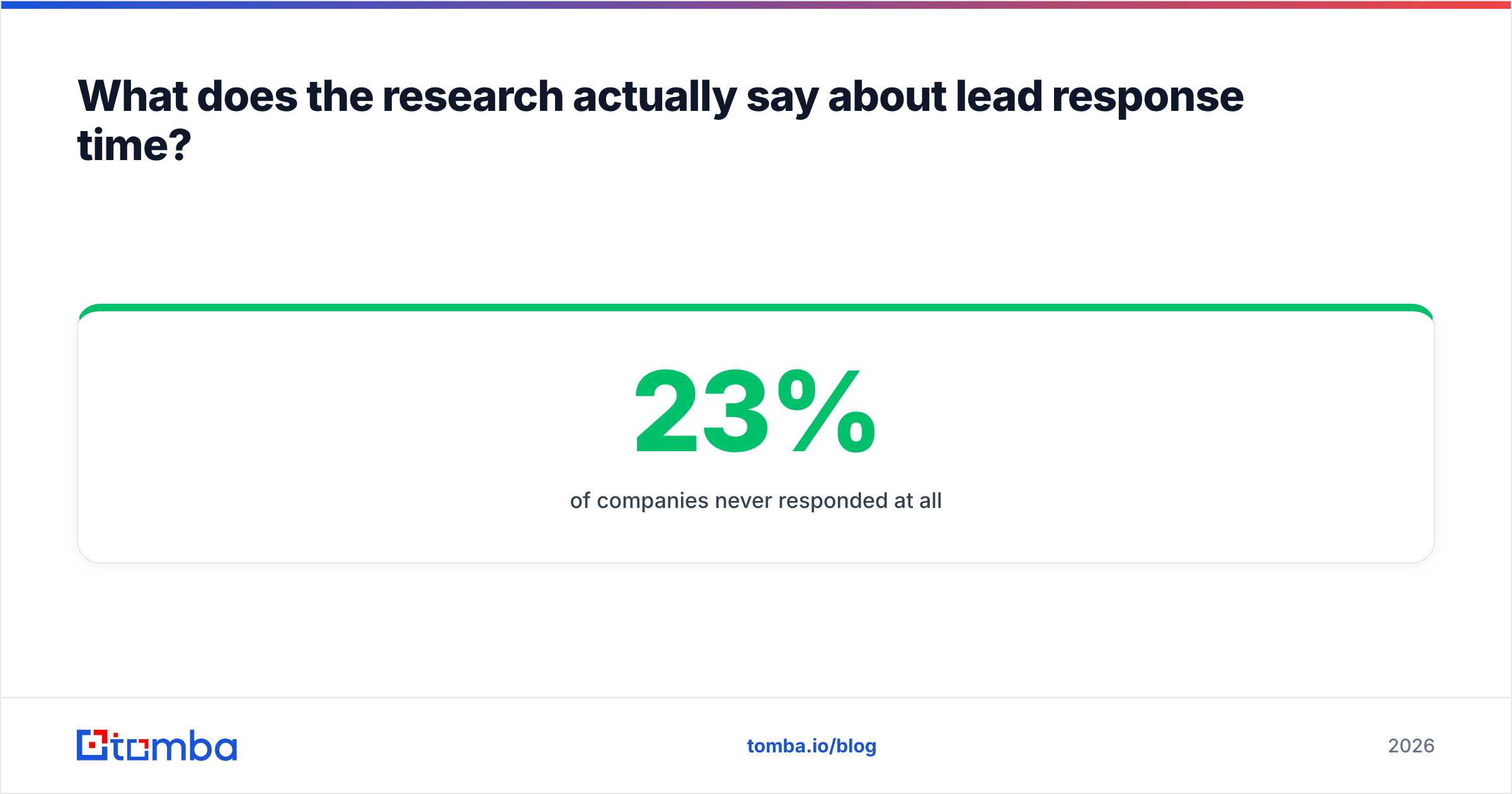
- 23% of companies never responded at all.
The second is the Lead Response Management study by Dr. James Oldroyd and InsideSales.com. It found that the odds of contacting a lead dropped by roughly 100x when the first call happened at 30 minutes instead of 5, and the odds of qualifying the lead dropped by about 21x.
Both studies are more than ten years old, and you should say so when you use them in internal decks. But no newer data has contradicted the direction of the effect. Buyers in 2026 have more options, faster self-serve trials, and AI chat on every competitor's site, so their patience has shrunk, not grown.
How fast should your lead response be? (Benchmarks by window)#
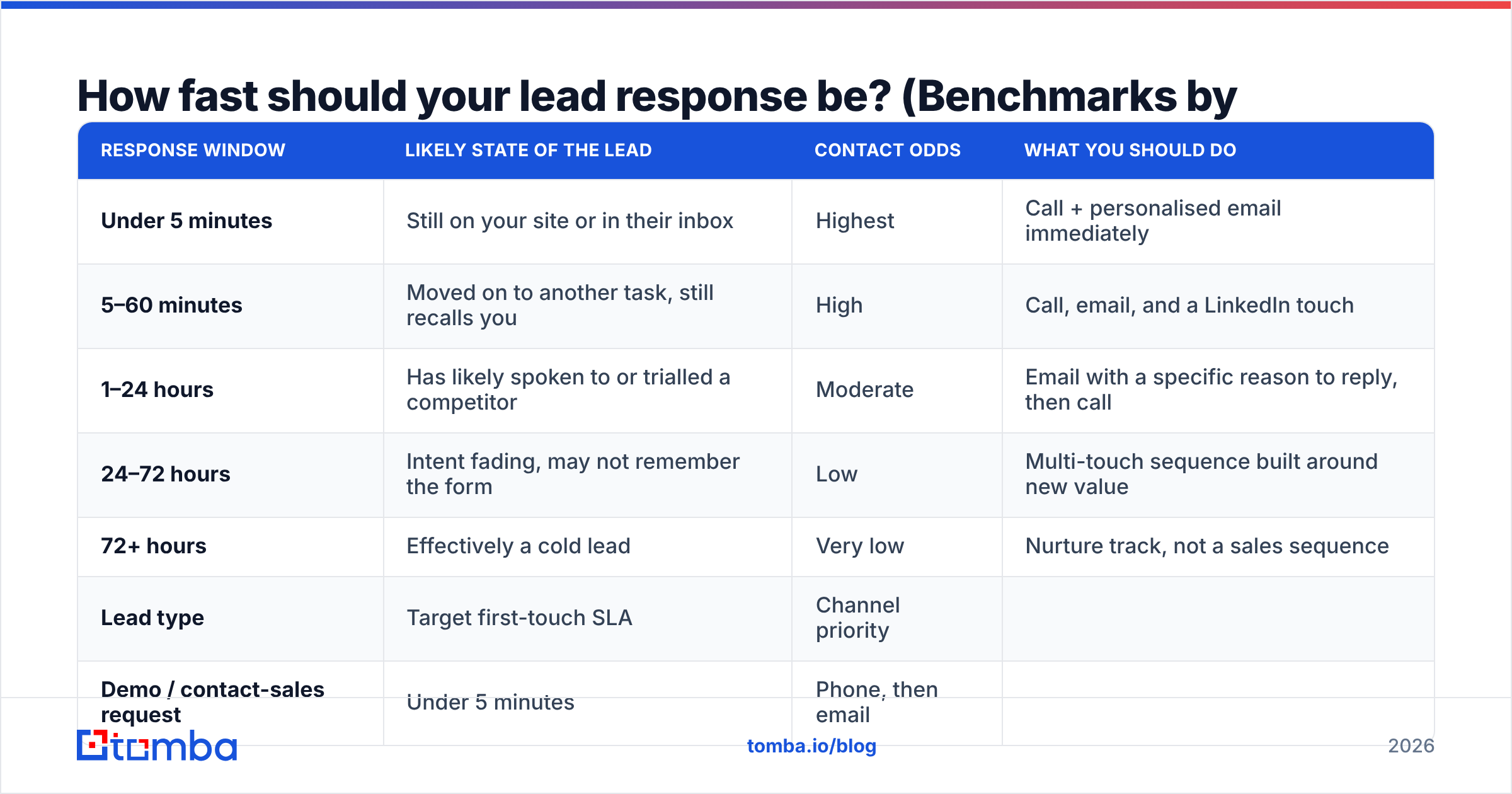
Here is how the likely outcome changes at each response window for a typical inbound B2B lead, such as a demo request or pricing inquiry:
| Response window | Likely state of the lead | Contact odds | What you should do |
|---|---|---|---|
| Under 5 minutes | Still on your site or in their inbox | Highest | Call + personalised email immediately |
| 5–60 minutes | Moved on to another task, still recalls you | High | Call, email, and a LinkedIn touch |
| 1–24 hours | Has likely spoken to or trialled a competitor | Moderate | Email with a specific reason to reply, then call |
| 24–72 hours | Intent fading, may not remember the form | Low | Multi-touch sequence built around new value |
| 72+ hours | Effectively a cold lead | Very low | Nurture track, not a sales sequence |
Use this to set SLAs by lead type:
| Lead type | Target first-touch SLA | Channel priority |
|---|---|---|
| Demo / contact-sales request | Under 5 minutes | Phone, then email |
| Pricing page form | Under 15 minutes | Email, then phone |
| Free trial signup | Under 1 hour | In-app + email |
| Content download (ebook, report) | Same business day | |
| Outbound reply ("interested, tell me more") | Under 30 minutes | Email reply, then calendar link |
The last row gets overlooked. A positive reply to a cold email is a hand-raise too, and it decays just as fast as a form fill. If you are sending cold outreach and taking a day to answer replies, you are wasting much of what you spent to get them.

Why is lead response so slow at most B2B companies?#
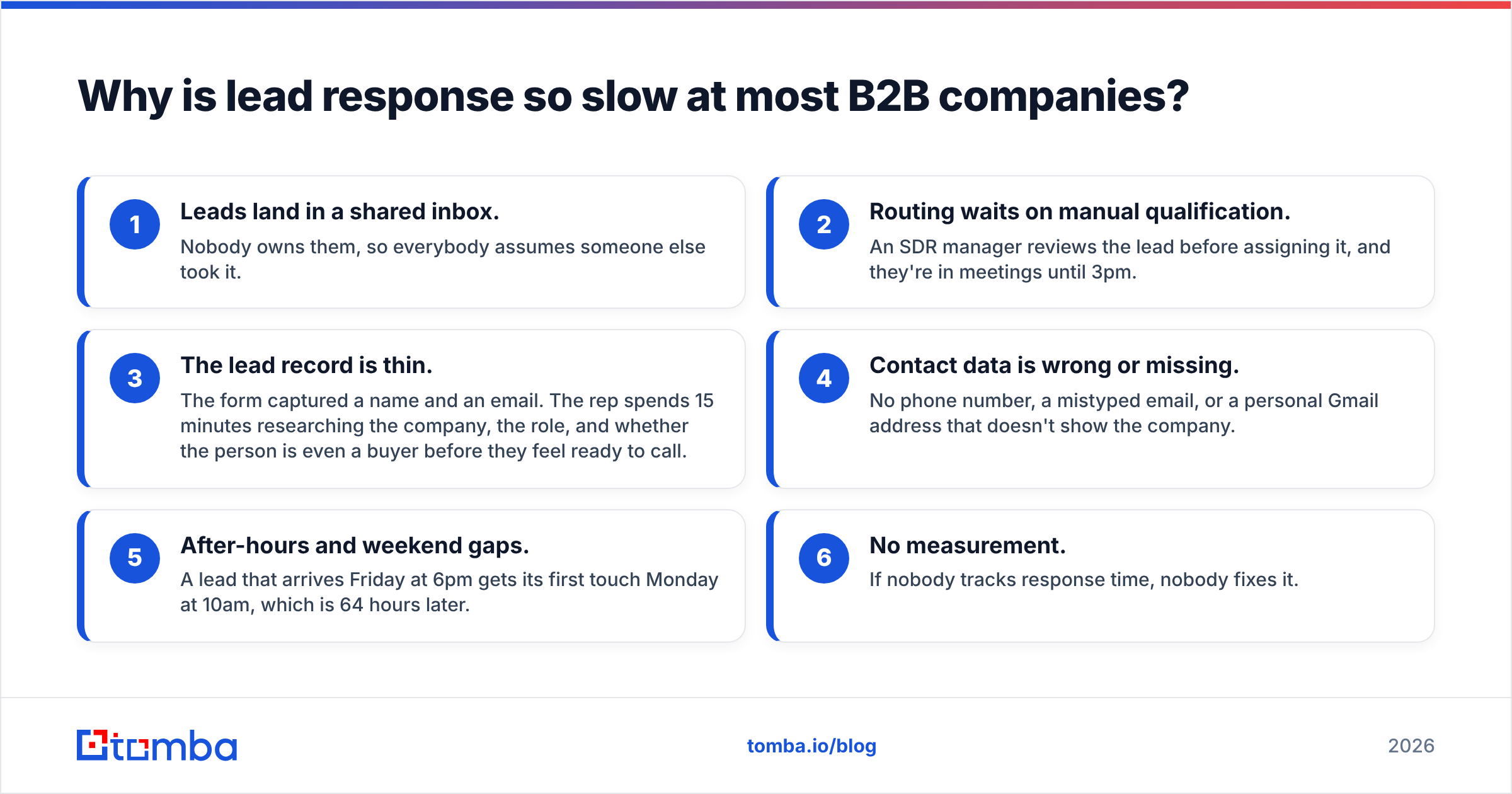
The HBR figure of 42 hours doesn't usually come from lazy reps. It comes from the plumbing between the form and the rep. The common causes:
- Leads land in a shared inbox. Nobody owns them, so everybody assumes someone else took it.
- Routing waits on manual qualification. An SDR manager reviews the lead before assigning it, and they're in meetings until 3pm.
- The lead record is thin. The form captured a name and an email. The rep spends 15 minutes researching the company, the role, and whether the person is even a buyer before they feel ready to call.
- Contact data is wrong or missing. No phone number, a mistyped email, or a personal Gmail address that doesn't show the company.
- After-hours and weekend gaps. A lead that arrives Friday at 6pm gets its first touch Monday at 10am, which is 64 hours later.
- No measurement. If nobody tracks response time, nobody fixes it.
Causes 3 and 4 get the least attention. Reps don't hesitate because they're slow. They hesitate because they don't want to call a VP of Engineering with nothing to say. Fix the context problem and the speed problem shrinks with it.
How do you build a fast lead response process? (The 7-step playbook)#
Here is a practical sequence you can implement in most CRMs, such as HubSpot or Salesforce, without a large project.
- Define "hot" in writing. Pick the two or three form types or behaviours that trigger the 5-minute SLA. Treat everything else on a slower track. If every lead is urgent, none of them is.
- Route instantly and automatically. Use round-robin or territory-based assignment the moment the lead is created. Drop the manual triage step for hot leads. You can disqualify after the call.
- Enrich before the rep sees the lead. Add company size, industry, role, seniority, and a direct phone number to the record automatically. Automated data enrichment turns a bare name and email into a briefing a rep can act on in 30 seconds.
- Verify the contact data. Run the submitted email through an email verifier at the point of capture. Mistyped addresses like "jon@acme.co" instead of "jon@acme.com" are common, and you want to catch them while you can still reach the person by phone.
- Resolve personal emails to work identities. When someone signs up with a Gmail address, a reverse email lookup can often reveal their name, employer, and role. Then you know whether you're talking to a Fortune 500 buyer or a student.
- Fire a two-channel first touch. Send a short, specific email at the same moment as a call attempt. The email should mention what they requested, one relevant detail from enrichment, and a calendar link. Leave a voicemail that points to the email.
- Cover the off-hours. Use a rotating on-call SDR, a follow-the-sun team, or at minimum an AI assistant that books a meeting directly, so a Friday-night lead gets a real next step before Monday.
Steps 3 to 5 add a few seconds of automated processing and save each rep several minutes of manual research. That trade is what makes a 5-minute SLA realistic rather than aspirational.
Is automation or a human better for lead response?#
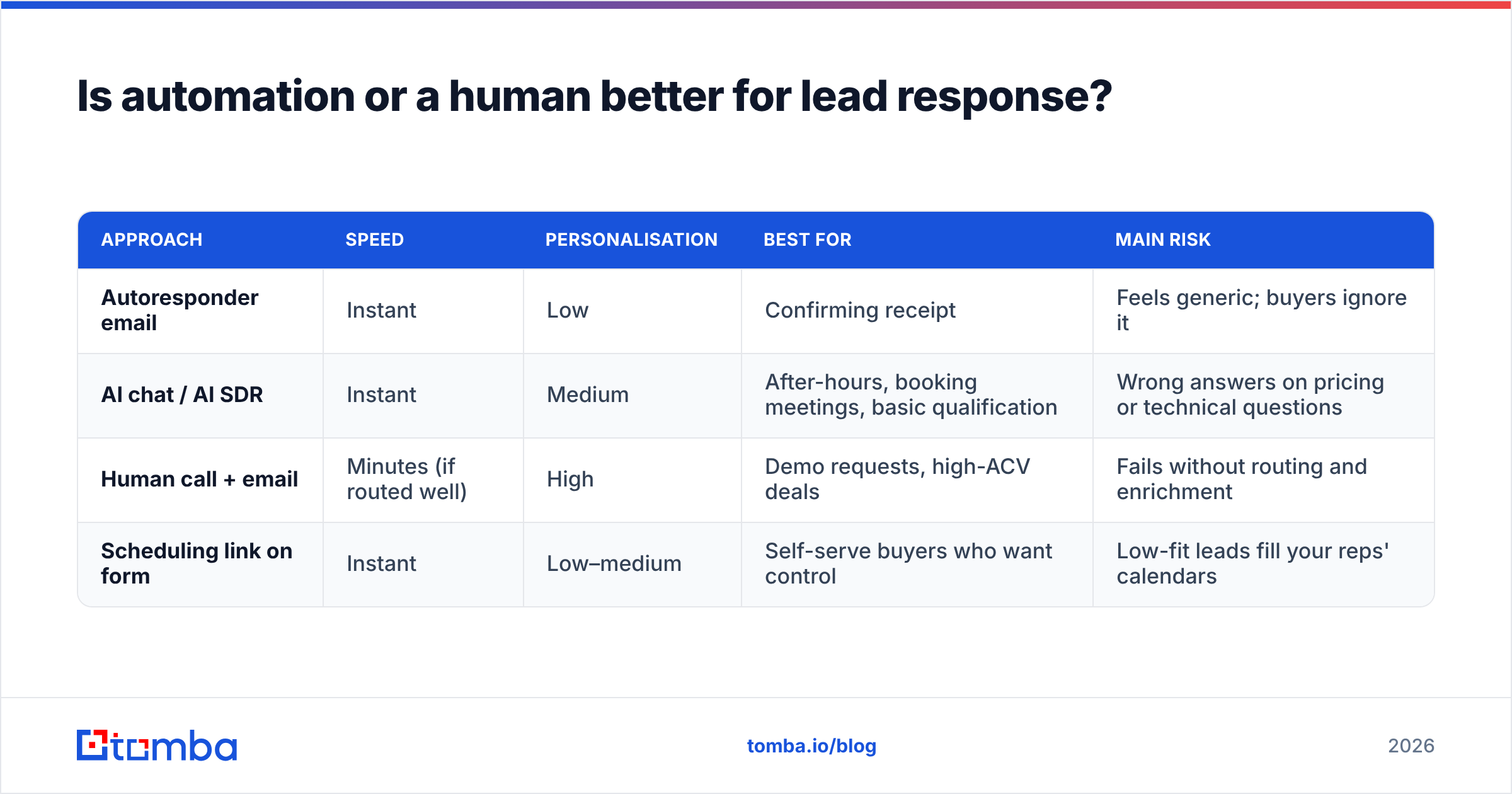
Both, doing different jobs. The table below shows where each fits.
| Approach | Speed | Personalisation | Best for | Main risk |
|---|---|---|---|---|
| Autoresponder email | Instant | Low | Confirming receipt | Feels generic; buyers ignore it |
| AI chat / AI SDR | Instant | Medium | After-hours, booking meetings, basic qualification | Wrong answers on pricing or technical questions |
| Human call + email | Minutes (if routed well) | High | Demo requests, high-ACV deals | Fails without routing and enrichment |
| Scheduling link on form | Instant | Low–medium | Self-serve buyers who want control | Low-fit leads fill your reps' calendars |
For most B2B teams the best setup is layered. An instant, specific confirmation or scheduler goes out first, a human follows within minutes for high-intent leads, and AI covers the hours when no human is available. What you should avoid is letting automation replace the human touch on your best leads. A buyer requesting a demo for a $50k contract wants a person.
Which metrics should you track for lead response?#
Averages hide the problem. One lead answered after 11 days pulls your average past every other lead you handled well. Track these instead:
- Median time to first touch. Your headline number.
- 90th percentile time to first touch. Shows how bad your worst cases get.
- % of hot leads contacted within SLA. The number your sales manager should see every Monday.
- Contact rate and connect rate by response window. Proves the impact of speed with your own data.
- Lead-to-meeting conversion by response window. This connects response time to pipeline. Once you have a quarter of data, it usually ends any argument about whether speed matters.
- Response time by hour of day and day of week. Shows where your coverage gaps are.
Split all of these by lead source and by rep. You'll often find that one source, such as a partner referral form, gets routed to a queue nobody watches.

How does contact data quality affect lead response?#
Speed only helps if the contact data is right. Here are four ways bad data damages lead response even when your routing is fast:
- Bounced first emails. If the address was mistyped, your fast reply never arrives and the prospect thinks you ignored them.
- No phone number. You lose the channel that has historically had the strongest effect in speed-to-lead studies.
- Unknown company. A lead with a personal email and no company field gets deprioritised, even when it's a strong buyer.
- Wrong person. The form was filled in by an analyst, but the decision-maker is their director. Finding the director's address quickly lets you multi-thread from day one.
This is where email-finding and verification tools come in, whether you use Tomba, a database provider such as BookYourData, or a mix. The requirement is the same: by the time a rep opens the record, it should hold a verified email, ideally a direct phone number, and enough firmographic context to open with something relevant. Check each vendor's coverage in your target markets before you commit. Coverage differs a lot by region and industry. The lead generation side of your funnel can be excellent and still leak if your data layer is weak.
What are the most common lead response mistakes?#
- Counting the autoresponder as the response. Your CRM says 0 minutes, but the buyer has heard nothing from a person.
- Calling once and giving up. Speed matters, but so does persistence. Plan 6–8 touches over 10–14 days for hot leads that don't pick up.
- Rushing with a generic script. "Hi, I saw you downloaded something, do you have 15 minutes?" is fast and useless. Use enrichment data to say one specific thing.
- Treating outbound replies as low priority. A "sure, send more info" reply is a warm lead. Answer it within the hour.
- Ignoring time zones. A 5-minute response at 2am the prospect's local time is a missed call. Route by region or use scheduled sends.
- Never auditing. Submit a test lead through your own forms every month and time the result. You may be surprised.
How do you get leadership to invest in faster lead response?#
Build the business case from your own funnel. Pull last quarter's inbound leads, bucket them by response window (under 5 minutes, 5–60 minutes, 1–24 hours, 24 hours or more), and compare meeting and opportunity rates across the buckets. Then run a simple what-if: if the leads in the slower buckets had converted at the rate of the fastest bucket, how many extra opportunities and how much pipeline would that have produced?
That number is usually large enough to fund routing automation, data enrichment, and an extra SDR shift several times over. It also changes the conversation. You're no longer asking leadership to buy tools. You're asking them to recover pipeline you already paid to generate. Compare the cost of the fix against your data tooling budget. Tomba pricing starts with a free tier of 25 searches a month and moves to $49/mo on Starter, which is small next to the value of one recovered enterprise meeting.
Ready to speed up your lead response?#
Fast lead response depends on complete data. When a demo request arrives with only a name and company, or a hot reply comes from someone who isn't the decision-maker, you need the right address in seconds, not after 15 minutes of searching LinkedIn. Tomba Email Finder finds professional email addresses by name, domain, or company, so your reps can reach the right buyer while the lead is still hot. Start on the free plan, connect it to your routing workflow, and measure the change in your median response time over the next month.
Related guides#
// get started
Find, verify and enrich your first contacts today
Start on the free plan with 25 searches a month, then scale when your team is ready.
Free plan · No credit card required · GDPR & CCPA
// about the author