Lead Routing Software: 7 Best Tools Compared for 2026
Your fastest rep can't help a lead that sat in the wrong queue for six hours. Here's how lead routing software works, what it costs, and which of seven tools fits your CRM and team size.
TL;DR
- Lead routing software assigns each inbound or outbound lead to the right rep automatically. It uses rules such as territory, account ownership, company size, or round robin.
- The hard part is matching the lead to the right account, not the assignment itself. A lead with a Gmail address and no company domain can't be matched.
- Your CRM's built-in assignment rules can handle simple round robin. Once you have account-based territories, SLAs, or meeting booking on the form, you need dedicated tools like LeanData, Chili Piper, or Distribution Engine.
- Most dedicated routing tools are priced by quote or per user. Budget for implementation time as well as the license.
- Clean, enriched contact data before routing improves every downstream rule. Fix the data first, then buy the router.
What is lead routing software?#
Lead routing software decides which rep, team, or queue owns a new lead, and it does it within seconds of the lead arriving. The lead might come from a demo form, a webinar list, an imported spreadsheet, or a contact your SDRs sourced. The software reads the lead's attributes and applies your rules. Then it assigns an owner and usually alerts that person in Slack, email, or the CRM.
A simple version runs inside your CRM. Salesforce has assignment rules and HubSpot has lead rotation. Dedicated tools add three things native rules handle badly:
- Lead-to-account matching. The tool links a new lead to an existing account, even when the domain, company name, or subsidiary structure doesn't match exactly.
- Complex branching logic. Visual flow builders let you nest territory, segment, product line, and capacity conditions without writing Apex or custom workflows.
- Speed-to-lead tooling. Instant meeting booking on the form, SLA timers, reassignment when a rep doesn't respond, and out-of-office handling.
Response speed has a big effect on conversion. The long-cited Harvard Business Review research on inbound response times found that firms contacting leads within an hour were several times more likely to qualify them than firms that waited longer. Most buyers today expect a reply faster than that.
How does lead routing actually work?#
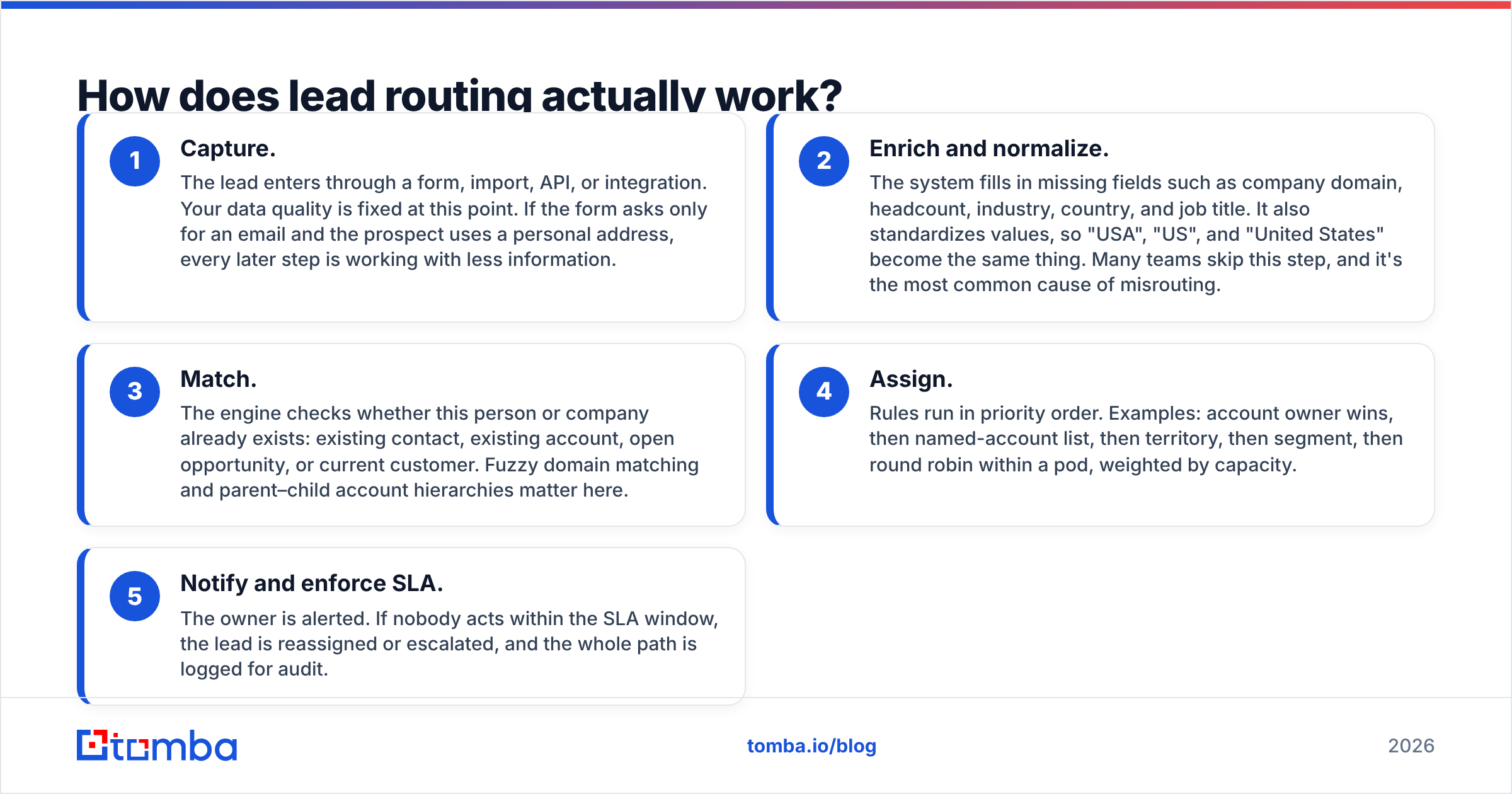
Every routing engine, from a $0 CRM rule to an enterprise platform, runs roughly the same five-step pipeline. If you know where each step can break, it's much easier to evaluate vendors.
- Capture. The lead enters through a form, import, API, or integration. Your data quality is fixed at this point. If the form asks only for an email and the prospect uses a personal address, every later step is working with less information.
- Enrich and normalize. The system fills in missing fields such as company domain, headcount, industry, country, and job title. It also standardizes values, so "USA", "US", and "United States" become the same thing. Many teams skip this step, and it's the most common cause of misrouting.
- Match. The engine checks whether this person or company already exists: existing contact, existing account, open opportunity, or current customer. Fuzzy domain matching and parent–child account hierarchies matter here.
- Assign. Rules run in priority order. Examples: account owner wins, then named-account list, then territory, then segment, then round robin within a pod, weighted by capacity.
- Notify and enforce SLA. The owner is alerted. If nobody acts within the SLA window, the lead is reassigned or escalated, and the whole path is logged for audit.

Most failures happen in steps 2 and 3. Assignment logic can be as detailed as you like, but if 30% of inbound leads come in with no company domain and a job title like "Manager", they'll land in the catch-all queue. We cover the fix for that further down.
Which lead routing tools are worth considering in 2026?#
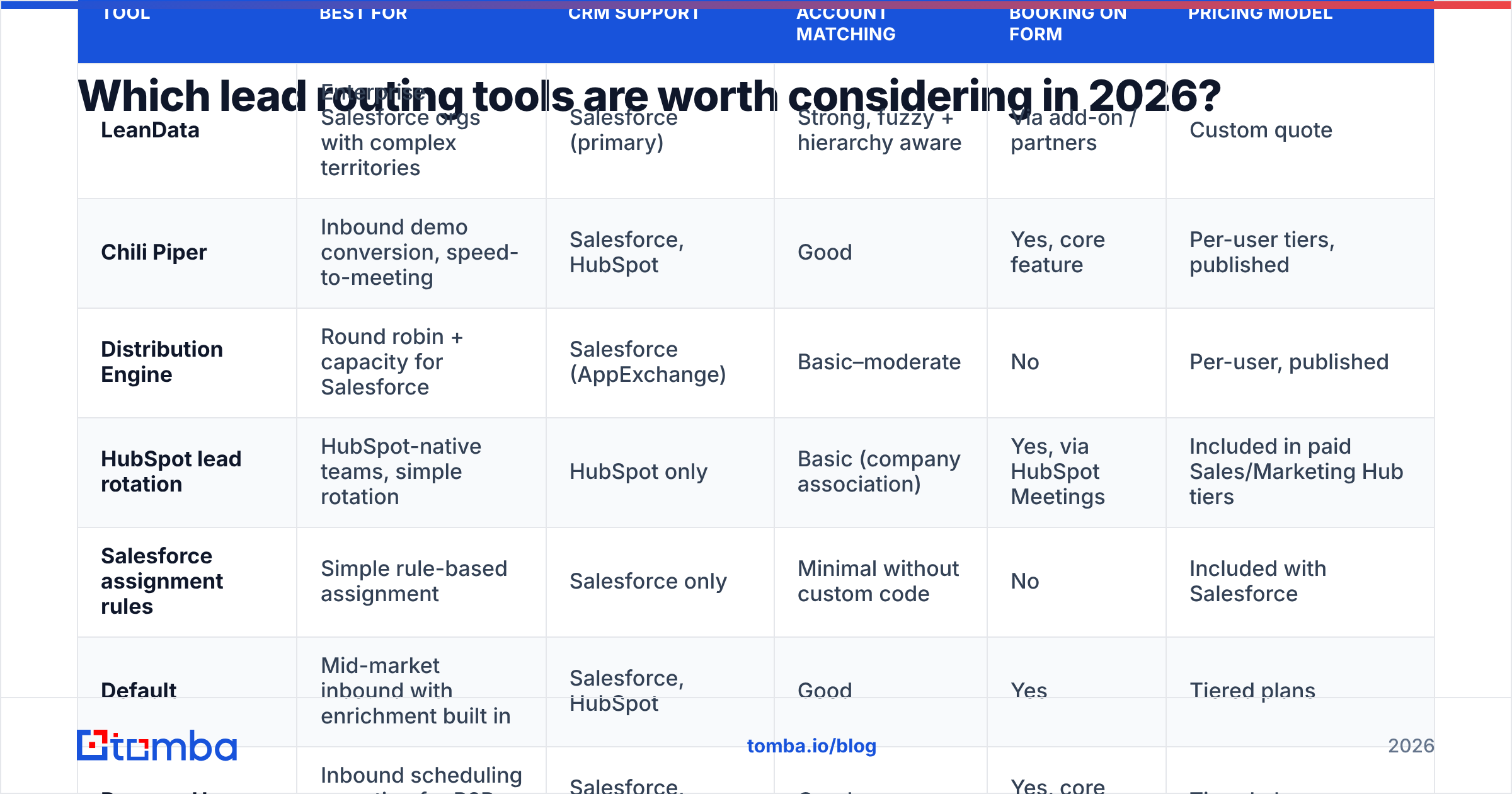
The shortlist below covers the tools that come up most often in RevOps evaluations and on G2's lead-to-account matching and routing category. Pricing models are listed as vendors present them. Most enterprise tools don't publish list prices, so expect a sales conversation.
| Tool | Best for | CRM support | Lead-to-account matching | Meeting booking on form | Pricing model |
|---|---|---|---|---|---|
| LeanData | Enterprise Salesforce orgs with complex territories | Salesforce (primary) | Strong, fuzzy + hierarchy aware | Via add-on / partners | Custom quote |
| Chili Piper | Inbound demo conversion, speed-to-meeting | Salesforce, HubSpot | Good | Yes, core feature | Per-user tiers, published |
| Distribution Engine | Round robin + capacity for Salesforce | Salesforce (AppExchange) | Basic–moderate | No | Per-user, published |
| HubSpot lead rotation | HubSpot-native teams, simple rotation | HubSpot only | Basic (company association) | Yes, via HubSpot Meetings | Included in paid Sales/Marketing Hub tiers |
| Salesforce assignment rules | Simple rule-based assignment | Salesforce only | Minimal without custom code | No | Included with Salesforce |
| Default | Mid-market inbound with enrichment built in | Salesforce, HubSpot | Good | Yes | Tiered plans |
| RevenueHero | Inbound scheduling + routing for B2B SaaS | Salesforce, HubSpot | Good | Yes, core feature | Tiered plans |
LeanData#
LeanData is the reference point for Salesforce-heavy enterprises. Its visual flow builder, lead-to-account matching, and support for territories and account hierarchies are why large RevOps teams choose it. The trade-off is setup time. Plan on real implementation work, often with a partner, and a quote-based price that suits orgs with dozens of reps or more.
Pros: strongest matching engine, detailed audit logs, handles complex territories. Cons: Salesforce-centric, heavy implementation, too much for teams under about 20 reps.
Chili Piper#
Chili Piper started with "book the meeting on the form" and grew its routing from there. When a demo request comes in, the prospect sees the right rep's calendar immediately instead of a "we'll be in touch" page. If your main goal is inbound conversion rate, this is the tool to test first.
Pros: fastest path from form to booked meeting, works on both major CRMs. Cons: routing logic isn't as deep as LeanData's for outbound or large territory models.
Distribution Engine#
Distribution Engine is a Salesforce AppExchange app built around round robin, capacity limits, working hours, and skills-based assignment. It suits support and sales teams that mainly need fair, availability-aware distribution rather than detailed account matching.
Pros: published pricing, quick to deploy, good capacity controls. Cons: Salesforce only, and matching is less sophisticated.
HubSpot lead rotation#
If you're fully on HubSpot, the native tools go further than many teams realize. Workflows can rotate leads among owners, set owners by property, and create tasks, and HubSpot Meetings handles scheduling. See HubSpot's Sales Hub for which tiers include workflows. Once you add the HubSpot integration for enrichment, HubSpot alone covers most teams under about 15 reps.
Pros: no extra license, same data model as your CRM. Cons: complex branching gets messy, and there's no true fuzzy account matching.
Salesforce assignment rules#
Native Salesforce lead assignment rules evaluate criteria in order and assign to a user or queue. They're free, reliable, and very literal. The first rule that matches wins, you get one active rule set per object, and matching leads to accounts requires custom development or a third-party tool.
Pros: included, stable, easy to audit. Cons: rigid, no round robin without workarounds, no account matching.
Default and RevenueHero#
Both are newer, inbound-focused platforms that combine form enrichment, qualification, routing, and scheduling in one product. They're worth a demo if you're a mid-market SaaS team that wants Chili Piper-style booking plus enrichment without putting together three separate tools.
How do you choose between native CRM routing and a dedicated tool?#
Start with your routing complexity rather than the feature list. A simple way to decide:
- Stay native if you have fewer than ~15 reps, one segment, simple geographic territories, and inbound volume a single SDR pod can handle. A well-built HubSpot workflow or Salesforce assignment rule set, backed by clean data, is enough.
- Add a scheduling-first tool (Chili Piper, RevenueHero, Default) if inbound demo requests are your main pipeline source and you're losing people between form submit and first touch.
- Add a matching-first tool (LeanData) if you run account-based territories, have named-account lists, sell into companies with many subsidiaries, or often see "this lead belonged to another rep's account" disputes.
- Add a distribution-first tool (Distribution Engine) if your main problem is fairness and capacity, for example reps on different shifts, PTO, or unequal quotas.
Before you sign, ask each vendor to run your messiest 200 leads through a trial. Include personal email addresses, subsidiaries, misspelled company names, and duplicates. Seeing how a tool handles those cases tells you more than the demo will.
Why does data quality decide whether routing works?#
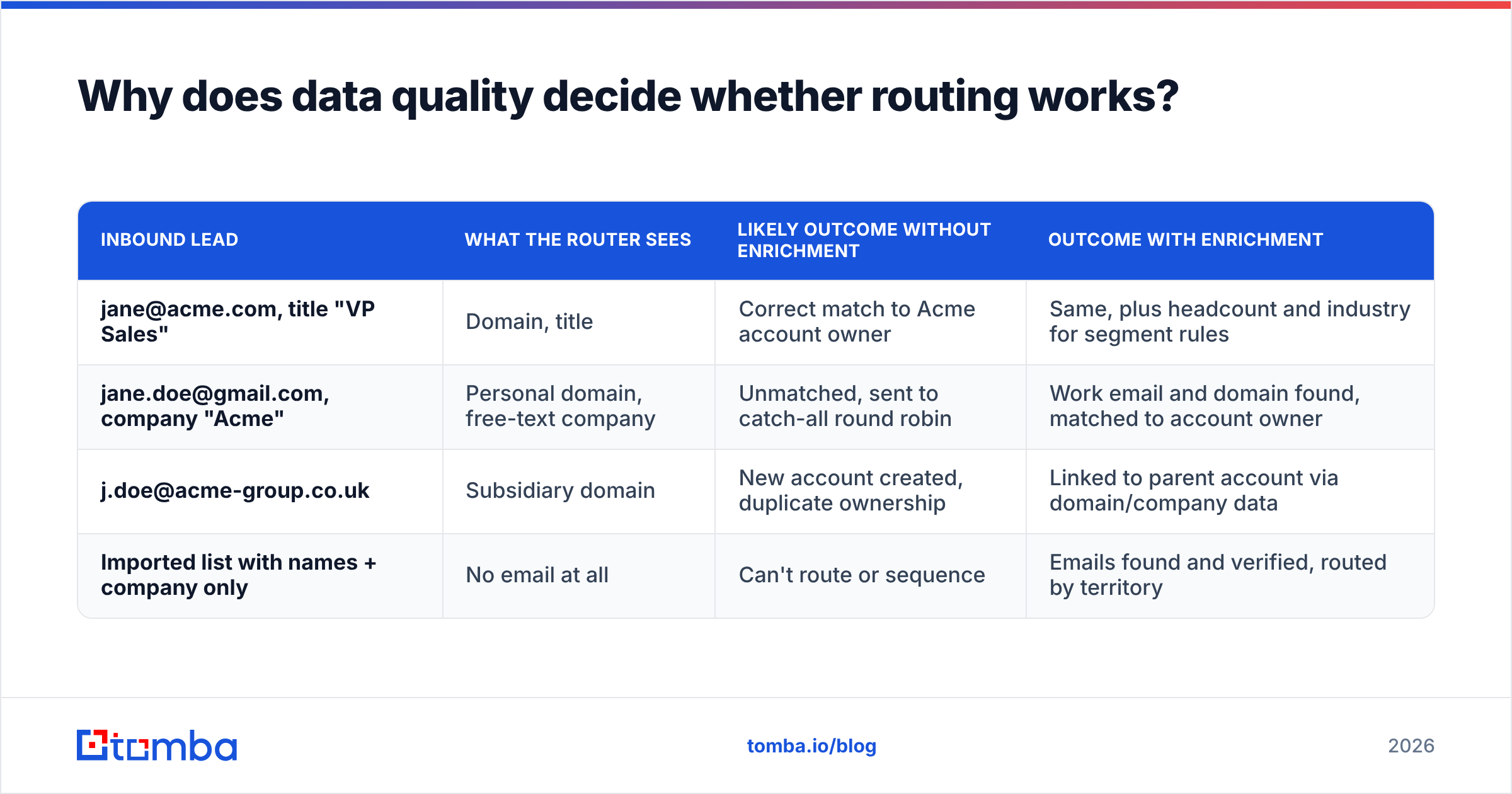
Routing rules can only use the fields the lead actually has. Consider three common inbound cases:
| Inbound lead | What the router sees | Likely outcome without enrichment | Outcome with enrichment |
|---|---|---|---|
| jane@acme.com, title "VP Sales" | Domain, title | Correct match to Acme account owner | Same, plus headcount and industry for segment rules |
| jane.doe@gmail.com, company "Acme" | Personal domain, free-text company | Unmatched, sent to catch-all round robin | Work email and domain found, matched to account owner |
| j.doe@acme-group.co.uk | Subsidiary domain | New account created, duplicate ownership | Linked to parent account via domain/company data |
| Imported list with names + company only | No email at all | Can't route or sequence | Emails found and verified, routed by territory |
The fix is to put enrichment before the routing step, not after. In practice:
- Resolve missing work emails for leads that came in with personal addresses or no email. An email finder that takes a name and company domain can return a likely work address.
- Verify before you assign. Sending a rep a lead whose email bounces wastes the SLA clock. Running new records through an email verifier catches invalid and risky addresses.
- Append firmographics like headcount, industry, and location so segment and territory rules have something to act on. Data enrichment through an API or a CRM integration covers this.
- Normalize country and state values so territory rules don't miss because of spelling.
What does lead routing software cost in 2026?#
Few vendors publish enterprise pricing, so compare on total cost rather than license alone:
- License. Native CRM rules cost nothing extra. Per-user tools scale with the number of reps receiving leads. Enterprise matching platforms are quoted annually and usually priced for mid-market and enterprise budgets.
- Implementation. Budget RevOps or partner hours to map territories, build flows, and test edge cases. For enterprise tools this can take longer than the procurement cycle.
- Maintenance. Every reorg, new hire, territory change, and product launch means routing updates. Tools with visual builders and audit logs reduce this ongoing cost.
- Data. Enrichment and verification credits feed the router. This is usually the smallest line item and the one with the biggest effect on accuracy.
Check review sites such as G2 and Capterra for recent buyer comments on implementation effort. They're often more useful than the pricing page.
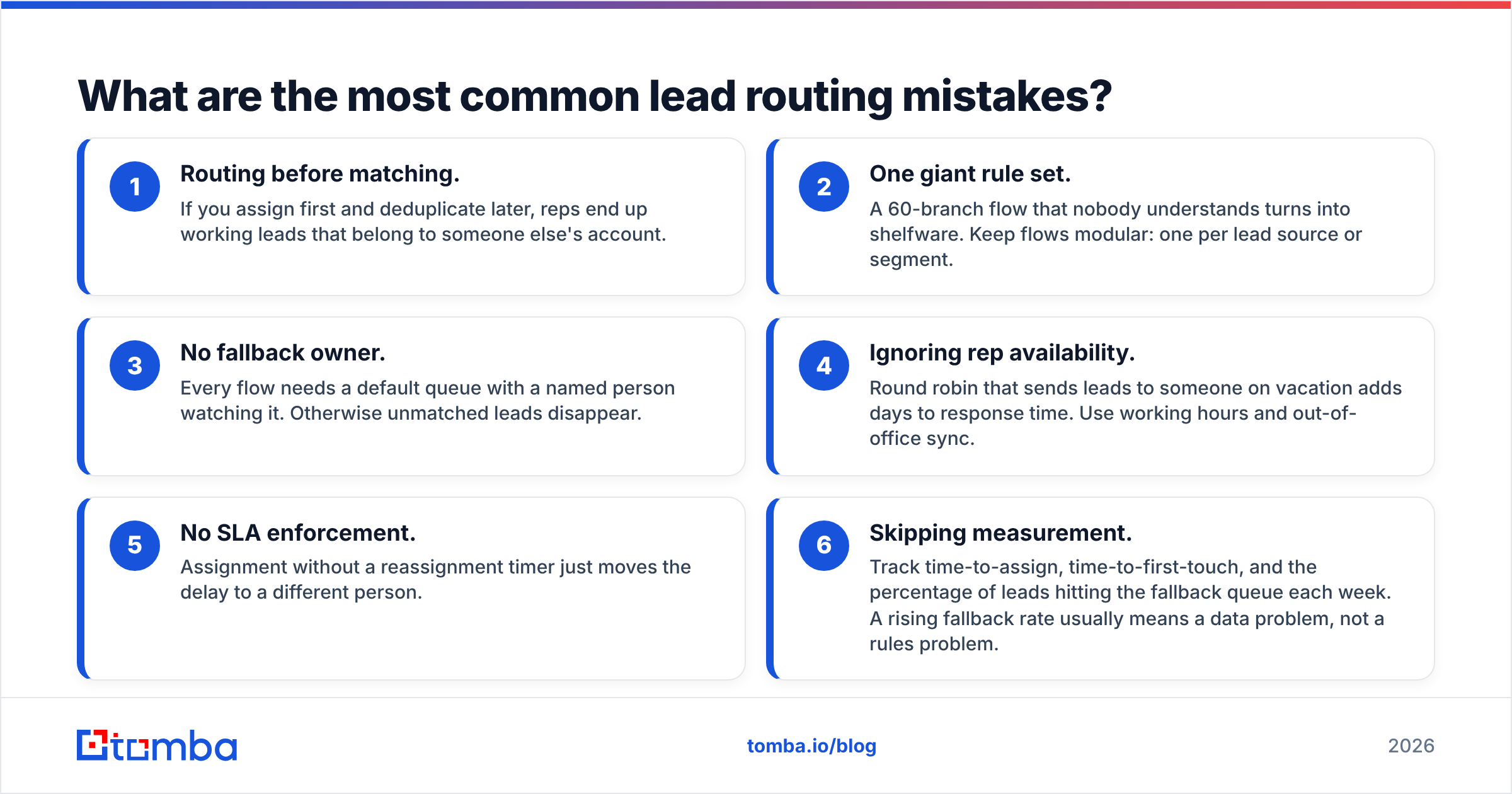
What are the most common lead routing mistakes?#
Most teams hit the same problems:
- Routing before matching. If you assign first and deduplicate later, reps end up working leads that belong to someone else's account.
- One giant rule set. A 60-branch flow that nobody understands turns into shelfware. Keep flows modular: one per lead source or segment.
- No fallback owner. Every flow needs a default queue with a named person watching it. Otherwise unmatched leads disappear.
- Ignoring rep availability. Round robin that sends leads to someone on vacation adds days to response time. Use working hours and out-of-office sync.
- No SLA enforcement. Assignment without a reassignment timer just moves the delay to a different person.
- Skipping measurement. Track time-to-assign, time-to-first-touch, and the percentage of leads hitting the fallback queue each week. A rising fallback rate usually means a data problem, not a rules problem.
Is lead routing software worth it for small teams?#
Often not at first. A team of five reps can run clean round robin inside HubSpot or Salesforce, and spending on a dedicated router too early mostly adds complexity. Your money is better spent on:
- Fixing form fields so you capture work email and company.
- Enriching and verifying leads as they arrive, which improves response rate and keeps bounces off your domain.
- Writing a one-page routing policy so everyone knows who owns what.
Revisit a dedicated tool once you see ownership disputes, a rising share of unmatched leads, or inbound volume that your SDRs can't respond to within your SLA.
How should you roll out a new routing setup?#
A rollout sequence that avoids most problems:
- Audit current leads. Export 90 days of leads and tag where each one ended up and where it should have gone. This gives you a baseline misroute rate.
- Clean and enrich the backlog. Deduplicate, fill domains, and verify emails before migrating.
- Write rules in plain language first. Get sales leadership to approve a written policy before anyone builds a flow.
- Run in shadow mode. Most dedicated tools can log what they would do without actually assigning. Compare the results with your current outcomes for two weeks.
- Go live by source. Start with demo requests, then content downloads, then imports and outbound lists.
- Review monthly. Territories change, so routing has to be updated with them.
Where does Tomba fit in your routing stack?#
Tomba doesn't replace LeanData, Chili Piper, or your CRM's assignment rules. It supplies the data those tools depend on. If your router keeps sending leads to the catch-all queue because they arrive with Gmail addresses, missing domains, or no email at all, the router isn't the problem. The input data is.
Tomba Email Finder turns a name and company into a verified professional email address, and it can find emails for an entire domain. Your routing rules then get the domain and company match they need. You can call it through the API, bulk upload a list, or connect it to Salesforce or HubSpot so enrichment runs before assignment. The free tier includes 25 searches a month for testing on real leads, and paid plans start at $49/mo. Run it on your last month of unmatched leads and see how many of them end up with a real owner.
Related guides#
// get started
Find, verify and enrich your first contacts today
Start on the free plan with 25 searches a month, then scale when your team is ready.
Free plan · No credit card required · GDPR & CCPA
// about the author