Lead Scoring Automation: How to Build a Model Sales Trusts
Most automated lead scores get ignored by sales within a quarter. Here is how to build lead scoring automation on clean data, sensible signals, and a feedback loop that keeps it accurate.
TL;DR
- Lead scoring automation gives every lead a number based on who they are (fit) and what they do (intent), then sends the ones above a threshold to sales automatically. Nobody has to triage by hand.
- Most scoring models fail because of what goes into them. Missing job titles, dead emails, and wrong company sizes quietly break even a well-designed model.
- Start with a rules-based model: 8–12 signals, a fit score and an engagement score kept separate, and score decay. Move to predictive scoring only once you have a few hundred closed-won deals to train on.
- Enrich and verify every lead before it gets scored, then check the scores against real win rates every quarter.
- Treat the score as a routing tool, not a grade. If sales doesn't act on it within an SLA, it isn't working.
What is lead scoring automation?#
Lead scoring automation is the process of giving leads a numeric value, updating it and acting on it automatically, based on how closely they match your ideal customer and how they engage with your brand. The score then triggers workflows, such as routing to an SDR, enrolling in a nurture sequence, creating a task, or changing lifecycle stage, without anyone making the call by hand.
Think of it like an airport security line with a fast lane. Everyone gets screened. The system just decides who goes into which lane so the people with boarding passes for the next flight don't wait behind everyone else.
In practice, the automation has three layers:
- Data capture. Form fills, page views, email clicks, product usage, and firmographic fields flow into your CRM or marketing automation platform.
- Scoring logic. Rules such as "+15 if VP or above" and "+10 for a pricing page visit", or a predictive model, turn those inputs into a number.
- Actions. Once a threshold is crossed, the lead is routed, notified, sequenced, or disqualified.
The concept isn't new. Wikipedia's entry on lead scoring traces it back to early marketing automation. What has changed is how much of the pipeline can now run without a person touching it, and how badly it breaks when the data underneath is wrong.
Why does lead scoring matter more in 2026?#
There are three reasons. Inbound volume keeps rising while SDR headcount stays flat. Buyers do most of their research before they fill in a form. And AI-generated form spam has made raw lead counts less meaningful than ever.
When one SDR faces 400 new leads a week, the order they work them in largely decides your pipeline. Industry research from firms like Forrester and Gartner has long shown that speed-to-lead strongly affects conversion. A lead contacted within the hour is far more likely to turn into a conversation than one contacted the next day. Automated scoring is how you make sure the fastest response goes to the leads that deserve it.
It also gives marketing and sales one shared definition of a marketing qualified lead (MQL). Without a score, "qualified" means whatever the loudest person in the pipeline review says it means.
What are the main types of lead scoring models?#
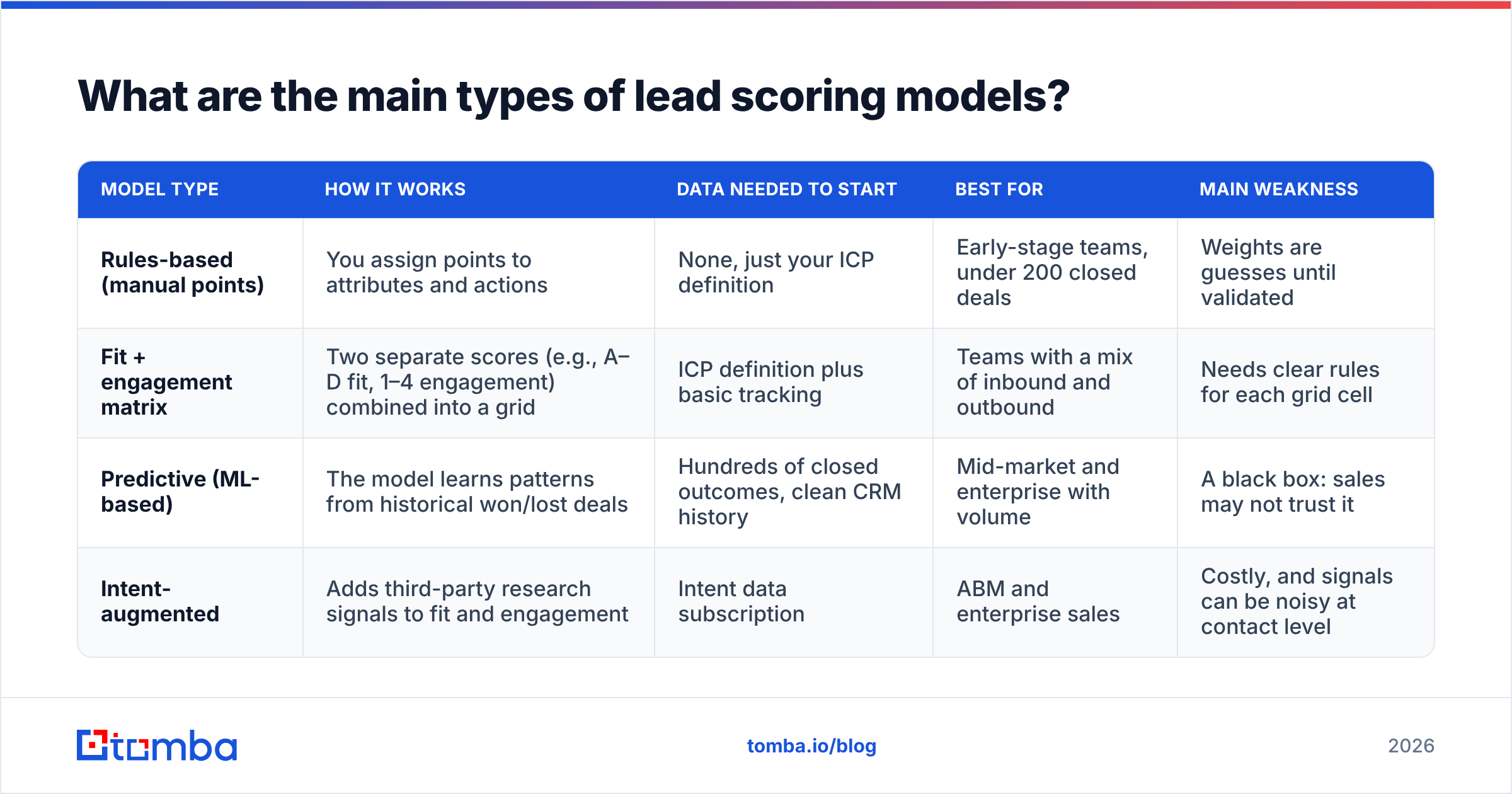
There are four common approaches. Most mature teams end up combining two of them.
| Model type | How it works | Data needed to start | Best for | Main weakness |
|---|---|---|---|---|
| Rules-based (manual points) | You assign points to attributes and actions | None, just your ICP definition | Early-stage teams, under 200 closed deals | Weights are guesses until validated |
| Fit + engagement matrix | Two separate scores (e.g., A–D fit, 1–4 engagement) combined into a grid | ICP definition plus basic tracking | Teams with a mix of inbound and outbound | Needs clear rules for each grid cell |
| Predictive (ML-based) | The model learns patterns from historical won/lost deals | Hundreds of closed outcomes, clean CRM history | Mid-market and enterprise with volume | A black box: sales may not trust it |
| Intent-augmented | Adds third-party research signals to fit and engagement | Intent data subscription | ABM and enterprise sales | Costly, and signals can be noisy at contact level |
Built-in options exist in the major platforms. HubSpot offers manual and predictive scoring depending on your tier, and Salesforce offers Einstein-based lead scoring for predictive use cases. Standalone vendors such as MadKudu and 6sense sit on top of your CRM for more advanced modeling.
The decision rule is simple. If you can't list your last 200 closed-won deals with accurate company size, industry, and buyer title on each one, you aren't ready for predictive scoring. Start with rules.
How do you build a lead scoring model step by step?#
Here is the sequence that works for most B2B teams. It fits in a two-week sprint.
- Pull your last 100–300 closed-won and closed-lost deals. Export the company and contact attributes. Look for what separates winners from losers: industry, headcount band, title seniority, tech stack, source channel.
- Define fit criteria from that data, not from opinion. If 70% of your wins come from 50–500 employee SaaS companies, that band gets the heaviest weight. If "Director of Marketing" contacts close at twice the rate of "Marketing Manager," weight it that way.
- Pick 4–6 engagement signals that show buying intent. Pricing page visits, demo requests, a return visit within 7 days, and replies to outbound email. Skip vanity actions like opening a newsletter.
- Keep the fit score and engagement score separate. A student who reads every blog post has high engagement and zero fit. A perfect-fit VP who hasn't engaged yet belongs in outbound, not in the MQL queue.
- Add negative scoring. Subtract points for competitor domains, personal email addresses (depending on your market), job-seeker page visits, unsubscribes, and hard bounces.
- Set score decay. Engagement points should drop off over time, for example losing 25% every 30 days of inactivity. Otherwise a lead who binged your content 9 months ago sits at the top of the queue forever.
- Set a threshold and an SLA together. "Score ≥ 70 routes to an SDR, who must make first contact within 4 business hours." A threshold without an SLA just produces a number nobody acts on.

What signals should carry the most weight?#
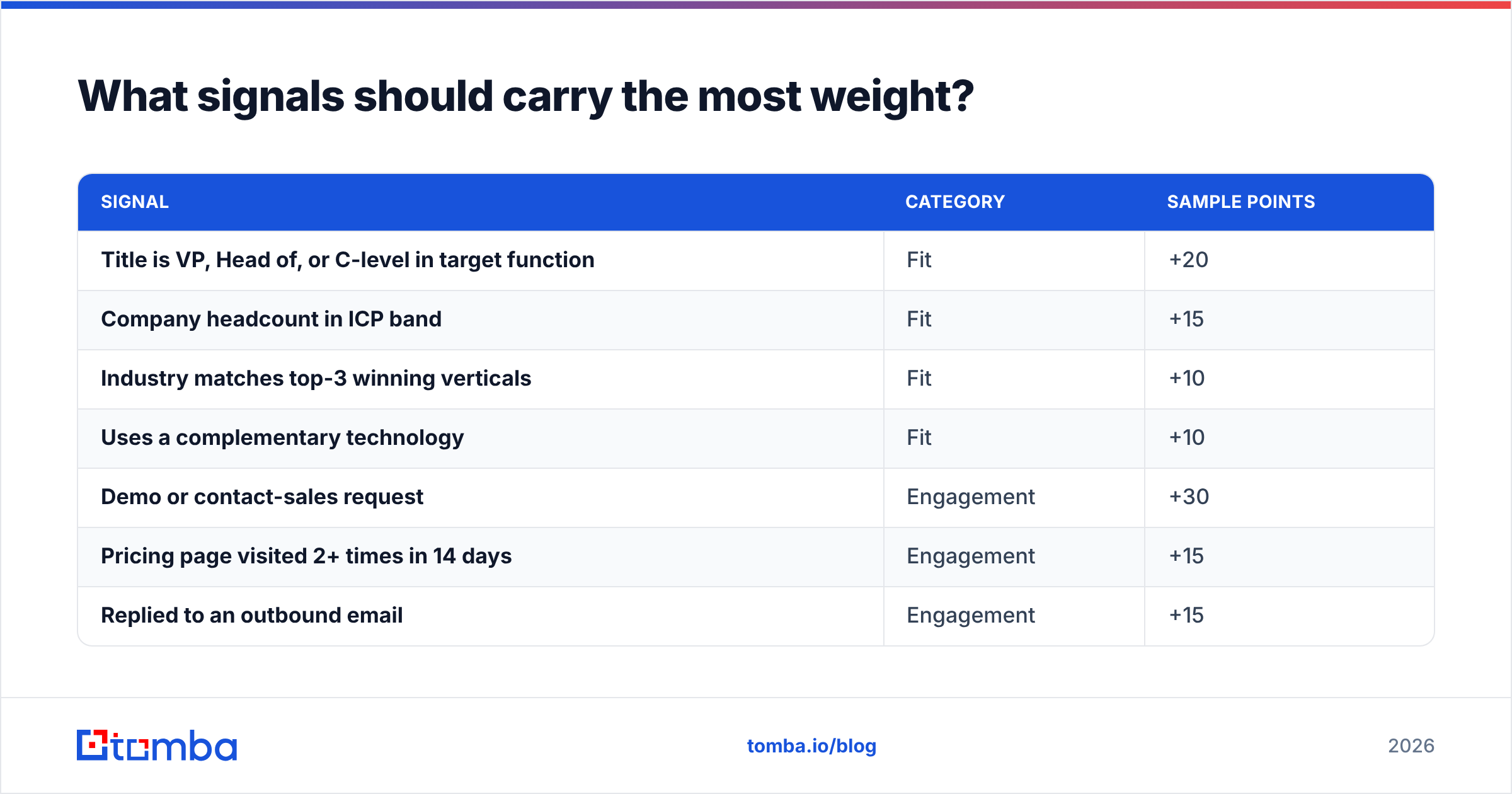
Weight signals by how well they predicted outcomes in your own historical data. As a starting point, here is a sample rules-based scorecard many B2B SaaS teams begin with:
| Signal | Category | Sample points |
|---|---|---|
| Title is VP, Head of, or C-level in target function | Fit | +20 |
| Company headcount in ICP band | Fit | +15 |
| Industry matches top-3 winning verticals | Fit | +10 |
| Uses a complementary technology | Fit | +10 |
| Demo or contact-sales request | Engagement | +30 |
| Pricing page visited 2+ times in 14 days | Engagement | +15 |
| Replied to an outbound email | Engagement | +15 |
| Webinar attended (not just registered) | Engagement | +5 |
| Personal or disposable email domain | Negative | -15 |
| Email hard-bounced | Negative | -30 |
| Visited careers page only | Negative | -20 |
Two things stand out in that table. Most of the fit points depend on fields the lead almost never types into a form: exact title, headcount, industry, tech stack. And one of the biggest negative signals is a bounced email, which is really a data-quality failure showing up as a score.
Why does automated lead scoring break?#
Automated lead scoring usually breaks because the data it scores is incomplete or wrong. The model logic is rarely the problem. The math can be perfect and the output still useless if half your leads have an empty "company size" field.
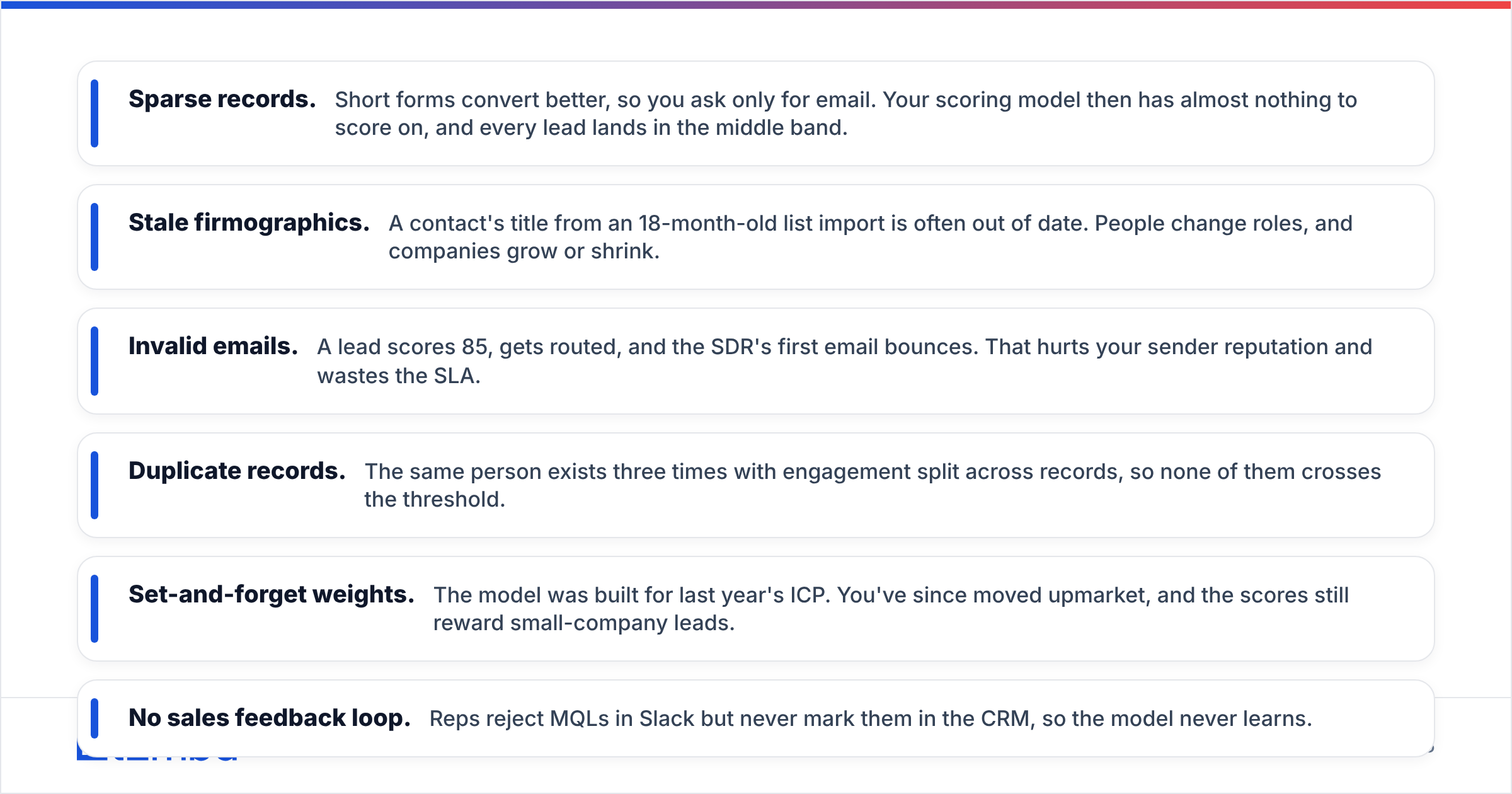
These are the failure modes we see most often:
- Sparse records. Short forms convert better, so you ask only for email. Your scoring model then has almost nothing to score on, and every lead lands in the middle band.
- Stale firmographics. A contact's title from an 18-month-old list import is often out of date. People change roles, and companies grow or shrink.
- Invalid emails. A lead scores 85, gets routed, and the SDR's first email bounces. That hurts your sender reputation and wastes the SLA.
- Duplicate records. The same person exists three times with engagement split across records, so none of them crosses the threshold.
- Set-and-forget weights. The model was built for last year's ICP. You've since moved upmarket, and the scores still reward small-company leads.
- No sales feedback loop. Reps reject MQLs in Slack but never mark them in the CRM, so the model never learns.
The fix for the first three is an enrichment and verification step that runs before scoring, not after. When a new lead arrives with only an email, an enrichment call can fill in name, title, company, headcount, and industry. Tomba's data enrichment returns these contact and company fields from an email or domain. A verification call such as an email verifier confirms the address is deliverable before any points are given. Other data providers, including Apollo, Clearbit (now part of HubSpot), and BookYourData, cover similar ground with different database strengths. Test two or three against a sample of your own leads and compare fill rates before committing.
How do you automate the full lead scoring workflow?#
A reliable automated pipeline runs in the order below. Each step feeds the next, so reordering them, for example scoring before enrichment, brings back the problems described above.
- Capture. A form submission, chat, product signup, or outbound reply creates or updates a record.
- Deduplicate. Match on email and domain and merge into an existing contact where one exists.
- Verify. Check deliverability. Flag or suppress invalid and risky addresses.
- Enrich. Fill in title, seniority, company size, industry, location, and tech stack.
- Score. Calculate fit and engagement separately and apply negative points and decay.
- Route. High fit plus high engagement goes to the SDR queue. High fit plus low engagement goes to an outbound sequence. Low fit goes to nurture or disqualification.
- Feed back. Rep dispositions ("bad fit," "no budget," "meeting booked") are written back to the record to recalibrate the weights.
Most of this can be wired together natively. HubSpot workflows and Salesforce Flow can call enrichment APIs through webhooks or native connectors. Tomba, for instance, offers a HubSpot integration and Salesforce connectors, while Zapier or Make can fill gaps for other stacks. The important design choice is to make enrichment and verification synchronous, so they finish before the scoring workflow runs. Otherwise your first score is calculated on an empty record.
Is predictive lead scoring better than rules-based scoring?#
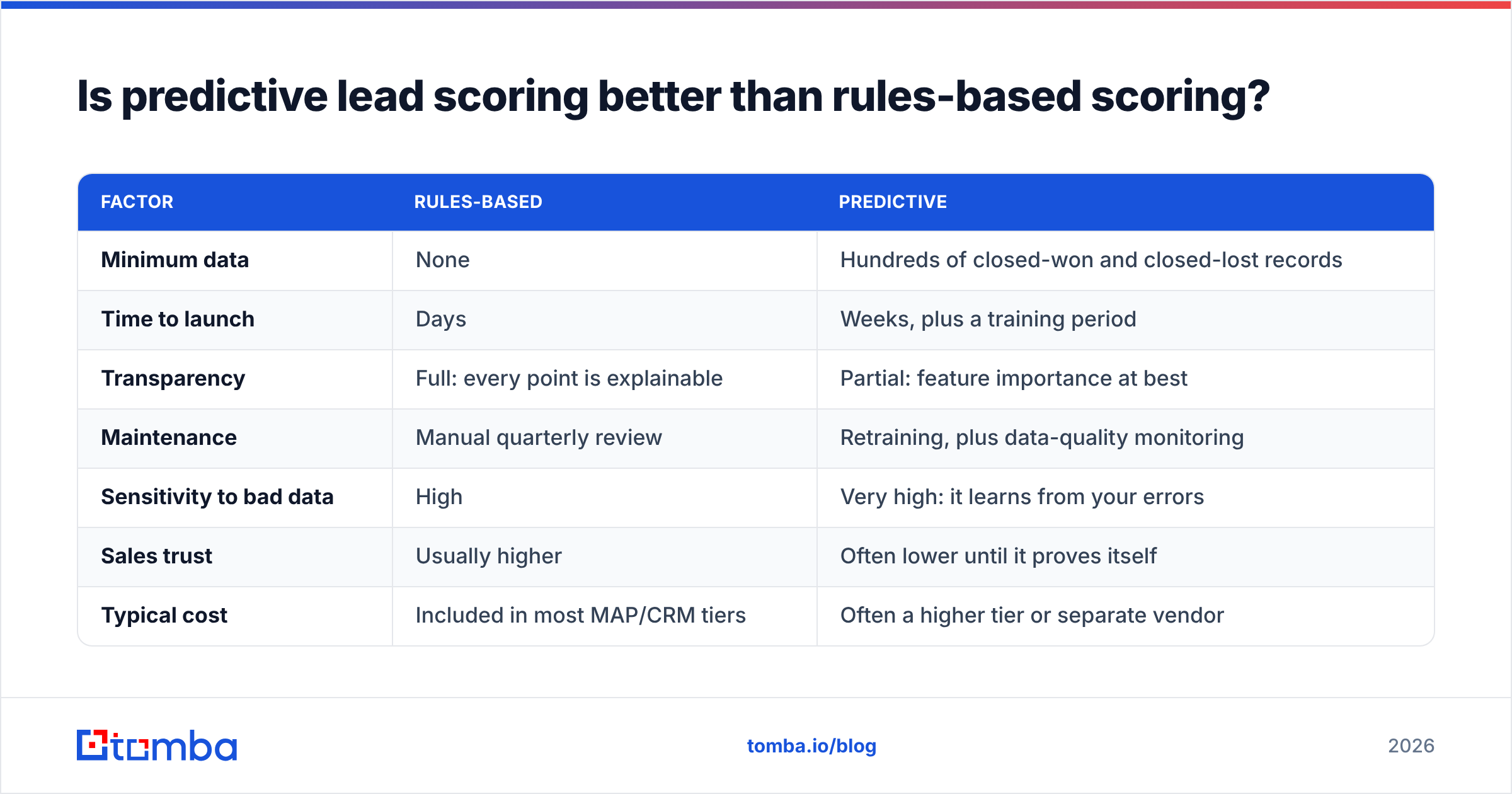
Predictive scoring is better only when you have enough clean historical outcomes to train on. Below that bar, a well-maintained rules model usually matches or beats it, and sales can understand why a lead scored the way it did.
| Factor | Rules-based | Predictive |
|---|---|---|
| Minimum data | None | Hundreds of closed-won and closed-lost records |
| Time to launch | Days | Weeks, plus a training period |
| Transparency | Full: every point is explainable | Partial: feature importance at best |
| Maintenance | Manual quarterly review | Retraining, plus data-quality monitoring |
| Sensitivity to bad data | High | Very high: it learns from your errors |
| Sales trust | Usually higher | Often lower until it proves itself |
| Typical cost | Included in most MAP/CRM tiers | Often a higher tier or separate vendor |
The row that matters most is "Sensitivity to bad data." A predictive model trained on a CRM where 40% of records lack industry data will learn that "industry: unknown" predicts something. It might even predict wins, simply because your best reps fill in fields less often. Clean the data first, prove a rules model, and then let a predictive model challenge it.
How do you know if your lead scoring automation is working?#
Check the score against actual outcomes every quarter. If high scores don't convert at meaningfully higher rates than low scores, the model is decoration.
Track these metrics:
- Conversion rate by score band. Split leads into deciles or bands such as 0–30, 31–60, 61–80, and 81+. The MQL-to-opportunity rate should rise steadily across the bands. A flat line means your weights are wrong.
- MQL acceptance rate. What share of routed leads does sales accept? Below roughly 50%, reps are telling you the threshold is too low or the fit criteria are off.
- Speed to first touch. Median time from threshold crossed to first rep activity. If it's measured in days, the automation isn't the bottleneck. Your SLA is.
- Opportunity win rate by source score. This is the ultimate test: do high-scoring leads close?
- Field completeness. The percentage of scored leads with title, company size, and industry filled in. If this drops, scores will drift soon after.
- Bounce rate on routed leads. Anything above 2–3% on first-touch emails points to a verification gap upstream.
When a signal consistently fails to separate winners from losers, drop its weight. When reps keep flagging a pattern ("every lead from X industry is a student"), turn it into a negative rule.
What mistakes should you avoid when automating lead scoring?#
- Scoring everything. Forty signals means none of them matter. Keep it to 8–12 that you've validated.
- Merging fit and engagement into one number. It hides the difference between "right person, not ready" and "wrong person, very active."
- Giving points for email opens. Apple Mail Privacy Protection and security scanners inflate opens. Clicks and replies are more reliable.
- Skipping decay. Scores only ever go up, the MQL queue fills with stale leads, and sales stops trusting it.
- Ignoring outbound leads. Prospects you source yourself need scoring too. Enrich them the same way so SDRs can prioritize their own lists.
- Launching without a sales sign-off. Build the scorecard with two or three top reps in the room. Their buy-in is what gets the score used.
Where should you start this week?#
Pick one routing decision you make manually today, such as "which inbound demo requests go to AEs versus SDRs," and automate just that. Build a rules-based fit score from your last 100 closed-won deals, add verification and enrichment in front of it, and set a 4-hour SLA. Review conversion by score band after 30 days. Then add engagement scoring, then decay, then negative rules. Consider predictive only after the rules model has earned sales' trust.
The teams whose lead scoring automation holds up aren't the ones with the most sophisticated models. They're the ones whose records are complete, whose emails are real, and whose reps can explain why a lead scored 82.
If your scoring model is starved for data, fix the inputs first. The Tomba Email Finder finds and verifies professional email addresses by name, company, or domain, and pairs with enrichment to fill in the title, company size, and industry fields your scorecard depends on. Start on the free tier with 25 searches a month to test fill rates on your own leads, or see the Tomba plans, which start at $49/month when you're ready to plug it into your scoring workflow.
Related guides#
// get started
Find, verify and enrich your first contacts today
Start on the free plan with 25 searches a month, then scale when your team is ready.
Free plan · No credit card required · GDPR & CCPA
// about the author