Lead Scoring Enrichment: How to Fix Scores Built on Bad Data
Your lead scoring model is only as good as the fields it reads. Here's how to use lead scoring enrichment to fill the gaps, raise score accuracy, and send reps leads worth calling.
TL;DR
- Lead scoring enrichment means filling in the firmographic, role, and contact fields your scoring model reads before it assigns points. Without those fields, most scores come down to guesswork.
- The usual failure isn't a badly weighted model. It's a model that reads empty fields: no job title, no company size, no industry. Those leads either score zero or get default points.
- Enrich at three points: when the lead comes in (real-time), on a schedule (re-enrichment), and just before routing (verification).
- Start with the five fields that move scores the most: job title/seniority, company size, industry, verified email status, and tech stack.
- Keep "fit" enrichment separate from "engagement" scoring, and measure both against closed-won deals, not MQL volume.
What is lead scoring enrichment?#
Lead scoring enrichment is the process of adding missing data to a lead record so your scoring model has something real to evaluate. A form fill usually gives you a name, an email, and maybe a company. Your scoring model wants seniority, headcount, industry, region, revenue band, and whether the email actually reaches someone. Enrichment fills that gap.
The idea behind lead scoring is simple. You assign points for attributes and behaviors that correlate with buying, and you route leads above a threshold to sales. In practice, most models are built on the assumption that the fields exist. Often they don't.
Here's an everyday comparison. A lead score works like a credit score. A credit bureau with no income history and no payment record can't tell you much about a borrower. It gives a thin-file default. Your CRM does the same with a lead that's just jane@company.com: the score looks precise, but it isn't measuring anything.
Enrichment usually covers two kinds of data:
- Fit data (who the lead is): job title, seniority, department, company size, industry, location, revenue, tech stack.
- Reachability data (whether you can contact them): verified email status, direct phone, LinkedIn URL.
Engagement data (page views, email opens, demo requests) comes from your own systems. Enrichment feeds fit and reachability, which is where most scoring models are weakest.
Why do lead scoring models fail without enrichment?#
Most models fail because of missing inputs, not bad weights. Teams spend weeks arguing whether "VP" should be worth 15 or 20 points, when 40% of their records don't have a title at all.
Here are the common failure patterns:
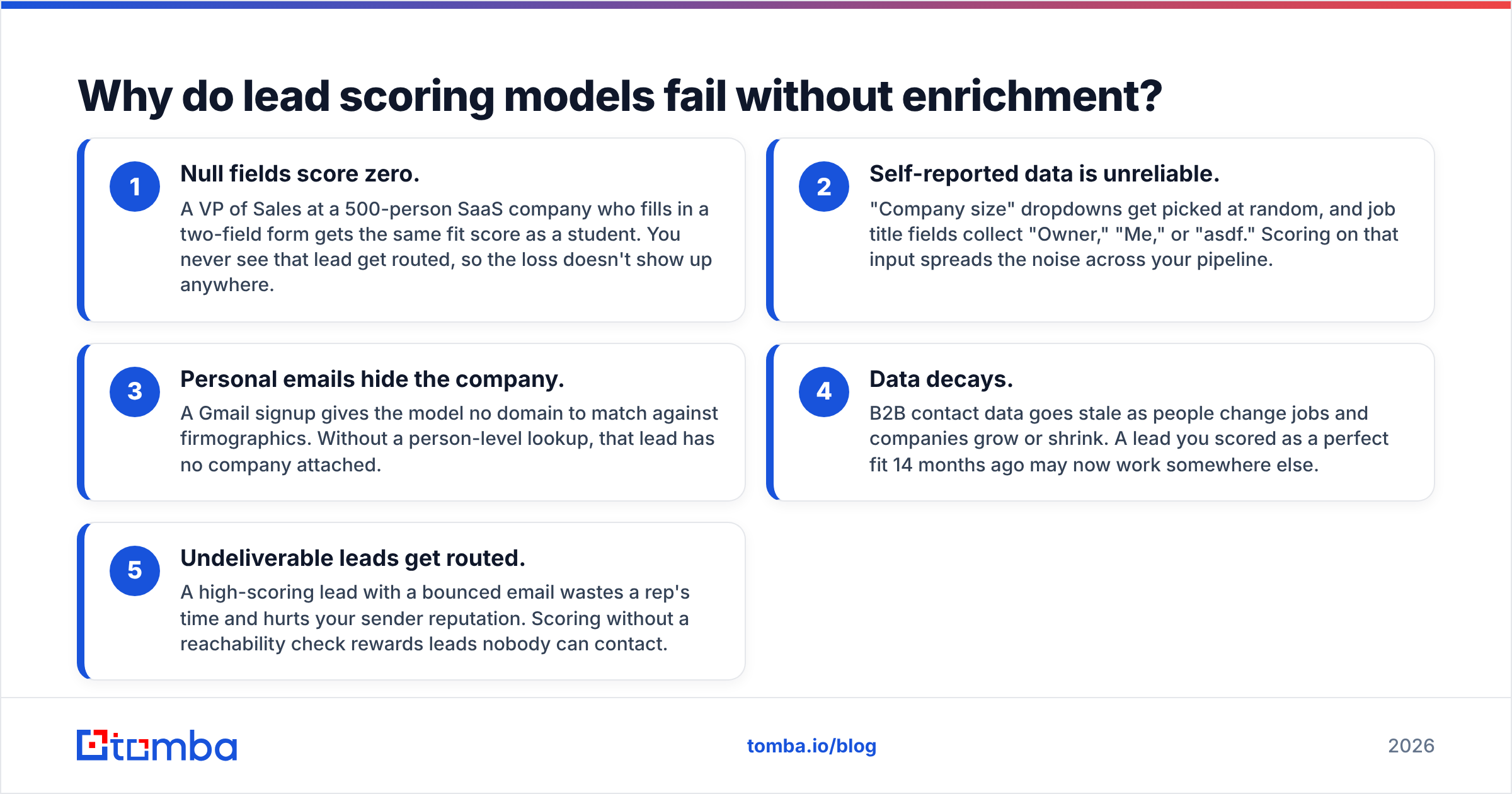
- Null fields score zero. A VP of Sales at a 500-person SaaS company who fills in a two-field form gets the same fit score as a student. You never see that lead get routed, so the loss doesn't show up anywhere.
- Self-reported data is unreliable. "Company size" dropdowns get picked at random, and job title fields collect "Owner," "Me," or "asdf." Scoring on that input spreads the noise across your pipeline.
- Personal emails hide the company. A Gmail signup gives the model no domain to match against firmographics. Without a person-level lookup, that lead has no company attached.
- Data decays. B2B contact data goes stale as people change jobs and companies grow or shrink. A lead you scored as a perfect fit 14 months ago may now work somewhere else.
- Undeliverable leads get routed. A high-scoring lead with a bounced email wastes a rep's time and hurts your sender reputation. Scoring without a reachability check rewards leads nobody can contact.
Research firms have been making this point for years. Gartner's work on data quality consistently puts poor data among the most expensive, least visible problems in revenue operations. In lead scoring, that cost shows up as good leads that never get routed and bad leads that do.

Which fields should you enrich for lead scoring?#
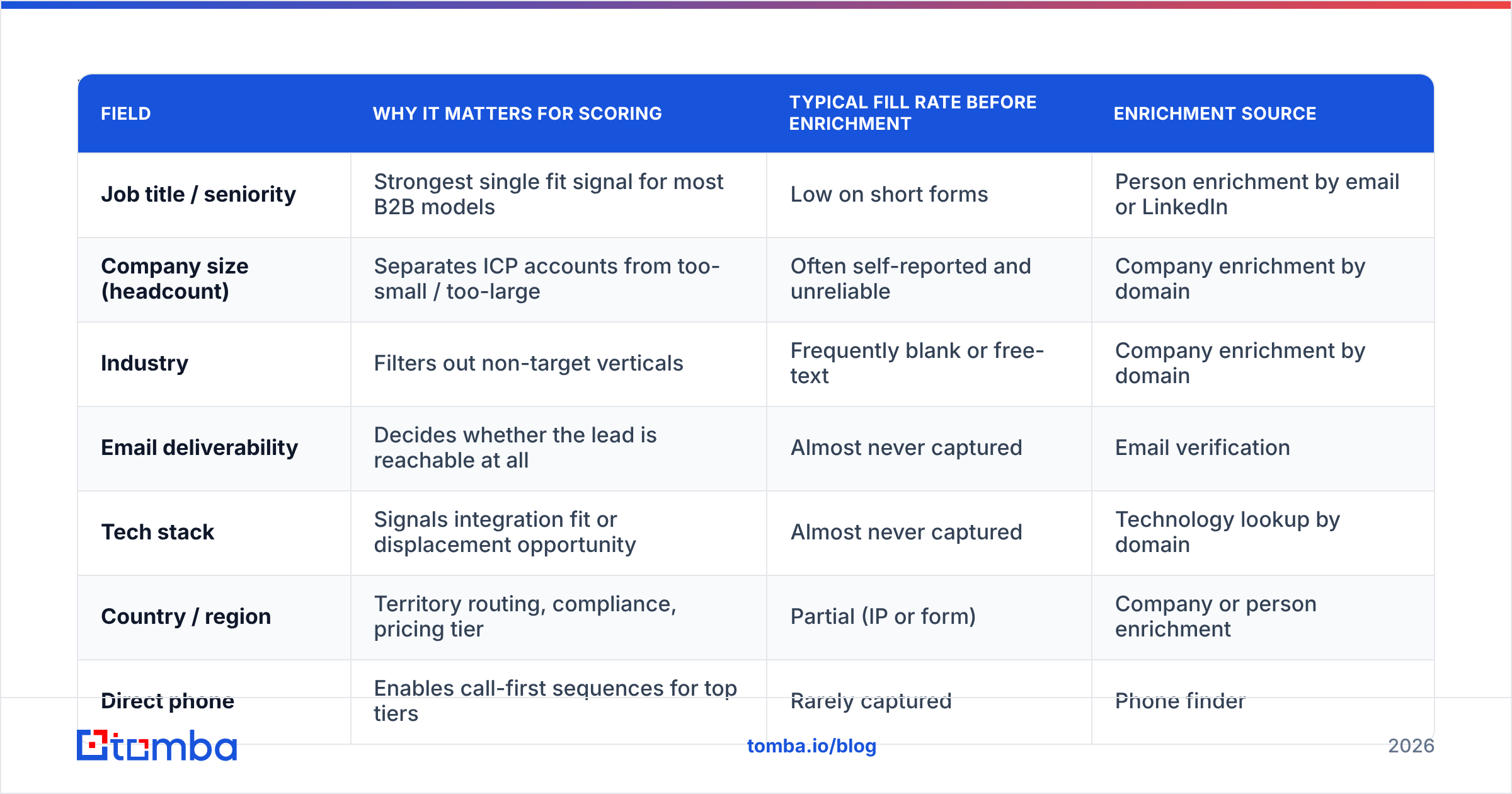
Enrich the fields your model weights most heavily and that are most often empty. Pull your last 1,000 leads and check the fill rate on each scoring field. Wherever the fill rate is low and the weight is high, you're losing the most scoring accuracy.
| Field | Why it matters for scoring | Typical fill rate before enrichment | Enrichment source |
|---|---|---|---|
| Job title / seniority | Strongest single fit signal for most B2B models | Low on short forms | Person enrichment by email or LinkedIn |
| Company size (headcount) | Separates ICP accounts from too-small / too-large | Often self-reported and unreliable | Company enrichment by domain |
| Industry | Filters out non-target verticals | Frequently blank or free-text | Company enrichment by domain |
| Email deliverability | Decides whether the lead is reachable at all | Almost never captured | Email verification |
| Tech stack | Signals integration fit or displacement opportunity | Almost never captured | Technology lookup by domain |
| Country / region | Territory routing, compliance, pricing tier | Partial (IP or form) | Company or person enrichment |
| Direct phone | Enables call-first sequences for top tiers | Rarely captured | Phone finder |
Two rules help:
- Normalize before you score. "VP Sales," "Vice President, Sales," and "VP of Revenue" should all map to one seniority bucket. Enriched titles are cleaner than self-reported ones, but you still need a mapping table.
- Prefer enriched values over self-reported ones for fit fields. Keep the form value for reference, but score on the enriched field when both exist.
How does enrichment fit into the scoring workflow?#
Enrichment should run at three stages, each with a different job. Picture a restaurant kitchen: you prep ingredients as deliveries arrive, restock on a schedule, and check each plate before it leaves the pass.
- Enrich at capture (real-time). When a form is submitted or a lead is imported, call an enrichment API with the email or domain, write the returned fields to the record, then run scoring. This is the stage that matters most, because it happens before the first score is assigned.
- Re-enrich on a schedule. Every 90 to 180 days, re-run enrichment on open leads and active contacts. Job changes, company growth, and funding events should update the score automatically.
- Verify before routing. Just before a lead crosses the MQL threshold and goes to a rep, check the email is still deliverable. A two-second check here saves the rep a bounced first touch.
- Enrich the gaps in bulk. For historical records with empty fields, run a one-time backfill. This usually surfaces good leads that were scored low and never followed up.
- Log the source and date of every enriched field. When a rep asks why a lead scored 85, you should be able to show which fields were enriched, from where, and when.
If you run HubSpot or Salesforce, the practical setup is a workflow that triggers on contact creation, calls the enrichment step, waits for the fields to write back, and then recalculates the score. The order matters. If scoring runs before enrichment finishes, you've scored an empty record again.
Real-time vs batch enrichment: which is better for scoring?#
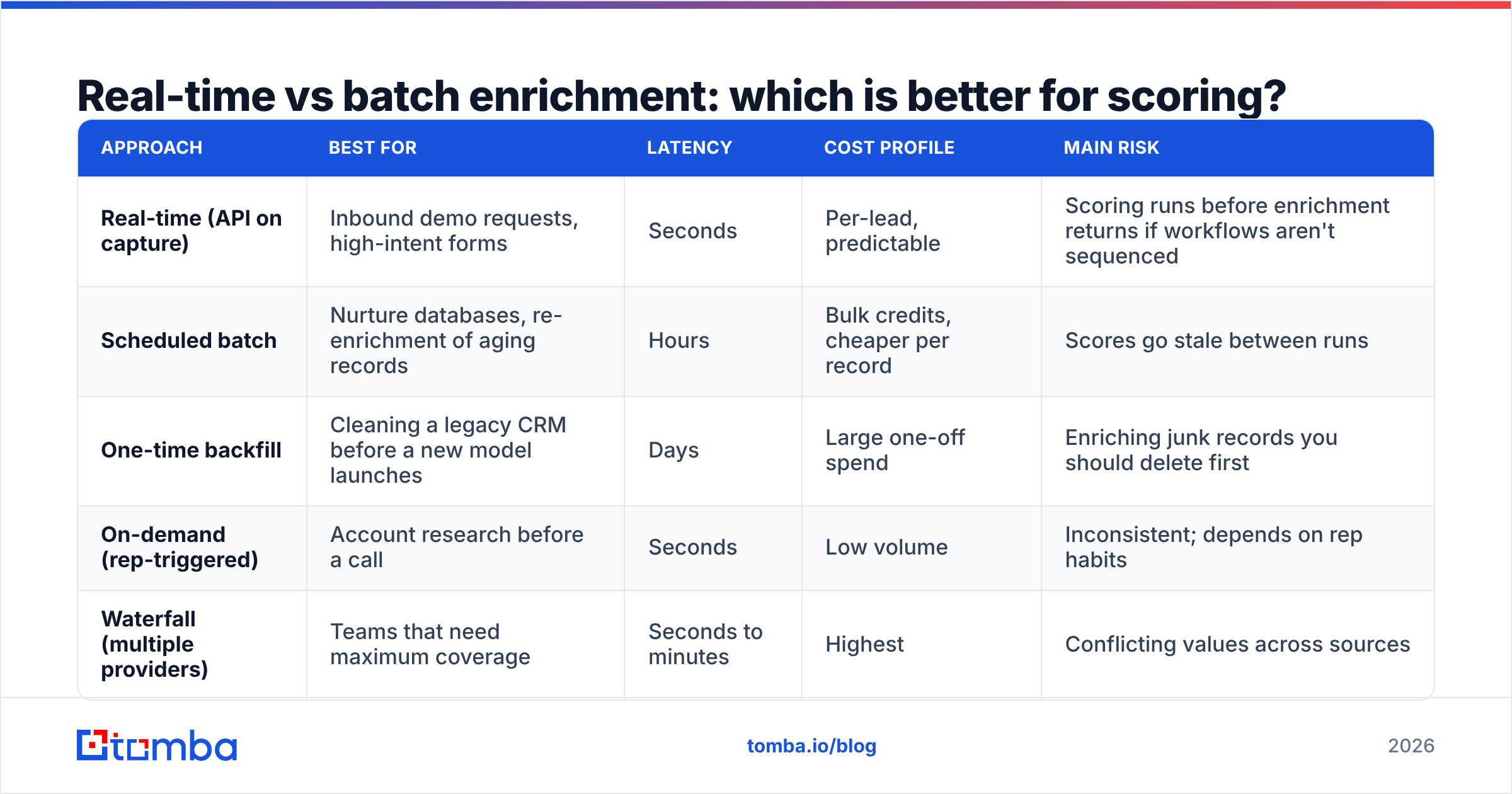
You need both. The right mix depends on inbound volume and how quickly sales follows up.
| Approach | Best for | Latency | Cost profile | Main risk |
|---|---|---|---|---|
| Real-time (API on capture) | Inbound demo requests, high-intent forms | Seconds | Per-lead, predictable | Scoring runs before enrichment returns if workflows aren't sequenced |
| Scheduled batch | Nurture databases, re-enrichment of aging records | Hours | Bulk credits, cheaper per record | Scores go stale between runs |
| One-time backfill | Cleaning a legacy CRM before a new model launches | Days | Large one-off spend | Enriching junk records you should delete first |
| On-demand (rep-triggered) | Account research before a call | Seconds | Low volume | Inconsistent; depends on rep habits |
| Waterfall (multiple providers) | Teams that need maximum coverage | Seconds to minutes | Highest | Conflicting values across sources |
For most mid-market teams, the sensible default is real-time enrichment on inbound, quarterly batch re-enrichment on the open database, and verification at routing. Waterfall setups are useful if you're getting low match rates in a specific region or segment, but they add complexity. Most teams should prove a single provider first.
Before you commit to a provider, check its match rate on your data. Export 200 recent leads, including some you know well, run them through a trial, and compare the returned values against what you know. The G2 lead scoring category and enrichment categories are useful for a shortlist, but your own test sample is what tells you whether a provider works for you.
How do you rebuild your scoring model around enriched data?#
Treat enrichment as the moment to rebuild the model, not just patch it. Once your fields are filled in, the old weights are probably wrong, because they were tuned to compensate for missing data.
Step 1: Split fit and engagement. Run two scores: a fit score (0-100, driven by enriched attributes) and an engagement score (0-100, driven by behavior). A high-fit, low-engagement lead goes to outbound or ABM. A low-fit, high-engagement lead goes to nurture or self-serve. Leads high on both go to sales immediately. A single combined number hides this distinction.
Step 2: Weight against closed-won, not MQL conversion. Pull 12 to 24 months of closed-won and closed-lost deals, enrich the original leads, and see which attributes actually separate the two groups. Most teams find one or two surprises. Often a particular industry or headcount band is doing far better or worse than the current weights assume.
Step 3: Add negative scoring. Enriched data makes disqualification easy. Subtract points for competitors' domains, students, job seekers, countries you don't sell into, and company sizes below your floor. Negative scoring cuts rep noise faster than fine-tuning positive weights.
Step 4: Gate on reachability. An undeliverable email shouldn't be able to reach MQL, whatever else the record says. Make a valid email result from your email verifier a hard requirement before routing, not just extra points.
Step 5: Set a review cadence. Revisit weights quarterly. Compare the marketing qualified lead to opportunity conversion rate by score band. If the 60-70 band converts about as well as the 80-90 band, your threshold is too high.

What does good lead scoring enrichment look like in practice?#
Take a common case: a 40-person B2B SaaS company with about 1,500 inbound leads a month from a three-field form (name, work email, company).
Before enrichment: Around half of leads have no usable title. Company size comes from a dropdown that most people skip. The model gives 20 points for "Director+" and 15 for "50-500 employees," but most leads never earn those points because the fields are empty. Sales complains that MQLs are junk, and marketing says sales isn't following up. Both are right.
After enrichment:
- Every form submission triggers a lookup on the email domain (company data) and the person (title, seniority, LinkedIn).
- Email deliverability is checked at capture and again before routing.
- The fit score now reads enriched fields, and form values are kept as secondary.
- Negative scores remove students, freelancers on personal domains, and out-of-territory companies.
The typical results: fewer MQLs, a higher share of them turning into opportunities, and reps spending less time on research before the first call. The MQL count going down makes some marketing teams nervous. That's why the scoring model should be judged on pipeline created, not lead volume.
What mistakes should you avoid with lead scoring enrichment?#
Most problems come from process, not the enrichment provider.
- Enriching before deduplicating. You'll pay to enrich the same person three times. Deduplicate first.
- Overwriting good data with worse data. Set field-level rules. Don't let an enriched value replace a field a rep has manually confirmed.
- Ignoring match confidence. Many providers return a confidence score or a source count. A low-confidence title shouldn't earn full seniority points.
- Treating catch-all domains as verified. Catch-all servers accept every address, so a "valid" result on them is really "unknown." Score them lower than confirmed-deliverable emails, or run a dedicated catch-all check.
- Scoring on stale data. If a record was last enriched two years ago, flag it for re-enrichment before it can reach MQL.
- Skipping compliance review. Enriching personal data has GDPR and CCPA implications. Document your lawful basis, respect opt-outs, and choose providers that are transparent about where their data comes from.
How do you choose an enrichment tool for lead scoring?#
Choose based on match rate on your own data, how the tool fits your workflow, and cost per enriched record. Feature lists matter less.
Questions to ask any vendor:
- What's your match rate on a sample of my leads, broken out by region and company size?
- Can I enrich from an email alone, a domain alone, and a LinkedIn URL?
- Is email verification included, or is it a separate product with separate credits?
- Do you have native integrations for my CRM, or will I need Zapier or Make?
- How often is your data refreshed, and can I see when each field was last updated?
- How are credits consumed: per lookup, per successful match, or per field?
The last question matters more than most teams expect. Pay-per-match pricing is much cheaper at scale than pay-per-lookup if your match rate is below 80%.
Where does Tomba fit into a lead scoring stack?#
Tomba covers the reachability side and much of the fit side from one API. Its data enrichment returns person and company attributes from an email or domain. The email finder fills in missing addresses for high-fit accounts, and verification plus catch-all checks provide the deliverability gate before routing. Plans start with a free tier of 25 searches a month, and paid plans run from $49/mo (Starter) through $99/mo (Growth) and $249/mo (Pro). Full details are on the Tomba pricing page.
It isn't the only option. Large enterprises with intent-data needs often combine a contact provider with a dedicated intent platform. For teams that mainly need filled-in fit fields and reachable emails feeding a scoring model in HubSpot, Salesforce, or Pipedrive, a single enrichment and verification layer is usually enough.
Ready to score leads on real data?#
If your scoring model keeps routing junk and missing good leads, look at empty fields before you change any weights. Enrich first, verify before routing, and then judge your model against closed-won deals. When a high-fit account in your model is missing a contact, Tomba Email Finder finds the verified professional email by name, domain, or company, so your highest-scoring leads are ones your reps can actually reach. Start on the free tier and test it against your own lead sample before you commit.
Related guides#
// get started
Find, verify and enrich your first contacts today
Start on the free plan with 25 searches a month, then scale when your team is ready.
Free plan · No credit card required · GDPR & CCPA
// about the author