Lead Scoring Software in 2026: 7 Tools Compared Honestly
Most lead scoring software fails because of the data going into it, not the algorithm. Here are 7 tools compared on price, scoring models, and fit, plus the data work that decides whether any score is useful.
- Lead scoring software ranks prospects by how well they fit your ICP (fit) and how interested they seem (engagement), so reps call the right people first.
- Your stack decides the choice. If you already run HubSpot or Salesforce, use their native scoring. Standalone tools make sense only when your stack is split or your data team wants custom models.
- Predictive AI scoring needs volume. Without a few hundred closed-won deals and clean historical data, simple rule-based scoring usually beats it.
- Pricing ranges from about $15/user/month (Zoho CRM) to more than $1,250/month (Salesforce Account Engagement). Marketo and 6sense are quote-only.
- Bad contact data breaks scores. Missing job titles, bounced emails, and unknown company sizes give you confident-looking numbers that mean nothing. Enrich and verify before you score.
What is lead scoring software?#
Lead scoring software gives each lead a number, a grade, or both, based on who they are and what they have done. The goal is to answer one question for your sales team: who should I talk to next?
Nearly every tool combines two kinds of signal:
- Fit (explicit data): job title, seniority, company size, industry, geography, tech stack. It measures whether this person looks like your best customers.
- Engagement (implicit data): email opens and clicks, pricing-page visits, demo requests, webinar attendance, product usage. It measures whether they are showing buying intent right now.
A VP of Sales at a 300-person SaaS company (strong fit) who visited your pricing page twice this week (strong engagement) goes to the top of the queue. A student with a Gmail address who downloaded one ebook goes to nurture.
The concept is older than the software. Wikipedia's lead scoring entry traces it back to early marketing automation. What has changed is the tooling. In 2026 most platforms offer both hand-built rules and machine-learning models trained on your closed-won history. Scores are also how most teams decide when a lead becomes a marketing qualified lead (MQL) and moves to sales.
How does lead scoring actually work?#
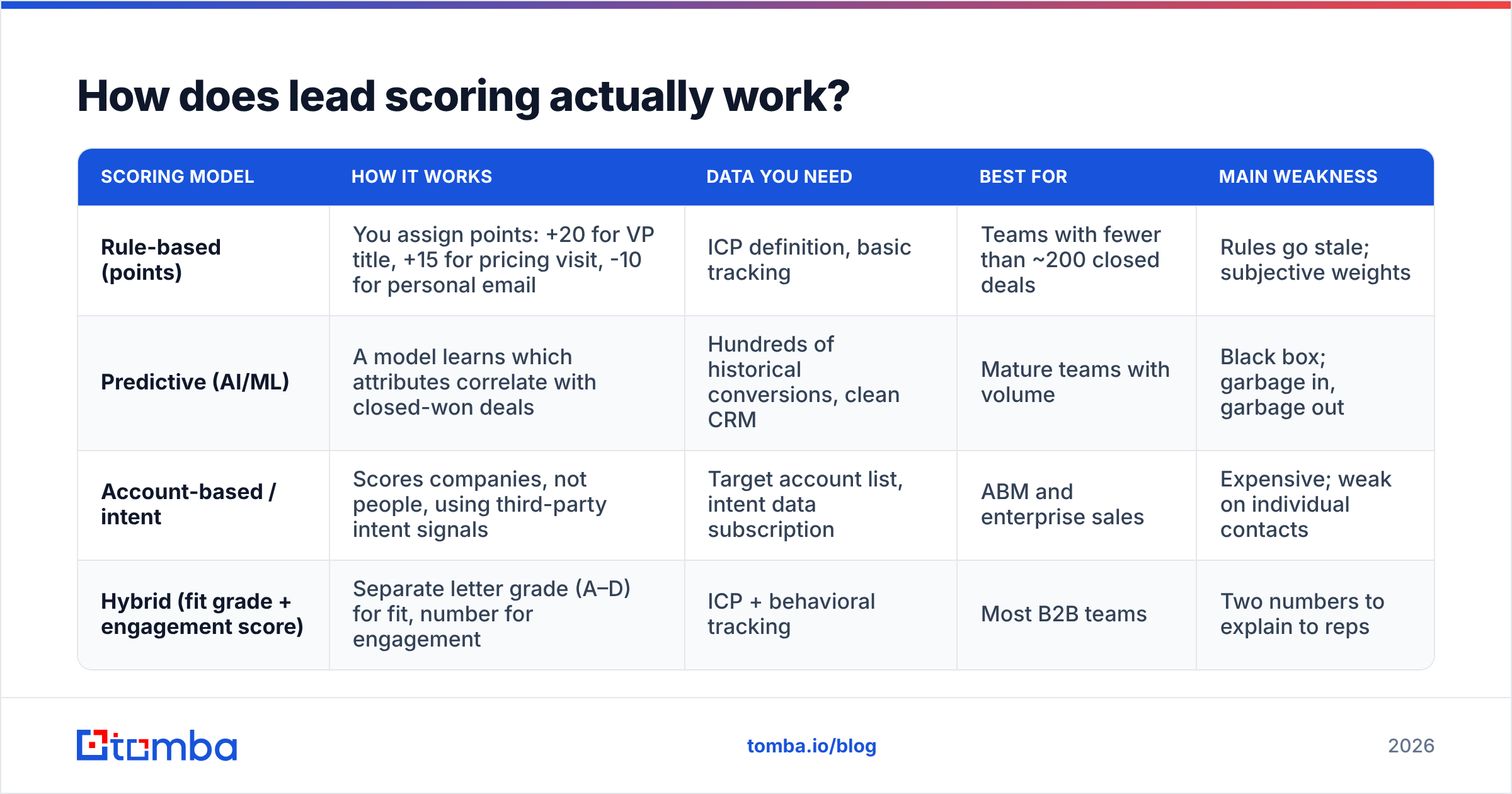
Before you compare vendors, you need to know which scoring model you are buying. The four main approaches differ in setup effort, data requirements, and how easy the scores are to explain:
| Scoring model | How it works | Data you need | Best for | Main weakness |
|---|---|---|---|---|
| Rule-based (points) | You assign points: +20 for VP title, +15 for pricing visit, -10 for personal email | ICP definition, basic tracking | Teams with fewer than ~200 closed deals | Rules go stale; subjective weights |
| Predictive (AI/ML) | A model learns which attributes correlate with closed-won deals | Hundreds of historical conversions, clean CRM | Mature teams with volume | Black box; garbage in, garbage out |
| Account-based / intent | Scores companies, not people, using third-party intent signals | Target account list, intent data subscription | ABM and enterprise sales | Expensive; weak on individual contacts |
| Hybrid (fit grade + engagement score) | Separate letter grade (A–D) for fit, number for engagement | ICP + behavioral tracking | Most B2B teams | Two numbers to explain to reps |
Most B2B teams should start with the hybrid model. It stops a common failure: a poor-fit lead who clicks everything scores as "hot" and wastes a rep's afternoon. Keeping fit and engagement separate makes that problem visible.
Which lead scoring software should you consider in 2026?#
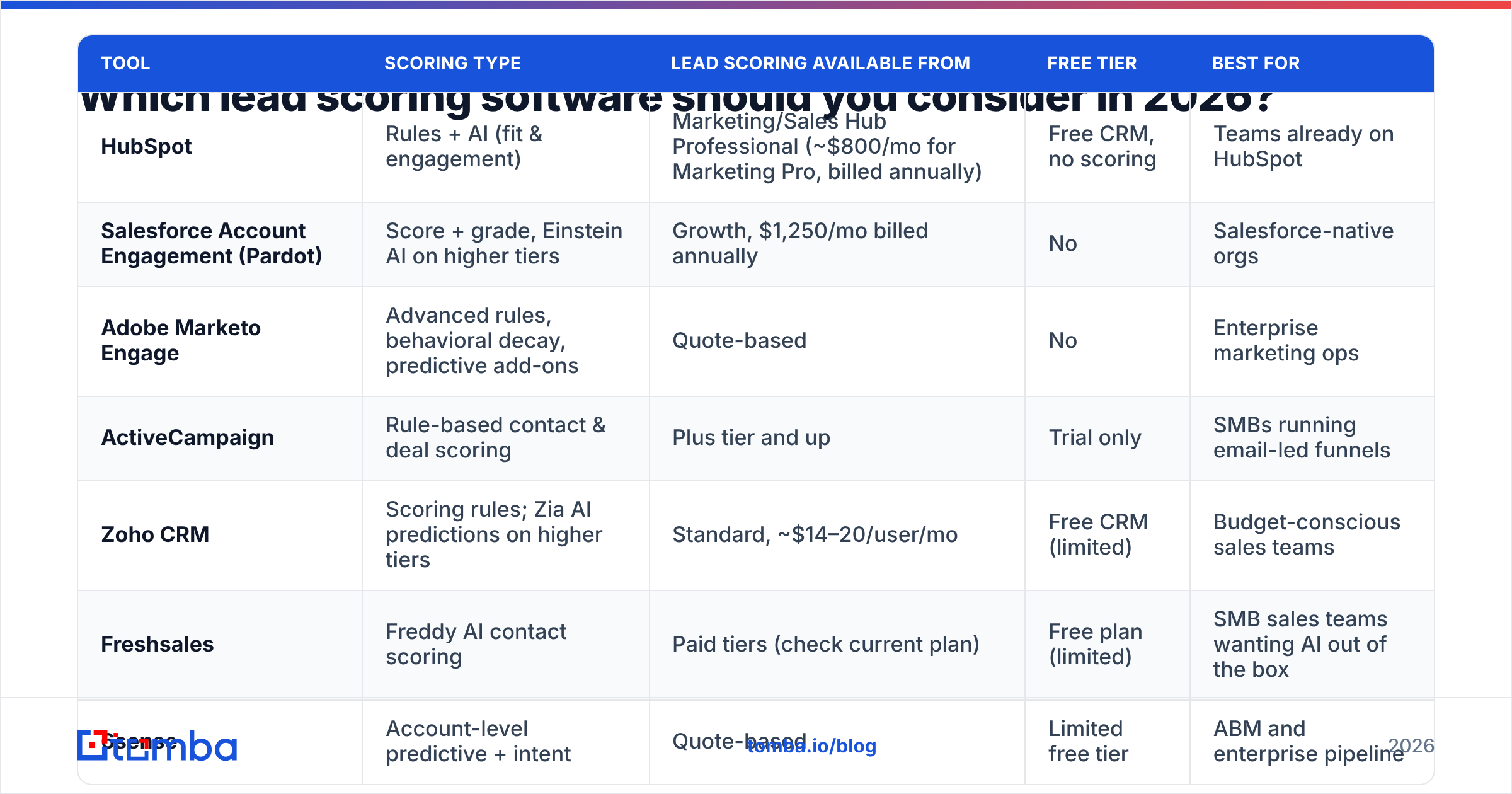
These seven tools cover most of the market, from CRM-native scoring to enterprise predictive platforms. Pricing reflects publicly listed plans at the time of writing. Vendors change packaging often, so check each pricing page before you buy.
| Tool | Scoring type | Lead scoring available from | Free tier | Best for |
|---|---|---|---|---|
| HubSpot | Rules + AI (fit & engagement) | Marketing/Sales Hub Professional (~$800/mo for Marketing Pro, billed annually) | Free CRM, no scoring | Teams already on HubSpot |
| Salesforce Account Engagement (Pardot) | Score + grade, Einstein AI on higher tiers | Growth, $1,250/mo billed annually | No | Salesforce-native orgs |
| Adobe Marketo Engage | Advanced rules, behavioral decay, predictive add-ons | Quote-based | No | Enterprise marketing ops |
| ActiveCampaign | Rule-based contact & deal scoring | Plus tier and up | Trial only | SMBs running email-led funnels |
| Zoho CRM | Scoring rules; Zia AI predictions on higher tiers | Standard, ~$14–20/user/mo | Free CRM (limited) | Budget-conscious sales teams |
| Freshsales | Freddy AI contact scoring | Paid tiers (check current plan) | Free plan (limited) | SMB sales teams wanting AI out of the box |
| 6sense | Account-level predictive + intent | Quote-based | Limited free tier | ABM and enterprise pipeline |
HubSpot#
HubSpot's scoring tool lets you build fit and engagement scores separately and combine them. Its AI features can suggest scoring criteria based on your conversion data. Everything runs in the CRM your reps already use, so scores show up on records, in views, and in workflow triggers without extra setup. Lead scoring is only on Professional and Enterprise tiers, so the real starting cost is significant. See HubSpot's Marketing Hub pricing for current seat and contact limits.
Pros: easy to set up, transparent scores, strong workflow automation. Cons: Professional tier costs add up quickly with contact-based pricing, and the predictive features need clean historical data.
Salesforce Account Engagement#
Account Engagement (still widely called Pardot) uses a dual system: a numeric score for engagement and a letter grade for profile fit. That is exactly the hybrid model described above. Einstein Lead Scoring adds ML predictions on higher editions. Growth starts at $1,250/month billed annually, per Salesforce's pricing page.
Pros: the score/grade split is built in; deep Salesforce integration. Cons: expensive; admin-heavy; Einstein needs enough conversion history to be reliable.
Adobe Marketo Engage#
Marketo remains the choice for marketing operations teams that want full control: multiple scoring programs, score decay (points fall over time without new activity), and detailed behavioral triggers. It is powerful, but you need a dedicated admin.
Pros: the most flexible rules engine on this list; built-in score decay. Cons: quote-only pricing, steep learning curve, overkill for teams with fewer than 5 marketers.
ActiveCampaign#
ActiveCampaign offers contact and deal scoring with simple point rules tied to email engagement, site visits, and tags. For an SMB whose funnel is mainly email, it covers most of what you need at a fraction of enterprise prices.
Pros: affordable, fast to set up, strong email automation. Cons: rule-based only, with limited firmographic depth unless you enrich contacts first.
Zoho CRM#
Zoho includes scoring rules in its lower paid tiers, and Zia AI adds conversion predictions higher up. It is the cheapest way to get real lead scoring inside a full CRM.
Pros: low per-user cost, good customization. Cons: the UI is dense, and AI features depend on upgrading tiers.
Freshsales#
Freddy AI scores contacts automatically from engagement and profile data, with little setup. Freshsales is a good fit for SMB sales teams that want an AI score without hiring a RevOps admin.
Pros: works out of the box, clean UI. Cons: less control over how scores are weighted; model quality depends on your data volume.
6sense#
6sense scores accounts, not individuals. It combines third-party intent signals with fit and engagement to predict which companies are in-market. It is built for ABM programs with enterprise budgets.
Pros: strong intent data; surfaces accounts before they fill out a form. Cons: quote-only and typically expensive. You still need contact-level data to act on an account score.
For peer reviews and current user ratings, G2's lead scoring category is worth checking alongside vendor demos.
Is predictive AI lead scoring better than rule-based scoring?#
Sometimes, but less often than vendor demos imply.
Predictive models learn from your past wins. If you have closed 40 deals in total, the model is fitting noise. Most vendors recommend a meaningful volume of conversions, usually hundreds, before AI scoring becomes reliable. Below that point, a rule-based score built on a sharp ICP definition usually gives better and more explainable results.
Predictive scoring earns its cost when:
- You have volume. Several hundred closed-won and closed-lost outcomes with consistent stage data.
- Your CRM is clean. Job titles, company sizes, and industries are filled in, not blank or "Other."
- Your ICP is shifting. Models can pick up new winning segments faster than a quarterly rules review.
- Reps trust it. The tool shows which factors drove each score, so reps don't ignore it.
If you can't check all four, start with rules and revisit AI in six months.
Why does lead scoring fail even with good software?#
The most common failure has nothing to do with the vendor. Scores are only as good as the data behind them.
Consider what happens to the fit side of a score when records are incomplete:
- No job title: the lead gets zero seniority points, so a CFO can score like an intern.
- No company size or industry: firmographic rules never fire.
- Personal or invalid email: engagement tracking breaks, bounces damage your sender reputation, and the lead may be dead on arrival.
- Duplicates: engagement is split across two records, so neither one crosses the MQL threshold.
This is why RevOps teams increasingly treat data enrichment and verification as step zero of lead scoring. Before a lead reaches your scoring model:
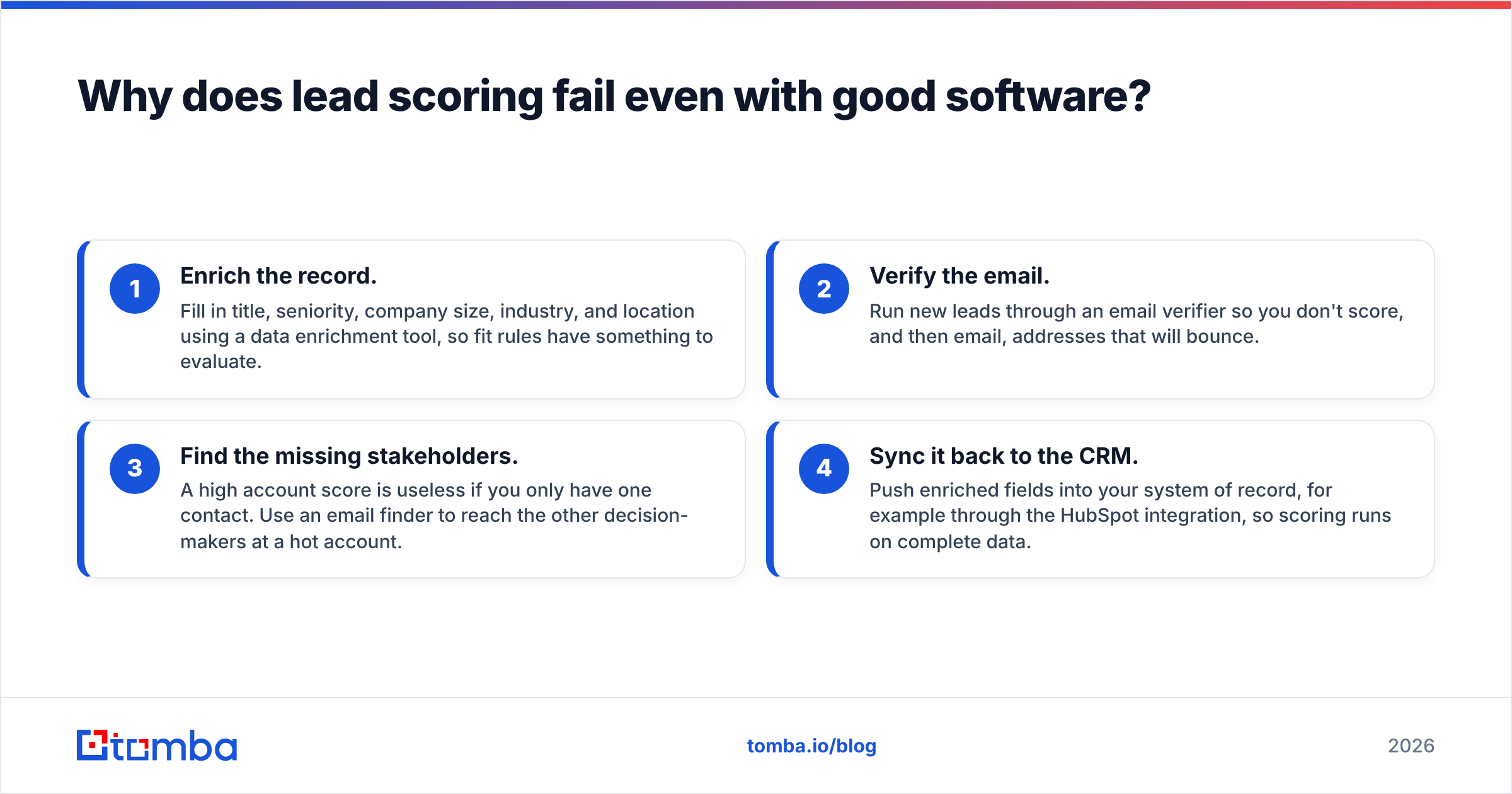
- Enrich the record. Fill in title, seniority, company size, industry, and location using a data enrichment tool, so fit rules have something to evaluate.
- Verify the email. Run new leads through an email verifier so you don't score, and then email, addresses that will bounce.
- Find the missing stakeholders. A high account score is useless if you only have one contact. Use an email finder to reach the other decision-makers at a hot account.
- Sync it back to the CRM. Push enriched fields into your system of record, for example through the HubSpot integration, so scoring runs on complete data.
Teams that enrich before scoring usually find their "hot lead" lists get shorter and more accurate. The software didn't change. It just finally had real inputs.
How do you choose the right lead scoring software?#
Answer these questions in order. Each one narrows the list.
- Which CRM do you already use? If it is HubSpot, Salesforce, Zoho, or Freshsales, use the native scoring first. Syncing scores from outside tools adds cost and failure points.
- How many closed deals do you have? Under a few hundred, choose rule-based or hybrid. Over that, predictive becomes worth testing.
- Do you sell to accounts or individuals? Enterprise ABM points toward 6sense-style account scoring. Transactional or mid-market B2B points toward contact-level scoring.
- Who will maintain it? Marketo and Account Engagement need an admin. ActiveCampaign and Freshsales mostly run themselves.
- What is your real budget? Include the tier upgrade you need to unlock scoring, not just the entry price.
How should you set up your first lead scoring model?#
A practical starting point for a hybrid model that most B2B teams can build in any of the tools above:
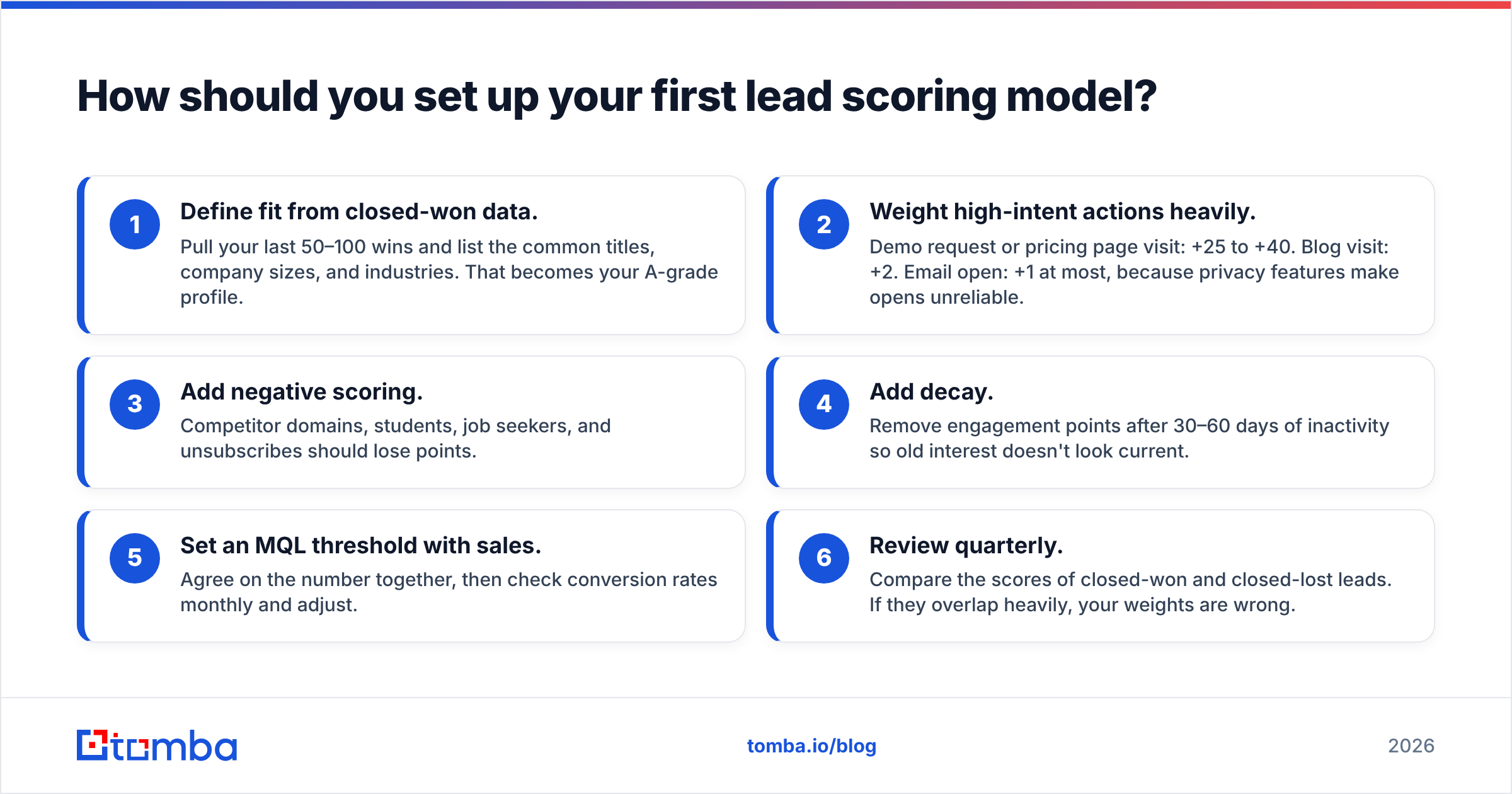
- Define fit from closed-won data. Pull your last 50–100 wins and list the common titles, company sizes, and industries. That becomes your A-grade profile.
- Weight high-intent actions heavily. Demo request or pricing page visit: +25 to +40. Blog visit: +2. Email open: +1 at most, because privacy features make opens unreliable.
- Add negative scoring. Competitor domains, students, job seekers, and unsubscribes should lose points.
- Add decay. Remove engagement points after 30–60 days of inactivity so old interest doesn't look current.
- Set an MQL threshold with sales. Agree on the number together, then check conversion rates monthly and adjust.
- Review quarterly. Compare the scores of closed-won and closed-lost leads. If they overlap heavily, your weights are wrong.
For a broader look at how scoring fits into the handoff between marketing and sales, HubSpot's guide to lead scoring walks through a manual scoring calculation step by step.
What does lead scoring software cost in practice?#
The listed price is rarely what you end up paying. Watch for:
- Tier gating. Scoring is often unavailable on starter plans. HubSpot needs Professional, and Zoho's AI needs higher tiers.
- Contact-based pricing. Marketing automation platforms charge by database size, so an unfiltered list inflates your bill.
- Data costs. Intent data, enrichment, and verification are usually separate line items. Budget for them from the start, not after scores disappoint.
- Admin time. A Marketo instance without an owner turns into shelfware.
A realistic small-team stack: a CRM with native scoring (Zoho, Freshsales, or ActiveCampaign) plus an enrichment and verification layer. Tomba plans start with a free tier of 25 searches per month, and paid plans run from $49/mo (Starter) to $249/mo (Pro). Together this costs well under a single month of enterprise scoring software.
Which lead scoring software is best?#
There is no single winner. The right choice depends on your stack:
- Already on HubSpot: use HubSpot's native fit + engagement scoring.
- Already on Salesforce: use Account Engagement's score + grade, then add Einstein once you have enough volume.
- Enterprise marketing ops: Marketo for control; 6sense if account-level intent is the priority.
- SMB on a budget: Zoho CRM, Freshsales, or ActiveCampaign.
Whatever you choose, the tool will only prioritize well if the underlying records are accurate and complete.
Ready to give your scoring model real data?#
Lead scoring software can only rank what it can see. If your CRM is full of blank job titles, unverified emails, and single-contact accounts, even the best AI model will send reps after the wrong people. Tomba Email Finder helps you find verified professional email addresses by name, domain, or company, so your scoring model has complete records and your reps can reach every decision-maker at a hot account. Start with the free tier, connect it to your CRM, and measure how much sharper your MQL list gets.
Related guides#
// get started
Find, verify and enrich your first contacts today
Start on the free plan with 25 searches a month, then scale when your team is ready.
Free plan · No credit card required · GDPR & CCPA
// about the author