Lead Scrape Pricing, Reviews, Pros and Cons: An Honest 2026 Guide
Lead Scrape charges a flat $97 or $247 a year with no usage caps. Here is what each license gets you, where the desktop-scraper model works well, where it doesn't, and when an email finder is the better buy.
- Lead Scrape sells an annual license, not a monthly subscription. Standard costs $97/year and Business costs $247/year. Neither plan has a monthly lead cap.
- Business is the plan most teams actually need. It adds bulk searches across cities and regions, seven data sources instead of three, up to 1,000 people results per search, and extra data points such as ratings and revenue codes.
- Its biggest strength is cost per lead for local and SMB prospecting. If you build lists from business directories and maps listings, it's hard to find anything cheaper.
- The weak spots are the usual ones for scrapers. Each row is only as good as the public listing behind it, you run the searches on your own machine, and it isn't built to find a specific decision-maker's email at a mid-market or enterprise company.
- Pick by use case: Lead Scrape for high-volume local lists, and a dedicated email finder with verification for named-contact B2B outreach. Many teams use both.
What is Lead Scrape?#
Lead Scrape is lead-generation software that you download and install. It pulls business data from public sources, mostly online directories and map listings, and turns it into a spreadsheet you can export. You type a keyword and a location, such as "dentists in Austin" or "HVAC contractors in Ohio," and it returns company names, addresses, phone numbers, websites, emails where it can find them, and, on higher tiers, extra fields like review scores, tech stack, and estimated revenue.
It helps to know what kind of tool this is before you look at the price. Lead Scrape is not a contact database like ZoomInfo or Apollo, where you query a pre-built index of people. It also isn't a pure email finder, where you enter a name and a domain and get back one verified address. It works more like a harvester: it goes out, collects what is publicly listed, and structures it for you.
That model decides almost everything in this review. It explains why the pricing is flat, why the data suits some segments much better than others, and why your results depend on the listings you point it at.
How much does Lead Scrape cost in 2026?#
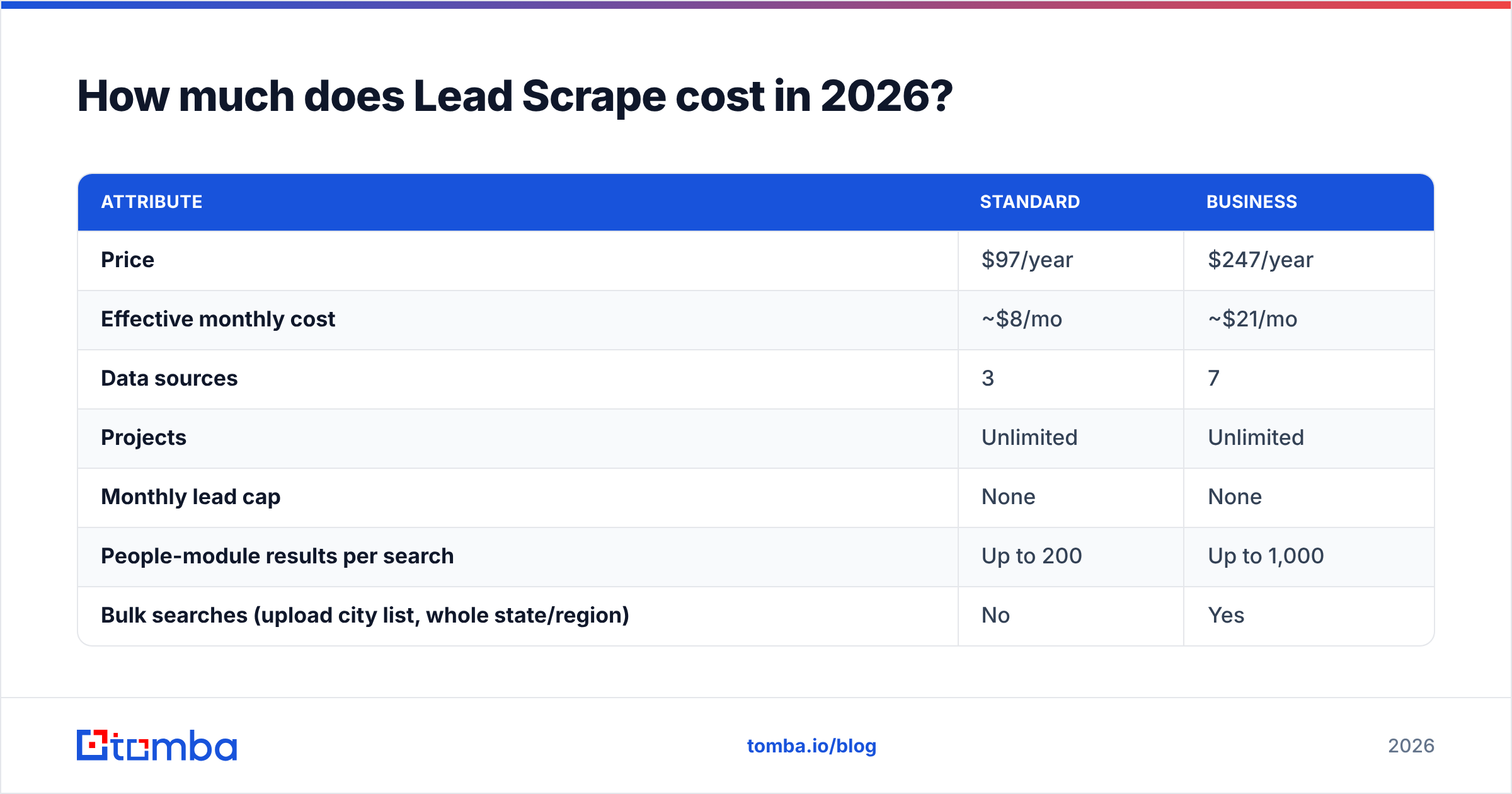
Lead Scrape has two paid tiers, both billed yearly. According to the official Lead Scrape buy page, they break down like this:
| Attribute | Standard | Business |
|---|---|---|
| Price | $97/year | $247/year |
| Effective monthly cost | ~$8/mo | ~$21/mo |
| Data sources | 3 | 7 |
| Projects | Unlimited | Unlimited |
| Monthly lead cap | None | None |
| People-module results per search | Up to 200 | Up to 1,000 |
| Bulk searches (upload city list, whole state/region) | No | Yes |
| Rating scores and follower counts | No | Yes |
| Advanced SEO data and revenue codes | No | Yes |
| Installs per license | 2 computers | 2 computers |
| Refund window | 14-day money-back | 14-day money-back |
The license covers a year of updates. The two-computer allowance means one person can run it on a desktop and a laptop, but a five-rep team needs several licenses, or one person who acts as the list builder for everyone.
Is there a free trial or free plan?#
There is no permanent free tier like the ones many SaaS email finders offer. What you get instead is the 14-day money-back guarantee. In practice, that means you pay first, test it hard in the first two weeks, and ask for a refund if it doesn't fit. Plan those two weeks before you buy. Have your target niches, cities, and a CRM import ready so the test covers real work, not a demo.
What are the hidden costs?#
The license price is what you pay, but it isn't the full cost of using the data. Budget for three things:
- Operator time. You run the searches, watch them, clean duplicates, and export the results. A cloud database hands you a finished filter. Here, someone on your team spends hours on it every week.
- Verification. Lead Scrape markets built-in email verification on its comparison pages, and that's a real plus. Even so, it's worth running scraped addresses through a second email verifier before a large campaign, especially when many of the domains are small-business mail servers or catch-all setups.
- Sending infrastructure. Scraping 20,000 local businesses is cheap. Emailing them without warmed domains is not. The list costs almost nothing. Your deliverability is where the money goes.

What do Lead Scrape reviews say?#
Lead Scrape is listed on the major software directories, including Capterra's Lead Scrape profile, GetApp, and Software Advice. It has fewer reviews than the big data platforms, which is normal for a niche desktop tool, so read individual comments rather than leaning on the star average. Across those listings and in how the vendor describes itself, the same themes keep coming up.
What reviewers and users tend to praise:
- Price and no caps. This comes up more than anything else. People used to per-credit pricing like that they can pull as many rows as they want for a fixed yearly fee.
- Local-business coverage. Agencies selling SEO, web design, or marketing services to SMBs say it matches their market well. Plumbers, clinics, restaurants, and law firms all show up in directory data.
- Speed to a usable list. You go from "I want roofers in Texas" to a CSV in one sitting, with no API, scripting, or Zapier setup.
- Extra fields on Business. Review scores, follower counts, and SEO data let an agency qualify prospects, for example by filtering for businesses with a weak site or low ratings.
What reviewers and users tend to flag:
- Uneven email coverage. Plenty of small businesses list a phone number and a contact form but no email. On those rows you'll have blanks or a generic
info@address. - Desktop workflow. A local install is fine for a solo operator. For a distributed team that shares lists in a CRM, it adds friction.
- Learning curve for bulk runs. Setting up region-wide searches and deduplicating overlapping results takes some practice.
- Not built for enterprise contacts. If your ICP is "VP of Finance at 500–5,000 employee SaaS companies," directory listings will not give you that person.
None of these is a dealbreaker. They're what you'd expect from a tool that does a specific job well.
What are the pros and cons of Lead Scrape?#
Here's the short version:
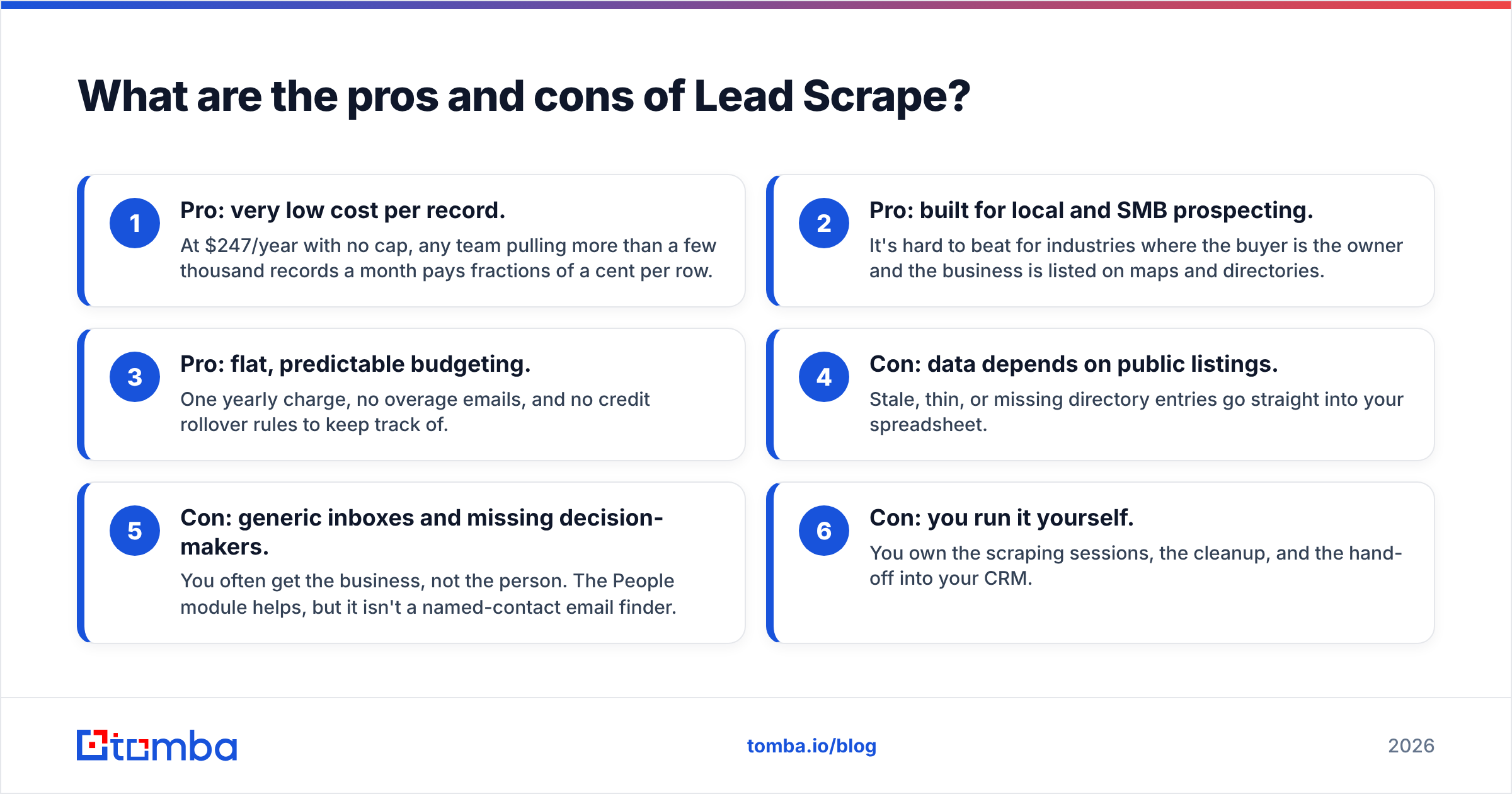
- Pro: very low cost per record. At $247/year with no cap, any team pulling more than a few thousand records a month pays fractions of a cent per row.
- Pro: built for local and SMB prospecting. It's hard to beat for industries where the buyer is the owner and the business is listed on maps and directories.
- Pro: flat, predictable budgeting. One yearly charge, no overage emails, and no credit rollover rules to keep track of.
- Con: data depends on public listings. Stale, thin, or missing directory entries go straight into your spreadsheet.
- Con: generic inboxes and missing decision-makers. You often get the business, not the person. The People module helps, but it isn't a named-contact email finder.
- Con: you run it yourself. You own the scraping sessions, the cleanup, and the hand-off into your CRM.
Is Lead Scrape worth it?#
For the right buyer, yes. A $247 license pays for itself with a single closed deal at almost any agency price point. The real question is whether your prospects live in the data Lead Scrape collects.
Lead Scrape is a strong fit if:
- You sell to local businesses: agencies, SaaS for trades, payment processors, POS vendors, local recruiters.
- You need volume, meaning tens of thousands of companies across many cities.
- You have someone on the team comfortable running the tool and cleaning the output.
- Phone and website are as useful to you as email, for example if you cold call or run multichannel outreach.
Look elsewhere (or add another tool) if:
- Your ICP is defined by job title at mid-market or enterprise accounts.
- Your team works entirely in the browser and CRM and won't adopt a desktop tool.
- You need an API to enrich records automatically as they enter your pipeline.
- Your campaigns depend on reaching a named person, not a shared inbox.
How does Lead Scrape compare with an email finder like Tomba?#
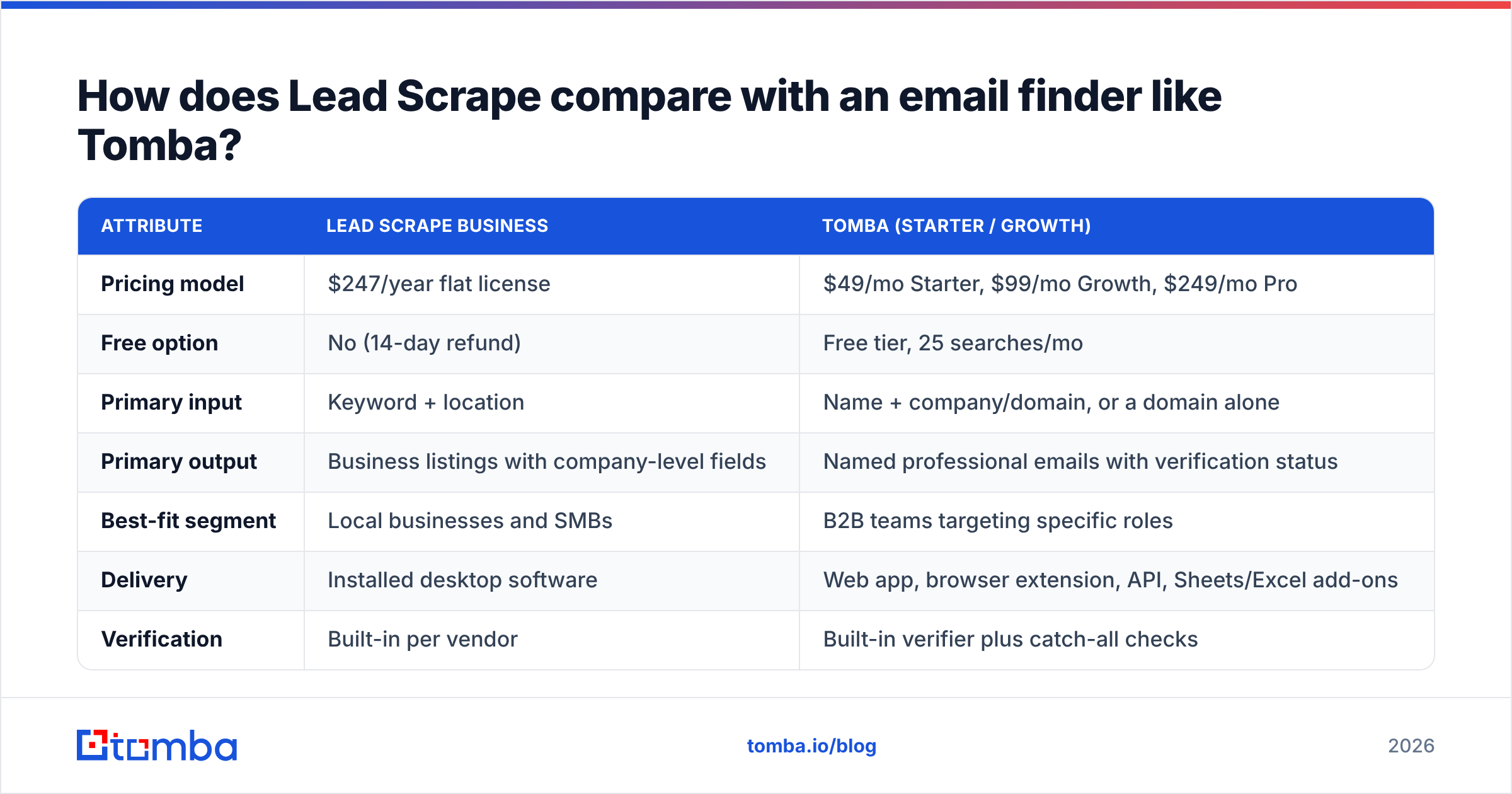
These two tools do different jobs, which is why many outbound teams end up with both. Lead Scrape answers "which businesses exist in this niche and location?" An email finder answers "what is this specific person's work email, and is it deliverable?"
| Attribute | Lead Scrape Business | Tomba (Starter / Growth) |
|---|---|---|
| Pricing model | $247/year flat license | $49/mo Starter, $99/mo Growth, $249/mo Pro |
| Free option | No (14-day refund) | Free tier, 25 searches/mo |
| Primary input | Keyword + location | Name + company/domain, or a domain alone |
| Primary output | Business listings with company-level fields | Named professional emails with verification status |
| Best-fit segment | Local businesses and SMBs | B2B teams targeting specific roles |
| Delivery | Installed desktop software | Web app, browser extension, API, Sheets/Excel add-ons |
| Verification | Built-in per vendor | Built-in verifier plus catch-all checks |
| Automation | Manual runs and exports | API and CRM integrations |
A workflow that uses both might look like this:
- Use Lead Scrape to build the company universe, for example every commercial cleaning company in five states.
- Filter by rating, website quality, or revenue code to narrow it to accounts worth pursuing.
- Run the remaining domains through a domain search to find named people at each company instead of
info@. - Verify everything, and check catch-all domains separately before any sequence goes live.
Step 3 is where most scraped-list campaigns gain or lose reply rate. An email to "Hi there" at a shared inbox competes with invoices and spam. An email to the owner by name gets read.

What are the best Lead Scrape alternatives?#
If Lead Scrape doesn't fit your workflow, the alternatives fall into three groups:
- Cloud map scrapers such as Apify actors and Outscraper. These cover the same local-business ground but run in the cloud and usually charge per result. They suit teams that prefer an API or don't want to install software. Look at pay-per-use costs closely at high volume, since they can end up well above a flat yearly license.
- B2B contact databases such as Apollo and similar platforms. These are better for title-based targeting at larger companies, with monthly subscriptions and credit limits. BookYourData also belongs here. It's a well-regarded option for buying pre-filtered, verified contact lists by industry and title when you'd rather not build lists yourself.
- Email finders and verifiers such as Tomba. These work as a layer on top of either approach and turn a company or domain into named, verified contacts.
Your choice mostly comes down to where your buyers are. Local owner-operators show up in maps and directories. Corporate department heads show up on LinkedIn and in professional email patterns.
How should you evaluate Lead Scrape during the 14-day window?#
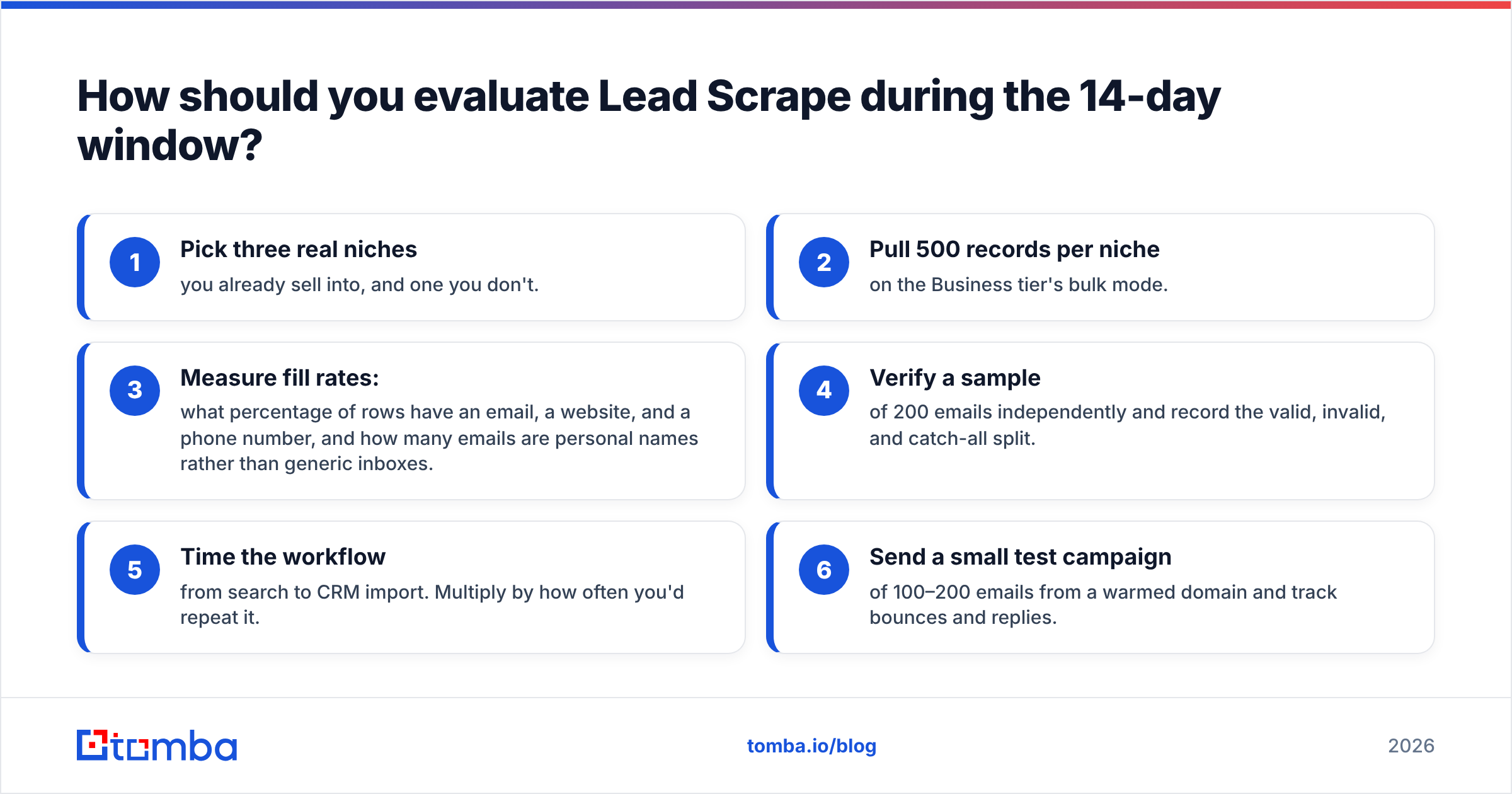
Treat the refund period as a structured test, not a quick look around. A simple scorecard helps:
- Pick three real niches you already sell into, and one you don't.
- Pull 500 records per niche on the Business tier's bulk mode.
- Measure fill rates: what percentage of rows have an email, a website, and a phone number, and how many emails are personal names rather than generic inboxes.
- Verify a sample of 200 emails independently and record the valid, invalid, and catch-all split.
- Time the workflow from search to CRM import. Multiply by how often you'd repeat it.
- Send a small test campaign of 100–200 emails from a warmed domain and track bounces and replies.
If fill rates and deliverability hold up, and the operator time fits your team, keep the license. If you find yourself manually looking up owner emails for most rows, that's your sign to pair it with a finder, or to choose a named-contact tool as your main source.
Final verdict: who should buy Lead Scrape in 2026?#
Lead Scrape is priced well for what it does. For $97 to $247 a year you get uncapped access to structured local-business data, with review scores, SEO signals, and revenue codes on the Business tier that agencies can use to qualify prospects. Its limits come with the category: public listings vary in quality, many small businesses only publish generic inboxes, and a desktop workflow won't suit every team.
If you prospect SMBs by location, it's one of the cheapest ways to build your total addressable list. If you sell to specific roles inside B2B companies, see it as a company-discovery tool rather than your contact source, and plan to add a finder and verifier on top. For a more detailed comparison of what that costs, the Tomba pricing page lists every tier.
When your scraped list gives you companies but not the people who sign contracts, the Tomba Email Finder closes that gap. Enter a domain or a name and company, get the decision-maker's professional email with verification status attached, and push it straight into your CRM. Start on the free tier with 25 searches a month, run it against 25 of your Lead Scrape domains, and compare the reply rates.
Related guides#
// get started
Find, verify and enrich your first contacts today
Start on the free plan with 25 searches a month, then scale when your team is ready.
Free plan · No credit card required · GDPR & CCPA
// about the author