Lead Scraping in 2026: Methods, Tools, Legal Limits and Workflow
Lead scraping can fill your pipeline in an afternoon or put your sending domain on blocklists by Friday. Here are the methods, tools, legal lines and a six-step workflow that turns raw scraped rows into contacts you can actually email.
TL;DR
- Lead scraping means pulling prospect data (names, roles, companies, URLs, sometimes emails) from public web sources in bulk. What you scrape is only raw material. Enriching and verifying it is what turns it into a lead list.
- The four main methods are browser extensions, cloud scrapers such as Apify and PhantomBuster, custom code, and B2B databases that have already done the scraping for you. Choose based on your volume and how much technical upkeep you can handle.
- Scraping public business data is generally legal in the US after hiQ v. LinkedIn. Breaking a platform's terms of service, logging in to scrape, or ignoring GDPR is still risky.
- Most scraped emails are guessed or stale. If you skip verification, a 30-40% bounce rate on your first send is realistic, and that is enough to damage your sender reputation.
- The workflow that holds up: scrape company and person data, find emails by domain, verify every address, handle catch-alls on their own, then load the list into your sequencer.
What is lead scraping?#
Lead scraping is the automated collection of prospect information from public online sources. The goal is a list you can use for outbound sales or marketing. Typical sources are business directories (Google Maps, Yelp, Clutch, G2), professional networks, company "About" and "Team" pages, conference speaker lists, job boards, and industry association member directories.
The underlying technique is ordinary web scraping: software requests a page, parses the HTML or rendered DOM, and pulls structured fields into a CSV or database. What makes it lead scraping is the fields you target:
- Full name and job title
- Company name, domain, industry, headcount
- Location and time zone
- Profile URLs (LinkedIn, X, GitHub)
- Phone numbers and, where published, email addresses
The last point is where most people get caught out. Scrapers are good at collecting names and companies. They are poor at collecting working email addresses, because most professionals don't publish theirs. Many "scraped emails" are actually pattern guesses such as firstname.lastname@company.com that nobody has checked.
How does lead scraping actually work?#
Every lead scraping setup, from a free Chrome extension to a custom Python pipeline, goes through the same five stages. Knowing them tells you where your data quality is lost.
- Target definition. You pick a source and a filter, for example "dental clinics in Texas on Google Maps" or "VP Sales at Series B SaaS companies". A narrow target gives cleaner data.
- Extraction. The scraper loads pages, handles pagination and infinite scroll, and pulls fields using CSS selectors, XPath, or an AI-based parser.
- Normalization. Names get split into first and last, domains get stripped of
wwwand tracking parameters, duplicates get removed. Many people skip this, and every later step suffers for it. - Enrichment. You add what the source didn't give you: email address, direct dial, company size, tech stack. This is where an email finder or domain search tool comes in.
- Verification. Every email is checked at the SMTP level before it goes near your sending domain. Catch-all domains are flagged and handled separately.
Think of stages 1-3 as fishing and stages 4-5 as cleaning the catch. Most teams put their effort into better nets. The ones with healthy reply rates put it into cleaning.
What are the main lead scraping methods?#
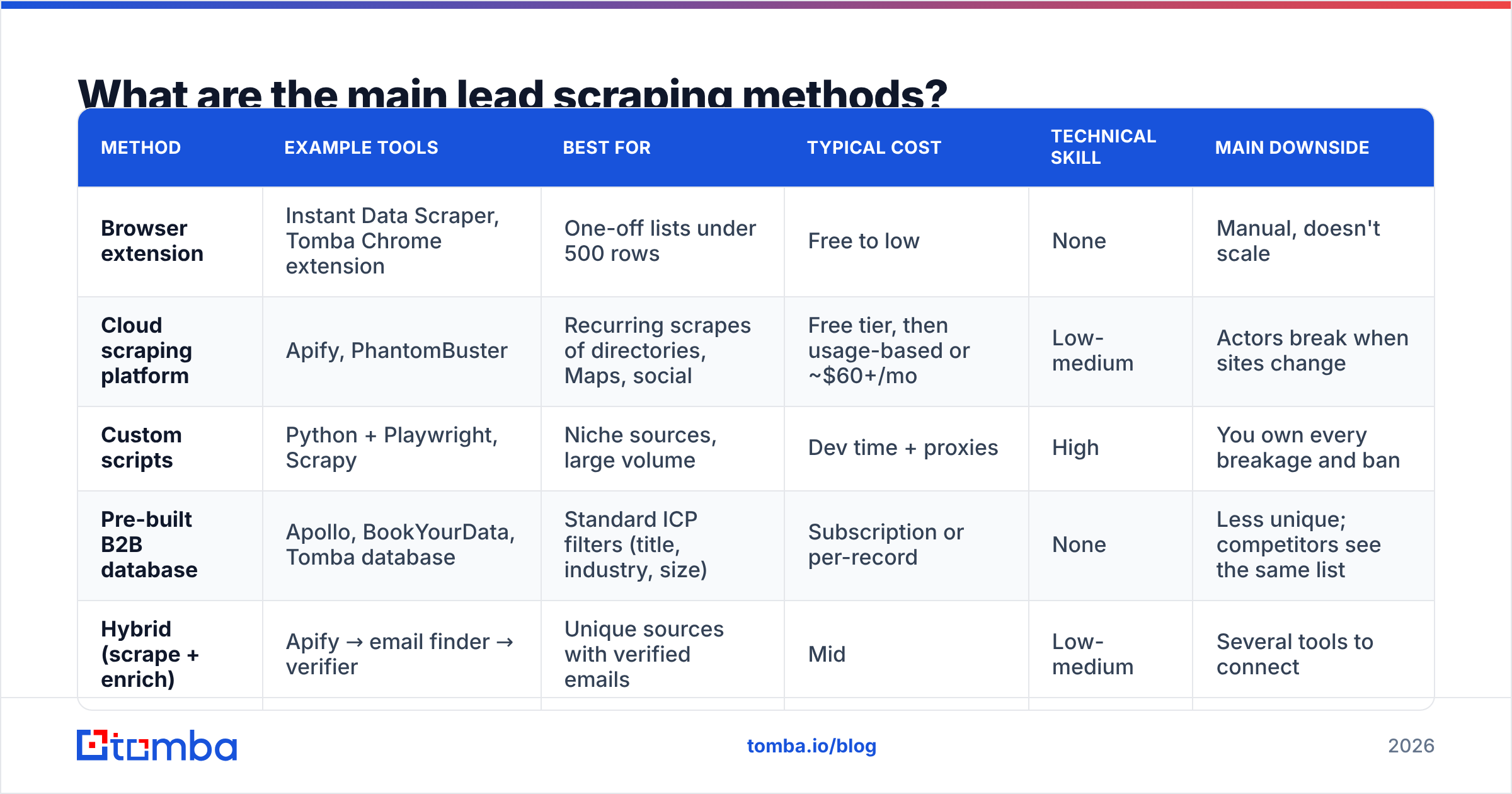
You have four realistic options. They differ mostly in the tradeoff between control and maintenance.
| Method | Example tools | Best for | Typical cost | Technical skill | Main downside |
|---|---|---|---|---|---|
| Browser extension | Instant Data Scraper, Tomba Chrome extension | One-off lists under 500 rows | Free to low | None | Manual, doesn't scale |
| Cloud scraping platform | Apify, PhantomBuster | Recurring scrapes of directories, Maps, social | Free tier, then usage-based or ~$60+/mo | Low-medium | Actors break when sites change |
| Custom scripts | Python + Playwright, Scrapy | Niche sources, large volume | Dev time + proxies | High | You own every breakage and ban |
| Pre-built B2B database | Apollo, BookYourData, Tomba database | Standard ICP filters (title, industry, size) | Subscription or per-record | None | Less unique; competitors see the same list |
| Hybrid (scrape + enrich) | Apify → email finder → verifier | Unique sources with verified emails | Mid | Low-medium | Several tools to connect |
A few notes on these:
Browser extensions are the quickest way to begin. Open a directory page, click, export. They're fine for testing a niche, but you will run into pagination limits and rate limits within a day.
Cloud platforms like Apify and PhantomBuster run pre-built scrapers ("actors" or "phantoms") on a schedule, on their infrastructure. They handle proxies and headless browsers for you. The catch is dependency: when Google Maps changes its markup, your pipeline stops until the actor's maintainer ships a fix.
Custom scripts give you complete control and the lowest marginal cost at scale. They also make you responsible for proxy rotation, CAPTCHA handling, retries, and legal review. Build them only for a source that is unique to your market and that no off-the-shelf tool covers.
Pre-built databases are scraping that someone else has done, cleaned, and indexed. Vendors like BookYourData and Apollo let you filter by title, industry, and headcount without writing any code, and they're often the sensible starting point for standard ICPs. The tradeoff is uniqueness: if a list is easy for you to buy, your competitors can buy it too.
The hybrid approach is where most mature outbound teams end up. They scrape a source that competitors aren't mining (a niche association directory, say, or a conference exhibitor list), then send the company domains and names through an email finder and verifier.
Is lead scraping legal?#
Short answer: scraping publicly available business information is generally legal in the US. How you scrape and what you do with the data can still create legal exposure. This section is not legal advice. If you're scraping at scale or selling into the EU, talk to counsel.
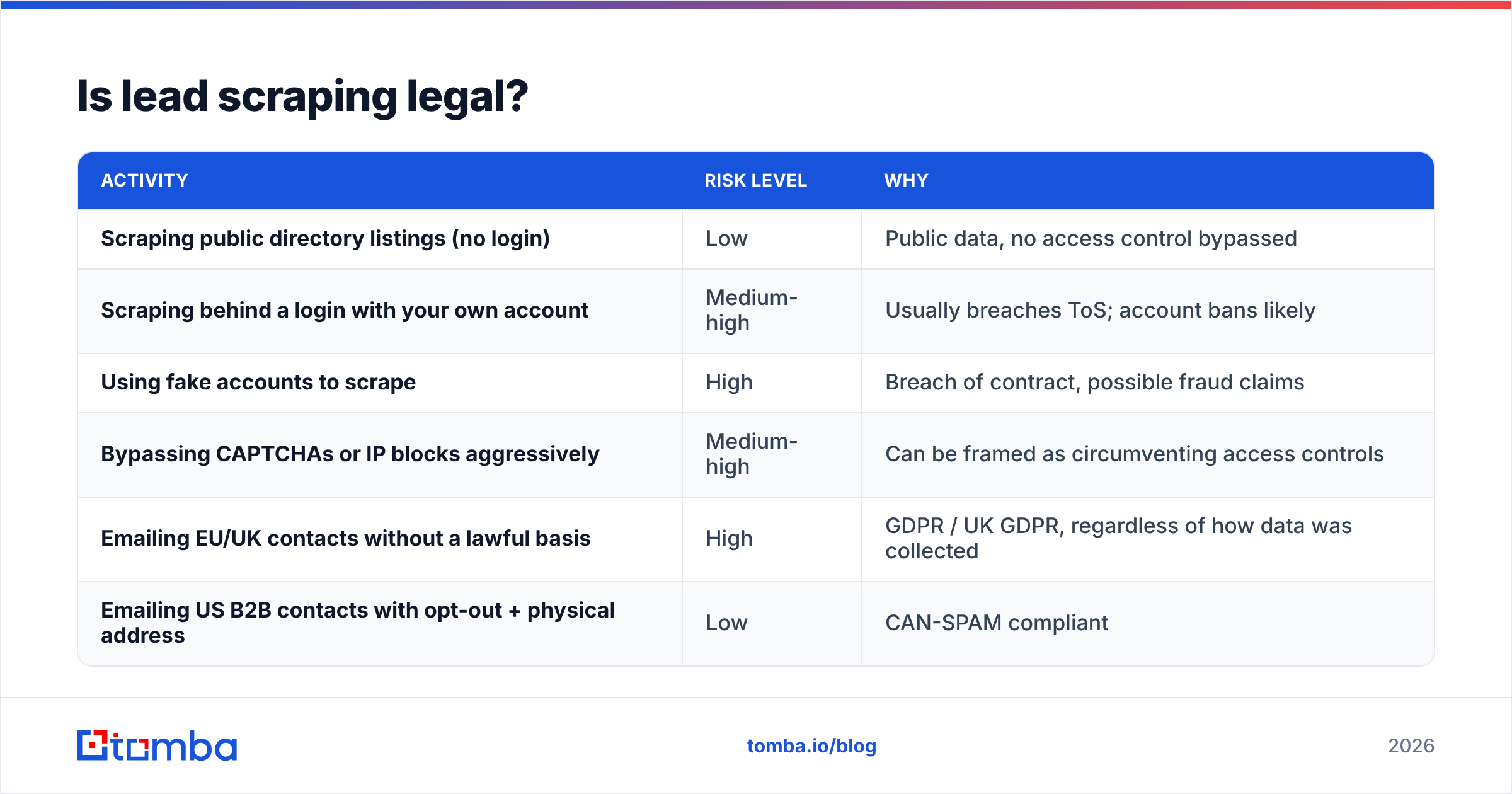
The key US case is hiQ Labs v. LinkedIn. The Ninth Circuit held that scraping publicly accessible profiles likely doesn't violate the Computer Fraud and Abuse Act. The case did not end cleanly for hiQ, though. The court later found hiQ had breached LinkedIn's User Agreement, partly through fake accounts and scraping behind a login. The distinction that matters:
| Activity | Risk level | Why |
|---|---|---|
| Scraping public directory listings (no login) | Low | Public data, no access control bypassed |
| Scraping behind a login with your own account | Medium-high | Usually breaches ToS; account bans likely |
| Using fake accounts to scrape | High | Breach of contract, possible fraud claims |
| Bypassing CAPTCHAs or IP blocks aggressively | Medium-high | Can be framed as circumventing access controls |
| Emailing EU/UK contacts without a lawful basis | High | GDPR / UK GDPR, regardless of how data was collected |
| Emailing US B2B contacts with opt-out + physical address | Low | CAN-SPAM compliant |
For European prospects, GDPR applies to personal data however you obtained it. Most B2B senders rely on "legitimate interest", which means you need a documented balancing test, a relevant offer, a clear way to opt out, and a disclosure of the data source when asked. Scraping personal emails (Gmail, Hotmail) for B2B outreach is almost never defensible. Stick to business addresses tied to a person's role.
Why do scraped email lists bounce so badly?#
Bounces are what break most lead scraping projects. You spend a weekend building a 5,000-row list, load it into your sequencer, and by Tuesday 1,800 emails have hard-bounced and your domain is on a blocklist.
The usual causes:
- Pattern-guessed addresses. The scraper (or a cheap enrichment step) assumes
first.last@domain.comwhen the company actually usesflast@. No mailbox exists. - Stale data. People change jobs often. An address on a 2023 conference page may have been deactivated long ago.
- Catch-all domains. Some servers accept mail for any address, so a basic check reports "valid" even for mailboxes that don't exist. You find out when the message bounces later, or goes to nobody.
- Role and trap addresses. Scraped
info@,sales@andwebmaster@addresses get low engagement, and a few recycled addresses are spam traps. - Typos and parsing errors. Obfuscated emails ("john [at] company [dot] com") parsed badly, trailing punctuation, HTML entities.
Mailbox providers watch bounce rates closely. Google's sender guidelines and most deliverability consultants treat anything above roughly 2% hard bounces as a warning sign. A raw scraped list will almost always be far above that. So skipping verification doesn't save money. It spends your domain's reputation instead.

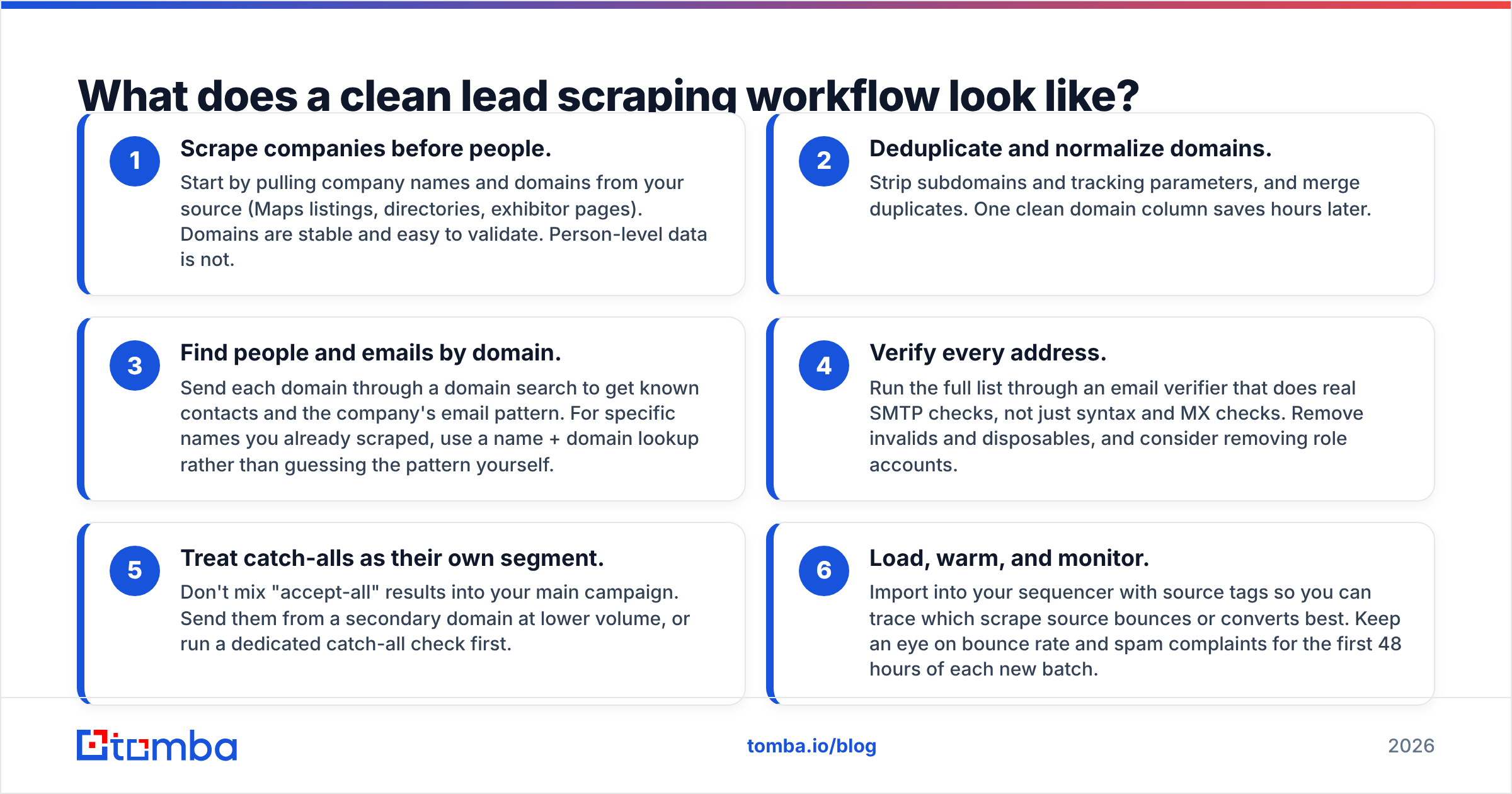
What does a clean lead scraping workflow look like?#
This is the six-step pipeline that consistently produces sendable lists. It works whether you start with a free extension or a scheduled Apify actor.
- Scrape companies before people. Start by pulling company names and domains from your source (Maps listings, directories, exhibitor pages). Domains are stable and easy to validate. Person-level data is not.
- Deduplicate and normalize domains. Strip subdomains and tracking parameters, and merge duplicates. One clean domain column saves hours later.
- Find people and emails by domain. Send each domain through a domain search to get known contacts and the company's email pattern. For specific names you already scraped, use a name + domain lookup rather than guessing the pattern yourself.
- Verify every address. Run the full list through an email verifier that does real SMTP checks, not just syntax and MX checks. Remove invalids and disposables, and consider removing role accounts.
- Treat catch-alls as their own segment. Don't mix "accept-all" results into your main campaign. Send them from a secondary domain at lower volume, or run a dedicated catch-all check first.
- Load, warm, and monitor. Import into your sequencer with source tags so you can trace which scrape source bounces or converts best. Keep an eye on bounce rate and spam complaints for the first 48 hours of each new batch.
If you already use Apify for step 1, you can connect enrichment directly to your actor output with the Apify integration rather than exporting and re-uploading CSVs.
Which lead scraping tools are worth using in 2026?#
A neutral shortlist by job to be done. Pricing changes often, so check each vendor's site before you buy.
| Tool | Category | What it's good at | Free option | Watch out for |
|---|---|---|---|---|
| Instant Data Scraper | Chrome extension | Table/list pages, zero setup | Yes, free | No scheduling, no enrichment |
| Apify | Cloud scraping | Huge actor marketplace (Maps, directories, social) | Monthly free credits | Actor quality varies by maintainer |
| PhantomBuster | Cloud automation | Social + Maps scraping, chained workflows | Trial | Account-safety limits on social sources |
| Apollo | B2B database + sequencer | Filters by title/industry, built-in outreach | Free plan | Data overlap with every other Apollo user |
| BookYourData | B2B database | Pre-verified list building by ICP filters | Sample credits | Less suited to niche, unindexed sources |
| Clay | Enrichment orchestration | Waterfall enrichment across many providers | Free tier | Credit costs add up quickly at volume |
| Tomba | Email finder + verifier | Domain search, name-to-email, verification, catch-all checks | 25 searches/mo | Not a general-purpose page scraper |
How to choose:
- Solo founder testing a niche: a free extension, plus a free email finder tier, plus manual verification of the best 100 rows.
- SDR team with a standard ICP: a B2B database (Apollo, BookYourData) plus a separate verifier pass before every send.
- Growth team mining unique sources: Apify or PhantomBuster for extraction, a domain-based email finder for enrichment, and a verifier as a hard gate.
- Engineering-led team at volume: custom scrapers plus API-based enrichment and verification, all running in one pipeline.
Review sites like G2 are useful for checking recent user feedback on actor reliability and data accuracy. Scraping tools can decline quickly when a target site changes its markup, and recent reviews show that.
How do you avoid getting blocked while scraping?#
If you run your own scrapers, or push cloud tools hard, these habits keep you running:
- Throttle requests. Add randomized delays of several seconds per page. Fast, regular request patterns get flagged.
- Rotate residential proxies for sources that rate-limit by IP. Datacenter IPs are blocked on most major directories.
- Respect robots.txt and public-only pages. This is partly etiquette and partly legal protection, as the hiQ story shows.
- Don't scrape behind logins with your main account. Losing a personal LinkedIn account you've built over ten years costs far more than any list is worth.
- Cache aggressively. Never re-scrape a page you already have unless you actually need fresher data.
- Scrape less, enrich more. The less you pull from rate-limited platforms, the lower your risk. Take company domains from the source and get contacts from an enrichment provider instead.
Is lead scraping still worth it versus buying data?#
Yes, when the source gives you something a database can't: timing or uniqueness. A list of companies that exhibited at a trade show last month, posted a specific job this week, or joined a niche association is a signal your competitors aren't using. Buying data is better when your ICP is standard ("Heads of Marketing at 50-200 person SaaS companies in North America") and speed matters more than being different.
In practice, the best-performing outbound teams combine the two. They scrape for signals, use databases for coverage, and send everything through the same verification gate before a single email goes out.
Where does Tomba fit in a lead scraping stack?#
Tomba doesn't replace your scraper. It sits right after it, in the enrichment and verification stages where scraped lists usually fall apart. Feed it the domains and names you collected and it returns professional email addresses along with the company's email pattern. It then verifies each address, catch-alls included, so your bounce rate stays low enough to protect your domain.
To test it on your next scrape, run your domain column through the Tomba Email Finder. The free tier covers 25 searches a month and paid plans start at $49/mo, so you can check the match and verification rate on your own data before you commit to anything.
Related guides#
// get started
Find, verify and enrich your first contacts today
Start on the free plan with 25 searches a month, then scale when your team is ready.
Free plan · No credit card required · GDPR & CCPA
// about the author