Lead Scraping Tool Guide 2026: 8 Options Compared Honestly
Most lead scraping tools collect data fast but leave you with bounces and legal risk. Here's how 8 popular options compare on price, data quality and compliance, plus how to pick one for your stack.
TL;DR
- A lead scraping tool pulls contact and company data from websites, directories, social profiles or search results and puts it into a spreadsheet or CRM. Tools differ mainly in where they collect data and how much cleaning you still have to do afterward.
- Raw scrapers like Instant Data Scraper, Octoparse and Apify are cheap and flexible. They rarely return verified emails, though, so you'll need a separate verification step.
- Automation platforms like PhantomBuster and Clay chain scraping, enrichment and export into one workflow. They're powerful, but credit costs add up quickly.
- If your end goal is an inbox, an email-first tool like Tomba (domain search plus verification, with a free tier and paid plans from $49/mo) usually skips most of the scraping.
- Whichever tool you use, verify before you send, respect platform terms of service and document your GDPR lawful basis.
What is a lead scraping tool?#
A lead scraping tool is software that automatically pulls prospect data from public sources and turns it into a structured list. Typical fields are name, job title, company, website, email, phone and LinkedIn URL. Common sources include Google Maps listings, company websites, industry directories, event attendee pages, job boards and social platforms.
The pitch is simple: a scraper can do in minutes what an SDR would spend a week copying by hand. The catch is that "data collected" and "data you can use" are different things. A scraped list of 5,000 rows might contain 1,200 generic info@ addresses, 800 duplicates, a few hundred people who left their jobs last year and no email at all for most decision-makers.
That's why the useful question isn't "which scraper grabs the most rows?" It's "which setup gets me the most reachable, compliant contacts per dollar and per hour?"
What types of lead scraping tools exist?#
Most tools on the market fall into one of five categories. Knowing which one you need saves you from paying for features you won't use.
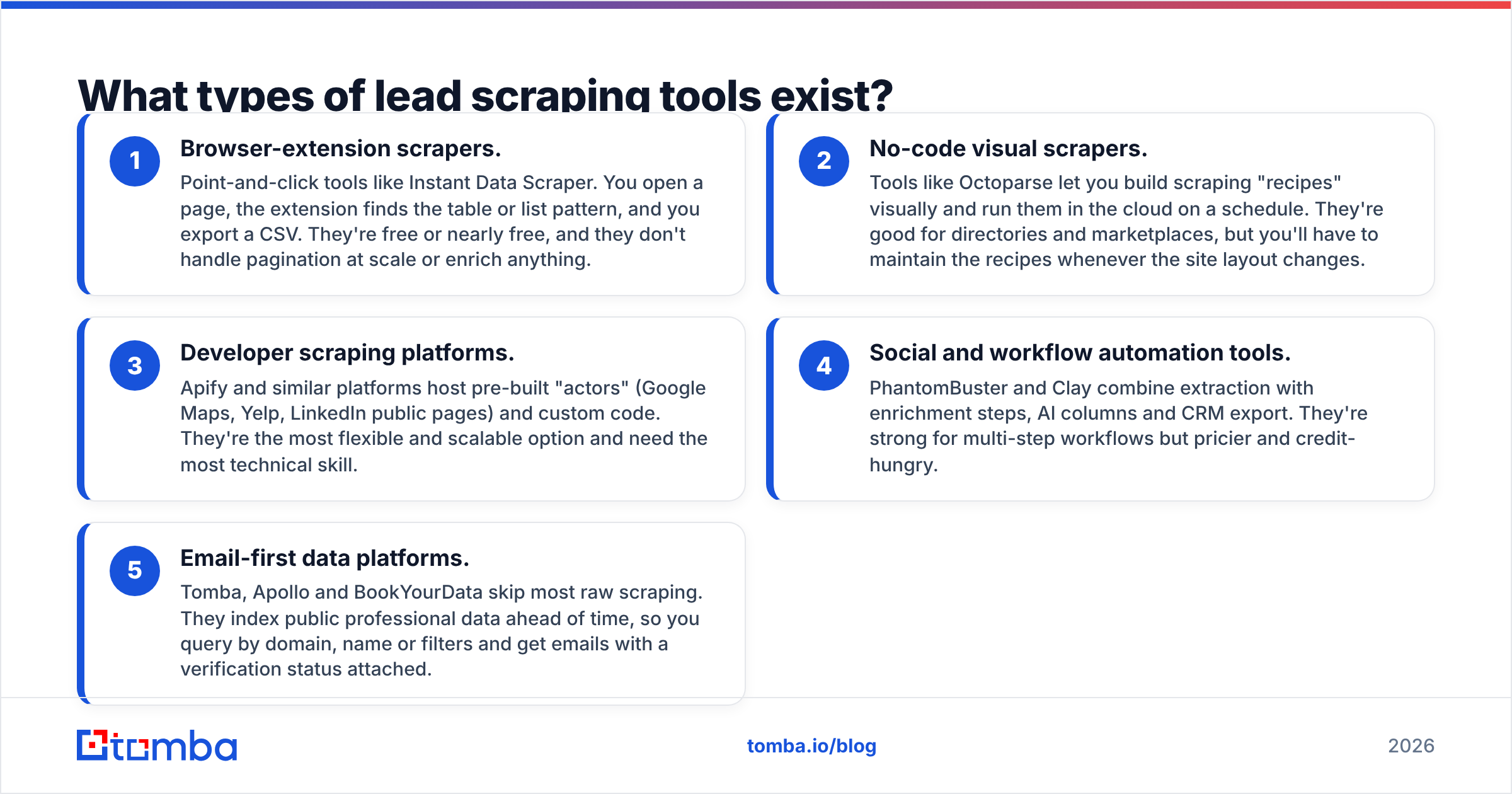
- Browser-extension scrapers. Point-and-click tools like Instant Data Scraper. You open a page, the extension finds the table or list pattern, and you export a CSV. They're free or nearly free, and they don't handle pagination at scale or enrich anything.
- No-code visual scrapers. Tools like Octoparse let you build scraping "recipes" visually and run them in the cloud on a schedule. They're good for directories and marketplaces, but you'll have to maintain the recipes whenever the site layout changes.
- Developer scraping platforms. Apify and similar platforms host pre-built "actors" (Google Maps, Yelp, LinkedIn public pages) and custom code. They're the most flexible and scalable option and need the most technical skill.
- Social and workflow automation tools. PhantomBuster and Clay combine extraction with enrichment steps, AI columns and CRM export. They're strong for multi-step workflows but pricier and credit-hungry.
- Email-first data platforms. Tomba, Apollo and BookYourData skip most raw scraping. They index public professional data ahead of time, so you query by domain, name or filters and get emails with a verification status attached.
Categories 1 to 3 give you raw material. Categories 4 and 5 give you something closer to a finished list. Most mature outbound teams end up using one tool from the raw-material side and one from the finished-list side.
How do the top lead scraping tools compare in 2026?#
Here's how eight widely used options compare. Prices are entry-level public list prices at the time of writing. Check each vendor's pricing page before you buy, because credit models change often.
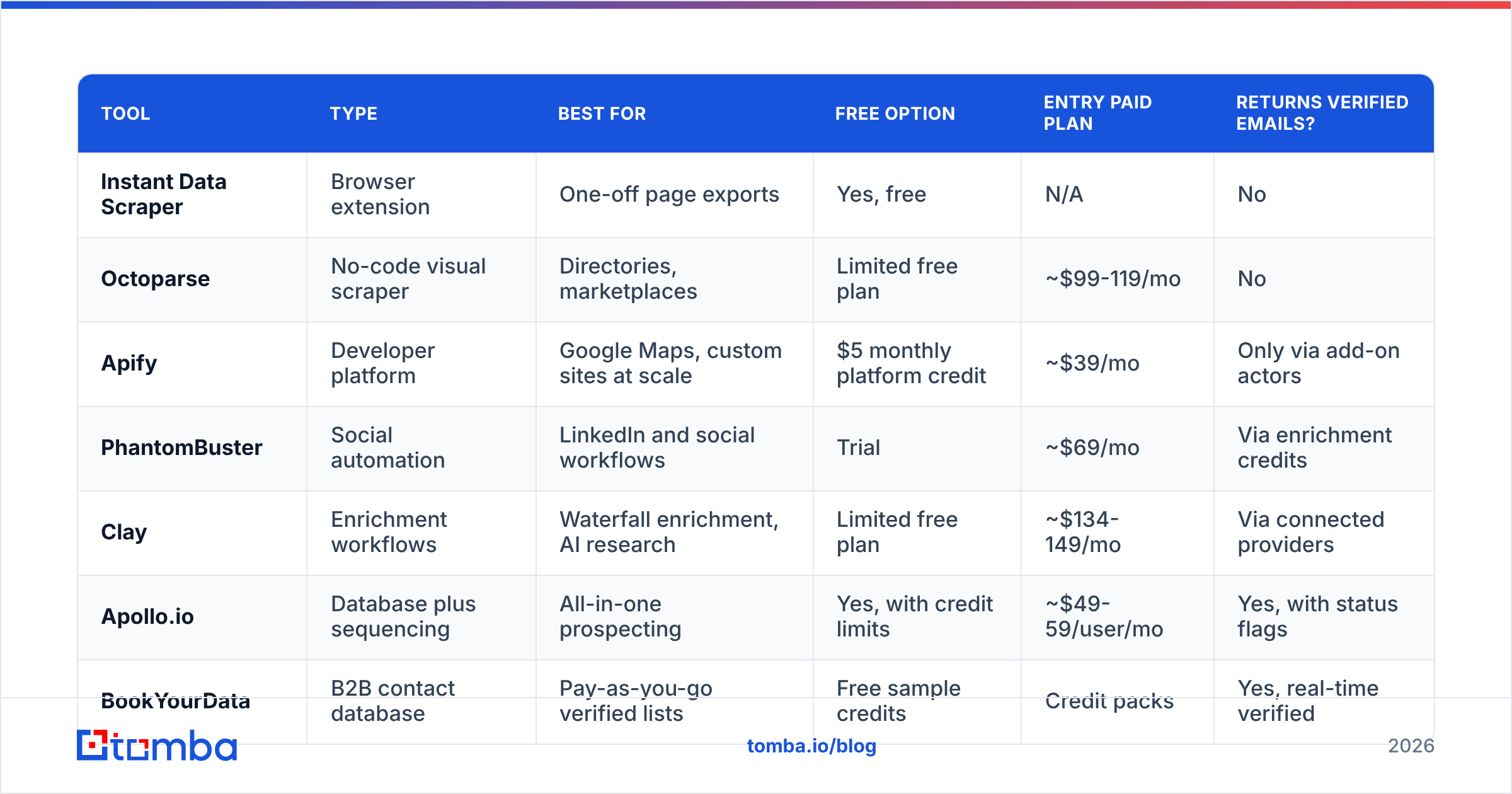
| Tool | Type | Best for | Free option | Entry paid plan | Returns verified emails? |
|---|---|---|---|---|---|
| Instant Data Scraper | Browser extension | One-off page exports | Yes, free | N/A | No |
| Octoparse | No-code visual scraper | Directories, marketplaces | Limited free plan | ~$99-119/mo | No |
| Apify | Developer platform | Google Maps, custom sites at scale | $5 monthly platform credit | ~$39/mo | Only via add-on actors |
| PhantomBuster | Social automation | LinkedIn and social workflows | Trial | ~$69/mo | Via enrichment credits |
| Clay | Enrichment workflows | Waterfall enrichment, AI research | Limited free plan | ~$134-149/mo | Via connected providers |
| Apollo.io | Database plus sequencing | All-in-one prospecting | Yes, with credit limits | ~$49-59/user/mo | Yes, with status flags |
| BookYourData | B2B contact database | Pay-as-you-go verified lists | Free sample credits | Credit packs | Yes, real-time verified |
| Tomba | Email finder and verifier | Domain-based email discovery | 25 searches/mo | $49/mo | Yes |
A few patterns stand out:
- Cost per usable email matters more than the sticker price. A $39 scraper that needs a $50 verification pass and three hours of cleanup is often more expensive than a $49 tool that returns verified emails.
- Coverage is source-dependent. Google Maps scrapers are excellent for local SMBs such as dentists, contractors and restaurants. They're poor for mid-market SaaS directors, where an email-first database performs better.
- BookYourData and Tomba are both built around verified contact data rather than raw extraction. BookYourData suits people who want to buy filtered lists on a pay-as-you-go basis. Tomba suits people who start from a list of target domains or names and want emails found and checked on demand.
Why do scraped lead lists bounce so often?#
Scraped lists fail at the inbox for predictable reasons:
- Pattern guessing. Many scrapers "find" emails by applying
first.last@domain.comwithout checking whether the mailbox exists. - Stale sources. Directory pages and cached profiles can be years out of date. B2B contact data decays by roughly a quarter or more per year as people change jobs.
- Catch-all domains. Some company servers accept mail for any address, so a basic SMTP check marks every guess as "valid" even when nobody reads that inbox.
- Role addresses.
info@,sales@andsupport@technically deliver, but they rarely reach a decision-maker, and many sending tools treat them as higher risk.

The damage isn't limited to one campaign. A bounce rate above a few percent tells Gmail and Microsoft that you're sending to lists you didn't build carefully, and your sender reputation takes the hit across every campaign on that domain. So before a scraped list goes anywhere near your sequencer, run it through an email verifier and remove invalid, disposable and unknown results. Treat catch-all results as a separate, lower-volume segment.
Is lead scraping legal?#
Short answer: scraping publicly available data is often lawful, but it depends on how you access it, which platform's terms you're bound by and what you do with personal data afterward. This is not legal advice. These are the lines most B2B teams work within:
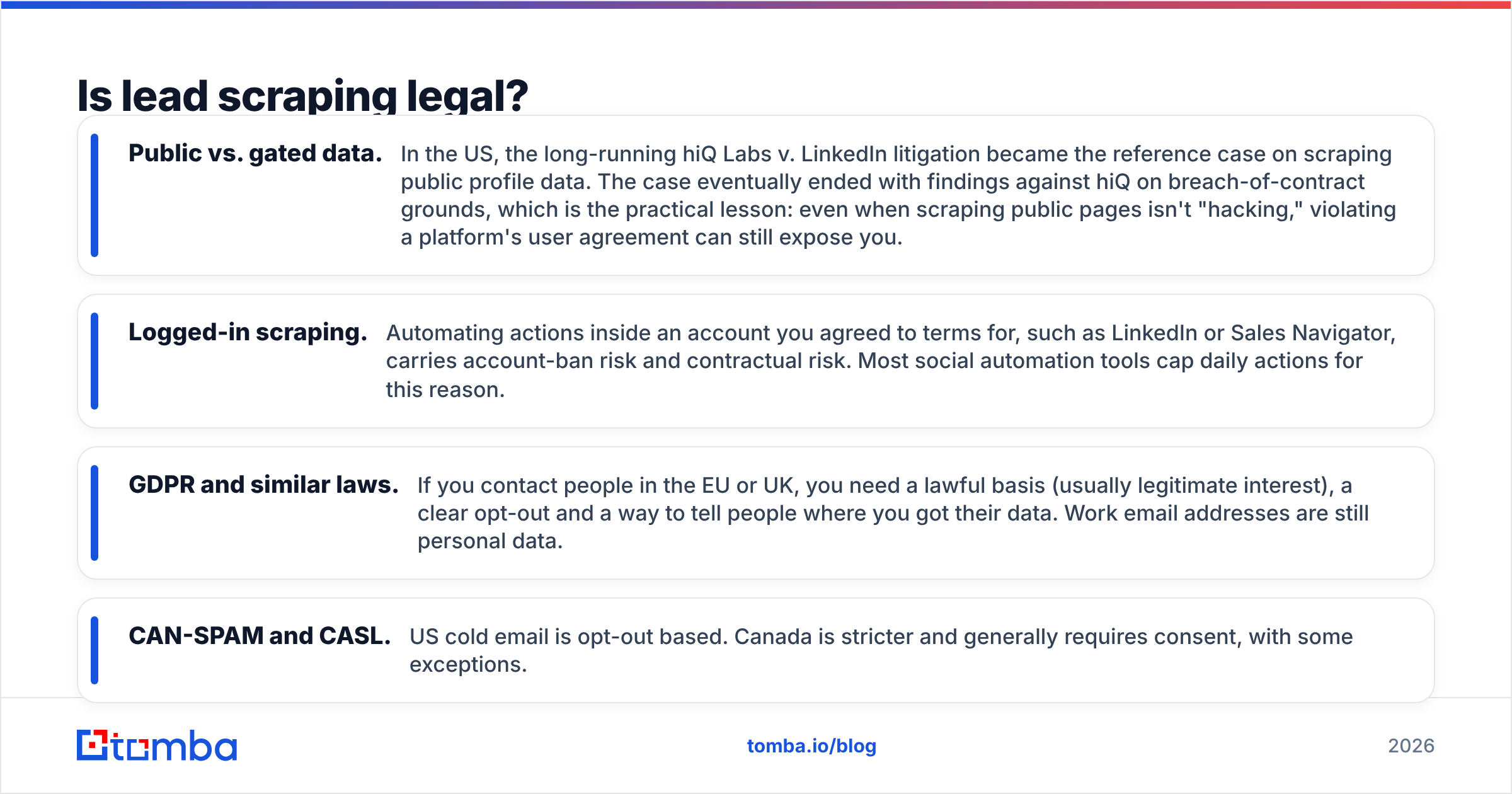
- Public vs. gated data. In the US, the long-running hiQ Labs v. LinkedIn litigation became the reference case on scraping public profile data. The case eventually ended with findings against hiQ on breach-of-contract grounds, which is the practical lesson: even when scraping public pages isn't "hacking," violating a platform's user agreement can still expose you.
- Logged-in scraping. Automating actions inside an account you agreed to terms for, such as LinkedIn or Sales Navigator, carries account-ban risk and contractual risk. Most social automation tools cap daily actions for this reason.
- GDPR and similar laws. If you contact people in the EU or UK, you need a lawful basis (usually legitimate interest), a clear opt-out and a way to tell people where you got their data. Work email addresses are still personal data.
- CAN-SPAM and CASL. US cold email is opt-out based. Canada is stricter and generally requires consent, with some exceptions.
A practical rule: scrape company-level data freely (websites, directories, tech stacks, locations). Get person-level data from providers that document their sources and verification, and keep a record of where each contact came from.
How do you build a lead scraping workflow that actually converts?#
The teams that get good results from scraping don't rely on one tool to do everything. They split the work into stages:
1. Scrape accounts, not people. Use Apify's Google Maps actors, Octoparse or a directory export to build a list of target companies: name, website, location, category, size signals. This is where raw scrapers are strongest and legal risk is lowest.
2. Filter hard. Remove companies outside your ICP before you spend credits on contacts. Deduplicate by root domain, and drop franchises, parked domains and companies with no website.
3. Find the right people by domain. Feed the cleaned domains into a domain search tool to see which professional emails are publicly associated with each company, including titles and departments. If you already know the person's name, use a direct email-finder lookup instead of guessing a pattern.
4. Verify everything. Verify every address, including ones your tool marked "found." Split the list into valid, catch-all and invalid, and only send full volume to the valid segment.
5. Enrich only what you'll use. Add phone numbers, LinkedIn URLs or technographics only where they change your message or channel. Enrichment you never reference in a sequence is wasted credit.
6. Sync and sequence. Push to your CRM or sequencer with a source field on each contact so you can answer "where did you get my email?" in one click.
For volume, run steps 3 and 4 as a batch job. Upload a CSV of domains or names to a bulk email finder rather than looking contacts up one by one.
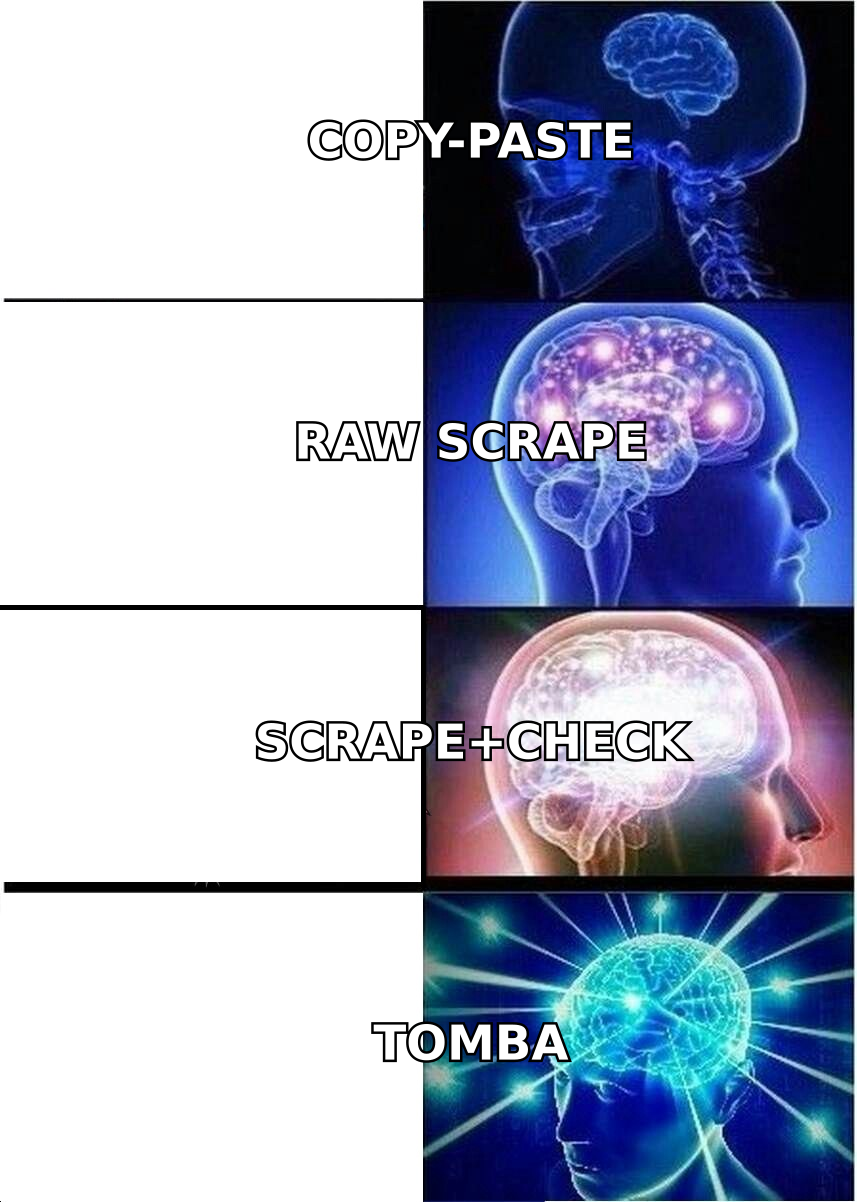
Which lead scraping tool should you choose?#
Match the tool to your starting point and your team's technical skill, not to whichever feature list is longest.
Pick Instant Data Scraper if you need a one-off export from a single directory or search results page and you're willing to clean the data manually. It's free and quick, and that's all it's designed for.
Pick Octoparse if you regularly scrape the same few directories or marketplaces, don't write code and want scheduled cloud runs. Budget time for maintaining recipes.
Pick Apify if you have someone technical, need scale (tens of thousands of Google Maps or website records) and want to pay per usage. Its actor marketplace covers most common lead sources out of the box.
Pick PhantomBuster if your prospecting runs through social platforms and you want scheduled extraction plus light outreach automation in one place. Keep daily limits conservative to protect your accounts.
Pick Clay if you have a RevOps-minded person who wants waterfall enrichment across many providers, AI research columns and complex routing logic. It's the most powerful option here and also the easiest place to overspend credits.
Pick Apollo if you want a database, email sequencer and dialer in one seat and your ICP is well covered by its data, typically US tech and mid-market.
Pick BookYourData if you'd rather buy filtered, verified contact lists on a pay-as-you-go basis than build them. It's a sensible option for teams without a steady monthly volume.
Pick Tomba if you already know which companies you want (from a scraper, a target account list or your CRM) and need the right people's emails found and verified quickly, through a web app, Chrome extension, Google Sheets, or the API.
What should you check before you buy a lead scraping tool?#
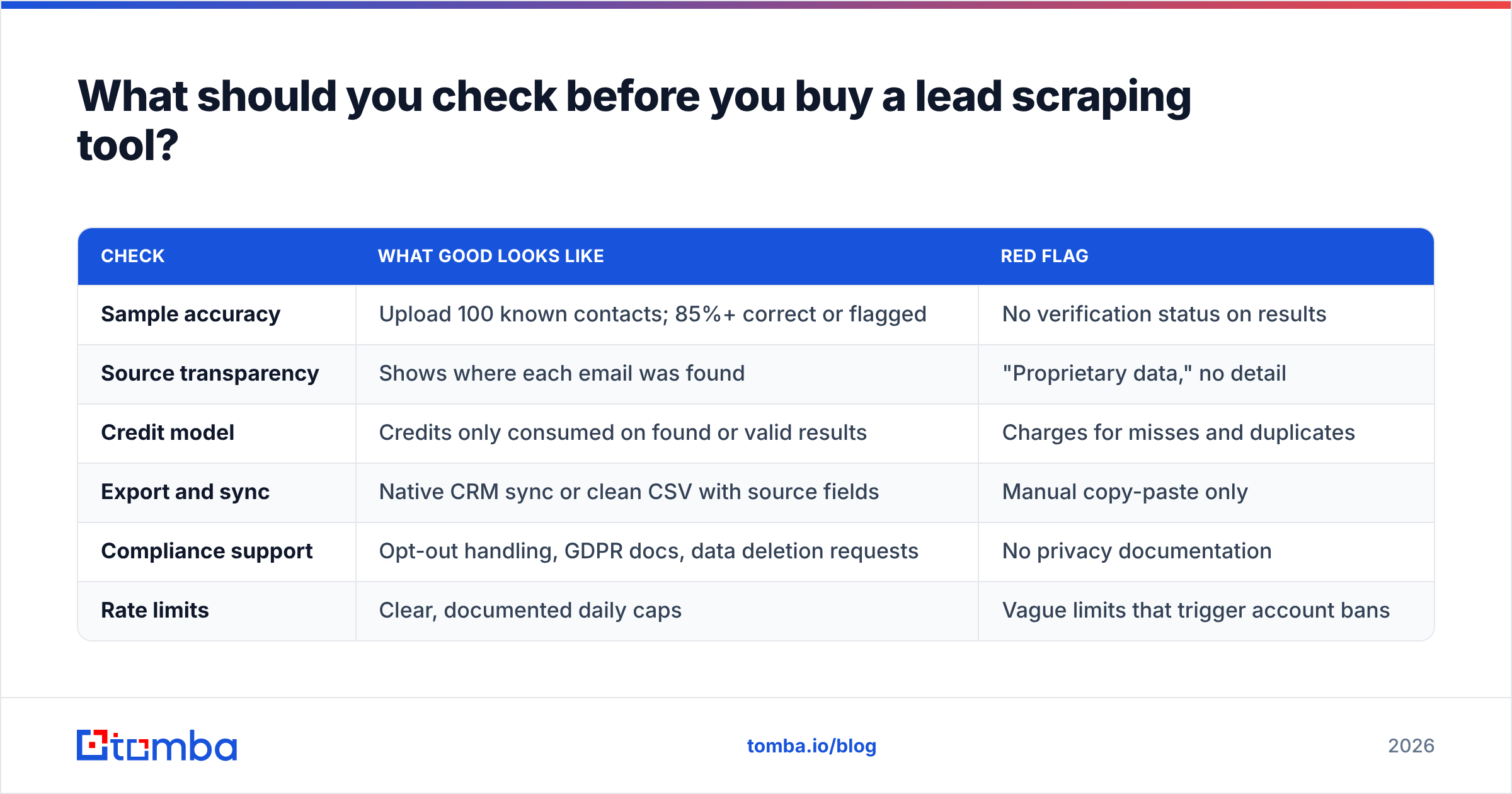
Run every shortlisted tool through the same short checklist during its free trial:
| Check | What good looks like | Red flag |
|---|---|---|
| Sample accuracy | Upload 100 known contacts; 85%+ correct or flagged | No verification status on results |
| Source transparency | Shows where each email was found | "Proprietary data," no detail |
| Credit model | Credits only consumed on found or valid results | Charges for misses and duplicates |
| Export and sync | Native CRM sync or clean CSV with source fields | Manual copy-paste only |
| Compliance support | Opt-out handling, GDPR docs, data deletion requests | No privacy documentation |
| Rate limits | Clear, documented daily caps | Vague limits that trigger account bans |
The sample-accuracy test is the one most buyers skip, and it's the one that saves the most money. Take 100 contacts you've already confirmed (current customers or recent replies), strip the emails, run the names and domains through each tool and compare. Ten minutes of testing tells you more than any feature page.
Do you even need a scraper to generate leads?#
Not always. Scraping solves a discovery problem: finding companies or people you don't know about yet. If you already have a target account list from your CRM, a trade show, a partner or a TAM spreadsheet, you don't have a discovery problem. You have a contact problem, and an email finder solves that more directly than any scraper.
For many outbound teams, the most efficient setup in 2026 is simple:
- One lightweight scraper (or none) for account discovery in niches that databases cover poorly, such as local businesses, new startups or niche verticals.
- One email-first platform for finding and verifying the people at those accounts.
- A sequencer that only receives verified contacts.
This keeps your tool spend predictable, your bounce rate low and your legal exposure small, since you're not running logged-in automations against platforms that prohibit them.
Final verdict: which lead scraping setup wins?#
No single lead scraping tool wins every scenario. Apify and Octoparse are the best raw extractors, PhantomBuster and Clay are the best workflow engines, and Apollo, BookYourData and Tomba are the best at turning names and domains into contacts you can actually email. The mistake to avoid is treating a raw scraper's output as a sendable list. Verification is the step that decides whether a campaign protects or damages your domain.
If you already have target companies, whether from a scraper, your CRM or a list of dream accounts, the fastest way to go from domain to verified inbox is the Tomba Email Finder. Search by domain, name or company, get emails with verification status and sources attached, and export straight to your sheet, CRM or sequencer. Start on the free plan with 25 searches a month, then move to paid plans from $49/mo when your volume grows.
Related guides#
// get started
Find, verify and enrich your first contacts today
Start on the free plan with 25 searches a month, then scale when your team is ready.
Free plan · No credit card required · GDPR & CCPA
// about the author