Lead Sourcing Software in 2026: How to Pick the Right Tool
Most lead sourcing software looks the same in a demo. The differences show up in bounce rates, credit burn and contract terms. Here is how to compare the options before you sign.
- Lead sourcing software finds and builds lists of prospects (companies and contacts) that match your ideal customer profile. Enrichment and outreach come after it.
- The tools fall into four groups: all-in-one databases (Apollo, ZoomInfo), contact-data specialists (Lusha, Cognism, BookYourData), domain-first email finders (Tomba), and orchestration layers (Clay).
- Contact accuracy and verification matter more than database size. A 200M-contact database with a 15% bounce rate costs you more than a smaller one that bounces at 3%.
- Look at pricing per usable contact, not per credit. Seat fees, export caps and annual lock-ins can double the real cost.
- Most teams end up with two tools: one for discovery and one for finding and verifying emails.
What is lead sourcing software?#
Lead sourcing software is the part of your sales stack that answers one question: who should we contact next? It turns an ideal customer profile (industry, headcount, tech stack, geography, job title) into a list of real companies and real people, with contact details attached.
That makes it different from nearby categories:
- Lead generation covers every way prospects reach you, including inbound, events and ads. Sourcing is the outbound, list-building piece.
- Lead enrichment adds fields to records you already have. Sourcing creates the records.
- Sales engagement tools (Outreach, Salesloft, Instantly) send the sequences. Sourcing fills them.
In practice these lines blur, because most vendors bundle two or three of these jobs. G2's sales intelligence category lists hundreds of products, and nearly all of them claim to "find leads." So the useful question isn't "does it source leads?" The useful question is how it sources them, and how often the data is right.
How does lead sourcing software actually find leads?#
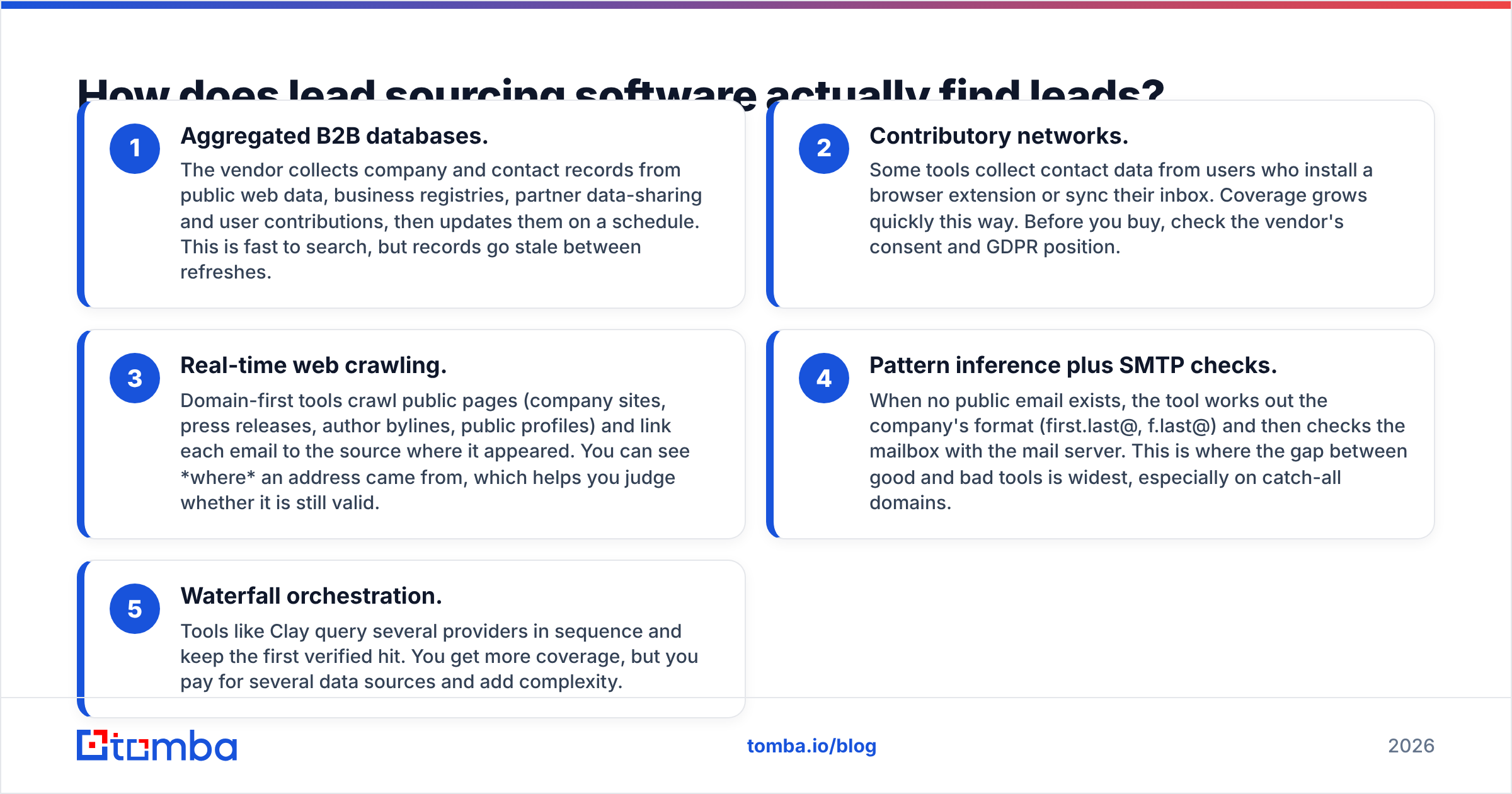
Knowing where the data comes from tells you more about accuracy than any vendor benchmark will. Almost every tool uses some mix of five methods:
- Aggregated B2B databases. The vendor collects company and contact records from public web data, business registries, partner data-sharing and user contributions, then updates them on a schedule. This is fast to search, but records go stale between refreshes.
- Contributory networks. Some tools collect contact data from users who install a browser extension or sync their inbox. Coverage grows quickly this way. Before you buy, check the vendor's consent and GDPR position.
- Real-time web crawling. Domain-first tools crawl public pages (company sites, press releases, author bylines, public profiles) and link each email to the source where it appeared. You can see where an address came from, which helps you judge whether it is still valid.
- Pattern inference plus SMTP checks. When no public email exists, the tool works out the company's format (first.last@, f.last@) and then checks the mailbox with the mail server. This is where the gap between good and bad tools is widest, especially on catch-all domains.
- Waterfall orchestration. Tools like Clay query several providers in sequence and keep the first verified hit. You get more coverage, but you pay for several data sources and add complexity.
No single method wins everywhere. Databases are best for discovery ("show me every Series B fintech in Germany with 50-200 employees"). Crawling and verification are best for contactability ("give me a working email for the Head of RevOps at this domain").

Which lead sourcing software is best in 2026?#
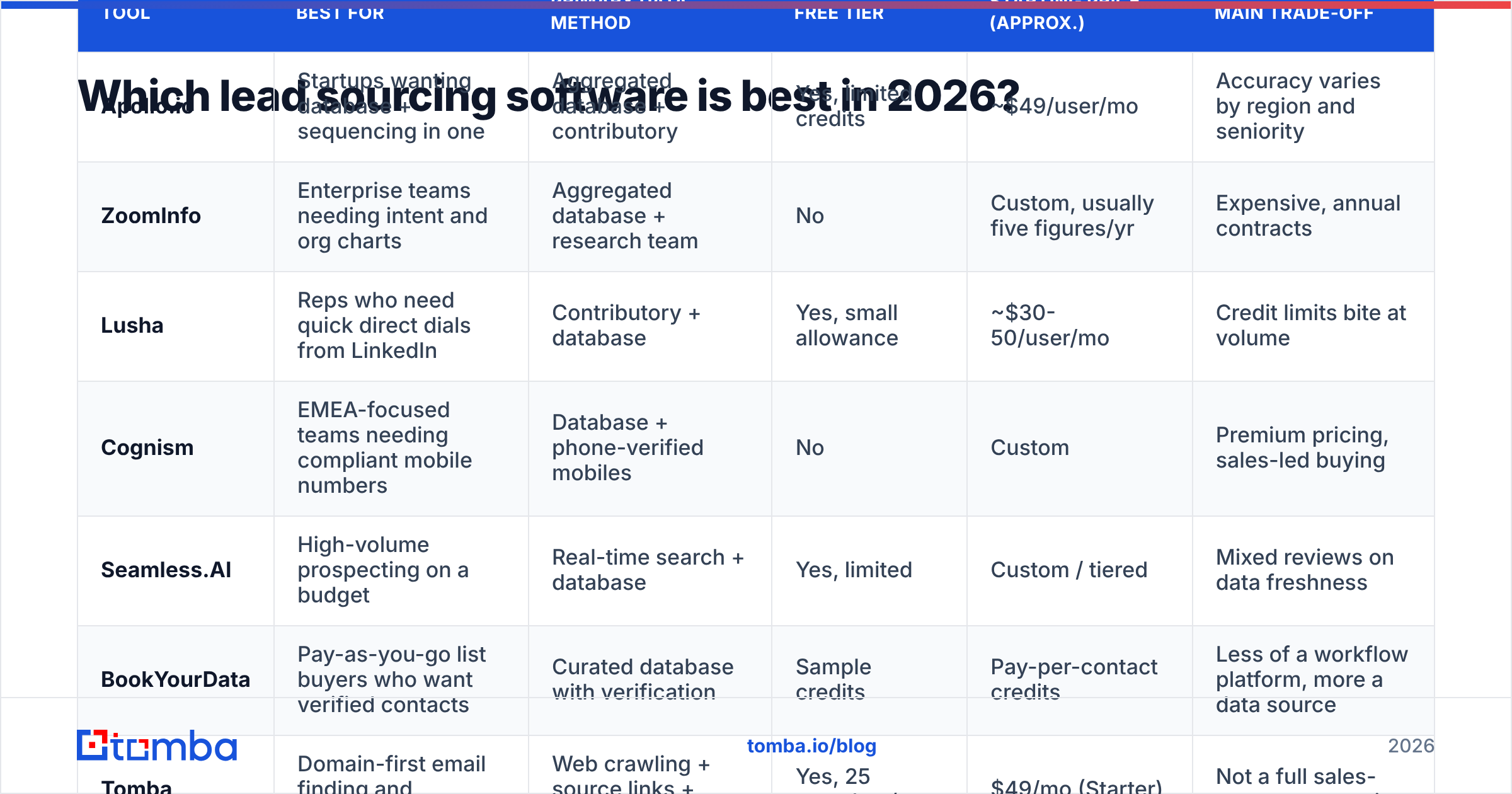
The table below compares eight widely used options on the things that affect your pipeline. Prices change often and many vendors discount annual plans, so treat these as starting points and check each vendor's current pricing page.
| Tool | Best for | Primary data method | Free tier | Starting price (approx.) | Main trade-off |
|---|---|---|---|---|---|
| Apollo.io | Startups wanting database + sequencing in one | Aggregated database + contributory | Yes, limited credits | ~$49/user/mo | Accuracy varies by region and seniority |
| ZoomInfo | Enterprise teams needing intent and org charts | Aggregated database + research team | No | Custom, usually five figures/yr | Expensive, annual contracts |
| Lusha | Reps who need quick direct dials from LinkedIn | Contributory + database | Yes, small allowance | ~$30-50/user/mo | Credit limits bite at volume |
| Cognism | EMEA-focused teams needing compliant mobile numbers | Database + phone-verified mobiles | No | Custom | Premium pricing, sales-led buying |
| Seamless.AI | High-volume prospecting on a budget | Real-time search + database | Yes, limited | Custom / tiered | Mixed reviews on data freshness |
| BookYourData | Pay-as-you-go list buyers who want verified contacts | Curated database with verification | Sample credits | Pay-per-contact credits | Less of a workflow platform, more a data source |
| Tomba | Domain-first email finding and verification | Web crawling + source links + SMTP verification | Yes, 25 searches/mo | $49/mo (Starter) | Not a full sales-engagement suite |
| Clay | Ops teams building waterfall enrichment | Orchestrates 50+ providers | Yes, limited | Tiered credits | Steep learning curve, costs stack |
A few notes on reading this table:
- Apollo (apollo.io) is the default for many early-stage teams because the free tier is generous and sequencing comes built in. Most complaints are about accuracy. Heavy users often verify Apollo exports with a separate tool before sending.
- ZoomInfo (zoominfo.com) still has the deepest firmographic data, intent signals and org-chart mapping. If your ACV is high and your territory is North American enterprise, it is often worth the cost. If you're a 5-person team, it rarely is.
- BookYourData suits teams that want verified contacts without a long seat-based contract. You buy credits, filter, export and go. It works well when your needs are list-driven and not tied to a workflow.
- Tomba starts from the company domain instead of a static database. You give it a domain or a name plus company, and it returns emails with the public sources where they were found, plus a verification status. That makes it a strong second tool next to a discovery database, or the main tool for account-based lists where you already know your target companies.
How do you evaluate lead sourcing software before you buy?#
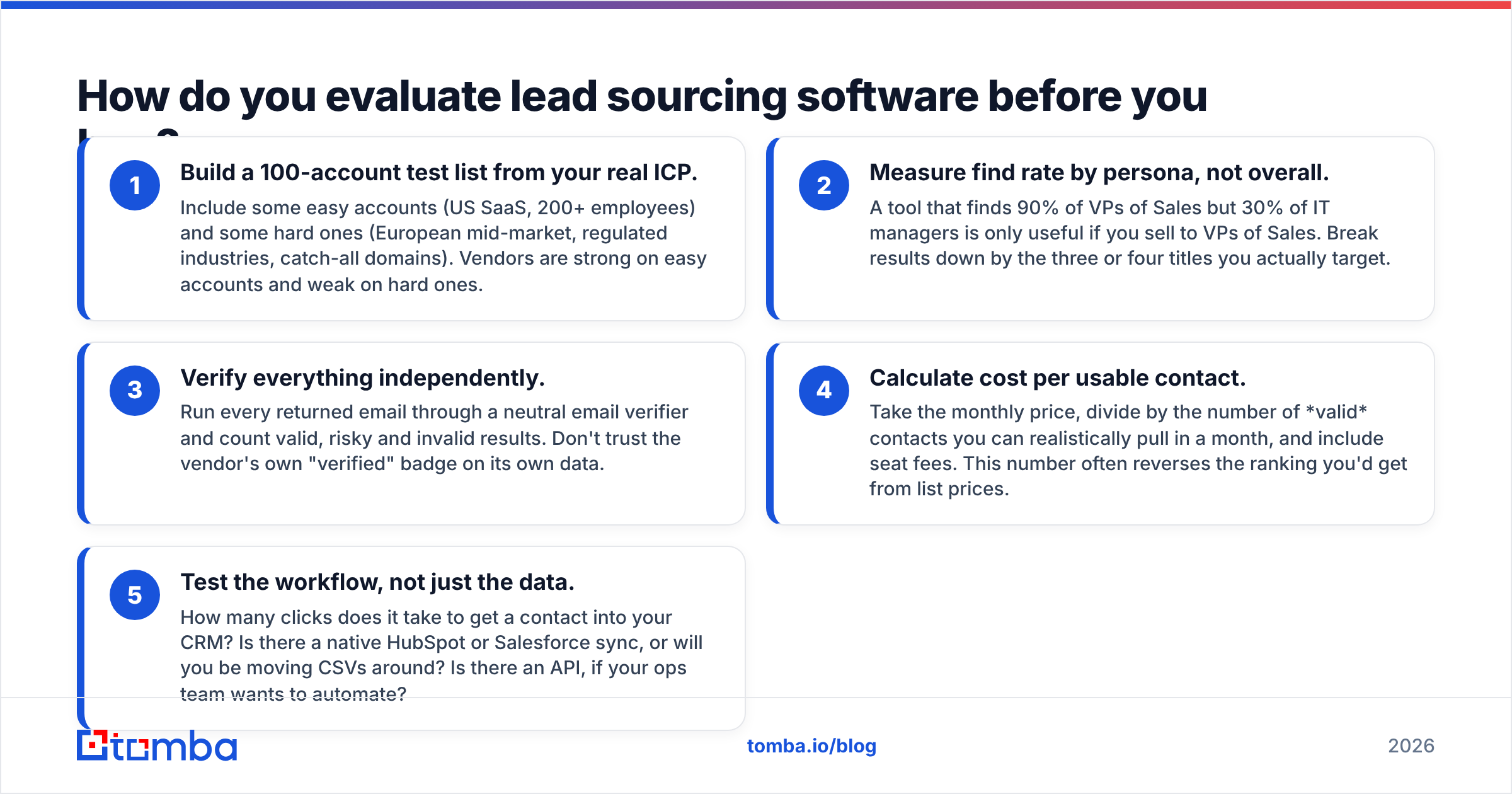
Demos always look good because vendors pick the searches. Run your own test instead. This five-step evaluation takes about a day and gives you numbers you can compare across tools.
- Build a 100-account test list from your real ICP. Include some easy accounts (US SaaS, 200+ employees) and some hard ones (European mid-market, regulated industries, catch-all domains). Vendors are strong on easy accounts and weak on hard ones.
- Measure find rate by persona, not overall. A tool that finds 90% of VPs of Sales but 30% of IT managers is only useful if you sell to VPs of Sales. Break results down by the three or four titles you actually target.
- Verify everything independently. Run every returned email through a neutral email verifier and count valid, risky and invalid results. Don't trust the vendor's own "verified" badge on its own data.
- Calculate cost per usable contact. Take the monthly price, divide by the number of valid contacts you can realistically pull in a month, and include seat fees. This number often reverses the ranking you'd get from list prices.
- Test the workflow, not just the data. How many clicks does it take to get a contact into your CRM? Is there a native HubSpot or Salesforce sync, or will you be moving CSVs around? Is there an API, if your ops team wants to automate?
Run this test on two or three shortlisted tools at the same time. The result is usually clear: one tool wins on discovery and another wins on contactability.
Is a bigger contact database always better?#
No. This is the most common mistake in buying lead sourcing software.
Vendors compete on database size ("300M+ contacts") because it's easy to market. But size and accuracy pull against each other. The more records a vendor holds, the harder it is to keep them all fresh. B2B contact data decays at roughly 2-3% per month as people change jobs, companies rebrand and domains move. On an annual basis, a large share of any static database is out of date.
What matters more:
- Refresh cadence. How often does the vendor re-check a record? Ask directly. Vague answers are a warning sign.
- Source transparency. Can you see where an email was found? Source links let you judge freshness yourself. A page from last month counts for more than one from 2021.
- Verification at export. Does the tool re-verify when you pull the contact, or does it show a status cached from months ago?
- Catch-all handling. Roughly a fifth to a third of B2B domains accept all mail at the server level, so a standard SMTP check can't confirm the mailbox. Tools that mark these "valid" will hurt your bounce rate. Tools with a dedicated catch-all check are worth paying more for.
Bounce rates above about 2% start to damage sender reputation. Mailbox providers such as Google and Microsoft have tightened bulk-sender requirements since 2024. A smaller, verified list protects your domain. A large, stale one burns through it.

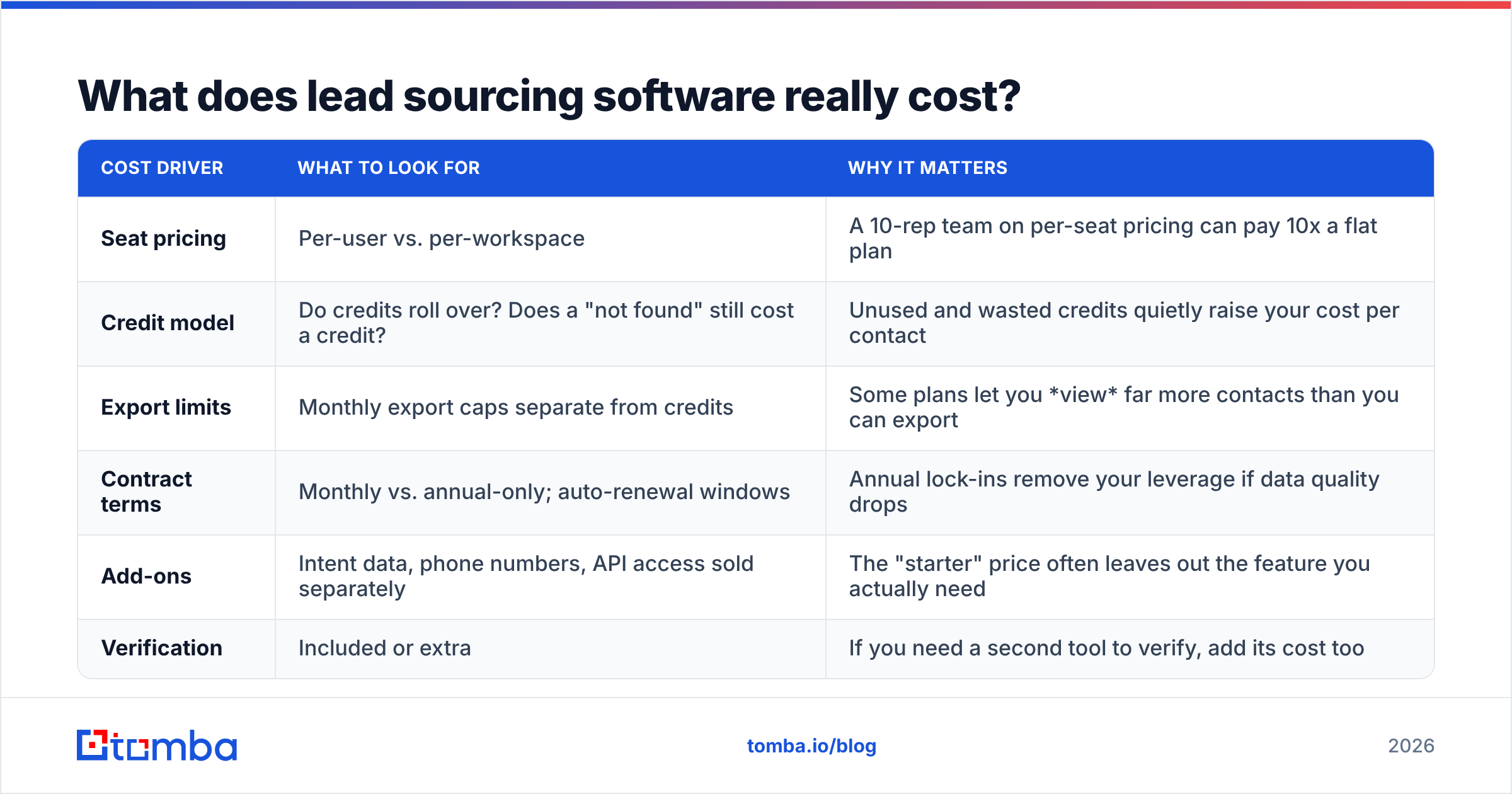
What does lead sourcing software really cost?#
List price is only part of the cost. When you model total cost, include these:
| Cost driver | What to look for | Why it matters |
|---|---|---|
| Seat pricing | Per-user vs. per-workspace | A 10-rep team on per-seat pricing can pay 10x a flat plan |
| Credit model | Do credits roll over? Does a "not found" still cost a credit? | Unused and wasted credits quietly raise your cost per contact |
| Export limits | Monthly export caps separate from credits | Some plans let you view far more contacts than you can export |
| Contract terms | Monthly vs. annual-only; auto-renewal windows | Annual lock-ins remove your leverage if data quality drops |
| Add-ons | Intent data, phone numbers, API access sold separately | The "starter" price often leaves out the feature you actually need |
| Verification | Included or extra | If you need a second tool to verify, add its cost too |
For reference, Tomba publishes its prices openly: a free tier with 25 searches a month, Starter at $49/mo, Growth at $99/mo, Pro at $249/mo, and custom Enterprise. See the pricing details for credit allowances per tier. Enterprise databases like ZoomInfo and Cognism are sales-led and quote-based, so budget time for negotiation.
A useful rule: if a vendor won't give you a trial or sample export on your ICP before you sign an annual contract, treat that as a data-quality signal.
Should you use one lead sourcing tool or several?#
Most mature outbound teams use two tools, sometimes three, because discovery and contactability are different jobs.
A common setup looks like this:
- Discovery layer. A database (Apollo, ZoomInfo, BookYourData, or a firmographic search) to find companies and titles that match your ICP.
- Contact layer. A domain-first finder that pulls emails for those specific accounts, using domain search to list everyone public at a company or a name-plus-domain lookup for a specific person.
- Verification layer. A verifier run on every contact before it goes into a sequence, whichever tool produced it.
- Optional orchestration. Clay, Make or Zapier to connect them, if your ops team has the time to maintain it.
Using several tools does cost more, but only one of them needs to be the expensive one. Teams that try to make a single all-in-one platform do everything often end up paying enterprise prices for a weak spot, usually email accuracy outside North America or on catch-all domains.
The main exception is the very early-stage team: one founder doing outbound, with fewer than 500 contacts a month. In that case, pick one tool with a usable free tier and a built-in verifier, and add more only when the numbers show a gap.
How do you match lead sourcing software to your sales motion?#
Choose based on how you sell, not on feature lists:
- Account-based, high ACV, known target list. You already know the 300 companies you want. You need depth on each account, not breadth. Pick domain-first finding plus enrichment, and add ZoomInfo or Cognism if you need org charts and direct dials.
- High-velocity SMB outbound. You need thousands of new contacts a month across broad filters. A large database with a low cost per contact (Apollo, Seamless.AI, BookYourData credits) plus strict verification is the practical choice.
- EMEA-heavy or regulated markets. Compliance and mobile coverage matter most. Cognism is built for this, and domain-first tools that show public sources also help with GDPR documentation.
- Ops-led, experimental teams. You have a RevOps person who enjoys building. Clay-style waterfalls get the highest coverage, as long as someone owns the upkeep and the credit budget.
- Developer-led or embedded use cases. You want sourcing inside your own product or scripts. Prioritize a clean API, good documentation and predictable per-call pricing over a polished UI.
Whichever group you're in, put the same check at the end of the pipeline: verify before you send, and track bounce rate per source so you know which tool is actually earning its cost.
What's the bottom line on lead sourcing software?#
There's no single "best lead sourcing software." The right choice is the pairing that gives you the lowest cost per reachable prospect in your ICP. Test with your own accounts, verify independently, work out real costs including seats and exports, and avoid multi-year lock-ins until the data has proven itself.
If your gap is contactability, meaning you already know who to target but can't reliably reach their inbox, a domain-first tool is usually the fastest fix. Tomba Email Finder lets you look up professional emails by domain, name or company, shows the public sources behind each result, and verifies deliverability before you export. Start on the free tier with 25 searches a month, run it on the 100-account test list from this guide, and compare the verified find rate with the tool you use now.
Related guides#
// get started
Find, verify and enrich your first contacts today
Start on the free plan with 25 searches a month, then scale when your team is ready.
Free plan · No credit card required · GDPR & CCPA
// about the author