Lead Status: Definitions, Stages, and How to Manage Them in 2026
Your lead status field is either the most useful column in your CRM or the most ignored. Here are the stages worth tracking, the exit criteria for each, and the mistakes that stall a pipeline.
TL;DR
- Lead status is a CRM field that records where a single lead is in your sales team's work right now: new, being contacted, connected, qualified, or disqualified.
- It is not the same as lifecycle stage or lead score. Status tracks rep activity, lifecycle stage tracks the buyer's journey, and score tracks fit and intent.
- Six to eight statuses is enough for most B2B teams. Each one needs a written exit rule. If it doesn't have one, reps will use it however they like.
- Bad contact data breaks lead status before anything else does. A lead with a dead email isn't "Attempted to Contact". It was never reachable.
- Check stale statuses every week. A "New" lead that's 14 days old usually means a routing problem, not a lead problem.
What is lead status?#
Lead status is a property on a lead or contact record that tells everyone on the team what is happening with that person right now. Is anyone working it? Has the rep reached them? Is it dead?
Think of it as the label on a folder sitting on a sales rep's desk. The label doesn't describe the whole relationship. It describes what the rep is doing with the folder today.
Most CRMs include one by default. HubSpot's CRM ships a "Lead Status" property with values like New, Open, In Progress, Attempted to Contact, Connected, Bad Timing, Unqualified, and Open Deal. Salesforce's default Lead Status picklist is shorter: Open – Not Contacted, Working – Contacted, Closed – Converted, and Closed – Not Converted. Both are starting points. Nobody expects you to use them unchanged.
The field matters because it drives three things you care about:
- Routing and SLAs. You can't enforce "respond within 1 hour" if you can't tell which leads are still untouched.
- Rep workload. Managers use status counts to see who is overloaded and who is sitting on uncontacted leads.
- Funnel reporting. Conversion rates between statuses show you where leads stall, which is usually more useful than the overall conversion rate.
How is lead status different from lifecycle stage and lead score?#
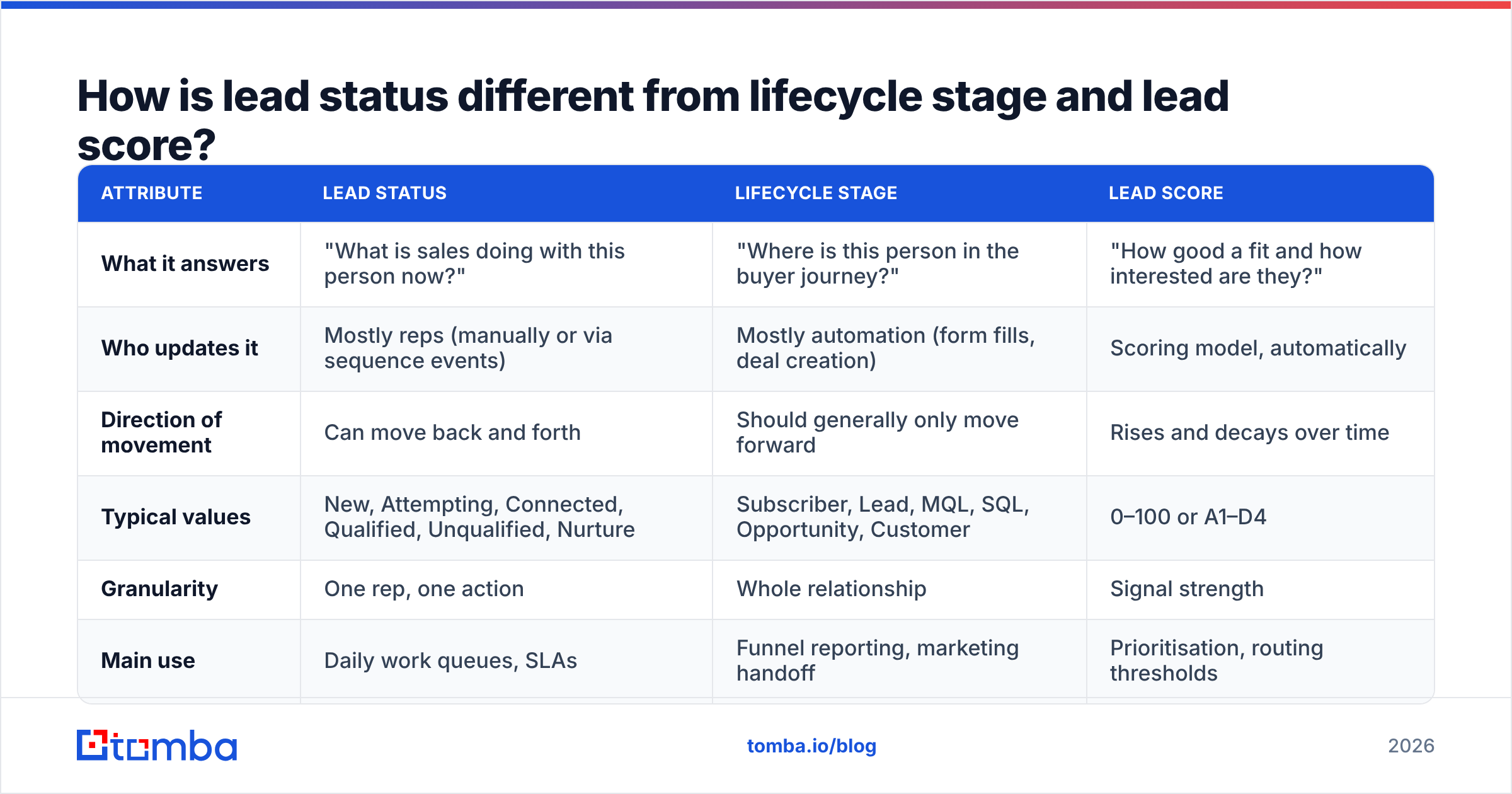
Teams mix these three fields up all the time, and the result is a CRM where nobody trusts any of them. Here's how they differ:
| Attribute | Lead status | Lifecycle stage | Lead score |
|---|---|---|---|
| What it answers | "What is sales doing with this person now?" | "Where is this person in the buyer journey?" | "How good a fit and how interested are they?" |
| Who updates it | Mostly reps (manually or via sequence events) | Mostly automation (form fills, deal creation) | Scoring model, automatically |
| Direction of movement | Can move back and forth | Should generally only move forward | Rises and decays over time |
| Typical values | New, Attempting, Connected, Qualified, Unqualified, Nurture | Subscriber, Lead, MQL, SQL, Opportunity, Customer | 0–100 or A1–D4 |
| Granularity | One rep, one action | Whole relationship | Signal strength |
| Main use | Daily work queues, SLAs | Funnel reporting, marketing handoff | Prioritisation, routing thresholds |
The practical rule is that lifecycle stage tells you who the person is to the business, and lead status tells you what sales is doing about it. A contact can be a marketing qualified lead (lifecycle) whose status is "Attempting Contact". Both fields are correct, and they answer different questions.
If you only keep one, keep lifecycle stage for reporting. Most sales teams need both, though, because lifecycle stage doesn't show rep activity well enough to run a daily queue from it.
What lead status values should a B2B team use?#
Most teams need fewer statuses than they think. Each extra value is one more decision a rep has to make on every record, and reps skip decisions. Here's a set of eight that works for most outbound and inbound B2B motions:
- New. The lead is in the CRM and assigned, but nobody has touched it. Exit rule: the first outreach attempt is logged.
- Attempting Contact. The rep has sent at least one email or made one call, and the lead hasn't responded yet. Exit rule: a reply, a connected call, or the sequence ends.
- Connected. Two-way contact happened: a reply, a call, or a LinkedIn conversation. Exit rule: the rep decides whether the lead is qualified or not.
- Qualified. The lead meets your qualification criteria (BANT, MEDDIC, or your own), and a meeting is booked or a deal is created. Exit rule: converted to an opportunity.
- Nurture / Bad Timing. The lead is a real fit but isn't buying now. Exit rule: a re-engagement date passes or they show new intent.
- Unqualified. Wrong fit: too small, wrong industry, student, competitor. Exit rule: none. This status is terminal unless the firmographics change.
- Unreachable / Bad Data. You couldn't reach the person because the contact data is invalid: the email bounced, the phone is disconnected, or they've left the company. Exit rule: new data is found and verified.
- Converted. Handed off to an opportunity or deal. Exit rule: terminal for the lead record.
Number 7 is the one most teams leave out, and leaving it out is expensive. When the only "failure" statuses are Unqualified and Nurture, bounced leads get filed under one of them. Your disqualification data then says the market isn't a fit, when the real cause was a bad email address.

Why does lead status break down in most CRMs?#
If you've inherited a CRM, you've probably seen the symptoms: 4,000 leads sitting in "New", a "Working" bucket that means something different to each rep, and a conversion report nobody believes. The causes tend to be the same everywhere.
Too many values. Some teams end up with 15+ statuses, like "Left voicemail 1", "Left voicemail 2", and "Emailed – no reply". That's activity logging, and your sequencing tool already records it. Keep status for the decisions that matter.
No exit criteria. If "Connected" isn't defined, one rep uses it for an auto-reply and another only uses it after a 20-minute discovery call. Write the definition into the property description in the CRM itself, where reps will see it.
Manual-only updates. Reps update status when they remember to, which usually means after the problem has already happened. Automate the obvious transitions: sequence enrolment moves New to Attempting, a positive reply moves Attempting to Connected, and deal creation moves the lead to Converted.
Bad data counted as bad leads. This one hurts reporting most. Suppose 30% of the leads in "Attempting Contact" were never reachable. Then your contact rate, reply rate, and rep productivity numbers are all wrong, and you'll end up coaching reps on a data problem.
Nothing ever leaves "New". Leads that sit untouched for weeks are a routing or capacity problem. The status field is doing its job by showing you that. It's the process around it that's broken.
How should you automate lead status transitions?#
A useful comparison: lead status works like a traffic light system. If someone has to flip each light by hand, the intersection jams. Put the predictable transitions on sensors and let people handle the exceptions.
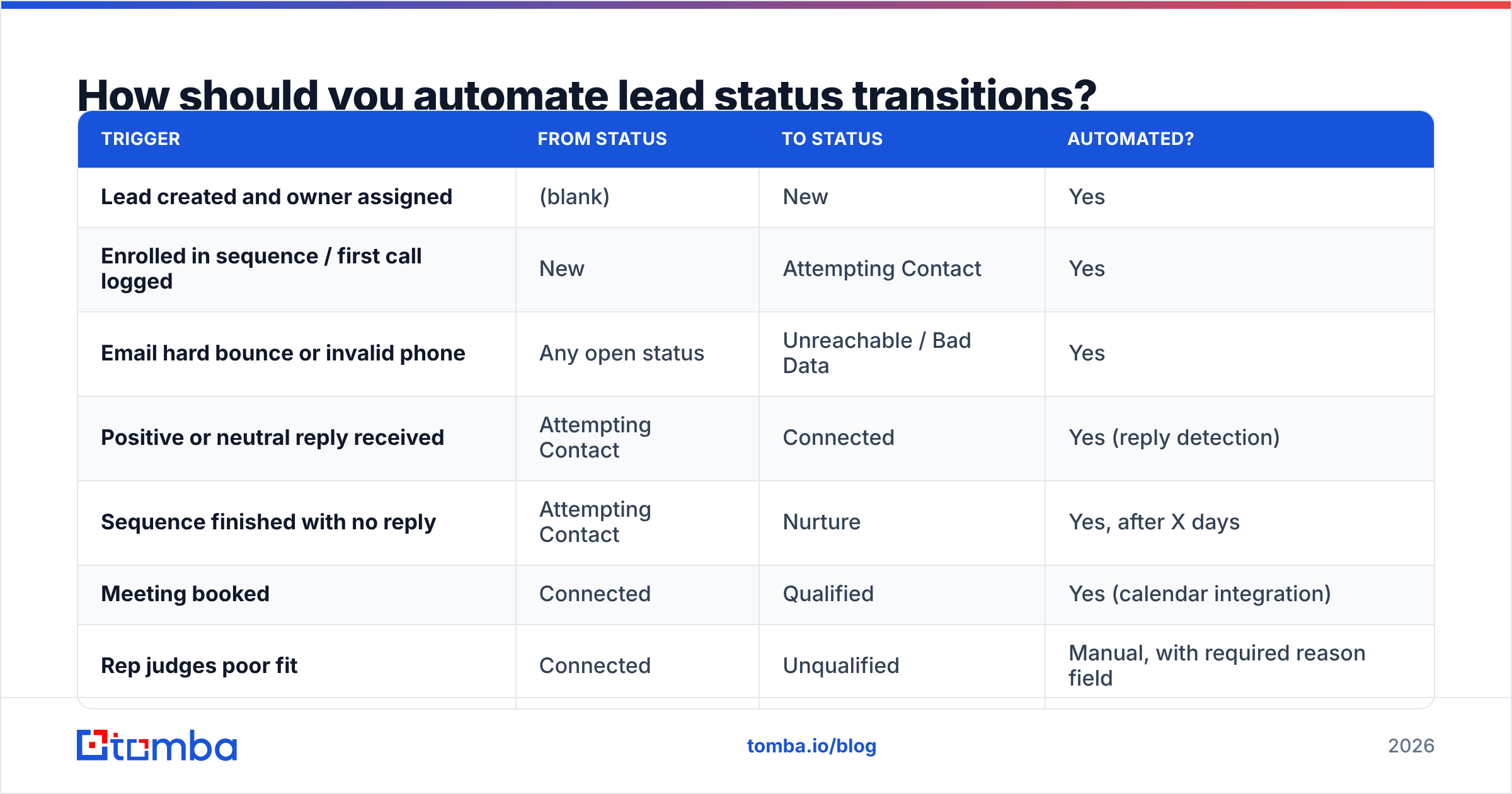
Here's a practical automation map you can build in HubSpot workflows, Salesforce Flow, or a sales automation tool with CRM sync:
| Trigger | From status | To status | Automated? |
|---|---|---|---|
| Lead created and owner assigned | (blank) | New | Yes |
| Enrolled in sequence / first call logged | New | Attempting Contact | Yes |
| Email hard bounce or invalid phone | Any open status | Unreachable / Bad Data | Yes |
| Positive or neutral reply received | Attempting Contact | Connected | Yes (reply detection) |
| Sequence finished with no reply | Attempting Contact | Nurture | Yes, after X days |
| Meeting booked | Connected | Qualified | Yes (calendar integration) |
| Rep judges poor fit | Connected | Unqualified | Manual, with required reason field |
| Deal / opportunity created | Qualified | Converted | Yes |
Two details make this work in practice:
- Require a reason on terminal statuses. When a lead is set to Unqualified, require a picklist reason such as company size, industry, no budget, competitor, or duplicate. Otherwise you'll know how many leads were disqualified but not why.
- Timestamp every transition. Most CRMs record "date entered stage" for lifecycle stages but not for custom status values. Add date properties, or use a history report, so you can measure time-in-status.
If you're on Salesforce, the Salesforce CRM platform lets you add "Closed" and "Converted" flags to specific picklist values. Set them deliberately, because lead conversion behaviour depends on them.
How does data quality affect lead status accuracy?#
This is where lead status and contact data overlap, and where most teams lose accuracy without noticing.
Every status after "New" assumes you can actually reach the person. If the email is a guess, the domain is catch-all, or the contact left the company eight months ago, the lead will sit in "Attempting Contact" until the sequence ends and then fall into "Nurture". Your funnel report counts it as a lead who went quiet. In reality, nobody ever received your emails.
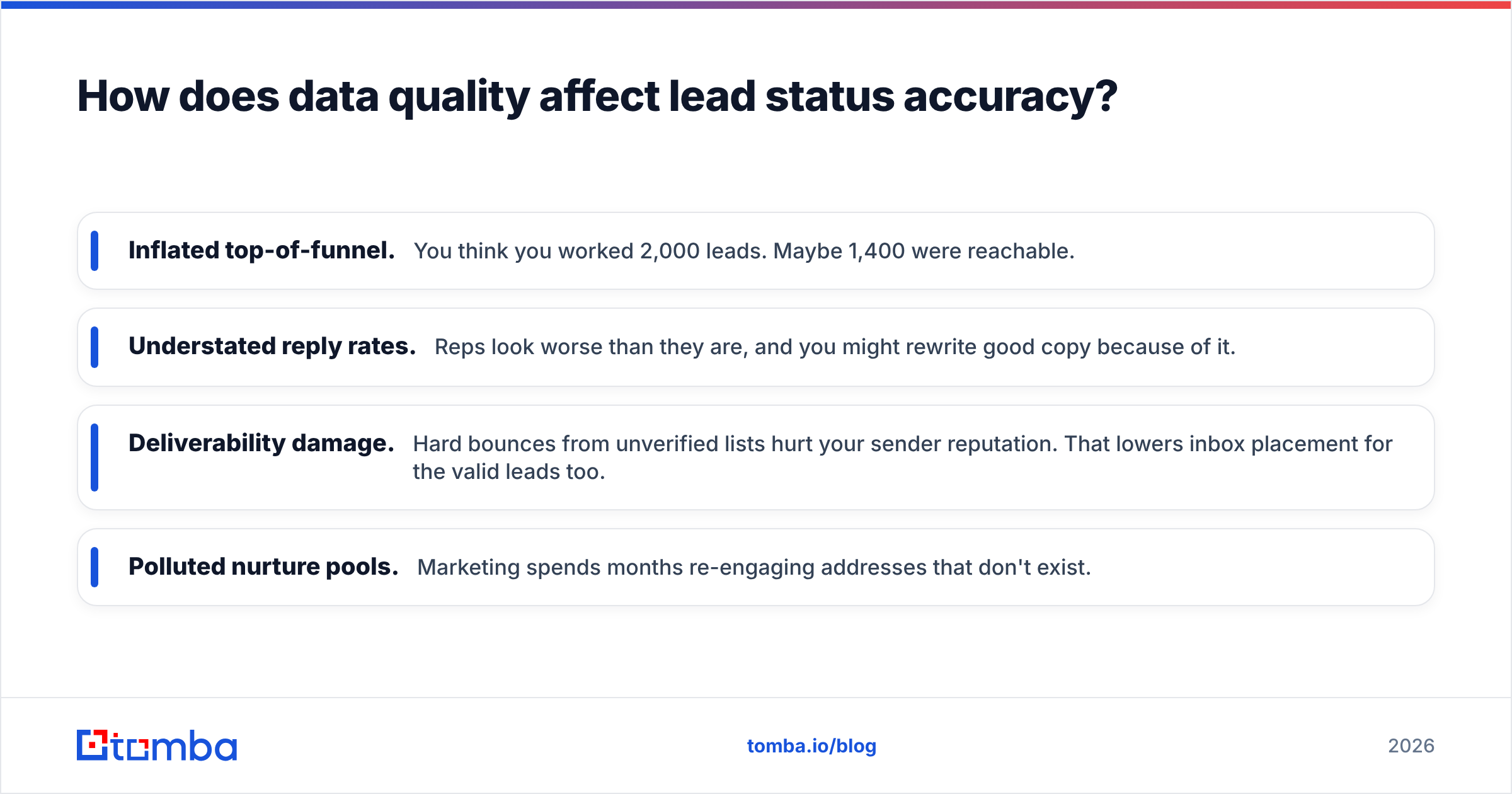
The consequences add up:
- Inflated top-of-funnel. You think you worked 2,000 leads. Maybe 1,400 were reachable.
- Understated reply rates. Reps look worse than they are, and you might rewrite good copy because of it.
- Deliverability damage. Hard bounces from unverified lists hurt your sender reputation. That lowers inbox placement for the valid leads too.
- Polluted nurture pools. Marketing spends months re-engaging addresses that don't exist.
The fix is simple and belongs before the lead gets a status. Run new leads through an email verifier at import or creation. Send invalid results straight to "Unreachable / Bad Data" so they never enter "New". For leads that come in with only a name and a company, data enrichment can fill in a verified email, job title, and company details before routing. That way the status reflects your sales work and not gaps in your data.

What metrics should you track by lead status?#
Once the statuses are clean, they give you a small set of metrics that are actually useful for managing a team. Track these at least weekly:
- Speed to first touch. Median time from New to Attempting Contact. For inbound leads, this is the metric most closely tied to conversion, and it's entirely within your control.
- Contact rate. The share of leads moving from Attempting to Connected. If it's low, look at data quality and channel mix before you blame the reps.
- Qualification rate. Connected to Qualified. This shows whether your targeting and your discovery questions are working.
- Bad-data rate. The share of new leads landing in Unreachable. This measures your list sources directly. If one source runs at 25%, stop buying from it or verify everything it sends.
- Stale leads. The number of leads in New for more than 3 business days, or in Attempting for more than 21 days. These should trigger a manager review.
- Disqualification reasons. Grouped by source and segment. This is the best input you have for refining your ICP.
Industry research from firms such as Gartner keeps pointing out that sales teams struggle less with a lack of data than with a lack of trusted data. Clean lead statuses are one of the cheapest ways to earn that trust back, because every metric above depends on them.
Should lead status differ for inbound and outbound leads?#
The values can stay the same, but the SLAs and automation should be different.
Inbound leads (demo requests, trial signups, content downloads) are asking for contact. Your "New" window should be measured in minutes or hours, and "Attempting Contact" should run as a short, fast cadence. Moving to Connected happens quickly, and the main risk is slow routing.
Outbound leads (prospected lists, account-based targets) didn't ask for anything. "Attempting Contact" will be longer, often 3–4 weeks of multi-channel touches, and "Nurture" will be your biggest bucket. Here the main risk is contacting unverified addresses. Outbound lists are where most bad data comes in.
A simple way to keep both in one field: add a Lead Source Type property (Inbound / Outbound / Partner / Event) and build separate views and SLA rules on top of the same status values. This is easier to maintain than two parallel sets of statuses, and it keeps your CRM reporting consistent.
How do you roll out a new lead status model without breaking reporting?#
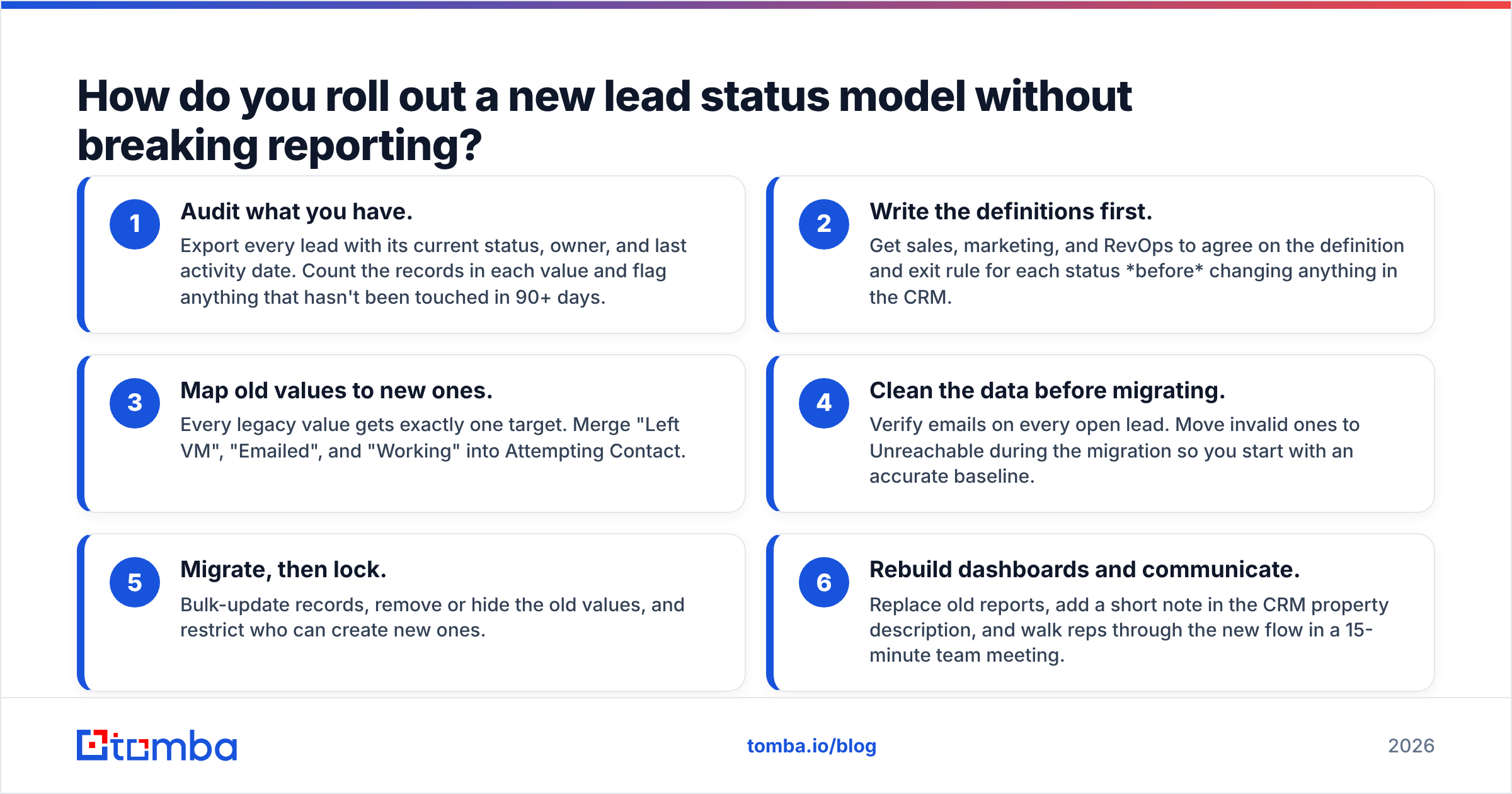
Changing picklist values on a live CRM makes people nervous, and it should. Historical reports depend on the old values. Here's a sequence that avoids most of the damage:
- Audit what you have. Export every lead with its current status, owner, and last activity date. Count the records in each value and flag anything that hasn't been touched in 90+ days.
- Write the definitions first. Get sales, marketing, and RevOps to agree on the definition and exit rule for each status before changing anything in the CRM.
- Map old values to new ones. Every legacy value gets exactly one target. Merge "Left VM", "Emailed", and "Working" into Attempting Contact.
- Clean the data before migrating. Verify emails on every open lead. Move invalid ones to Unreachable during the migration so you start with an accurate baseline.
- Migrate, then lock. Bulk-update records, remove or hide the old values, and restrict who can create new ones.
- Rebuild dashboards and communicate. Replace old reports, add a short note in the CRM property description, and walk reps through the new flow in a 15-minute team meeting.
Expect about two weeks of reps setting the wrong values. Watch stale-lead and unreachable-rate reports closely during that time and correct mistakes quickly.
What are the most common lead status mistakes to avoid?#
A quick checklist before you close this tab:
- Using lead status as an activity log. Your sequencer already tracks touches.
- Letting "Unqualified" absorb bad-data leads. This hides list-quality problems.
- Having no reason field on terminal statuses. You lose your best ICP feedback.
- Automating nothing. Status accuracy drops as soon as reps get busy.
- Automating everything. Qualification decisions still need a person.
- Treating lead status as lifecycle stage. They answer different questions.
- Never reviewing stale leads. "New" should never mean "forgotten".
For more background on how lead handling fits into the wider funnel, the Wikipedia overview of customer relationship management is a useful neutral primer on how these systems are meant to structure customer data.
How can Tomba help keep your lead statuses accurate?#
Lead status is only as reliable as the contact data underneath it. If you're filling your CRM with prospected leads, the most effective step is to make sure every record has a real, reachable email before it's assigned. Then "Attempting Contact" means a rep is actually trying to reach someone, not sending emails to addresses that don't exist.
The Tomba Email Finder finds professional email addresses by name, company, or domain. It works from the web app, the browser extension, bulk uploads, or the API, and every result can be checked with Tomba's built-in verification before it reaches your CRM. You can start on the free tier with 25 searches a month, and paid plans begin at $49/month when you're ready to scale. Fill your pipeline with contacts you can actually reach, and your lead status reports will start reflecting what your reps are really doing.
Related guides#
// get started
Find, verify and enrich your first contacts today
Start on the free plan with 25 searches a month, then scale when your team is ready.
Free plan · No credit card required · GDPR & CCPA
// about the author