Lead Temperature Scoring: How to Rank Hot, Warm, and Cold Leads
Most lead scores only ever go up. Lead temperature scoring adds time and decay, so your reps call the people who are ready now instead of the ones who were interested last quarter.
TL;DR
- Lead temperature scoring sorts leads into hot, warm, and cold based on how recently and how strongly they have shown buying intent, not only on who they are.
- It sits on top of traditional lead scoring. Fit tells you whether a lead is worth pursuing. Temperature tells you when to pursue it.
- The piece most teams skip is score decay. If points never expire, a lead who downloaded a whitepaper eight months ago still looks "hot."
- Temperature is only as good as the contact data underneath it. A hot lead with a bounced email is really a dead lead.
- Start simple: three bands, 5-8 weighted signals, a weekly decay rule, and a clear SLA for each band.
What is lead temperature scoring?#
Lead temperature scoring ranks prospects by how ready they are to buy right now. It groups them into three bands, usually hot, warm, and cold, and each band gets its own follow-up speed and owner.
Standard lead scoring adds points for attributes and actions: job title, company size, pageviews, form fills. Over time the score climbs. Temperature scoring adds time to that. It asks two questions:
- How strong is the intent signal? A pricing-page visit counts for more than a blog visit.
- How fresh is it? A demo request from this morning counts for more than one from last quarter.
Temperature works like a weather forecast, not a climate average. Your annual rainfall tells you something about your city, but it won't tell you whether to bring an umbrella today. A lifetime lead score is the climate. Lead temperature is today's forecast, and reps need the forecast.
In practice it's usually one extra field in your CRM (for example lead_temperature = hot | warm | cold). It gets recalculated from engagement data on a schedule, and routing rules, sequences, and SLAs hang off it.
How is lead temperature different from traditional lead scoring?#
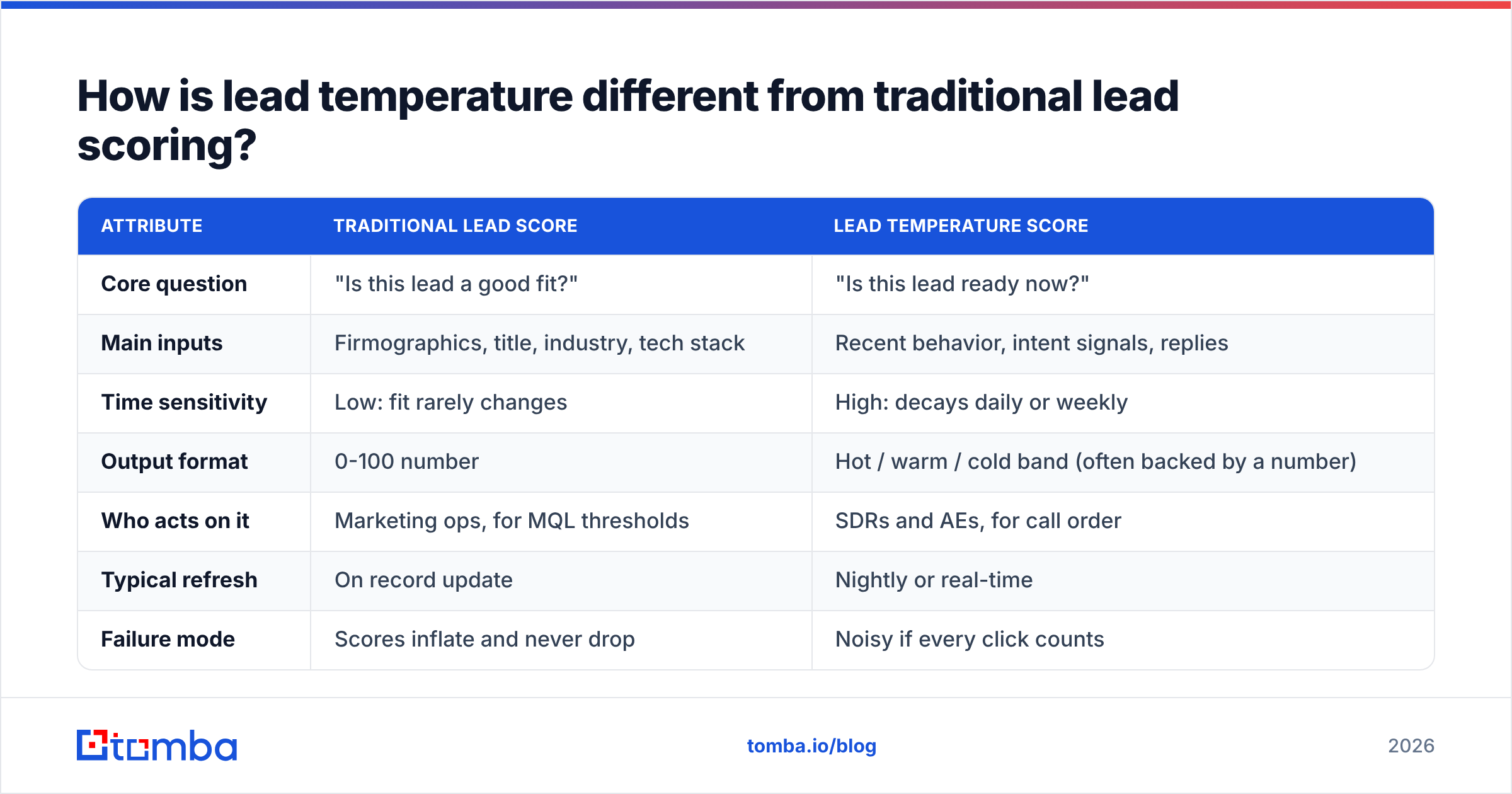
Traditional scoring and temperature scoring answer different questions, and mature teams run both. The most common failure is merging them into one number. Then a perfect-fit account that went quiet looks exactly like a mediocre-fit account that is actively shopping.
| Attribute | Traditional lead score | Lead temperature score |
|---|---|---|
| Core question | "Is this lead a good fit?" | "Is this lead ready now?" |
| Main inputs | Firmographics, title, industry, tech stack | Recent behavior, intent signals, replies |
| Time sensitivity | Low: fit rarely changes | High: decays daily or weekly |
| Output format | 0-100 number | Hot / warm / cold band (often backed by a number) |
| Who acts on it | Marketing ops, for MQL thresholds | SDRs and AEs, for call order |
| Typical refresh | On record update | Nightly or real-time |
| Failure mode | Scores inflate and never drop | Noisy if every click counts |
A useful mental model is a 2x2 matrix. Fit goes on one axis and temperature on the other. High fit + hot gets a same-day call. High fit + cold gets a nurture sequence and account-based ads. Low fit + hot gets a quick qualification check, since it may be a student, a competitor, or a very small buyer. Low fit + cold stays out of your reps' queues.
This split also makes your marketing qualified lead definition cleaner. An MQL should need both a fit floor and a temperature floor. With only one of the two, sales starts ignoring the MQL queue within a quarter.
What signals should raise a lead's temperature?#
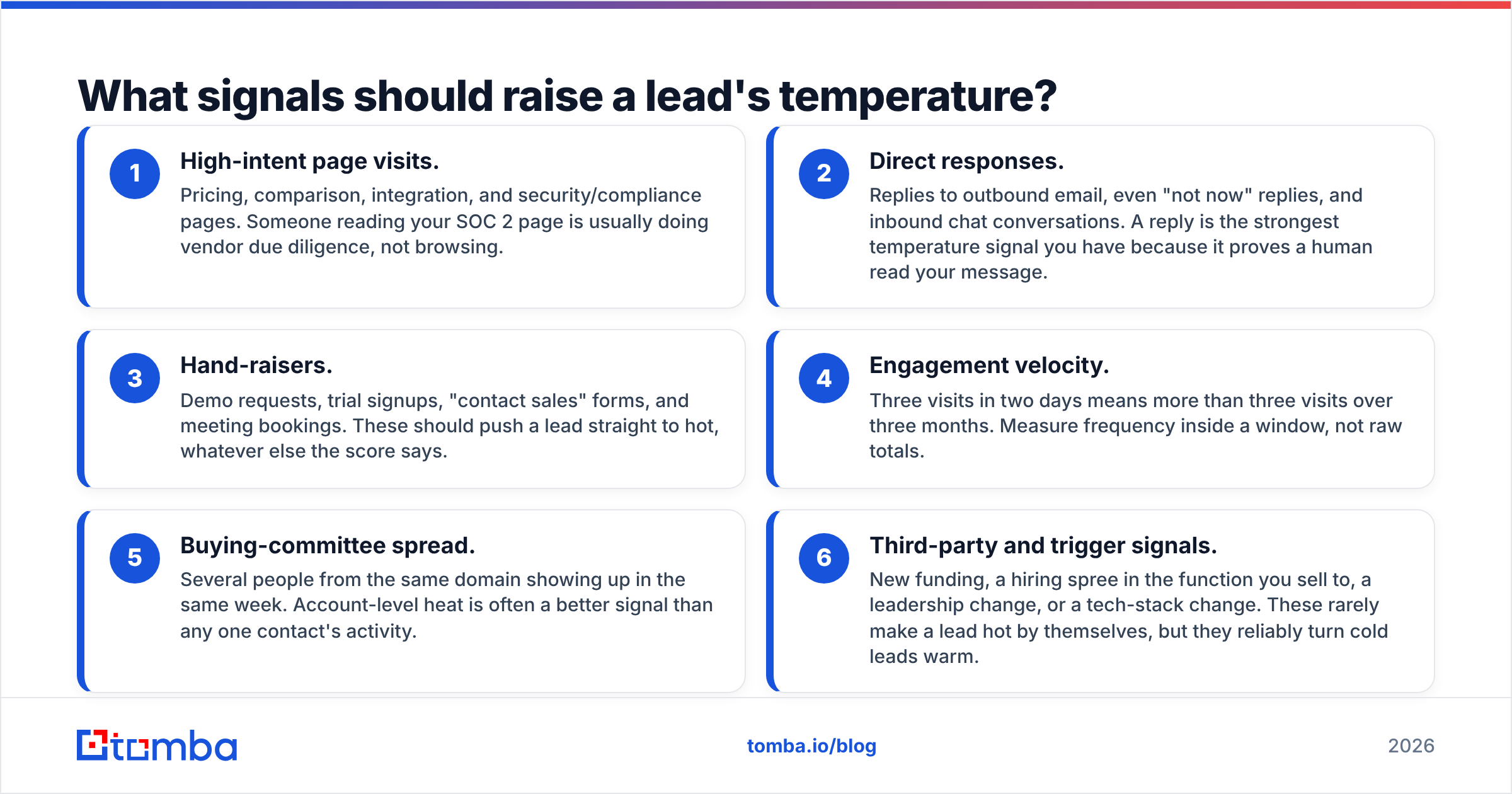
Not every interaction is intent. The signals worth weighting are the ones that happen right before a buying conversation. Here are the six categories that do most of the work in B2B models:
- High-intent page visits. Pricing, comparison, integration, and security/compliance pages. Someone reading your SOC 2 page is usually doing vendor due diligence, not browsing.
- Direct responses. Replies to outbound email, even "not now" replies, and inbound chat conversations. A reply is the strongest temperature signal you have because it proves a human read your message.
- Hand-raisers. Demo requests, trial signups, "contact sales" forms, and meeting bookings. These should push a lead straight to hot, whatever else the score says.
- Engagement velocity. Three visits in two days means more than three visits over three months. Measure frequency inside a window, not raw totals.
- Buying-committee spread. Several people from the same domain showing up in the same week. Account-level heat is often a better signal than any one contact's activity.
- Third-party and trigger signals. New funding, a hiring spree in the function you sell to, a leadership change, or a tech-stack change. These rarely make a lead hot by themselves, but they reliably turn cold leads warm.
Some signals should lower temperature: unsubscribes, "wrong person" replies, hard bounces, and careers-page-only visits, which usually mean a job seeker rather than a buyer.
That last point needs its own section, because it is where a lot of temperature models quietly break.
Why does contact data quality decide whether temperature scoring works?#
A temperature score assumes you can act on it. If your SDR tries to reach a hot lead and the email bounces, the score was accurate and useless at the same time.
Bad contact data damages temperature scoring in three ways:
- False cold. Your sequence sends five emails to an address that stopped working when the person changed jobs. There are zero opens and zero replies, so the model marks the lead cold. It never tested the lead's interest. It tested a dead mailbox.
- Missed hot. Someone from a target account visits your pricing page three times, but you only have a generic
info@address for the company. The account is hot and nobody on it can be reached. - Deliverability drag. Every hard bounce hurts your sender reputation, so fewer emails land in the inbox, so fewer leads engage, so more leads decay to cold. The model ends up measuring your spam-folder rate.
The fix is operational. Run every new or stale record through an email verifier before it enters a scored sequence, and exclude unverifiable records from engagement-based scoring until they are fixed. When an account heats up but you have no named contact, use contact enrichment to find the right person on the buying committee before routing it to a rep.
Treat "unreachable" as its own status, separate from cold. Cold means "not interested right now." Unreachable means "we don't know yet." If you merge the two, you will write off accounts that were never actually contacted.
How do you build a lead temperature scoring model?#
You don't need a data science team for a first version. A spreadsheet-grade model running in HubSpot, Salesforce, or any CRM with workflow rules will beat gut feel within a month. Here is a practical build order.
Step 1: Pull your last 50-100 closed-won deals#
Look at the 30 days before each opportunity was created. What did those contacts do? You are looking for the 5-8 behaviors that show up again and again. Every team's list is different. For a product-led SaaS company the top signal might be "invited a teammate to the trial." For an agency it might be "visited the case studies page twice."
Step 2: Assign weights#
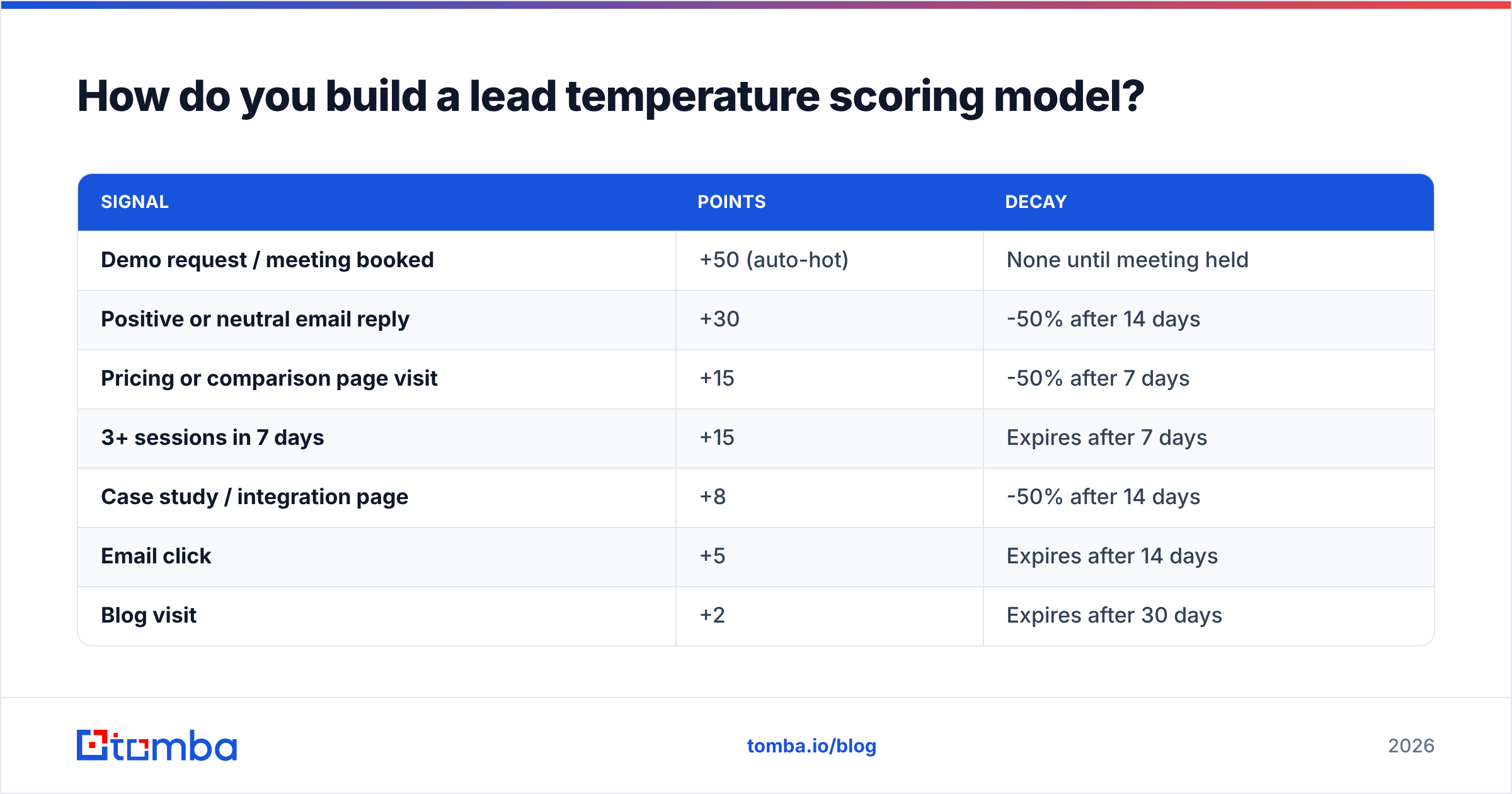
Keep the numbers round and the gaps between them large so the model is easy to explain to reps. A starting point:
| Signal | Points | Decay |
|---|---|---|
| Demo request / meeting booked | +50 (auto-hot) | None until meeting held |
| Positive or neutral email reply | +30 | -50% after 14 days |
| Pricing or comparison page visit | +15 | -50% after 7 days |
| 3+ sessions in 7 days | +15 | Expires after 7 days |
| Case study / integration page | +8 | -50% after 14 days |
| Email click | +5 | Expires after 14 days |
| Blog visit | +2 | Expires after 30 days |
| Multiple contacts from same account active this week | +20 (account-level) | Expires after 7 days |
| Unsubscribe / "not interested" | -40 | Manual reset only |
| Hard bounce | Set to "unreachable" | Until re-verified |
Leave email opens out of the model, or give them almost no weight. Apple Mail Privacy Protection and corporate security scanners generate automatic opens, so the open signal is mostly noise now.
Step 3: Set your band thresholds#
With the weights above, a reasonable first cut is hot ≥ 50, warm 20-49, cold < 20. Then check it against reality. If 40% of your database comes out hot, the thresholds are too loose. In most B2B databases the hot band should hold a small single-digit percentage of active contacts at any time.
Step 4: Add decay#
Decay is what makes this temperature scoring and not just scoring. Two common approaches:
- Time-boxed points. Each signal expires after a fixed window, as in the table above. This is easy to build with CRM workflows.
- Half-life decay. Each signal loses a percentage of its value per week. It is smoother and more accurate, but you need either a scoring tool that supports it or a nightly script.
Both work. What matters is that a lead who stops engaging moves down a band automatically, without a rep having to notice.
Step 5: Attach an action to every band#
A temperature label nobody acts on is just a CRM field. Write an SLA for each band:
- Hot: a rep calls or sends a personal email within 1 business hour, gets a phone task and a LinkedIn touch the same day, and the lead leaves automated sequences.
- Warm: a semi-personalized sequence of 4-6 touches over 2-3 weeks, plus a check for other contacts at the account.
- Cold: a monthly or quarterly nurture newsletter, retargeting, and re-verification of the email address before any reactivation campaign.
Most CRMs support this natively. See HubSpot's score properties and workflows, or Salesforce's Einstein scoring and flow automation. The tool matters much less than whether the SLA is actually followed.

What mistakes break lead temperature scoring?#
Most models that fail don't fail because of bad weights. They fail because of process problems around the model. These are the ones that come up most often:
- No decay. Scores only go up. Six months later half the database is "hot" and reps stop trusting the field. If you fix one thing, fix this.
- Scoring the contact and ignoring the account. In B2B, buying committees make the decision. One VP reading your pricing page matters less than four people from the same company reading different parts of the site in the same week. Roll contact activity up to the account.
- Rewarding activity instead of intent. Twenty blog visits from someone who reads your content for fun doesn't equal one pricing-page visit. Cap how many points low-intent activity can contribute.
- Treating "unreachable" as "cold." Covered above, but it deserves repeating. Bounced and unverified records need a separate path.
- Nobody owns the model. Set a quarterly review. Pull the leads that became opportunities, check which band they were in 30 days earlier, and adjust the weights. If most closed-won deals were "warm" beforehand, your hot threshold is set too high.
- Too many bands. "Lukewarm," "warm-plus," and "scorching" feel precise, but reps can't tell the difference in practice. Three bands, four at most.
Should you use AI or rules-based temperature scoring?#
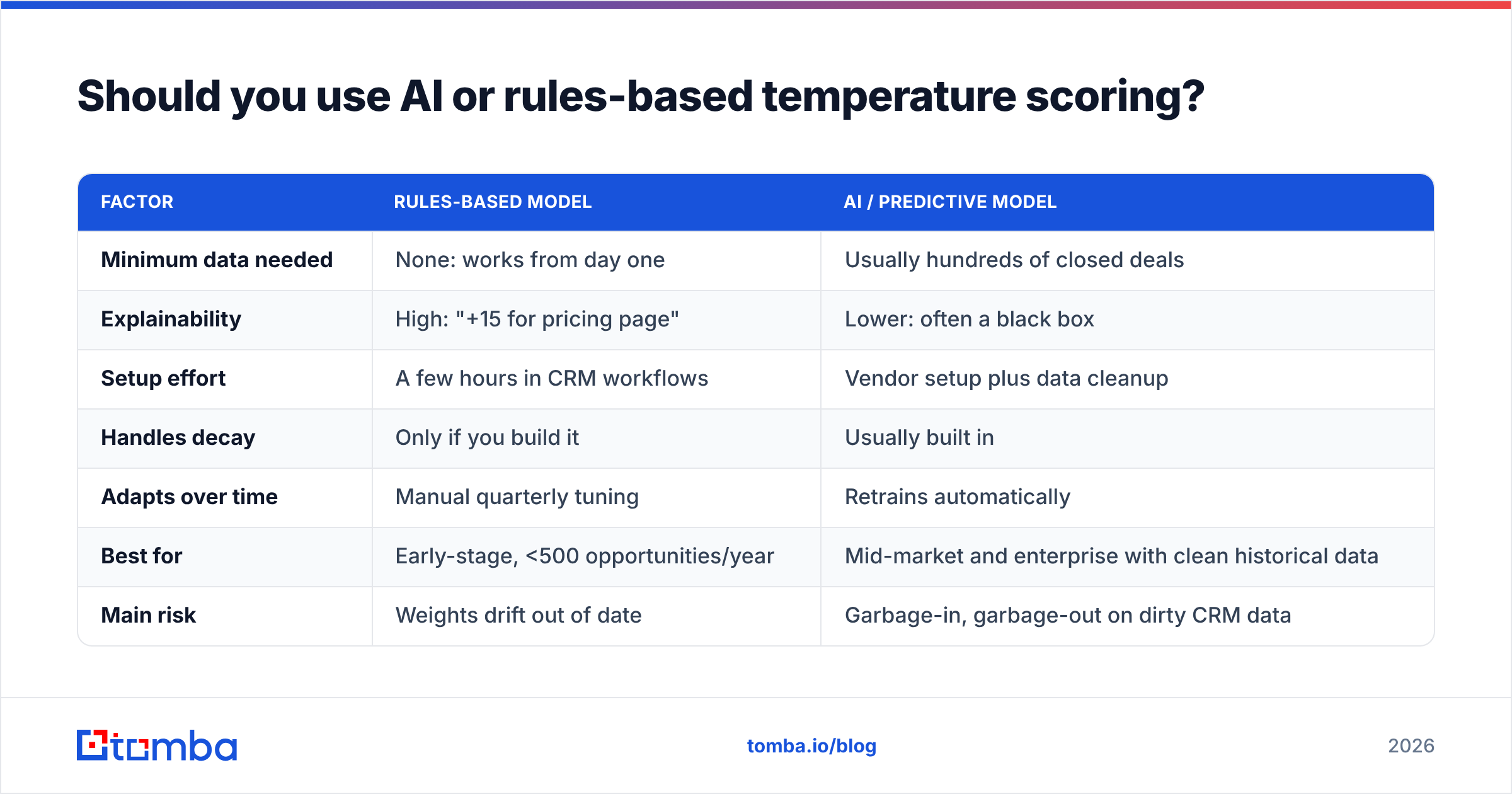
Both work. The right choice depends mainly on how much data you have.
| Factor | Rules-based model | AI / predictive model |
|---|---|---|
| Minimum data needed | None: works from day one | Usually hundreds of closed deals |
| Explainability | High: "+15 for pricing page" | Lower: often a black box |
| Setup effort | A few hours in CRM workflows | Vendor setup plus data cleanup |
| Handles decay | Only if you build it | Usually built in |
| Adapts over time | Manual quarterly tuning | Retrains automatically |
| Best for | Early-stage, <500 opportunities/year | Mid-market and enterprise with clean historical data |
| Main risk | Weights drift out of date | Garbage-in, garbage-out on dirty CRM data |
An honest recommendation: start rules-based even if you plan to move to predictive later. Building the rules makes you define what "hot" means for your business, audit your tracking, and clean your contact data. You have to do all three before a predictive model can produce anything useful. Analyst firms such as Gartner have repeatedly pointed to data quality as the top barrier to sales AI adoption, and lead scoring is a clear example.
How do you measure whether your temperature model is working?#
Track four numbers monthly:
- Band-to-opportunity conversion. Hot leads should convert to opportunities at a clearly higher rate than warm leads, and warm leads at a higher rate than cold. If the bands convert at similar rates, the model isn't separating anything.
- Speed-to-lead on hot. Median time from "became hot" to first human touch. If it's measured in days, the model isn't the problem. The SLA is.
- Hot-band size over time. It should stay fairly stable. A steady climb means decay is broken.
- Unreachable rate. The share of scored leads with invalid or unverifiable contact data. A rising number here quietly undermines everything else, and it also affects your overall email response rate.
Review the misses too. Pick five deals that closed from leads marked cold and ask what signal the model didn't see. That exercise usually tells you more than any dashboard.
Frequently asked questions about lead temperature scoring#
How often should lead temperature be recalculated? Nightly is enough for most B2B teams. Hand-raiser signals such as demo requests and replies should trigger an immediate update, since that is when speed matters most.
Can a lead skip straight from cold to hot? Yes, and it should be possible. A cold lead who books a meeting is hot. Hard-code hand-raisers to override the point total.
Do I need separate models for inbound and outbound? Usually not. Use the same bands but different signals. Outbound leads build heat mostly through replies and clicks, and inbound leads mostly through site behavior. One model with both kinds of signals, and outbound replies weighted heavily, works fine.
What's the difference between lead temperature and intent data? Intent data is an input. It is third-party research activity that shows an account is looking at your category. Lead temperature is the output: your combined judgment of first-party and third-party signals, adjusted for how recent they are.
Where should you start?#
Lead temperature scoring isn't complicated. It's a small set of weighted signals, a decay rule, three bands, and an SLA for each band. Most teams struggle less with the model and more with the data underneath it: hot accounts with no named contact, and warm leads whose emails bounce the moment a rep acts.
That's the gap the Tomba Email Finder covers. When an account heats up on your site, you can look up the verified, professional email addresses of the people on the buying committee by name, domain, or company, and have them in your CRM before the lead cools off. The free tier gives you 25 searches a month to test it against your current hot list, and paid plans start at $49/mo when you're ready to run it across the whole pipeline.
Related guides#
// get started
Find, verify and enrich your first contacts today
Start on the free plan with 25 searches a month, then scale when your team is ready.
Free plan · No credit card required · GDPR & CCPA
// about the author