Lead to Account Matching: A Practical Guide for B2B RevOps Teams
Most B2B routing problems start before any rule runs. The lead and the account never got linked. Here is how lead to account matching works, why it fails, and what to fix first.
TL;DR
- Lead to account matching links each new lead to the account record it belongs to in your CRM, so it goes to the rep who owns that account.
- Most match failures come from bad input data: personal email addresses, subsidiaries on different domains, and messy company names. The matching algorithm is rarely the problem.
- A dependable setup stacks several methods. It tries an exact domain match first, then normalized company name, then fuzzy matching, then a human review queue for anything left over.
- Native CRM features cover simple cases. Dedicated matching and routing tools start paying for themselves once you run account-based sales across territories, segments, or parent-child hierarchies.
- The cheapest fix happens before a lead ever reaches your CRM: capture or enrich a verified work email, because the domain is the strongest matching key you have.
What is lead to account matching?#
Lead to account matching links an incoming lead (a person who filled out a form, booked a demo, or got imported from a list) to an account that already exists in your CRM. If a VP of Finance at Acme Corp downloads your pricing guide, the matching step recognizes that Acme is already an account owned by Sarah on the enterprise team. It attaches the lead to Acme and sends it to Sarah. Without matching, the lead would sit in a generic queue or go to whichever SDR is next in round-robin.
Think of it like mail sorting in an office building. Envelopes reach the front desk addressed to a person. Before anyone can deliver them, someone has to work out which floor and which team that person sits with. If the envelope says "Bob, Acme" and the building has "Acme Corp," "ACME Holdings," and "Acme (EMEA)," the sorter has to decide which one is meant, and a wrong guess sends the mail to the wrong desk.
In technical terms, lead to account matching is a narrow case of record linkage: deciding whether two records refer to the same real-world entity when they share no unique ID. Salesforce stores Leads and Accounts as separate objects and links them only at conversion. That design is why this problem gets its own category of tools.
Why does lead to account matching matter for revenue teams?#
Matching determines who owns what, and ownership drives every downstream metric. When matching fails, you see the same problems again and again:
- Duplicate outreach. Two or three reps email the same buying committee without knowing about each other. The prospect notices, and you look disorganized.
- Slow speed-to-lead. A hot inbound lead from a target account waits in a general queue for hours when the account executive who owns the account should have heard about it within minutes.
- Broken ABM reporting. If half the engagement from a target account sits on unmatched leads, your account-level intent and pipeline dashboards undercount it, and you may cut a program that was actually working.
- Territory disputes. Reps argue over credit because the system can't show clearly who owned the account when the lead arrived.
These are ownership problems at the core, which is why lead to account matching normally sits with revenue operations, not marketing ops or sales alone.
How does lead to account matching actually work?#
Almost every matching engine, whether it is a native CRM rule or a dedicated platform, runs the same sequence of methods from most reliable to least. You should understand each one before you buy anything.
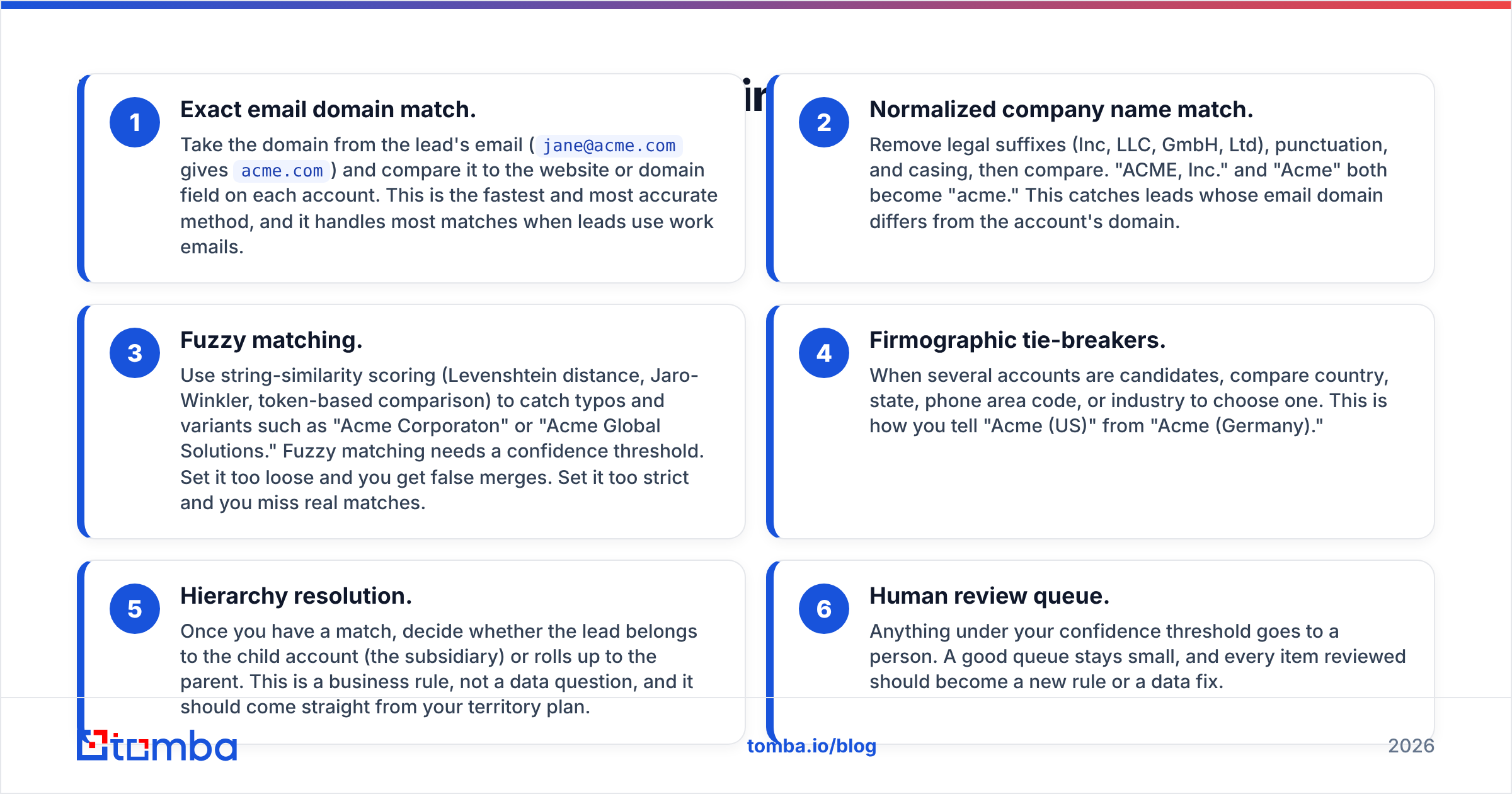
- Exact email domain match. Take the domain from the lead's email (
jane@acme.comgivesacme.com) and compare it to the website or domain field on each account. This is the fastest and most accurate method, and it handles most matches when leads use work emails. - Normalized company name match. Remove legal suffixes (Inc, LLC, GmbH, Ltd), punctuation, and casing, then compare. "ACME, Inc." and "Acme" both become "acme." This catches leads whose email domain differs from the account's domain.
- Fuzzy matching. Use string-similarity scoring (Levenshtein distance, Jaro-Winkler, token-based comparison) to catch typos and variants such as "Acme Corporaton" or "Acme Global Solutions." Fuzzy matching needs a confidence threshold. Set it too loose and you get false merges. Set it too strict and you miss real matches.
- Firmographic tie-breakers. When several accounts are candidates, compare country, state, phone area code, or industry to choose one. This is how you tell "Acme (US)" from "Acme (Germany)."
- Hierarchy resolution. Once you have a match, decide whether the lead belongs to the child account (the subsidiary) or rolls up to the parent. This is a business rule, not a data question, and it should come straight from your territory plan.
- Human review queue. Anything under your confidence threshold goes to a person. A good queue stays small, and every item reviewed should become a new rule or a data fix.
How much each layer contributes depends on your inputs. A company with many free-email signups will lean hard on layers 2 to 4. A company that gates content behind a work-email form will get most matches from layer 1.
Which matching method should you trust most?#
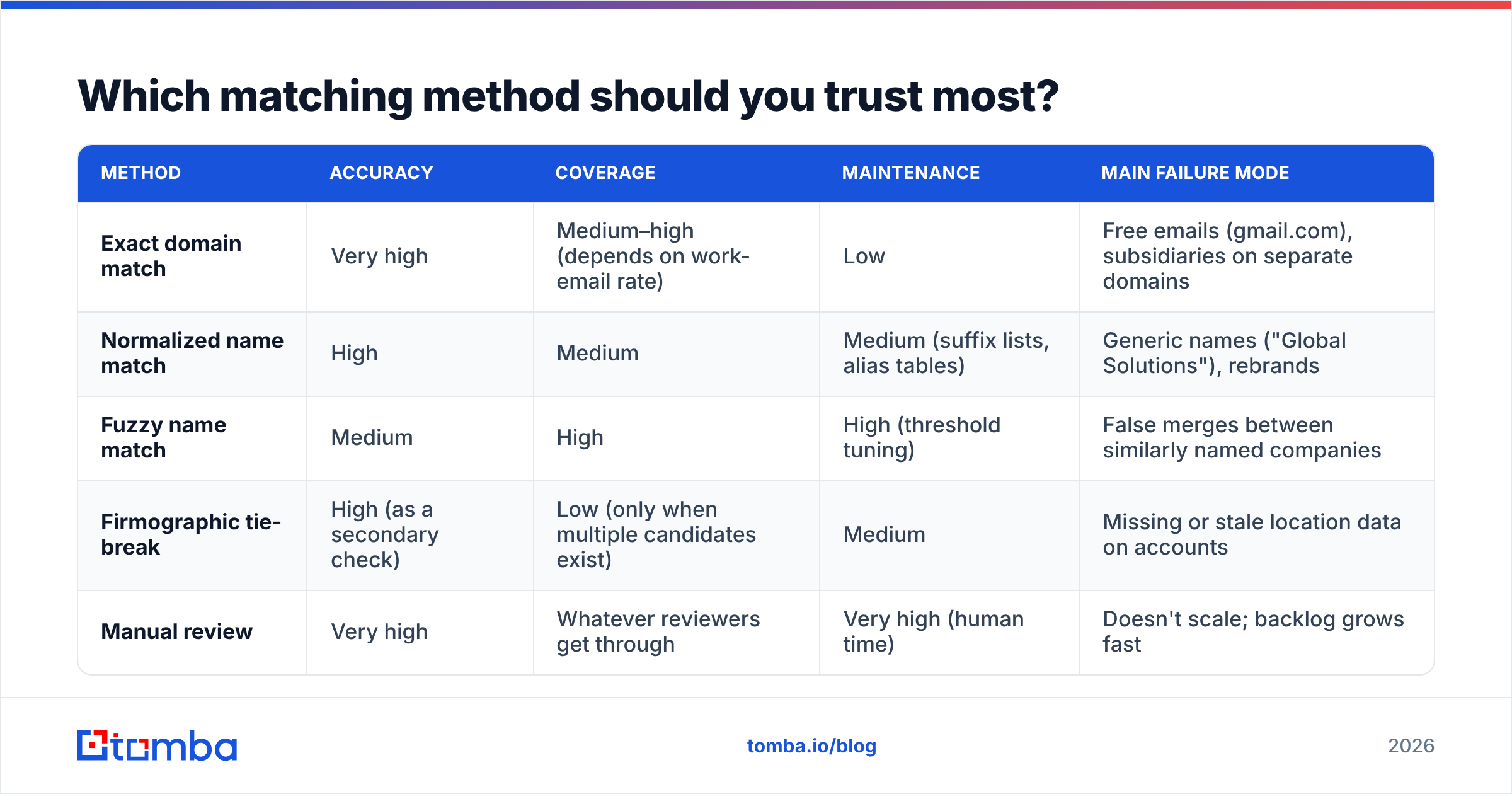
Here is how the methods compare on the attributes that matter in production:
| Method | Accuracy | Coverage | Maintenance | Main failure mode |
|---|---|---|---|---|
| Exact domain match | Very high | Medium–high (depends on work-email rate) | Low | Free emails (gmail.com), subsidiaries on separate domains |
| Normalized name match | High | Medium | Medium (suffix lists, alias tables) | Generic names ("Global Solutions"), rebrands |
| Fuzzy name match | Medium | High | High (threshold tuning) | False merges between similarly named companies |
| Firmographic tie-break | High (as a secondary check) | Low (only when multiple candidates exist) | Medium | Missing or stale location data on accounts |
| Manual review | Very high | Whatever reviewers get through | Very high (human time) | Doesn't scale; backlog grows fast |
The ranking itself is simple. What catches teams out is that they deploy fuzzy matching first because it produces an impressive match rate, and then spend months cleaning up bad merges. Maximize exact domain coverage first. Every point of coverage you win there is a point you don't have to resolve with fuzzy logic.
Why does lead to account matching break?#
Once you audit an unmatched queue, you'll find the causes fall into a small number of buckets:
- Personal email addresses. A lead signs up with
jane.doe@gmail.com. The domain tells you nothing, so you have to rely on the free-text company field, which may say "self," "N/A," or "acme." - Domain mismatches. The account record lists
acme.com, but the lead writes fromacme.co.uk,acmecorp.io, or a domain from an acquisition that was never migrated. None of these match exactly. - Missing or dirty account domains. Many older CRMs have account records with no website field filled in, or with values like
www.acme.com/aboutthat break exact comparisons. - Duplicate accounts. If Acme already exists three times in your CRM, a perfect match still has to pick one, and whichever it picks will be partly wrong.
- Hierarchy ambiguity. A lead from a subsidiary might belong to a dedicated subsidiary rep or roll up to the global account owner. Without a written rule, the system picks whichever record it finds first.
Notice that nearly all of these are data problems. Matching logic can only work with the data it's given. That's why the highest-return work is usually upstream: normalizing account domains, merging duplicate accounts, and making sure leads arrive with a usable work email.
Can you do lead to account matching natively in your CRM?#
Yes, up to a point. Here is what the two most common CRMs give you out of the box:
Salesforce. Lead and Account are separate objects, so there's no automatic link until a rep converts the lead. You can add matching rules and duplicate rules, build Flows that compare email domain to the account website, or write custom Apex. Plenty of teams get by with a Flow that pulls the email domain and looks up an account. It struggles with fuzzy logic, hierarchies, and anything beyond one or two tie-breakers. The Salesforce AppExchange is also where most dedicated matching tools sell their products.
HubSpot. HubSpot associates contacts with companies automatically by email domain when that setting is enabled. For teams with clean domains and mostly work-email leads, this covers a lot of ground. It gives you less control over subsidiaries, alternate domains, and name-based matching, and there's no built-in review queue for low-confidence matches. (See the HubSpot knowledge base for current association settings, since they change between releases.)
A reasonable rule of thumb: if you have a single sales team, one region, and mostly work-email leads, native features plus a clean CRM will probably be enough. If you run named-account territories, parent-child hierarchies, or several segments with separate routing, you'll hit the limits of native tooling quickly.
Native CRM vs dedicated matching tools: which is better?#
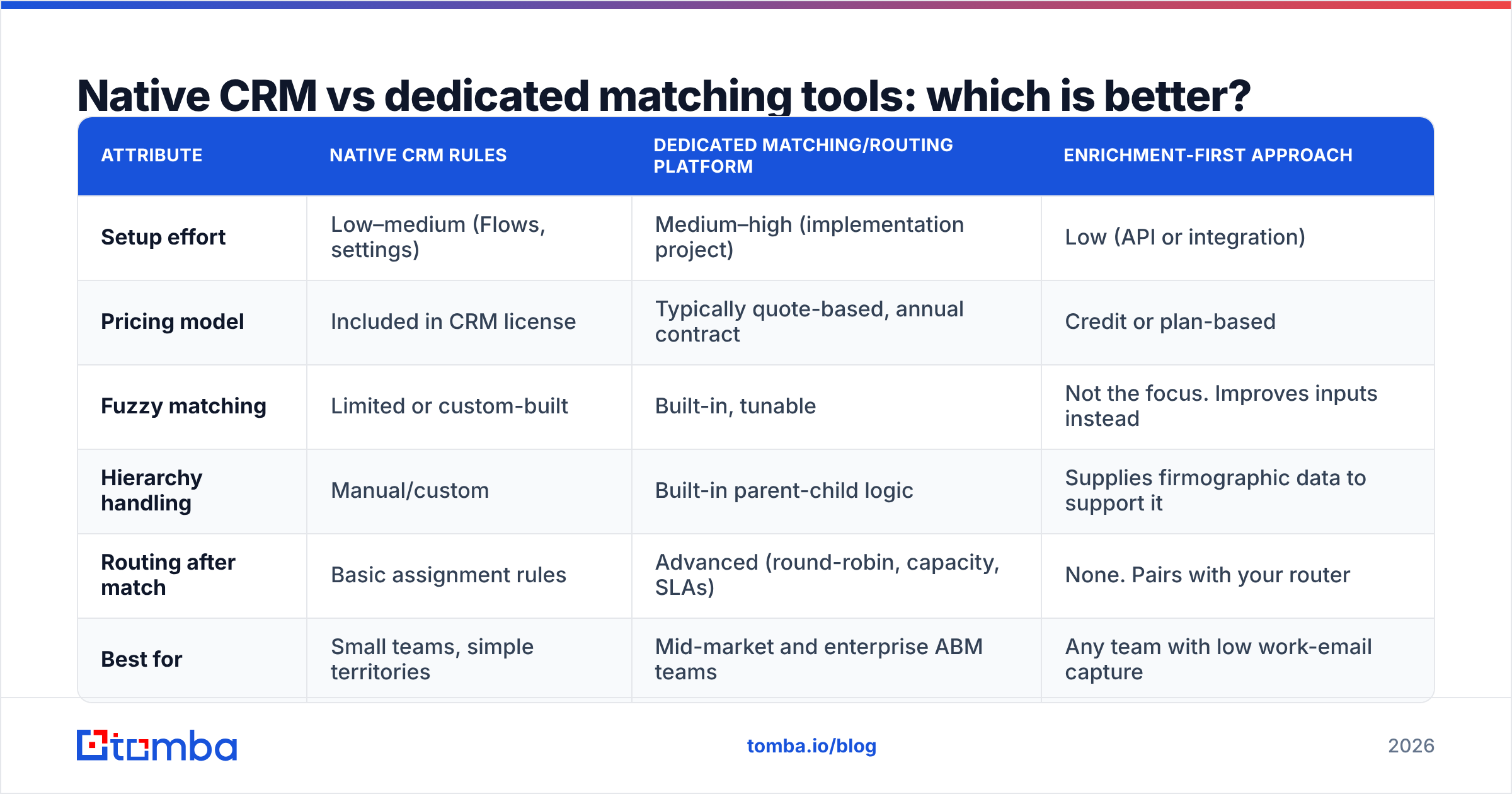
Dedicated lead-to-account matching and routing platforms such as LeanData add purpose-built matching engines, visual routing builders, and audit logs on top of your CRM. Here is how the options compare:
| Attribute | Native CRM rules | Dedicated matching/routing platform | Enrichment-first approach |
|---|---|---|---|
| Setup effort | Low–medium (Flows, settings) | Medium–high (implementation project) | Low (API or integration) |
| Pricing model | Included in CRM license | Typically quote-based, annual contract | Credit or plan-based |
| Fuzzy matching | Limited or custom-built | Built-in, tunable | Not the focus. Improves inputs instead |
| Hierarchy handling | Manual/custom | Built-in parent-child logic | Supplies firmographic data to support it |
| Routing after match | Basic assignment rules | Advanced (round-robin, capacity, SLAs) | None. Pairs with your router |
| Best for | Small teams, simple territories | Mid-market and enterprise ABM teams | Any team with low work-email capture |
These options don't exclude each other. Many mature teams run a dedicated router and an enrichment step in front of it, because even the best matching engine does better when every lead arrives with a verified work domain and a clean company name.
How do you set up lead to account matching step by step?#
Whatever tooling you choose, the rollout sequence is the same:
- Audit your account records first. Export all accounts and check what percentage have a populated, normalized domain field. Strip
www., protocols, and paths. Fill in missing domains with a domain search or company-to-website lookup. This step alone often lifts your match rate more than any algorithm change. - Merge duplicate accounts. Matching can't pick the "right" Acme when you have three. Deduplicate before turning on automated matching, or you'll be building ownership on top of the mess.
- Build an alternate-domain table. For every account with more than one domain (regional ccTLDs, acquired brands, product domains), store the alternates in a related field or custom object so exact matching can see them.
- Write the hierarchy rule down. Decide once, on paper and signed off by sales leadership, whether subsidiary leads go to the subsidiary owner or the parent owner. Then set up the system to enforce it.
- Layer the methods in order. Exact domain first, then alternate domains, then normalized name, then fuzzy name with a conservative threshold. Log which method produced each match so you can measure accuracy by layer.
- Enrich leads at the point of entry. When a lead arrives with a personal email or a blank company field, run data enrichment before the matching step so the lead has a work domain, company name, and location to match on.
- Stand up a review queue with an SLA. Low-confidence matches go to a named owner who clears them daily. Track which patterns keep showing up and turn them into rules.
- Measure weekly. Watch four numbers: auto-match rate, false-match rate (sampled), queue size, and time-to-owner for matched leads.
How do you measure whether matching is working?#
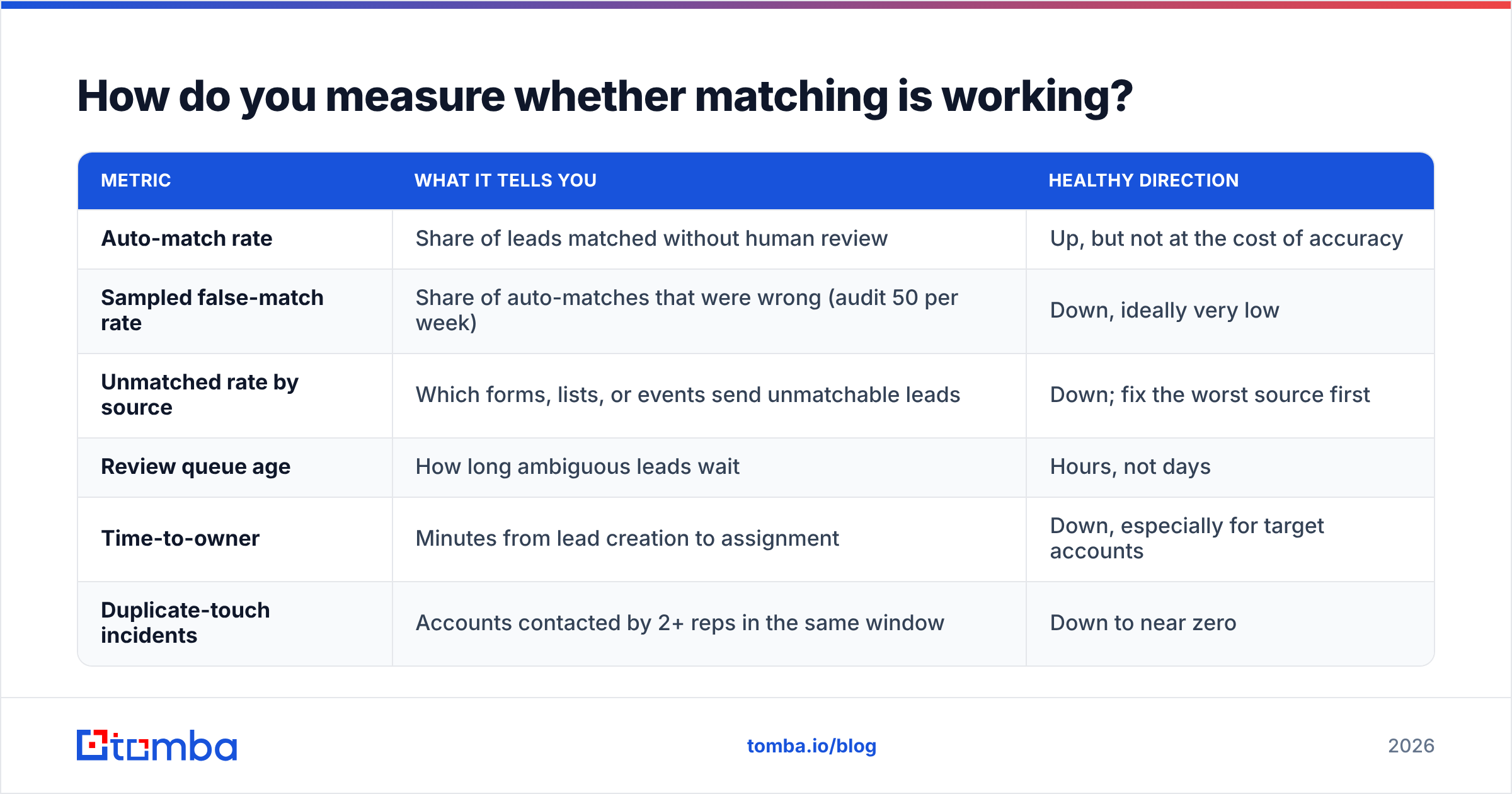
A high match rate on its own means little, because a system that merges every lead into the first account with a similar name would score 100% and still be wrong most of the time. Track these together:
| Metric | What it tells you | Healthy direction |
|---|---|---|
| Auto-match rate | Share of leads matched without human review | Up, but not at the cost of accuracy |
| Sampled false-match rate | Share of auto-matches that were wrong (audit 50 per week) | Down, ideally very low |
| Unmatched rate by source | Which forms, lists, or events send unmatchable leads | Down; fix the worst source first |
| Review queue age | How long ambiguous leads wait | Hours, not days |
| Time-to-owner | Minutes from lead creation to assignment | Down, especially for target accounts |
| Duplicate-touch incidents | Accounts contacted by 2+ reps in the same window | Down to near zero |
Break the unmatched rate out by source and you'll usually find the biggest win. If one webinar platform or trade-show list accounts for a large share of your unmatched leads, fixing capture on that source (requiring a work email or enriching on import) does more than any rule change.
Does work-email capture really change match rates?#
Yes, and it's the most underrated lever here. An exact domain match on a verified corporate email is deterministic: @acme.com either matches an account domain or it doesn't. Every other method is a probability guess layered on top of messy text.
You can raise work-email coverage in three ways:
- At capture. Ask for a business email on high-intent forms (demo requests, pricing pages). Leave low-intent content ungated, or accept any email there. Adding friction on a newsletter signup isn't worth it.
- At enrichment. For leads who come in with a personal email, look up their professional address using name and company. An email finder can usually return the work address when you know the person's name and employer, which gives the matching engine a real domain.
- At import. Before event lists or purchased lists reach the CRM, enrich and verify them in bulk so bad or personal addresses never reach the matching step.
Verification matters as much as discovery. A guessed work email that bounces is worse than no email, because it gives you a wrong match and a deliverability hit together. Run discovered addresses through an email verifier before they're written to the lead record.
What should you look for in a lead to account matching tool?#
If you're evaluating dedicated platforms, check these points during the demo:
- Transparent match logic. You should be able to see why a lead matched a given account (which field, which method, what confidence score). A black box makes troubleshooting impossible.
- Alternate domain support. Confirm that multiple domains per account work without custom development.
- Configurable thresholds per method. Fuzzy matching needs tuning, and you need to control it yourself.
- Hierarchy awareness. The tool should understand parent-child account structures and let you route by either level.
- Audit trail. Every match and every routing decision should be logged with a timestamp. This settles territory disputes quickly.
- Enrichment compatibility. Check that the tool can consume enriched fields from your data provider through a native Salesforce integration, HubSpot sync, or API.
Review sites like G2 and Capterra list user reviews for this category. Weight reviews from companies close to your size and CRM, because matching complexity grows quickly with account count and hierarchy depth.
The bottom line on lead to account matching#
Lead to account matching mostly depends on the quality of the data you feed it. The algorithms are well understood. Teams stay stuck at mediocre match rates because leads arrive with Gmail addresses, accounts lack clean domains, and duplicates confuse ownership. Fix the inputs first, stack your matching methods from exact to fuzzy, and give anything ambiguous to a person on a clear SLA.
If your unmatched queue is full of personal emails and blank company fields, start upstream. Tomba Email Finder returns verified professional email addresses from a name and company or domain, so every lead reaches your CRM with a real corporate domain to match on. You can test it on your worst-performing lead source with the free tier (25 searches a month), and paid plans start at $49/mo when you're ready to run it at volume.
Related guides#
// get started
Find, verify and enrich your first contacts today
Start on the free plan with 25 searches a month, then scale when your team is ready.
Free plan · No credit card required · GDPR & CCPA
// about the author