Lead to Deal Automation: How to Build a Pipeline That Moves Itself
Most pipelines don't leak because reps are lazy. They leak in the handoffs between lead, MQL, meeting, and deal. Here's how to automate each stage, and which ones still need a human.
TL;DR
- Lead to deal automation connects every stage between a new lead and a created deal: capture, enrichment, scoring, routing, outreach, and deal creation. The goal is fewer manual handoffs.
- Most "automation" projects break at the start of the chain. If the contact data is incomplete or wrong, every workflow after it runs faster in the wrong direction.
- Automate the mechanical steps: enrichment, verification, routing, reminders, and CRM updates. Keep people on discovery calls, qualification judgment, and pricing talks.
- A native CRM workflow tool (HubSpot, Salesforce, Pipedrive) handles most mid-market needs. Add Zapier or Make only when your stack goes beyond what the CRM covers.
- Start with one measurable bottleneck, usually speed-to-lead or data quality. Don't try to automate the whole funnel at once.
What is lead to deal automation?#
Lead to deal automation is a set of rules, integrations, and triggers that moves a prospect from "we just got this contact" to "there's a real opportunity in the CRM" with as little manual copying, pasting, and chasing as possible.
A useful comparison is an airport baggage system. Bags (leads) come in at check-in, get scanned and tagged (enrichment), sorted onto the right belt (routing), and loaded onto the right plane (deal stage). Nobody carries each suitcase by hand, but a person still steps in when a bag is flagged, oversized, or headed somewhere unusual. When the system works, nobody thinks about it. When it doesn't, you get lost bags, or in your case, lost pipeline.
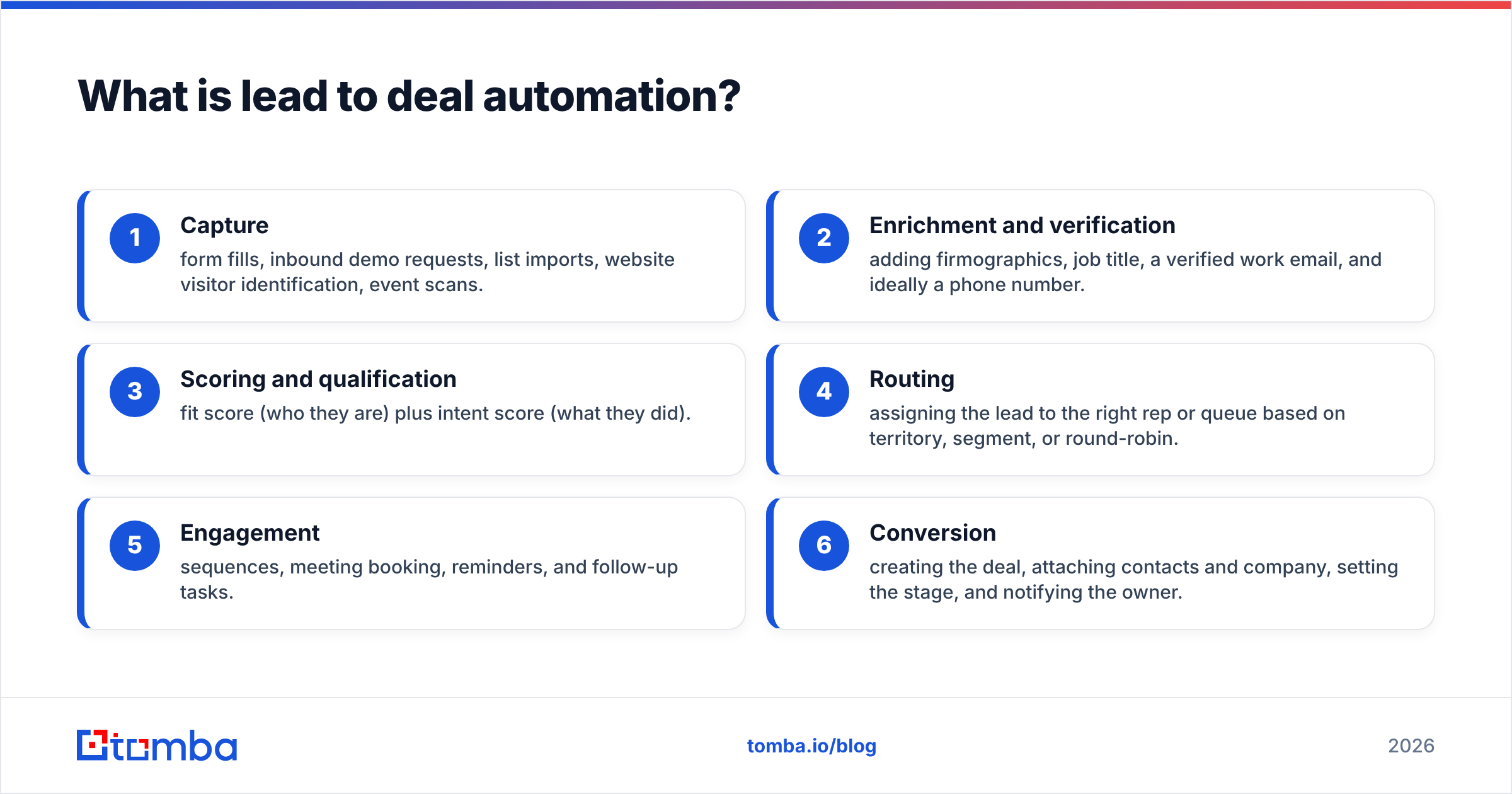
In practice, a lead to deal flow covers six stages:
- Capture: form fills, inbound demo requests, list imports, website visitor identification, event scans.
- Enrichment and verification: adding firmographics, job title, a verified work email, and ideally a phone number.
- Scoring and qualification: fit score (who they are) plus intent score (what they did).
- Routing: assigning the lead to the right rep or queue based on territory, segment, or round-robin.
- Engagement: sequences, meeting booking, reminders, and follow-up tasks.
- Conversion: creating the deal, attaching contacts and company, setting the stage, and notifying the owner.
Most teams automate stages 4 and 5 first because that's what sales engagement tools sell. The bigger gains usually come from stage 2, because every later stage depends on it.
Why does lead to deal automation fail so often?#
Speed is rarely the issue. The issue is what the automation is fed.
Here's how it usually goes. A team wires up a clean workflow: form fill → auto-assign → five-step sequence → auto-create deal on reply. Three months later, reply rates are flat, reps have stopped trusting the round-robin, and the CRM has 4,000 contacts with no job title and a Gmail address.
The workflow did exactly what it was built to do. It just ran on incomplete records.
The most common failure modes:
- No enrichment before routing. If you route by company size or industry and those fields are blank, leads end up in a catch-all queue that nobody owns.
- No email verification before sequencing. Sending sequences to unverified addresses creates bounces, bounces damage sender reputation, and a weaker reputation lowers inbox placement for every rep on the domain.
- Scoring on vanity signals. Scoring five opened emails the same as one pricing page visit means you promote the wrong leads.
- Over-automated conversion. Automatically creating a deal on any reply (including "unsubscribe me") fills the pipeline with fake opportunities and ruins forecasting.
- No owner for the workflow. Automations drift. Someone changes a lifecycle stage name, and half your triggers quietly stop firing.
If you only fix one thing, fix what goes into the system. Clean data makes an average workflow work well. Dirty data makes even a well-built workflow a liability.
Which stages should you automate, and which should stay human?#
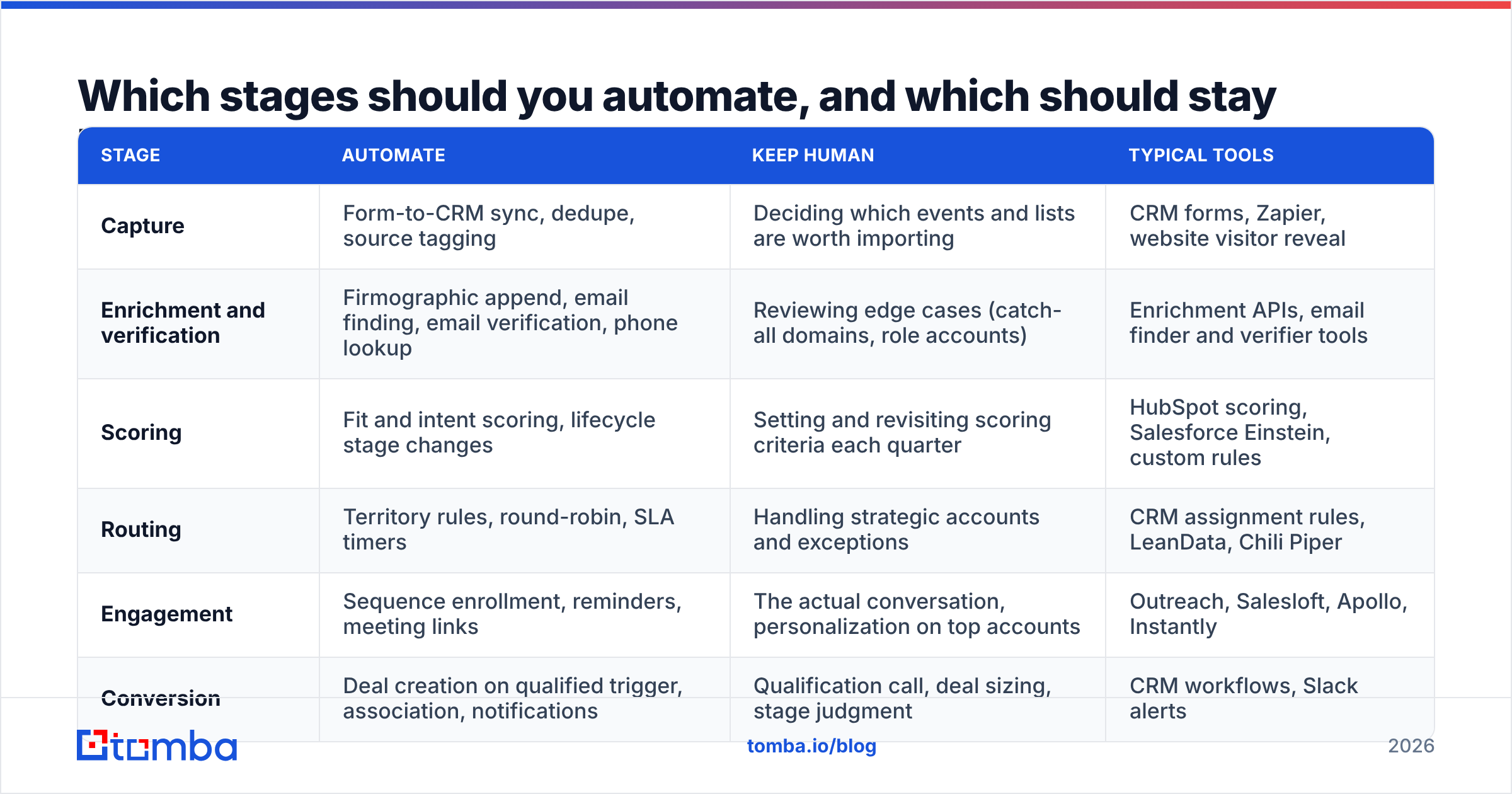
Not every step benefits from automation. The table below maps each stage to what works well automated, what should stay manual, and typical tooling.
| Stage | Automate | Keep human | Typical tools |
|---|---|---|---|
| Capture | Form-to-CRM sync, dedupe, source tagging | Deciding which events and lists are worth importing | CRM forms, Zapier, website visitor reveal |
| Enrichment and verification | Firmographic append, email finding, email verification, phone lookup | Reviewing edge cases (catch-all domains, role accounts) | Enrichment APIs, email finder and verifier tools |
| Scoring | Fit and intent scoring, lifecycle stage changes | Setting and revisiting scoring criteria each quarter | HubSpot scoring, Salesforce Einstein, custom rules |
| Routing | Territory rules, round-robin, SLA timers | Handling strategic accounts and exceptions | CRM assignment rules, LeanData, Chili Piper |
| Engagement | Sequence enrollment, reminders, meeting links | The actual conversation, personalization on top accounts | Outreach, Salesloft, Apollo, Instantly |
| Conversion | Deal creation on qualified trigger, association, notifications | Qualification call, deal sizing, stage judgment | CRM workflows, Slack alerts |
A simple rule: automate anything where the correct answer is the same every time. If two good reps might reasonably disagree about the next step, a person should make the call, with automation giving them the context to make it quickly.
How do you build a lead to deal workflow step by step?#
Below is a practical build order. It assumes you have a CRM and at least one outreach tool. It works for a two-person startup and for a 50-rep team with a RevOps function.
1. Map the current flow before touching any tool#
Pull 30 recent closed-won deals and trace each one back to its first touch. Write down every manual step: who looked it up, who assigned it, how long each handoff took. You'll usually find that one or two gaps (often "lead sat unassigned for two days" or "rep spent 20 minutes finding the right email") account for most of the delay.
2. Enrich and verify at the point of entry#
Every new contact should pass through enrichment before any other workflow touches it. The minimum useful record includes:
- Full name and job title
- Company domain, size, and industry
- A verified work email
- LinkedIn URL (useful for multichannel sequences)
- A direct dial or mobile, if your motion includes calling
If a record arrives with only a name and company, an email finder can resolve the address from the domain, and an email verifier confirms it will actually deliver before a sequence sends to it. Most tools in this category, including Tomba, Hunter, Apollo, and BookYourData, support this through an API or native CRM integration, so it can run as a background step with no one clicking anything.
3. Score on fit first, intent second#
Fit tells you whether you should sell to them. Intent tells you whether now is the moment. A useful starting model:
- Fit (0–50): ICP industry, company size band, job seniority, tech stack match.
- Intent (0–50): pricing page views, demo request, repeat visits, reply to outreach.
Set a threshold (say 60+) that turns a lead into a marketing qualified lead and triggers routing. Revisit weights every quarter against actual closed-won data. Scoring models that never get updated gradually stop reflecting reality.
4. Route with an SLA, not just a rule#
Assignment alone isn't enough. Attach a timer: if the owner hasn't logged an activity within X hours, reassign or alert their manager. For inbound demo requests, aim for minutes, not hours. A study published in Harvard Business Review found that firms contacting leads within an hour were far more likely to qualify them than firms that waited longer, and many never responded at all.
5. Automate the sequence, personalize the first line#
Enroll routed leads into a sequence that matches their segment and source. Let the tool handle timing and follow-ups. Let the rep write the opening line for anyone above a certain fit score. That split keeps volume up without making top accounts feel like they're getting a form letter.
6. Create the deal on a real qualification signal#
Don't create deals on "any reply." Good triggers include:
- Meeting booked and held (not just scheduled)
- Rep manually marks the lead as sales-accepted
- A qualification field (budget, authority, timeline) is completed
When the trigger fires, the workflow should create the deal, associate the contact and company, set the owner, choose the pipeline, and post a notification to Slack or the rep's inbox. That's the handoff that should never depend on someone remembering to do it.
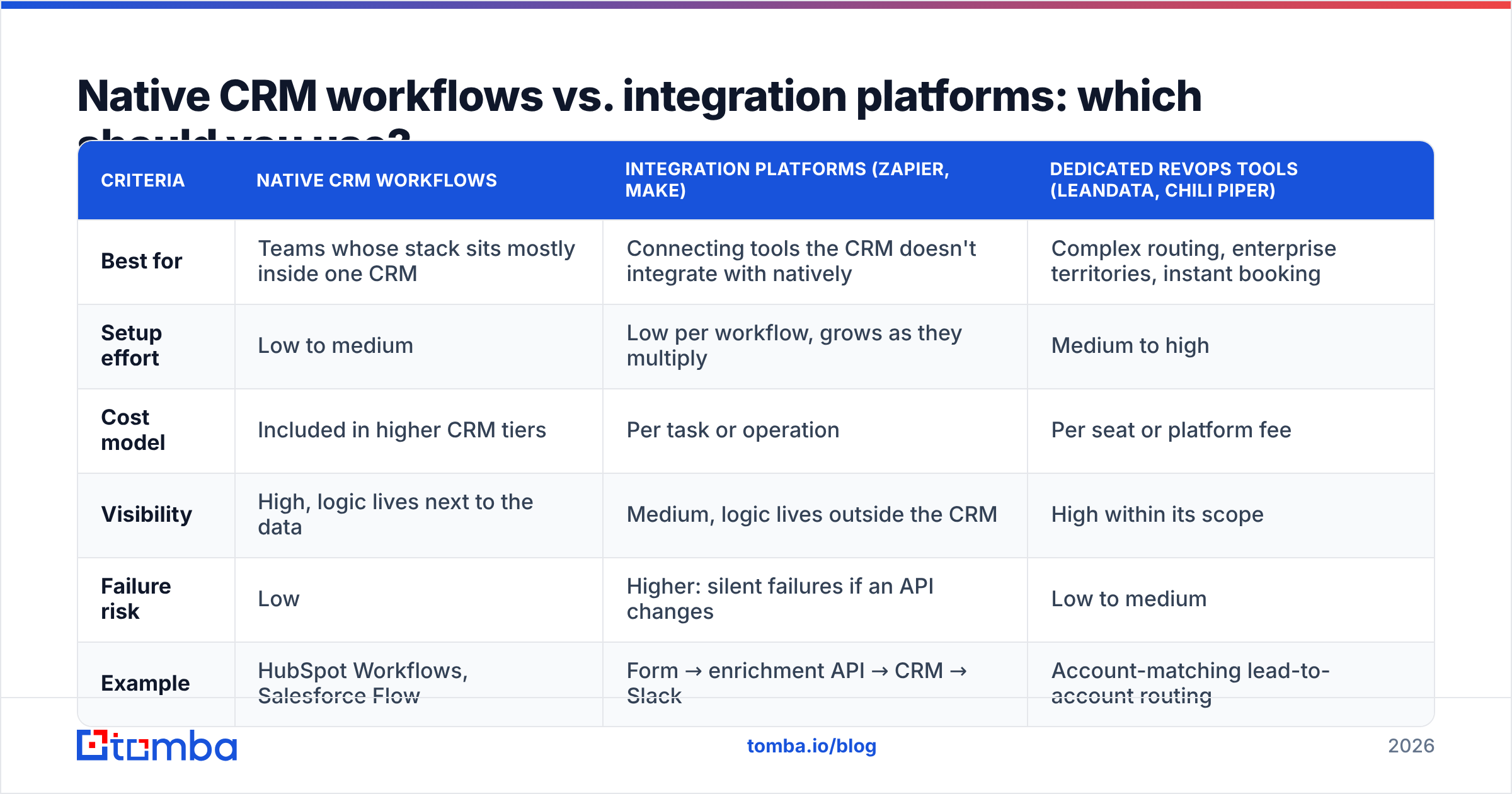
Native CRM workflows vs. integration platforms: which should you use?#
This is the main architecture decision, and teams often overcomplicate it.
| Criteria | Native CRM workflows | Integration platforms (Zapier, Make) | Dedicated RevOps tools (LeanData, Chili Piper) |
|---|---|---|---|
| Best for | Teams whose stack sits mostly inside one CRM | Connecting tools the CRM doesn't integrate with natively | Complex routing, enterprise territories, instant booking |
| Setup effort | Low to medium | Low per workflow, grows as they multiply | Medium to high |
| Cost model | Included in higher CRM tiers | Per task or operation | Per seat or platform fee |
| Visibility | High, logic lives next to the data | Medium, logic lives outside the CRM | High within its scope |
| Failure risk | Low | Higher: silent failures if an API changes | Low to medium |
| Example | HubSpot Workflows, Salesforce Flow | Form → enrichment API → CRM → Slack | Account-matching lead-to-account routing |
For most teams under roughly 30 reps, native workflows in HubSpot or Salesforce cover 80% of what you need. Use an integration platform for the gaps, for example running enrichment through a Zapier integration when your CRM tier doesn't support custom API calls. Bring in a dedicated routing tool when territory logic or account matching becomes too complex for your admin to maintain in the CRM.
The warning sign is 40+ Zaps that nobody documented. At that point, the automation itself becomes a source of pipeline leakage.
What metrics prove lead to deal automation is working?#
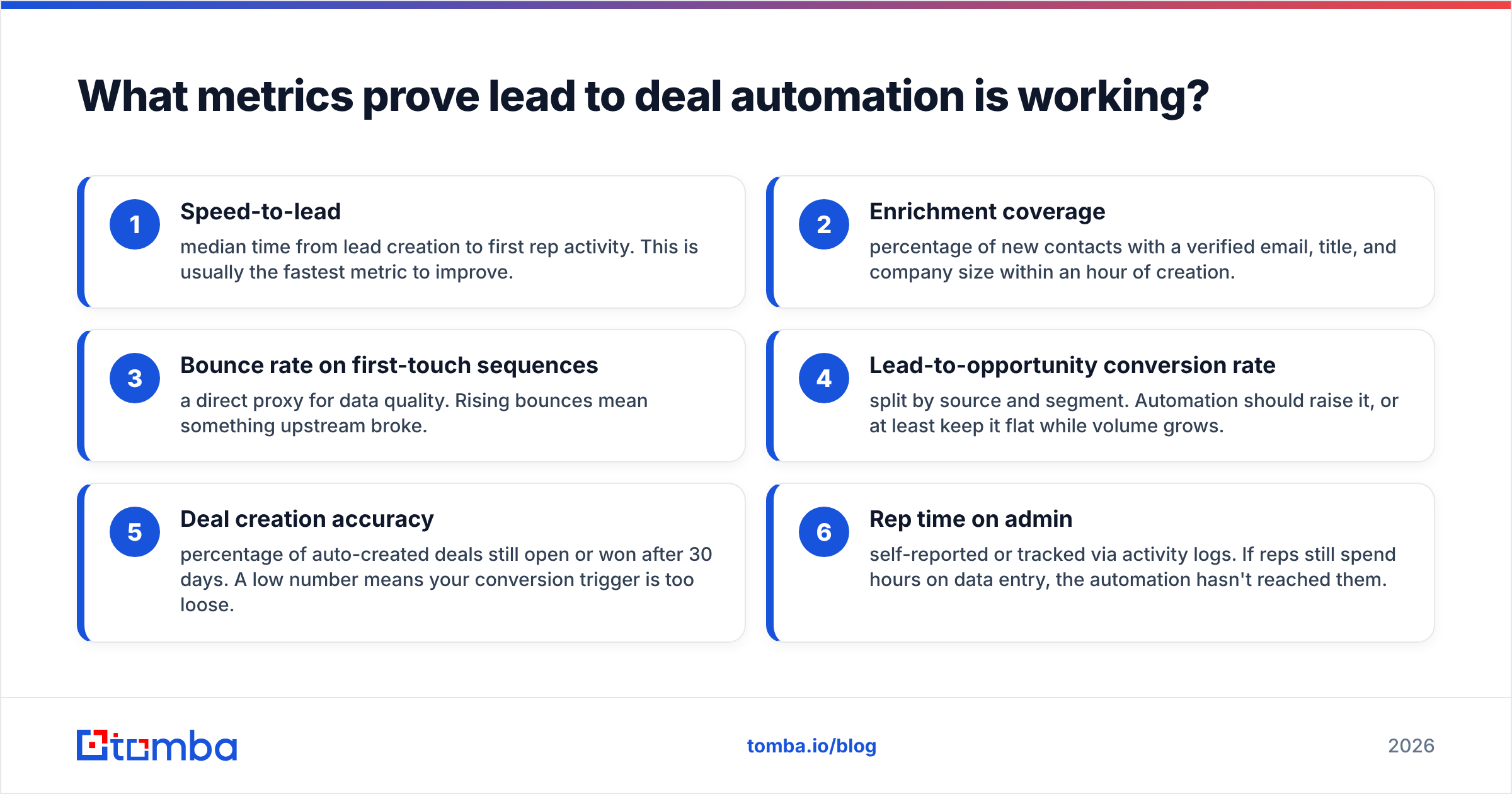
If you can't measure it, you can't defend the budget for it. Track these before and after each change:
- Speed-to-lead: median time from lead creation to first rep activity. This is usually the fastest metric to improve.
- Enrichment coverage: percentage of new contacts with a verified email, title, and company size within an hour of creation.
- Bounce rate on first-touch sequences: a direct proxy for data quality. Rising bounces mean something upstream broke.
- Lead-to-opportunity conversion rate: split by source and segment. Automation should raise it, or at least keep it flat while volume grows.
- Deal creation accuracy: percentage of auto-created deals still open or won after 30 days. A low number means your conversion trigger is too loose.
- Rep time on admin: self-reported or tracked via activity logs. If reps still spend hours on data entry, the automation hasn't reached them.
Bounce rate is the one teams most often skip, and the one that hurts most when it's ignored.

A sequence tool will send to any address you give it. It won't tell you that a third of your imported list was guessed, stale, or pointing at a catch-all domain. That check has to happen before enrollment, not afterward in a deliverability postmortem.
What does a realistic lead to deal automation stack look like?#
Here are three reference setups by team size. None of these are the only correct answer. They're starting points that work.
Solo founder or 1–3 reps
- CRM: HubSpot Starter or Pipedrive
- Enrichment: email finder + verifier on a low-tier plan, triggered on contact creation
- Outreach: lightweight sequencer or the CRM's built-in sequences
- Routing: none needed, since everything goes to you
- Glue: a handful of Zapier or Make scenarios
Growing team (5–25 reps)
- CRM: HubSpot Professional or Salesforce Sales Cloud
- Enrichment: API-based enrichment and verification running in a native workflow or via data enrichment connected to the CRM
- Outreach: Outreach, Salesloft, Apollo, or Instantly, depending on channel mix
- Routing: native round-robin plus SLA reassignment
- Scoring: native fit and intent scoring, reviewed quarterly
Mid-market or enterprise (25+ reps, RevOps function)
- CRM: Salesforce with a dedicated admin
- Enrichment: multi-provider waterfall with verification as the final gate
- Routing: LeanData or equivalent for lead-to-account matching
- Scheduling: Chili Piper or similar for instant inbound booking
- Governance: documented workflow inventory, owner per automation, monthly audits
The pattern across all three: enrichment and verification sit at the front, and they're automatic. The tools after that step vary. Clean entry data is what doesn't.
Is lead to deal automation worth it for small teams?#
Yes, but the payoff looks different.
For a small team, the win isn't headcount savings. It's consistency. When three people are doing sales, marketing, and support, a new demo request can easily sit for a day. A basic workflow that enriches the lead, sends a meeting link, and pings Slack costs almost nothing and removes that delay entirely.
Where small teams go wrong is buying enterprise tooling too early. You don't need lead-to-account matching with 200 leads a month. You need:
- A form that writes to your CRM
- An automatic enrichment and verification step
- One sequence per lead source
- A deal-creation trigger tied to a held meeting
That's four automations. Build them well, measure speed-to-lead and bounce rate, and add complexity only when the numbers show a specific bottleneck.
For reference, customer relationship management software has handled contact tracking for decades. What has changed is how easily you can now connect enrichment, scoring, and engagement tools to it without writing code. That lowers the barrier, and it also makes it easier to build a mess. Keep the system small until it proves itself.
What should you do first?#
Pick the single bottleneck that costs you the most deals and fix it this week. For most teams, it's one of two things:
- Leads wait too long for a first touch. Fix routing and add an SLA timer.
- Leads arrive incomplete or undeliverable. Put enrichment and verification at the point of entry.
Once that works and shows up in your metrics, move to the next stage. Lead to deal automation is less a single project than a series of small, measurable fixes, each one removing a handoff that used to rely on someone remembering.
If your bottleneck is at the front of the funnel (missing emails, guessed addresses, contacts you can't reach), start there. Tomba Email Finder resolves verified professional emails from a name and company domain, and connects to HubSpot, Salesforce, Pipedrive, Zapier, and Make, so every new lead can be enriched before your workflows touch it. The free tier includes 25 searches a month, which is enough to test it on real leads before you commit to a plan.
Related guides#
// get started
Find, verify and enrich your first contacts today
Start on the free plan with 25 searches a month, then scale when your team is ready.
Free plan · No credit card required · GDPR & CCPA
// about the author