Lead Tracking: How to Follow Every Prospect From Click to Close
Most pipelines don't leak because of bad reps. They leak because nobody can see where a lead is, who owns it, or whether the contact data still works. Here's how to track every lead from first touch to closed deal.
TL;DR
- Lead tracking means recording where each prospect came from, what they did, what stage they're in, and who owns them, from first touch until the deal closes or is lost.
- Most tracking fails for three reasons: stages nobody agreed on, fields nobody updates, and contact data that goes bad after it's entered.
- Start with six stages, five metrics, and one system of record (usually your CRM). Add tools after the process works.
- Every other metric depends on data quality. If the email bounces or the job title is two years old, your "tracked" lead is a dead record.
- Build it in this order: define stages, set ownership rules, automate data capture, enrich and verify contacts, then review weekly.
What is lead tracking?#
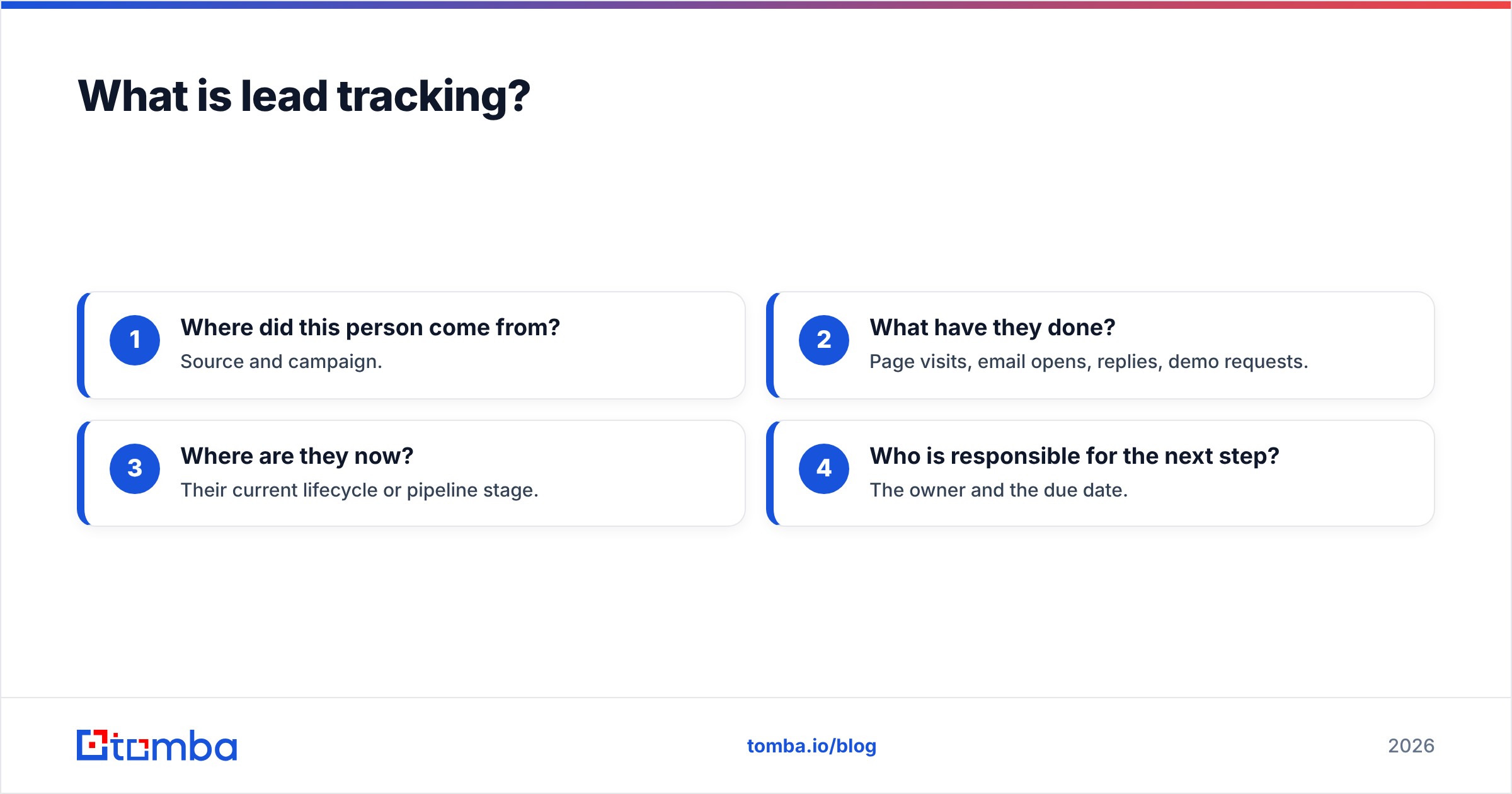
Lead tracking is how you record and monitor each potential customer's journey through your funnel. For every lead it answers four questions:
- Where did this person come from? Source and campaign.
- What have they done? Page visits, email opens, replies, demo requests.
- Where are they now? Their current lifecycle or pipeline stage.
- Who is responsible for the next step? The owner and the due date.
If you can't answer all four for a given lead in under ten seconds, you don't really have lead tracking. You have a list.
People often mix up lead tracking with lead generation and lead scoring. Lead generation is how you attract prospects. Lead scoring ranks them by fit and intent. Lead tracking sits under both. It's the record-keeping that lets you measure whether generation is working and whether your scores predict anything.
In practice, most B2B teams track leads inside a CRM like HubSpot, Salesforce, or Pipedrive. Marketing automation handles behavioral signals, and a data layer keeps contact details accurate. The tools matter less than the rules you set for them.
Why does lead tracking break down in most teams?#
Lead tracking rarely fails because the software is bad. It fails because of habits. These are the patterns that come up most often.
Stages that mean different things to different people. Marketing calls a lead "qualified" after a whitepaper download. Sales calls it qualified after a discovery call. Your dashboard says you have 400 SQLs, your AEs say they have 40, and nobody trusts the numbers.
Manual entry that never happens. If a rep has to log every call, email, and LinkedIn message by hand, they'll log about a third of them. Your activity data then shows who likes admin work, not who's actually engaged.
Duplicate records. The same person signs up for a webinar with a Gmail address, fills in a demo form with a work email, and gets imported from a list with a typo. You end up with three records, three owners, and three sequences hitting one inbox.
Decaying contact data. B2B contact data goes stale quickly because people change jobs, companies rebrand domains, and mailboxes get shut down. A lead you tracked perfectly in January may be unreachable by June, and nothing in your CRM tells you.
No closed-loop reporting. If a deal closes and nobody links the revenue back to the original source, you can't tell which channels bring in customers and which only bring in form fills.

A spreadsheet can work for your first 50 leads. By lead 500 you're sorting columns, guessing at who owns what, and losing replies in someone's inbox.
Which lead stages should you actually track?#
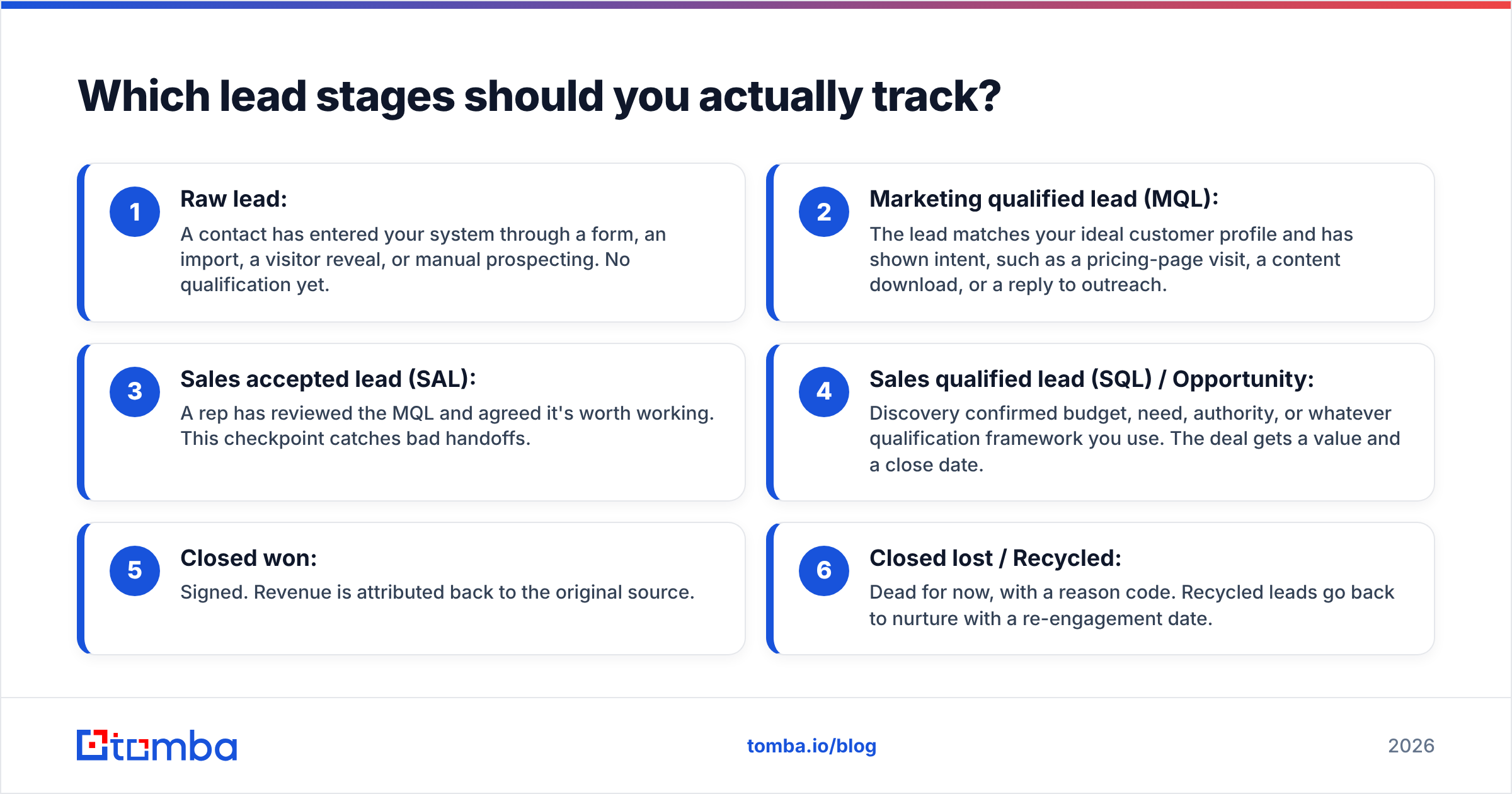
Keep the stage model short. Every stage you add is one more place for leads to get stuck and one more definition to argue over. For most B2B teams these six are enough:
- Raw lead: A contact has entered your system through a form, an import, a visitor reveal, or manual prospecting. No qualification yet.
- Marketing qualified lead (MQL): The lead matches your ideal customer profile and has shown intent, such as a pricing-page visit, a content download, or a reply to outreach.
- Sales accepted lead (SAL): A rep has reviewed the MQL and agreed it's worth working. This checkpoint catches bad handoffs.
- Sales qualified lead (SQL) / Opportunity: Discovery confirmed budget, need, authority, or whatever qualification framework you use. The deal gets a value and a close date.
- Closed won: Signed. Revenue is attributed back to the original source.
- Closed lost / Recycled: Dead for now, with a reason code. Recycled leads go back to nurture with a re-engagement date.
Put an exit criterion on every stage. "Moves to SAL when a rep books a discovery call" can be tracked. "Moves to SAL when it feels warm" can't.
Which lead tracking method fits your team?#
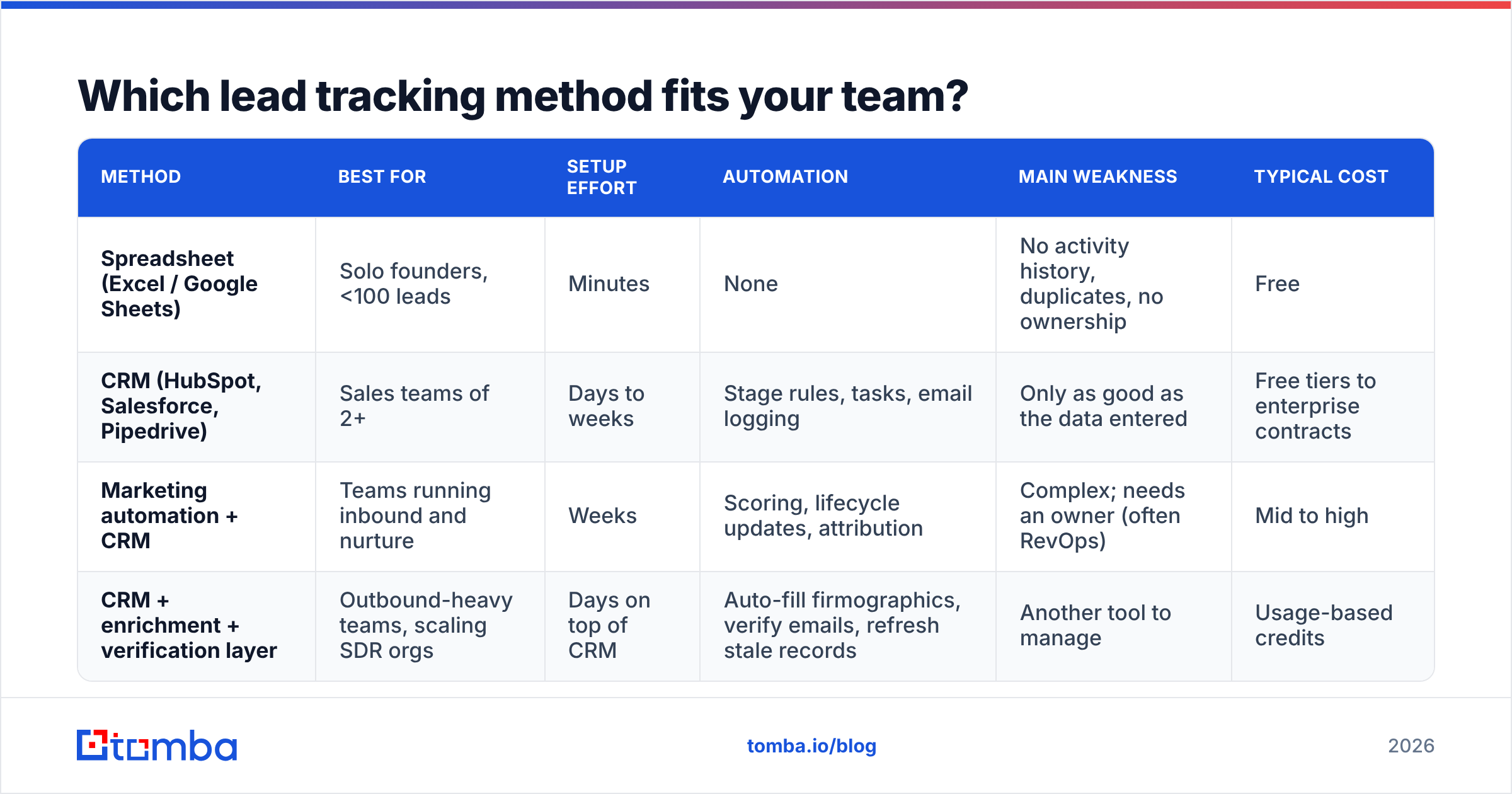
There are four common setups. Most companies go through them in order as they grow.
| Method | Best for | Setup effort | Automation | Main weakness | Typical cost |
|---|---|---|---|---|---|
| Spreadsheet (Excel / Google Sheets) | Solo founders, <100 leads | Minutes | None | No activity history, duplicates, no ownership | Free |
| CRM (HubSpot, Salesforce, Pipedrive) | Sales teams of 2+ | Days to weeks | Stage rules, tasks, email logging | Only as good as the data entered | Free tiers to enterprise contracts |
| Marketing automation + CRM | Teams running inbound and nurture | Weeks | Scoring, lifecycle updates, attribution | Complex; needs an owner (often RevOps) | Mid to high |
| CRM + enrichment + verification layer | Outbound-heavy teams, scaling SDR orgs | Days on top of CRM | Auto-fill firmographics, verify emails, refresh stale records | Another tool to manage | Usage-based credits |
A few practical notes on the table:
- HubSpot has a free CRM tier with contact, deal, and activity tracking, which makes it a sensible starting point for small teams. See HubSpot's CRM overview for what's included.
- Salesforce is the default at larger companies because of its customization and reporting depth. It also takes more work to configure well. Their CRM explainer is a good primer if you're evaluating it.
- For side-by-side user reviews of CRMs by company size, G2's CRM category is worth checking before you commit.
The fourth row is the one most teams skip, and it's the reason many "fully tracked" pipelines still miss their numbers. More on that below.
Which lead tracking metrics actually matter?#
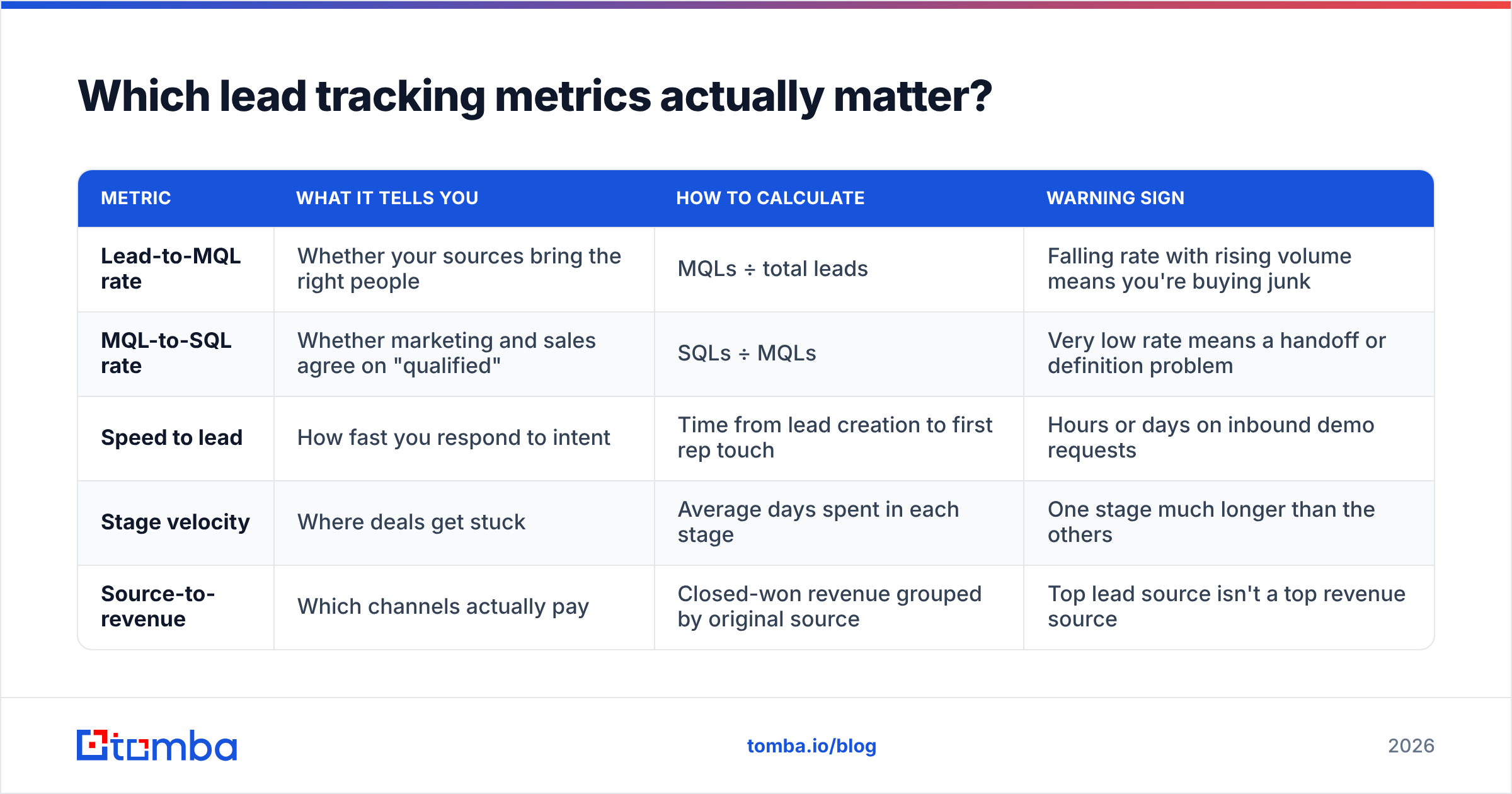
You can track dozens of metrics. These five tell you almost everything about pipeline health:
| Metric | What it tells you | How to calculate | Warning sign |
|---|---|---|---|
| Lead-to-MQL rate | Whether your sources bring the right people | MQLs ÷ total leads | Falling rate with rising volume means you're buying junk |
| MQL-to-SQL rate | Whether marketing and sales agree on "qualified" | SQLs ÷ MQLs | Very low rate means a handoff or definition problem |
| Speed to lead | How fast you respond to intent | Time from lead creation to first rep touch | Hours or days on inbound demo requests |
| Stage velocity | Where deals get stuck | Average days spent in each stage | One stage much longer than the others |
| Source-to-revenue | Which channels actually pay | Closed-won revenue grouped by original source | Top lead source isn't a top revenue source |
Two metrics are worth singling out:
Speed to lead is the easiest one to improve. Inbound leads go cold quickly. If a demo request sits in a queue overnight, your competitor who answered in ten minutes has the meeting. Round-robin assignment with instant notification (Slack, email, or a CRM task) fixes most of this.
Source-to-revenue is the metric that most often changes budgets. Teams regularly find that the channel producing the most leads is not the one producing the most revenue. You can only see that if the original source field is locked at creation and never overwritten.
How do you set up lead tracking step by step?#
Follow this order. Skipping ahead, for example buying a tool before agreeing on stages, is the most common reason setups get abandoned.
Step 1: Write down your stage definitions. Use the six stages above, or your own. Put the entry and exit criteria in a shared doc that both marketing and sales sign off on.
Step 2: Decide the required fields. Keep the list small: email, company, job title, source, stage, owner, next step date. Every extra required field reduces how often reps fill in the rest.
Step 3: Automate capture. Connect forms, your email tool, and your calendar to the CRM so activities log themselves. Most CRMs have native Gmail and Outlook sync. Anything a rep has to type manually will end up incomplete.
Step 4: Set ownership and routing rules. Assign by territory, account size, or round-robin. Every lead needs exactly one owner at every stage. Leads with no owner, or with several, are the ones that go dark.
Step 5: Clean the data on the way in. Before a lead reaches a rep, confirm the email is deliverable and fill in the basics (company size, industry, role). An email verifier at the import step stops bounced sequences from hurting your sender reputation.
Step 6: Build three dashboards. One for leads by stage, one for stage velocity, and one for source-to-revenue. Leave out vanity metrics.
Step 7: Review weekly, audit quarterly. A 20-minute weekly pipeline review catches stuck deals. A quarterly data audit catches duplicates, stale contacts, and stage definitions that have drifted.
How does data quality affect lead tracking?#
This is the part most lead tracking guides skip. You can have perfect stages, clean dashboards, and disciplined reps and still lose deals, because the data underneath has decayed.
Some examples of what that looks like:
- A lead reaches SQL, the rep sends a proposal, and the email bounces because the champion left the company last month.
- Your MQL rate looks low, but half the "unqualified" leads are missing job titles and company size, so your scoring model can't score them.
- An imported list shows 2,000 "tracked" contacts, but a large share are catch-all or invalid addresses that will never reply.
Tracking a lead with bad data just records that the lead is lost. The fix is a data layer that sits between capture and your reps:
- Enrich on entry. When a lead arrives with only a name and a company, data enrichment fills in role, seniority, company size, and verified contact details so scoring and routing work.
- Verify before you sequence. Check every email before it enters an outbound cadence. Handling catch-all domains carefully protects your deliverability.
- Re-verify on a schedule. Contacts sitting in nurture for 90+ days should be checked again before you re-engage them.
- Identify anonymous intent. Many of your best-fit accounts visit your pricing page without filling in a form. Website visitor reveal turns that anonymous traffic into company-level leads you can track and route.
Tomba fits here. It isn't a CRM and doesn't try to be one. It finds, verifies, and enriches the contact data your CRM depends on, and it connects to HubSpot, Salesforce, Pipedrive, Google Sheets, and Zapier, so records stay accurate without manual cleanup. Other data providers do similar work. BookYourData, for example, is a respected option for pre-verified B2B contact lists. Choose the one that fits how you capture leads: list-based buying, on-demand lookup, or API enrichment.
What lead tracking mistakes should you avoid?#
A quick checklist before you roll anything out:
- Don't overwrite the original source. Store "first touch source" and "latest touch source" as separate fields. Attribution depends on the first one staying fixed.
- Don't let stages go backwards silently. If a deal moves from SQL back to MQL, require a reason. Otherwise your velocity data stops meaning anything.
- Don't track activity instead of outcomes. Fifty logged calls with no meetings booked is not progress. Measure stage conversion, not effort.
- Don't import lists without deduplication and verification. One dirty import can double your duplicate rate and damage your sending domain in the same afternoon.
- Don't build dashboards nobody opens. If a report hasn't been viewed in 30 days, delete it.
Frequently asked questions about lead tracking#
What is the difference between lead tracking and lead management?#
Lead management is the whole process of capturing, qualifying, nurturing, and converting leads. Lead tracking is the part that records and measures each lead's progress. You can't manage leads well without tracking them, but tracking alone doesn't decide what to do next.
Can I do lead tracking in Google Sheets?#
Yes, for very small volumes. Once more than one person is working leads, or you pass about 100 active leads, you'll run into duplicate records, missing activity history, and unclear ownership. A free CRM tier is usually a better starting point.
How often should I update lead data?#
Activities should log automatically in real time. Contact data such as emails, titles, and companies should be verified when it's captured and checked again before any re-engagement campaign, typically every 60 to 90 days for leads in long nurture cycles.
What is the most important lead tracking metric?#
For most B2B teams it's source-to-revenue, because it shows which channels produce customers rather than form fills. If you're fixing an inbound funnel specifically, start with speed to lead. It's the fastest one to improve.
Do I need a separate lead tracking tool if I have a CRM?#
Usually not. The CRM should be your system of record. What most teams need on top of it is a data quality layer (enrichment and verification) so the records in the CRM stay accurate and reachable.
Ready to track leads that you can actually reach?#
Tracking only helps if the contact at the end of the record is real. Before your next import or outbound push, run your target accounts through the Tomba Email Finder to get verified professional emails by name, domain, or company, then sync them straight into your CRM. The free tier includes 25 searches a month, and paid plans start at $49/mo, so you can test it on a live pipeline before committing.
Related guides#
// get started
Find, verify and enrich your first contacts today
Start on the free plan with 25 searches a month, then scale when your team is ready.
Free plan · No credit card required · GDPR & CCPA
// about the author