Lead Tracking CRM: How to Choose, Set Up, and Keep Data Clean
A lead tracking CRM only works if the data going into it is right. Compare HubSpot, Pipedrive, Salesforce, Zoho and Close, then set up stages, fields and scoring your reps will actually keep up to date.
- A lead tracking CRM records every lead from first touch to closed deal: its source, its stage, what happened, and what comes next.
- The best CRM for you depends on team size and motion. HubSpot suits inbound-heavy teams, Pipedrive suits small outbound teams that live in a pipeline view, Salesforce suits complex orgs, Zoho suits teams watching their budget, and Close suits call-and-email-heavy SDR teams.
- Most lead tracking failures come from data, not software. Bounced emails, duplicate records and empty fields break reporting whichever CRM you use.
- Set up stages, required fields and a simple score before you import anything. Then enrich and verify contacts at the point of entry.
- Keep it minimal. Five to seven stages and fewer than ten required fields beats a 40-field form that nobody fills in.
What is a lead tracking CRM?#
A lead tracking CRM is a customer relationship management system set up to follow individual leads through your funnel. Every lead gets a record. Each record stores contact details, company data, source, owner, current stage and a timeline of activity: emails, calls, meetings, form fills and page visits.
Think of it as a package tracker for revenue. You can see where each shipment is, who has it, when it last moved, and which ones have been sitting in the warehouse too long. A general CRM can hold customers, tickets and invoices. A lead tracking setup focuses on the part before the deal closes. Its job is to answer three questions quickly:
- Where did this lead come from?
- What stage is it in, and who owns it?
- What is the next action, and is it overdue?
If your current system can't answer all three in under ten seconds per lead, you don't really have lead tracking. You have a contact list.
Why do spreadsheets stop working for lead tracking?#
Spreadsheets are fine until about the third rep or the 300th lead. After that, the same problems show up on almost every team:
- No activity history. A cell can say "Contacted" but not when, by whom, or what was said.
- No ownership rules. Two reps email the same VP on the same morning.
- No reminders. Follow-ups depend on memory, and memory doesn't scale.
- No source attribution. Marketing can't prove which channel produced pipeline.
- Silent data decay. People change jobs and domains change. Nothing flags it.

A CRM fixes the first four by design. The fifth, data decay, it only partly fixes. That's why the data layer gets its own section later in this guide.
What features should a lead tracking CRM have?#
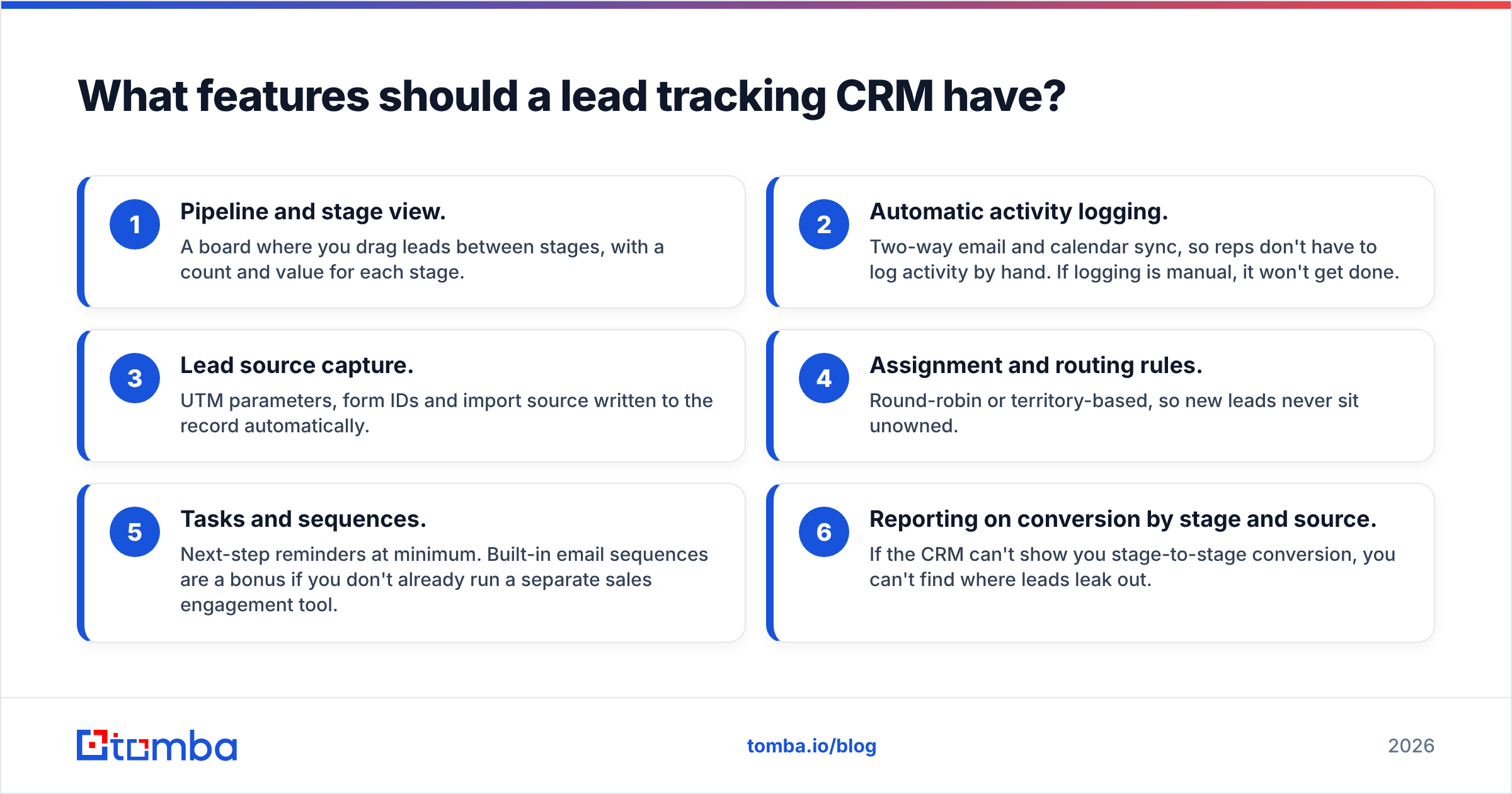
Before you compare vendors, write down the features that actually move your numbers. Most teams need these six:
- Pipeline and stage view. A board where you drag leads between stages, with a count and value for each stage.
- Automatic activity logging. Two-way email and calendar sync, so reps don't have to log activity by hand. If logging is manual, it won't get done.
- Lead source capture. UTM parameters, form IDs and import source written to the record automatically.
- Assignment and routing rules. Round-robin or territory-based, so new leads never sit unowned.
- Tasks and sequences. Next-step reminders at minimum. Built-in email sequences are a bonus if you don't already run a separate sales engagement tool.
- Reporting on conversion by stage and source. If the CRM can't show you stage-to-stage conversion, you can't find where leads leak out.
Other features are nice but not essential for lead tracking: AI forecasting, CPQ, territory planning and custom objects. Pay for them when a specific process needs them, not because they appear on a feature grid.
Which lead tracking CRM is best for your team?#
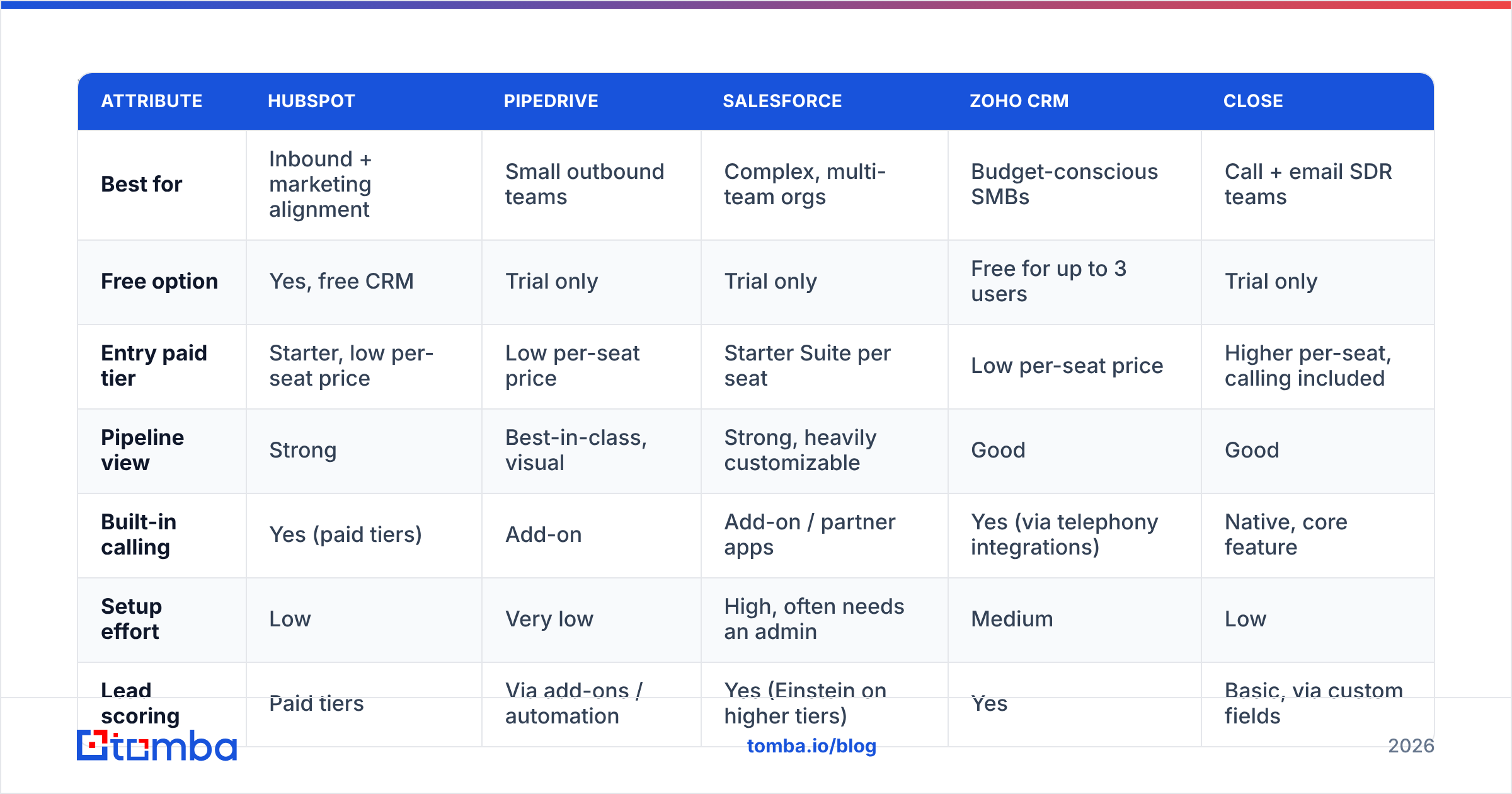
There's no universal winner. The right choice depends on how your leads arrive (inbound vs. outbound), how many reps you have, and how much admin time you can put into configuration. Prices below are entry-level paid tiers at the time of writing. Vendors change packaging often, so check current pricing before you commit.
| Attribute | HubSpot | Pipedrive | Salesforce | Zoho CRM | Close |
|---|---|---|---|---|---|
| Best for | Inbound + marketing alignment | Small outbound teams | Complex, multi-team orgs | Budget-conscious SMBs | Call + email SDR teams |
| Free option | Yes, free CRM | Trial only | Trial only | Free for up to 3 users | Trial only |
| Entry paid tier | Starter, low per-seat price | Low per-seat price | Starter Suite per seat | Low per-seat price | Higher per-seat, calling included |
| Pipeline view | Strong | Best-in-class, visual | Strong, heavily customizable | Good | Good |
| Built-in calling | Yes (paid tiers) | Add-on | Add-on / partner apps | Yes (via telephony integrations) | Native, core feature |
| Setup effort | Low | Very low | High, often needs an admin | Medium | Low |
| Lead scoring | Paid tiers | Via add-ons / automation | Yes (Einstein on higher tiers) | Yes | Basic, via custom fields |
| Main trade-off | Costs jump sharply at Pro | Thin marketing features | Admin overhead, total cost | Dated UI in places | Less suited to inbound marketing |
A few notes to go with the table:
- HubSpot is the easiest place to start if marketing and sales share one database. The free HubSpot CRM covers contact records, deals and basic pipeline tracking. The catch is that automation, custom reporting and scoring sit in paid Hub tiers, and the price rises steeply once you need them.
- Pipedrive was built around the pipeline board, and it shows. Reps adopt it quickly because it looks like the whiteboard they already used. See Pipedrive's site for current plans.
- Salesforce can model almost any process, which is both its strength and its cost. Budget for an admin or consultant, not just licenses.
- Zoho CRM offers a lot for the money and fits teams already using other Zoho apps.
- Close suits high-volume outbound teams where reps spend the day in calls and emails and don't want to switch tabs.
For user-reported pros and cons at your company size, filter the G2 CRM category by segment. Reviews from 10-person teams and 1,000-person teams describe very different products.
How do you set up a lead tracking CRM so reps actually use it?#
Configuration decides whether your CRM becomes the source of truth or just another tab reps ignore. Follow this order.
Define lifecycle stages before pipeline stages#
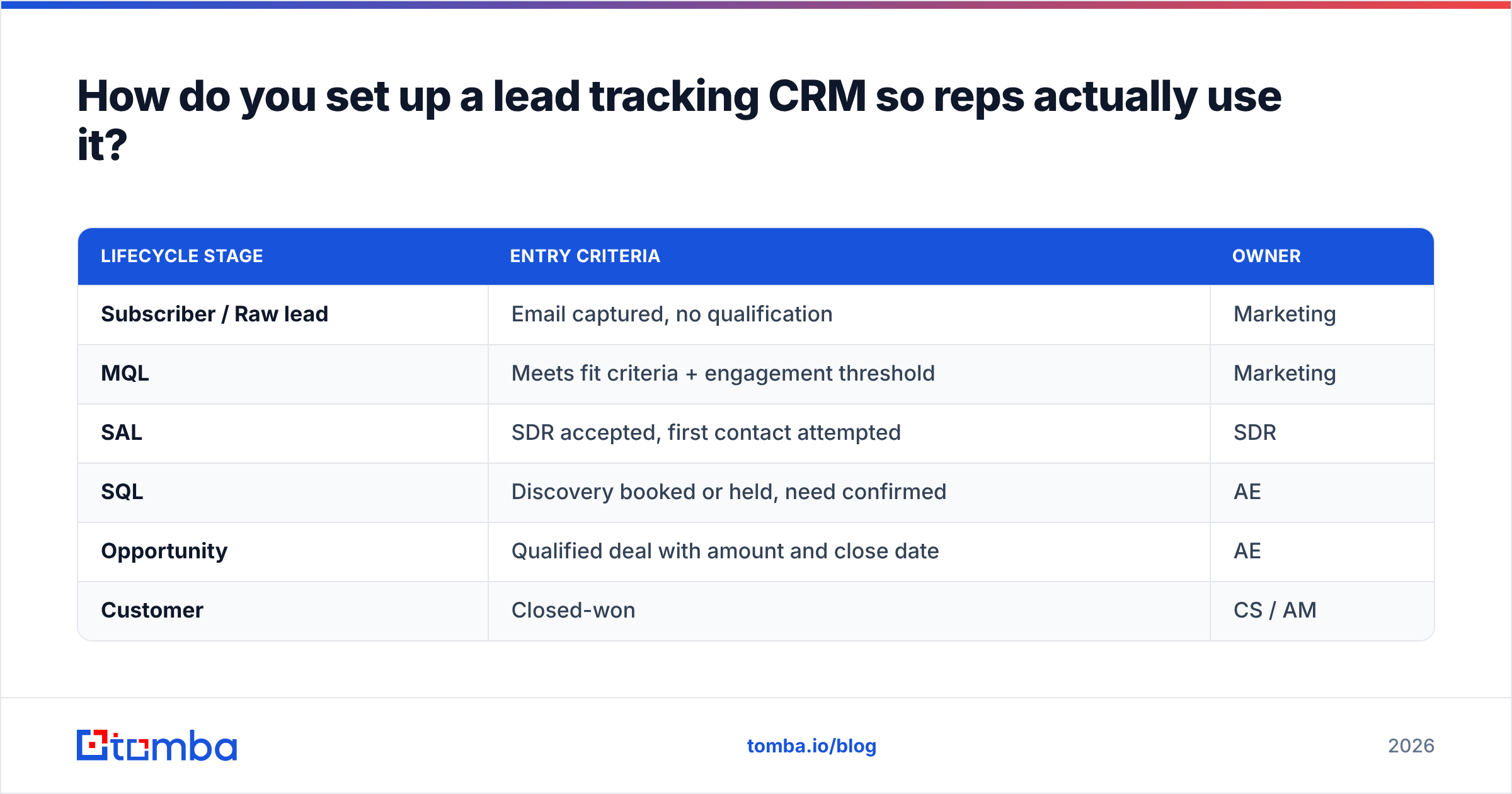
Separate who the lead is (lifecycle) from where the deal is (pipeline). A clean lifecycle model looks like this:
| Lifecycle stage | Entry criteria | Owner |
|---|---|---|
| Subscriber / Raw lead | Email captured, no qualification | Marketing |
| MQL | Meets fit criteria + engagement threshold | Marketing |
| SAL | SDR accepted, first contact attempted | SDR |
| SQL | Discovery booked or held, need confirmed | AE |
| Opportunity | Qualified deal with amount and close date | AE |
| Customer | Closed-won | CS / AM |
Write the entry criteria down and get sales and marketing leadership to agree on them. Most arguments about lead quality turn out to be arguments about undefined stages. If your team uses the term marketing qualified lead, put its definition in the CRM itself as a field description.
Keep required fields to a minimum#
Every required field makes it more likely that reps enter junk just to save the record. A workable minimum:
- Email (verified)
- Company domain
- Lead source
- Owner
- Lifecycle stage
- Next step date
Everything else, such as industry, headcount, title, phone and tech stack, should be filled automatically by enrichment, not typed by reps.
Build a simple lead score#
Start with a two-axis score:
- Fit (0–50): Does the company match your ICP? Consider headcount band, industry, region and role seniority.
- Engagement (0–50): Has the person shown intent? Consider pricing-page visits, email replies, demo requests and webinar attendance.
A lead with high fit and low engagement goes into outbound sequences. A lead with low fit and high engagement gets a quick triage call or nurture. High on both means routing to a rep today. Revisit the weights every quarter against actual closed-won data.
Automate the boring handoffs#
Set up these three automations first:
- New lead created → assign owner by territory or round-robin.
- Lifecycle changes to SQL → create a task for the AE and notify them.
- No activity for 14 days on an open lead → flag it for the owner and manager.
Why does lead tracking fail even with a good CRM?#
Because a CRM stores and organizes data but can't tell whether that data is true. The software can be perfectly configured and your reports still wrong, because the records underneath have gone bad.
Here are the most common data failures, roughly in order of how much damage they do:
- Unverified email addresses. Reps paste guessed addresses from LinkedIn profiles. Bounces pile up, your email deliverability drops, and the lead shows up as "Contacted" when nobody ever received anything.
- Duplicates. The same person appears under a work address, a personal address and a misspelled variant. Activity splits across three records and scoring stops working.
- Missing firmographics. With no headcount or industry, fit scoring and routing rules fall back to defaults. Enterprise leads end up in the SMB queue.
- Job changes. People move roles regularly. A lead record that was correct last year can point to someone who has left the company.
- Catch-all domains. Some company mail servers accept every address, so a standard SMTP check can't confirm the mailbox exists. These need separate handling.

Teams often respond by switching CRMs. That rarely helps. If you move bad data into a new system, you get the same bad reports with a nicer interface.
How do you keep lead data accurate inside your CRM?#
Treat data quality as a pipeline stage with its own checks, not a cleanup project you run once a year.
At the point of entry:
- Run every new email through an email verifier before the record is saved, or at least before it enters a sequence. Mark each result as valid, invalid, accept-all or unknown in a dedicated field.
- When a rep only has a name and a company, use a dedicated email finder instead of guessing the format by hand.
- Enrich the domain on creation so headcount, industry, location and socials fill in automatically. That keeps your required-field list short.
On a schedule:
- Re-verify open leads that haven't been contacted in 90 days.
- Run a dedupe job weekly on email and on normalized domain + full name.
- Refresh firmographics every quarter for accounts in active pipeline.
Through integrations, not exports: Every CSV export and re-import is another chance for field mismatches and duplicates. Connect your enrichment and verification tools directly to the CRM. For example, the Tomba HubSpot integration writes verified emails and company data straight onto contact records, so reps never touch a spreadsheet.
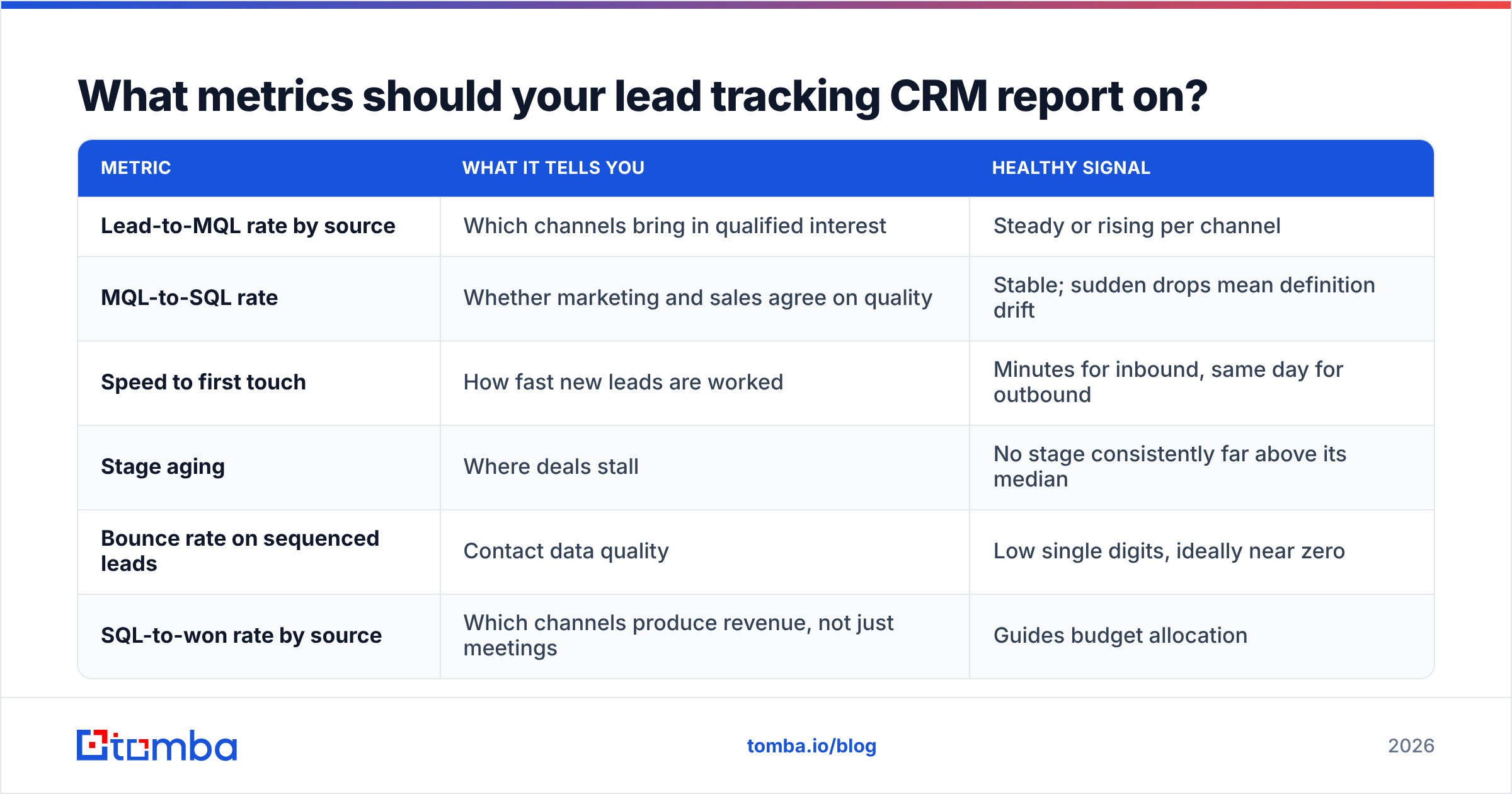
What metrics should your lead tracking CRM report on?#
Once stages and data are reliable, a small set of reports tells you almost everything:
| Metric | What it tells you | Healthy signal |
|---|---|---|
| Lead-to-MQL rate by source | Which channels bring in qualified interest | Steady or rising per channel |
| MQL-to-SQL rate | Whether marketing and sales agree on quality | Stable; sudden drops mean definition drift |
| Speed to first touch | How fast new leads are worked | Minutes for inbound, same day for outbound |
| Stage aging | Where deals stall | No stage consistently far above its median |
| Bounce rate on sequenced leads | Contact data quality | Low single digits, ideally near zero |
| SQL-to-won rate by source | Which channels produce revenue, not just meetings | Guides budget allocation |
Watch bounce rate closely. It's the earliest warning that data quality is slipping, and it shows up weeks before pipeline numbers drop.
Should you pick a CRM first or fix your data first?#
Do both at once, but make your data standards part of the CRM decision. When you evaluate a lead tracking CRM, ask each vendor:
- Can it block or flag records based on a verification status field?
- Does it have native enrichment, or open APIs for your enrichment tool?
- How does it handle duplicate detection on import and on API-created records?
- Can workflows be triggered by changes to data-quality fields?
A CRM that answers yes to all four will stay accurate as you grow. One that can't will need manual cleanup every few months.
What's the bottom line on choosing a lead tracking CRM?#
Choose the CRM that matches your sales motion and your admin capacity: HubSpot for inbound-led teams, Pipedrive for small outbound teams, Salesforce for complex orgs, Zoho for teams watching cost, and Close for call-heavy SDR floors. Then spend just as much effort on what flows into it. Define stages with written entry criteria, keep required fields minimal, score leads on fit and engagement, and verify and enrich every contact at the point of entry.
The CRM is where your leads live. Whether you can trust what it shows you depends on the data you feed it.
If your lead records start with guessed or unverified addresses, fix that first. Tomba Email Finder finds professional email addresses from a name and company or domain and checks them before they reach your CRM, so every lead you track is one you can actually reach. You can start on the free tier with 25 searches a month, and paid plans begin at $49/mo when you need more volume.
Related guides#
// get started
Find, verify and enrich your first contacts today
Start on the free plan with 25 searches a month, then scale when your team is ready.
Free plan · No credit card required · GDPR & CCPA
// about the author